habit-tracking
 mukesh
Build a mobile app called Habit Split — a habit tracker designed for two people (couples, roommates, workout buddies, accountability partners) to track habits together and see each other's progress. PROBLEM IT SOLVES: Most habit trackers are solo. People trying to build habits with a partner (working out, drinking more water, no-phone-after-10pm, reading, etc.) have no shared view of each other's streaks, so there's no accountability pressure. CORE FEATURES (MVP only, nothing extra): Signup/login (email + Apple/Google sign-in) Create or join a "pair" with a partner via invite code/link Each user creates habits (name, frequency, icon/emoji) Daily check-off screen showing your habits AND your partner's habits side by side Streak counter per habit, per person Push notification: daily reminder, plus a nudge when your partner completes a habit you haven't done yet Simple stats screen: weekly completion %, current streaks Settings: manage habits, leave/change pair, notification preferences MONETIZATION: Free tier: up to 3 habits per person Paid tier: $4.99/month or $29.99/year — unlimited habits, custom reminder times, streak history/stats Use RevenueCat for subscription management (handles both App Store and Google Play billing in one place) TECH STACK: React Native + Expo (single codebase for iOS and Android) Supabase for auth + database + realtime sync (so partner's check-offs update live) RevenueCat for in-app subscriptions Expo push notifications REQUIREMENTS: Clean, minimal UI — this needs to feel lightweight, not corporate. Favor simple, warm design over "productivity app" aesthetics No features beyond what's listed for MVP Handle offline state gracefully (habit check-offs should queue and sync when back online) Propose the full database schema and file/folder structure first, before writing any code Include a README covering: Supabase setup, RevenueCat setup, Expo build/submit steps for both app stores Note anywhere App Store or Google Play review guidelines might require specific handling (e.g. subscription disclosure, account deletion requirement) Start by proposing the schema and architecture for review before writing code. Show less Aug 22, 10:52 PM Welcome to Emergent—your launchpad for ambitious apps. This hits on something real: accountability works when someone else can see your streak. Habit Split transforms solo tracking into a partner experience that keeps both people honest. On Emergent, you'll ship this with real-time syncing, frictionless auth, and monetization built in from day one. I'll set up your core structure now and we'll iterate from there. Let's build. P.S. You retain full ownership of your idea, content, and any IP in the application you build. Emergent is here to help you build, launch, and manage it. Aug 22, 10:53 PM Agent has questions for you Toggle Aug 22, 10:53 PM Agent has questions for you RevenueCat subscriptions — Real IAP only works in a production build on TestFlight/Play. For preview, options: Mock the paywall UI + stub subscription state (recommended for MVP preview) ✅ Skip monetization entirely fo

Comments (0)
Sign in to leave a comment
System Requirements
System Requirements Document for Habit Split
1. Introduction
Habit Split is a mobile application designed to facilitate habit tracking for two people, such as couples, roommates, workout buddies, or accountability partners. The app aims to transform solo habit tracking into a shared experience, providing a platform for users to track habits together and view each other's progress, thereby enhancing accountability.
2. System Overview
Habit Split is a mobile app developed using React Native and Expo, targeting both iOS and Android platforms. It leverages Supabase for authentication, database management, and real-time synchronization, while RevenueCat handles in-app subscription management. The app features a clean, minimal, and warm user interface, emphasizing a collaborative and engaging experience for users.
2a. Product Interpretation and Delivery Boundary
Habit Split is designed for exactly two partnered users per pair, focusing on shared habit tracking and accountability. The app supports email and Apple/Google sign-in, allowing users to create or join pairs via invite codes or links. The MVP is strictly limited to the features outlined, with a free tier offering up to three habits per person and a paid tier providing additional capabilities. The app handles offline states by queuing habit check-offs for synchronization upon reconnection.
2b. Source Content Inventory
Not applicable as no explicit content_source directive was provided.
2c. Page Content and Component Coverage
Landing
- Information: Introduction to Habit Split, its purpose, and benefits for two-person habit tracking.
- Components: Overview of features, call-to-action for signup/login.
- States: Loading, success, error.
Architecture Proposal
- Information: Detailed database schema and file/folder structure proposal.
- Components: Review and approval interface.
- States: Submission pending, approved, rejected.
Login
- Information: User authentication via email or Apple/Google sign-in.
- Components: Input fields for credentials, sign-in buttons.
- States: Loading, success, error.
Pair Setup
- Information: Create or join a pair using an invite code or link.
- Components: Input for invite code, link generation.
- States: Loading, success, error.
Today
- Information: Daily habit check-off screen showing both users' habits.
- Components: Habit list, check-off buttons, streak counters.
- States: Loading, success, error.
Habits
- Information: Manage personal habits, including creation and editing.
- Components: Habit creation form, habit list with edit options.
- States: Loading, success, error.
Stats
- Information: Weekly completion percentages and current streaks.
- Components: Graphs, streak history (paid tier).
- States: Loading, success, error.
Settings
- Information: Manage notification preferences, pair settings, and subscription.
- Components: Toggle switches, subscription management interface.
- States: Loading, success, error.
Documentation
- Information: README covering setup and submission steps.
- Components: Text sections, download links.
- States: Loading, success, error.
3. Functional Requirements
- As a Habit partner, I should be able to sign up and log in using email or Apple/Google sign-in. (explicit)
- As a Habit partner, I should be able to create or join a pair using an invite code or link. (explicit)
- As a Habit partner, I should be able to create habits with a name, frequency, and icon/emoji. (explicit)
- As a Habit partner, I should see a daily check-off screen showing my habits and my partner's habits side by side. (explicit)
- As a Habit partner, I should receive push notifications for daily reminders and when my partner completes a habit I haven't done yet. (explicit)
- As a Habit partner, I should be able to view simple stats, including weekly completion percentages and current streaks. (explicit)
- As a Habit partner, I should be able to manage habits, leave or change pairs, and set notification preferences. (explicit)
- As a Habit partner, I should be able to access a free tier with up to three habits and a paid tier with additional features. (explicit)
- As a Habit partner, I should be able to handle offline habit check-offs that sync when back online. (explicit)
4. User Personas
- Habit partner: A person who creates or joins a pair, creates and checks off habits, views their partner’s progress, and manages shared accountability settings.
5. Core User Flows
Habit Partner Signup and Pair Creation
- Open the app and view the Landing page.
- Select sign-up and choose email or Apple/Google sign-in.
- Create an account and log in.
- Navigate to Pair Setup and create or join a pair using an invite code or link.
- Proceed to the Today page to view and manage habits.
Habit Management and Tracking
- Access the Habits page to create or edit habits.
- On the Today page, check off completed habits.
- Receive notifications for daily reminders and partner's habit completion.
- View stats on the Stats page for weekly completion and streaks.
Subscription Management
- Access the Settings page to manage subscription preferences.
- Choose between free and paid tiers.
- Use RevenueCat for subscription management.
6. Visuals Colors and Theme
- Muse: Pablo Stanley
- Palette:
- Background: #FFFFFF
- Surface: #FFFAF0
- Text: #333333
- Primary: #FFA500
- Accent: #FF69B4
- Muted: #F0E68C
- Typography:
- Headings: Nunito, bold, large sizes
- Body: DM Sans
- Scale: 1.25 modular
- Shape Language: Rounded corners, pill buttons
- Layout: Generous padding, rounded panels
- Motion: Playful micro-interactions, springy transitions
7. Signature Design Concept
The public entry page features a split-screen hero with two illustrated characters representing each user. The central area highlights shared progress using primary and accent colors. Rounded habit cards and side-by-side progress bars emphasize the collaborative nature of the app.
8. Interaction Model & Motion Direction
- Interaction Model: Animated
- Motion Tempo: Expressive
- Hero Dimensionality: Layered_2d
- Landing Hero Motion Brief: The split-screen hero features two characters that animate slightly upon interaction, with dynamic notifications using friendly emojis for habit reminders.
9. Non-Functional Requirements
- The app must handle offline states gracefully, queuing habit check-offs for synchronization when connectivity returns. (explicit)
- The UI must remain clean, minimal, and warm, avoiding corporate aesthetics. (explicit)
- The app must comply with App Store and Google Play review guidelines, including subscription disclosure and account deletion requirements. (explicit)
10. Tech Stack
- Frontend: React Native + Expo
- Backend: Supabase for authentication, database, and real-time sync
- Subscription Management: RevenueCat
- Notifications: Expo push notifications
11. Assumptions and Constraints
- The app is designed for exactly two partnered users per pair. (explicit)
- The MVP is limited to the features listed, with no additional functionality. (explicit)
- The free tier is limited to three habits per person, while the paid tier offers additional features. (explicit)
12. Glossary
- Habit partner: A user who participates in the shared habit tracking experience.
- Pair: A group of two users tracking habits together.
- Streak: A count of consecutive days a habit has been completed.
- Supabase: A backend service used for authentication, database management, and real-time synchronization.
- RevenueCat: A service for managing in-app subscriptions across platforms.
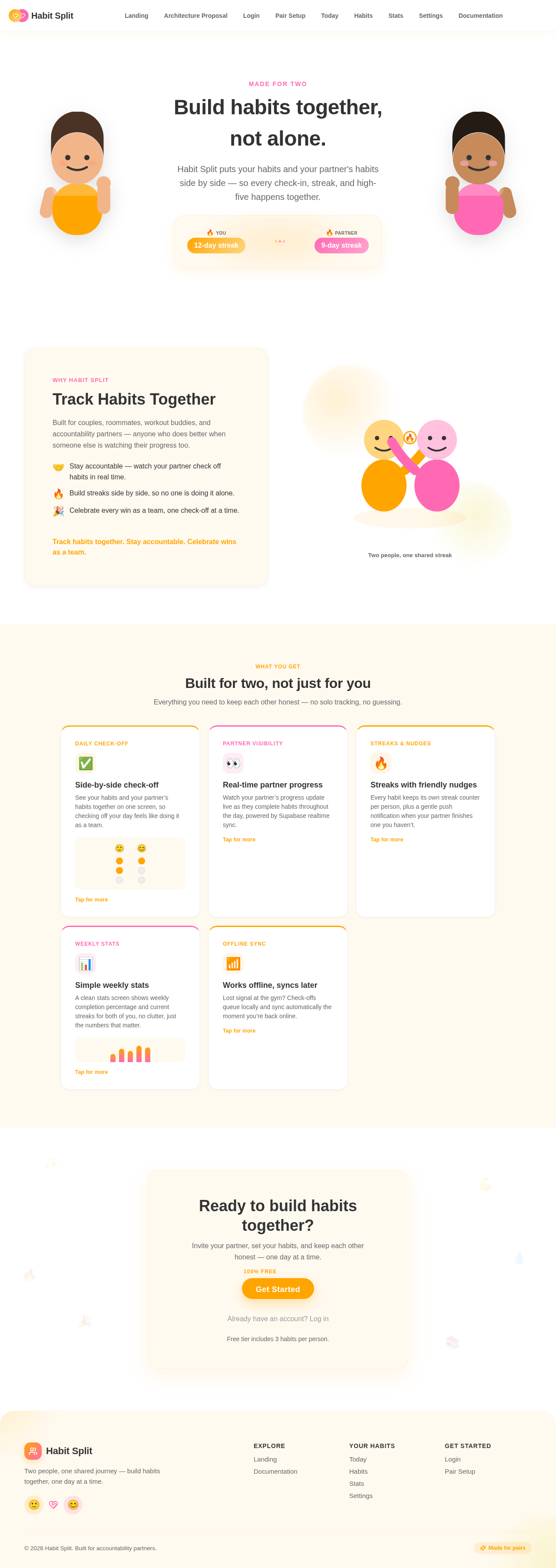
Made for two
Build habits together,
not alone.
Habit Split puts your habits and your partner's habits side by side — so every check-in, streak, and high-five happens together.
Track Habits Together
Built for couples, roommates, workout buddies, and accountability partners — anyone who does better when someone else is watching their progress too.
- Stay accountable — watch your partner check off habits in real time.
- Build streaks side by side, so no one is doing it alone.
- Celebrate every win as a team, one check-off at a time.
Track habits together. Stay accountable. Celebrate wins as a team.
Two people, one shared streak
Built for two, not just for you
Everything you need to keep each other honest — no solo tracking, no guessing.
Side-by-side check-off
See your habits and your partner’s habits together on one screen, so checking off your day feels like doing it as a team.
Tap for moreReal-time partner progress
Watch your partner’s progress update live as they complete habits throughout the day, powered by Supabase realtime sync.
Tap for moreStreaks with friendly nudges
Every habit keeps its own streak counter per person, plus a gentle push notification when your partner finishes one you haven’t.
Tap for moreSimple weekly stats
A clean stats screen shows weekly completion percentage and current streaks for both of you, no clutter, just the numbers that matter.
Tap for moreWorks offline, syncs later
Lost signal at the gym? Check-offs queue locally and sync automatically the moment you’re back online.
Tap for moreReady to build habits together?
Invite your partner, set your habits, and keep each other honest — one day at a time.
Already have an account? Log inFree tier includes 3 habits per person.
Made for two
Build habits together,
not alone.
Habit Split puts your habits and your partner's habits side by side — so every check-in, streak, and high-five happens together.
Track Habits Together
Built for couples, roommates, workout buddies, and accountability partners — anyone who does better when someone else is watching their progress too.
- Stay accountable — watch your partner check off habits in real time.
- Build streaks side by side, so no one is doing it alone.
- Celebrate every win as a team, one check-off at a time.
Track habits together. Stay accountable. Celebrate wins as a team.
Two people, one shared streak
Built for two, not just for you
Everything you need to keep each other honest — no solo tracking, no guessing.
Side-by-side check-off
See your habits and your partner’s habits together on one screen, so checking off your day feels like doing it as a team.
Tap for moreReal-time partner progress
Watch your partner’s progress update live as they complete habits throughout the day, powered by Supabase realtime sync.
Tap for moreStreaks with friendly nudges
Every habit keeps its own streak counter per person, plus a gentle push notification when your partner finishes one you haven’t.
Tap for moreSimple weekly stats
A clean stats screen shows weekly completion percentage and current streaks for both of you, no clutter, just the numbers that matter.
Tap for moreWorks offline, syncs later
Lost signal at the gym? Check-offs queue locally and sync automatically the moment you’re back online.
Tap for moreReady to build habits together?
Invite your partner, set your habits, and keep each other honest — one day at a time.
Already have an account? Log inFree tier includes 3 habits per person.
No comments yet. Be the first!