 Parcha received
Order previewHandwritten parchaPreparing
- Aashirvaad Atta5 kg
- Tata Salt1 kg
- Fortune Sunflower Oil1 L
Pickup slotToday, evening
 JAI


Sign in to leave a comment
You are acting as a Senior Product Designer, Principal Frontend Engineer, UI/UX Architect, PWA Specialist and Product Strategist.
Your task is to design and IMPLEMENT a premium, production-quality, fully responsive frontend for a startup product named HAAT.
Do not simply create a landing page or a collection of static dashboard screenshots. Build a complete, interactive, multi-role frontend prototype that can be demonstrated to real Indian kirana shop owners, their employees and customers.
The application must feel like a real commercial product developed by an experienced design and engineering team.
Product Name: HAAT
Tagline: Your Local Market, Digitally Connected.
Product Category: AI-powered Hyperlocal Commerce and Shop Operations Platform.
HAAT helps traditional neighbourhood shops digitise their ordering and preparation workflow.
In Indian kirana stores, customers generally place orders in three ways:
They physically visit the shop and give a handwritten shopping list (parcha).
They call the shopkeeper and dictate their shopping list.
They send their shopping list through WhatsApp using text, voice notes or photographs.
The shopkeeper or employees then manually read the parcha, collect each product, calculate the price and hand the order to the customer.
Customers frequently have to wait 10–30 minutes, especially during busy hours. Other walk-in customers also experience delays.
HAAT aims to make this process organised and efficient.
Display a personalised greeting:
"Namaste, Sharma Ji 👋"
Show current store status:
Open / Closed / Temporarily Paused.
HAAT is not just an online listing of local shops.
It is a digital operating system for neighbourhood commerce.
Our first objective is to help kirana shopkeepers manage physical parchas, WhatsApp orders, employee preparation and customer pickup through one simple mobile-first platform.
Product motto: Less Waiting. Better Shopping. Smarter Shops.
Project name is HAAT.
HAAT must have four distinct modules:
Super Admin.
Shop Owner.
Shop Staff.
Buyer.
All modules must have a unified visual identity but different interfaces and permissions.
<!-- planning-notes:v1:start -->Planning resolved these page and owner names itself instead of stopping. Review them before building.
Added during planning
Name changes
Instead:
Use realistic mock data.
Create simulated AI extraction results.
Make frontend interactions functional.
Persist demonstration data using localStorage.
Clearly label simulated integrations where necessary.
Create a role-based demonstration entry point where users can choose which module to preview.
/buyer
/buyer/discover
/buyer/shop/:id
/buyer/create-order
/buyer/orders
/buyer/orders/:id
/login
Add appropriate protected-route-style demo navigation, while making clear that actual authentication is not implemented.
The Super Admin is the platform-level administrator.
Admin must be able to view and manage the entire HAAT platform.
This module should be desktop-first but responsive.
Display:
Total registered shops.
Active shops.
Suspended shops.
Total orders today.
Total orders this month.
Active shop owners.
Total registered staff.
Platform-level order trends.
Create realistic charts:
Shop registration growth.
Monthly order volume.
Shop category distribution.
Active versus inactive shops.
Top-performing shops.
Add a recent activity feed.
Display a comprehensive shop table containing:
Shop name.
Owner name.
Phone number.
Shop category.
Location.
Registration date.
Staff count.
Order count.
Subscription plan.
Current status.
Features:
Search shops.
Filter by category.
Filter by active/inactive status.
View shop details.
Edit shop profile.
Activate shop.
Suspend shop.
View assigned staff.
View shop activity.
This is especially important.
HAAT's internal onboarding team will initially set up merchants for them.
Create an elegant multi-step shop onboarding wizard.
Steps:
Shop Information.
Owner Information.
Contact Information.
Location and Address.
Business Category.
Operating Hours.
Staff Details.
Account Setup.
Review and Confirm.
Fields should include:
Shop Name
Shop Category
Owner Name
Owner Phone Number
Shop Address
City
Pincode
Opening Time
Closing Time
Number of Staff
Staff Names
Staff Phone Numbers
Add validations.
Show a polished onboarding success screen with the newly created shop profile.
The owner should not have to repeat this setup every time they log in.
Create:
Staff management.
User management.
Subscription overview.
Plan status.
Shop account status.
Platform configuration.
The HAAT team will initially configure the shop profile.
The owner receives access to their shop dashboard.
Provide a simple dashboard entry action:
"Open My Dashboard"
The owner should be able to access the dashboard with minimum friction.
After first login, show a friendly welcome screen:
"Namaste, Sharma Ji!"
"Welcome to your HAAT Shop Dashboard."
Show the shop's name, category and status.
Do not force the owner through a long configuration flow.
This is the first screen.
Design for mobile before desktop.
Show four important metrics:
Today's Orders.
Preparing.
Ready for Pickup.
Completed.
Show:
Today's order count.
Today's estimated sales.
Pending orders.
Average preparation time.
Recent orders.
Busy-hour indicator.
Most demanded products.
Use clear numbers and simple descriptions.
Provide primary quick actions:
View All Orders.
Manage Staff.
View Analytics.
The most important action should be obvious.
This is a core feature.
Display a unified order inbox containing orders from:
WhatsApp.
Physical Parcha.
Phone Orders.
Each order card should include:
Order ID.
Customer name.
Source type.
Received time.
Requested pickup time.
Number of items.
Quantity summary.
Current status.
Assigned staff member.
Create filters:
All
New
Accepted
Preparing
Ready
Picked Up
Cancelled
Support search by customer and order ID.
When the owner opens an order, display:
Customer Information
Order Number
Order Source
Received Time
Requested Pickup Time
Product List
Quantity
Unit
Item Availability
Staff Assignment
Preparation Status
Final Price
Pickup Code
Provide owner controls:
Accept Order
Provide owner controls:
Reject Order
Provide owner controls:
Assign Staff
Provide owner controls:
Edit Quantity
Provide owner controls:
Mark Item Unavailable
Suggest Substitution
Enter Final Price
Mark Ready for Pickup
Require suitable confirmation for important actions.
Never automatically mark an order ready merely because the AI has extracted the items.
Only allow Ready status after preparation is complete and final pricing is entered.
Mark Picked Up
Require suitable confirmation for important actions.
The owner must be able to understand how their business is performing.
Create an understandable analytics area.
Show:
Today's sales.
Weekly sales.
Monthly sales.
Previous-period comparison.
Sales trend chart.
Total orders.
WhatsApp orders.
Physical parcha orders.
Phone orders.
Completed orders.
Cancelled orders.
Average preparation time.
Show:
Most demanded items.
Most frequently ordered products.
Product quantity sold.
Weekly product demand.
Monthly product demand.
Show:
Total customers.
Repeat customers.
New customers.
Frequently ordering customers.
The owner should be able to:
The owner should be able to:
The owner should be able to:
The owner should be able to:
Roles can include:
The owner should be able to:
The owner should be able to:
The owner should be able to:
View completed orders per employee.
Order Operator.
Picking Staff.
Make permissions clear and easy to understand.
Show:
Shop name.
Shop category.
Shop logo/image.
Owner details.
Address.
Opening hours.
Contact details.
Shop status.
Provide editable profile details.
Create an optional lightweight product management interface.
Show:
Product name.
Brand.
Unit.
Category.
Price.
Availability.
Aliases.
Support adding, editing and searching products.
Display:
"Good morning, Amit!"
Show:
Assigned orders.
New orders.
Orders in preparation.
Orders completed today.
Primary actions:
Scan Parcha.
View Assigned Orders.
Add Manual Order.
This is a critical demonstration feature.
Create a mobile-first scanning interface.
Include:
Camera capture.
Image upload.
Image preview.
Retake photo.
Use sample parcha.
Extracted product list.
Where browser camera permission is available, use the camera through the appropriate browser API. Provide upload as a fallback.
Do not make this interface dependent on actual AI APIs.
Simulate the extraction with realistic sample data and a convincing processing-state animation.
Example extracted result:
Aashirvaad Atta — 5 kg
Tata Salt — 2 packets
Amul Butter — 1 packet
Fortune Oil — 1 litre
Arhar Dal — 2 kg
Each extracted item must be editable.
The staff member must be able to:
Change product name.
Change quantity.
Change unit.
Remove incorrect items.
Add missing items.
Confirm the list.
After confirmation, create a new order in the shared order queue.
Clearly label AI extraction as a demonstration simulation.
When staff opens an assigned order, display:
Order Number
Customer Name
Pickup Time
Product List
Quantity
Item Checkboxes
Availability Status
Special Instructions
Each item should have a clear checkbox.
As employees collect products, they can mark the items complete.
Show a visible preparation progress indicator.
When all items are collected, allow staff to submit the order as ready for owner confirmation or final pricing, depending on permissions.
Provide a very simple form for orders received through phone calls.
Fields:
Customer Name
Phone Number
Product Name
Quantity
Unit
Customer Instructions
Add multiple line items.
Save the order to the same order queue.
Show:
Orders handled today.
Orders completed.
Current assigned workload.
Recent activities.
However, create a lightweight mobile-first buyer experience so that we can demonstrate the complete future customer journey.
This should behave like a simple local-shopping PWA or public web storefront.
Create a visually appealing discovery screen.
Display:
Search bar.
Shop categories.
Nearby shops (mock location data).
Featured shops.
Shop opening status.
Store information.
Available pickup options.
Initial demo categories:
Kirana
Dairy
Bakery
Fruits & Vegetables
General Store
Use realistic Indian shop names and product examples.
Show:
Shop name.
Shop banner.
Contact details.
Address.
Opening hours.
Categories.
Popular products.
Shop pickup details.
Create a simple order-building experience.
Customers can:
Search products.
Add products.
Change quantities.
View order summary.
Add a special instruction.
Select a preferred pickup time.
Submit a simulated order request.
Display a confirmation screen with an order number.
For the frontend demonstration, simulate the order creation locally.
Add an explanation that WhatsApp messaging will be integrated in a future phase.
Show:
Order Received
Confirmed
Preparing
Ready for Pickup
Picked Up
Create a clear tracking timeline.
Display:
Shop name.
Order ID.
Items.
Final amount.
Pickup code.
Pickup information.
Add a reorder interaction.
The prototype must have functional interactions.
This is not negotiable.
Implement:
Role-based demo entry.
Navigation between all modules.
Search and filters.
Interactive order cards.
Order detail pages.
Order status changes.
Order acceptance and rejection.
Staff assignments.
Product checklists.
Manual order creation.
Parcha image upload and preview.
Simulated AI extraction.
Item editing and deletion.
Final-price form.
Ready-for-pickup action.
Pickup completion.
Analytics date filters.
Shop onboarding wizard.
Staff creation.
Shop profile editing.
Buyer order creation.
Buyer order tracking.
When an owner marks an order ready, the buyer's simulated order tracking screen should update.
Role switching.
Demo data reset.
Include a demo reset control.
When staff completes an item, the order progress shown to the owner should update.
All modules should operate on shared demonstration data.
Use a central mock data service or context/store rather than keeping unrelated copies of order information in each screen.
Persist relevant changes using localStorage.
Order source types:
PHYSICAL_PARCHA
PHONE
Order statuses:
NEW
NEEDS_CLARIFICATION
AWAITING_ACCEPTANCE
ACCEPTED
PREPARING
AWAITING_CUSTOMER_APPROVAL
READY_FOR_PICKUP
PICKED_UP
CANCELLED
REJECTED
The same order must show the same price, items and status across all modules.
Primary CTA:
"Explore HAAT"
Secondary CTA:
"See How It Works"
Include:
Problem explanation.
How HAAT works.
Owner dashboard preview.
Staff parcha scanning preview.
Order preparation workflow.
Buyer experience preview.
Benefits for local shopkeepers.
Four module explanations.
A demo role selector should allow the presenter to instantly open:
Admin Demo
Shop Owner Demo
Staff Demo
Buyer Demo
This is extremely important because I will demonstrate the prototype directly to local shopkeepers.
Provide convenient demo-account access rather than making a presenter fill a long registration form.
Thoughtful empty states.
Proper loading states.
Helpful success and error messages.
All important buttons must perform a meaningful frontend action.
A shop owner should be able to:
Open their dashboard.
See how many new orders arrived.
Open a customer order.
View all requested products and quantities.
Assign an employee.
Enter a final amount.
Mark an order ready.
A shop owner should be able to:
A staff member should be able to:
Scan or upload a physical parcha.
Review extracted products.
Correct the list.
Create the order.
A staff member should be able to:
A staff member should be able to:
Open assigned orders.
Complete product checklist items.
Update preparation progress.
STEP 3:
Implement the shared routing, layouts and role-based demo entry.
STEP 4:
Implement the Shop Owner module first because it is our most important module.
STEP 5:
Implement the Staff module, including the parcha scanner and picking checklist.
STEP 6:
Implement the Admin module and shop onboarding wizard.
STEP 7:
Implement the Buyer storefront and order tracking experience.
STEP 8:
Connect all modules to a shared mock data layer.
Desktop-ready admin and owner dashboards.
Four fully navigable modules.
Shared interactive demo data.
Functional order management prototype.
Staff parcha scanner demonstration.
Analytics dashboards.
Merchant onboarding wizard.
Buyer storefront and tracking.
App icons and PWA manifest.
README with setup instructions.
Demo credentials or one-click demo access.
Known frontend-only limitations.
Build and validation results.
The final application should run locally using the documented development command.
The prototype must be impressive enough to demonstrate to real kirana shop owners and buyers.
THIS IS THE MOST IMPORTANT MODULE.
The majority of HAAT's product value will be experienced here.
The shop owner will use an Android phone most of the time.
The owner should be able to open the application and understand the current situation immediately.
The staff module should be even simpler than the owner dashboard.
Staff members are generally busy collecting products and serving customers.
They must be able to operate the interface with one hand wherever possible.
Example shop:
Sharma Kirana & General Store
Owner: Rajesh Sharma
Staff:
Amit Kumar — Store Manager
Rahul Verma — Picking Staff
Suresh — Order Operator
Create several realistic demo customers:
Rahul
Priya
Amit
Neha
Ramesh
HAAT connects customers, shop owners, staff, and the internal onboarding team through a shared order workflow. The customer submits a shopping list; the order enters the shop’s digital queue; staff prepares the products; the shopkeeper confirms the final price; the customer receives a ready notification; and the customer visits the shop to collect the order. Orders may also enter the shared queue from WhatsApp, a physical parcha, or a phone order. The same order must show the same price, items, and status across all modules.
The role-based entry point supports demonstration navigation across the super-admin, buyer, owner, and staff experiences, with one-click demo access rather than a long registration form. Protected-route-style navigation may be shown for the demo, while actual authentication is not implemented. Buyer routes include /buyer, /buyer/discover, /buyer/shop/:id, /buyer/create-order, /buyer/orders, and /buyer/orders/:id; the shared login route is /login.
Customer sends a shopping list → Order enters the shop's digital queue → Staff prepares the products → Shopkeeper confirms the final price → Customer receives a ready notification → Customer visits and collects the order.
A buyer should be able to:
Find a sample shop.
Open the storefront.
Create an order.
View its tracking status.
An admin should be able to:
View registered shops.
Onboard a new merchant.
Edit shop information.
Manage shop status.
View platform analytics.
[Design proposal; unspecified choices are defaults.]
HAAT is a warm, humane tool for Indian kirana retail — trustworthy, friendly, efficient, modern, approachable, professional and local-market inspired. The muse is Yves Béhar: serious technology softened by warm materials and a calm, everyday pace. Backgrounds stay predominantly light; green carries important actions and statuses; cards are not all filled with colour.
Colour tokens (light mode)
| Role | Token |
|---|---|
| Background | Warm Ivory #F7F6F0 |
| Surface | Pure White #FFFFFF |
| Primary / actions & status | Forest Green #176B4A |
| Deep green (pressed, emphasis) | Dark Green #124B37 |
| Accent (small warm signal only) | Terracotta #D98660 |
| Rare highlight | Soft Lime #D9EE9B |
| Primary text | #202C26 |
| Secondary text | #78827C |
| Border | #E7E9E3 |
| Success | #28845A |
| Warning | #D99734 |
| Error | #C94E4E |
Typography. Manrope for headings at 700–800 weight, tight tracking, short lines; DM Sans for interface text. Modular scale 1.25 — 56/44/32/24/18/16, hero clamp(40px, 8vw, 96px). Large but restrained page headings, readable labels, strong numerical hierarchy, comfortable line height, no unnecessarily tiny text.
Shape and spacing. Soft rounded blocks at 16–24px radii, capsule buttons, calm panels; thin warm borders replace heavy shadows. Consistent spacing, radius, typography and shadow tokens across all four modules (Super Admin, Shop Owner, Shop Staff, Buyer) under one unified identity.
Layout. Mobile-first single column with full-width order cards; desktop (1024/1280/1440px) uses a sidebar, top toolbar and three-column dashboard grid. Mobile and desktop are thoughtfully adapted, not scaled copies. Minimum 44px touch targets, no horizontal scrolling, no tiny data tables, safe-area respect, mobile-friendly sheets and dialogs.
Imagery. Warm natural-light photography of shop shelves, parcha paper and hands at work — used selectively at section openers, never behind text, never generic stock illustration.
Avoid. Generic AI dashboard aesthetics, excessive gradients, purple/blue gradients, glassmorphism, over-rounded card stacks, giant headings on operational screens, decorative elements that obstruct tasks, emoji as navigation icons.
Readable text and controls stay whole at 375px, 768px and 1280px — headlines, wordmarks, labels, numbers and controls wrap or scale to fit; imagery and decoration may bleed, rotate or overlap instead.
Use a coherent design system.
Suggested palette:
Primary Forest Green: #176B4A
Dark Green: #124B37
Warm Ivory: #F7F6F0
Pure White: #FFFFFF
Soft Lime: #D9EE9B
Terracotta Accent: #D98660
Primary Text: #202C26
Secondary Text: #78827C
Border: #E7E9E3
Success: #28845A
Warning: #D99734
Error: #C94E4E
Keep backgrounds predominantly light.
Use green to communicate important actions and statuses.
Do not fill every card with coloured backgrounds.
Use Manrope for headings and DM Sans for interface text.
Make the hierarchy clear:
Large but restrained page headings.
Readable labels.
Strong numerical hierarchy.
Comfortable line height.
No unnecessarily tiny text.
Avoid:
Generic AI dashboard aesthetics.
Excessive gradients.
Purple and blue gradient everywhere.
Excessive glassmorphism.
Overuse of rounded cards.
Unnecessary giant headings in operational screens.
Decorative elements that obstruct task completion.
Generic stock illustrations.
Emoji used as the main navigation icon.
Use meaningful product photography selectively, not randomly.
Build consistent spacing, border radius, typography and shadow tokens.
Design a professional sidebar with:
Overview
All Shops
Onboard Shop
Users & Staff
Analytics
Subscriptions
Activity Logs
Settings
Admin dashboard should look like a serious SaaS control centre.
Use readable charts and concise explanations.
Do not overcrowd the mobile screen with charts.
Use Recharts.
The UI should look premium and memorable without feeling artificial.
The result should look like a professionally funded Indian technology startup product.
Use:
Carefully designed spacing.
Consistent visual hierarchy.
Strong responsive layouts.
Subtle shadows.
Excellent typography.
Meaningful illustrations.
High-quality product visuals.
Beautiful charts.
STEP 2:
Create a coherent design system and HAAT brand identity.
[Design proposal; unspecified choices are defaults.]
Muse and headline. Yves Béhar's humane technology, expressed as "Your Shop. Smarter. Faster. Online." — the public entry's hero, with subline "Manage every parcha, prepare orders faster and serve customers without unnecessary waiting." and call to action "Open the Demo". Product motto: Less Waiting. Better Shopping. Smarter Shops.
Identity. An original HAAT wordmark with a simple custom SVG icon combining an abstract market/store or shopping-basket motif — no copied startup logos. The product should read as a carefully designed, professionally funded Indian retail technology startup.
Public entry composition. A split hero on warm ivory. Left: the stacked headline in forest green over a soft lime block, with the role selector pinned beneath it. Right: a layered order card carrying a parcha photo, tilting slightly on desktop via CSS 3D. This recomposes only accepted content and controls — no new behaviour or destination.
Signature moves.
Module expression. Super Admin reads as a serious SaaS control centre (sidebar: Overview, All Shops, Onboard Shop, Users & Staff, Analytics, Subscriptions, Activity Logs, Settings). Owner home is designed mobile-first with a low-friction "Open My Dashboard" entry. Staff is simpler still — one-handed, mobile-first, with the Parcha Scanner (camera capture, upload, preview, retake, sample parcha, extracted list) as the critical demonstration, clearly labelled as simulated. Buyer discovery shows search, categories (starting with Kirana), nearby mock shops, featured shops, opening status and pickup options. Simulated integrations are labelled; no dead buttons, Lorem Ipsum or fake success messages.
Create a distinctive, premium identity for HAAT.
The product should feel like a carefully designed Indian retail technology startup.
Trustworthy.
Friendly.
Efficient.
Modern.
Approachable.
Professional.
Local-market inspired.
Create an original HAAT wordmark.
Develop a simple custom SVG icon combining an abstract market/store or shopping-basket motif.
Do not copy existing startup logos.
Create a premium public landing/demo entry page.
Hero headline:
"Your Shop. Smarter. Faster. Online."
Supporting copy:
"Manage every parcha, prepare orders faster and serve customers without unnecessary waiting."
[Design proposal; unspecified choices are defaults.]
Interaction Model: Animated Motion Tempo: restrained Hero Dimensionality: layered_2d
Landing Hero Motion Brief. Focal subject: the layered order card with its parcha photo, resting on warm ivory beside the stacked forest-green headline over soft lime. Thesis: the visitor selects a role beneath the headline → the order card settles and its status badge breathes once → the visitor understands HAAT's promise and opens the demo. Vocabulary: slow breathing easing, one-shot reveals, a slight CSS 3D tilt on desktop pointer movement, capsule press-down feedback. Composed first frame: headline and role selector fully legible at left, order card layered at right, nothing covering text or controls. Reduced-motion state: static split layout, card flat and untilted, badge at rest, all content readable.
Motion system. Framer Motion for meaningful interactions only: smooth page transitions, order-card entrance, animated status badges, subtle modal transitions, picking-checklist progress (animates once), analytics chart reveal (Recharts), sidebar transitions, interactive success confirmation, subtle button press feedback, and the parcha scanning processing-state animation. 3D is selective — brand introduction, subtle hero perspective, floating order card, depth on product visuals, subtle tilt on selected desktop cards — built with CSS 3D transforms where possible. No heavy Three.js scene in dashboards; prioritise performance on low-end Android phones. Avoid continuous animation that distracts shopkeepers. All motion stops under prefers-reduced-motion, which must still present a usable static arrangement.
Use Framer Motion for meaningful interactions.
Examples:
Smooth page transitions.
Order card entrance animations.
Animated status badges.
Subtle modal transitions.
Picking checklist progress animation.
Analytics chart reveal.
Sidebar transitions.
Interactive success confirmation.
Subtle button press feedback.
Parcha scanning animation.
Use 3D effects selectively.
Possible applications:
A distinctive HAAT brand introduction.
Subtle perspective effect on the hero section.
A floating order-card visual.
Depth effects on product visuals.
A subtle tilt interaction on selected desktop cards.
Use CSS 3D transforms where possible.
Do not add a heavy Three.js scene to every dashboard screen.
Prioritise performance on low-end Android phones.
Respect prefers-reduced-motion.
Avoid continuous animations that distract shopkeepers from their tasks.
STEP 10:
Add animations, polish, transitions and realistic empty/loading/error states.
The users are traditional Indian shopkeepers and employees, not technology experts.
The UI must be simple enough that a shopkeeper can understand the dashboard within 30–60 seconds.
Never sacrifice usability for decorative design.
This is one of the highest-priority requirements.
Most of our target kirana shop owners use Android smartphones. Many will not have a laptop or desktop computer.
Therefore, mobile UX has priority.
Primary target viewport: 360px–430px width.
Support:
360px Android devices.
390px devices.
412px devices.
Tablet layouts.
Desktop screens.
On mobile:
Bottom navigation for Owner and Staff.
Large, easy-to-tap buttons.
Minimum 44px touch targets.
Readable text without zooming.
Sticky primary actions where helpful.
Full-width order cards.
No horizontal scrolling.
No tiny data tables.
Use cards instead of compressed desktop tables.
Respect device safe areas.
Support 1024px, 1280px and 1440px screens.
On desktop:
Sidebar navigation.
Top toolbar.
Multi-column dashboard layouts.
Proper data tables.
Spacious analytics.
Efficient order management.
The mobile and desktop interfaces must be thoughtfully adapted, not simply scaled versions of each other.
Make HAAT installable as a Progressive Web App.
Implement:
Web app manifest.
App name and short name.
App icons and favicon.
Theme colour.
Standalone display mode.
Service worker.
Offline fallback screen.
Install guidance.
Appropriate mobile viewport settings.
Test the most important workflows at 360px, 390px and 412px viewport widths.
No horizontal overflow, clipped buttons or unreadable text.
STEP 9:
Implement responsive PWA functionality.
STEP 11:
Test navigation, form validation, shared data changes and all main user workflows.
STEP 12:
Run the production build and fix all TypeScript errors, compilation errors and broken interactions.
Build HAAT with the quality of a serious startup product, not a hackathon-style temporary dashboard.
The frontend must be architected so that real FastAPI, Supabase and WhatsApp integrations can be introduced without rewriting the entire application.
Inspect the existing repository before starting.
If the repository already has a working stack, preserve it unless there is a strong technical reason to change it.
If it is an empty repository, use:
React + TypeScript
Vite
React Router
Tailwind CSS
Framer Motion
Recharts
Lucide React
React Hook Form + Zod
vite-plugin-pwa
LocalStorage for demo persistence
Keep the application modular and maintainable.
Use TypeScript interfaces for all major data structures.
Avoid putting the entire application in App.tsx.
Suggested architecture:
src/
app/
App.tsx

router.tsx

providers/
components/
common/

navigation/

dashboard/

charts/

orders/

forms/

feedback/
modules/
admin/

  pages/

  components/
modules/
owner/

  pages/

  components/

staff/
  pages/

  components/

buyer/
layouts/
hooks/
services/
mock/

api/
data/
types/
utils/
styles/
assets/
You may improve this structure where appropriate.
Suggested routes:
/demo
/admin
/admin/shops
/admin/shop-onboarding
/admin/users
/admin/analytics
/admin/settings
/owner
/owner/orders
/owner/orders/:id
/owner/analytics
/owner/staff
/owner/products
/owner/shop-profile
/owner/settings
/staff
/staff/orders
/staff/scan-parcha
/staff/orders/:id
/staff/my-activity
HAAT is pickup-first.
We are NOT building a delivery-first business.
IMPORTANT: This development phase is FRONTEND ONLY.
Build the complete frontend prototype with realistic mock data and functional interactions.
Do not implement:
Actual WhatsApp Cloud API integration.
Real AI model/API integration.
Real database/backend.
Real payment gateway.
Real OTP authentication.
Actual production subscriptions.
Actual OCR or speech recognition services.
Do not pretend simulated actions are live external integrations.
Do not claim that real-time notifications or offline order synchronisation are available unless actually implemented.
Use mock data.
All analytics must be based on consistent mock order data.
Distinguish estimated order revenue from actual collected payments.
Do not make a large catalogue mandatory to use HAAT.
Do not create a separate phone-order management system.
Avoid exposing owner-only financial analytics.
A separate native buyer application is NOT required in V1.
Do not request actual device location in the demonstration.
For the frontend demonstration, simulate the order creation locally.
The buyer module must remain simple and must not distract from the main owner/staff experience.
Seed the application with realistic Indian kirana shop data.
Use currency: INR (₹).
Use quantities and units relevant to Indian grocery stores:
kg, g, litre, ml, packet, piece, dozen, box.
Products:
Aashirvaad Atta.
Rice.
Sugar.
Tata Salt.
Amul Butter.
Milk.
Eggs.
Fortune Oil.
Arhar Dal.
Moong Dal.
Maggi.
Tea.
Biscuits.
Create enough data to populate analytics meaningfully.
Use realistic historical dates and a consistent sample dataset.
Avoid presenting unsupported sales improvements or making false productivity promises.
Do not:
Use Lorem Ipsum.
Use generic placeholder screens.
Add dead buttons.
Create non-functional navigation.
Use fake API-success messages.
Generate meaningless random charts.
Force the buyer module into the owner dashboard.
Display every feature on the mobile home screen.
Overcomplicate operational workflows.
Follow this exact process:
STEP 1:
Inspect the repository, existing dependencies and project structure.
Do not stop after writing a plan or creating a landing page.
Actually implement the full working frontend.
Do not ask me to approve every screen or minor design decision. Make sensible professional decisions and proceed.
If some advanced functionality cannot be implemented without a backend, create an honest and polished frontend simulation.
At completion, provide:
Complete working HAAT frontend.
Responsive mobile PWA.
| Term | Definition |
|---|---|
| HAAT | The product name: an AI-powered hyperlocal commerce and shop operations platform, taglined "Your Local Market, Digitally Connected." It helps traditional neighbourhood shops digitise their ordering and preparation workflow. |
| Hyperlocal commerce | Commerce between buyers and nearby neighbourhood shops within the same local area, as opposed to distant or national retailers. |
| Shop Owner Dashboard | The module through which a shop owner manages shop operations, including staff management (assigning roles and permissions). |
| Store Manager | A staff role assignable by the shop owner within the Shop Owner Dashboard. |
| Order Operator | A staff role assignable by the shop owner. |
| Picking Staff | A staff role assignable by the shop owner. |
| Buyer Experience | The module in which buyers discover local shops and shop by category. |
| Shop categories | The classifications used for local shop discovery: Dairy, Bakery, Fruits & Vegetables, and General Store. |
| Order source type | The channel through which an order enters the system: WHATSAPP, PHYSICAL_PARCHA, or PHONE. |
| Parcha | A written physical order slip; a PHYSICAL_PARCHA order is one captured from such a slip. |
| Order status | The lifecycle state of an order. Values: NEW, NEEDS_CLARIFICATION, AWAITING_ACCEPTANCE, ACCEPTED, PREPARING, AWAITING_CUSTOMER_APPROVAL, READY_FOR_PICKUP, PICKED_UP, CANCELLED, REJECTED. |
| Units of measure | Indian grocery-relevant quantities and units used in orders: kg, g, litre, ml, packet, piece, dozen, box. |
| Mock data | Representative sample data used in the product, including realistic Indian shop names and product examples such as Aashirvaad Atta, Rice, Sugar, Tata Salt, Amul Butter, Milk, Eggs, Fortune Oil, Arhar Dal, Moong Dal, Maggi, Tea, and Biscuits. |
Default: no additional terms are defined beyond those evidenced above.
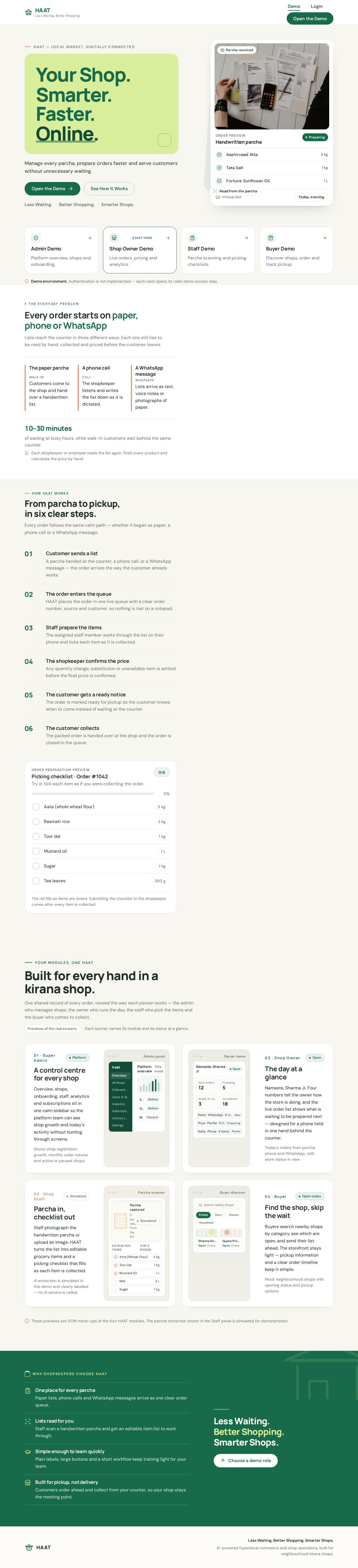
haat — local market, digitally connected
Manage every parcha, prepare orders faster and serve customers without unnecessary waiting.
Less Waiting. Better Shopping. Smarter Shops.
Demo environment. Authentication is not implemented — each card opens its role's demo access step.
The everyday problem
Lists reach the counter in three different ways. Each one still has to be read by hand, collected and priced before the customer leaves.
Customers come to the shop and hand over a handwritten list.
The shopkeeper listens and writes the list down as it is dictated.
Lists arrive as text, voice notes or photographs of paper.
Each shopkeeper or employee reads the list again, finds every product and calculates the price by hand.
Every order follows the same calm path — whether it began as paper, a phone call or a WhatsApp message.
A parcha handed at the counter, a phone call, or a WhatsApp message — the order arrives the way the customer already works.
HAAT places the order in one live queue with a clear order number, source and customer, so nothing is lost on a notepad.
The assigned staff member works through the list on their phone and ticks each item as it is collected.
Any quantity change, substitution or unavailable item is settled before the final price is confirmed.
The order is marked ready for pickup so the customer knows when to come instead of waiting at the counter.
The packed order is handed over at the shop and the order is closed in the queue.
Order preparation preview
The rail fills as items are ticked. Submitting the checklist to the shopkeeper comes after every item is collected.
One shared record of every order, viewed the way each person works — the admin who manages shops, the owner who runs the day, the staff who pick the items and the buyer who comes to collect.
Overview, shops, onboarding, staff, analytics and subscriptions sit in one calm sidebar so the platform team can see shop growth and today's activity without hunting through screens.
Shows shop registration growth, monthly order volume and active or paused shops.
Namaste, Sharma Ji. Four numbers tell the owner how the store is doing, and the live order list shows what is waiting to be prepared next — designed for a phone held in one hand behind the counter.
Today's orders from parcha, phone and WhatsApp, with store status in view.
Staff photograph the handwritten parcha or upload an image. HAAT turns the list into editable grocery items and a picking checklist that fills as each item is collected.
AI extraction is simulated in this demo and clearly labelled — no AI service is called.
Buyers search nearby shops by category, see which are open, and send their list ahead. The storefront stays light — pickup information and a clear order timeline keep it simple.
Mock neighbourhood shops with opening status and pickup options.
These previews are DOM mock-ups of the four HAAT modules. The parcha extraction shown in the Staff panel is simulated for demonstration.
Why shopkeepers choose HAAT
Paper lists, phone calls and WhatsApp messages arrive as one clear order queue.
Staff scan a handwritten parcha and get an editable item list to work through.
Plain labels, large buttons and a short workflow keep training light for your team.
Customers order ahead and collect from your counter, so your shop stays the meeting point.
haat — local market, digitally connected
Manage every parcha, prepare orders faster and serve customers without unnecessary waiting.
Less Waiting. Better Shopping. Smarter Shops.
Demo environment. Authentication is not implemented — each card opens its role's demo access step.
The everyday problem
Lists reach the counter in three different ways. Each one still has to be read by hand, collected and priced before the customer leaves.
Customers come to the shop and hand over a handwritten list.
The shopkeeper listens and writes the list down as it is dictated.
Lists arrive as text, voice notes or photographs of paper.
Each shopkeeper or employee reads the list again, finds every product and calculates the price by hand.
Every order follows the same calm path — whether it began as paper, a phone call or a WhatsApp message.
A parcha handed at the counter, a phone call, or a WhatsApp message — the order arrives the way the customer already works.
HAAT places the order in one live queue with a clear order number, source and customer, so nothing is lost on a notepad.
The assigned staff member works through the list on their phone and ticks each item as it is collected.
Any quantity change, substitution or unavailable item is settled before the final price is confirmed.
The order is marked ready for pickup so the customer knows when to come instead of waiting at the counter.
The packed order is handed over at the shop and the order is closed in the queue.
Order preparation preview
The rail fills as items are ticked. Submitting the checklist to the shopkeeper comes after every item is collected.
One shared record of every order, viewed the way each person works — the admin who manages shops, the owner who runs the day, the staff who pick the items and the buyer who comes to collect.
Overview, shops, onboarding, staff, analytics and subscriptions sit in one calm sidebar so the platform team can see shop growth and today's activity without hunting through screens.
Shows shop registration growth, monthly order volume and active or paused shops.
Namaste, Sharma Ji. Four numbers tell the owner how the store is doing, and the live order list shows what is waiting to be prepared next — designed for a phone held in one hand behind the counter.
Today's orders from parcha, phone and WhatsApp, with store status in view.
Staff photograph the handwritten parcha or upload an image. HAAT turns the list into editable grocery items and a picking checklist that fills as each item is collected.
AI extraction is simulated in this demo and clearly labelled — no AI service is called.
Buyers search nearby shops by category, see which are open, and send their list ahead. The storefront stays light — pickup information and a clear order timeline keep it simple.
Mock neighbourhood shops with opening status and pickup options.
These previews are DOM mock-ups of the four HAAT modules. The parcha extraction shown in the Staff panel is simulated for demonstration.
Why shopkeepers choose HAAT
Paper lists, phone calls and WhatsApp messages arrive as one clear order queue.
Staff scan a handwritten parcha and get an editable item list to work through.
Plain labels, large buttons and a short workflow keep training light for your team.
Customers order ahead and collect from your counter, so your shop stays the meeting point.
No comments yet. Be the first!