gym
 Aditya Yadav
act like 0.1 % website design builder not website looking like create by ai create agym website wher e people come and book their slot in gym and pay after pay they get an unique primpary key id card


Comments (0)
Sign in to leave a comment
System Requirements
System Requirements Document for gym
1. Introduction
The gym website is designed to allow users to book gym slots, make payments, and receive a unique primary-key ID card post-payment. The target audience includes gym members who wish to manage their bookings and gym staff who facilitate these operations. The design aims to be vibrant and engaging, appealing to a youthful and energetic demographic.
2. System Overview
The system provides a platform for gym members to book slots, pay for them, and receive a unique ID card. It also supports gym staff in managing bookings and member records. The website will feature a playful and maximalist design inspired by Jessica Walsh, focusing on bold visuals and interactive elements.
2a. Product Interpretation and Delivery Boundary
The gym website will be delivered as a custom UI with application-owned identity management. It will include pages for landing, login, bookings, staff operations, and ID card management. The system integrates with a payment provider to handle transactions securely. Access to certain pages will be restricted based on user roles (e.g., gym members and staff).
2b. Source Content Inventory
Not applicable as no content_source directive is provided.
2c. Page Content and Component Coverage
Landing
- Information/State: Introduction to the gym, available services, and call-to-action for booking.
- Primary Actions: Navigate to booking page, learn more about the gym.
- Components: Hero section with bold typography, vibrant imagery, and navigation links.
- States: Loading, success, error.
Login
- Information/State: User authentication for returning members and staff.
- Primary Actions: Log in, password recovery.
- Components: Login form, password recovery link.
- States: Loading, success, error, recovery.
Bookings
- Information/State: Available gym slots, user booking history.
- Primary Actions: Select slot, proceed to payment.
- Components: Slot selection interface, booking confirmation.
- States: Loading, success, error, empty (no slots available).
Staff Operations
- Information/State: Member records, booking management.
- Primary Actions: Manage bookings, update member records.
- Components: Member list, booking management tools.
- States: Loading, success, error.
ID Cards
- Information/State: Issued ID cards, member details.
- Primary Actions: View ID card, manage card details.
- Components: ID card display, management interface.
- States: Loading, success, error.
3. Functional Requirements
- As a Gym Member, I should be able to book a gym slot and pay for it. (explicit)
- As a Gym Member, I should receive a unique primary-key ID card after successful payment. (explicit)
- As a Gym Member, I should be able to log in to manage my bookings and view my ID card. (required_inference)
- As a Gym Staff, I should be able to log in to manage bookings and member records. (required_inference)
- The system must generate and persist a unique primary-key ID for each successfully paid member card. (required_inference)
4. User Personas
- Gym Member: Books gym slots, pays for them, and receives a unique ID card. Manages bookings and views ID card through the website.
- Gym Staff: Manages bookings and member records, supports the issuance of ID cards post-payment.
5. Core User Flows
Gym Member Booking and Payment Flow
- Visit the Landing page.
- Navigate to the Bookings page.
- Select an available gym slot.
- Proceed to payment via the integrated payment provider.
- Upon successful payment, receive a unique primary-key ID card.
Gym Member Login and Management Flow
- Visit the Login page.
- Enter credentials to log in.
- Access the Bookings page to manage bookings or the ID Cards page to view the ID card.
Gym Staff Operations Flow
- Visit the Login page.
- Enter staff credentials to log in.
- Access the Staff Operations page to manage bookings and member records.
6. Visuals Colors and Theme
- Muse: Jessica Walsh
- Palette: Background #FFC0CB, Surface #FFFFFF, Text #000000, Primary #FF4500, Accent #32CD32, Muted #FAFAD2
- Typography: Headings - Archivo Black, Body - Syne
- Shape Language: Overlapping bold color fields, sticker-like elements
- Layout: Asymmetric grids with bold color blocks
- Motion: Bouncy scale-ins, hover interactions, color flips
7. Signature Design Concept
The Landing page will feature a full-bleed hero section with oversized typography and surreal props on a vibrant pink background. The design will incorporate dynamic overlapping shapes that change color on hover, playful iconography, and bouncy entrance animations for interactive elements.
8. Interaction Model & Motion Direction
- Interaction Model: Animated
- Motion Tempo: Expressive
- Hero Dimensionality: Layered_2d
- Landing Hero Motion Brief: A dynamic composition with oversized typography and surreal props, engaging users with bouncy animations and color flips.
9. Non-Functional Requirements
- The system must ensure secure payment processing through an integrated payment provider. (required_inference)
- The website should maintain high availability and performance to handle user traffic efficiently. (basic_default)
10. Tech Stack
- Frontend: React
- Backend: Python/FastAPI
- Database: PostgreSQL
- Payment Integration: Stripe
- Deployment: Docker, Kubernetes
11. Assumptions and Constraints
- The ID card must contain a unique primary key ID and is provided only after successful payment.
- Gym members and staff require authentication to access protected functionalities.
12. Glossary
- Gym Member: A user who books gym slots and receives an ID card.
- Gym Staff: A user who manages bookings and member records.
- ID Card: A unique identifier provided to members post-payment.
- Slot Booking: The process of reserving a time slot at the gym.
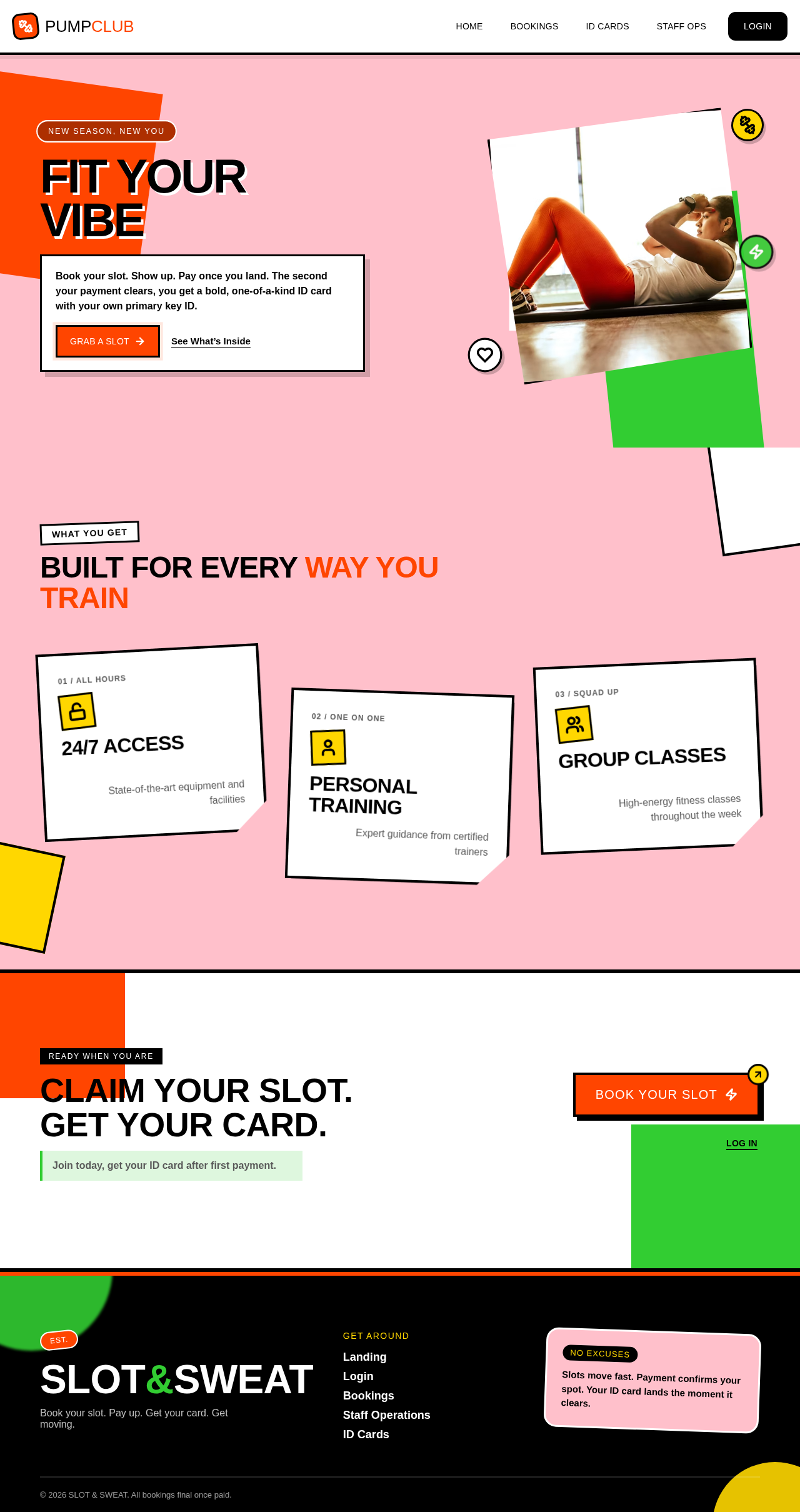
FIT YOUR
VIBE
Book your slot. Show up. Pay once you land. The second your payment clears, you get a bold, one-of-a-kind ID card with your own primary key ID.

Built For Every Way You Train
24/7 Access
State-of-the-art equipment and facilities
Personal Training
Expert guidance from certified trainers
Group Classes
High-energy fitness classes throughout the week
CLAIM YOUR SLOT.
GET YOUR CARD.
Join today, get your ID card after first payment.
FIT YOUR
VIBE
Book your slot. Show up. Pay once you land. The second your payment clears, you get a bold, one-of-a-kind ID card with your own primary key ID.
Built For Every Way You Train
24/7 Access
State-of-the-art equipment and facilities
Personal Training
Expert guidance from certified trainers
Group Classes
High-energy fitness classes throughout the week
CLAIM YOUR SLOT.
GET YOUR CARD.
Join today, get your ID card after first payment.
No comments yet. Be the first!