gym-management

byHussain Bekhushi

Create a project that contains gym trainning with all the excercise video inlucded and gym management all the feature

LandingLoginSign UpMembershipMember DetailsManagementExercise DetailsExercisesMembersPlansAttendancePlan Management
Landing

Comments (0)

No comments yet. Be the first!

System Requirements

System Requirements Document for gym-management

Page 1 of 40

1. Introduction

gym-management is a single web product that combines two things a gym needs in one place: gym training content with an instructional video included for every exercise, and gym management features covering the full set of standard gym management capabilities. Members use the product to find and watch the exercise videos they need for their workouts; gym managers and staff use it to run the gym's day-to-day administration — keeping members, schedules, and gym records organized in one place.

The product is delivered as a first-party React web application backed by a shared FastAPI service and a MariaDB database. Identity is application-owned: members and staff enroll themselves, verify on return, and reach protected training or management state only after verification. Training destinations are for members; management destinations are restricted to staff.

Membership renewal is handled inside the product: a payment reminder begins when a membership has 7 days remaining before its end date, and a renewal notification is delivered daily until the member renews. Members can also see their own gym attendance.

Membership purchase is handled inside the product through a payment module. Members choose a plan from four categories — 1 month, 3 month, 6 month, and 12 month — and purchase it without leaving the product. Gym management maintains the plan catalog: staff can change plan prices and run offers on plans at any time, and the member-facing plan list reflects the current price and any active offer.

Target users. Two active human roles: Gym Member, who trains with the exercise video library, checks their own attendance, and receives membership renewal reminders, and Gym Manager / Staff, who runs gym administration. Both are self-service users of the same product.

Page 2 of 40

Success criteria.

  • A member can find any exercise in the library and watch its instructional video without leaving the product.
  • Every exercise in the library has an accompanying video; no exercise is listed without one.
  • A manager can complete routine gym administration — member records, schedules, and gym records — from the management area without external tools.
  • Members and staff can enroll and return to their own protected work reliably.
  • A member whose membership has 7 days remaining sees a payment reminder, and receives a renewal notification every day until the membership is renewed.
  • A member can see their own gym attendance.
  • A member can purchase a membership plan from the 1 month, 3 month, 6 month, and 12 month categories through the payment module.
  • A manager can change a plan's price and run an offer on a plan, and members see the updated price and active offer when choosing a plan.
Page 3 of 40

2. System Overview

gym-management is a two-audience web application delivered as:

  • frontend — a React application providing the public entry, identity surfaces, the member exercise library, and the staff management area.
  • backend — a single shared FastAPI process exposing the application APIs and domain modules for training content, identity, and gym management.
  • database — MariaDB holding application-owned persistent data: accounts and roles, the exercise catalog with video references, member records, memberships and their end dates, renewal reminders and notifications, attendance records, schedules, gym records, the membership plan catalog (1 month, 3 month, 6 month, 12 month) with prices and offers, and plan purchase records.
  • reminder worker — a background scheduler process in the shared backend that evaluates membership end dates and issues the daily renewal notification until the member renews.
  • payment module — a domain module inside the shared backend that serves the membership plan catalog, applies staff-set prices and active offers, and records a member's plan purchase.
Page 4 of 40

Actors.

  • Gym Member (human) — browses the exercise library, opens an exercise, and watches its instructional video; views their own gym attendance; sees the payment reminder from 7 days before membership end and the daily renewal notification until renewal; purchases a membership plan (1 month, 3 month, 6 month, or 12 month) through the payment module.
  • Gym Manager / Staff (human) — uses the management area to keep member records, memberships, schedules, and gym records organized; changes membership plan prices and runs offers on plans.
  • Application backend (system) — serves training content, enforces staff-only access to management destinations, evaluates membership end dates, issues renewal reminders and notifications, serves the plan catalog with current prices and active offers, records plan purchases, and persists state.

Accepted behavior. The product provides (a) gym training content with an exercise video included for every exercise, browsable and watchable by members, (b) gym management features covering the full set of standard gym management capabilities, operated by staff, (c) a payment reminder that starts when a membership has 7 days remaining before its end and a daily renewal notification repeated until the member renews, (d) a member view of the member's own gym attendance, and (e) a payment module through which members purchase a membership plan from the 1 month, 3 month, 6 month, and 12 month categories, with staff able to change plan prices and run offers. Self-service enrollment, returning verification, and staff-role authorization for management destinations are the minimum identity mechanics that make these journeys executable.

Page 5 of 40

Ownership. All current behavior is first-party: the application owns identity, the exercise catalog and its videos, membership records and their end dates, renewal reminders and notifications, attendance records, the membership plan catalog with its prices and offers, plan purchase records, and all management records. No provider-owned or external surfaces are part of current scope.

Narrow exclusions. No third-party video hosting provider is specified; video references are stored and served by the application. No external calendar integration is specified. No third-party payment gateway, card processor, or external billing provider is specified: the payment module is an in-product plan purchase flow that records the purchase and the resulting membership period, and it does not integrate an external payment processor. The renewal reminder and its daily notification remain in-product reminders. No mobile native application is specified.

Removed from scope

  • None.
Page 6 of 40

2a. Product Interpretation and Delivery Boundary

The product is one coherent instrument with two faces. The member face is video-first: a landing entry, then an exercise library where every exercise carries its own instructional video, a focused exercise view for watching, a membership view carrying the renewal reminder and its daily notification, a plans view where the member purchases a 1, 3, 6, or 12 month plan through the payment module, and an attendance view of the member's own gym visits. The staff face is a command surface: a management hub that summarizes gym state and routes into member records, plan management (prices and offers), and the other standard management operations.

Access is application-owned and self-service. Anyone can reach the public landing page and the enrollment and login surfaces. Training destinations require a verified member session; management destinations require a verified staff session. A member cannot reach management destinations, and a staff member's management work is kept separate from member training browsing by role. A member sees only their own attendance and their own membership reminders; no member sees another member's attendance or membership state.

Renewal reminders are time-driven, not user-driven: the backend evaluates membership end dates and, from the moment a membership has 7 days remaining, surfaces a payment reminder and repeats a renewal notification every day until the membership is renewed. Renewal itself is recorded by staff in the management area; the reminder stops once the membership end date moves forward. A member may also renew by purchasing a plan through the payment module, which records the purchase and moves the membership end date forward.

Plan pricing is staff-controlled: the plan catalog always offers exactly the four categories (1 month, 3 month, 6 month, 12 month), and staff can change the price of any category and run an offer on a plan. Members always see the current price and any active offer when choosing a plan.

Page 7 of 40

Everything described here is current. No future-horizon features are committed in this document.

2c. Page Content and Component Coverage

Landing

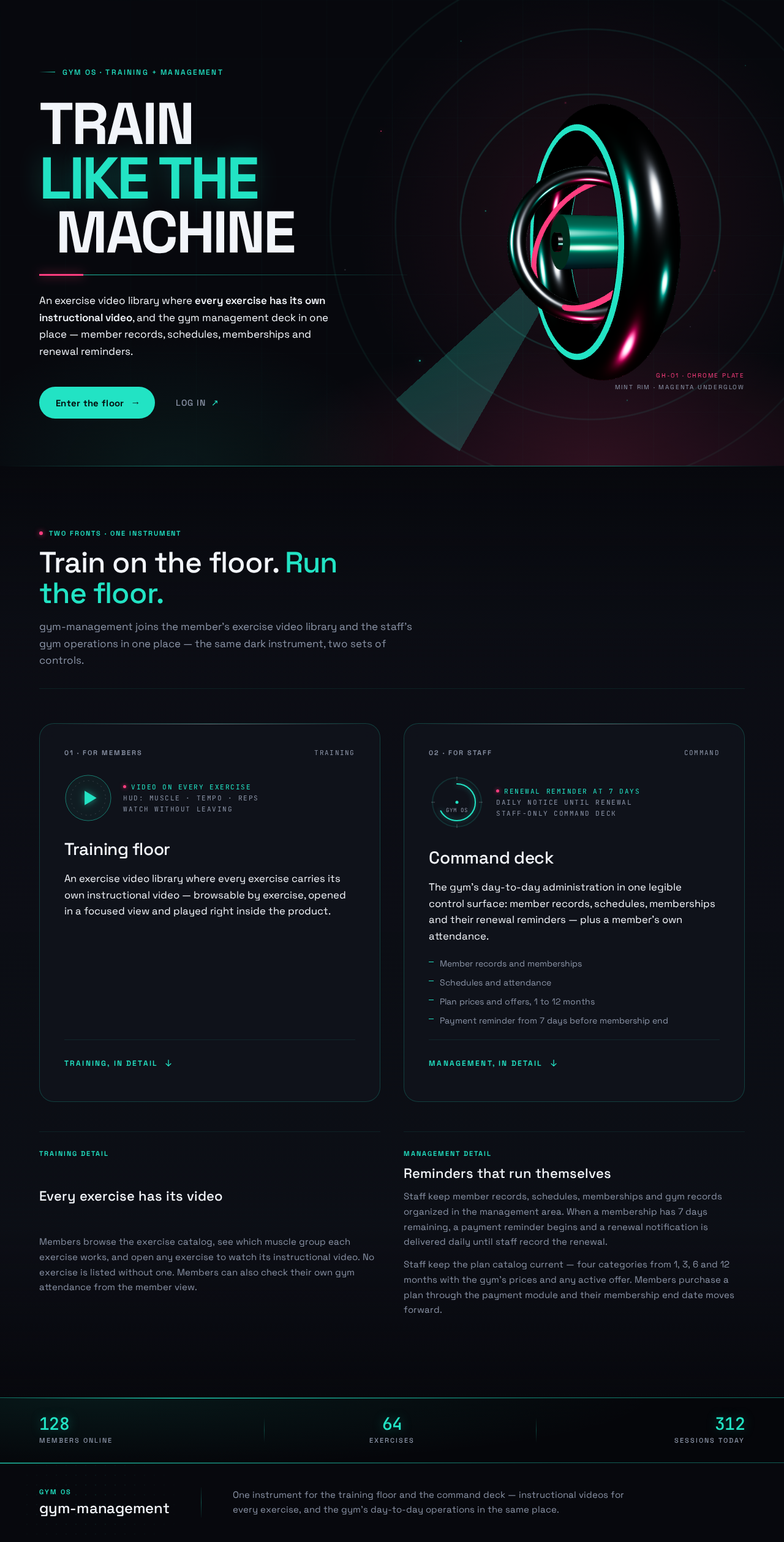
  • Information/state: anonymous public entry. Explains the two offerings — the exercise video library and gym management — and presents the product identity.
  • Primary actions: enter enrollment (Sign Up); go to Login for returning users.
  • Supporting actions: navigate to the public description of training and management.
  • Domain entities: none persisted; static product presentation.
  • Component responsibilities: hero presentation of the training + management proposition; entry calls to Sign Up and Login; no protected data shown.
  • States: loading (static content, no data dependency); empty (n/a); success (renders); error (n/a); recovery (n/a).
Page 8 of 40

Sign Up

  • Information/state: anonymous first-use enrollment for both members and staff.
  • Primary actions: submit enrollment details to create an account; select the role the account will hold (member or staff).
  • Supporting actions: move to Login if already enrolled.
  • Domain entities: Account (identity, role).
  • Component responsibilities: enrollment form; role selection; validation feedback; on success, route to Login or directly into the verified session.
  • States: loading (submitting); empty (blank form); success (account created, confirmation shown); error (invalid or duplicate enrollment details, shown inline); recovery (correct and resubmit).

Login

  • Information/state: anonymous returning verification for members and staff.
  • Primary actions: submit credentials to verify identity.
  • Supporting actions: move to Sign Up if not yet enrolled.
  • Domain entities: Account, Session.
  • Component responsibilities: credential form; verification; on success, route to the destination appropriate to the account's role (Exercises for members, Management for staff).
  • States: loading (verifying); empty (blank form); success (session established, routed); error (invalid credentials, shown inline); recovery (retry).
Page 9 of 40

Exercises

  • Information/state: member-facing browse of the exercise library. Every listed exercise has an instructional video.
  • Primary actions: browse the exercise catalog; open an exercise to view details and video.
  • Supporting actions: filter or scan the catalog by exercise.
  • Domain entities: Exercise (name, muscle group, video reference).
  • Component responsibilities: catalog listing with video availability indicated; navigation into Exercise Details; access restricted to verified member sessions.
  • States: loading (catalog fetch); empty (no exercises available — message shown); success (catalog rendered); error (fetch failure with retry); recovery (retry).

Exercise Details

  • Information/state: focused view of a single exercise with its instructional video.
  • Primary actions: play the exercise's instructional video.
  • Supporting actions: return to the Exercises catalog.
  • Domain entities: Exercise, Video.
  • Component responsibilities: video player; exercise metadata; back navigation; access restricted to verified member sessions.
  • States: loading (exercise and video fetch); empty (video unavailable — message shown); success (video plays); error (video load failure with retry); recovery (retry or return to catalog).
Page 10 of 40

Management

  • Information/state: staff hub summarizing gym state and routing to management operations.
  • Primary actions: open Members; open Plan Management; open the other standard management operations.
  • Supporting actions: return to the hub from any management operation.
  • Domain entities: aggregate gym state (members, schedules, records, plan prices and active offers).
  • Component responsibilities: summary of gym state; navigation into management operations; access restricted to verified staff sessions.
  • States: loading (summary fetch); empty (no data yet — message shown); success (summary rendered); error (fetch failure with retry); recovery (retry).

Members

  • Information/state: staff browse and management of member records.
  • Primary actions: browse member records; open a member record; create a new member record.
  • Supporting actions: search or scan member records.
  • Domain entities: Member record.
  • Component responsibilities: member list; entry into Member Details; access restricted to verified staff sessions.
  • States: loading (list fetch); empty (no members — prompt to create); success (list rendered); error (fetch failure with retry); recovery (retry).
Page 11 of 40

Plan Management

  • Information/state: staff maintenance of the membership plan catalog across the four categories (1 month, 3 month, 6 month, 12 month).
  • Primary actions: change the price of a plan category; create, edit, or end an offer on a plan.
  • Supporting actions: return to Management; review the current price and offer state of each category.
  • Domain entities: Membership plan (category, duration, price, active offer).
  • Component responsibilities: plan list for the four categories with prices in tabular numerals; price editing; offer editing with active/inactive state; validation; save confirmation; access restricted to verified staff sessions.
  • States: loading (plan catalog fetch); empty (no plans configured — message shown); success (plans rendered; price or offer saved); error (validation or save failure, shown inline); recovery (correct and resubmit).
Page 12 of 40

Member Details

  • Information/state: staff create/edit view for an individual member record, including the member's membership end date that drives renewal reminders.
  • Primary actions: create a new member record; edit an existing member record; save changes; record a membership renewal by setting a new membership end date.
  • Supporting actions: return to Members.
  • Domain entities: Member record, Membership (end date), Renewal reminder.
  • Component responsibilities: member form; membership end-date field; validation; save; renewal recording that clears the active reminder and stops the daily notification; access restricted to verified staff sessions.
  • States: loading (record fetch for edit); empty (new record form); success (saved confirmation, including renewal recorded); error (validation or save failure, shown inline); recovery (correct and resubmit).
Page 13 of 40

Plans

  • Information/state: member-facing plan selection and purchase through the payment module. Lists the four plan categories — 1 month, 3 month, 6 month, 12 month — each with its current price and any active offer.
  • Primary actions: choose a plan category; purchase the selected plan.
  • Supporting actions: move between the member's training destinations (Exercises, Membership, Attendance); review the current membership status before purchasing.
  • Domain entities: Membership plan (category, duration, price, active offer), Plan purchase (member, plan, price paid, purchase date), Membership (end date).
  • Component responsibilities: plan cards for the four categories with price in tabular numerals; active-offer treatment on the affected plan; purchase confirmation; on successful purchase, the membership end date moves forward and the member is routed to Membership; access restricted to verified member sessions; a member sees only their own purchase state.
  • States: loading (plan catalog fetch); empty (no plans available — message shown); success (plans rendered with current prices and offers; purchase confirmed); error (catalog fetch or purchase failure, shown inline with retry); recovery (retry or reselect a plan).
Page 14 of 40

Attendance

  • Information/state: member-facing view of the signed-in member's own gym attendance history.
  • Primary actions: review their own attendance entries (dates and visit information).
  • Supporting actions: move between the member's training destinations (Exercises, Membership).
  • Domain entities: Attendance record (member, date/time of visit).
  • Component responsibilities: attendance list for the current member only; tabular monospace numerals for dates and counts; access restricted to verified member sessions; no other member's attendance is exposed.
  • States: loading (attendance fetch); empty (no attendance recorded yet — message shown); success (attendance rendered); error (fetch failure with retry); recovery (retry).
Page 15 of 40

Membership

  • Information/state: member-facing view of the signed-in member's own membership status, end date, and renewal reminder state.
  • Primary actions: review membership status and remaining days; read the payment reminder and the current renewal notification.
  • Supporting actions: move between the member's training destinations (Exercises, Plans, Attendance); go to Plans to purchase a renewal.
  • Domain entities: Membership (end date, remaining days), Renewal reminder, Renewal notification, Membership plan, Plan purchase.
  • Component responsibilities: membership status panel with remaining-days countdown in tabular numerals; payment reminder shown once 7 days or fewer remain before the membership end; daily renewal notification surfaced on each day until the membership is renewed; reminder cleared when the membership end date moves forward; entry into Plans to purchase a renewal; access restricted to verified member sessions.
  • States: loading (membership fetch); empty (no membership on record — message shown); success (status rendered; reminder and notification shown when within 7 days of end); error (fetch failure with retry); recovery (retry).
Page 16 of 40

3. Functional Requirements

FR-1 — Exercise video library. As a Gym Member I should browse a library of gym exercises in which every exercise includes its own instructional video, so that I can find the exercise I need and watch how to perform it. (explicit)

  • Trigger/input: member opens Exercises.
  • Observable result: catalog of exercises, each with an instructional video available.
  • Access: verified member session.
  • Failure/recovery: catalog fetch failure shows an error with retry.
  • Continuation: member opens an exercise to watch its video.

FR-2 — Watch an exercise video. As a Gym Member I should open a single exercise and play its instructional video, so that I can follow the movement correctly. (explicit)

  • Trigger/input: member selects an exercise from the catalog.
  • Observable result: Exercise Details shows the exercise and plays its video.
  • Access: verified member session.
  • Failure/recovery: video load failure shows an error with retry; member can return to the catalog.
  • Continuation: member returns to the catalog to pick another exercise.
Page 17 of 40

FR-3 — Gym management capabilities. As a Gym Manager / Staff I should use gym management features covering the full set of standard gym management capabilities, so that routine gym administration is handled in one place. (explicit)

  • Trigger/input: staff opens Management.
  • Observable result: management hub summarizes gym state and routes into management operations.
  • Access: verified staff session.
  • Failure/recovery: summary fetch failure shows an error with retry.
  • Continuation: staff opens a management operation.

FR-4 — Member records. As a Gym Manager / Staff I should browse, create, and edit member records, so that the gym's member information stays current. (explicit, via standard management capabilities)

  • Trigger/input: staff opens Members and selects or creates a record.
  • Observable result: member list renders; Member Details saves created or edited records.
  • Access: verified staff session.
  • Failure/recovery: validation or save failure shown inline; staff corrects and resubmits.
  • Continuation: staff returns to Members.
Page 18 of 40

FR-5 — Self-service enrollment. As a Gym Member or Gym Manager / Staff I should enroll myself and choose my role, so that I can begin using the product without waiting for an administrator. (required_inference)

  • Trigger/input: anonymous visitor submits enrollment details and role on Sign Up.
  • Observable result: account created with the chosen role.
  • Access: anonymous.
  • Failure/recovery: invalid or duplicate details shown inline; visitor corrects and resubmits.
  • Continuation: visitor proceeds to Login or into the verified session.

FR-6 — Returning verification. As a Gym Member or Gym Manager / Staff I should verify my identity on return, so that I can reach my own protected training or management state. (required_inference)

  • Trigger/input: returning user submits credentials on Login.
  • Observable result: session established; member routed to Exercises, staff routed to Management.
  • Access: anonymous entry; protected state unavailable until verified.
  • Failure/recovery: invalid credentials shown inline; user retries.
  • Continuation: user proceeds to their role's destination.
Page 19 of 40

FR-7 — Staff authorization for management. As the application I should restrict management destinations to verified staff sessions, so that member training and gym administration remain correctly separated. (required_inference)

  • Trigger/input: any request to a management destination.
  • Observable result: staff sessions reach Management, Members, and Member Details; member sessions do not.
  • Access: role-restricted.
  • Failure/recovery: unauthorized access is refused and the user is returned to an allowed destination.
  • Continuation: staff continues management work.

FR-8 — Payment reminder before membership end. As a Gym Member I should see a payment reminder starting when my membership has 7 days remaining before its end, so that I have time to renew before it lapses. (explicit)

  • Trigger/input: the member's membership end date is 7 days or fewer away; the member opens Membership (and the reminder is also surfaced in the member's session).
  • Observable result: a payment reminder is shown with the membership end date and the remaining days.
  • Access: verified member session; the member sees only their own membership.
  • Failure/recovery: membership fetch failure shows an error with retry.
  • Continuation: the member reviews the reminder and renews through the gym; the reminder persists until the membership is renewed.
Page 20 of 40

FR-9 — Daily renewal notification until renewal. As a Gym Member I should receive a renewal notification every day from the start of the reminder until I renew my membership, so that I do not let the membership lapse. (explicit)

  • Trigger/input: a scheduled daily evaluation of membership end dates by the backend reminder worker.
  • Observable result: a renewal notification is issued once per day for each member whose membership is within 7 days of its end and has not been renewed; the notification is surfaced in the member's Membership view and as an in-product notification.
  • Access: verified member session for reading; the reminder worker runs as a system process.
  • Failure/recovery: a failed daily evaluation is retried on the next scheduled run; the member's Membership view still shows the current reminder state.
  • Continuation: the daily notification repeats each day until the member's membership end date is moved forward (renewal recorded by staff), at which point the notification stops.

FR-10 — Member views own gym attendance. As a Gym Member I should see the attendance of the gym for myself, so that I can track my visits. (explicit)

  • Trigger/input: member opens Attendance.
  • Observable result: the member's own attendance entries are listed with dates and visit information.
  • Access: verified member session; scoped to the signed-in member only.
  • Failure/recovery: fetch failure shows an error with retry; no attendance yet shows an empty-state message.
  • Continuation: member returns to their training destinations.
Page 21 of 40

FR-11 — Renewal recorded by staff. As a Gym Manager / Staff I should record a member's renewal by setting a new membership end date, so that the reminder and daily notification stop once the member has renewed. (required_inference)

  • Trigger/input: staff edits a member record on Member Details and saves a new membership end date.
  • Observable result: the membership end date is updated; the active payment reminder and daily renewal notification for that member stop.
  • Access: verified staff session.
  • Failure/recovery: validation or save failure shown inline; staff corrects and resubmits.
  • Continuation: staff returns to Members.

FR-12 — Membership plan categories. As a Gym Member I should choose from exactly four membership plan categories — 1 month, 3 month, 6 month, and 12 month — so that I can pick the commitment that suits me. (explicit)

  • Trigger/input: member opens Plans.
  • Observable result: the four plan categories are listed, each with its duration and its current price.
  • Access: verified member session.
  • Failure/recovery: plan catalog fetch failure shows an error with retry.
  • Continuation: member selects a plan category to purchase.
Page 22 of 40

FR-13 — Purchase a membership plan. As a Gym Member I should purchase a membership plan through the payment module, so that I can renew or extend my membership easily without leaving the product. (explicit)

  • Trigger/input: member selects a plan category on Plans and confirms the purchase.
  • Observable result: the purchase is recorded with the plan, the price paid, and the purchase date; the member's membership end date moves forward by the plan's duration; the member is routed to Membership with the updated status.
  • Access: verified member session; a member purchases only for their own membership.
  • Failure/recovery: purchase failure shows an error inline with retry; the member can reselect a plan.
  • Continuation: member reviews the updated membership status on Membership; the payment reminder and daily renewal notification stop once the end date has moved forward.

FR-14 — Staff change plan prices. As a Gym Manager / Staff I should change the price of any membership plan category, so that the gym's pricing stays current. (explicit)

  • Trigger/input: staff opens Plan Management and saves a new price for a plan category.
  • Observable result: the plan's price is updated and the member-facing Plans view shows the new price.
  • Access: verified staff session.
  • Failure/recovery: validation or save failure shown inline; staff corrects and resubmits.
  • Continuation: staff returns to Management or edits another plan.
Page 23 of 40

FR-15 — Staff run offers on plans. As a Gym Manager / Staff I should run offers on membership plans, so that the gym can promote plans without changing the base price. (explicit)

  • Trigger/input: staff opens Plan Management and creates, edits, or ends an offer on a plan category.
  • Observable result: the offer is stored with its active state; the member-facing Plans view shows the active offer on the affected plan alongside the current price.
  • Access: verified staff session.
  • Failure/recovery: validation or save failure shown inline; staff corrects and resubmits.
  • Continuation: staff returns to Management or edits another plan.

4. User Personas

Page 24 of 40

Gym Member

  • Product context: a person who trains at the gym and uses the product to look up how to perform exercises. They arrive through the public landing page, enroll or log in, and spend their time in the exercise library.
  • Primary goal: find the exercise they need and watch its instructional video.
  • Distinct responsibilities: browsing the exercise catalog; opening a single exercise; playing its video; returning to the catalog for the next exercise; reviewing their own gym attendance; reading the payment reminder and the daily renewal notification for their own membership; choosing among the 1 month, 3 month, 6 month, and 12 month plan categories and purchasing a plan through the payment module. They do not perform gym administration.
  • Inputs/decisions: which exercise to look up; whether to watch the video now or pick another exercise; whether to renew their membership after the reminder appears; which plan category to purchase and whether to take advantage of an active offer.
  • Interactions with other participants: none directly; their training content and membership records are maintained by staff through management, and the application enforces that they cannot reach management destinations. Renewal is recorded by staff or completed by the member's own plan purchase, either of which stops the member's daily renewal notification. Plan prices and offers are set by staff and shown to the member on Plans.
  • Observable success: the member finds the exercise and watches its video without leaving the product; the member sees their own attendance; the member is reminded from 7 days before membership end and every day after until renewed; the member purchases a plan in a few steps and sees the updated membership end date.
Page 25 of 40

Gym Manager / Staff

  • Product context: a person who runs the gym's day-to-day administration. They enroll or log in with a staff role and work from the management area.
  • Primary goal: keep members, schedules, and gym records organized in one place.
  • Distinct responsibilities: reviewing the management hub summary; browsing, creating, and editing member records; recording membership renewals by setting new membership end dates; maintaining the membership plan catalog by changing plan prices and running offers; carrying out the other standard management operations. They do not browse the member training library as part of their management work.
  • Inputs/decisions: which management operation to open; what member details to create or change; what new membership end date to set when a member renews; what price each plan category should carry; which plans should run an offer and when an offer should end.
  • Interactions with other participants: their member records describe the Gym Members who train in the product; the prices and offers they set appear to members on Plans; the application restricts management destinations to staff.
  • Observable success: routine gym administration is completed from the management area without external tools; price and offer changes reach members immediately on Plans.

5. Core User Flows

Page 26 of 40

Flow A — Member enrolls and watches an exercise video

  1. Anonymous visitor opens Landing and reads the training + management proposition.
  2. Visitor selects Sign Up, enters enrollment details, and chooses the member role.
  3. Sign Up creates the account and confirms success; on invalid or duplicate details it shows the error inline and the visitor corrects it.
  4. Visitor proceeds to Login (or continues into the verified session) and submits credentials.
  5. Login verifies identity and routes the member to Exercises.
  6. Member browses the catalog, where every exercise carries an instructional video, and selects one.
  7. Exercise Details loads the exercise and plays its video. If the video fails to load, an error with retry is shown and the member can return to the catalog.
  8. Member returns to Exercises to pick the next exercise.

Flow B — Returning member verifies and trains

  1. Returning member opens Login and submits credentials.
  2. Login verifies identity and routes to Exercises.
  3. Member selects an exercise and watches its video on Exercise Details.
  4. Member returns to the catalog. If credentials are invalid, the error is shown inline and the member retries.
Page 27 of 40

Flow C — Staff enrolls and reaches management

  1. Anonymous visitor opens Landing and selects Sign Up.
  2. Visitor enters enrollment details and chooses the staff role.
  3. Sign Up creates the account and confirms success; errors are shown inline for correction.
  4. Visitor proceeds to Login and submits credentials.
  5. Login verifies identity and routes the staff member to Management.
  6. Management renders the gym summary and routes into management operations. If the summary fails to load, an error with retry is shown.

Flow D — Staff manages member records

  1. Staff member opens Management and selects Members.
  2. Members renders the member list; if empty, it prompts to create a record.
  3. Staff selects an existing record or chooses to create a new one, opening Member Details.
  4. Staff enters or edits member details and saves.
  5. Member Details validates and saves, confirming success; on validation or save failure it shows the error inline and the staff member corrects and resubmits.
  6. Staff returns to Members to continue.
Page 28 of 40

Flow E — Access separation

  1. A member session attempts a management destination.
  2. The application refuses access and returns the member to an allowed destination.
  3. A staff session attempting member training destinations is likewise kept to its role's allowed destinations.

Flow F — Member sees the renewal reminder and renews

  1. The backend reminder worker evaluates membership end dates daily.
  2. When a member's membership has 7 days remaining before its end, a payment reminder appears for that member with the end date and remaining days.
  3. Each day thereafter, a renewal notification is issued to the member until the membership is renewed.
  4. The member opens Membership and reviews the reminder and the current notification; if the fetch fails, an error with retry is shown.
  5. The member renews through the gym; staff open Members → Member Details and save a new membership end date.
  6. The membership end date moves forward, the reminder clears, and the daily renewal notification stops.

Flow G — Member views their gym attendance

  1. Member opens Attendance from their member destinations.
  2. Attendance loads the signed-in member's own attendance entries.
  3. If no attendance is recorded yet, an empty-state message is shown; if the fetch fails, an error with retry is shown.
  4. Member reviews their visits and returns to their training destinations.
Page 29 of 40

Flow H — Member purchases a membership plan

  1. Member opens Plans from their member destinations (or from the payment reminder on Membership).
  2. Plans loads the four plan categories — 1 month, 3 month, 6 month, 12 month — each with its current price and any active offer. If the catalog fails to load, an error with retry is shown.
  3. Member selects a plan category and confirms the purchase.
  4. The payment module records the purchase with the plan, price paid, and purchase date, and moves the member's membership end date forward by the plan's duration.
  5. On success the member is routed to Membership, which shows the updated end date and remaining days; the payment reminder and daily renewal notification stop. On purchase failure an error is shown inline and the member retries or reselects a plan.

Flow I — Staff changes plan prices and runs offers

  1. Staff member opens Management and selects Plan Management.
  2. Plan Management lists the four plan categories with their current prices and offer state; if the fetch fails, an error with retry is shown.
  3. Staff edits the price of a plan category and saves; validation or save failure is shown inline for correction.
  4. Staff creates, edits, or ends an offer on a plan category and saves.
  5. The updated price and active offer appear to members on Plans.
  6. Staff returns to Management to continue.
Page 30 of 40

6. Visuals Colors and Theme

Muse: Gleb Kuznetsov. Headline direction: "TRAIN / LIKE THE / MACHINE" — cinematic future tech for the training floor.

Mode: dark only.

Colour tokens (exact hex, by role):

  • Background ground: #07080D
  • Surface (glass panels, 60–80% opacity): #10131C
  • Text (body, full opacity): #F2F5FA
  • Primary signal (play controls, active states, progress rings, key numerals): #22E3C4
  • Accent (single hot highlight, live badges, PR markers): #FF3D7F
  • Muted (micro-labels only): #8A93A6
  • Borders: 1px luminous strokes derived from #22E3C4 at low opacity; faint inner border-light at panel top edge.

Ratio: ~70% dark ground, 20% glass surface, 7% mint, 3% magenta. Never blue-indigo on white.

Typography:

  • Headings: Space Grotesk, 500–700 weight, sentence case at display scale, tight tracking.
  • Body: Space Grotesk.
  • Numerals, durations, reps, member counts: JetBrains Mono, tabular.
  • Micro-labels, categories, telemetry: uppercase, 0.18em tracking.
  • Scale (1.4 modular): display clamp(40px, 9vw, 96px); section head 28→48px; card title 18→22px; body 15→17px; micro-label 11→12px uppercase.
Page 31 of 40

Shape language: thin luminous 1px strokes; 20–28px radii on glass panels; circular gauge bezels; radial progress rings; soft volumetric glows behind key objects; pill or rounded-rect capsule buttons with a single mint glow on hover. No hard drop shadows — use light, not shadow, to lift layers.

Layout: full-bleed dark canvas; floating glass navigation rail pinned left on desktop, collapsing to a bottom dock on mobile; 8-pt grid with a visible 12-column overlay feel; generous negative space between luminous clusters.

Imagery: abstract 3D gym-equipment forms (chrome-and-mint dumbbell, kettlebell, barbell plate) as luminous volumetric objects with rim light and particle dust; exercise videos treated as hero media with a mint HUD overlay of reps, sets, muscle group, and tempo. No stock photography of smiling people; no flat clip art.

Accessibility: all readable text and controls stay whole inside the viewport and their container at 375px, 768px, and 1280px, wrapping or scaling to fit; imagery and decoration may bleed and overlap but never cover readable text or controls.

Page 32 of 40

7. Signature Design Concept

The public entry is a full-bleed #07080D viewport. A single crafted 3D dumbbell/plate form in chrome with mint rim-light floats slightly right of centre, slowly orbiting, casting a soft magenta glow on its underside; behind it a faint radial grid and drifting particle field. On the left, an oversized Space Grotesk headline stacked in three lines — TRAIN / LIKE THE / MACHINE — with an uppercase mint micro-label above it (GYM OS · TRAINING + MANAGEMENT) and a single pill CTA Enter the floor beneath, leading to Sign Up. A thin HUD strip along the bottom edge shows live tabular numerals in JetBrains Mono (members online, exercises, sessions today). No centred headline, no blue button, no gradient blob. The same luminous system carries into the exercise library (radial orbit grid with a large featured video tile) and the management hub (circular gauge bezels with needle-sweep motion).

Page 33 of 40

8. Interaction Model & Motion Direction

Interaction Model: Animated Motion Tempo: cinematic Hero Dimensionality: webgl

Landing Hero Motion Brief

  • Focal subject: the chrome-and-mint dumbbell/plate form from the hero direction, floating right of centre in the dark void.
  • Input → transformation → outcome thesis: as the visitor scrolls or the page settles, the hero subject orbits slowly with parallax and scroll-scrubbed camera drift while the HUD numerals count up; the outcome is a composed, legible entry frame that presents the training + management proposition and the single "Enter the floor" CTA.
  • Motion vocabulary: continuous slow orbit, parallax, light sweeps across glass panels, counting numerals, scroll-scrubbed camera drift, soft light bloom on hover.
  • Composed first frame: dark ground, subject right of centre with mint rim-light and magenta underglow, three-line headline left, mint micro-label above, pill CTA below, HUD strip along the bottom edge.
  • Reduced-motion state: all motion freezes to a static composed frame with the same layout and readable content; the hero subject holds its first-frame pose.

Landing Hero 3D Scene Brief — DIRECTION-DERIVED A single real-time WebGL/R3F object — a chrome dumbbell or barbell plate — with mint rim-light, magenta underglow, a faint radial grid, and a drifting particle field. It shows the product's defining state: physical training energy rendered as a luminous instrument. The scene must degrade to a static composed frame under prefers-reduced-motion.

Page 34 of 40

9. Non-Functional Requirements

  • NFR-1 — Persistent state. Accounts, roles, exercise catalog with video references, member records, memberships and their end dates, renewal reminders and notifications, attendance records, schedules, gym records, the membership plan catalog (four categories with prices and offers), and plan purchase records persist in MariaDB. (required_inference, from durable_state_required)
  • NFR-2 — Access control. Management destinations are reachable only by verified staff sessions; training destinations only by verified member sessions. A member's attendance, membership reminder data, and plan purchases are scoped to that member. Plan price and offer changes are restricted to verified staff sessions. (required_inference)
  • NFR-3 — Video availability. Every exercise in the catalog has an associated instructional video; the catalog must not list an exercise without one. (explicit)
  • NFR-4 — Responsive legibility. Readable text and controls remain whole and inside the viewport at 375px, 768px, and 1280px. (explicit, from creative direction)
  • NFR-5 — Reduced motion. All motion respects prefers-reduced-motion by freezing to a static composed frame with the same layout and readable content. (explicit, from creative direction)
  • NFR-6 — Dark-only theme. The product ships a single dark theme using the specified palette; no light mode is required. (explicit, from creative direction)
  • NFR-7 — Reminder timing. The payment reminder starts when a membership has 7 days remaining before its end date, and the renewal notification is issued once per day until the membership is renewed. (explicit)
Page 35 of 40
  • NFR-8 — Reminder delivery reliability. The daily renewal evaluation runs on a schedule in the shared backend and retries on the next scheduled run after a failure, so no day is silently skipped for an unrenewed membership. (required_inference)
  • NFR-9 — Plan catalog integrity. The plan catalog always offers exactly the four categories — 1 month, 3 month, 6 month, and 12 month — and every plan carries a current price. A price or offer change saved by staff is reflected on the member-facing Plans view. (explicit)
  • NFR-10 — Purchase consistency. A recorded plan purchase stores the plan, the price paid at the time of purchase, and the purchase date, and moves the membership end date forward by the plan's duration in the same operation. (required_inference)

10. Tech Stack

  • frontend: React application UI.
  • backend: shared FastAPI process for application APIs and domain modules (training content, identity, management, membership reminders, attendance, payment module for plan catalog, prices, offers, and purchases), including the scheduled reminder worker that issues the daily renewal notification.
  • database: MariaDB for application-owned persistent data, including the membership plan catalog with prices and offers and plan purchase records.
  • Orchestration: docker-compose with the three services above; no Kubernetes is required for current scope.
Page 36 of 40

11. Assumptions and Constraints

  • A-1: "All the exercise video included" is interpreted as every exercise in the catalog carrying its own instructional video, served by the application. (explicit)
  • A-2: "Gym management all the feature" is interpreted as the full set of standard gym management capabilities, with member records as the concretely specified operation and the management hub routing to the remaining standard operations. (explicit)
  • A-3: Identity is application-owned and self-service; enrollment and returning verification are the minimum mechanics required to make the accepted journeys executable. (required_inference)
  • A-4: Role selection at enrollment determines whether the account reaches training or management destinations. (required_inference)
  • A-5: No third-party video hosting or external calendar integration is in current scope. The payment reminder and daily renewal notification are in-product reminders. The payment module is an in-product plan purchase flow: it records the plan, price paid, and purchase date and moves the membership end date forward; no third-party payment gateway or card processor is integrated. (constraint)
  • A-6: The creative direction is authoritative for palette, typography, layout, and motion; the generic indigo/blue-on-white SaaS template is forbidden. (explicit)
  • A-7: "Start before 7 remaining" is interpreted as the payment reminder beginning when a membership has 7 days or fewer remaining before its end date. (explicit)
  • A-8: "Daily give the notification for renewal till the member not renew the membership" is interpreted as one renewal notification per day per unrenewed membership, stopping when the membership end date is moved forward. (explicit)
Page 37 of 40
  • A-9: "Member can see the attendance of the gym" is interpreted as a member viewing their own gym attendance history, not other members' attendance. (explicit)
  • A-10: Renewal can be recorded by staff setting a new membership end date, or completed by the member purchasing a plan through the payment module, which moves the membership end date forward. (required_inference)
  • A-11: The four plan categories are fixed at 1 month, 3 month, 6 month, and 12 month; staff change prices and run offers within those categories rather than adding or removing categories. (explicit)
  • A-12: An offer is a staff-set promotion attached to a plan category with an active state; the member-facing Plans view shows the active offer alongside the plan's current price. (required_inference)
Page 38 of 40

12. Glossary

  • Exercise — a single gym movement in the training library, with an associated instructional video.
  • Instructional video — the video attached to an exercise showing how to perform it.
  • Exercise library — the browsable catalog of exercises, each with its video.
  • Management area — the staff-only hub and its operations for running the gym.
  • Member record — the stored information about a gym member, created and edited by staff, including the membership end date.
  • Membership — the member's current gym membership period, defined by its end date.
  • Membership plan — one of the four purchasable plan categories (1 month, 3 month, 6 month, 12 month), carrying a staff-set price and an optional active offer.
  • Plan purchase — a recorded transaction in which a member buys a membership plan through the payment module, storing the plan, price paid, and purchase date and moving the membership end date forward.
  • Offer — a staff-set promotion on a membership plan, shown to members on Plans while active.
  • Payment module — the in-product domain module that serves the plan catalog, applies staff-set prices and offers, and records plan purchases.
  • Payment reminder — the in-product reminder shown to a member from 7 days before the membership end date.
  • Renewal notification — the daily in-product notification issued to an unrenewed member until the membership is renewed.
  • Attendance record — a stored gym visit for a member, visible to that member in Attendance.
Page 39 of 40
  • Staff session — a verified session belonging to an account with the staff role.
  • Member session — a verified session belonging to an account with the member role.
  • HUD — the mint micro-caps and monospace telemetry overlay used on video and gauge surfaces.
Page 40 of 40
Live
Landing design preview
Landing: Read management proposition
Sign Up: 1. Enter enrollment details
Sign Up: 2. Select staff role
Sign Up: 3. Correct invalid details
Login: 1. Submit credentials
Login: 2. Retry invalid credentials
Management: 1. Review gym summary
Management: 2. Retry summary fetch
Members: 3. Browse member records
Members: 4. Retry member list fetch
Members: 5. Open existing record
Members: 6. Choose to create record
Member Details: 7. Edit member details
Member Details: 8. Enter new member details
Member Details: 9. Save member record
Member Details: 10. Correct validation error
Member Details: 11. Record membership renewal with new end date
Members: 12. Continue managing records
Management: 13. Return to hub
Management: Attempt training destination
Plan Management: 14. Review plan categories with current prices and offer state
Plan Management: 15. Retry plan catalog fetch
Plan Management: 16. Edit plan category price
Plan Management: 17. Create, edit, or end offer on plan
Plan Management: 18. Correct validation or save error
Plan Management: 19. Save price and offer changes
Live
Landing design preview
Landing: Read management proposition
Sign Up: 1. Enter enrollment details
Sign Up: 2. Select staff role
Sign Up: 3. Correct invalid details
Login: 1. Submit credentials
Login: 2. Retry invalid credentials
Management: 1. Review gym summary
Management: 2. Retry summary fetch
Members: 3. Browse member records
Members: 4. Retry member list fetch
Members: 5. Open existing record
Members: 6. Choose to create record
Member Details: 7. Edit member details
Member Details: 8. Enter new member details
Member Details: 9. Save member record
Member Details: 10. Correct validation error
Member Details: 11. Record membership renewal with new end date
Members: 12. Continue managing records
Management: 13. Return to hub
Management: Attempt training destination
Plan Management: 14. Review plan categories with current prices and offer state
Plan Management: 15. Retry plan catalog fetch
Plan Management: 16. Edit plan category price
Plan Management: 17. Create, edit, or end offer on plan
Plan Management: 18. Correct validation or save error
Plan Management: 19. Save price and offer changes