gurgaon-builder-floors
 Narendra Joshi
I want you to design a modern looking website for a property portal where builders can publish their builder floor projects with images, specifications and prices. Buyers can see a list of builder floors as per the locality of gurgaon. Buyers can search the properties without logging in but for complete details like address, price and all images uploaded by the builder can only be sen after entering their phone number and email address


Comments (0)
Sign in to leave a comment
System Requirements
System Requirements Document for gurgaon-builder-floors
1. Introduction
gurgaon-builder-floors is a modern property portal for builder floor projects in Gurgaon. Builders publish their builder floor projects with images, specifications and prices. Buyers browse a list of builder floors organised by Gurgaon locality and can search properties without logging in. Complete details — the full address, the price and all images uploaded by the builder — are revealed only after the buyer enters a phone number and an email address.
The product serves two audiences: Builders, who need a credible, self-service place to publish and manage their builder floor projects, and Buyers, who need to search and compare builder floors by locality before they are willing to share contact details in exchange for the complete record.
This document is the System Requirements Document requested by Narendra Joshi for the gurgaon-builder-floors project. It specifies the product's features and workflows in full, together with the target users, delivery boundary, design direction and technical stack.
1a. Target Users and Success Criteria
Target users. Builders publishing builder floor projects in Gurgaon, and Buyers searching for builder floors by Gurgaon locality. Buyers begin anonymously and only identify themselves at the moment they want complete details.
Success criteria.
- A Builder can enroll, sign in, and publish a builder floor project with images, specifications and prices, and see it appear in the public catalogue under its locality.
- A Buyer can browse the builder floor list by Gurgaon locality and search properties without logging in.
- A Buyer can view a property's summary without identifying themselves, and can unlock the full address, price and all builder images by entering a phone number and email address.
- No complete detail (address, price, all builder images) is visible to a Buyer who has not entered both a phone number and an email address.
2. System Overview
2a. Product Interpretation and Delivery Boundary
gurgaon-builder-floors is delivered as a first-party web application: a React frontend, a shared FastAPI backend, and a MariaDB database for application-owned persistent data. All five product surfaces — Landing, Builder Floors, Property Details, Builder Studio and Builder Login — are owned and rendered by the application.
Buyer access. Browsing and searching are anonymous. The Landing page, the Builder Floors list and the Property Details page are all reachable without logging in. A Buyer never creates an account and never logs in. The only identity a Buyer provides is a phone number and an email address, entered on the Property Details page, and that entry is what unlocks the complete details for that property. The Property Details page is therefore anonymously reachable, but its complete-detail state (address, price, all builder images) remains locked until the phone number and email address are submitted.
Builder access. Builders own durable, private listings that they must be able to resume and manage across visits. Builder Studio is therefore restricted to an authenticated Builder, and Builder Login is the anonymous entry surface where a Builder establishes or verifies that identity. A Builder cannot reach Builder Studio without first completing Builder Login.
Current and future boundary. Everything specified in this document is current. No future-horizon features are accepted; nothing outside the accepted capabilities below is in scope.
2b. Source Content Inventory
Not applicable — no reference directive supplies a content_source.
2c. Page Content and Component Coverage
Landing
- Information and state. Anonymous public entry. Presents the product name gurgaon-builder-floors, the hero headline "Gurgaon builder floors, measured exactly", the subline "Search every locality without login. Unlock address, price and all builder images with your phone and email.", and the primary call to action "Browse floors". A champagne gauge ring displays the count of Gurgaon localities that currently have published builder floors. A locality list is presented as ruled rows with tabular numbers.
- Primary actions. "Browse floors" navigates to Builder Floors. Each locality row navigates to Builder Floors pre-filtered to that locality.
- Supporting actions. A Builder entry link to Builder Login.
- Domain entities. Locality (name, published project count).
- Component responsibilities. Hero (macro facade imagery, condensed headline, gauge ring with needle sweep on load); locality ruled-row list with tabular counts; Builder entry link.
- States. Loading: gauge ring and locality rows show a restrained placeholder while counts load. Empty: if no localities have published floors, the gauge reads zero and the locality list shows a short "no localities published yet" message with the "Browse floors" action still available. Success: gauge and rows render counts. Error: if locality counts fail to load, the hero and "Browse floors" action remain usable and the locality list shows a retry control. Recovery: retry re-requests counts.
Builder Floors
- Information and state. Anonymous. A list of published builder floors organised by Gurgaon locality. Each card shows the project name, locality, a summary of specifications, and a small teal status dial. Price and full address are not shown here; they are gated on Property Details. A search input and a locality filter are available without login.
- Primary actions. Search properties by text without logging in. Filter the list by Gurgaon locality. Open a property card to go to Property Details.
- Supporting actions. Clear search and filter; return to Landing.
- Domain entities. Builder floor project (name, locality, specification summary, cover image, status), Locality.
- Component responsibilities. Search field; locality filter (ruled-row or select control); 12-column property card grid with teal status dial; result count readout.
- States. Loading: card grid skeleton. Empty: no results for the current search or locality shows a clear message and a control to clear the search or filter. Success: matching cards render. Error: list request failure shows an inline message with retry while search and filter controls remain usable. Recovery: retry or adjust search/filter.
Property Details
- Information and state. Anonymous entry with a locked complete-detail state. Before unlock, the page shows the project name, locality, specification summary and a limited preview of imagery. The full address, the price and all images uploaded by the builder are hidden behind a titanium lock panel. The lock panel contains a phone number field, an email address field and a teal unlock button. After a successful unlock, the full address, the price and the complete builder image set are shown for that property.
- Primary actions. Enter a phone number and an email address and submit to unlock complete details.
- Supporting actions. Return to Builder Floors; view the unlocked image set.
- Domain entities. Builder floor project (full address, price, complete image set, specifications), Buyer contact entry (phone number, email address).
- Component responsibilities. Summary header; preview gallery; titanium lock panel with phone and email fields and teal unlock button; unlocked detail block (address, price, full gallery).
- States. Loading: summary and lock panel render with a placeholder for the preview. Locked (default): complete details hidden, lock panel visible. Validation error: missing or malformed phone number or email address shows a field-level message and keeps details locked. Submit error: unlock request failure shows an inline message and keeps details locked. Success: complete details render and the lock panel is replaced by the unlocked detail block. Recovery: correct the fields and resubmit.
Builder Studio
- Information and state. Restricted to an authenticated Builder. Shows the signed-in Builder's own builder floor projects and the publishing form. The form captures project name, Gurgaon locality, specifications, price, full address and builder images. Only the signed-in Builder's own listings are shown and editable.
- Primary actions. Publish a new builder floor project with images, specifications and prices. Edit an existing own project. Manage the images uploaded for a project.
- Supporting actions. Sign out; return to the public catalogue view of a published project.
- Domain entities. Builder floor project (name, locality, specifications, price, full address, images, publication status), Builder account.
- Component responsibilities. Own-listings table with ruled rows; publishing/edit form; image upload and ordering control; publish and save controls; sign-out control.
- States. Loading: listings table skeleton. Empty: a Builder with no projects sees an empty state prompting the first publish. Success: saved project appears in the own-listings table and, once published, in the public catalogue. Validation error: missing required fields or invalid price show field-level messages and block save. Upload error: a failed image upload shows an inline message and lets the Builder retry that image. Error: save failure shows an inline message and preserves entered values. Recovery: retry save or upload.
Builder Login
- Information and state. Anonymous identity-access surface for Builders. Offers self-service enrollment for a first-time Builder and returning verification for an existing Builder.
- Primary actions. Enroll as a new Builder. Sign in as a returning Builder.
- Supporting actions. Return to Landing.
- Domain entities. Builder account.
- Component responsibilities. Enrollment form; sign-in form; mode switch between enrollment and sign-in; inline error region.
- States. Default: sign-in form with a switch to enrollment. Validation error: incomplete or malformed credentials show field-level messages. Auth error: incorrect credentials show an inline message without revealing which field was wrong. Success: the Builder is taken to Builder Studio. Recovery: correct entries and resubmit.
3. Functional Requirements
FR-1 — Modern property portal for builder floor projects (explicit) As a visitor I should see a modern-looking property portal dedicated to builder floor projects, so that I understand the product immediately.
- Trigger: visitor opens the site. Observable result: the Landing page presents the product name, hero headline, subline and "Browse floors" call to action. Access: anonymous. Failure/recovery: if locality counts fail, the hero and call to action remain usable with a retry for counts. Continuation: "Browse floors" leads to Builder Floors.
FR-2 — Builders publish projects with images, specifications and prices (explicit) As a Builder I should publish my builder floor projects with images, specifications and prices, so that buyers can find and evaluate them.
- Trigger: authenticated Builder submits the publishing form in Builder Studio. Input: project name, Gurgaon locality, specifications, price, full address, builder images. Observable result: the project is saved to the Builder's own listings and, once published, appears in the public catalogue under its locality. Access: authenticated Builder only. Failure/recovery: validation and upload errors are shown inline and entered values are preserved for retry. Continuation: the Builder can edit the project or view it in the public catalogue.
FR-3 — Buyers see builder floors by Gurgaon locality (explicit) As a Buyer I should see a list of builder floors organised by locality in Gurgaon, so that I can focus on the areas I care about.
- Trigger: Buyer opens Builder Floors or selects a locality from Landing. Observable result: the list shows published builder floors for the selected Gurgaon locality, each with a summary and teal status dial. Access: anonymous. Failure/recovery: a failed list request shows an inline message with retry while controls stay usable. Continuation: the Buyer opens a property card.
FR-4 — Buyers search without logging in (explicit) As a Buyer I should search properties without logging in, so that I can explore freely before identifying myself.
- Trigger: Buyer types a search query or applies a locality filter on Builder Floors. Observable result: the list narrows to matching builder floors with no login prompt. Access: anonymous. Failure/recovery: no matches show a clear empty state with a control to clear the search or filter. Continuation: the Buyer opens a matching property card.
FR-5 — Complete details gated behind phone number and email address (explicit) As a Buyer I should see the complete details — address, price and all images uploaded by the builder — only after I enter my phone number and email address, so that my contact details are the price of the full record.
- Trigger: Buyer opens Property Details and submits a phone number and an email address in the lock panel. Input: phone number, email address. Observable result: on success the full address, the price and the complete builder image set are revealed for that property; until then they remain hidden. Access: anonymous page, locked complete-detail state. Failure/recovery: missing or malformed fields show field-level messages and details stay locked; a failed unlock request shows an inline message and details stay locked; the Buyer corrects and resubmits. Continuation: the Buyer views the unlocked details and images or returns to Builder Floors.
FR-6 — Builder self-service enrollment (required_inference) As a first-time Builder I should enroll myself before publishing, so that my listings are bound to me.
- Trigger: Builder selects enrollment on Builder Login and submits the enrollment form. Observable result: a Builder account exists and the Builder is taken to Builder Studio. Access: anonymous entry on Builder Login. Failure/recovery: incomplete or malformed entries show field-level messages and no account is created. Continuation: the Builder publishes a first project.
FR-7 — Builder identity verification on return (required_inference) As a returning Builder I should verify my identity to manage my listings, so that only I can publish and edit my own projects.
- Trigger: Builder submits the sign-in form on Builder Login. Observable result: the Builder reaches Builder Studio and sees only their own listings. Access: anonymous entry on Builder Login; Builder Studio is restricted. Failure/recovery: incorrect credentials show an inline message that does not reveal which field was wrong. Continuation: the Builder edits or publishes projects.
FR-8 — Buyer contact entry unlocks complete details (required_inference) As a Buyer I should have my phone number and email address recorded when I unlock a property, so that the unlock is a real, attributable exchange rather than a display toggle.
- Trigger: Buyer submits a valid phone number and email address on Property Details. Observable result: the contact entry is recorded against that property and the complete details are revealed. Access: anonymous. Failure/recovery: invalid entries are rejected with field-level messages and nothing is recorded. Continuation: the Buyer can unlock other properties by entering details again.
4. User Personas
Builder
Product context. A builder with builder floor projects in Gurgaon who needs a credible, self-service place to publish them with images, specifications and prices. The Builder's success depends on Buyers being able to find the project by locality and view its complete record.
Primary goal. Publish and manage builder floor projects so that Buyers can find them by Gurgaon locality and see the full address, price and all uploaded images once they identify themselves.
Distinct accepted responsibilities.
- Complete self-service enrollment on Builder Login before publishing anything.
- Verify identity on Builder Login when returning to manage listings.
- Publish a builder floor project in Builder Studio with images, specifications and prices, plus the full address and Gurgaon locality.
- Edit and manage their own projects and their uploaded images.
Relevant inputs and decisions. Project name, Gurgaon locality, specifications, price, full address and builder images; when a project is ready to be published; which images to upload and in what order.
Interactions with other accepted participants. The Builder's published projects are what Buyers browse, search and unlock. The Builder does not interact with Buyers directly in the product; the exchange is the published record and the Buyer's contact entry on Property Details.
Observable success. The published project appears in the public catalogue under its locality, and its complete details are revealed to Buyers who enter a phone number and email address.
Buyer
Product context. A prospective buyer of a builder floor in Gurgaon who wants to compare options by locality before sharing contact details. The Buyer expects to search freely and anonymously, and expects the full address, price and all builder images to be worth the phone number and email address they must give up.
Primary goal. Find builder floors in the Gurgaon localities that interest them and see the complete details of the ones worth pursuing.
Distinct accepted responsibilities.
- Browse the builder floor list by Gurgaon locality.
- Search properties without logging in.
- Decide, per property, whether to enter a phone number and email address to unlock the complete details.
- Review the unlocked address, price and all builder images.
Relevant inputs and decisions. Search terms and locality filters; which property to open; whether to submit contact details; the phone number and email address to provide.
Interactions with other accepted participants. The Buyer consumes the Builder's published projects. The Buyer's contact entry is the exchange that unlocks the Builder's complete record.
Observable success. The Buyer finds relevant builder floors by locality without logging in and successfully unlocks the full address, price and all builder images of a chosen property by entering a phone number and email address.
5. Core User Flows
Flow A — Builder enrolls and publishes a builder floor project
- The Builder opens Landing and selects the Builder entry link, arriving at Builder Login.
- On Builder Login the Builder switches to enrollment and submits the enrollment form. (FR-6)
- On success the Builder lands in Builder Studio, which shows an empty own-listings state prompting the first publish.
- The Builder opens the publishing form and enters the project name, Gurgaon locality, specifications, price and full address, then uploads builder images. (FR-2)
- The Builder saves and publishes. The project appears in the own-listings table.
- Observable result: the project is now in the public catalogue under its locality, visible to Buyers on Builder Floors. (FR-2, FR-3)
- Failure/recovery: missing required fields or an invalid price show field-level messages and block save; a failed image upload shows an inline message and the Builder retries that image; a failed save preserves entered values for retry.
- Continuation: the Builder edits the project or opens its public view.
Flow B — Returning Builder verifies identity and manages listings
- The Builder opens Builder Login and submits the sign-in form. (FR-7)
- Observable result: the Builder reaches Builder Studio and sees only their own listings.
- The Builder edits a project's specifications, price or images and saves. The updated record is reflected in the public catalogue.
- Failure/recovery: incorrect credentials show an inline message that does not reveal which field was wrong; the Builder corrects and resubmits. A failed save preserves entered values.
- Continuation: the Builder signs out or continues editing.
Flow C — Buyer browses builder floors by Gurgaon locality without logging in
- The Buyer opens Landing, sees the hero headline, subline and "Browse floors" call to action, and the champagne gauge ring counting localities with published floors.
- The Buyer selects "Browse floors" or a locality row. Either path leads to Builder Floors. (FR-3)
- On Builder Floors the Buyer sees builder floors for the chosen Gurgaon locality, each card showing the project name, locality, specification summary and a teal status dial. No login is requested. (FR-3)
- Failure/recovery: if the list request fails, an inline message with retry appears while search and filter controls stay usable.
- Continuation: the Buyer opens a property card to reach Property Details.
Flow D — Buyer searches properties without logging in
- The Buyer is on Builder Floors and types a search query, applies a locality filter, or both. (FR-4)
- Observable result: the list narrows to matching builder floors with no login prompt.
- Failure/recovery: no matches show a clear empty state with a control to clear the search or filter; the Buyer adjusts and searches again.
- Continuation: the Buyer opens a matching property card to reach Property Details.
Flow E — Buyer unlocks complete details with phone number and email address
- The Buyer opens a property card and arrives at Property Details. The page shows the project name, locality, specification summary and a limited image preview. The full address, the price and all builder images are hidden behind the titanium lock panel. (FR-5)
- The Buyer decides to unlock and enters a phone number and an email address in the lock panel, then presses the teal unlock button. (FR-5, FR-8)
- Observable result: on success the contact entry is recorded against the property and the full address, the price and the complete builder image set are revealed. (FR-5, FR-8)
- Failure/recovery: a missing or malformed phone number or email address shows a field-level message and the details stay locked; a failed unlock request shows an inline message and the details stay locked. The Buyer corrects the fields and resubmits.
- Continuation: the Buyer reviews the unlocked images and details, or returns to Builder Floors to unlock another property by entering details again.
6. Visuals Colors and Theme
The creative direction is Precision instrument luxury for Gurgaon builder floors, with MARQ by Garmin as the muse: dark titanium grounds, macro material detail and dial-like data. The headline is "Gurgaon builder floors, measured exactly."
Mode. Dark mode throughout.
Colour tokens (exact hex by role).
- Background:
#14171A(titanium dark ground, ~70% of surface area) - Surface:
#1E2226 - Text:
#F2EDE4 - Primary:
#C9A227(champagne — marks price and primary action) - Accent:
#3FB6A8(teal — marks locality and status) - Muted:
#8C949B
Typography.
- Headings: Saira Condensed, condensed uppercase at heavy weight, tight tracking, large scale contrast.
- Body: Barlow.
- Scale: 1.25 modular — 44 / 34 / 26 / 18 / 15, with a 72px desktop display size.
- Inter, Roboto, Arial and system-ui are excluded.
Shape language. Circular gauge rings and ruled data rows. Sharp-cornered panels with 1px hairline borders.
Layout. Full-bleed dark hero with a macro facade image. Locality list as ruled rows. Property cards on a strict 12-column grid.
Spacing rhythm. Consistent instrument-like spacing on a base unit, with ruled hairlines separating data rows and generous vertical rhythm around the hero and card grid.
Imagery style. Macro exterior and material photography of Gurgaon builder floors, with topographic line overlays and dial graphics.
Readability rule. Headlines, wordmarks, labels, numbers, card text and controls stay entirely inside the viewport and their container at 375px, 768px and 1280px, wrapping or scaling (for example font-size: clamp(...) with its mobile size) to fit. Imagery and decoration may crop, bleed, overlap or rotate, but never cover readable text or controls.
Avoid. Blue or indigo accents on light grounds; gradient blob heroes and identical hover-lift card grids; Inter, Roboto, Arial or system-ui fonts; playful illustration or cartoon icons; the generic indigo/blue-on-white SaaS template.
7. Signature Design Concept
The public entry is a dark titanium instrument panel. A full-bleed hero fills the right seven columns with a macro facade photograph of a Gurgaon builder floor, its material detail rendered large. Over the dark ground on the left sits the condensed uppercase headline "Gurgaon builder floors, measured exactly" in #F2EDE4, with the subline "Search every locality without login. Unlock address, price and all builder images with your phone and email." beneath it and the champagne "Browse floors" call to action.
Beside the headline, a champagne gauge ring (#C9A227) shows the count of Gurgaon localities with published floors; its needle sweeps on load and its number counts up on reveal. Below the hero, the locality list is rendered as ruled rows with tabular numbers, each row separated by a 1px hairline, reading like an instrument readout. The signature moves carry through the product: property cards show a small teal status dial instead of a badge, and on Property Details the price and address hide behind a titanium lock panel with a teal unlock button.
The concept recomposes only accepted content and controls: the hero copy, the locality count and rows, the "Browse floors" action, the property cards and the lock panel. It introduces no new behaviour or destination.
8. Interaction Model & Motion Direction
Interaction Model: Animated Motion Tempo: cinematic Hero Dimensionality: dimensional_css
Landing Hero Motion Brief
- Focal subject. The macro facade photograph of a Gurgaon builder floor filling the right seven columns, paired with the champagne gauge ring that counts localities.
- Input → transformation → outcome thesis. On load, the gauge needle sweeps from rest to the locality count while the number counts up and the macro facade crossfades in slowly; the outcome is a composed instrument panel that states how many Gurgaon localities have published builder floors and invites the Buyer to browse.
- Motion vocabulary. Needle sweeps on gauges, counting numbers on reveal, slow product-style crossfades, no bounce.
- Composed first frame. Dark titanium ground, condensed headline left, macro facade right, gauge ring at rest with its needle at zero and the locality count at zero.
- Reduced-motion state. With
prefers-reduced-motion, the gauge shows its final needle position and final count immediately, the facade appears without crossfade, and the locality rows wrap or scroll so every row can be brought fully into view.
9. Non-Functional Requirements
- Anonymous search. Buyers must be able to search and browse builder floors without logging in; no login prompt may block the Builder Floors list or search. (explicit)
- Complete-detail gating. The full address, the price and all images uploaded by the builder must not be rendered or returned to a Buyer until a phone number and an email address have been submitted for that property. (explicit)
- Builder listing isolation. Builder Studio must show and allow editing of only the signed-in Builder's own projects. (required_inference — bound to the accepted Builder identity lifecycle)
- Durable state. Builder accounts, builder floor projects, uploaded images, and Buyer contact entries must persist in the application database across sessions. (required_inference)
- Readable layout. Readable text and controls stay whole and inside the viewport and their container at 375px, 768px and 1280px, per the creative direction's readability rule. (explicit direction)
- Reduced motion. A usable static arrangement must be provided under
prefers-reduced-motion, with locality rows wrapped or horizontally scrollable so each is fully readable. (explicit direction) - Modern visual quality. The interface must follow the dark titanium, champagne and teal instrument aesthetic and must not use the forbidden indigo/blue-on-white template look. (explicit direction)
10. Tech Stack
- Frontend: React application UI.
- Backend: shared FastAPI process for application APIs and domain modules (builder accounts, builder floor projects, image handling, Buyer contact entries, locality aggregation).
- Database: MariaDB for application-owned persistent data.
- Deployment: docker-compose with the backend, database and frontend services. Kubernetes is not required for the current scope.
11. Assumptions and Constraints
- Assumption. Builders enroll and sign in with self-service credentials on Builder Login; no invitation or provisioning flow is specified. (required_inference)
- Assumption. A Buyer's phone number and email address are recorded against the property they unlock, so the unlock is attributable. (required_inference)
- Assumption. "All images uploaded by the builder" means every image the Builder attached to that project; the locked state shows only a limited preview. (required_inference)
- Constraint. Buyers never create accounts or log in; their only identity input is the phone number and email address on Property Details. (explicit)
- Constraint. Builder Studio is restricted to authenticated Builders; Builder Login is anonymously reachable. (required_inference)
- Constraint. The palette, fonts, dark mode, shape language and motion tempo in Sections 6–8 are fixed by the creative direction and must not be substituted.
12. Glossary
- Builder floor — A residential floor built and offered for sale by a builder; the unit of listing in this portal.
- Builder — The persona who publishes and manages builder floor projects.
- Buyer — The persona who browses, searches and unlocks complete property details.
- Locality — A named area of Gurgaon used to organise and filter builder floors.
- Complete details — The full address, the price and all images uploaded by the builder, revealed only after a Buyer enters a phone number and email address.
- Lock panel — The titanium panel on Property Details containing the phone number and email address fields and the teal unlock button.
- Gauge ring — The champagne circular instrument on the Landing hero that counts Gurgaon localities with published floors.
- Builder Studio — The authenticated Builder's workspace for publishing and managing own projects.
- Builder Login — The anonymous surface where Builders enroll or verify identity.
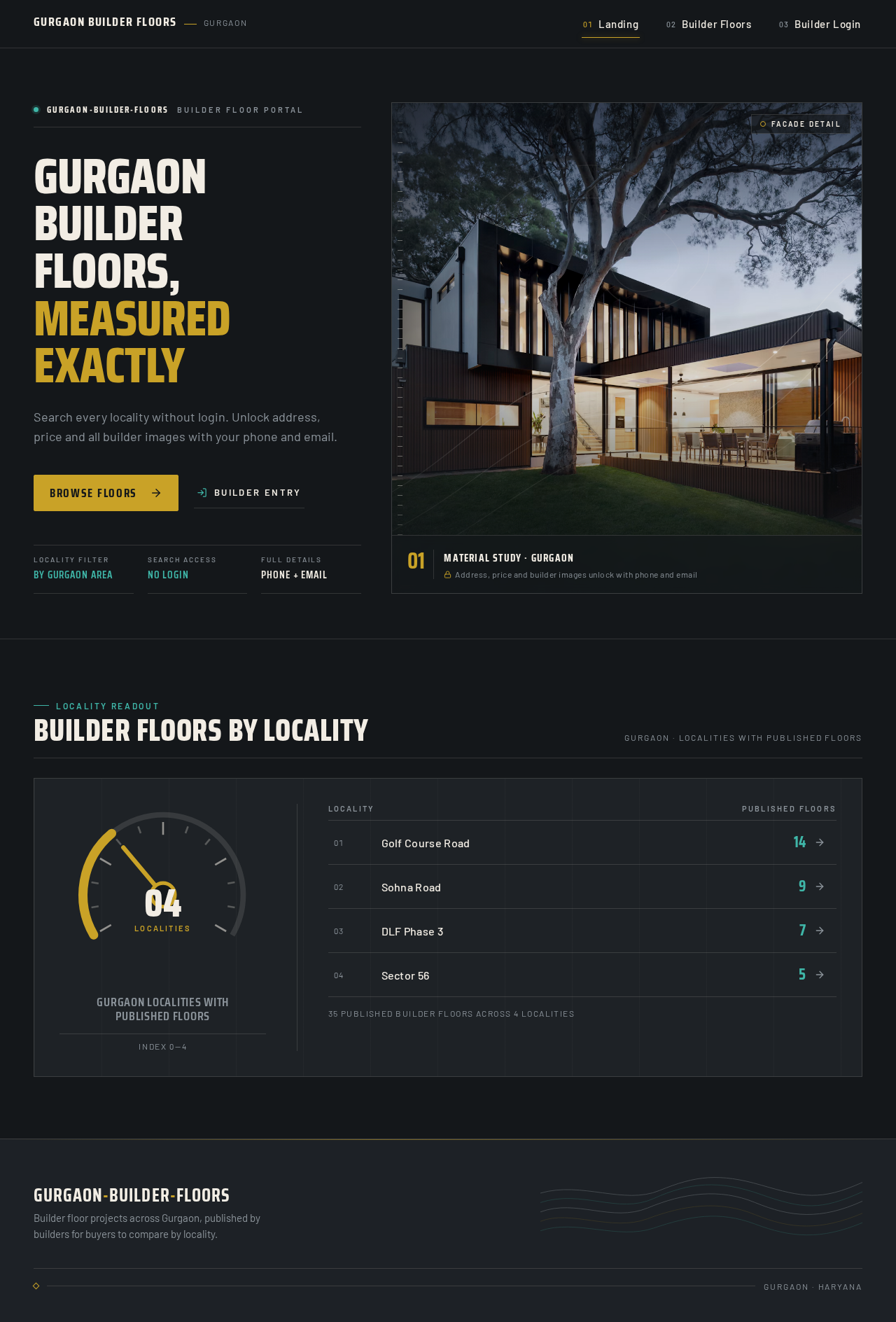
gurgaon-builder-floorsBuilder floor portal
Gurgaon builder floors, measured exactly
Search every locality without login. Unlock address, price and all builder images with your phone and email.
- Locality filter
- By Gurgaon area
- Search access
- No login
- Full details
- Phone + email

Locality readout
Builder floors by locality
Gurgaon · localities with published floors
Gurgaon localities with published floors
Index 0—4
35 published builder floors across 4 localities
gurgaon-builder-floorsBuilder floor portal
Gurgaon builder floors, measured exactly
Search every locality without login. Unlock address, price and all builder images with your phone and email.
- Locality filter
- By Gurgaon area
- Search access
- No login
- Full details
- Phone + email
Locality readout
Builder floors by locality
Gurgaon · localities with published floors
Gurgaon localities with published floors
Index 0—4
35 published builder floors across 4 localities
No comments yet. Be the first!