green-scp81
 Arvind Kumar
Write a for complete explanation of scp81


Comments (0)
Sign in to leave a comment
System Requirements
System Requirements Document for green-scp81
1. Introduction
green-scp81 is a system application that implements the SCP-81 protocol. It is built for the people who actually execute and govern that protocol: a Protocol Operator who starts runs, supplies the required inputs, and watches each run through to its result, and a Protocol Administrator who configures the protocol's parameters, audits previous runs, and resolves failed or blocked runs so operators can keep working.
The product intent is narrow and deliberate. This is not a general-purpose automation platform, a data-science workbench, or a monitoring suite. It is a single-purpose instrument: a Java 8 application whose job is to accept a protocol run request, execute the SCP-81 protocol sequence, expose the run's live state and final result, retain a durable history of runs, and let an administrator tune the parameters that govern execution. Everything in this document serves that intent.
The audience is technical. The interface is expected to read as instrumentation — dense, ordered, honest about state — rather than as a marketing surface.
2. System Overview
green-scp81 is a first-party web application with a Java 8 backend. It owns its own identity: operators enroll themselves, administrators are provisioned, and both verify themselves on return before reaching protected protocol work. The application owns the durable state of protocol runs — their inputs, their progress, their results, and their history — and it owns the configured parameters that govern how the protocol executes.
The current delivery comprises eight pages: an anonymous Landing page that explains the SCP-81 system application and its run-management purpose; Login and Sign Up as the identity access surfaces; and five authenticated working surfaces — Dashboard, Start Run, Run Status, Run History, and Settings.
Two accepted human roles act on the system. The Protocol Operator initiates runs and monitors them to completion. The Protocol Administrator configures parameters and reviews run history. Both are authenticated users of the same application; the difference between them is which working surfaces they own, not a general permission matrix over shared state.
2a. Product Interpretation and Delivery Boundary
Delivery ownership. green-scp81 is delivered as a first-party application with custom UI and a first-party backend. The Java 8 runtime constraint is explicit and binding: the application is implemented in Java 8. The backend executes the SCP-81 protocol, persists run records and results, and stores the configured protocol parameters. No third-party protocol service, external execution provider, or headless-only delivery is accepted or implied.
Access ownership. The application owns identity. Because protocol runs are durable, resumable, and revisitable, and because a run's inputs, progress, and result must remain bound to the operator who started it, application-owned identity is indispensable rather than conventional. The anonymous entry boundary is the Landing page, which is reachable without identity and explains the product. Login and Sign Up are themselves anonymously reachable — a protected destination cannot own the interaction that establishes access to itself. Only after verification does the application expose the protected working surfaces: Dashboard, Start Run, Run Status, Run History, and Settings.
Role boundary. Self-service enrollment through Sign Up establishes a Protocol Operator. Administrative access is not self-service: it is established by invitation or provisioning, and the administrative surfaces (Run History and Settings) are restricted to the Protocol Administrator role. Start Run and Run Status are restricted to the Protocol Operator role. Dashboard is available to both authenticated roles and routes each to the work it owns.
Current and future boundary. Everything described in this document is current. No future-horizon capabilities were accepted in the authoritative requirement thread, and none are introduced here. The application does not include, and this document does not authorize, adjacent capabilities such as team collaboration, billing, external integrations, notification delivery, or general-purpose workflow authoring.
2b. Source Content Inventory
Not applicable. No reference directive in this project declares a content_source, so no source content inventory is rendered.
2c. Page Content and Component Coverage
Landing
- Information and state. Anonymous, publicly reachable. Presents the SCP-81 system application: what the protocol is, who it is for (Protocol Operator and Protocol Administrator), and what the application does with it — start runs, watch them, review history, configure parameters. Carries a small live status strip reading
JAVA 8 RUNTIME · READYin uppercase micro-type. No run data, no account data, no personalized content. - Primary actions.
Start a run— a graphite control that routes an anonymous visitor into the identity boundary (Sign Up for a new operator, Login for a returning user).Read the protocol— a text link that scrolls to the protocol explanation and specification table on the same page. - Supporting actions. Navigate to Login; navigate to Sign Up.
- Domain entities. Protocol definition (SCP-81 sequence, numbered steps); runtime specification (Java 8); role descriptions (Protocol Operator, Protocol Administrator).
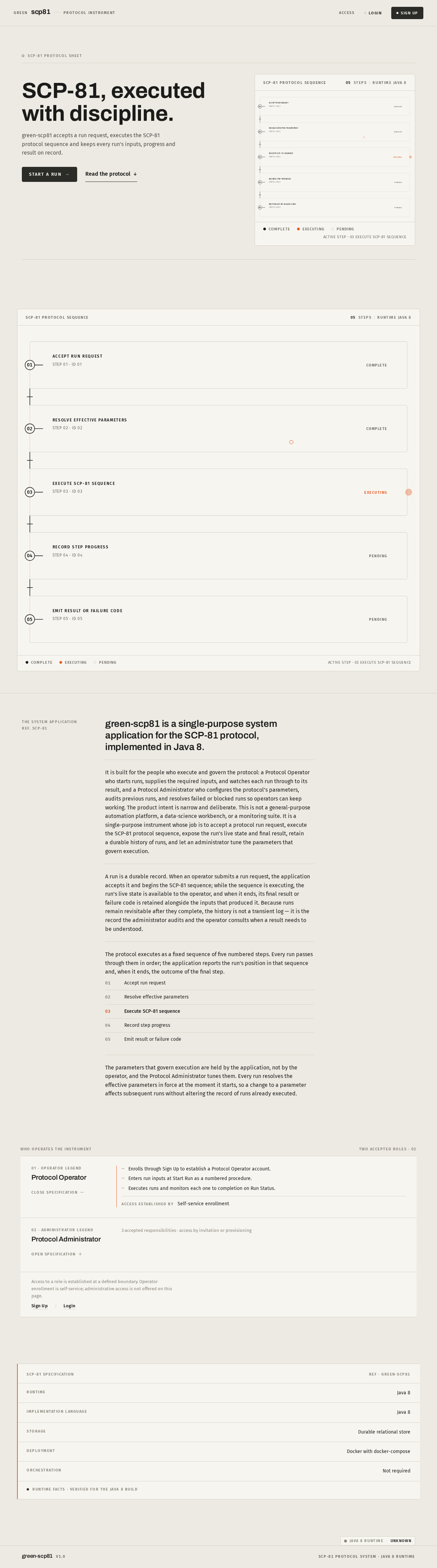
- Component responsibilities. Editorial statement block (oversized flush-left headline plus one line of body); diagrammatic SCP-81 protocol schematic rendered as real DOM/SVG nodes and hairline strokes with a single orange indicator on the active node; specification table below the fold with aligned label/value pairs and tabular numerals; live status strip in the top-right corner.
- States. Loading: static content, no data fetch required; the schematic renders immediately. Empty: not applicable — the page has no data-dependent region. Success: the page renders fully with the schematic's active node pulsing once on load. Error: if the runtime status strip cannot be resolved, it renders the strip label with an explicit
UNKNOWNstate rather than a falseREADY. Recovery: the status strip retries on next page load; no user action is required.
Login
- Information and state. Anonymous, publicly reachable. Returning verification for both Protocol Operator and Protocol Administrator. Collects the credentials required to establish identity and resume durable, actor-bound state.
- Primary actions. Submit credentials to verify identity and enter the application.
- Supporting actions. Navigate to Sign Up when the visitor has no account; return to Landing.
- Domain entities. Account identity; session.
- Component responsibilities. Credential entry form with aligned label/value pairs and engraved-style uppercase legends; submit control in graphite; inline error region.
- States. Loading: submit control enters a pending state and is not re-submittable. Empty: form renders with empty fields and no error. Success: identity is verified and the user is routed to Dashboard. Error: invalid credentials render an inline message that does not disclose which field was wrong; a failed verification leaves the form populated except for the secret field. Recovery: the user corrects the entry and resubmits; repeated failure does not lock the account, and the user may navigate to Sign Up instead.
Sign Up
- Information and state. Anonymous, publicly reachable. Self-service enrollment for a Protocol Operator who is starting independently. Administrative access is explicitly not obtainable here — it remains subject to invitation or provisioning.
- Primary actions. Submit enrollment details to create a Protocol Operator account.
- Supporting actions. Navigate to Login for an existing account; return to Landing.
- Domain entities. Account identity; role assignment (Protocol Operator).
- Component responsibilities. Enrollment form with aligned label/value pairs; a visible statement that administrative access is provisioned separately; submit control in graphite; inline validation and error region.
- States. Loading: submit control enters a pending state. Empty: form renders with empty fields. Success: the account is created as a Protocol Operator and the user proceeds to the authenticated application. Error: validation failures render inline against the offending field; a duplicate-identity failure renders a message directing the user to Login. Recovery: the user corrects the entry and resubmits, or follows the Login route.
Dashboard
- Information and state. Authenticated; available to both Protocol Operator and Protocol Administrator. Summarizes protocol activity and routes each role to the work it owns. Shows recent run activity with run identifiers, states, and timings in tabular form.
- Primary actions. Route to Start Run (operator); route to Run Status for a selected run (operator); route to Run History (administrator); route to Settings (administrator).
- Supporting actions. Open a specific run from the recent-activity list; refresh activity.
- Domain entities. Protocol run (identifier, state, start time, elapsed time, result summary); configured parameters (summary reference only).
- Component responsibilities. Persistent left instrument rail with uppercase micro-labels and an orange indicator dot marking the active section; summary region of aligned label/value pairs; recent-activity ruled table with tabular numerals; role-appropriate routing controls.
- States. Loading: ruled skeleton rows in the activity table. Empty: when no runs exist, the activity region states that no protocol runs have been recorded and offers the operator a route to Start Run. Success: activity table renders with current run states. Error: if activity cannot be loaded, the region renders an explicit failure message with a retry control, and the routing controls remain usable. Recovery: retry reloads the activity region without leaving the page.
Start Run
- Information and state. Authenticated and restricted to the Protocol Operator. Owns the workflow for entering the required inputs and starting an SCP-81 protocol run. Presents the run as a numbered control sequence (01, 02, 03) with hairline dividers, so the form reads as a procedure rather than a generic form. Displays the currently configured parameter values that will govern the run, read-only, so the operator can see what will execute.
- Primary actions. Enter the required run inputs; execute the run via the single graphite
Executecontrol. - Supporting actions. Review the effective parameter values; abandon the run before execution and return to Dashboard.
- Domain entities. Protocol run request (inputs); configured parameters (effective values, read-only here).
- Component responsibilities. Numbered control sequence with aligned label/value pairs and engraved uppercase legends; read-only effective-parameter table with tabular numerals; single
Executecontrol at the end of the sequence; inline validation region. - States. Loading: the effective-parameter table loads before the sequence becomes submittable. Empty: the sequence renders with empty input fields and the current parameter values. Success: the run is accepted and the operator is routed to Run Status for that run. Error: missing or invalid inputs render inline against the offending step and
Executeremains unavailable until corrected; a submission failure renders an explicit message and preserves the entered inputs. Recovery: the operator corrects inputs and re-executes, or abandons the run; a failed submission never silently discards entered inputs.
Run Status
- Information and state. Authenticated and restricted to the Protocol Operator. Owns the revisitable view of an individual protocol run's progress and result. Shows the run identifier, its current state, the ruled step timeline of the SCP-81 sequence, and the elapsed-time readout. Remains revisitable after completion so the operator can return to a finished run.
- Primary actions. Observe live progress; read the final result of a completed run; return to a run later.
- Supporting actions. Navigate back to Dashboard; start another run.
- Domain entities. Protocol run (identifier, state, step timeline, elapsed time, result, failure detail).
- Component responsibilities. Run-state panel with a single soft low-spread elevation; ruled step timeline where each protocol step is a horizontal segment with a graphite hairline, a numbered node, and one orange segment for the currently executing step; tabular elapsed-time readout; result region; failure region with the failure code and its legend.
- States. Loading: the timeline renders in an unresolved state with the run identifier already shown. Empty: not applicable — this page always addresses a specific run; an unknown run identifier renders an explicit not-found state with a route back to Dashboard. Success: the timeline completes, the run state flips to its terminal state in place, and the result renders. Error: a failed run renders its failure code and legend in the failure region, with the timeline marking the step at which it stopped; a run whose status cannot be retrieved renders an explicit retrieval failure with a retry control. Recovery: retry re-reads the run state; a failed run can be re-executed by starting a new run from Start Run, which is stated on the page.
Run History
- Information and state. Authenticated and restricted to the Protocol Administrator. Owns browsing and review of previous protocol runs. Presents runs in a ruled table with run identifiers, initiating operator, state, start time, elapsed time, and outcome, using tabular numerals.
- Primary actions. Browse and filter previous runs; open a run's detail for review.
- Supporting actions. Sort by time or state; return to Dashboard.
- Domain entities. Protocol run records (identifier, operator, state, timings, outcome, failure detail); run history collection.
- Component responsibilities. Ruled history table with aligned columns and tabular figures; filter and sort controls as honest, labelled controls; run detail region or expansion showing the recorded inputs, effective parameters, step timeline, and outcome.
- States. Loading: ruled skeleton rows. Empty: when no runs match, the table states that no runs match the current filter and offers to clear the filter. Success: the table renders matching runs with their recorded outcomes. Error: if history cannot be loaded, an explicit failure message with a retry control replaces the table. Recovery: retry reloads the table; clearing the filter restores the unfiltered set.
Settings
- Information and state. Authenticated and restricted to the Protocol Administrator. Owns configuration of the SCP-81 parameters used by the application. Parameters are rendered as an aligned label/value table with engraved-style uppercase legends and tabular numerals, edited in place — never as a grid of identical rounded cards. Shows the current effective value of each parameter.
- Primary actions. Edit a parameter value in place; save the configuration.
- Supporting actions. Discard unsaved edits; return to Dashboard.
- Domain entities. Configured protocol parameters (name, current value, unit, effective scope).
- Component responsibilities. Aligned parameter table with in-place editing; per-row validation; save control in graphite; unsaved-change indicator; confirmation of applied configuration.
- States. Loading: the parameter table loads with values unresolved. Empty: if no parameters are configured, the table states that no parameters are currently defined and that runs will use application defaults. Success: saved values are applied and the table reflects the new effective values. Error: an invalid value renders inline against its row and blocks the save; a save failure renders an explicit message and preserves the edited values in place. Recovery: the administrator corrects the offending row and saves again, or discards the edits to restore the last applied values.
3. Functional Requirements
FR-01 — Implement the SCP-81 protocol as a system application. (explicit) As a Protocol Operator, I should be able to execute the SCP-81 protocol through the green-scp81 application rather than by hand, so that the protocol runs consistently and its results are recorded.
- Trigger/input: the operator has authenticated and has the inputs the protocol requires.
- Observable result: a protocol run is created, executed by the application, and produces a recorded result.
- Access state: authenticated Protocol Operator.
- Failure/recovery: if the run cannot be executed, the run records a failure with a code and the operator can start a new run.
- Continuation: the operator can review the run and start another.
FR-02 — Implement the application in Java 8. (explicit) As a Protocol Administrator, I should have the application implemented in Java 8, so that it runs on the Java 8 runtime the project mandates.
- Trigger/input: deployment or execution of the application.
- Observable result: the application runs on a Java 8 runtime, and the Landing page's status strip reports the Java 8 runtime.
- Access state: not applicable — this is a delivery constraint.
- Failure/recovery: if the runtime is not Java 8, the application does not start.
- Continuation: not applicable.
FR-03 — Understand what the application does before committing to it. (required_inference) As an anonymous visitor, I should be able to read what the SCP-81 system application is, who it is for, and what it does with protocol runs, so that I can decide whether to enroll or log in.
- Trigger/input: the visitor opens the application without identity.
- Observable result: the Landing page presents the protocol explanation, the numbered SCP-81 sequence schematic, the specification table, and the runtime status strip.
- Access state: anonymous.
- Failure/recovery: if the runtime status cannot be resolved, the strip shows
UNKNOWNrather than a falseREADY. - Continuation: the visitor proceeds to Sign Up or Login.
FR-04 — Enroll as a Protocol Operator. (required_inference) As a new Protocol Operator, I should be able to create my own account, so that I can start and monitor protocol runs without waiting to be provisioned.
- Trigger/input: the visitor submits enrollment details on Sign Up.
- Observable result: a Protocol Operator account is created and the user enters the authenticated application.
- Access state: anonymous entry; the resulting account is a Protocol Operator.
- Failure/recovery: validation failures render inline; a duplicate identity directs the user to Login.
- Continuation: the operator reaches Dashboard and can start a run.
FR-05 — Verify identity on return. (required_inference) As a returning Protocol Operator or Protocol Administrator, I should be able to verify my identity, so that I can reach my durable runs and configuration.
- Trigger/input: the user submits credentials on Login.
- Observable result: identity is verified and the user reaches Dashboard.
- Access state: anonymous entry; authenticated on success.
- Failure/recovery: invalid credentials render an inline message that does not disclose which field was wrong; the user may retry or go to Sign Up.
- Continuation: the user proceeds to the work their role owns.
FR-06 — See protocol activity at a glance and reach the right work. (required_inference) As an authenticated user, I should see a summary of protocol activity and be routed to the work I own, so that I do not have to hunt for the right surface.
- Trigger/input: the user opens Dashboard.
- Observable result: recent run activity renders with identifiers, states, and timings, and role-appropriate routes are presented.
- Access state: authenticated; both roles.
- Failure/recovery: if activity cannot be loaded, an explicit failure message with a retry control replaces the activity region while routing controls remain usable.
- Continuation: the user routes to Start Run, Run Status, Run History, or Settings.
FR-07 — Enter the required inputs and start an SCP-81 run. (required_inference) As a Protocol Operator, I should enter the required inputs as a numbered procedure and execute the run, so that the protocol starts with the correct inputs.
- Trigger/input: the operator completes the numbered control sequence on Start Run and activates
Execute. - Observable result: a protocol run is created and the operator is routed to Run Status for that run.
- Access state: authenticated and restricted to the Protocol Operator.
- Failure/recovery: missing or invalid inputs render inline and
Executestays unavailable; a submission failure preserves the entered inputs and renders an explicit message. - Continuation: the operator observes the run on Run Status.
FR-08 — See the effective parameters before executing. (required_inference) As a Protocol Operator, I should see the parameter values that will govern my run before I execute it, so that I know what will actually run.
- Trigger/input: the operator opens Start Run.
- Observable result: the effective parameter values render read-only in an aligned label/value table with tabular numerals.
- Access state: authenticated and restricted to the Protocol Operator.
- Failure/recovery: if parameters cannot be loaded, the sequence does not become submittable and an explicit message is shown.
- Continuation: the operator executes the run or abandons it.
FR-09 — Watch a run's progress and read its result. (required_inference) As a Protocol Operator, I should watch my run's step-by-step progress and read its final result, so that I know whether the protocol completed and what it produced.
- Trigger/input: the operator opens Run Status for a run.
- Observable result: the ruled step timeline shows each protocol step with the currently executing step marked in orange, an elapsed-time readout counts, and the terminal state and result render in place.
- Access state: authenticated and restricted to the Protocol Operator.
- Failure/recovery: a failed run renders its failure code and legend with the timeline marking the stopping step; an unretrievable status renders an explicit retrieval failure with a retry control.
- Continuation: the operator returns to Dashboard or starts another run.
FR-10 — Return to a run later. (required_inference) As a Protocol Operator, I should be able to revisit a run after leaving it, so that I can check a long-running or completed run without restarting it.
- Trigger/input: the operator navigates back to Run Status for a known run identifier.
- Observable result: the run's current state, timeline, and result render as they stand now.
- Access state: authenticated and restricted to the Protocol Operator.
- Failure/recovery: an unknown run identifier renders an explicit not-found state with a route back to Dashboard.
- Continuation: the operator continues monitoring or returns to Dashboard.
FR-11 — Browse and review previous protocol runs. (required_inference) As a Protocol Administrator, I should browse and review previous runs, so that I can audit what executed, with what inputs, and with what outcome.
- Trigger/input: the administrator opens Run History and applies a filter or sort.
- Observable result: a ruled table of runs renders with identifiers, initiating operator, state, timings, and outcome, and a selected run's recorded inputs, effective parameters, timeline, and outcome can be reviewed.
- Access state: authenticated and restricted to the Protocol Administrator.
- Failure/recovery: if history cannot be loaded, an explicit failure message with a retry control replaces the table; an empty result set states that no runs match and offers to clear the filter.
- Continuation: the administrator reviews another run or returns to Dashboard.
FR-12 — Configure the SCP-81 parameters. (required_inference) As a Protocol Administrator, I should edit the protocol's parameters in place, so that subsequent runs execute with the intended configuration.
- Trigger/input: the administrator edits a value in the parameter table on Settings and saves.
- Observable result: the saved values become the effective configuration and the table reflects them.
- Access state: authenticated and restricted to the Protocol Administrator.
- Failure/recovery: an invalid value renders inline against its row and blocks the save; a save failure preserves the edited values in place with an explicit message.
- Continuation: the administrator corrects and saves again, or discards the edits.
FR-13 — Resolve failed or blocked runs. (required_inference) As a Protocol Administrator, I should be able to identify failed runs and the parameters that govern them, so that I can correct configuration and let operators keep executing.
- Trigger/input: the administrator reviews a failed run in Run History and inspects the effective parameters recorded for it.
- Observable result: the failure code, the stopping step, and the effective parameters for that run are visible together.
- Access state: authenticated and restricted to the Protocol Administrator.
- Failure/recovery: if the run detail cannot be loaded, an explicit failure message with a retry control is shown.
- Continuation: the administrator adjusts parameters on Settings, and the operator re-executes from Start Run.
4. User Personas
Protocol Operator
Product context. The Protocol Operator is the person who actually runs the SCP-81 protocol. They come to green-scp81 with a specific run in mind: they know the inputs the protocol needs, they need the run to start correctly, and they need to know what happened. They are technical, they work in short focused sessions, and they judge the application by whether it tells them the truth about run state without making them dig.
Primary goal. Execute the SCP-81 protocol with the correct inputs and obtain a trustworthy result, without losing track of a run in progress.
Distinct accepted responsibilities. The operator enrolls themselves through Sign Up rather than waiting to be provisioned. They enter the required inputs as a numbered procedure on Start Run, review the effective parameter values that will govern the run, and execute it. They then own the run's lifecycle from their side: watching the ruled step timeline advance on Run Status, reading the elapsed-time readout, and reading the terminal result or the failure code. They can leave and return to a run later without restarting it.
Relevant inputs and decisions. The protocol inputs required by the run; the decision to execute or abandon a prepared run; the decision to re-execute after a failure.
Interactions with other accepted participants. The operator is the counterparty to the Protocol Administrator's configuration: the parameter values the administrator sets on Settings are the values the operator sees read-only on Start Run and that govern the operator's run. When a run fails, the operator's failure code and stopping step are the same facts the administrator reviews in Run History.
Observable success. A run reaches a terminal state with a recorded result; the operator can point to the run identifier, the completed timeline, and the result. On failure, the operator can point to the failure code and the step at which the run stopped.
Protocol Administrator
Product context. The Protocol Administrator is responsible for the application's operational setup. They do not primarily execute runs; they govern the conditions under which runs execute and they answer for what happened afterwards. Their work is periodic and investigative: they tune parameters, then audit runs against those parameters.
Primary goal. Keep the SCP-81 configuration correct and be able to account for every run that has executed.
Distinct accepted responsibilities. The administrator's access is established by invitation or provisioning, not self-service. They own the parameter table on Settings, editing values in place and saving them so subsequent runs use the intended configuration. They own Run History: browsing and filtering previous runs, and reviewing a run's recorded inputs, effective parameters, step timeline, and outcome. When a run fails, they correlate the failure code and stopping step with the effective parameters recorded for that run, adjust configuration, and hand the operator back a working setup.
Relevant inputs and decisions. Parameter values and their units; the decision to apply or discard an edit; filter and sort criteria over run history; the judgement of whether a failure is a configuration problem.
Interactions with other accepted participants. The administrator's configuration decisions directly determine what the Protocol Operator sees on Start Run and what governs the operator's runs. The administrator reads the operator's runs in Run History, including which operator initiated each run, and resolves failures so the operator can re-execute.
Observable success. Saved parameter values are the effective values used by subsequent runs; the administrator can locate any previous run and state its inputs, effective parameters, and outcome.
5. Core User Flows
Flow A — A new Protocol Operator enrolls and executes a first run
- The visitor opens green-scp81 and lands on Landing without identity. They read the SCP-81 explanation, the numbered protocol schematic with its orange active-node indicator, and the specification table. The status strip reads
JAVA 8 RUNTIME · READY. - The visitor activates
Start a run. Because they have no account, they are routed into the identity boundary at Sign Up. - On Sign Up, the visitor submits enrollment details. The page states plainly that administrative access is provisioned separately, so they understand they are enrolling as a Protocol Operator.
- The account is created as a Protocol Operator and the user enters the authenticated application at Dashboard. The left instrument rail shows the operator's available sections with the orange indicator on Dashboard.
- Dashboard shows recent activity — initially empty — and states that no protocol runs have been recorded, offering a route to Start Run. The operator takes it.
- On Start Run, the operator works through the numbered control sequence (01, 02, 03), separated by hairline dividers. Above the sequence, the read-only effective-parameter table shows the values that will govern the run.
- The operator enters the required inputs. If a required input is missing or invalid, an inline message appears against that step and
Executeremains unavailable. - The operator activates the single graphite
Executecontrol. The run is accepted and the operator is routed to Run Status for that run. - On Run Status, the ruled step timeline renders with numbered nodes and graphite hairlines. The currently executing step is the single orange segment. The elapsed-time readout counts in tabular figures.
- As the run advances, each step's segment resolves in place and the run-state indicator flips colour and legend text without animation flourish.
- The run reaches its terminal state. The result renders in the result region. The operator reads the outcome and returns to Dashboard, or starts another run from Start Run.
Failure and recovery. If the run fails, Run Status renders the failure code and its legend in the failure region, and the timeline marks the step at which the run stopped. The page states that a failed run can be re-executed by starting a new run. The operator returns to Start Run, corrects the inputs, and executes again.
Flow B — A returning Protocol Operator resumes a long-running run
- The operator opens green-scp81 and reaches Login.
- They submit their credentials. On success they are routed to Dashboard, where recent activity shows their runs with identifiers, states, and timings.
- The operator selects the run they want to check and is routed to Run Status for that run.
- Run Status renders the run's current state, its step timeline as it stands now, and the elapsed-time readout. The run continues from where it was; nothing is restarted.
- The operator reads the current state and either continues monitoring or returns to Dashboard.
Failure and recovery. If the run's status cannot be retrieved, Run Status renders an explicit retrieval failure with a retry control. The operator retries; the run itself is unaffected. If the operator navigates to a run identifier that does not exist, an explicit not-found state renders with a route back to Dashboard.
Credential failure. If the credentials are rejected, Login renders an inline message that does not disclose which field was wrong, and the form remains populated except for the secret field. The operator corrects the entry and resubmits, or navigates to Sign Up.
Flow C — A Protocol Administrator configures parameters
- The administrator, whose access was established by invitation or provisioning, reaches Login and verifies their identity.
- They are routed to Dashboard, which presents the administrative routes alongside the activity summary.
- The administrator routes to Settings. The parameter table renders as an aligned label/value table with engraved-style uppercase legends and tabular numerals, showing each parameter's current effective value.
- The administrator edits a value in place. If the value is invalid, an inline message appears against that row and the save is blocked.
- The administrator activates the save control. The saved values become the effective configuration and the table reflects the new values.
- The administrator returns to Dashboard. Subsequent runs started by operators on Start Run show these values in the read-only effective-parameter table and execute under them.
Failure and recovery. If the save fails, an explicit message renders and the edited values remain in place so nothing is lost. The administrator corrects the offending row and saves again, or discards the edits to restore the last applied values. If no parameters are configured at all, the table states that runs will use application defaults.
Flow D — A Protocol Administrator audits history and resolves a failed run
- The administrator verifies identity at Login and reaches Dashboard.
- They route to Run History. A ruled table renders previous runs with identifiers, initiating operator, state, start time, elapsed time, and outcome, in tabular figures.
- The administrator filters or sorts to narrow the set. If nothing matches, the table states that no runs match the current filter and offers to clear it.
- The administrator opens a run's detail and reviews its recorded inputs, the effective parameters that governed it, its step timeline, and its outcome.
- The administrator identifies a failed run. The failure code and the step at which the run stopped are visible alongside the effective parameters recorded for that run.
- Judging it a configuration problem, the administrator routes to Settings, corrects the relevant parameter, and saves.
- The administrator returns to Dashboard. The operator can now re-execute from Start Run under the corrected configuration.
Failure and recovery. If history cannot be loaded, an explicit failure message with a retry control replaces the table; retry reloads it. If a run's detail cannot be loaded, the same explicit failure and retry apply to the detail region.
6. Visuals, Colors and Theme
The visual direction is authoritative for this project: Less, but better — a protocol instrument panel after Dieter Rams. The headline idea is that green-scp81 should read as a Braun control surface: trustworthy, dense but ordered, every control honest about its state, nothing decorative. The audience is technical, so the interface reads as instrumentation, not marketing.
Color tokens — light mode
| Role | Hex | Use |
|---|---|---|
| Background | #EDEAE3 | Warm off-white ground for every page. Never pure #FFFFFF. |
| Surface | #F7F5F0 | Paper-white panels, tables, and the run-state panel. |
| Text | #1B1B1A | Near-black graphite for all text. Never pure #000000. |
| Primary | #2B2B28 | Primary control colour; buttons read as machined controls, not brand chrome. |
| Accent | #E4571E | Braun orange. The single signal accent. |
| Muted | #8A867C | Labels, units, and secondary data. |
| Hairline | #D6D1C6 | 1px rules and table dividers. |
Accent discipline. Braun orange #E4571E is used only for live run state, the active run indicator, the active navigation indicator dot, and destructive or attention markers. It is never used for decoration, never as a background fill behind body text, and never as a general button colour. Contrast is high: graphite #1B1B1A on off-white #EDEAE3 is approximately 13:1; orange is used only on graphite or at large scale.
Typography
- Headings: Archivo, weights 600–700, tracking
-0.01em, sentence case, large scale contrast. - Body: Fira Sans.
- Section labels: Fira Sans 600, uppercase, 11–12px,
0.14emtracking — treated like engraved panel legends. - Numerals: Fira Sans with tabular figures for run IDs, timings, and parameter values.
- Type scale: 1.25 modular — 56 / 44 / 28 / 20 / 16 / 13. Body 16px at 1.6 line height; data rows 14px at 1.45.
Shape and surface language
Rounded-rectangle controls with 4px radii — no pills, no blobs. 1px hairline rules in #D6D1C6. Aligned label/value pairs throughout. A modular 12-column grid with visible 24px gutters. Status is shown as a small circular indicator plus a text label, never as a coloured badge alone. No shadows except one soft, low-spread elevation on the run-status panel.
Layout
A strict modular grid, asymmetric where data demands it. A persistent left rail (72px icon + label column) carries Dashboard / Start Run / Run History / Settings, with an orange indicator dot marking the active section. The main column is a stack of ruled sections. The Landing page is an editorial instrument sheet: a large left-aligned statement, a diagrammatic protocol schematic on the right, and a specification table below. Every page is a control surface — dense but ordered, with aligned label/value pairs and no empty hero padding.
Imagery
Diagrammatic line art and protocol schematics drawn in 1.5px graphite strokes on off-white, plus a single technical illustration of the SCP-81 protocol sequence as a numbered flow. No stock photography, no illustration for its own sake, no 3D renders. Data is the imagery: ruled tables, gauges, and a state timeline.
7. Signature Design Concept
The Landing page as an editorial instrument sheet.
The first screen is a split instrument sheet, not a centred SaaS hero. The left seven columns carry an oversized Archivo headline at 56–64px, flush left, reading "SCP-81, executed with discipline." Below it sits a single line of Fira Sans body copy and two honest controls: a graphite Start a run button and a text link Read the protocol. The right five columns carry a ruled, diagrammatic SCP-81 protocol schematic drawn in graphite hairlines on the off-white ground, with numbered nodes and a single Braun-orange indicator on the active node. The top-right corner carries a small live status strip reading JAVA 8 RUNTIME · READY in uppercase micro-type.
The schematic is a real diagram in the page, not an image: nodes and strokes are DOM/SVG, and the active node pulses once on load. Below the fold, a specification table presents the protocol's parameters and runtime facts as aligned label/value pairs with tabular numerals and engraved uppercase legends.
There is no gradient, no blob, no floating card, and no blue button. The page recomposes only accepted content — the protocol explanation, the numbered sequence, the runtime fact, and the two routes into the identity boundary — into a form that reads as a specification sheet for a protocol instrument.
8. Interaction Model & Motion Direction
Interaction Model: Static Motion Tempo: restrained Hero Dimensionality: flat
Landing Hero Motion Brief
- Focal subject. The SCP-81 protocol schematic: numbered nodes connected by graphite hairlines on the off-white ground, with one Braun-orange indicator on the active node.
- Input → transformation → outcome thesis. On load, the schematic is present and complete; the active node's orange indicator pulses exactly once, then holds steady. The visitor's input — activating
Read the protocol— scrolls the sheet to the specification table below. The outcome is that the visitor has read the protocol sequence and its specification and is positioned at the two routes into the identity boundary. No accepted behaviour is invented; the schematic depicts the protocol the application executes. - Motion vocabulary. Instant, mechanical feedback. 120ms state transitions. No bounce, no spring, no easing flourish. The single pulse is a state announcement, not decoration.
- Composed first frame. Left seven columns: the oversized flush-left Archivo headline, one line of Fira Sans body, the graphite
Start a runcontrol and theRead the protocoltext link. Right five columns: the ruled schematic with numbered nodes and the orange active-node indicator. Top-right: the uppercase micro-type status strip. Everything is present in the first frame; nothing animates in from off-screen. - Reduced-motion state. Under
prefers-reduced-motion, the active node's pulse is suppressed entirely and the orange indicator renders as a static mark. All other content is unchanged, because nothing else moves.
Run progress motion. Run progress is a determinate horizontal rule that fills, paired with a counting numeric readout in tabular figures. When a run enters a new state, its indicator colour and legend text flip in place. Scroll reveals nothing decorative — sections are simply present.
9. Non-Functional Requirements
NFR-01 — Java 8 runtime. (explicit) The application is implemented in Java 8 and runs on a Java 8 runtime. This is a hard, source-stated constraint and is not substitutable. Rationale: the authoritative requirement thread names Java 8 explicitly.
NFR-02 — Durable run state. (required_inference) Protocol runs, their inputs, their effective parameters, their progress, and their results are persisted durably so that a run can be revisited after the operator leaves the page and so that history survives across sessions. Rationale: Run Status is explicitly revisitable and Run History explicitly retains previous runs; neither is usable without durable storage.
NFR-03 — Actor-bound run ownership. (required_inference) A run's inputs, progress, and result remain bound to the operator who started it, and the application verifies identity before exposing protected run state. Rationale: durable, resumable, actor-specific state requires continuity of identity; without it, a returning operator could not be shown their own run.
NFR-04 — Role-scoped working surfaces. (required_inference) Start Run and Run Status are reachable only by an authenticated Protocol Operator; Run History and Settings are reachable only by an authenticated Protocol Administrator; Dashboard is reachable by both. Rationale: the accepted page contract assigns these surfaces to these roles, and administrative configuration and audit are not operator work.
NFR-05 — Honest state reporting. (required_inference) Every state the application reports — run state, runtime status, parameter values, save outcome — reflects the actual state, and an unresolvable state is reported as unknown or failed rather than as a success. Rationale: the product's purpose is trustworthy protocol execution; a false READY or a silently discarded edit would defeat it.
NFR-06 — No decorative motion. (direction) Motion is limited to 120ms state transitions, the determinate progress rule, and the single hero pulse. No parallax, marquees, particles, or scroll-jacking. Rationale: the authoritative creative direction specifies instant, mechanical feedback and forbids decorative animation.
NFR-07 — Accessible contrast and non-colour-only status. (direction) Text contrast is high (graphite on off-white ≈ 13:1). Status is conveyed by a circular indicator plus a text label, never by colour alone. Rationale: the creative direction requires it, and it is necessary for the run-state indicators to be readable.
10. Tech Stack
- Backend runtime: Java 8 — explicit, source-stated, and binding. The protocol execution engine, run orchestration, persistence layer, and configuration store are implemented on this runtime.
- Frontend: React, delivering the custom UI described in the page contract. The Landing schematic is rendered as DOM/SVG, not as an image.
- Storage: a durable relational store for accounts, protocol runs, run inputs, effective parameters per run, run step progress, results, and configured parameters.
- Containerization: Docker with docker-compose for local and single-host deployment of the application and its store.
- Orchestration: Kubernetes is not required by any accepted requirement and is not included.
11. Assumptions and Constraints
Constraints (binding).
- The application is implemented in Java 8. This is explicit and not substitutable.
- The application implements the SCP-81 protocol as its defining capability.
- The page inventory is fixed at the eight accepted pages: Landing, Login, Sign Up, Dashboard, Start Run, Run Status, Run History, Settings. No page is added, removed, merged, split, renamed, or reordered.
- Access is fixed as accepted: Landing, Login, and Sign Up are anonymously reachable; Dashboard requires login; Start Run and Run Status are restricted to the Protocol Operator; Run History and Settings are restricted to the Protocol Administrator.
- The visual direction is authoritative: the palette, typography, shape language, layout, and motion tempo in sections 6–8 are not open to substitution, and the generic indigo/blue-on-white SaaS template is forbidden.
Assumptions (narrow, labeled).
- Assumption — protocol inputs. The specific input fields the SCP-81 protocol requires are not enumerated in the authoritative thread. Start Run presents them as a numbered control sequence and validates them; the concrete field list is determined by the protocol definition rather than invented here.
- Assumption — parameter set. The specific configurable parameters are not enumerated in the authoritative thread. Settings presents them as an aligned label/value table with units and effective values; the concrete parameter list is determined by the protocol definition rather than invented here.
- Assumption — administrative provisioning. Administrative access is established by invitation or provisioning. The provisioning mechanism itself is outside the accepted page contract and is not a page in this application.
- Assumption — single-tenant operation. The application serves one protocol deployment; no multi-tenant partitioning is accepted or implied.
Explicitly out of scope. No future-horizon capabilities were accepted. This document does not authorize team collaboration, billing, external integrations, notification delivery, general-purpose workflow authoring, or any capability beyond executing, observing, auditing, and configuring the SCP-81 protocol.
12. Glossary
- SCP-81 protocol — the named protocol this application implements. Its execution is the product's defining capability; its sequence is depicted as a numbered flow on Landing and as a ruled step timeline on Run Status.
- Protocol run — one execution of the SCP-81 protocol, initiated by a Protocol Operator from Start Run. A run has an identifier, inputs, effective parameters, a step timeline, an elapsed time, a state, and a result or failure.
- Run state — the current phase of a protocol run, shown as a circular indicator plus a text label. The currently executing step is marked with the single Braun-orange segment on the timeline.
- Step timeline — the ruled representation of the SCP-81 sequence for a run: each protocol step is a horizontal segment with a graphite hairline and a numbered node, with one orange segment for the step currently executing.
- Effective parameters — the configured parameter values that govern a specific run. Shown read-only on Start Run before execution, and recorded with the run for later review in Run History.
- Protocol Operator — the accepted human role that enrolls through Sign Up, enters run inputs, executes runs, and monitors them to completion on Run Status.
- Protocol Administrator — the accepted human role, established by invitation or provisioning, that configures parameters on Settings and audits previous runs on Run History.
- Instrument rail — the persistent 72px left navigation column carrying Dashboard / Start Run / Run History / Settings, with an orange indicator dot marking the active section.
- Failure code — the recorded identifier for a run that did not complete, rendered with its legend on Run Status and reviewable alongside the run's effective parameters in Run History.
SCP-81, executed with discipline.
green-scp81 accepts a run request, executes the SCP-81 protocol sequence and keeps every run’s inputs, progress and result on record.
SCP-81 protocol sequence
SCP-81 protocol sequence
The system application
Ref. SCP-81green-scp81 is a single-purpose system application for the SCP-81 protocol, implemented in Java 8.
It is built for the people who execute and govern the protocol: a Protocol Operator who starts runs, supplies the required inputs, and watches each run through to its result, and a Protocol Administrator who configures the protocol’s parameters, audits previous runs, and resolves failed or blocked runs so operators can keep working. The product intent is narrow and deliberate. This is not a general-purpose automation platform, a data-science workbench, or a monitoring suite. It is a single-purpose instrument whose job is to accept a protocol run request, execute the SCP-81 protocol sequence, expose the run’s live state and final result, retain a durable history of runs, and let an administrator tune the parameters that govern execution.
A run is a durable record. When an operator submits a run request, the application accepts it and begins the SCP-81 sequence; while the sequence is executing, the run’s live state is available to the operator, and when it ends, its final result or failure code is retained alongside the inputs that produced it. Because runs remain revisitable after they complete, the history is not a transient log — it is the record the administrator audits and the operator consults when a result needs to be understood.
The protocol executes as a fixed sequence of five numbered steps. Every run passes through them in order; the application reports the run’s position in that sequence and, when it ends, the outcome of the final step.
- 01Accept run request
- 02Resolve effective parameters
- 03Execute SCP-81 sequence
- 04Record step progress
- 05Emit result or failure code
The parameters that govern execution are held by the application, not by the operator, and the Protocol Administrator tunes them. Every run resolves the effective parameters in force at the moment it starts, so a change to a parameter affects subsequent runs without altering the record of runs already executed.
Who operates the instrument
Protocol Operator
- Enrolls through Sign Up to establish a Protocol Operator account.
- Enters run inputs at Start Run as a numbered procedure.
- Executes runs and monitors each one to completion on Run Status.
Protocol Administrator
3 accepted responsibilities · access by invitation or provisioning
SCP-81 specification
Ref · green-scp81| Runtime | Java 8 |
|---|---|
| Implementation language | Java 8 |
| Storage | Durable relational store |
| Deployment | Docker with docker-compose |
| Orchestration | Not required |
SCP-81, executed with discipline.
green-scp81 accepts a run request, executes the SCP-81 protocol sequence and keeps every run’s inputs, progress and result on record.
SCP-81 protocol sequence
SCP-81 protocol sequence
The system application
Ref. SCP-81green-scp81 is a single-purpose system application for the SCP-81 protocol, implemented in Java 8.
It is built for the people who execute and govern the protocol: a Protocol Operator who starts runs, supplies the required inputs, and watches each run through to its result, and a Protocol Administrator who configures the protocol’s parameters, audits previous runs, and resolves failed or blocked runs so operators can keep working. The product intent is narrow and deliberate. This is not a general-purpose automation platform, a data-science workbench, or a monitoring suite. It is a single-purpose instrument whose job is to accept a protocol run request, execute the SCP-81 protocol sequence, expose the run’s live state and final result, retain a durable history of runs, and let an administrator tune the parameters that govern execution.
A run is a durable record. When an operator submits a run request, the application accepts it and begins the SCP-81 sequence; while the sequence is executing, the run’s live state is available to the operator, and when it ends, its final result or failure code is retained alongside the inputs that produced it. Because runs remain revisitable after they complete, the history is not a transient log — it is the record the administrator audits and the operator consults when a result needs to be understood.
The protocol executes as a fixed sequence of five numbered steps. Every run passes through them in order; the application reports the run’s position in that sequence and, when it ends, the outcome of the final step.
- 01Accept run request
- 02Resolve effective parameters
- 03Execute SCP-81 sequence
- 04Record step progress
- 05Emit result or failure code
The parameters that govern execution are held by the application, not by the operator, and the Protocol Administrator tunes them. Every run resolves the effective parameters in force at the moment it starts, so a change to a parameter affects subsequent runs without altering the record of runs already executed.
Who operates the instrument
Protocol Operator
- Enrolls through Sign Up to establish a Protocol Operator account.
- Enters run inputs at Start Run as a numbered procedure.
- Executes runs and monitors each one to completion on Run Status.
Protocol Administrator
3 accepted responsibilities · access by invitation or provisioning
SCP-81 specification
Ref · green-scp81| Runtime | Java 8 |
|---|---|
| Implementation language | Java 8 |
| Storage | Durable relational store |
| Deployment | Docker with docker-compose |
| Orchestration | Not required |
No comments yet. Be the first!