green-create

byUmang Suthar

create website for my pure veg restro and cafe

Authentication
Authentication

Comments (0)

No comments yet. Be the first!

System Requirements

System Requirement Document
Page 1 of 6

System Requirements Document for green-create

1. Introduction

This document outlines the system requirements for the project "green-create," which aims to enable customers to make reservations and place online orders for a pure veg restaurant and cafe.

2. System Overview

The "green-create" project is designed to provide a seamless experience for customers of a pure veg restaurant and cafe, allowing them to make reservations and place online orders through a dedicated web application. The system will include custom pages for reservations, orders, authentication, and public notices to ensure secure and efficient transactions.

Page 2 of 6

2a. Product Interpretation and Delivery Boundary

  • Domain Descriptors:

    • Reservation Management: The product must allow customers to make reservations.
    • Online Ordering: The product must enable customers to place online orders.
    • Public Notices: The product must display public notices to customers.
  • What is being built:

    • A first-party web application with custom pages for reservations, orders, authentication, and public notices.
    • The application will manage customer interactions directly without relying on external provider-managed surfaces.
  • Excluded Conventional Assumptions:

    • No external provider-managed surfaces or generated documents are included.
    • No external recipients or background automation processes are involved.
  • Access:

    • Application-owned identity management is required for authentication.
  • Behavior Contracts:

    • Customer Reservation:

      • Actor: Customer
      • Trigger: Customer initiates a reservation request.
      • Inputs: Reservation details
      • Outcomes: Reservation confirmation
      • State Changes: Reservation record
      • State Lifetime: Durable
      • Identity Continuity: Persistent
      • Audience Entry: Public
      • Touchpoints: Reservation page
      • Failure Outcome: Reservation failed notification
      • Provenance: Basic default
    • Customer Online Order:

      • Actor: Customer
      • Trigger: Customer places an online order.
      • Inputs: Order details
      • Outcomes: Order confirmation
      • State Changes: Order record
      • State Lifetime: Durable
      • Identity Continuity: Persistent
      • Audience Entry: Public
      • Touchpoints: Order page
      • Failure Outcome: Order failed notification
      • Provenance: Basic default
    • Public Notice Display:

      • Actor: Customer
      • Trigger: Customer accesses the public notice page.
      • Inputs: None
      • Outcomes: Display of current public notices
      • State Changes: None
      • State Lifetime: Ephemeral
      • Identity Continuity: None required
      • Audience Entry: Public
      • Touchpoints: Public Notice page
      • Failure Outcome: None
      • Provenance: Explicit
Page 3 of 6

3. Functional Requirements as Story Points

  • As a Customer, I should be able to make reservations online to secure a table at the restaurant. explicit
  • As a Customer, I should be able to place online orders to have food delivered to my location. explicit
  • As a Customer, I should be able to sign up, log in, and manage my session to access personalized features. required_inference
  • As a Customer, I should be able to view public notices on a dedicated page. explicit

4. User Personas

  • Customer: The primary user who initiates reservations and online orders and views public notices. This persona interacts with the reservation, order, and public notice pages to manage their dining experience.

5. Core User Flows

Page 4 of 6

Customer Flow

  1. Access the Application:

    • Navigate to the public entry surface of the application.
  2. Authentication:

    • Sign up or log in to access personalized features.
  3. Make a Reservation:

    • Navigate to the Reservation Page.
    • Enter reservation details and submit the request.
    • Receive confirmation or failure notification.
  4. Place an Online Order:

    • Navigate to the Order Page.
    • Enter order details and submit the order.
    • Receive confirmation or failure notification.
  5. View Public Notices:

    • Navigate to the Public Notice Page.
    • View the displayed public notices.
Page 5 of 6

6. Visuals Colors and Theme

  • Primary: #4CAF50 (Green)
  • Primary Light: #81C784 (Light Green)
  • Secondary: #FFC107 (Amber)
  • Accent: #FF5722 (Deep Orange)
  • Highlight: #FFEB3B (Yellow)
  • Background: #FFFFFF (White)
  • Surface: #F5F5F5 (Light Grey)
  • Text: #212121 (Dark Grey)
  • Text Muted: #757575 (Grey)
  • Border: #BDBDBD (Grey)

7. Signature Design Concept

The design for "green-create" will focus on a clean and intuitive interface that reflects the natural and fresh theme of a pure veg restaurant. The Reservation, Order, and Public Notice pages will have a simple layout with clear calls to action. The use of green as the primary color will emphasize the eco-friendly and healthy aspect of the restaurant. Typography will be clean and modern, ensuring readability and accessibility.

8. Interaction Model & Motion Direction

  • Interaction Model: Animated
  • Motion Direction: The application will feature moderate scroll-triggered reveals and hover transitions to enhance user engagement without overwhelming the user experience. The focus will be on clarity and ease of use.
Page 6 of 6

9. Non-Functional Requirements

No additional non-functional requirements were inferred beyond those necessary for the stated behaviors.
10. Tech Stack

  • Frontend: React for Web
  • Backend: Python with FastAPI
  • Database: MySQL or MariaDB, using Alembic for migrations
  • Local Orchestration: Docker, docker-compose

11. Assumptions and Constraints

  • The application will be accessible via web browsers and optimized for both desktop and mobile devices.
  • Authentication is required for accessing reservation and order functionalities.
  • The system will handle a moderate volume of concurrent users.

12. Glossary

  • Reservation Page: A dedicated page for customers to make and manage reservations.
  • Order Page: A dedicated page for customers to place and manage online orders.
  • Public Notice Page: A dedicated page for displaying public notices to customers.
  • Authentication: The process of verifying a user's identity to provide access to personalized features.
  • Customer: The end-user who interacts with the application to make reservations, place orders, and view public notices.
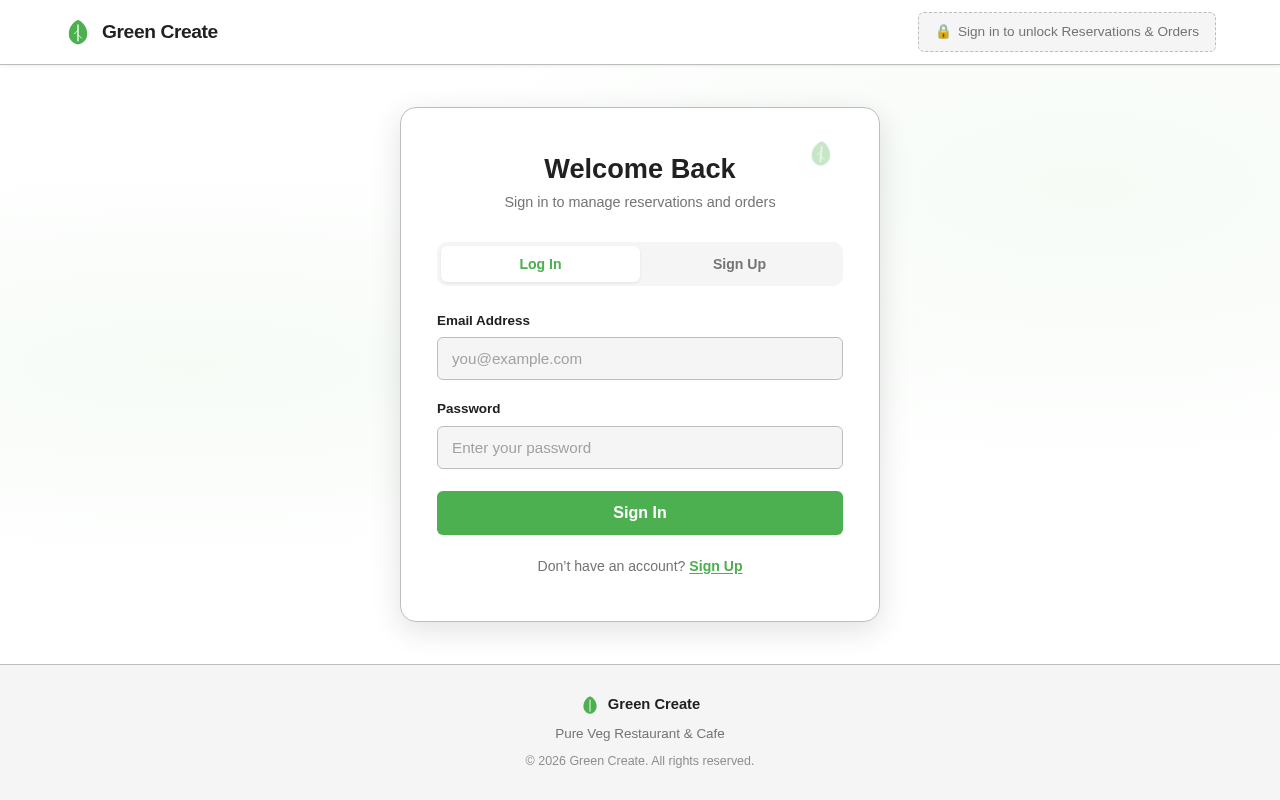
Authentication design preview
Authentication: Customer signs up or logs in
Reservation Page: Customer enters reservation details and submits request
Reservation Page: Process: Reservation request processed
Reservation Page: Process: Reservation confirmation received
Reservation Page: Failure: Reservation failed notification received
Order Page: Customer enters order details and submits order
Order Page: Process: Order processed
Order Page: Process: Order confirmation received
Order Page: Failure: Order failed notification received
Authentication design preview
Authentication: Customer signs up or logs in
Reservation Page: Customer enters reservation details and submits request
Reservation Page: Process: Reservation request processed
Reservation Page: Process: Reservation confirmation received
Reservation Page: Failure: Reservation failed notification received
Order Page: Customer enters order details and submits order
Order Page: Process: Order processed
Order Page: Process: Order confirmation received
Order Page: Failure: Order failed notification received