green-calculator
 Diya Trivedi
start a project to build simple single page design of calculator

Comments (0)
Sign in to leave a comment
System Requirements
System Requirements Document for green-calculator
1. Introduction
green-calculator is a simple calculator delivered as a single-page design. The product intent is narrow and complete: an anonymous visitor opens one page and performs everyday arithmetic — entering numbers and operators, seeing the expression and result, and clearing the display to start a new calculation. There is no navigation, no onboarding, no account, and no second page.
The audience is any visitor who needs to calculate quickly and accurately. The page is the anonymous public entry and the only interactive surface. Success is a working calculator on one page with no extra navigation.
2. System Overview
green-calculator is a single-page web calculator. The page presents a calculator slab with a numeric display, a key matrix for digits and operators, an equals action, and a clear action. All arithmetic interaction happens on this one page.
Actors
- Calculator user (active human persona): the single visitor to the page who enters numbers and operators, reads the running expression and result, and clears the display to begin again.
Current delivery and ownership
- The calculator is a first-party custom page owned by the application, reachable anonymously with no access requirement.
- The page owns number and operator entry, expression and result display, and clearing for a new calculation.
- The provisioned backend (FastAPI), database (MariaDB), and frontend (React) services support the application; the calculator's arithmetic interaction is a client-side, single-page experience and does not require accounts, persistence of calculations, or history.
Narrow exclusions
- No additional pages, navigation menus, accounts, history panels, or onboarding.
- No persistence of past calculations.
Removed from scope
- None.
2a. Product Interpretation and Delivery Boundary
The accepted scope is a simple calculator as a single-page design. The one page is the anonymous public entry: a visitor arrives and can immediately use the calculator without establishing identity, signing in, or navigating anywhere. There is no protected state, no durable actor-specific record, and no commitment or value transfer that would require application-owned identity, so no identity establishment or verification journey exists.
Everything the product does is current. There is no future horizon, no provider-owned surface, and no external destination. The calculator's arithmetic is performed within the page interaction; the provisioned backend, database, and frontend are infrastructure that supports the application but do not add product behavior, domain entities, or access rules.
2c. Page Content and Component Coverage
Calculator
The single page and the only interactive surface. It is anonymously reachable with no access requirement and is owned by the application.
Information and state
- Expression display: the sequence of entered numbers and operators, shown in IBM Plex Mono at expression scale (18/24px).
- Result display: the current result, right-aligned, in oversized IBM Plex Mono tabular figures (result scale clamp(42px, 8vw, 96px)), with a thin baseline rule extending beyond the digits like a Swiss poster measurement.
- Active operator state: the currently selected operator is marked with an instant lime rule / lime active state.
- Error state: an invalid operation (for example division by zero) is surfaced with vermilion error feedback in the display area.
- Idle/initial state: display shows a starting value (0) ready for entry.
Primary actions
- Digit keys (0–9) append digits to the current number.
- Decimal point key begins a fractional part.
- Operator keys (+, −, ×, ÷) select the pending operation and mark the active operator.
- Equals key (=) evaluates the pending expression and shows the result; it is the acid-lime cell.
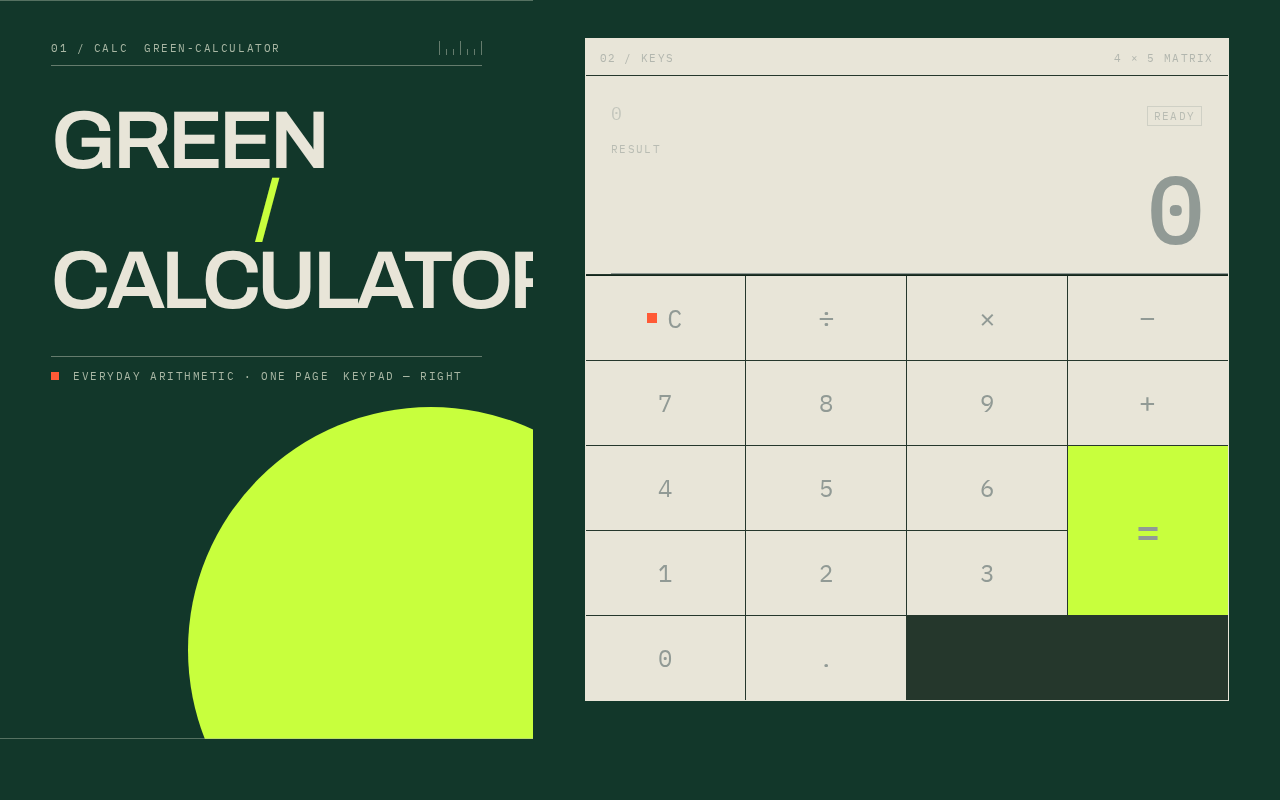
- Clear key (C) resets the display to start a new calculation; it is marked with a small vermilion square.
Supporting actions and controls
- Every key is a full square cell in a strict 4-by-5 matrix with 1px ink rules; keys receive an immediate 100ms colour inversion and a 2px press translation on input.
- The equals cell is a single acid-lime colour block that spans two grid rows visually while retaining a standard, reachable button size on every viewport.
Domain entities
- Expression (the entered sequence of operands and operators).
- Result (the evaluated value).
- Pending operator (the selected operation awaiting its second operand).
Component responsibilities
- Display component: renders expression, result, active operator, and error feedback; keeps numerals tabular and right-aligned; never clips display values.
- Key matrix component: renders the 4-by-5 square-cell grid with 1px ink rules; routes each key press to entry, operator selection, evaluation, or clear.
- Page composition: full-viewport deep-forest-green poster field; stacked "GREEN / CALCULATOR" Archivo headline in the left margin at desktop, horizontal masthead at 768px, two-line header at 375px; cream calculator slab on the right; off-edge acid-lime circle behind the calculator's lower-right corner as pure geometry that never overlaps readable controls.
States
- Loading: not applicable — the page is immediately usable with no asynchronous gate.
- Empty/initial: display shows 0 with no pending operator.
- Success: result updates instantly on equals with no count-up animation; active operator shows lime.
- Error: invalid operation shows vermilion error feedback; the user can clear to recover.
- Recovery: the clear key resets the display to the initial state for a new calculation.
3. Functional Requirements
FR-1 — Single-page calculator delivery (explicit) As a Calculator user I should get a simple calculator delivered as a single page so that I can calculate without navigating anywhere.
- Trigger: opening the page.
- Observable result: one page containing the calculator; no navigation, no additional pages.
- Access state: anonymous, no access requirement.
- Failure/recovery: not applicable.
- Continuation: the user proceeds directly to entry.
FR-2 — Number entry (explicit) As a Calculator user I should enter digits and a decimal point so that I can build the number I want to calculate with.
- Trigger: pressing a digit key or the decimal point key.
- Observable result: the entered digits appear in the display as the current number.
- Access state: anonymous.
- Failure/recovery: not applicable.
- Continuation: the user selects an operator or continues entering digits.
FR-3 — Operator selection (explicit) As a Calculator user I should select an operator (+, −, ×, ÷) so that I can specify the operation to perform.
- Trigger: pressing an operator key.
- Observable result: the pending operator is recorded and the active operator is marked with an instant lime rule.
- Access state: anonymous.
- Failure/recovery: not applicable.
- Continuation: the user enters the second operand.
FR-4 — Expression and result display (explicit) As a Calculator user I should see the expression and the running result so that I can verify what I have entered and what it evaluates to.
- Trigger: any entry or operator selection.
- Observable result: the expression and result are shown in the display with oversized tabular numerals and a thin baseline rule.
- Access state: anonymous.
- Failure/recovery: display values are never clipped at any viewport.
- Continuation: the user continues entry or evaluates.
FR-5 — Evaluation (explicit) As a Calculator user I should press equals to evaluate the pending expression so that I obtain the result.
- Trigger: pressing the equals key.
- Observable result: the result updates instantly in the display with no count-up animation; the equals cell is the acid-lime cell.
- Access state: anonymous.
- Failure/recovery: an invalid operation (for example division by zero) shows vermilion error feedback.
- Continuation: the user clears to start a new calculation or continues from the result.
FR-6 — Clear for a new calculation (explicit) As a Calculator user I should clear the display so that I can start a new calculation.
- Trigger: pressing the clear key (marked with a small vermilion square).
- Observable result: the display resets to the initial state with no pending operator.
- Access state: anonymous.
- Failure/recovery: clear also recovers from an error state.
- Continuation: the user begins a new calculation.
FR-7 — Immediate key feedback (explicit) As a Calculator user I should receive immediate feedback on key press so that entry feels decisive and unambiguous.
- Trigger: pressing any key.
- Observable result: 100ms colour inversion and a 2px press translation; identical static states under reduced motion.
- Access state: anonymous.
- Failure/recovery: not applicable.
- Continuation: the user continues entry.
4. User Personas
Calculator user
Product context. The Calculator user is the single visitor to the green-calculator page. They arrive anonymously with no account, no onboarding, and no prior state. The page is the only surface they encounter.
Primary goal. Perform everyday arithmetic quickly and accurately on one page, with the expression and result clearly visible and the ability to clear and start again.
Distinct accepted responsibilities.
- Enter numbers and a decimal point.
- Select operators (+, −, ×, ÷) and see the active operator marked.
- Read the expression and running result.
- Press equals to evaluate.
- Clear the display to start a new calculation.
Relevant inputs and decisions. Which digits and operators to enter, when to evaluate, and when to clear. The user decides the sequence of operations; the page reflects each decision immediately.
Interactions with other accepted participants. None — the Calculator user is the only active human persona and completes the entire lifecycle alone on the page.
Observable success. A working calculator on one page with no extra navigation: the entered expression and result are legible, the active operator is marked, equals produces the result, and clear resets for a new calculation.
5. Core User Flows
Flow 1 — Perform a calculation
- The Calculator user opens the green-calculator page. The page loads as a full-viewport deep-forest-green poster with the stacked "GREEN / CALCULATOR" headline and the cream calculator slab; the display shows the initial value 0. (Owner: Calculator page)
- The user presses digit keys to enter the first number. The digits appear in the display as the current number. (Owner: Calculator page)
- The user presses an operator key (+, −, ×, ÷). The pending operator is recorded and the active operator is marked with an instant lime rule. (Owner: Calculator page)
- The user presses digit keys to enter the second number. The digits appear in the display. (Owner: Calculator page)
- The user presses the acid-lime equals key. The result updates instantly in the display with no count-up animation. (Owner: Calculator page)
- The user reads the result and either continues from it or clears to start a new calculation. (Owner: Calculator page)
Flow 2 — Clear and start a new calculation
- The Calculator user, having completed or abandoned a calculation, presses the clear key marked with the small vermilion square. (Owner: Calculator page)
- The display resets to the initial state with no pending operator. (Owner: Calculator page)
- The user begins a new calculation by entering digits and operators. (Owner: Calculator page)
Flow 3 — Recover from an invalid operation
- The Calculator user enters an operation that cannot be evaluated (for example division by zero) and presses equals. (Owner: Calculator page)
- The display shows vermilion error feedback. (Owner: Calculator page)
- The user presses the clear key. The display resets to the initial state. (Owner: Calculator page)
- The user begins a new calculation. (Owner: Calculator page)
6. Visuals Colors and Theme
Muse and headline. Josef Müller-Brockmann — Swiss geometric rigour for everyday arithmetic. The register is decisive and orderly: a tool that makes numbers visible and operations unambiguous.
Mode. Dark mode. The deep forest green is the full-page ground; the calculator body is warm paper cream for strong readability.
Colour tokens (exact hex by role)
| Role | Hex | Use |
|---|---|---|
| Background | #12372A | Full-page forest-green ground |
| Surface | #E8E5D8 | Warm paper cream calculator slab |
| Text | #10231A | Dark ink for numerals, labels, 1px rules |
| Primary | #C8FF3D | Acid lime — equals key, active operator state, result emphasis, geometric disc |
| Accent | #FF5A36 | Vermilion — clear/delete and error feedback only |
| Muted | #A9B7A4 | Muted green-grey for labels and secondary rules |
Typography
- Headings: Archivo — Archivo SemiBold with tight tracking, flush-left alignment; uppercase operation labels and oversized tabular numerals create the primary visual rhythm.
- Body: IBM Plex Mono.
- Scale (grid-based): display
clamp(56px, 11vw, 128px); resultclamp(42px, 8vw, 96px); expression 18/24px; key labels 20/28px; utility labels 11/14px uppercase. At 375px the display begins at 56px and wraps or reduces safely before any overflow.
Shape language. Hard-edged rectangular planes, square key cells, 1px ink rules, and one large lime circle used as a positional counterweight behind the calculator — not as a text container. No pills, glass, soft shadows, or floating cards.
Layout. Poster-like 12-column composition at desktop, collapsing to a 4-column grid on mobile. A large vertical wordmark reading "GREEN / CALCULATOR" occupies the left margin at 1280px while the working calculator sits in a precisely ruled 4-by-5 key matrix on the right. At 768px the wordmark becomes a horizontal masthead; at 375px it becomes a two-line header above the full-width calculator. The calculator remains the only interactive surface.
Spacing rhythm. Grid-based; strict alignment to the 12-column (desktop) and 4-column (mobile) grid; 1px ink rules as measurement lines.
Imagery style. No photography or decorative illustrations. The visual image is the calculator itself: oversized numerals, an acid-lime geometric disc, thin measurement rules, and a small coordinate-style index such as 01 / CALC.
Avoid. Blue or indigo accents on a white background; rounded pill controls, glass surfaces, blur, or soft floating shadows; centred SaaS headline with explanatory subtitle and primary CTA; decorative gradient blobs or stock photography; a grid of independent hover-lift cards; bouncy, elastic, or continuous decorative animation; unreadably small calculator keys or clipped display values; extra pages, navigation menus, accounts, history panels, or onboarding.
Readability rule. Headlines, wordmarks, labels, numbers, and controls stay entirely inside the viewport and their container at 375px, 768px, and 1280px, wrapping or scaling to fit; no other element covers any part of them. Decoration (the lime circle) may bleed off an edge but never covers readable text or controls.
7. Signature Design Concept
The first viewport is a full-height deep-forest-green arithmetic poster. On desktop, an oversized stacked "GREEN / CALCULATOR" Archivo headline fills the left five columns while a cream calculator slab occupies the right seven columns, its display showing a giant real result in dark ink. A lime circle approximately 38vw wide is cropped behind the calculator's lower-right corner as pure geometry and never overlaps readable controls. A small vermilion square marks the clear action. On mobile, the masthead sits intact above the cream calculator slab, and the lime circle bleeds only behind the lower slab edge. The calculator is immediately usable — there is no marketing CTA or generic SaaS hero.
Signature moves:
- A full-viewport forest-green poster field with "GREEN / CALCULATOR" set as a stacked, viewport-spanning Archivo headline from 56px on mobile to 128px on desktop.
- A cream calculator slab built as a strict 4-by-5 square-cell matrix with 1px ink rules; every key is a full cell rather than a rounded button.
- A single acid-lime equals cell that spans two grid rows visually through its colour block treatment while retaining a standard, reachable button size on every viewport.
- A giant right-aligned result display with IBM Plex Mono tabular figures and a thin baseline rule that extends beyond the digits like a Swiss poster measurement.
- An off-edge acid-lime circle behind the calculator and a tiny vermilion delete square creating asymmetric geometric balance without obscuring text or controls.
8. Interaction Model & Motion Direction
Interaction Model: Static (direction) Motion Tempo: still Hero Dimensionality: flat
Landing Hero Motion Brief
- Focal subject: the cream calculator slab with its oversized right-aligned result display, set against the forest-green poster field with the stacked "GREEN / CALCULATOR" headline and the cropped acid-lime circle.
- Input → transformation → outcome thesis: a key press inverts the key colour over 100ms and translates it 2px; the display updates instantly with the entered digit, the active operator gains an instant lime rule, and pressing equals updates the result with no count-up animation.
- Motion vocabulary: still by default; immediate 100ms colour inversion and 2px press translation on input; instant lime rule for the current operator; result updates without count-up animation.
- Composed first frame: full-height forest-green field; stacked Archivo headline in the left margin; cream calculator slab on the right with the display showing a giant real result in dark ink; lime circle cropped behind the lower-right corner; small vermilion square marking clear.
- Reduced-motion state: identical static states — no press translation or colour animation is required for comprehension; all keys, labels, and display values remain fully visible and usable.
9. Non-Functional Requirements
- Single-page constraint (explicit): the design must be a single page; no additional pages, navigation, or routes.
- Simplicity (explicit): the design must be a simple single-page calculator.
- Readability at all viewports (explicit): headlines, wordmarks, labels, numbers, and controls stay entirely inside the viewport and their container at 375px, 768px, and 1280px; display values are never clipped; keys are never unreadably small.
- Reduced motion (explicit): with
prefers-reduced-motion, provide identical static states; the page remains fully usable. - Anonymous access (explicit): the page has no access requirement; no account, sign-in, or identity establishment.
- No persistence of calculations (explicit): no history panels or stored calculations.
10. Tech Stack
- Frontend: React application UI (single page).
- Backend: shared FastAPI process for application APIs and domain modules.
- Database: MariaDB for application-owned persistent data (provisioned infrastructure; the calculator's arithmetic interaction does not require stored domain entities).
- Containerization: Docker / docker-compose for the backend, database, and frontend services.
11. Assumptions and Constraints
- A-1 (required_inference): The calculator's arithmetic is performed within the single page interaction; the provisioned backend and database support the application but do not add calculator-specific persistence or domain entities.
- A-2 (required_inference): The page is anonymously reachable with no identity establishment, because no durable actor-specific state, commitment, or value transfer exists.
- A-3 (explicit): The page count is exactly one; the Calculator page is the only page.
- A-4 (explicit): The calculator is the only interactive surface; there is no navigation, onboarding, account, or history.
- A-5 (explicit): The visual direction (palette, fonts, layout, motion) is authoritative for presentation and does not add product behavior.
12. Glossary
- Calculator page: the single, anonymously reachable page that owns number/operator entry, expression and result display, and clearing.
- Expression: the sequence of entered numbers and operators shown in the display.
- Result: the evaluated value shown in the display after pressing equals.
- Pending operator: the selected operation (+, −, ×, ÷) awaiting its second operand.
- Active operator state: the lime rule marking the currently selected operator.
- Clear: the action that resets the display to the initial state for a new calculation.
- Calculator user: the single active human persona who visits the page and performs arithmetic.
GreenCalculator
0
ready0
GreenCalculator
0
ready0
No comments yet. Be the first!