grapgerhub

byOluwafemi Onifade

Customer → Search → Portfolio → Chat → Book → Pay → Invoice → Review and Vendor → Register → Profile → Portfolio → Services → Availability → Accept Booking → Get Paid Then add the advanced features later. That gives you something you can actually launch, test with real Lagos photographers, videographers, makeup artists and stylists, and improve based on what people use. The original document itself identifies GrapherHub as a two-sided marketplace and emphasizes that it should be a real application rather than a static prototype

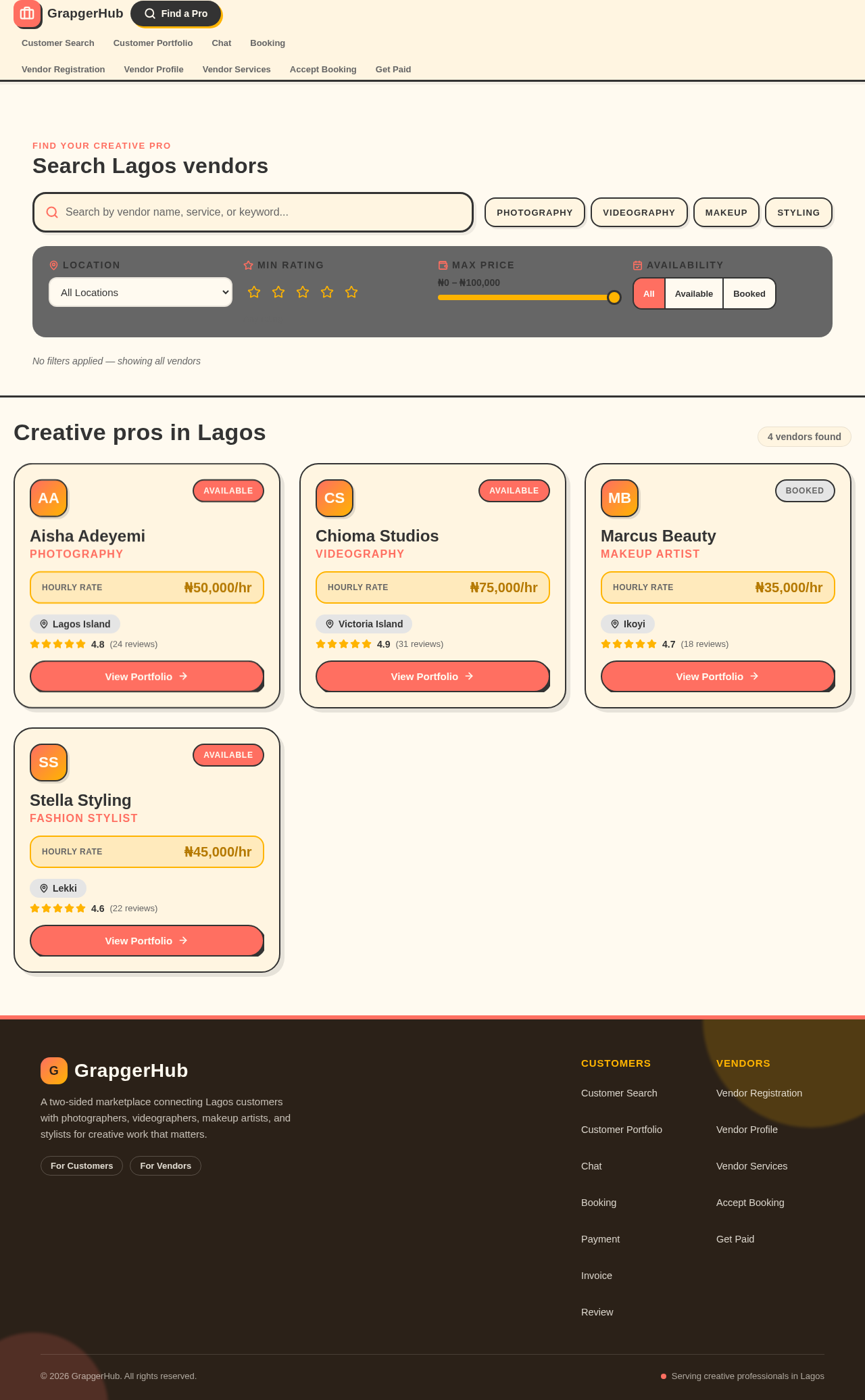
Customer Search
Customer Search

Comments (0)

No comments yet. Be the first!

System Requirements

System Requirement Document
Page 1 of 8

System Requirements Document for grapgerhub

1. Introduction

GrapgerHub is a two-sided marketplace designed for creative professionals in Lagos, including photographers, videographers, makeup artists, and stylists. The platform aims to facilitate interactions between customers seeking creative services and vendors offering these services. The initial focus is on launching a Minimum Viable Product (MVP) with core functionalities, allowing real-world testing and iterative improvements based on user feedback.

2. System Overview

GrapgerHub is a real application that supports two primary user groups: customers and vendors. Customers can search for creative professionals, view portfolios, chat with vendors, book services, make payments, receive invoices, and leave reviews. Vendors can register, manage their profiles and portfolios, list services, set availability, accept bookings, and receive payments. The platform is designed to be vibrant and engaging, reflecting the dynamic nature of the creative industries in Lagos.

2a. Product Interpretation and Delivery Boundary

GrapgerHub is delivered as a web application with a focus on usability and engagement. The platform is accessible to both customers and vendors, with distinct workflows for each group. The MVP will not include advanced features, which are planned for future iterations. The application emphasizes a bold and inviting design, avoiding neutral corporate aesthetics.

Page 2 of 8

2b. Source Content Inventory

Not applicable as no content source directive was provided.

2c. Page Content and Component Coverage

Customer Search

  • Search Bar: Allows customers to search for vendors by service type or location.
  • Filter Options: Options to filter results by availability, ratings, and price range.
  • Search Results: Displays vendor profiles with key information and a link to their portfolio.

Vendor Registration

  • Registration Form: Collects vendor information including name, email, password, and service type.
  • Verification Process: Confirms vendor identity and service legitimacy.

Customer Portfolio

  • Portfolio Display: Showcases vendor work samples, descriptions, and client testimonials.
  • Contact Button: Initiates chat with the vendor.

Chat

  • Chat Interface: Real-time messaging between customers and vendors.
  • Notification System: Alerts users to new messages.

Booking

  • Booking Form: Customers specify service details, date, and time.
  • Confirmation Page: Displays booking details and vendor confirmation status.
Page 3 of 8

Payment

  • Payment Gateway: Secure processing of customer payments.
  • Payment Confirmation: Displays transaction success or failure.

Invoice

  • Invoice Generation: Automatically creates an invoice for completed bookings.
  • Download Option: Allows customers to download invoices as PDFs.

Review

  • Review Form: Customers rate and review vendor services.
  • Review Display: Shows average ratings and recent reviews on vendor profiles.

Vendor Profile

  • Profile Management: Vendors update personal and service information.
  • Portfolio Management: Vendors upload and organize work samples.

Vendor Services

  • Service Listing: Vendors list available services with descriptions and pricing.
  • Availability Calendar: Vendors set and update availability.

Accept Booking

  • Booking Requests: Vendors view and accept or decline booking requests.
  • Booking Management: Vendors manage upcoming bookings and client communications.
Page 4 of 8

Get Paid

  • Payment Dashboard: Vendors track earnings and payment statuses.
  • Withdrawal Options: Vendors withdraw funds to their bank accounts.

3. Functional Requirements

  • As a Customer, I should be able to search for vendors by service type or location to find suitable creative professionals.
  • As a Customer, I should be able to view vendor portfolios to assess their work quality.
  • As a Customer, I should be able to chat with vendors to discuss service details.
  • As a Customer, I should be able to book services by specifying details and confirming availability.
  • As a Customer, I should be able to make payments securely to complete the booking process.
  • As a Customer, I should receive an invoice for completed services.
  • As a Customer, I should be able to leave a review to provide feedback on the vendor's services.
  • As a Vendor, I should be able to register and create a profile to offer my services on the platform.
  • As a Vendor, I should be able to manage my portfolio to showcase my work.
  • As a Vendor, I should be able to list my services and set availability to inform customers of my offerings.
  • As a Vendor, I should be able to accept or decline bookings to manage my schedule.
  • As a Vendor, I should be able to receive payments for services rendered.

4. User Personas

  • Customer: Individuals seeking creative services in Lagos. Responsibilities include searching for vendors, booking services, and providing feedback.
  • Vendor: Creative professionals offering services on the platform. Responsibilities include managing profiles, portfolios, and bookings.

5. Core User Flows

Page 5 of 8

Customer Flow

  1. Search for Vendors: Enter search criteria and view results.
  2. View Portfolio: Select a vendor to view their work samples and testimonials.
  3. Initiate Chat: Contact the vendor to discuss service details.
  4. Book Service: Fill out the booking form and confirm the date and time.
  5. Make Payment: Complete the transaction through the payment gateway.
  6. Receive Invoice: Download the invoice for the completed service.
  7. Leave Review: Rate and review the vendor's services.

Vendor Flow

  1. Register: Complete the registration form and verify identity.
  2. Manage Profile: Update personal information and service offerings.
  3. Upload Portfolio: Add work samples and organize them.
  4. List Services: Define services, pricing, and availability.
  5. Accept Booking: Review booking requests and confirm or decline.
  6. Receive Payment: Track earnings and withdraw funds as needed.
Page 6 of 8

6. Visuals Colors and Theme

  • Muse: Haraldur Thorleifsson
  • Palette:
    • Background: #FFFAF0
    • Surface: #FFF5E1
    • Text: #333333
    • Primary: #FF6F61
    • Accent: #FFB400
    • Muted: #E5E5E5
  • Typography:
    • Headings: Outfit — Bold, large, with loose tracking
    • Body: Sora
    • Scale: 1.25 modular, 64/48/32/24/16
  • Shape Language: Chunky rounded cards and illustrations, with bold color blocks and soft edges.
  • Layout: Color-blocked sections with illustration-led heroes, using large friendly fonts.
  • Motion: Lively entrance animations and hover pops to keep the interface engaging and dynamic.

7. Signature Design Concept

The public entry page will feature a vibrant illustration-led hero section with large color blocks and bold typography. The hero section will showcase creative professionals in action, using coral and yellow as primary attention grabbers. Oversized headings in the Outfit font will make a strong visual impact, and lively hover animations will bring illustrations and icons to life.
Page 7 of 8

8. Interaction Model & Motion Direction

  • Interaction Model: Animated
  • Motion Tempo: Expressive
  • Hero Dimensionality: Layered_2d
  • Landing Hero Motion Brief: The hero section will feature a vibrant illustration of creative professionals in action. Upon page load, the illustration will animate with lively entrance animations, drawing attention to the bold color blocks and oversized headings. Hover animations will add interactivity, making the interface dynamic and engaging. A reduced-motion state will be available for accessibility.

9. Non-Functional Requirements

  • Performance: The application should load within 3 seconds on standard broadband connections.
  • Security: All transactions must be processed securely, with data encryption in place.
  • Usability: The interface should be intuitive and easy to navigate for both customers and vendors.
  • Scalability: The platform should support a growing number of users and transactions without performance degradation.

10. Tech Stack

  • Frontend: React
  • Backend: Python/FastAPI
  • Database: PostgreSQL
  • Deployment: Docker, Kubernetes (if required for scaling)
  • Payment Processing: Stripe or similar service

11. Assumptions and Constraints

  • The MVP will focus on core functionalities, with advanced features planned for future iterations.
  • The platform will initially target creative professionals and customers in Lagos.
  • The design will avoid neutral corporate aesthetics, focusing on a bold and inviting style.
Page 8 of 8

12. Glossary

  • MVP: Minimum Viable Product
  • Vendor: Creative professional offering services on the platform
  • Customer: Individual seeking creative services
  • Portfolio: Collection of a vendor's work samples
  • Booking: Process of scheduling a service with a vendor
  • Invoice: Document detailing the transaction for services rendered

No completed page designs yet.

Completed design pages will appear here when they are ready to preview.

Customer Search: Search for vendors
Customer Portfolio: View vendor portfolio
Chat: Chat with vendor
Booking: Book service
Payment: Make payment
Invoice: Download invoice
Review: Leave review

No completed page designs yet.

Completed design pages will appear here when they are ready to preview.

Customer Search: Search for vendors
Customer Portfolio: View vendor portfolio
Chat: Chat with vendor
Booking: Book service
Payment: Make payment
Invoice: Download invoice
Review: Leave review