grand-sale
by Kanti Kumar
create a app for sale potato and onion online from directly kishan to cusumer. potato in the pack of 5 Kg. 10 Kg. 20 Kg. 25 Kg and 50 kg pack and also onion in same pack.


Comments (0)
Sign in to leave a comment
System Requirements
Page 1 of 26
System Requirements Document for grand-sale
1. Introduction
grand-sale is an online marketplace for buying potatoes and onions directly from kishans (farmers). It serves practical household customers who want to select produce in defined pack sizes and place orders, and farmers who need to publish their available produce and handle incoming customer orders.
The current product supports only potatoes and onions. Both produce types are available only in the following pack sizes:
- 5 Kg
- 10 Kg
- 20 Kg
- 25 Kg
- 50 Kg
The system provides public entry and account-access pages, followed by role-restricted customer and farmer marketplace workspaces.
Page 2 of 26
2. System Overview
grand-sale is an application-owned, role-based direct farmer-to-consumer produce marketplace with custom application user interfaces.
Current delivery includes:
- A public Landing page introducing the potato and onion marketplace.
- Self-service account enrollment through Sign Up.
- Returning account verification through Login.
- Customer-only browsing, produce-detail, ordering, and order-tracking experiences.
- Farmer-only produce-listing management and incoming-order handling experiences.
- Role-based access that makes customer and farmer protected destinations available only to the appropriate signed-in user.
The system connects two active human participant groups:
- Customer — buys potatoes and onions directly from farmers.
- Kishan (Farmer) — lists potatoes and onions and handles orders received from customers.
Current Product Scope
The current product supports:
- Potato listings in 5 Kg, 10 Kg, 20 Kg, 25 Kg, and 50 Kg packs.
- Onion listings in 5 Kg, 10 Kg, 20 Kg, 25 Kg, and 50 Kg packs.
- Customer browsing of available produce.
- Customer viewing of individual produce listings and pack-size options.
- Customer order placement.
- Customer visibility of their own placed orders.
- Farmer creation and management of their own produce listings.
- Farmer visibility of incoming customer orders.
- Farmer handling of incoming orders and updating their order progress.
Page 3 of 26
Narrow Exclusions
The following are not current requirements and shall not be introduced as implied product scope:
- Products other than potatoes and onions.
- Pack sizes outside 5 Kg, 10 Kg, 20 Kg, 25 Kg, and 50 Kg.
- Payment processing or payment-provider integration.
- Delivery-provider management or shipment booking.
- Customer-to-customer marketplace features.
- Farmer storefront pages beyond the specified listing-management experience.
- Ratings, reviews, loyalty points, referrals, discounts, coupons, subscriptions, or promotional campaigns.
- Inventory forecasting, accounting, analytics dashboards, or unrelated farm-management functions.
Page 4 of 26
2a. Product Interpretation and Delivery Boundary
grand-sale is a first-party application for direct produce commerce between customers and kishans. The application owns account enrollment, returning sign-in verification, role assignment, protected marketplace access, listings, and order records.
Customers and farmers enroll through the application and select the role that reflects their intended marketplace participation:
- Customers receive access to customer marketplace work.
- Farmers receive access to farmer marketplace work.
Signing in establishes the identity required to show the correct protected destinations and to associate listings and orders with the correct participant.
The product’s current purpose is narrowly focused on enabling potatoes and onions to be offered in the required pack weights, selected by customers, ordered, viewed by the customer after placement, and handled by the farmer responsible for the listing.
2b. Page Content and Component Coverage
Page 5 of 26
Landing
- Information and state
- Introduces grand-sale as a direct kishan-to-customer marketplace for potatoes and onions.
- Presents the supported produce categories: Potato and Onion.
- Communicates the available pack range: 5 Kg through 50 Kg.
- Remains accessible without sign-in.
- Primary actions
- Start account enrollment through Sign Up.
- Start returning account access through Login.
- Supporting actions
- Direct a signed-in Customer toward Produce.
- Direct a signed-in Kishan (Farmer) toward their role-appropriate protected work.
- Components
- Harvest-poster hero.
- Produce and pack-weight overview.
- Clear entry actions for Sign Up and Login.
- Direct-from-farmer marketplace statement.
- States
- Default public-entry state.
- Signed-in continuation state that provides access to the participant’s appropriate protected destination.
- Navigation recovery state if protected content is requested before sign-in, directing the user to Login.
Page 6 of 26
Sign Up
- Information and state
- Supports first-time account enrollment.
- Allows the user to establish an account as either a Customer or Kishan (Farmer).
- Remains accessible without sign-in.
- Primary actions
- Enter the account information required by the application.
- Select Customer or Farmer role.
- Submit enrollment.
- Supporting actions
- Navigate to Login when the user already has an account.
- Return to Landing.
- Components
- Enrollment form.
- Role-selection control for Customer and Farmer.
- Submission and validation feedback area.
- States
- Initial enrollment state.
- Incomplete or invalid submission state with corrective feedback.
- Successful enrollment state.
- Successful continuation to the role-appropriate protected experience.
- Recovery
- If enrollment cannot be completed, preserve the entered information where feasible and explain that the user must correct the identified issue before trying again.
Page 7 of 26
Login
- Information and state
- Supports returning identity verification for existing Customers and Kishan (Farmer) users.
- Remains accessible without sign-in.
- Primary actions
- Enter the account information required for verification.
- Submit Login.
- Supporting actions
- Navigate to Sign Up when the user does not yet have an account.
- Return to Landing.
- Components
- Login form.
- Verification feedback area.
- Link to Sign Up.
- States
- Initial login state.
- Verification failure state.
- Verified signed-in state.
- Role-directed continuation state.
- Recovery
- When verification fails, the system shall not expose protected content and shall allow the user to correct the verification input and try again.
Page 8 of 26
Produce
- Information and state
- Customer-only protected marketplace destination.
- Displays available potato and onion listings.
- Shows each listing’s supported pack-size options from the allowed pack-size set.
- Primary actions
- Browse potato and onion listings.
- Open a selected listing in Produce Details.
- Supporting actions
- View available pack sizes for a listing.
- Continue to My Orders to view previously placed orders.
- Domain entities
- Produce listing.
- Produce type: Potato or Onion.
- Pack size: 5 Kg, 10 Kg, 20 Kg, 25 Kg, or 50 Kg.
- Farmer associated with the listing.
- Components
- Produce listing collection.
- Potato and onion identification.
- Pack-size visibility.
- Listing-detail navigation action.
- States
- Loading state while listings are retrieved.
- Populated state with available listings.
- Empty state when no produce listings are available.
- Error state when listings cannot be retrieved.
- Recovery
- When retrieval fails, provide a retry path.
- When no listings are available, explain that no currently available produce can be opened from this destination.
Page 9 of 26
Produce Details
- Information and state
- Customer-only protected destination for one selected produce listing.
- Shows the listing’s produce type, farmer association, and supported pack-size options.
- Allows a Customer to select one permitted pack size and place an order.
- Primary actions
- Select an available pack size.
- Place an order for the selected pack size.
- Supporting actions
- Return to Produce.
- Continue to My Orders after successful order placement.
- Domain entities
- Selected produce listing.
- Potato or Onion.
- Farmer.
- Selected pack size.
- Customer order.
- Components
- Listing-detail information panel.
- Pack-size selection controls.
- Order-placement action.
- Order-result feedback.
- States
- Loading state while the selected listing is retrieved.
- Available listing state with selectable supported pack sizes.
- Selection-required state when an order is attempted before choosing a pack size.
- Successful order-placement state.
- Listing-unavailable or retrieval-error state.
- Recovery
- If a pack size is no longer available or the listing cannot be ordered, the system shall show the failure and allow the Customer to return to Produce or choose another available option.
- A successfully placed order shall be visible to the Customer in My Orders and to the responsible Farmer in Farmer Orders.
Page 10 of 26
My Orders
- Information and state
- Customer-only protected destination.
- Displays the signed-in Customer’s own placed orders.
- Shows the produce, selected pack size, responsible farmer, and available order-progress state for each order.
- Primary actions
- View placed orders.
- Review the current progress of an order.
- Supporting actions
- Open Produce to continue browsing.
- Domain entities
- Customer order.
- Potato or Onion.
- Selected pack size.
- Farmer.
- Order progress state.
- Components
- Customer-specific order list.
- Order tracking rail or progress presentation.
- Produce and pack-weight information.
- States
- Loading state while orders are retrieved.
- Populated state with one or more placed orders.
- Empty state when the Customer has not placed an order.
- Error state when order information cannot be retrieved.
- Recovery
- When loading fails, provide a retry path.
- When no orders exist, provide a continuation path to Produce.
Page 11 of 26
My Listings
- Information and state
- Farmer-only protected destination.
- Displays the signed-in Farmer’s own potato and onion listings.
- Supports creation and management of produce listings using only the allowed pack sizes.
- Primary actions
- Create a potato or onion listing.
- Select one or more supported pack sizes for a listing.
- Manage an existing personal listing.
- Supporting actions
- View current listings.
- Continue to Farmer Orders to handle incoming customer orders.
- Domain entities
- Farmer-owned produce listing.
- Produce type: Potato or Onion.
- Supported pack sizes: 5 Kg, 10 Kg, 20 Kg, 25 Kg, and 50 Kg.
- Components
- Listing collection.
- Listing-create control.
- Produce-type selection.
- Pack-size selection controls.
- Listing-management controls.
- States
- Loading state while listings are retrieved.
- Populated listing-management state.
- Empty state when the Farmer has no listings.
- Create or update validation state.
- Successful listing creation or update state.
- Error state when listing data cannot be retrieved or saved.
- Recovery
- If saving fails, preserve the Farmer’s work where feasible and show what must be corrected or retried.
- Pack-size controls shall reject values outside the required pack-size set.
Page 12 of 26
Farmer Orders
- Information and state
- Farmer-only protected destination.
- Displays incoming customer orders associated with the signed-in Farmer’s listings.
- Supports handling of incoming orders and recording the resulting order progress.
- Primary actions
- View incoming customer orders.
- Handle an order.
- Update an order’s progress as part of handling it.
- Supporting actions
- Review the ordered produce and selected pack size.
- Continue to My Listings to manage available produce.
- Domain entities
- Incoming customer order.
- Customer.
- Farmer-owned produce listing.
- Potato or Onion.
- Ordered pack size.
- Order progress state.
- Components
- Incoming-order collection.
- Order detail summary.
- Order-handling controls.
- Status/progress update feedback.
- States
- Loading state while incoming orders are retrieved.
- Populated state with incoming orders.
- Empty state when no incoming orders exist.
- Successful order-handling update state.
- Update failure state.
- Retrieval error state.
- Recovery
- If an update cannot be recorded, the Farmer shall be informed and able to retry.
- The Customer’s My Orders view shall reflect successfully recorded progress changes.
Page 13 of 26
3. Functional Requirements
FR-01 — Public Marketplace Introduction
As a Customer or Kishan (Farmer), I should be able to access Landing so that I can understand that grand-sale connects farmers directly with customers for potato and onion sales.
- Provenance: explicit
- Access: Public; no sign-in required.
- Trigger/Input: A visitor opens the application.
- Required behavior:
- The system shall provide a public Landing page.
- The page shall introduce potatoes and onions as the produce supported by grand-sale.
- The page shall communicate direct farmer-to-consumer marketplace intent.
- The page shall present the available pack range from 5 Kg through 50 Kg.
- The page shall provide navigation to Sign Up and Login.
- Observable result: A visitor can understand the marketplace purpose and begin account access.
- Failure/recovery: If a visitor attempts to access protected work before signing in, the system shall direct them to Login without exposing protected content.
- Continuation: A new user proceeds to Sign Up; an existing user proceeds to Login.
Page 14 of 26
FR-02 — Customer Account Enrollment
As a Customer, I should be able to sign up with the Customer role so that I can access customer marketplace work.
- Provenance: required_inference for enrollment and role assignment; explicit for Sign Up availability.
- Access: Public; no sign-in required.
- Trigger/Input: A new user opens Sign Up and selects Customer.
- Required behavior:
- The system shall provide self-service enrollment through Sign Up.
- The system shall allow the enrolling user to select the Customer role.
- The system shall establish an application account associated with the Customer role after successful enrollment.
- The system shall make Customer-only protected destinations available after successful enrollment and sign-in continuity is established.
- Observable result: The user becomes a Customer account holder eligible to access Produce, Produce Details, and My Orders.
- Failure/recovery: Invalid or incomplete enrollment shall not create protected access; the system shall identify the issue and allow correction and resubmission.
- Continuation: The successful Customer continues to the appropriate customer marketplace destination.
Page 15 of 26
FR-03 — Farmer Account Enrollment
As a Kishan (Farmer), I should be able to sign up with the Farmer role so that I can manage my produce listings and incoming orders.
- Provenance: required_inference for enrollment and role assignment; explicit for Sign Up availability.
- Access: Public; no sign-in required.
- Trigger/Input: A new user opens Sign Up and selects Farmer.
- Required behavior:
- The system shall provide self-service enrollment through Sign Up.
- The system shall allow the enrolling user to select the Farmer role.
- The system shall establish an application account associated with the Farmer role after successful enrollment.
- The system shall make Farmer-only protected destinations available after successful enrollment and sign-in continuity is established.
- Observable result: The user becomes a Farmer account holder eligible to access My Listings and Farmer Orders.
- Failure/recovery: Invalid or incomplete enrollment shall not create protected access; the system shall identify the issue and allow correction and resubmission.
- Continuation: The successful Farmer continues to the appropriate farmer marketplace destination.
Page 16 of 26
FR-04 — Returning Identity Verification
As a Customer or Kishan (Farmer), I should be able to log in so that I can access the protected destinations available to my assigned role.
- Provenance: explicit for Login availability; required_inference for returning identity verification and role-directed access.
- Access: Public; no sign-in required.
- Trigger/Input: An existing user opens Login and submits the information required for account verification.
- Required behavior:
- The system shall provide Login for returning users.
- The system shall verify the returning user’s account identity before protected marketplace content is made available.
- The system shall identify the user’s assigned Customer or Farmer role.
- The system shall direct the verified user toward role-appropriate protected work.
- Observable result: The verified user enters a signed-in session with access limited to their assigned role’s destinations.
- Failure/recovery: If verification fails, protected pages shall remain unavailable and the user shall be able to correct the input and retry.
- Continuation: Customers continue to customer marketplace work; Farmers continue to farmer marketplace work.
Page 17 of 26
FR-05 — Customer Produce Browsing
As a Customer, I should be able to browse available potato and onion listings in Produce so that I can find produce to order.
- Provenance: explicit
- Access: Signed-in Customer only.
- Trigger/Input: A signed-in Customer opens Produce.
- Required behavior:
- The system shall display available potato listings.
- The system shall display available onion listings.
- The system shall show the pack sizes available for each listing.
- The system shall allow the Customer to open a listing in Produce Details.
- Observable result: The Customer can identify an available produce listing and continue to its details.
- Failure/recovery: If listing retrieval fails, the system shall display an error and provide a retry path. If no listings are available, the system shall show an empty state.
- Continuation: The Customer opens Produce Details for a selected listing or proceeds to My Orders.
Page 18 of 26
FR-06 — Customer Produce Detail Viewing
As a Customer, I should be able to view Produce Details for a selected listing so that I can review its produce type and available pack sizes before ordering.
- Provenance: explicit
- Access: Signed-in Customer only.
- Trigger/Input: A Customer selects a listing in Produce.
- Required behavior:
- The system shall display the selected listing’s produce type.
- The system shall show the farmer associated with the listing.
- The system shall show only available pack-size options supported by that listing.
- The system shall make the permitted pack sizes visually distinguishable for selection.
- Observable result: The Customer can make an informed pack-size selection for the selected listing.
- Failure/recovery: If the selected listing is unavailable or cannot be retrieved, the system shall explain the issue and allow the Customer to return to Produce.
- Continuation: The Customer selects a supported pack size and places an order.
Page 19 of 26
FR-07 — Required Pack-Size Rules
As a Customer or Kishan (Farmer), I should be able to use only the supported potato and onion pack sizes so that all marketplace listings and orders follow the defined produce-pack rules.
- Provenance: explicit
- Access: Applies to signed-in Customer ordering and signed-in Farmer listing management.
- Trigger/Input: A Farmer configures listing pack sizes or a Customer selects a pack size for an order.
- Required behavior:
- The system shall limit potato pack sizes to 5 Kg, 10 Kg, 20 Kg, 25 Kg, and 50 Kg.
- The system shall limit onion pack sizes to 5 Kg, 10 Kg, 20 Kg, 25 Kg, and 50 Kg.
- The system shall reject any pack size outside these five values.
- Observable result: Listings and orders use only the required pack-size values.
- Failure/recovery: An unsupported value shall not be saved or ordered. The system shall require selection of a valid pack size before continuation.
- Continuation: Farmers save compliant listings; Customers place orders for a selected compliant pack size.
Page 20 of 26
FR-08 — Customer Order Placement
As a Customer, I should be able to place an order from Produce Details after selecting a pack size so that the responsible Farmer can handle my produce request.
- Provenance: explicit for order placement; required_inference for order record, farmer handoff, and shared visibility.
- Access: Signed-in Customer only.
- Trigger/Input: The Customer selects one supported pack size on Produce Details and submits an order.
- Required behavior:
- The system shall require a selected permitted pack size before order placement.
- The system shall create an order associated with the Customer, selected listing, selected produce type, selected pack size, and responsible Farmer.
- The system shall make the placed order visible to the Customer in My Orders.
- The system shall make the incoming order visible to the responsible Farmer in Farmer Orders.
- Observable result: The Customer receives confirmation that the order was placed, and the Farmer receives the incoming order in their order workspace.
- Failure/recovery: If the order cannot be placed, the system shall not create a completed order record and shall allow the Customer to retry, select another available pack size, or return to Produce.
- Continuation: The Customer tracks the order in My Orders; the Farmer handles it in Farmer Orders.
Page 21 of 26
FR-09 — Customer Order Tracking
As a Customer, I should be able to view my placed orders in My Orders so that I can track their progress.
- Provenance: explicit for viewing orders; required_inference for Customer-specific order association and progress visibility.
- Access: Signed-in Customer only.
- Trigger/Input: A Customer opens My Orders.
- Required behavior:
- The system shall display only orders associated with the signed-in Customer.
- The system shall show the ordered produce and selected pack size.
- The system shall show the responsible Farmer.
- The system shall show the available current order-progress state.
- Observable result: The Customer can see their own placed orders and their current progress.
- Failure/recovery: If orders cannot be retrieved, the system shall show an error and provide a retry path. If no orders exist, the system shall show an empty state and allow continuation to Produce.
- Continuation: The Customer may return to Produce to browse additional listings.
Page 22 of 26
FR-10 — Farmer Listing Creation and Management
As a Kishan (Farmer), I should be able to create and manage my produce listings in My Listings so that customers can browse my available potatoes and onions.
- Provenance: explicit
- Access: Signed-in Farmer only.
- Trigger/Input: A Farmer opens My Listings and begins creating or managing a personal listing.
- Required behavior:
- The system shall allow the Farmer to create potato listings.
- The system shall allow the Farmer to create onion listings.
- The system shall allow the Farmer to configure only the permitted pack sizes: 5 Kg, 10 Kg, 20 Kg, 25 Kg, and 50 Kg.
- The system shall display the Farmer’s own listings for management.
- The system shall allow the Farmer to manage existing personal listings.
- The system shall not expose another Farmer’s listing-management controls to the signed-in Farmer.
- Observable result: The Farmer’s produce listings are available for customer browsing when successfully managed as available listings.
- Failure/recovery: If a listing cannot be saved or updated, the system shall show the failure, prevent unsupported pack-size values, preserve work where feasible, and allow correction or retry.
- Continuation: The Farmer can continue managing listings or move to Farmer Orders to handle incoming orders.
Page 23 of 26
FR-11 — Farmer Incoming Order Viewing
As a Kishan (Farmer), I should be able to view incoming customer orders in Farmer Orders so that I can identify requests for my listings.
- Provenance: explicit
- Access: Signed-in Farmer only.
- Trigger/Input: A Farmer opens Farmer Orders.
- Required behavior:
- The system shall display incoming orders associated with the signed-in Farmer’s listings.
- The system shall show the ordering Customer, ordered produce, and selected pack size.
- The system shall show the current order-progress state.
- Observable result: The Farmer can identify each incoming customer request and its requested produce pack.
- Failure/recovery: If incoming orders cannot be retrieved, the system shall show an error and provide a retry path. If no incoming orders exist, the system shall show an empty state.
- Continuation: The Farmer handles an incoming order.
Page 24 of 26
FR-12 — Farmer Order Handling and Customer Progress Update
As a Kishan (Farmer), I should be able to handle an incoming order in Farmer Orders so that the Customer can see the resulting order progress in My Orders.
- Provenance: explicit for handling incoming orders; required_inference for recording progress and Customer visibility.
- Access: Signed-in Farmer only.
- Trigger/Input: A Farmer selects an incoming order and performs the available order-handling action.
- Required behavior:
- The system shall allow the Farmer to handle incoming orders associated with their own listings.
- The system shall record the resulting order-progress state after successful handling.
- The system shall show the updated progress to the Farmer in Farmer Orders.
- The system shall show the updated progress to the ordering Customer in My Orders.
- The system shall not allow a Farmer to handle orders belonging to another Farmer.
- Observable result: The Farmer sees the recorded order progress, and the Customer can track that progress in My Orders.
- Failure/recovery: If an order-progress update cannot be saved, the system shall show the failure and allow the Farmer to retry without reporting the update as complete to the Customer.
- Continuation: The Farmer proceeds to another incoming order or returns to My Listings; the Customer returns to My Orders to review the updated progress.
Page 25 of 26
FR-13 — Role-Restricted Destination Access
As a Customer or Kishan (Farmer), I should be able to access only the protected destinations appropriate to my assigned role so that marketplace work remains associated with the correct participant.
- Provenance: explicit for protected-page and appropriate-role requirement; required_inference for role-directed access enforcement.
- Access: Applies to all protected destinations.
- Trigger/Input: A signed-out, Customer-role, or Farmer-role user attempts to open a protected destination.
- Required behavior:
- Produce, Produce Details, and My Orders shall require sign-in and Customer role access.
- My Listings and Farmer Orders shall require sign-in and Farmer role access.
- A signed-out user attempting to access a protected destination shall be directed to Login.
- A signed-in user without the required role shall not be shown protected destination content or controls for the other role.
- Observable result: Customers can access customer work only; Farmers can access farmer work only.
- Failure/recovery: Unauthorized access attempts shall retain protected data confidentiality and provide an appropriate continuation path, such as the applicable role destination or Login.
- Continuation: The user returns to a destination available to their verified role.
4. User Personas
Page 26 of 26
Customer
Product context:
The Customer buys potatoes and onions online directly from kishans through grand-sale.
Primary goal:
Find an available potato or onion listing, choose a required pack size, place an order, and monitor the order afterward.
Accepted responsibilities:
- Enroll as a Customer or log in as an existing Customer.
- Browse available potato and onion listings in Produce.
- Open Produce Details for a selected listing.
- Choose one available pack size: 5 Kg, 10 Kg, 20 Kg, 25 Kg, or 50 Kg.
- Place an order for the selected produce pack.
- View their own placed orders in My Orders.
- Track the progress recorded by the Farmer handling the order.
Relevant inputs and decisions:
- Whether to enroll or log in.
- Which available produce listing to open.
- Whether to choose potato or onion.
- Which supported pack size to select.
- Whether to place the order after selecting a permitted pack size.
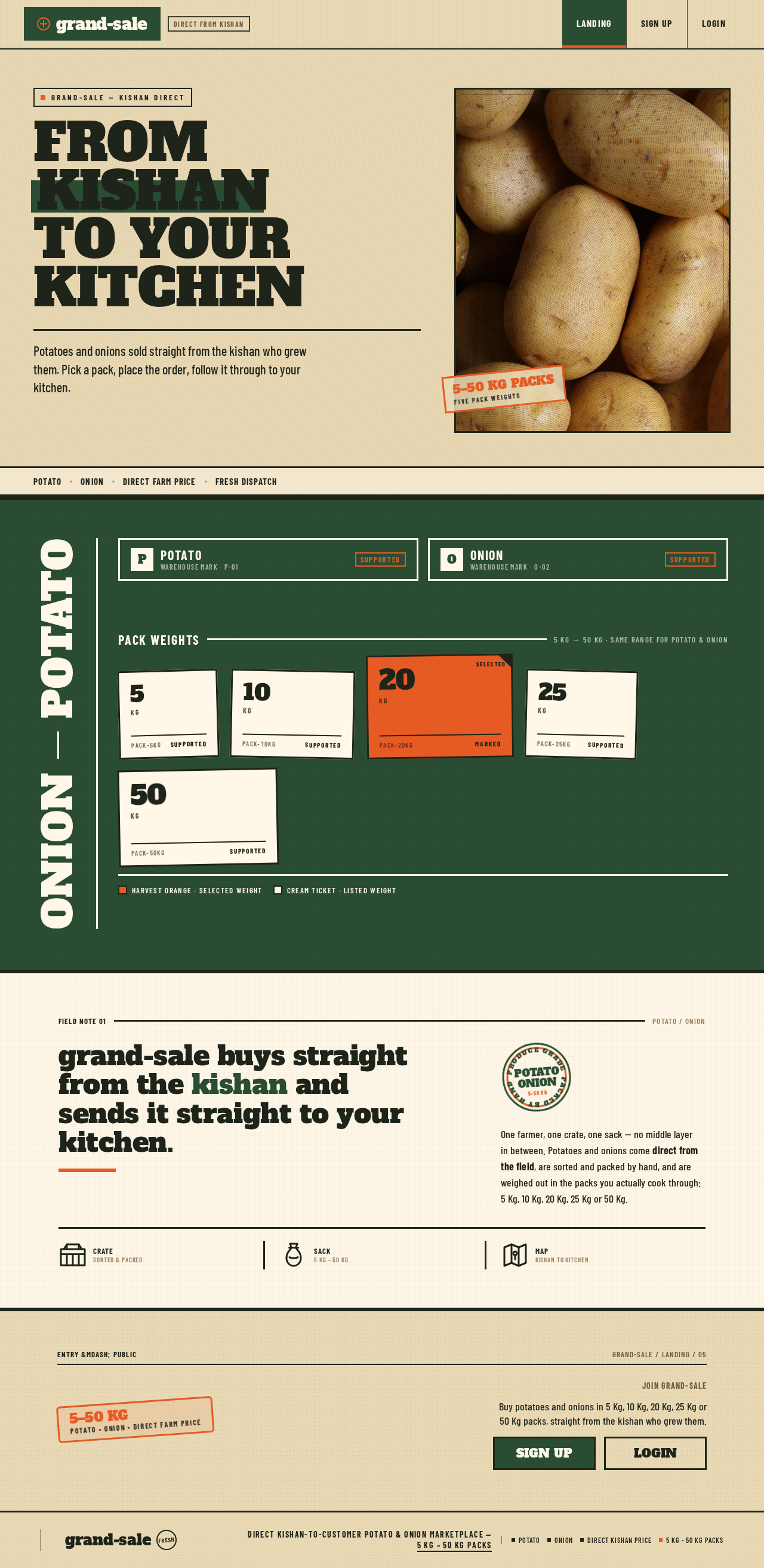
grand-saleDirect from kishan
Potato & Onion · 5 Kg to 50 Kg packs · Direct farm price
grand-sale — kishan direct
FromKishanTo yourKitchen
Potatoes and onions sold straight from the kishan who grew them. Pick a pack, place the order, follow it through to your kitchen.

PotatoOnionDirect farm priceFresh dispatch
Produce categories and supported pack range at grand-sale
Pack weights
5 Kg → 50 Kg · same range for potato & onion- 5Kgpack-5kgSupported
- 10Kgpack-10kgSupported
- Selected20Kgpack-20kgMarked
- 25Kgpack-25kgSupported
- 50Kgpack-50kgSupported
Harvest orange · selected weightCream ticket · listed weight
grand-sale buys straight from the kishan and sends it straight to your kitchen.
One farmer, one crate, one sack — no middle layer in between. Potatoes and onions come direct from the field, are sorted and packed by hand, and are weighed out in the packs you actually cook through: 5 Kg, 10 Kg, 20 Kg, 25 Kg or 50 Kg.
CrateSorted & packed
Sack5 Kg – 50 Kg
MapKishan to kitchen
grand-saleDirect from kishan
Potato & Onion · 5 Kg to 50 Kg packs · Direct farm price
grand-sale — kishan direct
FromKishanTo yourKitchen
Potatoes and onions sold straight from the kishan who grew them. Pick a pack, place the order, follow it through to your kitchen.
PotatoOnionDirect farm priceFresh dispatch
Produce categories and supported pack range at grand-sale
Pack weights
5 Kg → 50 Kg · same range for potato & onion- 5Kgpack-5kgSupported
- 10Kgpack-10kgSupported
- Selected20Kgpack-20kgMarked
- 25Kgpack-25kgSupported
- 50Kgpack-50kgSupported
Harvest orange · selected weightCream ticket · listed weight
grand-sale buys straight from the kishan and sends it straight to your kitchen.
One farmer, one crate, one sack — no middle layer in between. Potatoes and onions come direct from the field, are sorted and packed by hand, and are weighed out in the packs you actually cook through: 5 Kg, 10 Kg, 20 Kg, 25 Kg or 50 Kg.
CrateSorted & packed
Sack5 Kg – 50 Kg
MapKishan to kitchen
No comments yet. Be the first!