goud-industries-cloth
 Singarapu Pavangoud
Create a app AI company Goud industries that produce and manufactured cloth brand brand promotion advertisement and sale boats and AI agents.

Comments (0)
Sign in to leave a comment
System Requirements
System Requirements Document for goud-industries-cloth
1. Introduction
goud-industries-cloth is the web application for Goud Industries, an AI company that produces and manufactures cloth brands, runs brand promotion and advertising, sells boats, and ships AI agents. The application is the company's public face and its inbound-interest desk: it presents the four divisions of the business to prospective clients and gives company representatives a protected place to receive and answer inquiries.
The audience is prospective clients — brand owners, boat buyers, and marketing leads — who need to understand what Goud Industries makes and how to engage it, plus the company representatives who present that work and respond to interest.
This document is the System Requirements Document requested for the project; it specifies the product's features, pages, personas, and flows in full.
Success Criteria
- A first-time visitor can, without an account, understand all four divisions (cloth brands, brand promotion and advertising, boats, AI agents) and reach a specific offering's details.
- A visitor can send an inquiry about an offering and receive an on-screen confirmation that it was received.
- A company representative can enroll, sign in, and see inbound inquiries in a protected destination, and can respond to them.
- Every readable headline, label, number, card text, and control stays whole and inside the viewport at 375px, 768px, and 1280px.
2. System Overview
goud-industries-cloth is delivered as a React frontend talking to a shared FastAPI backend backed by MariaDB. The application owns its identity: company representatives enroll themselves through Sign Up and return through Login; visitors browse anonymously.
Actors
- Prospective Client (human, anonymous): browses the Landing catalog, opens Offering Details, and sends an inquiry through Contact.
- Company Representative (human, application identity): enrolls via Sign Up, signs in via Login, and reviews and responds to inquiries in Inquiries.
- Application backend (system): persists offerings and inquiries, enforces that Inquiries is reachable only by an authenticated representative, and records responses.
Accepted behavior
- The app presents Goud Industries as an AI company that produces and manufactures cloth brands.
- The app presents Goud Industries' brand promotion and advertising offerings.
- The app presents Goud Industries' boats.
- The app presents Goud Industries' AI agents.
- Company representatives complete self-service enrollment via Sign Up and verify identity via Login before accessing Inquiries.
- Visitors send inquiries about offerings through Contact; representatives review and respond to them in Inquiries.
Ownership and delivery boundary
All six destinations are first-party application pages. Landing, Offering Details, Contact, Login, and Sign Up are anonymously reachable; Inquiries is restricted to authenticated company representatives. There is no provider-owned or external surface in the current scope, and no headless-only delivery.
Removed from scope
- None. No concept from the authoritative requirement thread was removed or replaced.
2a. Product Interpretation and Delivery Boundary
Goud Industries is presented as one studio with four divisions — cloth brands, brand promotion and advertising, boats, and AI agents — and the application's job is to make that single confident hand legible to prospective clients and to capture their interest.
The public side of the app is fully anonymous: a visitor lands, reads the divisions, opens an offering, and sends an inquiry without creating anything. The private side exists only because an inquiry must be received by someone accountable: a company representative enrolls themselves (no invitation or provisioning boundary is established), signs in, and works the inbound queue. Identity is application-owned and used solely for that continuity — it does not create differentiated permissions beyond "a representative may see Inquiries."
Everything described here is current. No future-horizon capabilities are specified by the source.
2c. Page Content and Component Coverage
Landing
- Purpose and access: Anonymous public entry. Explains Goud Industries and lets visitors browse its cloth brands, brand promotion and advertising, boats, and AI agents.
- Information and state: Company identity and positioning; the four divisions; the offering catalog (each offering with name, division tag, short description, and image); navigation to Login/Sign Up for representatives.
- Primary actions: Browse the offering catalog; open an offering (→ Offering Details); start a project (→ Contact); navigate to Login or Sign Up.
- Supporting actions: Division marquee (pauses on hover; wraps into rows under reduced motion); capsule navigation with lime active dot.
- Domain entities: Offering (name, division, description, image reference).
- Component responsibilities: Hero (oversized headline with one word filled pink, capsule CTA, lime division tag, pebble-masked image composition bleeding off the right edge with lime badge); division marquee; 2-up (mobile 1-up) pebble offering-card grid with four different colour tags and varying internal crops; floating white capsule nav.
- States: Loading — skeleton pebble cards while offerings load. Empty — if no offerings are published, a blush panel stating offerings are coming soon, with the Contact CTA still available. Success — catalog rendered. Error — inline message with a retry control if offerings fail to load; hero and navigation remain usable. Recovery — retry re-fetches the catalog without leaving the page.
Offering Details
- Purpose and access: Anonymous. Focused view of an individual offering reached from the catalog.
- Information and state: Offering name, division, full description, imagery, and a clear path to inquire.
- Primary actions: Send an inquiry about this offering (→ Contact with the offering preselected); return to Landing.
- Supporting actions: Browse to another offering.
- Domain entities: Offering.
- Component responsibilities: Pebble-masked hero image; oversized Unbounded title; body description in Manrope; capsule "Inquire about this" CTA; back navigation.
- States: Loading — pebble placeholder. Empty/not found — a blush panel explaining the offering is unavailable with a link back to Landing. Success — full offering detail. Error — inline retry for a failed fetch. Recovery — retry or return to Landing.
Contact
- Purpose and access: Anonymous. Lets visitors send an inquiry to the company about an offering.
- Information and state: Single centred 640px capsule column on blush with generous vertical air; the offering in question (preselected when arriving from Offering Details, otherwise selectable); visitor name, email, and message; submission state.
- Primary actions: Submit the inquiry.
- Supporting actions: Change the offering being asked about; return to Landing.
- Domain entities: Inquiry (offering reference, visitor name, visitor email, message, submitted timestamp, status).
- Component responsibilities: Capsule form fields; capsule submit button with glossy highlight sweep on hover; inline validation messages; confirmation panel.
- States: Loading — submit button in progress state, disabled against double submission. Empty — form with no offering preselected requires the visitor to choose one. Success — confirmation panel stating the inquiry was received, with a link back to Landing. Error — field-level validation messages for missing name, email, or message; a submission failure message with the entered content preserved and a retry control. Recovery — correct fields or retry without re-entering content.
Inquiries
- Purpose and access: Restricted to authenticated company representatives. Protected destination where representatives review inbound inquiries and respond.
- Information and state: List of inbound inquiries with offering, visitor name and email, message, submitted timestamp, and status (new / responded); selected inquiry detail; response composer.
- Primary actions: Open an inquiry; write and send a response; mark an inquiry as responded.
- Supporting actions: Filter or scan the list by status; sign out.
- Domain entities: Inquiry, Response (inquiry reference, representative, body, sent timestamp).
- Component responsibilities: Inquiry list; detail panel; response composer with capsule send button; status tags using the four-tag colour system; empty-state panel.
- States: Loading — list skeleton. Empty — a blush panel stating no inquiries have arrived yet. Success — list and detail rendered; response recorded and status updated. Error — inline message with retry for a failed load or failed send, with the composed response preserved. Recovery — retry; unauthenticated access redirects to Login and returns here after sign-in.
Login
- Purpose and access: Anonymous. Returning verification for company representatives who manage inbound inquiries.
- Information and state: Email and password fields; link to Sign Up.
- Primary actions: Sign in.
- Supporting actions: Navigate to Sign Up.
- Domain entities: Representative account.
- Component responsibilities: Centred capsule form; capsule submit button; inline error region.
- States: Loading — submit in progress. Empty — blank fields. Success — redirect to Inquiries (or the destination that prompted sign-in). Error — a single non-revealing message for invalid credentials, with fields preserved. Recovery — correct and resubmit, or go to Sign Up.
Sign Up
- Purpose and access: Anonymous. Self-service first-use enrollment for company representatives.
- Information and state: Name, email, password, and confirmation; link to Login.
- Primary actions: Create the representative account.
- Supporting actions: Navigate to Login.
- Domain entities: Representative account.
- Component responsibilities: Centred capsule form; capsule submit button; inline validation and error region.
- States: Loading — submit in progress. Empty — blank fields. Success — account created and the representative signed in, landing on Inquiries. Error — field-level validation; a message when the email is already registered, with a link to Login. Recovery — correct fields or switch to Login.
3. Functional Requirements
FR-1 — Present Goud Industries as an AI company that produces and manufactures cloth brands (explicit) As a Prospective Client I should see, on the anonymous Landing page, that Goud Industries is an AI company that produces and manufactures cloth brands, so that I understand the company's identity and its cloth division.
- Trigger/input: visitor opens Landing.
- Observable result: company positioning and the cloth-brands division are visible in the hero and catalog.
- Access: anonymous. Failure/recovery: if catalog data fails to load, the positioning copy and a retry control remain visible. Continuation: open a cloth offering in Offering Details.
FR-2 — Present brand promotion and advertising offerings (explicit) As a Prospective Client I should see Goud Industries' brand promotion and advertising offerings on Landing and in Offering Details, so that I can evaluate that service.
- Trigger/input: visitor browses the catalog or opens a promotion/advertising offering.
- Observable result: the division and its offerings are listed with descriptions; the detail page shows the full description.
- Access: anonymous. Failure/recovery: load error shows an inline retry. Continuation: proceed to Contact to inquire.
FR-3 — Present Goud Industries' boats (explicit) As a Prospective Client I should see Goud Industries' boats on Landing and in Offering Details, so that I can evaluate a boat offering.
- Trigger/input: visitor browses the catalog or opens a boat offering.
- Observable result: boat offerings appear with imagery and descriptions; the detail page shows the full description.
- Access: anonymous. Failure/recovery: load error shows an inline retry. Continuation: proceed to Contact to inquire.
FR-4 — Present Goud Industries' AI agents (explicit) As a Prospective Client I should see Goud Industries' AI agents on Landing and in Offering Details, so that I can evaluate an AI-agent offering.
- Trigger/input: visitor browses the catalog or opens an AI-agent offering.
- Observable result: AI-agent offerings appear with imagery and descriptions; the detail page shows the full description.
- Access: anonymous. Failure/recovery: load error shows an inline retry. Continuation: proceed to Contact to inquire.
FR-5 — Send an inquiry about an offering (required_inference) As a Prospective Client I should send an inquiry about a specific offering from Contact, so that the company receives my interest and can respond.
- Trigger/input: visitor submits name, email, message, and the offering in question.
- Observable result: the inquiry is persisted with status "new" and a submitted timestamp; the visitor sees a confirmation panel.
- Access: anonymous. Failure/recovery: validation errors are shown per field; a submission failure preserves entered content with a retry control. Continuation: return to Landing, or the representative sees the inquiry in Inquiries.
FR-6 — Self-service enrollment via Sign Up (required_inference) As a Company Representative I should create my account through Sign Up, so that I can access Inquiries.
- Trigger/input: representative submits name, email, password, and confirmation.
- Observable result: the account is created and the representative is signed in, landing on Inquiries.
- Access: anonymous. Failure/recovery: field validation; duplicate-email message with a link to Login. Continuation: proceed to Inquiries.
FR-7 — Verify identity via Login before accessing Inquiries (required_inference) As a Company Representative I should sign in through Login before reaching Inquiries, so that only representatives see inbound inquiries.
- Trigger/input: representative submits email and password, or is redirected from Inquiries.
- Observable result: an authenticated session is established and the representative lands on Inquiries (or the destination that prompted sign-in).
- Access: anonymous entry; Inquiries remains unavailable until identity is established. Failure/recovery: a single non-revealing invalid-credentials message with fields preserved. Continuation: retry, or go to Sign Up.
FR-8 — Review inbound inquiries (required_inference) As a Company Representative I should see inbound inquiries in Inquiries, so that I know who is interested and in what.
- Trigger/input: representative opens Inquiries while authenticated.
- Observable result: the list shows offering, visitor name and email, message, timestamp, and status; selecting one shows its detail.
- Access: authenticated representative only; unauthenticated access redirects to Login and returns here after sign-in. Failure/recovery: load error shows an inline retry; empty state explains no inquiries have arrived. Continuation: open an inquiry to respond.
FR-9 — Respond to an inquiry (required_inference) As a Company Representative I should write and send a response to an inquiry, so that the prospective client's interest is answered.
- Trigger/input: representative composes a response on a selected inquiry and sends it.
- Observable result: the response is recorded against the inquiry with a sent timestamp and the inquiry status becomes "responded".
- Access: authenticated representative only. Failure/recovery: a failed send preserves the composed text with a retry control. Continuation: return to the list and handle the next inquiry.
4. User Personas
Prospective Client
- Product context: A brand owner, boat buyer, or marketing lead who has heard of Goud Industries and wants to know whether one company can genuinely deliver cloth brands, promotion and advertising, boats, and AI agents.
- Primary goal: Understand the relevant offering and find a way to make contact.
- Distinct responsibilities: Browses the anonymous catalog, opens a specific offering to read its detail, and composes and submits an inquiry naming the offering in question.
- Inputs and decisions: Which division and offering matter; what to say in the message; whether to submit.
- Interactions with other participants: Their submitted inquiry becomes the item a Company Representative reviews and answers in Inquiries.
- Observable success: The offering detail was found and an inquiry was submitted with an on-screen confirmation.
Company Representative
- Product context: A member of Goud Industries responsible for presenting the company's manufactured products and services and answering inbound interest.
- Primary goal: Ensure the company's offerings are clearly showcased and that inquiries are received and answered.
- Distinct responsibilities: Enrolls through Sign Up, signs in through Login, reviews the inbound inquiry queue in Inquiries, and writes responses.
- Inputs and decisions: Which inquiry to open; what the response should say; when an inquiry is answered.
- Interactions with other participants: Reads Prospective Clients' inquiries and responds to them; the response is recorded against the client's inquiry.
- Observable success: Signed in, the inquiry list is visible, and a response has been recorded with the inquiry marked responded.
5. Core User Flows
Flow A — Prospective Client discovers an offering and sends an inquiry
- The Prospective Client opens Landing anonymously and reads the hero positioning and the four divisions.
- They browse the pebble offering-card grid and select an offering.
- Offering Details loads with the offering's name, division, description, and imagery.
- They choose "Inquire about this", arriving at Contact with the offering preselected.
- They enter name, email, and message and submit.
- Observable result: a confirmation panel states the inquiry was received; the inquiry is stored with status "new".
- Failure/recovery: missing fields show inline validation; a submission failure preserves the entered content with a retry control.
- Continuation: they return to Landing to browse another division.
Flow B — Company Representative enrolls
- The Company Representative opens Sign Up anonymously.
- They enter name, email, password, and confirmation and submit.
- Observable result: the account is created, they are signed in, and Inquiries opens.
- Failure/recovery: field validation messages appear; a duplicate email shows a message with a link to Login.
- Continuation: they begin reviewing the inquiry list.
Flow C — Company Representative signs in and reviews inquiries
- The Company Representative opens Login (or is redirected there from Inquiries).
- They enter email and password and submit.
- Observable result: they land on Inquiries, which lists inbound inquiries with offering, visitor name and email, message, timestamp, and status.
- They select an inquiry to read its detail.
- Failure/recovery: invalid credentials show one non-revealing message with fields preserved; a load failure shows an inline retry; an empty queue shows a panel explaining no inquiries have arrived.
- Continuation: they open an inquiry to respond.
Flow D — Company Representative responds to an inquiry
- From Inquiries, the Company Representative selects an inquiry with status "new".
- They compose a response and send it.
- Observable result: the response is recorded against the inquiry with a sent timestamp and the inquiry status becomes "responded".
- Failure/recovery: a failed send preserves the composed text with a retry control.
- Continuation: they return to the list and handle the next inquiry.
6. Visuals Colors and Theme
Muse: Karim Rashid — sensual pop minimalism for a company that makes cloth, boats and thinking machines. Headline idea: soft continuous form plus confident colour.
Colour tokens (light mode)
| Role | Hex | Use |
|---|---|---|
| Background | #FDF6F2 | Warm blush-white ground, ~60% of every screen |
| Surface | #FFFFFF | Glossy cards and panels, 1px #F0DDE6 hairline borders |
| Text | #1A0F1C | All reading text on light grounds |
| Primary | #FF2E88 | Bubblegum pink — full-bleed bands, primary buttons, oversized type fills |
| Accent | #C6FF3D | Acid lime — one thing per screen only (category tag, stat, active nav dot); fill only, never text on white; ink on lime is the only legal pairing |
| Muted | #7A6B78 | Secondary labels |
| Hairline | #F0DDE6 | Dividers and card borders, 1px only |
Typography
- Headings: Unbounded 700–800, tracking −0.03em, sentence-and-title case.
- Labels: Unbounded 500, 12–13px, uppercase, 0.14em tracking.
- Body: Manrope 400/500, 17–18px, line-height 1.65.
- Scale (1.4 modular): display
clamp(2.75rem, 7vw, 6rem); h2 32→56; h3 22→30; body 17→18; label 12→13; stats in Unbounded tabular 36→64.
Shape language
- No sharp corners: cards 28–36px continuous radii; buttons full capsules (
999px); section containers as soft blobs and capsule panels overlapping 24–48px; colour blocks cut with a gentle curve at one edge (border-bottom-left-radius: 120px); product imagery masked into capsule or pebble shapes with a 1px glossy inner highlight at the top edge; dividers 1px#F0DDE6.
Layout
- Asymmetric 12-column editorial grid, 24px gutters; oversized headline in columns 1–8; glossy pebble image or pink panel bleeding off the right edge from column 7.
- Section rhythm alternates blush ground → full-bleed pink band → white capsule panel.
- Offering catalog: 2-up (mobile 1-up) pebble cards, 32px gaps, each with a different colour tag (pink, lime, ink, blush) and varying internal crops.
- Contact and Inquiries: single centred 640px capsule column on blush with 96px vertical air.
Imagery
- Glossy art-directed 3D and photography: draped cloth on candy-coloured seamless paper with hard specular highlights; boat hulls in gelcoat gloss cropped into capsule masks; AI agents as glossy 3D blobs and fluid capsules in pink and lime. No stock people, no gradient-blob heroes, no flat clip art, no wireframe robots or neural-net diagrams.
Avoid: blue–indigo primaries or accents (#2563EB, #4F46E5, #7C3AED and neighbours); Inter, Roboto, Arial, Helvetica, Poppins, system-ui for headings or body; gradient-blob heroes and identical hover-lift grids; sharp 0px corners; heavy 2px+ rules; lime as text on white or as a large ground behind body copy; stock business photography; bouncy spring physics that overshoot the capsule shape.
7. Signature Design Concept
The Landing hero is a full-viewport blush field (#FDF6F2) with an asymmetric editorial split. On the left, an Unbounded headline — "WE MAKE CLOTH. BOATS. AND MINDS." — is set at clamp(44px, 7vw, 96px) in ink, stacked over three lines, with the word MINDS. filled solid #FF2E88. Beneath it sit a capsule pink CTA "Start a project" and a lime capsule tag "4 divisions · 1 studio" (ink on lime). On the right, a large glossy pebble-masked composition — a draped cloth form overlapping a boat hull render, both in candy gloss — bleeds off the right viewport edge, with a lime capsule badge reading "AI agents inside" pinned at the seam. A thin 1px pink rule runs the full viewport width beneath the hero, carrying a horizontal marquee of the four divisions in Unbounded 500 uppercase 13px at 0.14em tracking. The type is the hero, not a background image; no centred stack, no blue button, no gradient blob.
8. Interaction Model & Motion Direction
Interaction Model: Animated Motion Tempo: expressive Hero Dimensionality: layered_2d
Landing Hero Motion Brief
- Focal subject: the pebble-masked cloth-and-hull composition bleeding off the right edge, with the lime "AI agents inside" badge at the seam.
- Input → transformation → outcome thesis: as the page settles, the headline lines and the pebble composition enter from scale 0.96 with a 420–600ms
cubic-bezier(0.22, 1, 0.36, 1)ease; hovering the pink CTA sweeps a subtle glossy highlight across the capsule; the division marquee scrolls continuously and pauses on hover. Nothing overshoots the capsule shape. - Motion vocabulary: liquid and soft — 420–600ms entrances, scale from 0.96, glossy highlight sweeps, section colour bands wiping in from the leading edge on scroll (one 500ms wipe per section, no bounce), category tags morphing radius from capsule to pebble on hover.
- Composed first frame: blush ground, ink headline with MINDS. in pink, pink capsule CTA and lime tag on the left, glossy pebble composition entering at the right edge, pink hairline rule and division marquee beneath.
- Reduced-motion state: all wipes and sweeps become instant opacity swaps, nothing scales, and the marquee wraps into rows so every division is fully readable.
9. Non-Functional Requirements
- Readability at every viewport (explicit): headlines, wordmarks, labels, numbers, card text, and controls stay entirely inside the viewport and their container at 375px, 768px, and 1280px, wrapping or scaling (e.g.
clamp(...)) to fit; no other element covers any part of them. Imagery and decoration may crop, bleed, or overlap freely as long as they cover no readable text or control. - Moving content (explicit): marquees and tickers may cross the viewport edge by design; every item must become fully readable as it passes, and under
prefers-reduced-motionthe marquee wraps into rows or becomes horizontally scrollable so each item can be brought fully into view. - Reduced motion (explicit): with
prefers-reduced-motion, all wipes and sweeps become instant opacity swaps and nothing scales. - Access control (required_inference): Inquiries is reachable only with an authenticated representative session; unauthenticated requests are redirected to Login and returned to Inquiries after sign-in. No differentiated permissions beyond representative access to Inquiries are established.
- Durable state (required_inference): offerings, representative accounts, inquiries, and responses persist in MariaDB so that an inquiry submitted anonymously is still present when a representative signs in later.
- Input validation (required_inference): Contact requires name, email, message, and an offering; Sign Up requires name, email, password, and matching confirmation; Login requires email and password. Invalid credentials produce one non-revealing message.
10. Tech Stack
- Frontend: React application UI.
- Backend: shared FastAPI process for application APIs and domain modules (offerings, inquiries, representative identity).
- Database: MariaDB for application-owned persistent data.
- Infrastructure: docker-compose with the
frontend,backend, anddatabaseservices; the backend is extended with routes and modules rather than split into new services.
11. Assumptions and Constraints
- Assumption: The four divisions are presented as a single offering catalog on Landing, with each offering belonging to one division. (required_inference)
- Assumption: Company representatives enroll themselves; no invitation or provisioning boundary is established by the source. (required_inference)
- Assumption: A representative's response is recorded in the application against the inquiry; no outbound email delivery channel is specified by the source and none is added.
- Constraint: The generic indigo/blue-on-white SaaS template is forbidden; the palette, fonts, shape language, and motion in Sections 6–8 are binding.
- Constraint: Readable text and controls must remain whole at 375px, 768px, and 1280px; the gesture is carried by imagery and decoration instead.
- Constraint: No future-horizon capabilities are specified; all requirements in this document are current.
12. Glossary
- Goud Industries — the AI company the application presents; produces and manufactures cloth brands, runs brand promotion and advertising, sells boats, and ships AI agents.
- Division — one of the four business lines: cloth brands, brand promotion and advertising, boats, AI agents.
- Offering — an individual item or service within a division, shown as a pebble card on Landing and in full on Offering Details.
- Inquiry — a message a Prospective Client submits through Contact about a specific offering.
- Response — a Company Representative's recorded answer to an inquiry.
- Company Representative — an authenticated member of Goud Industries who reviews and answers inquiries.
- Prospective Client — an anonymous visitor evaluating Goud Industries' offerings.
- Pebble mask — the capsule/pebble-shaped image mask with a 1px glossy top-edge highlight used throughout the visual system.
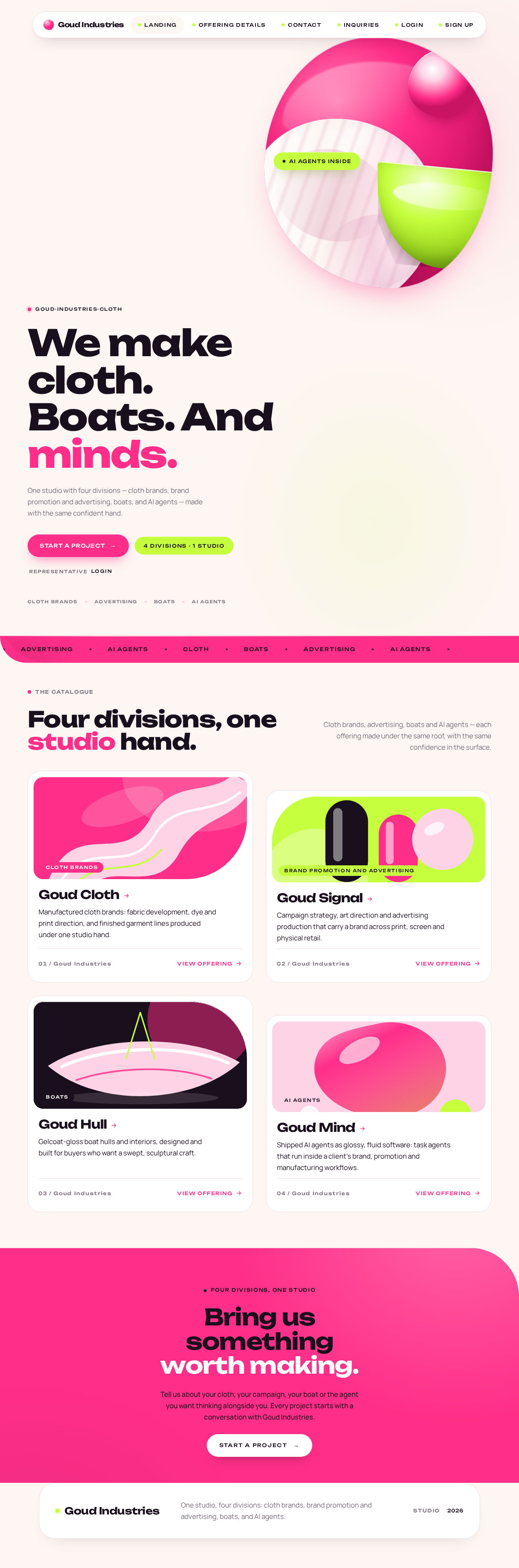
goud-industries-cloth
We make cloth.Boats. Andminds.
One studio with four divisions — cloth brands, brand promotion and advertising, boats, and AI agents — made with the same confident hand.
Four divisions, one studio hand.
Cloth brands, advertising, boats and AI agents — each offering made under the same roof, with the same confidence in the surface.
- Cloth brands
Goud Cloth
Manufactured cloth brands: fabric development, dye and print direction, and finished garment lines produced under one studio hand.
- Brand promotion and advertising
Goud Signal
Campaign strategy, art direction and advertising production that carry a brand across print, screen and physical retail.
- Boats
Goud Hull
Gelcoat-gloss boat hulls and interiors, designed and built for buyers who want a swept, sculptural craft.
- AI agents
Goud Mind
Shipped AI agents as glossy, fluid software: task agents that run inside a client's brand, promotion and manufacturing workflows.
Four divisions, one studio
Bring us something worth making.
Tell us about your cloth, your campaign, your boat or the agent you want thinking alongside you. Every project starts with a conversation with Goud Industries.
Start a projectgoud-industries-cloth
We make cloth.Boats. Andminds.
One studio with four divisions — cloth brands, brand promotion and advertising, boats, and AI agents — made with the same confident hand.
Four divisions, one studio hand.
Cloth brands, advertising, boats and AI agents — each offering made under the same roof, with the same confidence in the surface.
- Cloth brands
Goud Cloth
Manufactured cloth brands: fabric development, dye and print direction, and finished garment lines produced under one studio hand.
- Brand promotion and advertising
Goud Signal
Campaign strategy, art direction and advertising production that carry a brand across print, screen and physical retail.
- Boats
Goud Hull
Gelcoat-gloss boat hulls and interiors, designed and built for buyers who want a swept, sculptural craft.
- AI agents
Goud Mind
Shipped AI agents as glossy, fluid software: task agents that run inside a client's brand, promotion and manufacturing workflows.
Four divisions, one studio
Bring us something worth making.
Tell us about your cloth, your campaign, your boat or the agent you want thinking alongside you. Every project starts with a conversation with Goud Industries.
Start a project
No comments yet. Be the first!