golden-hi
 Geo
GeoHi


Comments (0)
Sign in to leave a comment
System Requirements
System Requirements Document (SRD) for Project: golden-hi
1. Introduction
The golden-hi project aims to develop a website that supports file and article writing functionality. This platform is designed to cater to professionals, students, and content creators, providing them with tools to create, edit, and manage files and articles efficiently. The system will be user-friendly, feature-rich, and optimized for the Indian market, considering local preferences such as time zones (IST) and currency (INR) where applicable.
2. System Overview
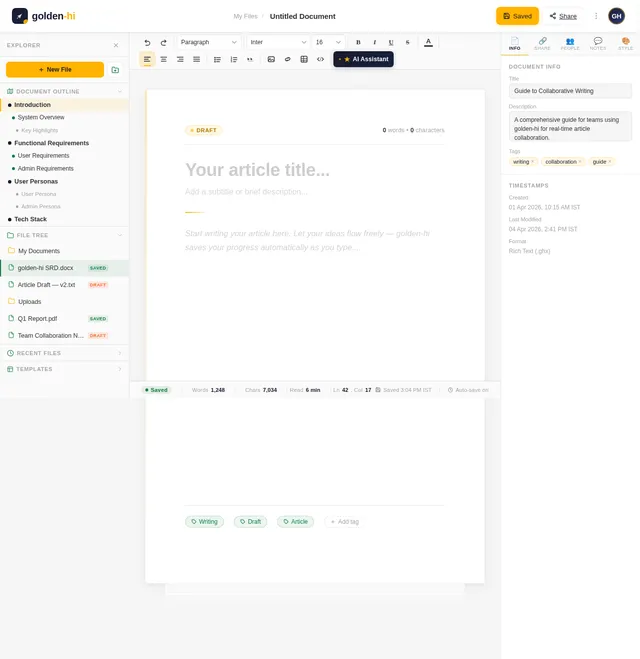
The golden-hi platform will serve as a comprehensive tool for file and article writing. It will include a robust text editor, file upload capabilities, and templates for various types of content. The system will ensure seamless user experience through intuitive design and responsive functionality. The platform will also support collaborative features, enabling multiple users to work on the same document in real-time.
Key highlights of the system:
- A modern, web-based interface accessible via desktop and mobile devices.
- Secure file storage and management.
- Advanced text editing tools with formatting options.
- Support for multiple file formats.
- Collaboration tools for team-based writing.
3. Functional Requirements
- As a User, I should be able to write and edit articles using a rich text editor.
- As a User, I should be able to upload and manage files in various formats (e.g., .docx, .pdf, .txt).
- As a User, I should be able to save drafts of my articles and files.
- As a User, I should be able to share articles or files with others via a link or email.
- As an Admin, I should be able to manage user accounts and permissions.
- As an Admin, I should be able to monitor and moderate content uploaded by users.
- As a Guest, I should be able to view publicly shared articles or files without needing an account.
4. User Personas
1. User
- Description: Registered users who create, edit, and manage files and articles.
- Goals: Efficiently write articles, upload files, and collaborate with others.
- Needs: A user-friendly interface, secure storage, and advanced editing tools.
2. Admin
- Description: System administrators responsible for managing the platform.
- Goals: Ensure smooth operation of the platform and enforce content policies.
- Needs: Tools for user management, content moderation, and system monitoring.
3. Guest
- Description: Unregistered visitors who can view publicly shared content.
- Goals: Access shared articles or files without creating an account.
- Needs: Easy navigation and access to shared content.
5. Visuals Colors and Theme
The golden-hi platform will feature a unique and professional color palette that reflects creativity and productivity. Below is the proposed color scheme:
- Background: #F5F5F5 (Light Gray)
- Surface: #FFFFFF (White)
- Text: #333333 (Dark Gray)
- Accent: #FFB400 (Golden Yellow)
- Muted: #A6A6A6 (Muted Gray)
This palette ensures readability and a clean, modern aesthetic while incorporating a "golden" accent to align with the project name.
6. Signature Design Concept
The homepage of golden-hi will feature a dynamic "writing canvas" animation. Upon landing, users will see a blank sheet of paper that "unfolds" in a smooth animation, revealing a sleek text editor interface. As users scroll, the paper will appear to extend infinitely, symbolizing endless possibilities for writing and creativity.
Additional features of the homepage:
- Interactive Toolbar Animation: The toolbar icons will animate subtly when hovered over, giving a tactile feel.
- Golden Ink Effect: When users type in the editor, the cursor will leave a faint golden trail that fades after a second, reinforcing the "golden" theme.
- Responsive Design: The homepage will adapt seamlessly to different screen sizes, ensuring a consistent experience across devices.
This design will captivate users and make the platform memorable from the very first interaction.
7. Non-Functional Requirements
- The system should support at least 10,000 concurrent users.
- The platform must ensure a response time of less than 2 seconds for all major operations.
- All user data must be encrypted using AES-256 encryption.
- The system should comply with GDPR and Indian IT Act regulations for data privacy.
- The platform must be accessible and meet WCAG 2.1 AA standards.
8. Tech Stack
Frontend:
- React for Web
Backend:
- Python
- FastAPI
Database:
- MySQL (with Alembic for migrations)
AI Models:
- GPT 5.4 for user-friendly responses
- Claude 4.6 Opas for academic or coding work
AI Tools:
- Langchain
- Litellm for LLM Routing
Local Orchestration:
- Docker
- docker-compose
Server-Side Orchestration:
- Kubernetes
9. Assumptions and Constraints
Assumptions:
- Users will primarily access the platform via desktop and mobile browsers.
- The majority of users will be based in India, so the system will default to IST and INR.
- Users will have basic familiarity with text editors and file management.
Constraints:
- The platform must operate within a budget suitable for a mid-scale web application.
- Initial deployment will focus on English as the primary language.
10. Glossary
- Rich Text Editor: A text editor that allows formatting such as bold, italics, and font changes.
- AES-256 Encryption: A secure encryption standard used to protect data.
- WCAG: Web Content Accessibility Guidelines, ensuring websites are accessible to all users.
- GDPR: General Data Protection Regulation, a legal framework for data protection and privacy in the EU.
- IST: Indian Standard Time.
- INR: Indian Rupee, the currency of India.

Unleash Your Writing Potential
Create, collaborate, and publish with golden-hi — the modern platform built for writers, teams, and creators who demand excellence.
Everything You Need to Write Brilliantly
Powerful tools designed for professionals, students, and content creators to write, edit, and collaborate with ease.
Rich Text Editor
A powerful editor with advanced formatting, markdown support, and real-time preview. Write with confidence using our intuitive toolbar and keyboard shortcuts.
Learn More→File Management
Upload, organize, and manage files in multiple formats including .docx, .pdf, and .txt. Keep all your documents structured and easily accessible.
Learn More→Real-Time Collaboration
Work together with your team on the same document simultaneously. Track changes, leave comments, and stay in sync effortlessly.
Learn More→Ready-Made Templates
Kickstart your projects with professionally designed templates for articles, reports, proposals, and more. Customize them to match your style.
Learn More→AI Writing Assistance
Enhance your writing with intelligent suggestions, grammar corrections, and tone adjustments. Let AI help you craft polished, professional content.
Learn More→Secure Cloud Storage
Enterprise-grade encryption keeps your files safe. Auto-save drafts, version history, and reliable backups ensure you never lose your work.
Learn More→See the Editor in Action
Watch golden-hi bring your words to life with rich formatting, real-time collaboration, and a writing experience that feels magical.
From Idea to Published in 5 Steps
Getting started with golden-hi is simple. Follow these steps to create, collaborate, and share your best writing.
Sign Up
Create your free golden-hi account in seconds. No credit card required — just your email and a password to get started.
Create or Upload
Start a new article from scratch using our rich text editor, or upload existing files in .docx, .pdf, or .txt format.
Edit & Format
Use advanced formatting tools — headings, lists, images, code blocks, and more. Save drafts automatically as you write.
Collaborate
Invite teammates to edit in real-time. Leave comments, track changes, and work together seamlessly on any document.
Publish & Share
Share your finished work via a public link or email. Export to multiple formats and let the world read your content.
Loved by Writers Everywhere
Join thousands of professionals, students, and creators who trust golden-hi for their writing needs.
“golden-hi transformed how I manage my writing workflow. The rich text editor is incredibly intuitive, and real-time collaboration has made working with my team seamless.
“I have tried dozens of writing platforms, but golden-hi stands out with its clean interface and powerful formatting tools. Publishing directly from drafts saves me hours every week.
“Our entire marketing team switched to golden-hi for content creation. The template library and secure file sharing features are exactly what we needed for enterprise workflows.
“As a student, managing research papers and notes was chaotic until I found golden-hi. The file management and multi-format support make academic writing effortless.
Simple, Transparent Pricing
Choose the plan that fits your writing workflow. Upgrade or downgrade anytime with no hidden fees.
Basic
Perfect for individual writers getting started.
Free forever
What’s included
- Rich text editor with basic formatting
- Upload up to 50 files (10 MB each)
- Save unlimited drafts
- Share via public link
- Access from any device
- Community support
Pro
For professionals and content creators who need more.
Billed annually at ₹4,990/year
What’s included
- Everything in Basic
- Advanced editor with templates & AI Assistance
- Unlimited file uploads (100 MB each)
- Real-time collaboration (up to 5 users)
- Export to .docx, .pdf, and .txt
- Version history & auto-save
- Priority email support
- Custom branding on shared content
Enterprise
For teams and organizations with advanced needs.
Billed annually, minimum 10 users
What’s included
- Everything in Pro
- Unlimited collaboration with role-based access
- Admin panel for user & content management
- Content moderation tools
- GDPR-compliant secure storage
- SSO & advanced authentication
- Dedicated account manager
- Custom integrations (Slack, GitHub, Notion)
Connect Your Tools
Seamlessly integrate with the tools you already use.
GitHub
Slack
Notion
Google Drive
Dropbox
Microsoft Word
Trello
OneDrive
GitHub
Slack
Notion
Google Drive
Dropbox
Microsoft Word
Trello
OneDrive
And 20+ more integrations available for your workflow.
Ready to Start Writing?
Join thousands of writers and creators using golden-hi to craft, collaborate, and publish stunning content — all in one place.
Frequently Asked Questions
Everything you need to know about golden-hi. Can't find what you're looking for? Reach out to our support team.
golden-hi is a modern web-based writing platform designed for professionals, students, and content creators. It provides a rich text editor, file management tools, and collaboration features to help you create, edit, and publish articles and documents efficiently.
You can upload and manage files in a wide range of formats including .docx, .pdf, and .txt. Our editor also supports exporting your work in multiple formats so you can share content in whatever format your audience needs.
Absolutely. golden-hi supports real-time collaboration, allowing multiple users to work on the same document simultaneously. You can share articles or files with others via a direct link or email invitation, making teamwork seamless.
Security is a top priority. golden-hi uses enterprise-grade encryption for file storage and data transmission. We are GDPR certified and WCAG 2.1 AA compliant, ensuring your content is protected and accessible to everyone.
We offer three flexible tiers: Basic, Pro, and Enterprise. The Basic plan includes essential writing and file management features at no cost to get you started. Pro and Enterprise plans unlock advanced collaboration, AI assistance, and priority support. All prices are listed in INR.
Yes. When you share an article or file publicly, anyone with the link can view it without needing to sign up. This makes it easy to distribute content to a wide audience while keeping your editing tools private.
golden-hi integrates with popular tools like GitHub, Slack, Notion, and Google Drive. These integrations let you connect your existing workflow, import and export documents, and stay productive without switching between apps.
Getting started is simple. Sign up for a free account, create or upload your first document, and start writing. Our guided onboarding and pre-built templates help you hit the ground running in minutes.
Still have questions? We're here to help.
Get Started Free
No comments yet. Be the first!