golden-application
create a project to build a to-do application with single page design and minimal design

Comments (0)
Sign in to leave a comment
Project Tasks15
Implement Navbar for Home
As a frontend developer, implement the Navbar section for the Home page. Build the `Navbar` component with `scrolled` state via `window.scrollY > 24` scroll listener and `dropdownOpen` state for a dropdown overlay. Include an animated SVG logo using `framer-motion` `motion.circle` and four `motion.path` elements (outer ring in blue #3b82f6, four compass-point star paths in amber #f59e0b) driven by `logoPathVariants` with staggered spring `pathLength` animations via custom index. Apply `.nb-scrolled` class conditionally on the nav when scrolled. Render `.nb-overlay` div when dropdown is open. Style with `Navbar.css` using `.nb-navbar`, `.nb-inner`, `.nb-logo-area`, `.nb-logo-svg` classes.
Build Tasks CRUD API
As a Backend Developer, implement the RESTful API for task management. Create endpoints: POST /api/tasks (create task), GET /api/tasks (list all tasks), PUT /api/tasks/:id (update task including mark complete/edit), DELETE /api/tasks/:id (delete task). Each task model should include fields: id, title, description, status (todo/complete), created_at, updated_at. Store in the configured database with appropriate migrations. Validate input and return proper HTTP status codes and error messages. Note: Frontend tasks HomeTaskQuickAdd (619df098) and HomeTaskGrid (ee6f54be) depend on this API.
Setup Tasks DB Schema
As a Backend Developer, create the database model and migration for the tasks table. Define the Task model with fields: id (UUID or auto-increment), title (string, required), description (text, optional), status (enum: todo/complete, default: todo), created_at (timestamp), updated_at (timestamp). Run initial migration and provide seed data with a few sample tasks for development and testing purposes.
Setup Global State Management
As a Frontend Developer, set up global state management for the to-do application. Implement a React Context (or lightweight store such as Zustand) to manage the tasks list state across all Home page sections (HomeTaskQuickAdd, HomeTaskGrid, HomeTaskStats, HomeEmptyState). The store should expose: tasks array, addTask, updateTask, deleteTask, toggleComplete actions. All section components should read from and write to this shared state to avoid prop drilling and ensure UI consistency across sections.
Setup Theme and Design System
As a Frontend Developer, set up the global theme and design system for the application. Define CSS custom properties (design tokens) for colors, typography, spacing, border-radius, and shadows consistent across all Home page sections. Create a base `global.css` or `theme.css` file that all section CSS files can reference. Ensure the minimal and single-page aesthetic is consistently applied across Navbar, Hero, TaskGrid, TaskQuickAdd, TaskStats, TaskOverview, Footer and other sections.
Implement HomeHero for Home
As a frontend developer, implement the `HomeHero` section for the Home page. Build a full-screen hero with a `@react-three/fiber` `Canvas` and `OrbitControls` from `@react-three/drei` rendering a 3D galaxy scene using `THREE` particle geometry driven by `useMemo` and `useFrame`. Integrate a `motion` + `AnimatePresence` task card carousel cycling through a 15-item `TASKS` array (each with `name`, `desc`, `badge`, `urgent`, `tags` fields) with `useState` for `activeIndex` and `useRef` for canvas. Include `useCallback` for interaction handlers and `useThree` for camera access. Render badge variants ('In Progress', 'Urgent', 'Planned') and tag chips per task. Style with `HomeHero.css`.
Implement HomeTaskQuickAdd for Home
As a frontend developer, implement the `HomeTaskQuickAdd` section for the Home page. Build a form card with `useState` hooks for `value`, `isFocused`, `submitted`, `showSuccess`, `particles`, and `glowPos`. Implement `handleMouseMove` with `useCallback` tracking cursor position relative to `.htqa-input-wrapper` via `getBoundingClientRect` to drive a CSS glow effect. Implement `spawnParticles` spawning 8 particles with angles spread across 360° using `PARTICLE_COLORS` (`#f97316`, `#f59e0b`, `#fbbf24`, `#3b82f6`, `#f1f5f9`) cleared after 600ms. On submit, trigger particles and show success state for 1800ms then reset. Animate the card with `motion.div` `whileInView` slide-up. Include parallax `.htqa-deco-bg` and `.htqa-deco-mid` layers. A `.htqa-card-label` with a star SVG icon and 'Quick Add' label. Style with `HomeTaskQuickAdd.css`.
Implement HomeTaskOverview for Home
As a frontend developer, implement the `HomeTaskOverview` section for the Home page. Build the section with `useInView` from `framer-motion` (once, margin '-60px') and a `window.matchMedia('(min-width: 768px)')` listener via `useState` and `useEffect` to toggle between `accentBarVerticalVariant` (desktop, `scaleY`) and `accentBarVariant` (mobile, `scaleX`). Animate the `.hto-accent-bar` with the responsive variant. Render a staggered title using `titleWords` array `['Your', 'Tasks,', 'Your', 'Universe']` with `wordVariant` (blur+fade+translateY per word). Animate `.hto-label` with `labelVariant` (letterSpacing from '0.6em' to '0.25em'). Animate subtitle with `subtitleVariant`. Include parallax `.hto-deco-bg` and `.hto-deco-mid` layers. Style with `HomeTaskOverview.css`.
Implement HomeTaskGrid for Home
As a frontend developer, implement the `HomeTaskGrid` section for the Home page. Build a task card grid where each card renders a `@react-three/fiber` `Canvas` (via `IconCanvas`) inside `Suspense` displaying one of six rotating 3D geometries: `RotatingCube` (boxGeometry 1.1³), `RotatingPyramid` (coneGeometry 4-sided), `RotatingSphere` (icosahedronGeometry wireframe), `RotatingTorus` (torusGeometry), `RotatingOctahedron`, `RotatingDodecahedron` — each using `useFrame` for continuous rotation on y/x/z axes with metalness 0.55–0.7 materials. `geometryIndex` cycles via modulo. Use `useState` for selected card, `useRef` for canvas refs, `AnimatePresence` for card detail panel transitions. Canvas configured with `alpha: true`, `dpr={[1,2]}`, `camera fov=40`. Style with `HomeTaskGrid.css`.
Implement HomeTaskStats for Home
As a frontend developer, implement the `HomeTaskStats` section for the Home page. Build the section with a custom `useCounter(target, duration, start)` hook using `requestAnimationFrame` with cubic ease-out (`1 - Math.pow(1 - progress, 3)`) counting up to `TASK_COUNT = 24` over 1200ms when `isInView` triggers (via `useInView` once, margin '-80px'). Render `.hts-orbit-ring` and `.hts-orbit-ring-inner` decorative rings plus `.hts-glow` behind the animated count number. Render two orbiting emoji elements: primary `🌟` on a 6s infinite linear rotation, secondary on 8s starting at 180°. Animate count number with spring `scale: 0.6→1` on view entry. Include parallax `.hts-deco-bg` and `.hts-deco-mid` layers. Style with `HomeTaskStats.css`.
Implement HomeEmptyState for Home
As a frontend developer, implement the `HomeEmptyState` section for the Home page. Build the component with `useState` for `isEmpty` (static true) wrapped in `AnimatePresence` with an `exit` fade. Render a `motion.section` with opacity 0→1 over 0.8s. Include parallax `.hes-deco-bg` and `.hes-deco-mid` layers plus a `.hes-starfield` overlay animating to `opacity: 0.15` over 2s with 0.3s delay. Render an `.hes-icon-wrap` with spring scale animation (stiffness 200, damping 18) containing `.hes-icon-ring`, `.hes-icon-ring-outer` pulsing rings and an SVG globe/grid icon (circle, latitude/longitude path arcs). Animate headline 'Explore empty space' with accent span, subtext paragraph, and a CTA button each with staggered y+opacity transitions. Include a `.hes-top-line` accent. Style with `HomeEmptyState.css`.
Implement HomeCTA for Home
As a frontend developer, implement the `HomeCTA` section for the Home page. Build the component with `useScroll` (target `sectionRef`, offset `['start end', 'end start']`) and `useTransform` mapping `scrollYProgress` [0,1] to `gradientPos` ['0%','100%'] for a scrolling gradient `backgroundPosition` on the headline. Implement `spawnParticles` with `useCallback` spawning 14 particles in a full circle from button center using `getBoundingClientRect`, random angle jitter ±0.5, distance 60–160px, size 6–14px, from `PARTICLE_COLORS` 12-color array; cleared after 800ms rendered via `AnimatePresence`. Render `.hcta-top-line` accent, parallax `.hcta-deco-bg`/`.hcta-deco-mid`, headline with `whileInView` slide-up, subheading, and button row with `btnRef`. Style with `HomeCTA.css`.
Implement Footer for Home
As a frontend developer, implement the `Footer` section for the Home page. Note: this component may already exist from a previous page — reuse if available. Build the `Footer` with three link columns defined in `columns` array ('Product', 'Company', 'Resources', each with 5 links to '/Home'). Use `motion.div` with `containerVariants` (staggerChildren 0.12, delayChildren 0.1) and `whileInView` trigger (once, margin '-40px'). Animate each column via `columnVariants` (y: 30→0, opacity). Render social icons `FaGithub`, `FaTwitter`, `FaLinkedin`, `FaDiscord` from `react-icons/fa` in a `motion.div` with `socialContainerVariants` (staggerChildren 0.08) and individual `socialItemVariants` (spring stiffness 300, damping 20, scale 0.8→1). Include `.ftr-brand` with logo SVG star polygon and `.ftr-tagline`. Add parallax `.ftr-deco-bg`. Style with `Footer.css`.
Integrate Quick Add Task
As a Tech Lead, verify the end-to-end integration between the HomeTaskQuickAdd frontend section and the Tasks CRUD backend API. Ensure the quick add form submits a POST /api/tasks request, the response is handled correctly, the new task appears in the global state and HomeTaskGrid, task count in HomeTaskStats updates, and HomeEmptyState hides when tasks exist. Confirm error states and loading indicators are handled gracefully.
Integrate Task Grid CRUD
As a Tech Lead, verify the end-to-end integration between the HomeTaskGrid frontend section and the Tasks CRUD backend API. Ensure tasks are fetched via GET /api/tasks on page load and rendered in the grid, mark-complete triggers PUT /api/tasks/:id and updates the UI, delete triggers DELETE /api/tasks/:id and removes the card, and edit/update flow triggers PUT /api/tasks/:id with updated fields. Verify the HomeTaskStats count reflects real task data.
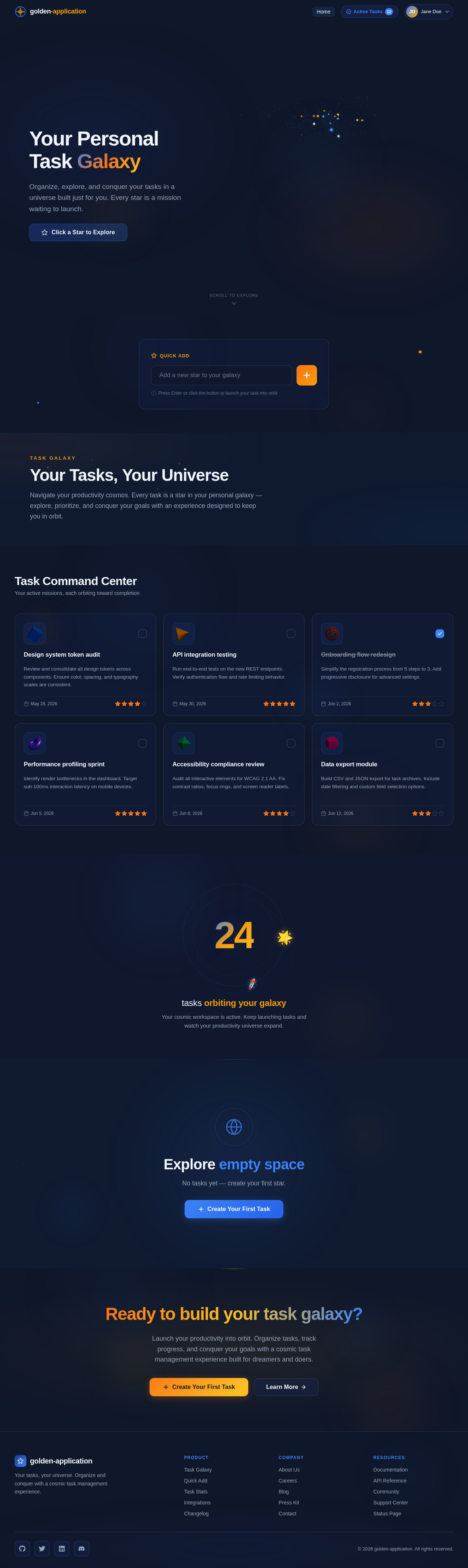
Your Personal Task Galaxy
Organize, explore, and conquer your tasks in a universe built just for you. Every star is a mission waiting to launch.
Explore empty space
No tasks yet — create your first star.
Ready to build your task galaxy?
Launch your productivity into orbit. Organize tasks, track progress, and conquer your goals with a cosmic task management experience built for dreamers and doers.
No comments yet. Be the first!