glacial-start
 Diya Trivedi
start a project to build a simple single page design of calculator

Comments (0)
Sign in to leave a comment
System Requirements
System Requirements Document for glacial-start
1. Introduction
glacial-start is a simple calculator delivered as a single-page design. The product intent is narrow and complete: one page on which a person can perform everyday arithmetic — entering numbers and operators, seeing the computed result, and clearing the entry to start over. There is no marketing story around the tool; the product is the interface, and the design brief treats that interface as a small piece of Swiss information design (a calculator as a concert poster).
The audience is anyone doing everyday arithmetic who wants a clean, instant instrument rather than a templated web form. The requester is Diya Trivedi (IN). The project name is glacial-start.
The single page is anonymous and public: no account, no sign-in, and no persisted history are part of the accepted scope.
2. System Overview
glacial-start is a React front end served alongside a shared FastAPI backend process and a MariaDB database provisioned by the initial scaffold. The calculator itself is a client-side interaction on one page: number and operator entry, a computed result display, and clearing. The backend and database exist as provisioned infrastructure and are reused for any application API the calculator needs; the accepted calculator behavior does not require application-owned identity, stored calculation history, or domain persistence, so no such entities are introduced.
Actors:
- Calculator User (active human persona) — the only human actor; enters numbers and operators, reads the result, clears to start over.
- Frontend application (system) — renders the single page, holds the current entry and result state, and computes the arithmetic result.
- Shared backend (system) — the FastAPI process available for application APIs; it supports the page but does not own any accepted human interaction.
- MariaDB (system) — provisioned storage; not required by any accepted calculator workflow.
Accepted behavior in one sentence: a Calculator User opens the single Calculator page, enters numbers and operators, sees the computed result, and clears the entry to begin a new calculation.
Removed from scope
- None. No concept was removed by the user; the only refinement restates the original single-page calculator request.
2a. Product Interpretation and Delivery Boundary
The product is a first-party, single-page web calculator. The page is publicly reachable with no identity establishment: there is no sign-in, no account, and no session continuity requirement, because the accepted workflow is a self-contained arithmetic interaction whose state lives only for the current visit. Nothing about the calculator is provider-owned or external; the entire interaction is delivered by the application's own front end.
The delivery boundary is deliberately tight. Current scope is exactly one page hosting entry, computation display, and clearing. There is no calculation history, no saved memory, no unit conversion, no scientific function set, no sharing, and no account management — none of these were requested, and the single-page constraint plus the "simple calculator" framing exclude them. The shared backend and MariaDB are provisioned infrastructure that the calculator may use for its own APIs; they do not create product requirements, and the absence of a persistence need means no domain entities or authentication are introduced.
2c. Page Content and Component Coverage
Calculator
The one and only page. Anonymous public entry; no authentication gate. It presents the calculator as a poster-like composition and hosts the complete arithmetic lifecycle.
Information and state
- Current entry (the digits and operator the user is building) and the computed result.
- Display state: an initial resting state showing a zero; an in-progress entry state; a computed-result state after equals; a cleared state returning to zero.
- Static page metadata: the page title "CALCULATOR", a short descriptive paragraph, and the numbered key legend (01 ENTER · 02 COMPUTE · 03 CLEAR).
Primary actions
- Enter digits (0–9) and a decimal point into the current entry.
- Select an operator (+, −, ×, ÷) from the operator column.
- Compute the result with the equals key.
- Clear the entry with the clear key to start over.
Supporting actions
- Read the oversized tabular result display.
- Read the key legend to understand the three interaction phases.
Domain entities
- Calculation entry (operand digits, selected operator, second operand) — transient, in-page state only.
- Computed result — transient, in-page state only.
- No persisted entity, no user record, no history record.
Component responsibilities
- Page shell / poster grid — 12-column layout; left column holds title, paragraph, and numbered legend; right column holds the calculator panel; full-width hairline measurement rule with 12 tick marks above the title.
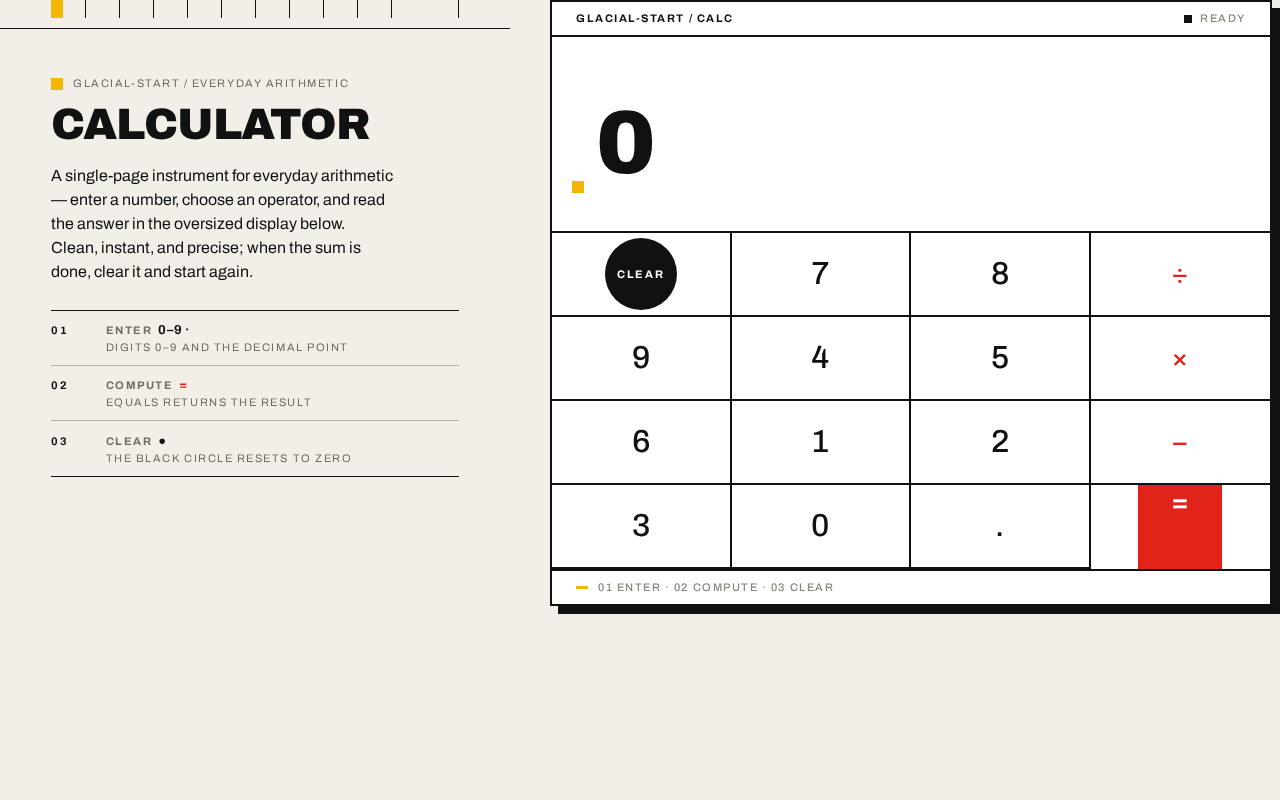
- Display — oversized flush-left tabular numerals (clamp 56px→128px, weight 900, tabular-nums), ruled off from the key matrix by a 2px black line, with a 12px mustard square marker at its left edge.
- Key matrix — 4×5 ruled grid of 0px-radius square keys separated by 2px black rules; digit keys, decimal key, operator column in Swiss red, one black circle for CLEAR, one solid red square for equals, placed asymmetrically.
- Calculator panel — pure white surface, 2px black border, hard 8px black offset shadow.
- Key feedback — instant 90ms background flip to black with white glyph on press; single 200ms colour wipe on the equals key after computation; reduced-motion removes the wipe and keeps the state flip.
States
- Loading — the page is static client-rendered content; no blocking loading state is required. If any backend call is used, the display shows the resting zero until the interaction is ready.
- Empty / resting — display shows zero; no operator selected; no pending computation.
- In progress — digits and an operator are being entered; display reflects the current entry.
- Success — equals produces a computed result shown in the display; the equals key performs its colour wipe.
- Error — an invalid operation (for example division by zero) surfaces a clear in-display error indication rather than a silent wrong number; the user can clear and re-enter.
- Recovery — the clear key returns the page to the resting zero state at any point, including after an error, so the user can always start a new calculation.
3. Functional Requirements
FR-1 — Single-page calculator delivery (explicit) As a Calculator User, I should get a simple calculator delivered as a single page, so that I can do everyday arithmetic in one place without navigating anywhere.
- Trigger/input: opening the product.
- Observable result: exactly one page, the Calculator page, is presented; no other destination exists.
- Access state: anonymous, public.
- Failure/recovery: if the page fails to render, reloading returns the same single page.
- Continuation: the user proceeds to enter numbers.
FR-2 — Number and operator entry (explicit) As a Calculator User, I should enter numbers and operators, so that I can build the arithmetic expression I want to compute.
- Trigger/input: pressing digit keys, the decimal key, and an operator key on the key matrix.
- Observable result: the display reflects the digits and selected operator as they are entered.
- Access state: anonymous, public.
- Failure/recovery: the clear key resets the entry to zero at any time.
- Continuation: the user presses equals to compute.
FR-3 — Computed result display (explicit) As a Calculator User, I should see the computed result, so that I get the answer to my arithmetic.
- Trigger/input: pressing the equals key after a valid entry.
- Observable result: the display shows the computed result in the oversized tabular display; the equals key performs its 200ms colour wipe.
- Access state: anonymous, public.
- Failure/recovery: an invalid operation (e.g. division by zero) shows a clear error indication in the display; the user clears and re-enters.
- Continuation: the user reads the result, then either continues with a new calculation or clears.
FR-4 — Clearing to start over (explicit) As a Calculator User, I should clear the entry, so that I can start a new calculation from a clean state.
- Trigger/input: pressing the clear key (the black circle key).
- Observable result: the display returns to the resting zero state and any pending entry or result is discarded.
- Access state: anonymous, public.
- Failure/recovery: clearing is always available, including after an error.
- Continuation: the user begins a new entry.
FR-5 — Poster-style single-page presentation (explicit, from the design direction) As a Calculator User, I should see the calculator presented as a clear, poster-like instrument, so that the tool feels designed and precise rather than templated.
- Trigger/input: opening the page.
- Observable result: the page renders the Swiss-grid composition — full-bleed warm paper ground, hairline measurement rule with 12 tick marks, flush-left "CALCULATOR" title, numbered key legend, and the white ruled calculator panel with hard offset shadow.
- Access state: anonymous, public.
- Failure/recovery: at 375px, 768px, and 1280px all readable text and controls remain whole and inside the viewport; the key grid stays 4 columns with keys ≥64px tall on mobile.
- Continuation: the user interacts with the calculator as in FR-2 through FR-4.
4. User Personas
Calculator User
Product context. A person doing everyday arithmetic — a quick sum, a percentage, a division — who wants an instant, clean answer. They arrive at the single Calculator page anonymously, with no account and no expectation of saved history. The product is a small utility, and they judge it on whether it answers immediately and looks like a deliberate instrument.
Primary goal. Enter a calculation and read its result quickly, then clear and start the next one.
Distinct accepted responsibilities.
- Enter digits, a decimal point, and an operator into the current entry (FR-2).
- Press equals to compute and read the result in the oversized display (FR-3).
- Press clear to reset to zero and start over (FR-4).
- Read the page's title, paragraph, and numbered key legend to understand the three phases (FR-5).
Relevant inputs or decisions. Which numbers and operator to enter; when to compute; when to clear. The user decides when a calculation is finished and when to begin a new one.
Interactions with other accepted participants. The Calculator User is the only human participant. The frontend application renders the page and holds the transient entry and result state; the shared backend and MariaDB are infrastructure that do not require the user's interaction. There is no counterparty, recipient, or approver.
Observable success. The display shows the correct computed result after equals; the clear key returns the display to zero; the page remains legible and whole at 375px, 768px, and 1280px.
5. Core User Flows
Flow 1 — Perform a calculation
- Starting context. The Calculator User opens the product in a browser. The single Calculator page loads anonymously; the display rests at zero.
- Entry. On the Calculator page, the user presses digit keys and, if needed, the decimal key; the display reflects the digits as entered. (FR-2)
- Operator selection. The user presses an operator key in the red operator column; the display reflects the selected operator. (FR-2)
- Second operand. The user presses the digit keys for the second operand; the display reflects them. (FR-2)
- Commitment. The user presses the equals key (the solid red square). The frontend computes the result and the display shows it in oversized tabular numerals; the equals key performs its 200ms colour wipe. (FR-3)
- Observable result. The user reads the computed result.
- Continuation. The user either presses clear to start a new calculation (Flow 2) or begins a new entry directly.
Flow 2 — Clear and start over
- Starting context. The user is on the Calculator page with an in-progress entry, a computed result, or an error indication in the display.
- Action. The user presses the clear key (the black circle key). (FR-4)
- Observable result. The display returns to the resting zero state; any pending entry or result is discarded.
- Continuation. The user begins a new entry (Flow 1, step 2).
Flow 3 — Recover from an invalid operation
- Starting context. The user has entered an operation that cannot be computed (for example division by zero) and pressed equals.
- Observable result. The display shows a clear error indication instead of a silent wrong number. (FR-3 failure/recovery)
- Recovery. The user presses the clear key; the display returns to zero. (FR-4)
- Continuation. The user re-enters a valid calculation (Flow 1).
6. Visuals Colors and Theme
The creative direction is authoritative: Swiss grid arithmetic — a calculator as a concert poster, after Josef Müller-Brockmann. Calm confidence and precision; utility first; no playfulness, no enterprise density.
Mode. Light mode only.
Colour tokens (exact hex by role)
- Background (warm paper ground):
#F2EFE9 - Surface (calculator panel):
#FFFFFF - Text / key grid rules / type:
#111111 - Primary (Swiss red — equals key and operator column only):
#E2231A - Accent (mustard — 12px square marker beside the display and one thin rule only):
#F2B705 - Muted (secondary small-caps labels):
#8A857C
Proportion. 70% paper, 20% black/white panel, 10% red/yellow signal. Red appears exactly twice: the operator column glyphs and the equals key. No blue or indigo of any kind.
Typography
- Headings and body: Archivo.
- Display result: Archivo at weight 900, tabular numerals, flush-left, ragged-right, tracking −0.02em,
clamp(56px, 11vw, 128px). - Page title: 28px → 44px, heavy black caps.
- Key numerals: 24px → 32px. Operator glyphs: 20px → 28px.
- Labels: 11px uppercase, 0.14em letterspacing, fixed. Body: 16px.
- Scale: 1.414 modular.
Shape language. Hard edges only — 0px radius everywhere. Keys are square white blocks separated by 2px black rules like a grid diagram. The panel has a 2px black border and a hard 8px black offset shadow. One pure geometric gesture: a perfect black circle (clear key) and a red square (equals), placed asymmetrically in the key matrix.
Spacing rhythm. Strict 12-column grid; no gaps in the key matrix other than the 2px rules; 16px page margins on mobile; full-width hairline measurement rule with 12 tick marks at the column intervals above the title.
Imagery style. No photography and no illustration. The imagery is the interface itself: the ruled key matrix, the tabular numerals, and the diagrammatic measurement rule.
Avoid. Rounded or pill buttons; soft drop shadows; glass or blur surfaces; centred headline + subtext + button hero; gradients, blobs, decorative illustration; blue/indigo accents; hover-lift cards; Inter, Roboto, Helvetica, Arial, Poppins, or system-ui as the named family; animated particles, parallax, or scroll-scrubbed motion; cropping or shrinking the display number or any key label at 375px.
7. Signature Design Concept
The first screen is a poster, not a SaaS hero. A full-bleed warm paper ground (#F2EFE9) carries a hairline black measurement rule running edge-to-edge near the top, with 12 small tick marks at the 12-column intervals — the page reads as a Swiss grid poster. The word CALCULATOR is set flush-left at 28–44px in heavy black caps on the left third, stacked over a small paragraph and the numbered key legend (01 ENTER · 02 COMPUTE · 03 CLEAR) in 11px uppercase.
The calculator itself is the dominant object: a white panel with a 2px black border and a hard 8px black offset shadow occupying the right two-thirds, its display ruled off from the key matrix by a 2px black line, showing an oversized black tabular zero with a 12px mustard square marker at its left edge. Below, a 4×5 matrix of square keys separated by 2px black rules, with the operator column in Swiss red, one black circle for CLEAR, and one solid red square for equals placed asymmetrically. Nothing is centred, nothing floats, no gradient, no button pills.
8. Interaction Model & Motion Direction
Interaction Model: Static Motion Tempo: restrained Hero Dimensionality: flat
Landing Hero Motion Brief
- Focal subject. The calculator panel itself — the white 2px-ruled card with its oversized tabular zero and the ruled 4×5 key matrix — set against the warm paper ground and the hairline measurement rule.
- Input → transformation → outcome thesis. A key press (input) flips that key's background to black with a white glyph for 90ms (transformation), confirming the entry; the display digits swap without fade to show the new entry or computed result (outcome). Pressing equals adds a single 200ms colour wipe on the equals key after the computation.
- Motion vocabulary. Instant, mechanical key feedback (90ms background flip, no easing flourish); result digits swap without fade; one 200ms colour wipe on the equals key after a computation. No particles, no parallax, no bounce.
- Composed first frame. Full-bleed paper ground; hairline measurement rule with 12 tick marks near the top; flush-left "CALCULATOR" title over the paragraph and numbered legend on the left; the white ruled calculator panel with hard offset shadow on the right, display showing a black tabular zero with the mustard square marker, key matrix below.
- Reduced-motion state.
prefers-reduced-motionremoves the 200ms colour wipe and keeps the instant state flip; the page remains fully usable and static.
9. Non-Functional Requirements
- Single-page constraint (explicit): the product is exactly one page; no additional routes or destinations. Rationale: the user asked for a simple single-page design.
- Responsive legibility (explicit, from the design direction): at 375px, 768px, and 1280px, all headlines, labels, numbers, and controls stay entirely inside the viewport and their container; the key grid stays 4 columns with keys ≥64px tall on mobile; nothing wraps or crops. Rationale: readable text and controls must stay whole at every viewport.
- Accessibility of motion (explicit, from the design direction):
prefers-reduced-motionremoves the equals colour wipe and keeps the state flip. Rationale: usable static arrangement under reduced motion. - Anonymous access (explicit): the page is publicly reachable with no sign-in, account, or session continuity. Rationale: the accepted workflow is a self-contained arithmetic interaction; no identity is required.
- No persistence requirement (explicit): no calculation history or saved state is part of scope; the provisioned MariaDB is not required by any accepted workflow. Rationale: the user asked for a simple calculator, not a history feature.
- Performance expectation (basic_default): key feedback and result display are immediate (the 90ms flip and instant digit swap); no blocking network round-trip is required for arithmetic. Rationale: the direction calls for an instrument that answers instantly.
10. Tech Stack
- Frontend: React application UI (provisioned scaffold), rendering the single Calculator page.
- Backend: shared FastAPI process for application APIs and domain modules (provisioned scaffold); reused for any calculator API rather than adding a new service.
- Database: MariaDB (provisioned scaffold); available but not required by the accepted calculator workflow.
- Containerization: Docker / docker-compose for the provisioned services (backend, database, frontend).
- Typography: Archivo (headings and body), loaded as a web font.
- No additional infrastructure is required for the accepted workflows; the calculator arithmetic runs in the front end.
11. Assumptions and Constraints
- Assumption (required_inference): the calculator performs basic arithmetic — addition, subtraction, multiplication, and division — with digit and decimal entry, since the user asked for a "simple calculator" without naming a function set. No scientific, memory, percentage, or unit-conversion functions are included.
- Assumption (required_inference): the calculator state is transient and lives only for the current visit; there is no saved history or account.
- Constraint (explicit): the design must be a single page.
- Constraint (explicit): the product is a simple calculator.
- Constraint (explicit, design direction): the palette, Archivo typography, hard-edged 0px-radius shape language, 12-column Swiss grid, and restrained motion are binding; the generic indigo/blue-on-white SaaS template is forbidden.
- Constraint (explicit, design direction): readable text and controls stay whole at 375px, 768px, and 1280px.
12. Glossary
- Calculator page — the single, anonymous, public page that hosts the entire calculator interaction.
- Display — the oversized tabular numeral area at the top of the calculator panel showing the current entry or computed result.
- Key matrix — the 4×5 ruled grid of square keys (digits, decimal, operators, clear, equals) separated by 2px black rules.
- Operator column — the column of operator keys (+, −, ×, ÷) rendered in Swiss red.
- Clear key — the black circle key that resets the display to zero.
- Equals key — the solid red square key that computes the result and performs the 200ms colour wipe.
- Measurement rule — the full-width hairline black rule with 12 tick marks at the 12-column intervals above the title.
- Key legend — the numbered 11px uppercase legend (01 ENTER · 02 COMPUTE · 03 CLEAR) in the left column.
- Swiss grid — the strict 12-column layout system derived from Müller-Brockmann's geometric rigour.
glacial-start / everyday arithmetic
CALCULATOR
A single-page instrument for everyday arithmetic — enter a number, choose an operator, and read the answer in the oversized display below. Clean, instant, and precise; when the sum is done, clear it and start again.
- 01EnterDigits 0–9 and the decimal point
- 02ComputeEquals returns the result
- 03ClearThe black circle resets to zero
glacial-start / everyday arithmetic
CALCULATOR
A single-page instrument for everyday arithmetic — enter a number, choose an operator, and read the answer in the oversized display below. Clean, instant, and precise; when the sum is done, clear it and start again.
- 01EnterDigits 0–9 and the decimal point
- 02ComputeEquals returns the result
- 03ClearThe black circle resets to zero
No comments yet. Be the first!