glacial-househelp
 TinyTales
Create an application to get househelp needs anytime like procto


Comments (0)
Sign in to leave a comment
System Requirements
System Requirements Document for glacial-househelp
1. Introduction
glacial-househelp is an on-demand househelp application: a household can get help with a household need at any time, and a househelp provider can find and take on that work. The product intent is a two-sided marketplace with a single, honest promise — help is available whenever it is needed, and the people who provide it are real, accountable workers who accept and complete the job.
The audience is everyday households in India who need household help on demand (cleaning, laundry, ironing, mopping, and similar household tasks) and the househelp providers who offer that labor. The application is built for both sides of that exchange: requesters who browse services, submit a request for a specific household need, and track it to completion; and providers who review incoming requests, accept the ones they can serve, and mark the work done.
This document is the System Requirements Document for the product. It defines the current delivery, the two accepted personas, the seven-page information architecture, the functional requirements, the end-to-end flows, and the visual and technical direction.
2. System Overview
glacial-househelp is delivered as a custom React web application backed by a shared FastAPI service and a MariaDB database. The application owns identity: requesters and providers self-enroll with a role, verify themselves on return, and then reach role-restricted working surfaces. All durable state — requests, their status, and the jobs providers accept — is application-owned and persisted.
Actors
- Household Requester (human persona): browses available househelp services, submits a request for a specific household need, and tracks that request until it is completed.
- Househelp Provider (human persona): views incoming househelp requests, accepts one to fulfill it, and marks accepted work completed.
- Application backend (system actor): persists requests and jobs, enforces role-restricted access, and moves request state from requested to accepted to done.
Accepted behavior at a glance
- On-demand availability: househelp can be requested at any time, day or night.
- Service browsing and request submission for a specific household need.
- Provider review and acceptance of incoming requests.
- Provider completion of accepted jobs.
- Self-service enrollment with role selection, and returning verification before protected state is reached.
Delivery shape
- Frontend: React application UI.
- Backend: one shared FastAPI process hosting the application APIs and domain modules.
- Database: MariaDB for application-owned persistent data.
Removed from scope
- None. No concept from the authoritative requirement thread was removed or superseded.
2a. Product Interpretation and Delivery Boundary
The product is a first-party, application-owned marketplace. Both sides of the exchange — the household asking for help and the provider doing the work — are served by the same application, and the application itself holds the durable record of every request and job. There is no external provider surface and no headless delivery: the request lifecycle lives entirely inside glacial-househelp.
Access is split into two boundaries. The anonymous boundary covers Landing, Login, and Sign Up: a visitor can learn what the product does, and a new or returning requester or provider can establish or verify identity and choose a role. The protected boundary covers Services, My Requests, Incoming Requests, and My Jobs, each restricted to the role that owns that work. A requester never sees provider job surfaces, and a provider never sees another household's request history.
The current horizon is the complete request-to-completion loop described in this document. Nothing beyond that loop — payments, ratings, scheduling calendars, messaging, or provider verification workflows — is part of the current delivery, and none is implied by the pages below.
2c. Page Content and Component Coverage
Landing
- Purpose and access: Anonymous public entry surface for both personas. Explains on-demand househelp, who it is for, and what it does before identity is established.
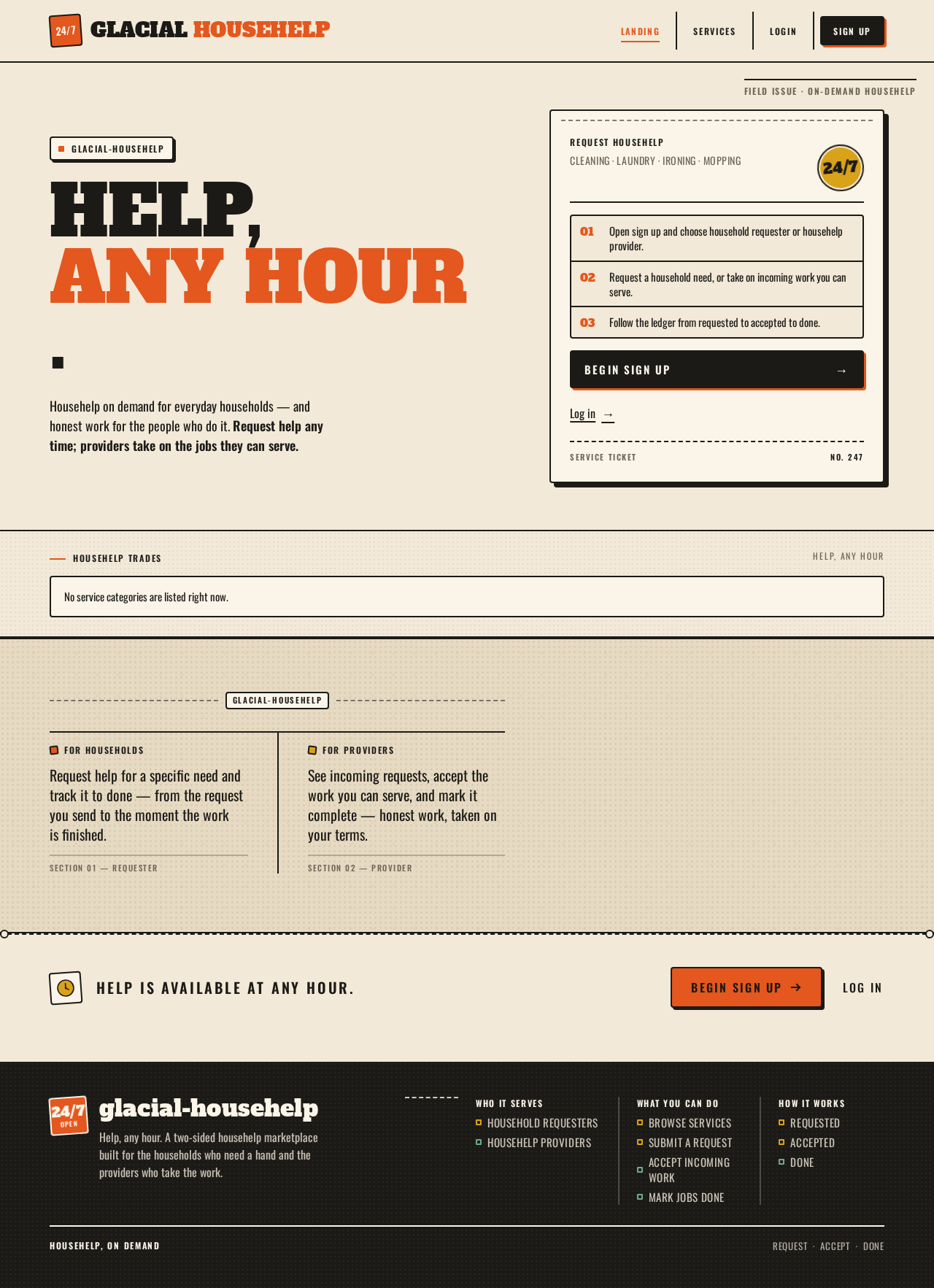
- Information and state: Product promise ("HELP, ANY HOUR."), a short statement of what the product does for households and for providers, the trade-badge service strip, and the two entry paths (sign up, log in). No request or job data is shown.
- Primary actions: Begin sign up (with role selection on the Sign Up page); go to Login for returning users.
- Supporting actions: Read the service strip to understand the categories of help available.
- Domain entities: None persisted; presents service categories as static badge content.
- Components: Hero lockup (stacked headline, orange second line), thick-bordered "service ticket" card with perforated top edge, rotated 24/7 stamp badge, solid ink CTA, ruled trade-badge icon strip (broom, bucket, iron, mop, laundry basket), halftone section band.
- States: Static content only. No loading, empty, or error states apply beyond the page rendering; if the page fails to load, the visitor can retry by reloading.
Login
- Purpose and access: Anonymous identity-access surface. Returning requesters and providers verify their identity to reach their protected request and job state.
- Information and state: Email and password fields, a submit control, and a link to Sign Up for visitors without an account.
- Primary actions: Submit credentials to verify identity and continue to the role-appropriate protected surface.
- Supporting actions: Navigate to Sign Up.
- Domain entities: Account (email, password credential, role).
- Components: Ruled form panel with all-caps Oswald labels, ink-bordered inputs, solid ink submit button with hard offset shadow, inline error region.
- States:
- Loading: submit control shows a pending state while verification runs.
- Empty: fields blank on arrival.
- Success: identity verified; the user is taken to the surface matching their role (requester → Services or My Requests; provider → Incoming Requests or My Jobs).
- Error: invalid credentials show an inline message and keep the entered email; the user can correct and resubmit.
- Recovery: a failed verification leaves the user on Login with no protected state exposed.
Sign Up
- Purpose and access: Anonymous identity-access surface. Self-starting requesters and providers enroll with a role so they can create and manage application-owned durable requests and jobs.
- Information and state: Email, password, and an explicit role selection between Household Requester and Househelp Provider.
- Primary actions: Create the account with the chosen role and continue into the matching protected surface.
- Supporting actions: Navigate to Login if an account already exists.
- Domain entities: Account (email, password credential, role).
- Components: Ruled form panel, role selection rendered as two chunky outlined tiles with badge pictograms, ink-bordered inputs, solid orange or ink submit button with hard offset shadow, inline error region.
- States:
- Loading: submit control shows a pending state while the account is created.
- Empty: fields blank, no role preselected.
- Success: account created with the selected role; the user lands on the surface for that role.
- Error: missing fields, invalid email, weak or mismatched password, or an email already in use each show an inline message; the user corrects and resubmits.
- Recovery: a failed submission preserves entered values except the password.
Services
- Purpose and access: Protected, role-restricted to Household Requester. The requester browses available househelp services and submits a request for a specific household need.
- Information and state: The catalog of available househelp services, each presented as a stamped trade card with its name and a short description; the requester's selected service and the household-need details they enter.
- Primary actions: Select a service and submit a request describing the specific household need.
- Supporting actions: Review service descriptions before choosing; move to My Requests after submitting.
- Domain entities: Service (name, description, badge icon), Request (service, household-need description, status, requester, created time).
- Components: Trade-card grid with 2px ink borders and all-caps labels, request form panel with a household-need field, submit button with hard offset shadow, confirmation stamp on success.
- States:
- Loading: card grid shows a ruled skeleton while services load.
- Empty: if no services are available, a ruled empty panel states that no services are listed right now.
- Success: the request is created with status REQUESTED and the requester is offered a path to My Requests.
- Error: a failed submission shows an inline message and preserves the entered need; the requester can retry.
- Recovery: a request that fails to save is not shown as created; the requester remains on Services with their input intact.
My Requests
- Purpose and access: Protected, role-restricted to Household Requester. The requester tracks submitted househelp requests until completion.
- Information and state: A ruled, ledger-style list of the requester's own requests, each row showing the service, the household need, and a rotated status stamp — REQUESTED (orange), ACCEPTED (mustard), or DONE (forest).
- Primary actions: Review the status of each request and follow it through to DONE.
- Supporting actions: Return to Services to submit another request.
- Domain entities: Request (service, household-need description, status, assigned provider, created and updated times).
- Components: Ruled table-like rows with hairline ink rules, all-caps Oswald column labels, rotated rubber-stamp status labels, empty-state panel.
- States:
- Loading: ruled skeleton rows while requests load.
- Empty: a ruled panel explains that no requests have been made yet, with a link to Services.
- Success: rows reflect the current status of each request, updating to ACCEPTED when a provider accepts and DONE when the provider completes it.
- Error: if requests fail to load, an inline message offers a retry.
- Recovery: retry reloads the list without losing the requester's place.
Incoming Requests
- Purpose and access: Protected, role-restricted to Househelp Provider. The provider views incoming househelp requests and accepts one to fulfill it.
- Information and state: A ruled, ledger-style list of open requests from requesters, each row showing the service, the household need, and a REQUESTED stamp.
- Primary actions: Accept a request, which assigns it to the provider and moves it to their jobs.
- Supporting actions: Review the household need before accepting; move to My Jobs after accepting.
- Domain entities: Request (service, household-need description, status, requester, assigned provider).
- Components: Ruled table-like rows with hairline ink rules, all-caps Oswald labels, REQUESTED stamp, accept control with hard offset shadow, empty-state panel.
- States:
- Loading: ruled skeleton rows while requests load.
- Empty: a ruled panel states that no incoming requests are waiting right now.
- Success: the accepted request leaves the incoming list and appears in My Jobs with an ACCEPTED stamp.
- Error: if acceptance fails — for example because another provider accepted first — an inline message explains it and the list refreshes.
- Recovery: the provider can retry on another request; no partial acceptance is shown.
My Jobs
- Purpose and access: Protected, role-restricted to Househelp Provider. The provider marks accepted househelp requests as completed.
- Information and state: A ruled, ledger-style list of the provider's accepted jobs, each row showing the service, the household need, and an ACCEPTED stamp until completed.
- Primary actions: Mark an accepted job as completed, which moves it to DONE.
- Supporting actions: Return to Incoming Requests to accept more work.
- Domain entities: Job (the accepted request, assigned provider, status, completed time).
- Components: Ruled table-like rows with hairline ink rules, all-caps Oswald labels, ACCEPTED and DONE stamps, complete control with hard offset shadow, empty-state panel.
- States:
- Loading: ruled skeleton rows while jobs load.
- Empty: a ruled panel states that no jobs have been accepted yet, with a link to Incoming Requests.
- Success: the completed job shows a DONE stamp in forest, and the requester's My Requests reflects DONE.
- Error: if completion fails to save, an inline message appears and the job stays ACCEPTED.
- Recovery: the provider can retry marking the job complete.
3. Functional Requirements
FR-1 — On-demand availability (explicit) As a Household Requester, I should be able to get househelp at any time, so that a household need is never blocked by the hour.
- Trigger: the requester opens the application at any time of day or night.
- Observable result: Services and request submission are available without a time-of-day restriction.
- Access: protected, role-restricted to Household Requester.
- Failure/recovery: if the service is unreachable, the requester sees an error and can retry.
- Continuation: after submission, the request appears in My Requests with status REQUESTED.
FR-2 — Browse services and request help for a specific need (explicit) As a Household Requester, I should be able to browse available househelp services and request help for a specific household need, so that the right kind of help is sent for my situation.
- Trigger: the requester opens Services.
- Input: a selected service and a description of the specific household need.
- Observable result: a request is created with status REQUESTED, owned by the requester, and visible in My Requests.
- Access: protected, role-restricted to Household Requester.
- Failure/recovery: an invalid or failed submission shows an inline error and preserves the entered need for retry.
- Continuation: the requester tracks the request in My Requests.
FR-3 — Provider views and accepts incoming requests (explicit) As a Househelp Provider, I should be able to view incoming requests and accept one to fulfill the household work, so that I can take on work I can serve.
- Trigger: the provider opens Incoming Requests.
- Input: selection of a specific open request.
- Observable result: the request is assigned to that provider, leaves the incoming list, and appears in My Jobs with status ACCEPTED; the requester's My Requests shows ACCEPTED.
- Access: protected, role-restricted to Househelp Provider.
- Failure/recovery: if the request was already accepted by another provider, an inline message explains it and the list refreshes.
- Continuation: the provider works the job and later marks it complete in My Jobs.
FR-4 — Provider marks accepted jobs completed (required_inference) As a Househelp Provider, I should be able to mark an accepted job as completed, so that the household knows the work is done and the request closes.
- Trigger: the provider opens My Jobs and selects an accepted job.
- Observable result: the job moves to status DONE, and the requester's My Requests shows DONE.
- Access: protected, role-restricted to Househelp Provider.
- Failure/recovery: if the save fails, an inline message appears and the job remains ACCEPTED for retry.
- Continuation: the provider returns to Incoming Requests for more work.
FR-5 — Self-service enrollment with role selection (required_inference) As a visitor, I should be able to enroll myself and choose whether I am a Household Requester or a Househelp Provider, so that I reach the right working surface.
- Trigger: the visitor opens Sign Up from Landing or Login.
- Input: email, password, and a role selection.
- Observable result: an account is created with that role, and the user lands on the matching protected surface.
- Access: anonymous.
- Failure/recovery: validation errors and an email already in use show inline messages and preserve entered values.
- Continuation: the user proceeds into their role's surface.
FR-6 — Returning verification (required_inference) As a returning Household Requester or Househelp Provider, I should verify my identity before reaching my protected request or job state, so that my requests and jobs stay private to me.
- Trigger: the returning user opens Login.
- Input: email and password.
- Observable result: identity is verified and the user reaches the surface matching their role.
- Access: anonymous entry; protected state remains unavailable until verification succeeds.
- Failure/recovery: invalid credentials show an inline message and keep the entered email for correction.
- Continuation: the user continues into their role's surface.
FR-7 — Requester identity binds requests (required_inference) As a Household Requester, I should have my submitted requests bound to my identity, so that I can submit and track only my own requests.
- Trigger: the requester submits a request while verified.
- Observable result: the request records its requester, and My Requests lists only that requester's requests.
- Access: protected, role-restricted to Household Requester.
- Failure/recovery: an unverified visitor is directed to Login rather than shown request state.
- Continuation: the requester tracks the request to DONE.
FR-8 — Provider identity and role bind jobs (required_inference) As a Househelp Provider, I should have my accepted jobs bound to my identity and role, so that I can view incoming requests and mark only my own accepted jobs completed.
- Trigger: the provider accepts a request while verified.
- Observable result: the job records its assigned provider, and My Jobs lists only that provider's jobs.
- Access: protected, role-restricted to Househelp Provider.
- Failure/recovery: an unverified visitor is directed to Login rather than shown job state.
- Continuation: the provider completes the job and returns for more work.
4. User Personas
Household Requester
- Product context: A household in India that needs help with a household task — cleaning, laundry, ironing, mopping, or a similar chore — and needs it at whatever hour the need arises. They are not shopping for a subscription or a scheduled service; they want help now, for a specific need.
- Primary goal: Get a specific household need handled by a real provider, and know when it has been accepted and completed.
- Distinct responsibilities: Browsing the service catalog, describing the specific household need, submitting the request, and tracking its status through REQUESTED → ACCEPTED → DONE. The requester does not accept work or mark jobs complete; those belong to the provider.
- Inputs and decisions: Which service matches the need, and how to describe the need clearly enough for a provider to accept it.
- Interactions with other participants: The requester's submitted request is what the Househelp Provider sees in Incoming Requests; the provider's acceptance and completion are what change the requester's status stamps.
- Observable success: The request appears in My Requests with a REQUESTED stamp, changes to ACCEPTED when a provider takes it, and reaches DONE when the work is finished.
Househelp Provider
- Product context: A househelp worker who offers household services and takes on work through the platform. They need to see what work is available, judge whether they can serve it, and close out what they finish.
- Primary goal: Find incoming requests they can serve, accept them, and mark the work completed.
- Distinct responsibilities: Reviewing incoming requests, accepting one (which assigns it to them), and marking accepted jobs completed. The provider does not create requests or browse the catalog as a requester.
- Inputs and decisions: Whether a request's household need is one they can fulfill, and when the work is actually done.
- Interactions with other participants: The provider acts on requests submitted by Household Requesters; accepting and completing them changes what those requesters see in My Requests.
- Observable success: An accepted request appears in My Jobs with an ACCEPTED stamp and moves to DONE when the provider marks it complete.
5. Core User Flows
Flow A — A household requests help for a specific need
- The Household Requester opens the application at any hour and lands on Landing, which states the on-demand promise and shows the trade-badge service strip.
- The requester chooses to begin and goes to Sign Up (first use) or Login (returning).
- On Sign Up, the requester enters email and password and selects the Household Requester role, then submits. On success they land on Services.
- On Services, the requester reviews the stamped trade cards and selects the service matching the household need.
- The requester describes the specific household need in the request form and submits.
- The request is created with status REQUESTED and bound to the requester. The requester is offered a path to My Requests.
- On My Requests, the requester sees the new row with a REQUESTED stamp in orange.
- When a provider accepts, the row's stamp changes to ACCEPTED in mustard. When the provider completes the work, it changes to DONE in forest.
- Failure/recovery: if the request fails to save, an inline error appears on Services and the entered need is preserved for retry. If My Requests fails to load, a retry reloads the list.
- Continuation: the requester can return to Services to submit another request at any time.
Flow B — A provider finds and takes on work
- The Househelp Provider opens the application and goes to Sign Up (first use) or Login (returning).
- On Sign Up, the provider enters email and password and selects the Househelp Provider role, then submits. On success they land on Incoming Requests.
- On Incoming Requests, the provider reviews the ruled rows of open requests, each showing the service, the household need, and a REQUESTED stamp.
- The provider selects a request they can serve and accepts it.
- The request is assigned to that provider, leaves the incoming list, and appears in My Jobs with an ACCEPTED stamp; the requester's My Requests shows ACCEPTED.
- Failure/recovery: if another provider accepted the request first, an inline message explains it and the list refreshes; the provider can accept a different request.
- Continuation: the provider returns to Incoming Requests for more work.
Flow C — A provider completes an accepted job
- The Househelp Provider opens My Jobs and sees their accepted jobs with ACCEPTED stamps.
- After finishing the household work, the provider selects the job and marks it completed.
- The job moves to DONE with a forest stamp, and the requester's My Requests reflects DONE.
- Failure/recovery: if the completion fails to save, an inline message appears and the job stays ACCEPTED; the provider can retry.
- Continuation: the provider returns to Incoming Requests to accept more work.
Flow D — A returning user verifies identity
- A returning Household Requester or Househelp Provider opens Login.
- They enter email and password and submit.
- On success, identity is verified and they reach the surface matching their role — Services or My Requests for a requester, Incoming Requests or My Jobs for a provider.
- Failure/recovery: invalid credentials show an inline message and keep the entered email; no protected state is exposed. The user corrects and resubmits.
6. Visuals Colors and Theme
The visual register is bold, honest, hand-built househelp — a local workwear brand or neighborhood co-op, not a gig-economy startup. The muse is Aaron Draplin: thick lines, badge-and-stamp language, kraft paper, and sturdy type.
Color tokens (light mode)
| Role | Hex | Use |
|---|---|---|
| Background | #F2E9D8 | Kraft-paper cream ground across all pages |
| Surface | #FBF5E9 | Warm off-white panels, cards, form fields |
| Text | #1B1A17 | Ink-black type and thick rules/borders |
| Primary | #1B1A17 | Solid ink buttons and primary structural elements |
| Accent | #E4571E | Signal orange for primary CTAs, active states, REQUESTED stamp, and the "ANY HOUR" headline line |
| Muted | #6E6558 | Secondary labels and supporting text |
| Badge — mustard | #D9A21B | ACCEPTED stamp and secondary badge codes |
| Badge — forest | #2F5D46 | DONE stamp and secondary badge codes |
Orange stays under 10% of any screen so it lands like a stamp, not a wash. No blue or indigo appears as a primary or accent color.
Typography
- Headings: Alfa Slab One at heavy weight for display headlines and the wordmark, all-caps or sentence case with tight leading.
- Subheads, labels, and eyebrow tags: Oswald 500/600, all-caps with wide letterspacing.
- Body: Oswald 400 at a comfortable reading size.
- Scale: 1.333 modular — 88 / 64 / 48 / 32 / 20 / 16, with a mobile display floor of 44px. Eyebrow labels at 12px all-caps with +0.14em tracking.
Shape language
- Chunky 2px ink borders; hard 4px corner radii, never pill.
- Badge-and-stamp motifs, ruled panels, halftone textures, and dashed "ticket" dividers.
- Buttons are solid ink or orange rectangles with a 2px black outline and a 3px offset hard shadow — no soft blur.
Layout
- Poster-like sections on a visible field grid.
- Landing uses a big badge-like hero lockup with the headline stacked left and a thick-bordered "service ticket" card right.
- Services render as stamped trade cards with thick rules and all-caps labels.
- My Requests, Incoming Requests, and My Jobs use ruled table-like rows with a status stamp (REQUESTED / ACCEPTED / DONE) in orange, mustard, or forest rather than pills.
Imagery
- Thick-line vector icons drawn like Draplin field badges — broom, bucket, iron, mop, laundry basket — each in a 2px stroke with an orange or mustard fill.
- Halftone-treated photography of hands at work (folded laundry, a clean counter) as section bands, never as hero stock-people.
- A hand-drawn map motif for the "available in your area" strip.
Accessibility and fit
- Readable text and controls stay whole at 375px, 768px, and 1280px, wrapping or scaling with
clamp(...)to fit; no element covers any part of them. - Imagery and decoration may bleed, rotate, or overlap as the direction asks, provided they cover no readable text or control.
- Under
prefers-reduced-motion, everything appears instantly with no rotation.
7. Signature Design Concept
The public entry is a full-bleed kraft ground (#F2E9D8) carrying a giant Alfa Slab One headline — "HELP, ANY HOUR." — set at clamp(44px, 9vw, 96px), stacked flush-left across seven of twelve columns, with "ANY HOUR" on its own line in signal orange (#E4571E). To its right sits a thick 2px-ink-bordered "service ticket" card on off-white (#FBF5E9) with a perforated dashed top edge, an all-caps Oswald "REQUEST HOUSEHELP" label, a stamped 24/7 badge rotated −4°, and a solid ink CTA with a hard 3px offset shadow. Underneath, a ruled strip of trade-badge icons (broom, bucket, iron, mop, laundry basket) runs as a static badge row, cut by the viewport edge and wrapping on mobile. There is no centered stack, no gradient, and no floating card. The concept recomposes only accepted content — the product promise, the entry paths, and the service categories — into a single poster-like lockup.
8. Interaction Model & Motion Direction
Interaction Model: Animated Motion Tempo: restrained Hero Dimensionality: flat
Landing Hero Motion Brief
- Focal subject: the stacked "HELP, ANY HOUR." headline and the thick-bordered service ticket card beside it.
- Input → transformation → outcome thesis: as the page settles, the headline and ticket card snap into place with a slight stamp effect (scale 0.98 → 1 over 140ms), and the 24/7 badge rotates in 3° with a quick settle — the page lands like a stamp pressed onto kraft paper, then holds still.
- Motion vocabulary: snap-in transitions with a slight stamp effect on cards and buttons; status stamps rotate in 3° with a quick settle. No parallax, no floats, no bounces beyond the stamp settle.
- Composed first frame: kraft ground, headline stacked flush-left with "ANY HOUR" in orange, ticket card at right with perforated top edge and rotated 24/7 badge, ruled trade-badge strip beneath.
- Reduced-motion state: everything appears instantly with no rotation and no scale transition; the static arrangement wraps the badge strip into rows so every badge is fully readable.
9. Non-Functional Requirements
- On-demand availability (explicit): househelp must be obtainable at any time; no time-of-day gate may block browsing services or submitting a request.
- Durable state (required_inference): requests, their status, and accepted jobs persist in MariaDB so that a requester's tracking and a provider's job list survive reloads and sessions.
- Identity and access separation (required_inference): anonymous surfaces (Landing, Login, Sign Up) never expose request or job state; protected surfaces are role-restricted so a requester cannot reach provider job surfaces and a provider cannot reach another household's request history.
- Readable layout integrity (explicit design constraint): headlines, wordmarks, labels, numbers, cards' text, and controls stay entirely inside the viewport and their container at 375px, 768px, and 1280px.
- Reduced motion (explicit design constraint): with
prefers-reduced-motion, all content appears instantly with no rotation, and any horizontally arranged strip wraps or scrolls so each item can be brought fully into view. - No blue/indigo primary or accent (explicit design constraint): the generic indigo/blue-on-white SaaS template is forbidden.
10. Tech Stack
- Frontend: React application UI.
- Backend: one shared FastAPI process hosting the application APIs and domain modules for accounts, services, requests, and jobs.
- Database: MariaDB for application-owned persistent data.
- Infrastructure: the provisioned
backend,database, andfrontendservices; feature APIs extend the shared backend rather than adding new services.
11. Assumptions and Constraints
- Assumption: the service catalog shown on Services and the Landing badge strip is a fixed set of househelp categories (cleaning, laundry, ironing, mopping, and similar household tasks) maintained by the application; no provider-authored catalog management is part of the current scope.
- Assumption: a request is fulfilled by a single provider; once accepted it is assigned to that provider and is no longer offered to others.
- Assumption: status values are exactly REQUESTED, ACCEPTED, and DONE, and no other status is introduced.
- Constraint (explicit): househelp must be obtainable at any time.
- Constraint (explicit): the visual direction — kraft/orange palette, Alfa Slab One and Oswald, chunky 2px ink borders, hard 4px radii, stamp status labels, no blue/indigo — is binding.
- Boundary: payments, ratings, messaging, scheduling calendars, and provider verification workflows are outside the current delivery.
12. Glossary
- Househelp: household work such as cleaning, laundry, ironing, mopping, and similar chores.
- Household Requester: the persona who browses services, submits a request for a specific household need, and tracks it to completion.
- Househelp Provider: the persona who views incoming requests, accepts one to fulfill it, and marks accepted jobs completed.
- Request: an application-owned record of a household need submitted by a requester, carrying a service, a need description, a status, and its requester.
- Job: an accepted request assigned to a provider, tracked in My Jobs until marked DONE.
- Status stamp: the rotated rubber-stamp label showing REQUESTED (orange), ACCEPTED (mustard), or DONE (forest).
- Service ticket: the thick-bordered hero card on Landing carrying the request entry path and the 24/7 badge.
glacial-househelp
Help,Any Hour
Househelp on demand for everyday households — and honest work for the people who do it. Request help any time; providers take on the jobs they can serve.
Request Househelp
Cleaning · Laundry · Ironing · Mopping
- Open sign up and choose household requester or househelp provider.
- Request a household need, or take on incoming work you can serve.
- Follow the ledger from requested to accepted to done.
Househelp trades
Help, any hourNo service categories are listed right now.
What glacial-househelp does
For Households
Request help for a specific need and track it to done — from the request you send to the moment the work is finished.
Section 01 — RequesterFor Providers
See incoming requests, accept the work you can serve, and mark it complete — honest work, taken on your terms.
Section 02 — ProviderHelp is available at any hour.
glacial-househelp
Help,Any Hour
Househelp on demand for everyday households — and honest work for the people who do it. Request help any time; providers take on the jobs they can serve.
Request Househelp
Cleaning · Laundry · Ironing · Mopping
- Open sign up and choose household requester or househelp provider.
- Request a household need, or take on incoming work you can serve.
- Follow the ledger from requested to accepted to done.
Househelp trades
Help, any hourNo service categories are listed right now.
What glacial-househelp does
For Households
Request help for a specific need and track it to done — from the request you send to the moment the work is finished.
Section 01 — RequesterFor Providers
See incoming requests, accept the work you can serve, and mark it complete — honest work, taken on your terms.
Section 02 — ProviderHelp is available at any hour.
No comments yet. Be the first!