glacial-calculator
 Diya Trivedi
start a project to build a simple singke page design of the calculator

Comments (0)
Sign in to leave a comment
System Requirements
System Requirements Document for glacial-calculator
1. Introduction
glacial-calculator is a simple calculator delivered as a single-page design. The product intent is narrow and exact: one page that presents a working four-function calculator — number entry, operator selection, expression and result display, and clearing — with no surrounding product surface, no marketing copy, and no additional destinations.
The audience is the everyday user who opens the page to perform basic arithmetic and read an accurate result. The page is anonymous and public: no account, sign-in, or stored history is part of the accepted scope. The design register is calm, exact, and gallery-like — the calculator itself is the only content.
2. System Overview
glacial-calculator is a single-page web application. The page, named Calculator, is the entire product surface. It hosts:
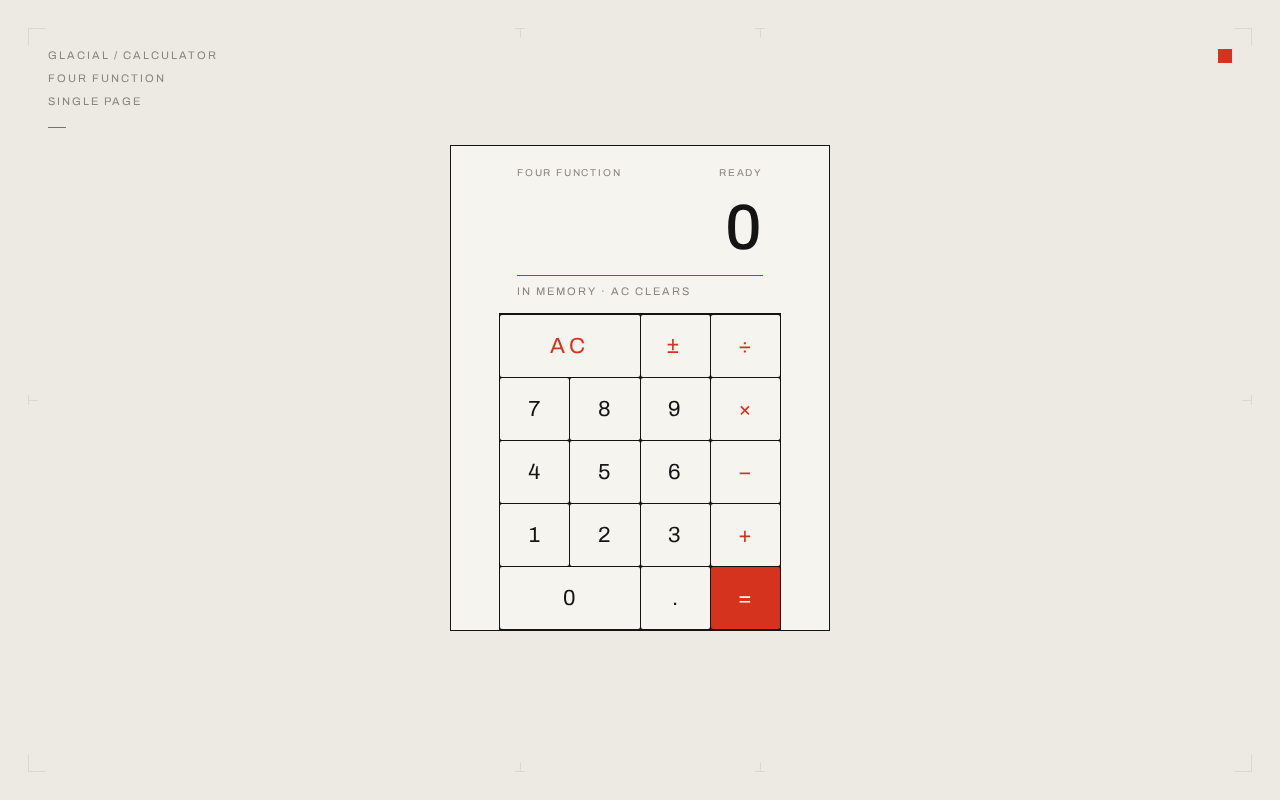
- a right-aligned display showing the current expression and, after evaluation, the result;
- a 4×5 keypad of digits, decimal point, operators, sign toggle, clear, and equals;
- a small three-line metadata block and a single red square mark as the only non-instrument content.
The single active human actor is the Calculator User, who enters numbers and operators, reads the displayed result, and clears or corrects the current calculation. There are no other human participants: no counterparty, recipient, or beneficiary is affected by the arithmetic, and no durable state is created for any other party.
Delivery uses the provisioned scaffold: a React frontend serving the single page, a shared FastAPI backend process for application APIs, and MariaDB as application-owned storage. The calculator's arithmetic is performed in the browser on the page; the backend and database are provisioned infrastructure and are not required to hold calculator state, because the accepted scope defines no persistence, history, or account continuity. No authentication is required or introduced.
Removed from scope
- Multi-page navigation or additional destinations beyond the single Calculator page (also: single page, one page).
- User accounts, sign-in, and saved calculation history.
2a. Product Interpretation and Delivery Boundary
The requester asked for a simple single-page design of a calculator. That is the whole current product: one anonymously reachable page where a user performs arithmetic. The page is public and ephemeral — nothing the user types is owned by an identity, resumed later, or shared with another participant, so no identity establishment, session continuity, or permission model is introduced.
Everything the user needs — entry, display, evaluation, clearing, and correction — lives on the one page. There is no separate entry screen, no settings surface, and no results archive. Future ideas are not part of this delivery and are not represented in the page.
2c. Page Content and Component Coverage
Calculator
The single page of the product. Anonymous, public, no sign-in. It is the only destination.
Information and state
- Current expression string (digits, decimal point, operators, sign) shown in the display.
- Current result after equals is pressed, replacing the expression in the display.
- Error state when an expression cannot be evaluated (for example division by zero), shown in the display.
- Idle/initial state: display shows
0.
Primary actions
- Digit keys
0–9append digits to the current entry. - Decimal point key
.starts or extends a fractional entry. - Operator keys
+,−,×,÷select the pending operation. =evaluates the expression and shows the result.ACclears the display and all pending state back to0.±toggles the sign of the current entry.
Supporting elements
- Three-line metadata block, top-left:
GLACIAL / CALCULATOR,FOUR FUNCTION,SINGLE PAGE, set at 11px uppercase with 0.18em letterspacing. - A single 14px Saville-red square mark, top-right.
- Faint 1px printer's crop marks in the page margins at 8% ink opacity (decoration only).
Domain entities
- Calculation (in-memory only): current entry, pending operator, accumulated value, display text. Not persisted.
Component responsibilities
- Display: right-aligned tabular numeral, clamp(40px, 6vw, 64px), 1px Saville-red rule beneath; cross-fades over 120ms when a result replaces an expression.
- Keypad: strict 4×5 grid, square keys with 2px radius, 1px ink rules, red operator column, equals key the only filled red keycap,
0spanning two columns. - Metadata block and red square mark: static, non-interactive.
States
- Loading: plate fades in once over 600ms; no spinner or skeleton.
- Empty/initial: display reads
0. - Success: result shown in display after
=. - Error: non-evaluable expression shows an error indication in the display; the user recovers by pressing
ACand re-entering. - Recovery:
ACalways returns the page to the initial0state.
3. Functional Requirements
-
As a Calculator User I should see a single calculator page when I open the product so that I can begin arithmetic immediately. (explicit) — Trigger: page load. Result: the Calculator page renders with the display at
0and the full keypad visible. Access: anonymous, public. Failure/recovery: if the page fails to load, reloading restores the initial state. Continuation: user begins entering digits. -
As a Calculator User I should enter digits and a decimal point into the display so that I can build the number I want to calculate with. (explicit) — Input: presses on
0–9and.. Result: the display appends the entered characters to the current entry. Failure/recovery:ACclears a mistaken entry. -
As a Calculator User I should select an operator (
+,−,×,÷) so that I can specify the operation to perform. (explicit) — Input: operator key press. Result: the operator is recorded as pending and reflected in the expression. Continuation: user enters the second operand. -
As a Calculator User I should press
=to evaluate the expression so that I obtain an accurate result. (explicit) — Input:=key press on a complete expression. Result: the display replaces the expression with the computed result (120ms cross-fade). Failure/recovery: a non-evaluable expression (for example division by zero) shows an error in the display;ACresets. Continuation: the result can be used as the start of a new calculation. -
As a Calculator User I should press
ACto clear the calculation so that I can start over or recover from a mistake. (explicit) — Input:ACkey press. Result: display returns to0and all pending state is discarded.
-
As a Calculator User I should toggle the sign of the current entry with
±so that I can enter negative numbers. (explicit) — Input:±key press. Result: the current entry's sign flips and the display updates. -
As a Calculator User I should see the calculator presented as a single, quiet, gallery-like page so that the instrument is the only content. (explicit) — Result: one centred plate on a warm-paper field with the metadata block, red square mark, and crop marks; no headline, subhead, or marketing copy.
4. User Personas
Calculator User
Product context. An anonymous everyday user who opens the single page to do a quick piece of arithmetic. There is no account, no history, and no other participant in the work.
Primary goal. Get an accurate result from a simple single-page calculator with as little friction as possible.
Distinct responsibilities. Enter numbers and operators, read the displayed expression and result, clear or correct the current calculation, and toggle sign when a negative value is needed. This is the only role in the product; its work is defined by the arithmetic itself, not by any surrounding workflow.
Inputs and decisions. Digit and decimal input, operator choice, the decision to evaluate with =, and the decision to clear with AC or flip sign with ±.
Interactions with other participants. None. No counterparty, recipient, or beneficiary is affected by the calculation, and no state is shared with another person.
Observable success. The display shows the correct result for the entered expression, and the user can clear and start again at any time.
5. Core User Flows
Flow 1 — Perform a basic calculation
- The Calculator User opens the product; the Calculator page loads anonymously with the display at
0. - The user presses digit keys to enter the first operand; the display updates as digits are appended.
- The user presses an operator key (
+,−,×, or÷); the operator is recorded as pending. - The user enters the second operand; the display reflects the full expression.
- The user presses
=; the display cross-fades over 120ms to the computed result. - The user reads the result. To continue, they may begin a new entry or press
AC.
Flow 2 — Correct a mistake or recover from an error
- Mid-entry, the user notices an incorrect digit or an error shown in the display (for example division by zero).
- The user presses
AC; the display returns to0and all pending state is discarded. - The user re-enters the calculation from step 2 of Flow 1.
Flow 3 — Enter a negative number
- The user enters a number.
- The user presses
±; the sign of the current entry flips and the display updates. - The user continues with an operator or presses
=to evaluate.
6. Visuals Colors and Theme
Muse: Peter Saville. Headline idea: a calculator as a single coded artefact — one centred instrument on a quiet paper field.
Colour tokens (light mode)
- Background (paper field):
#EDEAE3 - Surface (keypad plate):
#F6F4EF - Text / ink (digits, rules, display):
#141413 - Primary (ink):
#141413 - Accent (Saville red):
#D6331F— reserved for the equals key, the operator column, the hairline rule under the display, and the 14px top-right square mark. Never a background fill; never larger than a keycap. - Muted (metadata labels):
#8A867C
No blue, indigo, violet, gradient, glass, or tinted background fill anywhere.
Typography
- Headings and body: Archivo.
- Display numeral: Archivo 500, tabular figures, tracking −0.02em, flush right,
clamp(40px, 6vw, 64px). - Keypad digits: 20px mobile → 22px desktop.
- Metadata labels: fixed 11px uppercase, 0.18em letterspacing.
- Modular scale 1.25: 40 / 32 / 20 / 13 / 11. One weight jump (400 vs 500) carries the hierarchy; rules do the rest.
Shape language
- Hard edges only: square keycaps with 2px radius, 1px ink rules, a single 1px Saville-red rule under the display.
- No shadows, no rounded cards, no pills.
Layout
- One page, one centred column: max-width 420px mobile, 380px desktop.
- Calculator plate vertically centred in a large empty paper field; page margins grow with viewport.
- Metadata block pinned top-left; red square mark top-right.
- Display occupies the top row of the plate, full width, right-aligned; below it the 4×5 keypad:
AC,±,÷on the first row, operator column in red,0spanning two columns. - Everything stays inside the viewport at 375px, 768px, and 1280px; readable text and controls stay whole.
Imagery
- No photography, illustration, or icons beyond typographic glyphs (
÷ × − + = ±). - Faint 1px printer's crop marks in the page margins at 8% ink opacity.
- The red square top-right is the only graphic artefact.
7. Signature Design Concept
The first screen is a full-viewport warm-paper field (#EDEAE3), empty except for three small-caps metadata lines in the top-left corner (GLACIAL / CALCULATOR, FOUR FUNCTION, SINGLE PAGE), a 14px Saville-red square in the top-right, and a single rectangular calculator plate (#F6F4EF, 1px ink border) centred in the field at roughly 380px wide. The plate is the hero: its top third is the display — a right-aligned ink numeral at clamp(40px, 6vw, 64px) with tabular figures and a 1px red rule beneath it; the lower two-thirds is the 4×5 keypad with square keys and a red operator column, the equals key the only filled red keycap. There is no headline, no subhead, and no button. The first screen is the instrument and its silence, framed by printer's crop marks at 8% ink opacity.
8. Interaction Model & Motion Direction
Interaction Model: Static (direction) Motion Tempo: still Hero Dimensionality: flat
Landing Hero Motion Brief
- Focal subject: the calculator plate itself, centred on the paper field.
- Input → transformation → outcome thesis: a key press depresses the keycap 1px on a 90ms linear response with no easing or shadow; the display updates; when
=is pressed the display numeral cross-fades over 120ms to the result. The instrument responds like a physical object, not a web control. - Motion vocabulary: 1px key depression (90ms linear), 120ms display cross-fade, a single 600ms fade-in of the plate on load. No parallax, no reveal animation, no hover-lift, no spring.
- Composed first frame: the plate fully composed at rest on the paper field, metadata block and red square mark in place, display reading
0. - Reduced-motion state: with
prefers-reduced-motion, the 600ms plate fade-in and the 120ms display cross-fade are removed; the display updates instantly and the plate appears immediately. Key depression feedback remains as a static pressed state.
9. Non-Functional Requirements
- Single-page constraint (explicit): the product is exactly one page; no additional routes or destinations are introduced.
- Simplicity (explicit): the design is a simple single-page calculator; no adjacent features (history, memory, scientific functions, accounts) are added.
- Anonymous access (required_inference): the page is publicly reachable with no sign-in; no identity is established because no durable actor-specific state exists.
- Readability and containment (explicit, from design constraints): readable text and controls stay entirely inside the viewport and their container at 375px, 768px, and 1280px; nothing covers them.
- Accessibility (basic_default): body text on paper meets roughly 13:1 contrast; keys are keyboard-focusable and operable; the display is announced to assistive technology on change.
- Performance (basic_default): the page loads and becomes interactive without a network round-trip for arithmetic, since evaluation is client-side.
10. Tech Stack
- Frontend: React application UI — the single Calculator page, client-side arithmetic, Archivo typography, CSS tokens per Section 6.
- Backend: shared FastAPI process for application APIs and domain modules (provisioned; not required to hold calculator state).
- Database: MariaDB for application-owned persistent data (provisioned; no calculator domain entities are persisted in current scope).
- Containerization: Docker / docker-compose per the provisioned scaffold (
backend,database,frontend).
11. Assumptions and Constraints
- The calculator performs four-function arithmetic (
+,−,×,÷) with decimal input, sign toggle, clear, and equals; no scientific, memory, or history functions are in scope. - Arithmetic is evaluated on the page; the backend and database are provisioned infrastructure and are not required for the accepted calculator behavior.
- The page is anonymous and public; no authentication, accounts, or persistence of calculations is introduced.
- The design follows the supplied creative direction (Saville register, palette, Archivo, hard edges, still motion) exactly; unspecified details default to that direction.
- The product is exactly one page; no additional destinations are created.
12. Glossary
- Calculator User — the single anonymous human actor who performs arithmetic on the page.
- Calculator page — the one and only page of the product, hosting the display and keypad.
- Plate — the rectangular calculator surface (
#F6F4EF) centred on the paper field. - Display — the right-aligned numeral area at the top of the plate showing the expression or result.
- Keypad — the 4×5 grid of keys below the display.
- Saville red — the single accent colour
#D6331F, reserved for the equals key, operator column, display rule, and top-right square mark. - AC — the clear key that resets the display and pending state to
0. ±— the sign-toggle key for the current entry.
0
0
No comments yet. Be the first!