glacial-ai
 Hemen Ashodia
build an AI app
Comments (0)
Sign in to leave a comment
System Requirements
System Requirements Document (SRD)
1. Introduction
This document outlines the requirements for a sophisticated and creative AI-powered to-do application. The application will feature a 3D workspace with functional, interactive 3D elements, providing users with an immersive and engaging experience for managing their tasks. The app will use a light color theme to maintain a clean and sophisticated aesthetic while incorporating creative design elements.
2. System Overview
The AI-powered to-do app will allow users to manage their tasks in an interactive 3D environment. Tasks will be represented as 3D objects that users can interact with, such as picking up, moving, and organizing within a virtual workspace. The app will leverage AI to provide smart task suggestions, reminders, and productivity insights. The design will focus on a light, sophisticated theme with creative 3D elements to ensure a visually appealing and user-friendly experience.
3. Functional Requirements as Story Points
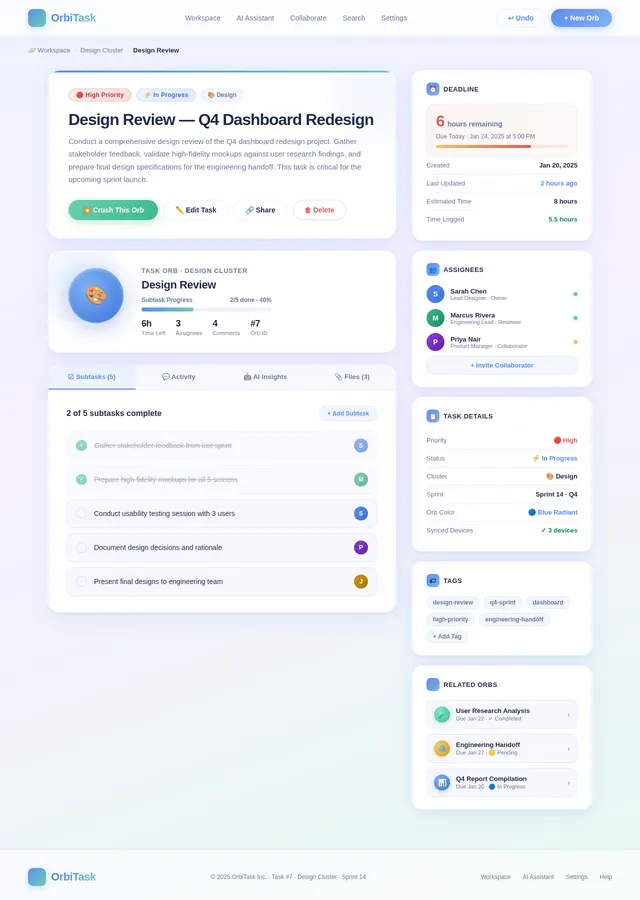
- As a User, I should be able to create tasks that appear as 3D objects in the workspace.
- As a User, I should be able to drag and drop tasks within the 3D workspace to organize them.
- As a User, I should be able to mark tasks as complete by interacting with the 3D objects (e.g., "ticking off" or "crushing" the object).
- As a User, I should be able to set deadlines and priorities for tasks.
- As a User, I should be able to receive AI-generated task suggestions based on my habits and deadlines.
- As a User, I should be able to view my tasks in different perspectives (e.g., zoom in/out, rotate workspace).
- As a User, I should be able to customize the appearance of the 3D workspace and task objects.
- As a User, I should be able to receive reminders and notifications for upcoming deadlines.
- As a User, I should be able to sync my tasks across devices.
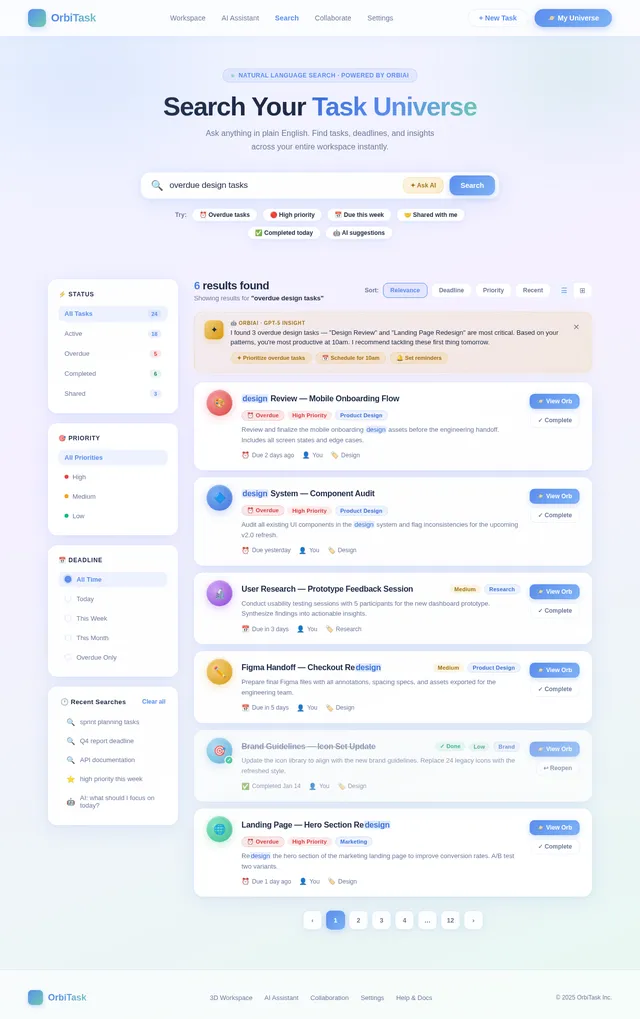
- As a User, I should be able to search for tasks using natural language queries.
- As a User, I should be able to undo/redo actions within the 3D workspace.
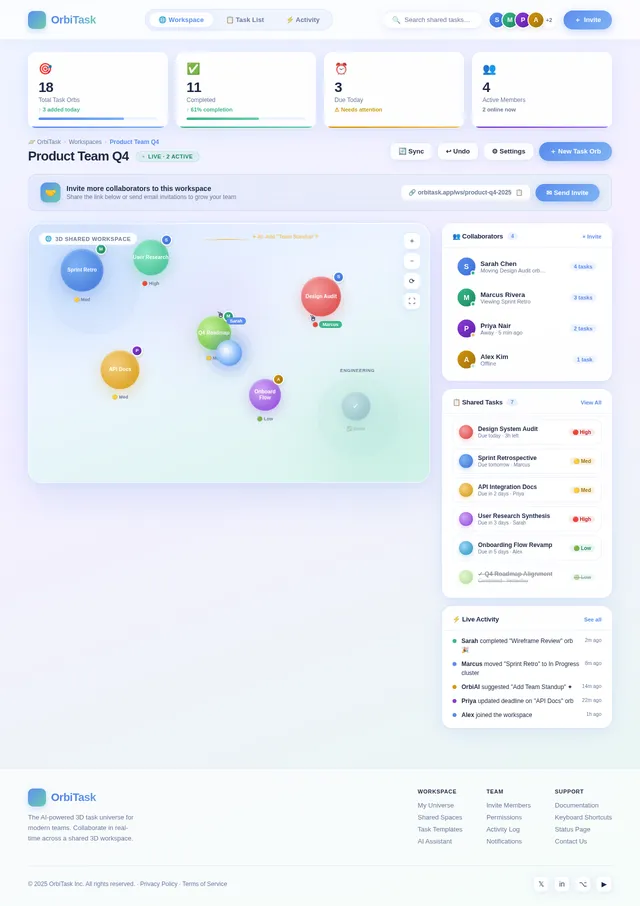
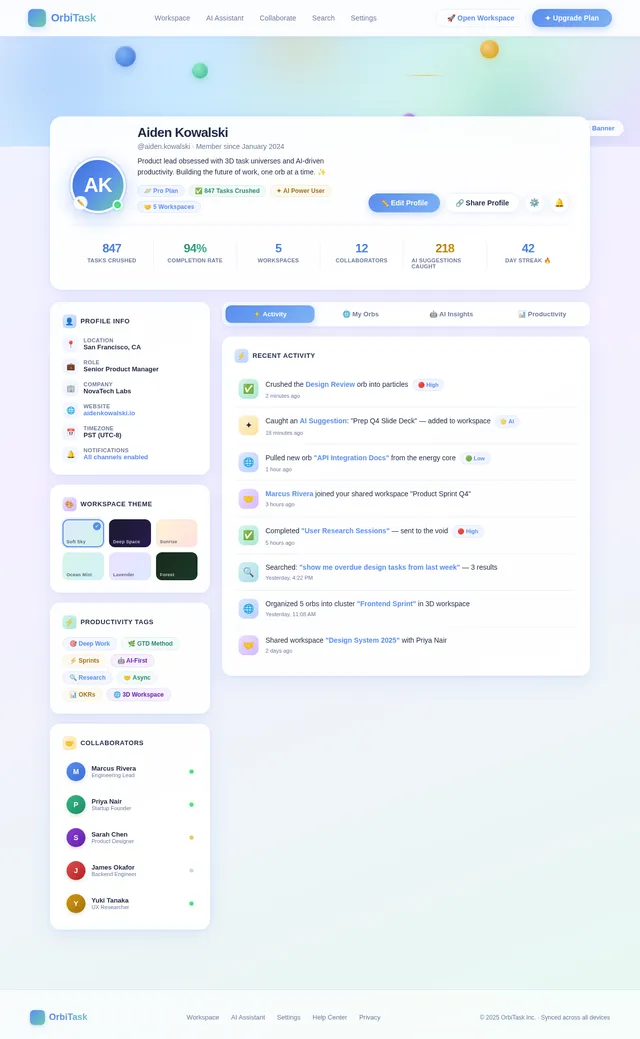
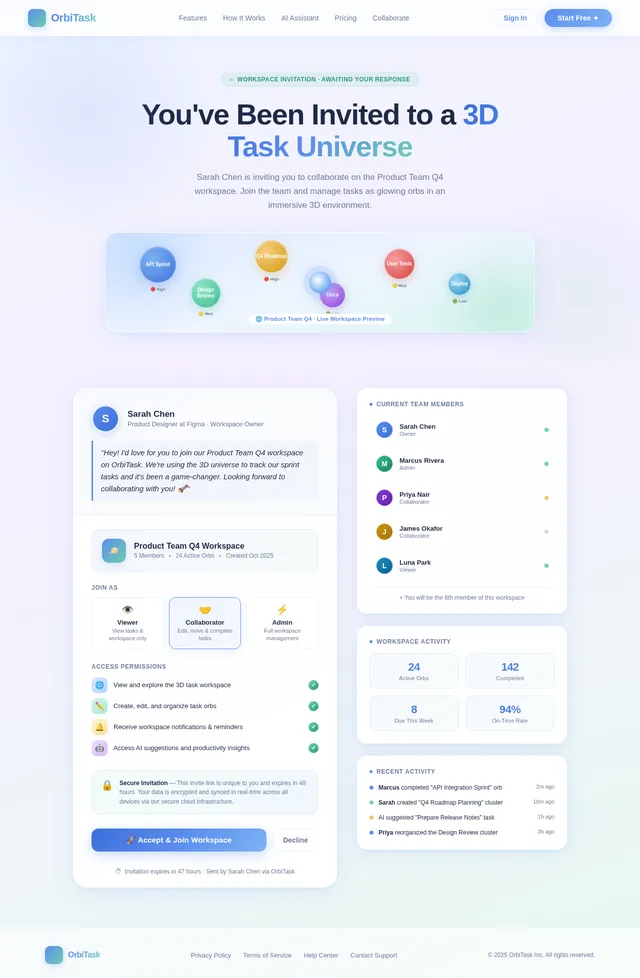
- As a User, I should be able to collaborate with other users by sharing tasks or workspaces.
4. User Personas
- User: The primary user of the app who creates, manages, and interacts with tasks in the 3D workspace.
- Collaborator: A secondary user who can access shared tasks or workspaces for collaboration purposes.
5. Visuals Colors and Theme
The app will use a light, sophisticated color theme with creative accents. The primary palette will include:
- Background: Soft whites and light grays for a clean and minimalistic look.
- Primary Accent: Pastel blues and greens for interactive elements.
- Secondary Accent: Subtle golds and silvers for highlights and completed tasks.
- 3D Object Colors: Muted tones with occasional vibrant pops for emphasis.
- Typography: Modern sans-serif fonts in dark gray for readability.
6. Signature Design Concept
"The 3D Task Universe"
The home page and workspace will immerse users in a 3D floating universe of tasks. Each task will be represented as a glowing, interactive orb or object floating in space. Users can:
- Drag and drop tasks to organize them into clusters or categories.
- Zoom in and out to view tasks at different levels of detail.
- Rotate the workspace to explore tasks from different angles.
- Mark tasks as complete by "crushing" the orb into a burst of particles or "sending it into the void" with a swipe gesture.
- Create new tasks by "pulling" a glowing orb from a central energy source in the workspace.
- AI Suggestions will appear as shooting stars that users can "catch" to add to their task list.
- Micro-interactions: Subtle animations like orbs pulsing gently when hovered over or glowing brighter when selected.
- Transitions: Smooth, physics-based animations for all interactions, such as orbs bouncing slightly when moved or colliding with other objects.
- Background: A soft gradient sky with dynamic lighting that changes based on the time of day, creating a calming and immersive environment.
This concept ensures the app is not only functional but also a delightful and unforgettable experience for users.
7. Non-Functional Requirements
- The app must maintain a smooth frame rate (minimum 60 FPS) for all 3D interactions.
- The app must be responsive and work seamlessly on both web and mobile platforms.
- The app must ensure data synchronization across devices in real-time.
- The app must provide accessibility features, including keyboard navigation and screen reader support.
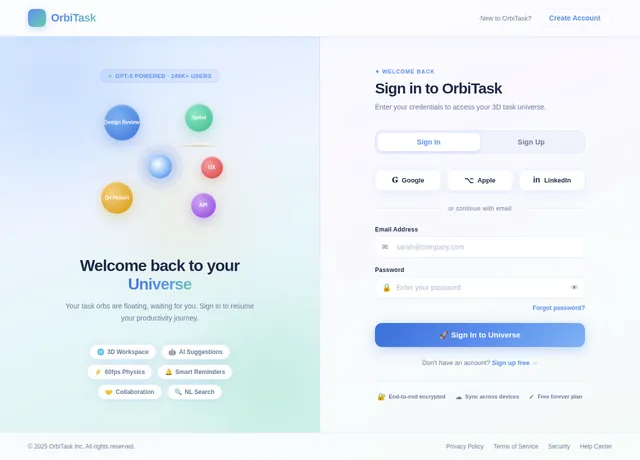
- The app must have a secure authentication system to protect user data.
8. Tech Stack
- Frontend: React for web, React Native for mobile app.
- Backend: Python with FastAPI.
- Database: MySQL for structured data and MongoDB for unstructured data.
- AI Models: GPT 5.2 for user-friendly responses and task suggestions.
- AI Tools: Langchain for AI integration and Litellm for LLM routing.
- Local Orchestration: Docker and docker-compose.
- Server-Side Orchestration: Kubernetes.
9. Assumptions and Constraints
- The app will primarily target individual users but will include basic collaboration features.
- The app will require devices with moderate to high graphical capabilities for optimal performance.
- The app will use cloud-based storage for task data to enable synchronization across devices.
- The app will support English as the primary language initially, with plans for multilingual support in the future.
10. Glossary
- 3D Workspace: The virtual environment where users interact with their tasks as 3D objects.
- Task Orbs: 3D representations of tasks within the workspace.
- AI Suggestions: Task recommendations generated by the AI based on user habits and deadlines.
- Micro-Interactions: Small, subtle animations or effects that enhance user experience.
- Natural Language Queries: Search functionality that allows users to find tasks using conversational language.
This document provides a comprehensive plan for developing the AI-powered to-do app with a 3D interactive workspace. The unique design and functionality aim to create an engaging and productive user experience.
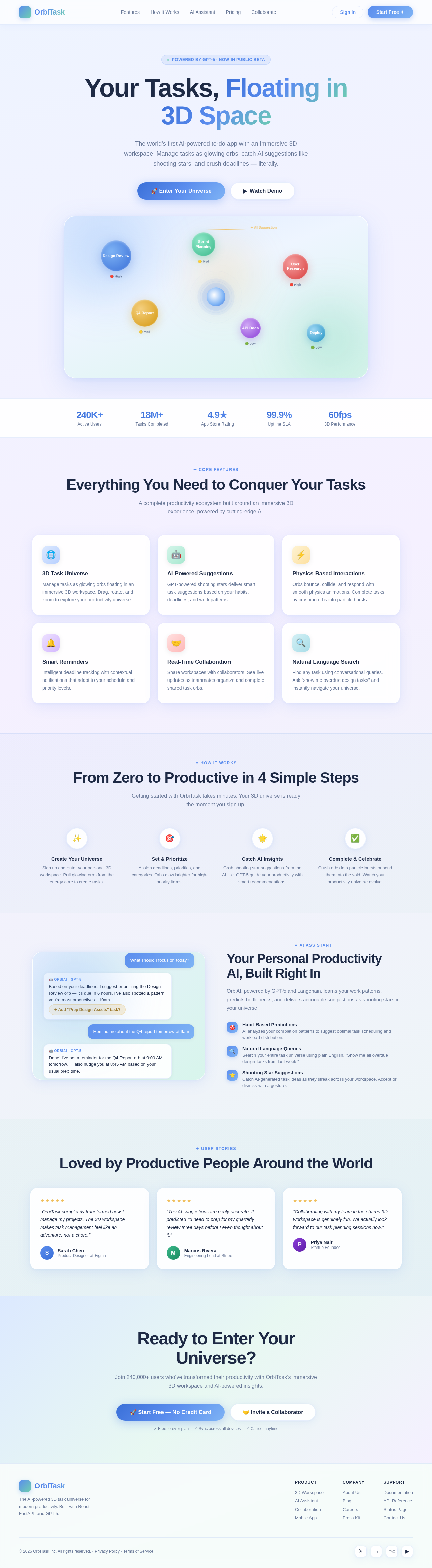
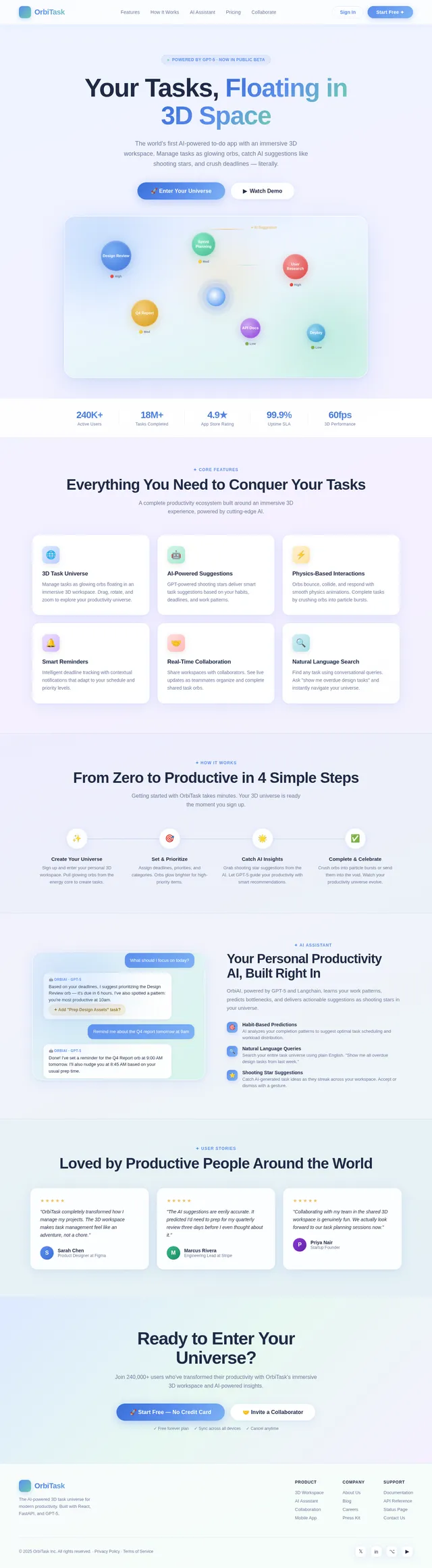
Your Tasks, Floating in
3D Space
The world's first AI-powered to-do app with an immersive 3D workspace. Manage tasks as glowing orbs, catch AI suggestions like shooting stars, and crush deadlines — literally.
✦ Core Features
Everything You Need to Conquer Your Tasks
A complete productivity ecosystem built around an immersive 3D experience, powered by cutting-edge AI.
3D Task Universe
Manage tasks as glowing orbs floating in an immersive 3D workspace. Drag, rotate, and zoom to explore your productivity universe.
AI-Powered Suggestions
GPT-powered shooting stars deliver smart task suggestions based on your habits, deadlines, and work patterns.
Physics-Based Interactions
Orbs bounce, collide, and respond with smooth physics animations. Complete tasks by crushing orbs into particle bursts.
Smart Reminders
Intelligent deadline tracking with contextual notifications that adapt to your schedule and priority levels.
Real-Time Collaboration
Share workspaces with collaborators. See live updates as teammates organize and complete shared task orbs.
Natural Language Search
Find any task using conversational queries. Ask "show me overdue design tasks" and instantly navigate your universe.
✦ How It Works
From Zero to Productive in 4 Simple Steps
Getting started with OrbiTask takes minutes. Your 3D universe is ready the moment you sign up.
Create Your Universe
Sign up and enter your personal 3D workspace. Pull glowing orbs from the energy core to create tasks.
Set & Prioritize
Assign deadlines, priorities, and categories. Orbs glow brighter for high-priority items.
Catch AI Insights
Grab shooting star suggestions from the AI. Let GPT-5 guide your productivity with smart recommendations.
Complete & Celebrate
Crush orbs into particle bursts or send them into the void. Watch your productivity universe evolve.
✦ AI Assistant
Your Personal Productivity AI, Built Right In
OrbiAI, powered by GPT-5 and Langchain, learns your work patterns, predicts bottlenecks, and delivers actionable suggestions as shooting stars in your universe.
✦ User Stories
Loved by Productive People Around the World
"OrbiTask completely transformed how I manage my projects. The 3D workspace makes task management feel like an adventure, not a chore."
"The AI suggestions are eerily accurate. It predicted I'd need to prep for my quarterly review three days before I even thought about it."
"Collaborating with my team in the shared 3D workspace is genuinely fun. We actually look forward to our task planning sessions now."
Ready to Enter Your Universe?
Join 240,000+ users who've transformed their productivity with OrbiTask's immersive 3D workspace and AI-powered insights.
No comments yet. Be the first!