gilded-send
 Pluto Bill
Send again

Comments (0)
Sign in to leave a comment
System Requirements
System Requirements Document for gilded-send
1. Introduction
The "gilded-send" project is a mobile application designed for creating and editing gaming videos, with a focus on games like Free Fire. The app targets video creators who are gaming enthusiasts, providing them with a comprehensive set of video editing features to enhance their content creation process.
2. System Overview
The gilded-send app is a mobile application that supports video creators in editing gaming videos. It includes a broad set of video editing features, allowing users to create, edit, and export videos directly from their mobile devices. The app is designed to cater to young, tech-savvy gamers who seek a futuristic and immersive editing experience.
2a. Product Interpretation and Delivery Boundary
The app is delivered as a mobile application with custom UI and app-owned identity. It includes features for video editing, project management, and media import/export. The app requires users to sign up and log in to manage their projects, ensuring that editing projects and exported videos are persisted for future access. The app does not include adjacent capabilities outside the scope of video editing.
2b. Source Content Inventory
Not applicable as no content source directive was provided.
2c. Page Content and Component Coverage
Landing
- Information/State: Introduction to the app, its features, and target audience.
- Primary Actions: Explore app features, navigate to Sign Up or Login.
- Components: Full-bleed hero with 3D animation, feature highlights.
- States: Loading, success, error.
Sign Up
- Information/State: User registration form.
- Primary Actions: Submit registration details.
- Components: Form fields for user information, submit button.
- States: Loading, success, error, validation feedback.
Login
- Information/State: User login form.
- Primary Actions: Submit login credentials.
- Components: Form fields for username and password, login button.
- States: Loading, success, error, validation feedback.
Projects
- Information/State: List of user projects.
- Primary Actions: Create new project, open existing project.
- Components: Project list, create button, project details.
- States: Loading, success, error, empty state.
Project Editor
- Information/State: Editing workspace for video projects.
- Primary Actions: Import media, edit timeline, apply effects, export video.
- Components: Media library, timeline editor, effects panel, export options.
- States: Loading, success, error, unsaved changes warning.
3. Functional Requirements
- As a Video Creator, I should be able to sign up for the app to start creating and editing video projects. (required_inference)
- As a Video Creator, I should be able to log in to access my existing projects and continue editing. (required_inference)
- As a Video Creator, I should be able to create a new video editing project and import media files. (required_inference)
- As a Video Creator, I should be able to edit video timelines, apply effects, and preview changes. (explicit)
- As a Video Creator, I should be able to export my edited videos for sharing or further use. (required_inference)
4. User Personas
- Video Creator: The primary user of the app, responsible for creating and editing gaming videos. This persona is tech-savvy and seeks a futuristic and immersive editing experience.
5. Core User Flows
-
Sign Up Flow
- Trigger: User opens the app for the first time.
- Steps: Navigate to Sign Up page → Fill out registration form → Submit form.
- Outcome: User account is created, and the user is redirected to the Projects page.
- Failure/Recovery: Display error messages for invalid inputs; allow retry.
-
Login Flow
- Trigger: Returning user opens the app.
- Steps: Navigate to Login page → Enter credentials → Submit form.
- Outcome: User is authenticated and redirected to the Projects page.
- Failure/Recovery: Display error messages for incorrect credentials; allow retry.
-
Project Creation and Editing Flow
- Trigger: User selects to create a new project from the Projects page.
- Steps: Click "Create New Project" → Import media → Edit video timeline → Apply effects → Preview changes.
- Outcome: Video project is edited and saved.
- Failure/Recovery: Display error messages for import failures; allow retry.
-
Export Video Flow
- Trigger: User completes editing a video project.
- Steps: Click "Export" → Choose export settings → Confirm export.
- Outcome: Video is exported and available for sharing.
- Failure/Recovery: Display error messages for export failures; allow retry.
6. Visuals Colors and Theme
- Muse: Gleb Kuznetsov
- Palette:
- Background: #0A0A0F
- Surface: #12121C
- Text: #E0E0E0
- Primary: #1FA2FF
- Accent: #FF3CAC
- Muted: #2E2E3E
- Typography:
- Headings: Space Grotesk
- Body: Orbitron
- Scale: 64/42/28/18/14
- Shape Language: Full-bleed 3D scenes with floating glass panels and luminous strokes.
- Layout: Radial layouts with floating panels, thin luminous strokes.
- Motion: Continuous slow orbit/parallax, light sweeps, and data streams.
7. Signature Design Concept
A full-bleed 3D animated hero on the Landing page, featuring floating glass panels and electric cyan glows for interactive elements. The design emphasizes a futuristic and immersive experience, aligning with the cinematic future tech theme.
8. Interaction Model & Motion Direction
- Interaction Model: Animated
- Motion Tempo: Cinematic
- Hero Dimensionality: WebGL
- Landing Hero Motion Brief: A floating, animated 3D object in a dark void background, with electric cyan glows highlighting interaction points. The motion includes slow rotation and parallax effects, creating an immersive entry experience.
9. Non-Functional Requirements
- The app must perform efficiently on mobile devices, ensuring smooth video editing and playback. (required_inference)
- The app should support a wide range of video formats for import and export. (required_inference)
- The app must provide a secure authentication mechanism for user accounts. (required_inference)
10. Tech Stack
- Frontend: React Native
- Backend: Python/FastAPI
- Storage: Cloud-based storage for media and project files
- Deployment: Docker/docker-compose for containerization
11. Assumptions and Constraints
- The app is designed exclusively for mobile platforms. (explicit)
- The primary focus is on gaming video content, specifically Free Fire-style edits. (explicit)
- Users must have an internet connection to access all features of the app. (required_inference)
12. Glossary
- Video Creator: A user who creates and edits gaming videos using the app.
- Project Editor: The workspace within the app where video editing takes place.
- Free Fire: A popular mobile battle royale game, used as a reference for the style of video edits.
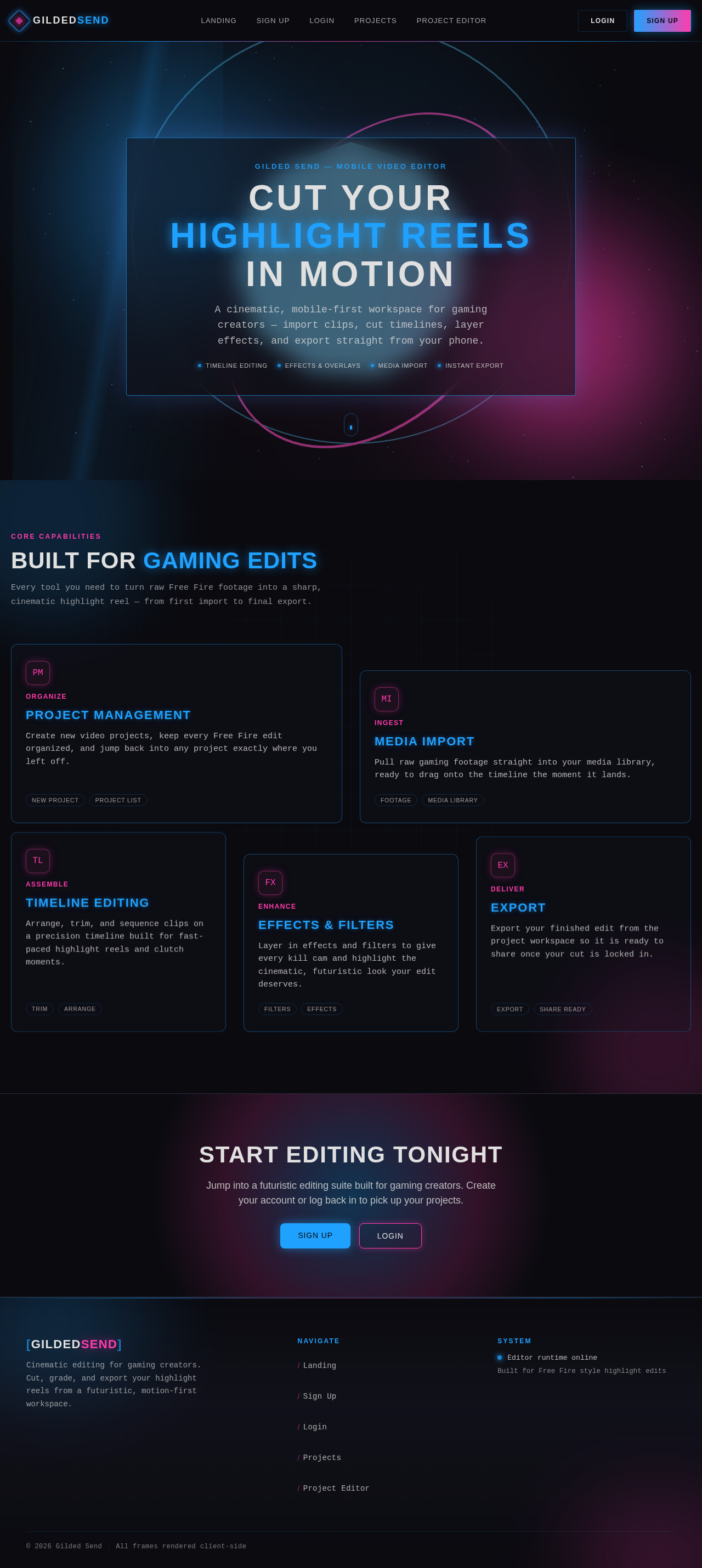
Cut Your Highlight Reels In Motion
A cinematic, mobile-first workspace for gaming creators — import clips, cut timelines, layer effects, and export straight from your phone.
Built For Gaming Edits
Every tool you need to turn raw Free Fire footage into a sharp, cinematic highlight reel — from first import to final export.
Project Management
Create new video projects, keep every Free Fire edit organized, and jump back into any project exactly where you left off.
Media Import
Pull raw gaming footage straight into your media library, ready to drag onto the timeline the moment it lands.
Timeline Editing
Arrange, trim, and sequence clips on a precision timeline built for fast-paced highlight reels and clutch moments.
Effects & Filters
Layer in effects and filters to give every kill cam and highlight the cinematic, futuristic look your edit deserves.
Export
Export your finished edit from the project workspace so it is ready to share once your cut is locked in.
Cut Your Highlight Reels In Motion
A cinematic, mobile-first workspace for gaming creators — import clips, cut timelines, layer effects, and export straight from your phone.
Built For Gaming Edits
Every tool you need to turn raw Free Fire footage into a sharp, cinematic highlight reel — from first import to final export.
Project Management
Create new video projects, keep every Free Fire edit organized, and jump back into any project exactly where you left off.
Media Import
Pull raw gaming footage straight into your media library, ready to drag onto the timeline the moment it lands.
Timeline Editing
Arrange, trim, and sequence clips on a precision timeline built for fast-paced highlight reels and clutch moments.
Effects & Filters
Layer in effects and filters to give every kill cam and highlight the cinematic, futuristic look your edit deserves.
Export
Export your finished edit from the project workspace so it is ready to share once your cut is locked in.
No comments yet. Be the first!