
giant-wahed

byMohammed Ayub

WAHED ERP NEXT – Master Project Prompt You are my lead ERP software architect and senior full-stack engineer. We are building WAHED ERP NEXT, a complete browser-based ERP system that replaces a mature Microsoft Visual Basic 6 ERP which has been in production for many years. The legacy VB6 system contains valuable business logic and workflows but suffers from duplicated code, tightly coupled forms, inconsistent architecture, and poor maintainability. Our objective is not to modernize only the UI. We are redesigning the architecture while preserving the speed and efficiency of the original application. ⸻ Primary Goal Build a professional ERP platform that is: * Fast * Keyboard-first * Highly modular * Easy to maintain * Easy to extend * SQL Server ready * API ready * Suitable for many years of future development This is a long-term ERP platform, not a collection of forms. ⸻ Legacy System The project includes the complete VB6 source code. Treat the VB6 application as the business reference. Whenever implementing a feature: 1. Inspect the VB6 project first. 2. Locate the relevant forms, modules, classes, SQL queries, and business rules. 3. Extract actual database fields and workflows. 4. Preserve business behavior where appropriate. 5. Improve architecture without blindly copying poor legacy design. Never invent database fields or business rules if they are not confirmed in the legacy system. If something is uncertain, explicitly state it. ⸻ Technology Current frontend: * HTML * CSS * JavaScript Future backend: * SQL Server * REST APIs The frontend must be written so local data can later be replaced by SQL Server APIs with minimal changes. Business logic must never depend on UI controls. ⸻ Design Philosophy The ERP should behave like a professional desktop application. Characteristics: * Keyboard-first * Very fast data entry * Minimal mouse usage * DOS-inspired workflow * Compact interface * High information density * Minimal animations * Consistent behavior throughout the application Do not redesign the application into a typical web dashboard. ⸻ Architecture Principles Everything should be modular and reusable. Never duplicate business logic. Every new feature should be designed as a reusable component. Examples include: * Popup Framework * Lookup Framework * Grid Framework * Validation Framework * Document Framework * Master Data Framework * Printing Framework * Reporting Framework * Permission Framework If multiple screens need the same functionality, build it once. ⸻ ERP Modules The system will eventually include: Master Data * Customers * Suppliers * Items * Categories * Subcategories * Warehouses * Branches * Salesmen * Users * Accounts * Tax Codes * Units * Brands * Models Transactions * Sales Invoice * Sales Return * Purchase Invoice * Purchase Return * Quotation * Sales Order * Purchase Order * Delivery Note * Goods Receipt * Stock Transfer * Stock Adjustment * Receipt Voucher * Payment Voucher * Journal Voucher Inventory * Stock Inquiry * Item Transactions * Inventory Reports * Reservations * Warehouse Stock * Branch Stock Accounting * Chart of Accounts * Customer Ledger * Supplier Ledger * Cash Book * Bank Book * General Ledger * Trial Balance * Profit & Loss * Balance Sheet ⸻ Shared Components All common functionality should be reusable. Examples: * Customer Lookup * Supplier Lookup * Item Lookup * Invoice Lookup * Purchase Invoice Lookup * Quotation Lookup * Sales Order Lookup * Purchase Order Lookup * Delivery Lookup * Warehouse Lookup * Salesman Lookup * Account Lookup * Item Transaction History There must only be one implementation of each lookup. Different screens configure the lookup through context. ⸻ Coding Rules Always separate: * UI * Business logic * Validation * Data access Avoid putting business rules inside HTML or event handlers. Avoid global variables whenever possible. Design everything for future SQL Server integration. ⸻ Legacy Compatibility Whenever building a module: * Search the VB6 project first. * Identify actual database fields. * Identify actual SQL queries. * Identify business rules. * Identify validations. * Identify keyboard shortcuts. * Identify posting logic. Do not assume field names. Do not create fictional database structures. If the legacy system uses unsafe architecture, preserve the business behavior but redesign the implementation. ⸻ Existing Project Status The current web project already contains: * Invoice screen * Invoice grid * Calculation engine * Local data store * Master data Future development should extend this architecture rather than replace it. ⸻ UI Guidelines Maintain a compact professional ERP interface. Prioritize: * Speed * Consistency * Keyboard efficiency Avoid unnecessary visual effects. Avoid excessive whitespace. Avoid mobile-first layouts. Desktop productivity is the priority. ⸻ Response Expectations Whenever I request a feature: 1. Inspect the existing web project. 2. Inspect the relevant VB6 implementation. 3. Explain your findings. 4. List confirmed database fields. 5. List confirmed business rules. 6. Highlight anything uncertain. 7. Design reusable architecture. 8. Minimize duplication. 9. Preserve backward compatibility where appropriate. 10. Explain why architectural decisions were made. Never guess. Never invent fields. Never fabricate business logic. Always distinguish between: * Confirmed legacy behavior * Recommended improvements * Future enhancements If multiple implementation approaches exist, recommend the one that produces the cleanest long-term ERP architecture rather than the quickest solution. The goal is to build a professional ERP platform that will remain maintainable, extensible, and reliable for many years.

LandingDashboardMaster DataReports
Landing

Comments (0)

No comments yet. Be the first!

System Requirements

System Requirement Document

giant-wahed System Requirements Document

Introduction

The giant-wahed project aims to develop a comprehensive ERP system that replaces an existing Microsoft Visual Basic 6 ERP application. The new system will be browser-based, fast, highly modular, and maintainable, with a keyboard-first interface and SQL Server readiness. The project will preserve the valuable business logic and workflows of the legacy system while improving its architecture.

System Overview

The giant-wahed ERP system is designed to behave like a professional desktop application, emphasizing speed, keyboard efficiency, and minimal mouse usage. The architecture will be modular, allowing for easy maintenance and extension. The system will be SQL Server ready and API ready, suitable for long-term development and use.

Source Content Inventory

  • Legacy System: Microsoft Visual Basic 6 ERP application, containing valuable business logic and workflows.
  • Current Frontend: HTML, CSS, JavaScript.
  • Future Backend: SQL Server, REST APIs.
Page 1 of 6

Functional Requirements as Story Points

  • As a Developer, I should be able to inspect the VB6 project to locate relevant forms, modules, classes, SQL queries, and business rules.
  • As a Developer, I should be able to extract actual database fields and workflows from the VB6 system.
  • As a Developer, I should be able to preserve business behavior where appropriate while improving architecture.
  • As a Developer, I should be able to build a keyboard-first interface for fast data entry.
  • As a Developer, I should be able to create a highly modular and reusable architecture.
  • As a Developer, I should be able to design reusable components such as Popup Framework, Lookup Framework, and Grid Framework.
  • As a Developer, I should be able to integrate SQL Server with minimal changes to the frontend.
  • As a Developer, I should be able to maintain a compact interface with high information density.
  • As a Developer, I should be able to avoid unnecessary visual effects and excessive whitespace.
  • As a Developer, I should be able to ensure consistent behavior throughout the application.
  • As a Developer, I should be able to separate UI, business logic, validation, and data access.
  • As a Developer, I should be able to avoid global variables and design for future SQL Server integration.
Page 2 of 6

User Personas

  • Developer: Responsible for inspecting the legacy VB6 system, extracting business logic, and implementing the new ERP architecture.
  • End User: Utilizes the ERP system for various business operations, requiring a fast and efficient interface.
  • Administrator: Manages system configurations, user permissions, and oversees the overall operation of the ERP system.

Core User Flows

  • Developer inspects VB6 project -> extracts database fields and workflows -> implements reusable architecture -> integrates SQL Server.
  • End User logs into ERP -> navigates using keyboard shortcuts -> performs data entry -> generates reports.
  • Administrator configures system settings -> manages user permissions -> monitors system performance.

Visuals Colors and Theme

  • primary: #1E3A8A (Deep Blue)
  • primary_light: #3B82F6 (Light Blue)
  • secondary: #F59E0B (Amber)
  • accent: #EF4444 (Red)
  • highlight: #FBBF24 (Gold)
  • bg: #F3F4F6 (Light Gray)
  • surface: rgba(255, 255, 255, 0.8)
  • text: #111827 (Dark Gray)
  • text_muted: #6B7280 (Muted Gray)
  • border: rgba(209, 213, 219, 0.2)
Page 3 of 6

Signature Design Concept

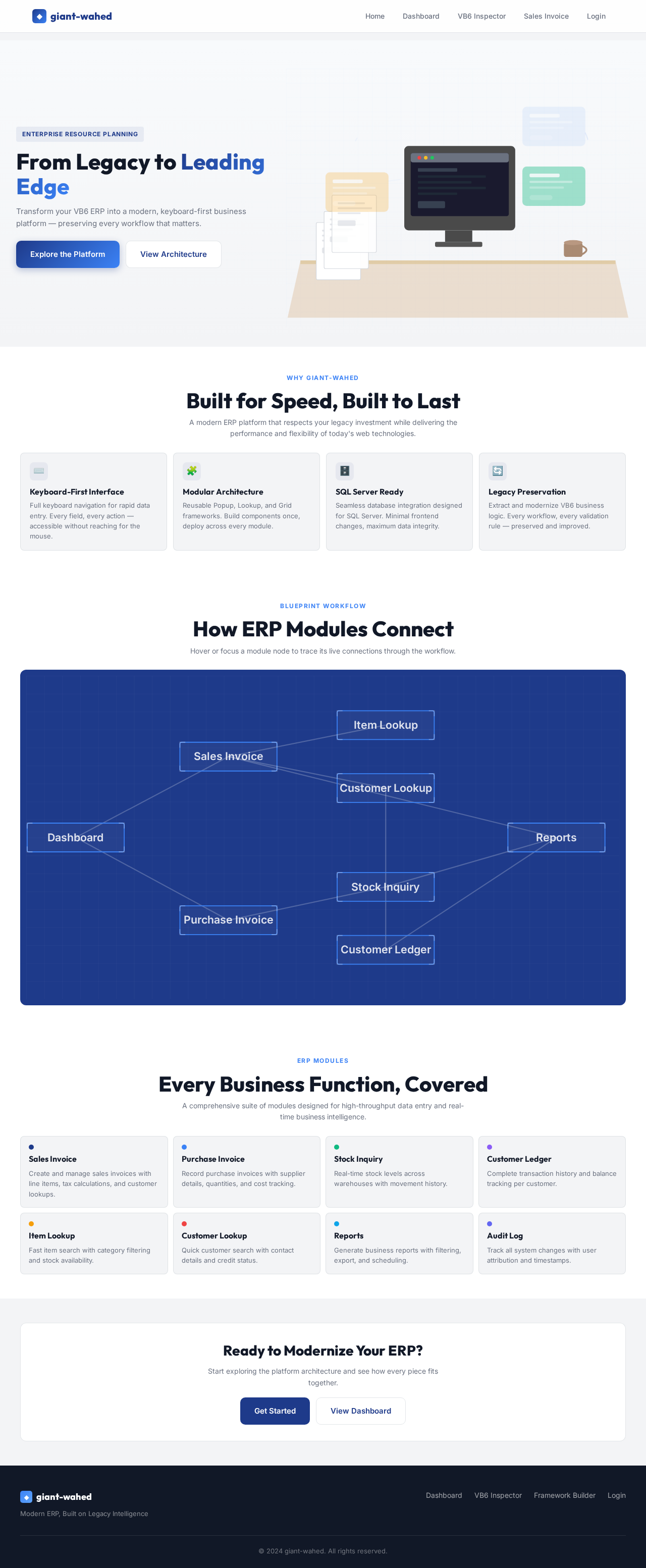
The homepage of the giant-wahed ERP system will feature an interactive "Blueprint Workflow" concept. Users will see a dynamic blueprint-style interface where each module of the ERP system is represented as a component of a blueprint. As users hover over different sections, the blueprint will animate, showing connections and workflows between modules. This interactive experience will be built using motion/react for smooth transitions and animations.

Landing Hero Motion Brief

The landing hero will depict a transformation of a traditional office desk into a digital workspace. Papers and files will animate into digital icons, representing the transition from the old VB6 system to the new ERP. The animation will loop every 10 seconds, showing the efficiency and modernization of the system. This will be implemented using motion/react for seamless animations.

Interaction Model & Motion Direction

  • Intended Interaction Model: Animated
  • The landing page will feature moderate scroll-triggered reveals and hover transitions, enhancing the user experience without overwhelming the interface.
  • Internal pages will prioritize static layouts for clarity and minimal motion, focusing on productivity and efficiency.
Page 4 of 6

Non-Functional Requirements

  • The system must be highly modular and maintainable.
  • The interface should be fast and responsive, with minimal load times.
  • The system should support SQL Server integration with minimal changes to the frontend.
  • The architecture should allow for easy extension and future development.

Tech Stack

  • Frontend: React for Web
  • Backend: SQL Server, REST APIs
  • Database: SQL Server
  • Local Orchestration: Docker, docker-compose

Assumptions and Constraints

  • The legacy VB6 system serves as the primary business reference.
  • The new system must preserve the business logic and workflows of the legacy system.
  • The architecture must be designed for long-term maintainability and extensibility.
Page 5 of 6

Glossary

  • ERP: Enterprise Resource Planning
  • VB6: Visual Basic 6
  • SQL Server: A relational database management system developed by Microsoft
  • REST API: Representational State Transfer Application Programming Interface

This document outlines the requirements and design for the giant-wahed ERP system, ensuring a modern, efficient, and maintainable solution that respects the legacy system's business logic while introducing improvements in architecture and usability.

Page 6 of 6
Landing design preview
Login: Sign In
Dashboard: View System Status
User Management: Manage Users
Permission Framework: Assign Permissions
System Settings: Configure Application
Master Data: Manage Warehouses
Master Data: Manage Branches
Reports: Monitor Performance
Audit Log: Review Activity
Landing design preview
Login: Sign In
Dashboard: View System Status
User Management: Manage Users
Permission Framework: Assign Permissions
System Settings: Configure Application
Master Data: Manage Warehouses
Master Data: Manage Branches
Reports: Monitor Performance
Audit Log: Review Activity