giant-start
 Diya Trivedi
start a project to build a simple single page design of the calculator

Comments (0)
Sign in to leave a comment
System Requirements
System Requirements Document for giant-start
1. Introduction
giant-start is a simple calculator delivered as a single page. The product intent is narrow and complete: a person opens one page, enters numbers and operators, reads the computed result, and can clear the display to begin again. There is no navigation, no account, no saved history, and no second screen. The page is the object.
The audience is anyone who needs quick arithmetic — a casual, everyday utility user who wants a fast, pleasant, tactile calculator rather than a spreadsheet or enterprise tool. The design brief asks for simplicity, so the product earns its character through form, colour, and press-feedback rather than through features.
2. System Overview
giant-start is a single-page web calculator. The current delivery consists of:
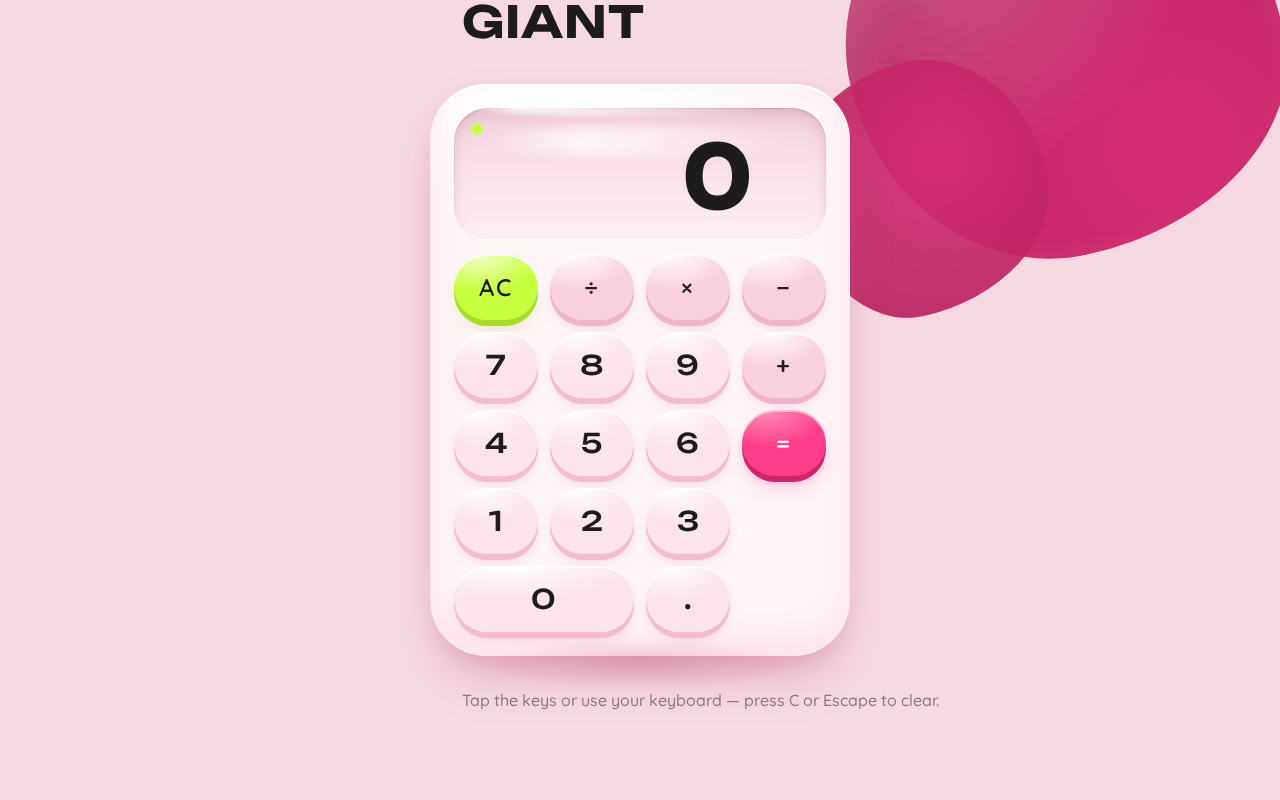
- Frontend — a React application rendering the one Calculator page: wordmark, glossy calculator body with a display capsule and a 4-column keypad, and a single line of helper copy.
- Backend — a shared FastAPI process. It hosts application APIs and domain modules. For the current product, the calculator's arithmetic is evaluated in the browser; the backend exists as the shared application process and is available for any server-side evaluation the implementation chooses to route through it, without adding product capability.
- Database — MariaDB, provisioned as application-owned persistent storage. The current calculator has no durable user state, history, or saved calculations, so no domain entities are required by this document; the database is provisioned infrastructure only.
Actors. The only active human actor is the Calculator user, who opens the page, enters numbers and operators, reads the result, and clears to start again. There are no system, provider, or external actors in the accepted behavior.
Accepted behavior. Number entry, operator entry, equals to compute, clear to reset, and a displayed result — all on one page, anonymously reachable, with no identity, session, or persistence requirement.
Narrow exclusions. No navigation, no multiple pages, no accounts or sign-in, no calculation history, no memory keys, no scientific functions, no unit conversion, no sharing or export.
Removed from scope
- Multi-page navigation (also: routing, page navigation)
- User accounts and authentication (also: sign-in, login, identity)
- Calculation history and saved calculations (also: memory, persistence of results)
- Scientific or advanced calculator functions (also: trigonometry, parentheses, functions)
2a. Product Interpretation and Delivery Boundary
giant-start is delivered as a single, anonymously accessible page. There is no access boundary to cross: a visitor lands directly on the Calculator and can use it immediately. No identity is established, no session is required, and nothing the user enters is bound to a person or persisted as durable state. This is deliberate and matches the accepted scope — the calculator is a stateless, ephemeral utility.
The current delivery horizon contains exactly one page and one capability set: arithmetic entry, computation, display, and clear. Everything else — history, accounts, scientific functions, additional pages — is outside the current boundary and is not planned as a future requirement in this document.
The backend and database are provisioned infrastructure. They do not create product requirements, do not imply authentication, and do not justify domain entities for the current calculator.
2c. Page Content and Component Coverage
Calculator
The single page of the product, and the anonymous public entry surface. It is the whole application: there is no surrounding chrome, navigation, or secondary destination.
Information and state
- Current display value (the number being entered, or the result of the last computation).
- Pending operator indicator, shown in hot pink at the right edge of the display when an operator is active.
- Idle, entering-first-operand, operator-pending, entering-second-operand, result-shown, and error states.
- A lime status dot that pulses once when a result is produced.
Primary actions
- Digit keys (0–9) and decimal point: append to the current operand.
- Operator keys (+, −, ×, ÷): set the pending operator.
- Equals key (primary hot pink): compute and display the result.
- Clear key (acid lime pill): reset the display and pending state to begin a new calculation.
Supporting actions
- Keyboard input mirroring the on-screen keys (digits, operators, Enter/equals, Escape/clear), with the corresponding key showing its press state.
Domain entities
- None persisted. The calculator operates on in-memory display and operand state only.
Component responsibilities
- Wordmark — small "GIANT" wordmark in Unbounded, top-left.
- Calculator body — one continuous glossy blob (56px radius) containing the display and keypad; carries the specular top-edge highlight and soft contact shadow.
- Display capsule — recessed glass capsule showing the oversized readout in Unbounded, with the active operator in hot pink at its right edge and a faint horizontal specular streak.
- Keypad grid — 4-column grid with 12px gutters of capsule/squircle keys; digits in Unbounded, labels uppercase Quicksand with 0.08em tracking; the clear key is the single lime pill; the equals key is hot pink.
- Status dot — small lime dot that pulses once on result.
- Helper copy — one quiet line of Quicksand copy beneath the body.
- Decorative blob — a deep-pink organic shape bleeding off the top-right edge, never overlapping the readout or keys.
States
- Loading — the page is static markup and client state; no loading state is required beyond first paint.
- Empty — initial state shows
0in the display with no pending operator. - Success — a computed result appears in the display; the status dot pulses once.
- Error — division by zero or an invalid operation shows an error indication in the display (for example
Error); the next digit or clear returns the calculator to a usable state. - Recovery — clear resets to
0; entering a new digit after an error starts a fresh operand.
3. Functional Requirements
FR-1 — Open the calculator As a Calculator user, I should open the single Calculator page and immediately see a working calculator, so that I can begin arithmetic without any setup.
- Provenance: explicit (single-page calculator).
- Trigger: navigating to the page.
- Observable result: the page renders the wordmark, calculator body, display showing
0, and full keypad. - Access: anonymous; no identity or session required.
- Failure/recovery: if the page fails to render, reloading restores the calculator.
- Continuation: the user proceeds to enter a number.
FR-2 — Enter digits As a Calculator user, I should press digit keys to build a number in the display, so that I can enter the operands of my calculation.
- Provenance: required_inference (indispensable mechanics of a calculator).
- Trigger: pressing a digit key (on-screen or keyboard).
- Observable result: the digit appends to the current display value; the display cross-fades and slides up 8px on each new entry.
- Access: anonymous.
- Failure/recovery: none material; clear resets entry.
- Continuation: the user enters an operator or more digits.
FR-3 — Enter a decimal point As a Calculator user, I should press the decimal key to enter fractional numbers, so that I can calculate with non-integers.
- Provenance: required_inference.
- Trigger: pressing the decimal key.
- Observable result: a decimal point is appended to the current operand (a second decimal point in the same operand is ignored).
- Access: anonymous.
- Continuation: the user continues entering digits or an operator.
FR-4 — Choose an operator As a Calculator user, I should press an operator key (+, −, ×, ÷) to select the operation, so that the calculator knows what to do with the next operand.
- Provenance: required_inference.
- Trigger: pressing an operator key.
- Observable result: the operator is recorded as pending and shown in hot pink at the right edge of the display.
- Access: anonymous.
- Failure/recovery: pressing a different operator before entering the second operand replaces the pending operator.
- Continuation: the user enters the second operand.
FR-5 — Compute a result As a Calculator user, I should press equals to compute and see the result, so that I get the answer to my calculation.
- Provenance: required_inference.
- Trigger: pressing the equals key (or Enter).
- Observable result: the display shows the computed result; the lime status dot pulses once.
- Access: anonymous.
- Failure/recovery: division by zero or an invalid operation shows an error indication; the next digit or clear recovers.
- Continuation: the user can chain another operation on the result or clear to start over.
FR-6 — Clear the calculator As a Calculator user, I should press the clear key to reset the calculator, so that I can start a new calculation.
- Provenance: required_inference.
- Trigger: pressing the clear key (or Escape).
- Observable result: the display returns to
0and any pending operator is removed. - Access: anonymous.
- Continuation: the user begins a new calculation.
FR-7 — Keyboard operation As a Calculator user, I should use my keyboard to enter digits, operators, equals, and clear, so that I can calculate quickly without reaching for the mouse.
- Provenance: required_inference (tactile press-feedback on both touch and keyboard is part of the accepted design).
- Trigger: keyboard input.
- Observable result: the corresponding on-screen key shows its press state and the display updates as with a pointer press.
- Access: anonymous.
- Continuation: as with pointer input.
4. User Personas
Calculator user
Product context. An everyday person who needs quick arithmetic and opens giant-start as a small, pleasant utility. They arrive with no account, no prior state, and no expectation of saved work — the calculator is a momentary tool they pick up and put down.
Primary goal. Get a correct answer to a simple arithmetic expression quickly, and be able to start a fresh calculation immediately afterward.
Distinct accepted responsibilities. Entering operands (digits and decimal point), choosing an operator, committing the computation with equals, reading the result, and clearing to reset. The user is both the initiator and the sole participant — no other human is affected by the calculation, and no state is created for anyone else.
Relevant inputs and decisions. Which numbers to enter, which operator to apply, when to press equals, and when to clear. The user decides when a calculation is complete and when to begin a new one.
Interactions with other participants. None. The calculator is a single-participant, stateless utility; the user's own action produces the only observable outcome.
Observable success. The display shows the correct result, the status dot confirms the computation, and the calculator is immediately ready for a new calculation after clear.
5. Core User Flows
Flow 1 — Perform a basic calculation
- The Calculator user opens the Calculator page. The page renders with the display showing
0and the full keypad visible. (Owner: Calculator page.) - The user presses digit keys to enter the first operand; the digits appear in the display with a cross-fade and 8px slide on each entry.
- The user presses an operator key; the operator appears in hot pink at the right edge of the display.
- The user presses digit keys to enter the second operand; the digits appear in the display.
- The user presses equals; the display shows the computed result and the lime status dot pulses once.
- The user reads the result. To start a new calculation, they press clear; the display returns to
0and the pending operator is removed.
Failure/recovery: If the user divides by zero, the display shows an error indication; pressing clear or entering a new digit returns the calculator to a usable state.
Continuation: After a result, the user may chain another operator onto the result or clear to begin again.
Flow 2 — Calculate with keyboard input
- The Calculator user opens the Calculator page.
- The user types digits, operators, Enter for equals, and Escape for clear on their keyboard.
- Each keystroke shows the corresponding on-screen key's press state and updates the display exactly as a pointer press would.
- The user reads the result and continues or clears as in Flow 1.
Failure/recovery: As in Flow 1.
Flow 3 — Correct a mistake mid-entry
- The Calculator user is mid-calculation and realizes the entry is wrong.
- The user presses clear; the display resets to
0and any pending operator is removed. - The user re-enters the calculation from the start.
Continuation: The calculator is immediately ready for the corrected calculation.
6. Visuals Colors and Theme
The creative direction is authoritative for this section. The muse is Karim Rashid; the headline idea is a glossy candy object you enjoy pressing.
Mode: light only.
Colour tokens (exact hex by role)
- Background (bubblegum-pink ground):
#F7D9E3 - Surface (glossy near-white calculator body):
#FFF6F8 - Text / ink (digits and labels):
#1E1B1F - Primary (equals key, active operator in display):
#FF3D8B - Accent (clear key, status dot):
#C6FF3D - Muted (secondary labels):
#8A7A82
Colour proportion: roughly 55% pink ground, 30% white surface, 10% ink, 5% hot pink/lime accents. Accents stay loud because they are scarce.
Typography
- Headings and display readout: Unbounded, 600–700 weight for the wordmark and display, 500 for digits on keys, set with slightly positive tracking so it feels inflated like a glossy object.
- Body and key labels: Quicksand, 500–600, soft terminals and generous roundness.
- All key labels uppercase with
0.08emtracking. - Scale: 1.25 modular for UI, with an oversized display — wordmark
clamp(28px, 5vw, 44px); readoutclamp(44px, 9vw, 88px); key labelsclamp(18px, 2.4vw, 24px); supporting copy 15/16px.
Shape language
- Capsule and blob geometry: every key is a pill or squircle with 40–48px radii; the calculator body is a single continuous rounded blob with a 56px radius; the display inset is a glossy capsule.
- Curved section edges; no sharp corners anywhere.
- Soft double shadows — a wide diffuse pink-tinted shadow plus a tight inner highlight — give surfaces a candy gloss.
Spacing rhythm
- One centred column on the pink ground; the calculator body is roughly 360px wide on mobile growing to 420px on desktop, vertically centred with generous breathing room.
- Inside the body: a full-width glossy display capsule above a 4-column keypad grid with 12px gutters.
- Below the body: a single quiet line of helper copy.
Imagery style
- No photography. The imagery is the interface itself: glossy 3D candy surfaces rendered in CSS — a pink-to-white highlight on the body's top edge, a specular streak on the display glass, a soft contact shadow beneath the calculator.
- One optional decorative blob shape bleeding off the top-right corner in a deeper pink, purely as ground texture.
7. Signature Design Concept
The public entry is the calculator itself. The first screen is a saturated bubblegum-pink field (#F7D9E3) with one oversized glossy calculator object floating slightly above centre, lit from the top-left so a specular streak runs across its rounded white body (#FFF6F8). The calculator is the hero at roughly 85% of the viewport height on desktop and near-full-width on mobile. The wordmark "GIANT" in Unbounded sits small in the top-left, and a single line of Quicksand copy sits beneath the body. There is no centred headline-and-button stack and no gradient blob behind a CTA — the object itself, its colour, and its gloss carry the composition. A deep-pink organic blob bleeds off the top-right edge for depth, never overlapping the readout or keys.
Signature moves, all recomposing accepted content and controls:
- The calculator body is one continuous glossy blob with a 56px radius and a CSS specular highlight sweeping its top edge — it reads as a physical candy object, not a panel.
- Keys are capsules that physically squash to 0.94 on press with a moving gloss highlight, so arithmetic feels tactile on both touch and keyboard.
- The readout is an oversized Unbounded number (up to 88px desktop) inside a recessed glass capsule with a faint horizontal specular streak, with the active operator shown in hot pink at its right edge.
- A single acid-lime pill for the clear key and a lime status dot that pulses once on equals — the only lime on the page, making reset feel like an event.
- A deep-pink organic blob bleeding off the top-right viewport edge as the only decoration, giving the flat page a sense of layered depth without imagery.
8. Interaction Model & Motion Direction
Interaction Model: Animated Motion Tempo: expressive Hero Dimensionality: layered_2d
Landing Hero Motion Brief
- Focal subject: the glossy calculator body itself, floating slightly above centre on the pink ground, lit from the top-left with a specular streak across its rounded white body.
- Input → transformation → outcome thesis: a key press (pointer or keyboard) → the key squashes to 0.94 with a gloss highlight sweeping across it and the display value cross-fades and slides up 8px → the new value or result appears in the readout, and on equals the lime status dot pulses once.
- Motion vocabulary: 90ms scale-down to 0.94 on key press with a moving gloss highlight; display value cross-fade with an 8px upward slide on each new entry; a very slow 6s ambient shadow drift on the body; a single lime status-dot pulse after a result.
- Composed first frame: the calculator body centred on the pink field, wordmark top-left, helper copy beneath, decorative blob bleeding off the top-right, display showing
0, all keys at rest. - Reduced-motion state: with
prefers-reduced-motion, all motion collapses to instant state changes — no scale, no slide, no drift, no pulse — while every control remains fully usable and readable.
9. Non-Functional Requirements
- Single page (explicit). The product must be delivered as exactly one page. No routing, navigation, or secondary destinations.
- Simplicity (explicit). The design must remain a simple single-page calculator; character comes from form, colour, and press-feedback, not from added features.
- Anonymous access (required_inference). The Calculator page must be reachable without identity, sign-in, or session. No account-management capability is in scope.
- Statelessness (required_inference). No calculation is persisted or bound to a user; the database is not used for calculator state.
- Readability at every viewport (explicit design constraint). Headlines, wordmarks, labels, numbers, and controls must stay entirely inside the viewport and their container at 375px, 768px, and 1280px, wrapping or scaling (for example
clamp(...)) to fit; no other element may cover any part of them. Decoration may bleed off edges but must never cover readable text or controls. - Reduced motion (explicit design constraint). All motion must respect
prefers-reduced-motionby collapsing to instant state changes with no scale or drift. - Accessibility of contrast and target size (required_inference). Text and controls must remain legible against their surfaces, and keys must be large enough to press comfortably on touch.
10. Tech Stack
- Frontend: React application rendering the single Calculator page.
- Backend: shared FastAPI process for application APIs and domain modules.
- Database: MariaDB, provisioned as application-owned persistent storage (not used for calculator state in the current product).
- Containerization: Docker / docker-compose for the frontend, backend, and database services.
No additional infrastructure is required for the current calculator workflows.
11. Assumptions and Constraints
- A-1 (assumption). Arithmetic is evaluated client-side in the browser; the backend is provisioned infrastructure and does not add a required API for the current calculator.
- A-2 (assumption). The calculator supports the four basic operations (+, −, ×, ÷), digits, and a decimal point; no scientific functions, memory, or parentheses are in scope.
- A-3 (constraint, explicit). The product is exactly one page.
- A-4 (constraint, explicit). The design must remain simple; character comes from form, colour, and press-feedback.
- A-5 (constraint, explicit). The generic indigo/blue-on-white SaaS template is forbidden.
- A-6 (constraint, explicit). Readable text and controls stay whole at 375px, 768px, and 1280px; decoration may bleed but must not cover them.
- A-7 (constraint, explicit). Motion respects
prefers-reduced-motion.
12. Glossary
- Calculator page — the single page of the product; the entire application.
- Display capsule — the recessed glass capsule showing the current value and active operator.
- Pending operator — the operator selected but not yet applied, shown in hot pink at the right edge of the display.
- Status dot — the small lime dot that pulses once when a result is produced.
- Clear key — the single acid-lime pill that resets the calculator to
0. - Equals key — the hot-pink key that commits the computation.
- Specular streak — the CSS-rendered highlight on the display glass and body top edge that gives the candy gloss.
GIANT
Tap the keys or use your keyboard — press C or Escape to clear.
GIANT
Tap the keys or use your keyboard — press C or Escape to clear.
No comments yet. Be the first!