giant-like
 Monin Modi
Create an application like newsupdate around the world

Comments (0)
Sign in to leave a comment
System Requirements
System Requirements Document for giant-like
1. Introduction
The "giant-like" application is designed to provide users with news updates from around the world, similar in concept to the "NewsUpdate" application. The primary audience for this application is individuals interested in consuming global news content in an engaging and bold presentation style.
2. System Overview
The "giant-like" application delivers worldwide news content through a custom user interface. It is designed to be accessed anonymously, allowing users to explore and read news updates without requiring an account. The application consists of two main pages: the "Landing" page, which serves as the entry point and introduction to the application, and the "News" page, where users can browse and read news articles. The application is styled with an editorial minimalism inspired by Tobias van Schneider, focusing on bold typography and a striking color palette.
2a. Product Interpretation and Delivery Boundary
The application is delivered as a web-based platform with a custom user interface. It does not require user authentication, allowing for anonymous access to news content. The application is designed to provide a seamless and engaging experience for users interested in global news. In addition to the reader-facing pages, the application provides an editorial workspace where the Editor prepares and maintains the article headlines, summaries, and accompanying imagery that the News feed and article views present. Future enhancements or additional features are not included in the current scope.
2b. Source Content Inventory
Not applicable as there is no explicit content_source directive.
2c. Page Content and Component Coverage
Landing
- Purpose: Introduce the application and direct users to the news content. The Landing page is currently only a skeleton (imports and a partial component with no real content); it must be fully rewritten so that every section below renders complete, proper content rather than placeholder or missing markup.
- Components:
- Introduction Section: Brief explanation of the application's purpose and features, rendered with real copy (not placeholder text) describing worldwide news coverage and what the reader can do on the News page.
- Call to Action (CTA): Bold red button directing users to the "News" page, fully rendered and functional.
- Imagery: Full-width editorial photography with monochrome treatment, actually loaded and displayed.
- Typography: Oversized headline in Playfair Display, all caps, rendered at full size.
News
- Purpose: Primary destination for browsing and reading news updates.
- Components:
- News Feed: List of news articles with headlines and brief summaries.
- Article View: Detailed view of selected news articles.
- Navigation: Options to filter or sort news by category or date.
- Imagery: Large-scale editorial photography accompanying articles.
- Typography: Bold headlines and body text in Söhne.
3. Functional Requirements
- As a News Reader, I should be able to access the application anonymously to explore and read news updates from around the world. (Provenance: explicit)
- As a News Reader, I should be able to view a list of news articles and select an article to read in detail. (Provenance: required_inference)
- As a News Reader, I should be able to navigate through news categories or sort articles by date. (Provenance: required_inference)
- As an Editor, I should be able to prepare and maintain the article headlines, summaries, and accompanying imagery that the News feed and article views present. (Provenance: required_inference)
4. User Personas
- News Reader: A human user who browses and consumes news updates from around the world in the application.
- Editor: The distinct in-product role responsible for the news content that readers browse. The Editor prepares and maintains article headlines, summaries, and accompanying imagery so the feed and article views stay accurate and properly presented.
5. Core User Flows
-
Accessing the Application:
- The News Reader visits the "Landing" page.
- The News Reader reads the introduction and clicks the CTA to proceed to the "News" page.
-
Browsing News:
- The News Reader views the list of news articles on the "News" page.
- The News Reader selects an article to read in detail.
- The News Reader navigates through news categories or sorts articles by date if desired.
-
Maintaining News Content:
- The Editor opens the editorial workspace.
- The Editor prepares and maintains article headlines, summaries, and accompanying imagery.
- The maintained articles become available to the News feed and article views for readers.
6. Visuals Colors and Theme
- Muse: Tobias van Schneider
- Palette:
- Background: #FFFFFF
- Surface: #F4F4F4
- Text: #000000
- Primary: #FF0000
- Accent: #FF4500
- Muted: #B0B0B0
- Typography:
- Headings: Playfair Display — Bold, oversized, all caps
- Body: Söhne
- Scale: 1.25 modular, 64/48/32/24/16
- Shape Language: Sharp corners, full-bleed imagery
- Layout: Asymmetric editorial grids with generous white space
7. Signature Design Concept
The "Landing" page features an oversized headline in Playfair Display, spanning the viewport over a textured monochrome background. A bold red block accent highlights the CTA, inviting users to explore the news content. Full-bleed editorial imagery with monochrome treatments enhances the visual appeal.
8. Interaction Model & Motion Direction
- Interaction Model: Static
- Motion Tempo: Restrained
- Hero Dimensionality: Flat
- Landing Hero Motion Brief: The focal subject is an oversized headline with a slow crossfade reveal over a monochrome background. Hover interactions swap images for dynamic engagement.
9. Non-Functional Requirements
- The application must load quickly and efficiently to ensure a seamless user experience.
- The design must be responsive and accessible across various devices and screen sizes.
10. Tech Stack
- Frontend: React
- Backend: Python/FastAPI
- Storage: Appropriate storage solution for news content
- Deployment: Docker/docker-compose
11. Assumptions and Constraints
- The application will not require user authentication, allowing for anonymous access.
- The application will focus solely on delivering news content without additional features or services.
12. Glossary
- News Reader: A user who accesses the application to read news updates.
- Editor: The in-product role responsible for preparing and maintaining article headlines, summaries, and accompanying imagery.
- CTA: Call to Action, a prompt for the user to take a specific action, such as clicking a button to proceed.
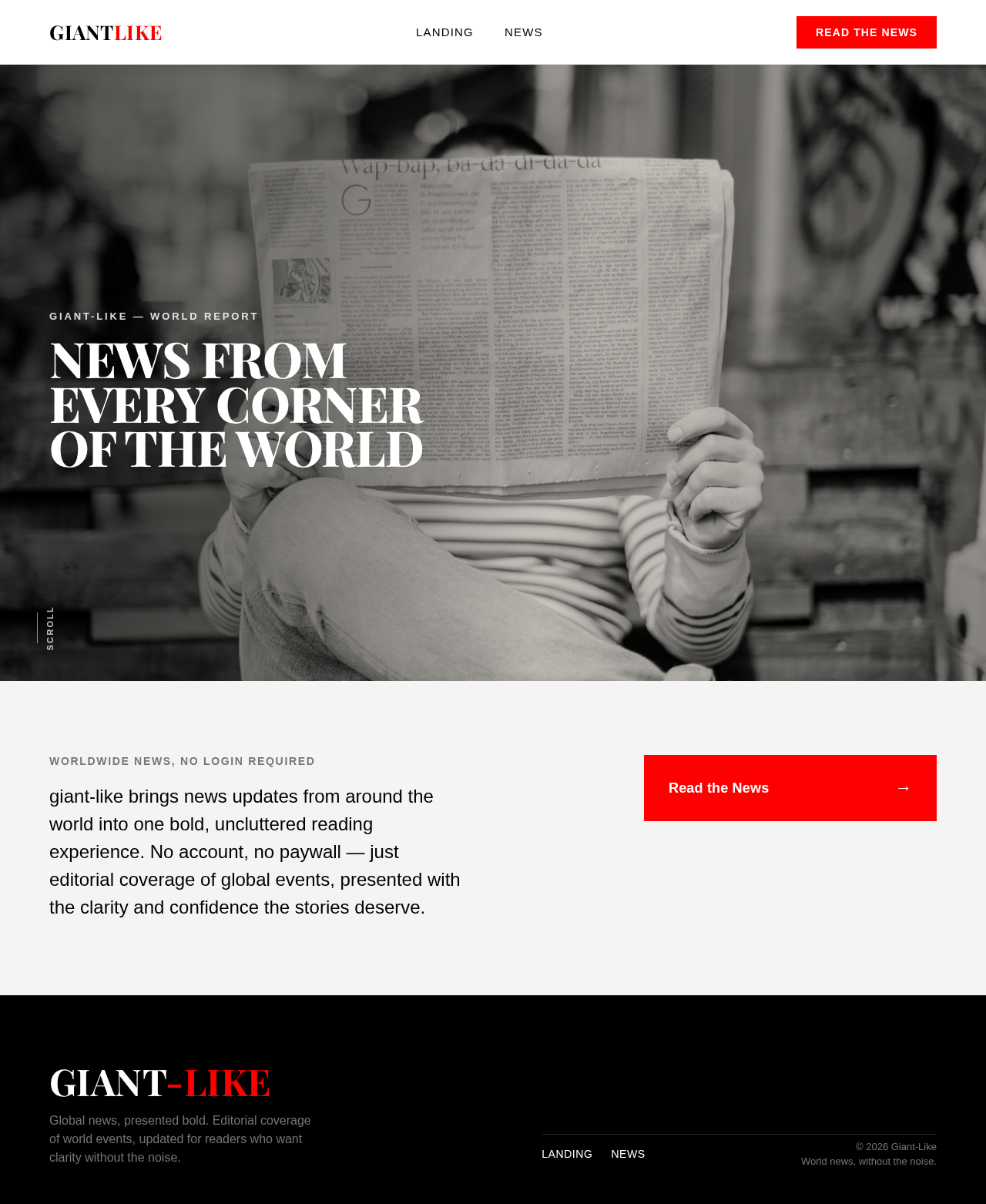


Giant-Like — World Report
News From
Every Corner
Of The World
Worldwide News, No Login Required
giant-like brings news updates from around the world into one bold, uncluttered reading experience. No account, no paywall — just editorial coverage of global events, presented with the clarity and confidence the stories deserve.
Giant-Like — World Report
News From
Every Corner
Of The World
Worldwide News, No Login Required
giant-like brings news updates from around the world into one bold, uncluttered reading experience. No account, no paywall — just editorial coverage of global events, presented with the clarity and confidence the stories deserve.
No comments yet. Be the first!