giant-calculator
create a project to build a calculator with single page design and simple arthemetic calculations with minimal logic

Comments (0)
Sign in to leave a comment
Project Tasks3
Implement CalculatorHeader for Calculator
As a frontend developer, implement the CalculatorHeader section for the Calculator page. This section renders a `<header className="ch-header">` containing: (1) A `ch-symbols` div with four `motion.span` elements (aria-hidden) for math symbols (+, −, ×, ÷), each animated via `symbolVariants` (opacity 0→0.07, scale 0.5→1, spring, staggered delay 0.6 + i*0.12s). (2) A `ch-content` div containing an `<h1 className="ch-title">` where `titleWords` array drives three `motion.span` elements ('giant', '-', 'calculator') animated via `wordVariants` (opacity, y: 24→0, rotateX: 40→0, spring, staggered 0.13s delay, perspective 600px inline style) — the word 'calculator' receives `ch-title-accent` class. (3) A `motion.p` subtitle animated via `subtitleVariants` (opacity, y: 12→0, delay 0.45s). (4) A `motion.div` divider animated via `dividerVariants` (scaleX: 0→1, delay 0.6s, spring). Import `framer-motion`; apply `CalculatorHeader.css` styles. This is a root page with no cross-page dependencies.
Implement CalculatorContainer for Calculator
As a frontend developer, implement the CalculatorContainer section for the Calculator page. This section renders the full interactive calculator using `useState` hooks: `display` (string, init '0'), `expression` (string), `prevValue` (null|number), `operator` (null|string), `waitingForOperand` (bool), and `justEvaluated` (bool). Key logic: `inputDigit` (useCallback) handles digit entry respecting `justEvaluated` and `waitingForOperand` states, caps display at 15 chars; `inputDecimal` (useCallback) handles '.' entry with duplicate prevention; `performOperation` (useCallback) uses `OP_MAP` object (`+`, `−`, `×`, `÷` mapped to pure functions including division-by-zero guard returning 'Error') and `DISPLAY_SYMBOLS` for expression display; `formatNumber` utility trims floats to 10 decimal places. Sub-component `CalcButton` uses `motion.button` with `whileHover={{ scale: 1.06, y: -2 }}` and `whileTap={{ scale: 0.92, y: 2 }}` with `springTap` transition (stiffness 500, damping 25, mass 0.8). Uses `AnimatePresence` from `framer-motion` for display transitions. Apply `CalculatorContainer.css`. Keyboard input support hinted via CalculatorFooter. No backend calls — pure client-side arithmetic.
Implement CalculatorFooter for Calculator
As a frontend developer, implement the CalculatorFooter section for the Calculator page. This section renders a `<footer className="cf-footer">` containing a `motion.div` (`cf-inner`) animated with opacity 0→1, y: 10→0, duration 0.6s, delay 0.8s, easeOut. Inside: (1) A `cf-status` div with a `cf-status-dot-ring` + `cf-status-dot` pulse indicator and a 'Calculator ready' label. (2) A `<hr className="cf-divider">`. (3) A `cf-text` paragraph with dynamic `currentYear` via `new Date().getFullYear()`, a `cf-brand` span for 'giant-calculator', and tagline text. (4) A secondary `motion.div` (`cf-hint`) animated opacity 0→0.6 with delay 1.2s, containing three `<kbd className="cf-kbd">` elements showing keyboard hints: '0-9', '+-*/', and 'Enter'. Import `framer-motion`; apply `CalculatorFooter.css`. No cross-page or cross-section dependencies.
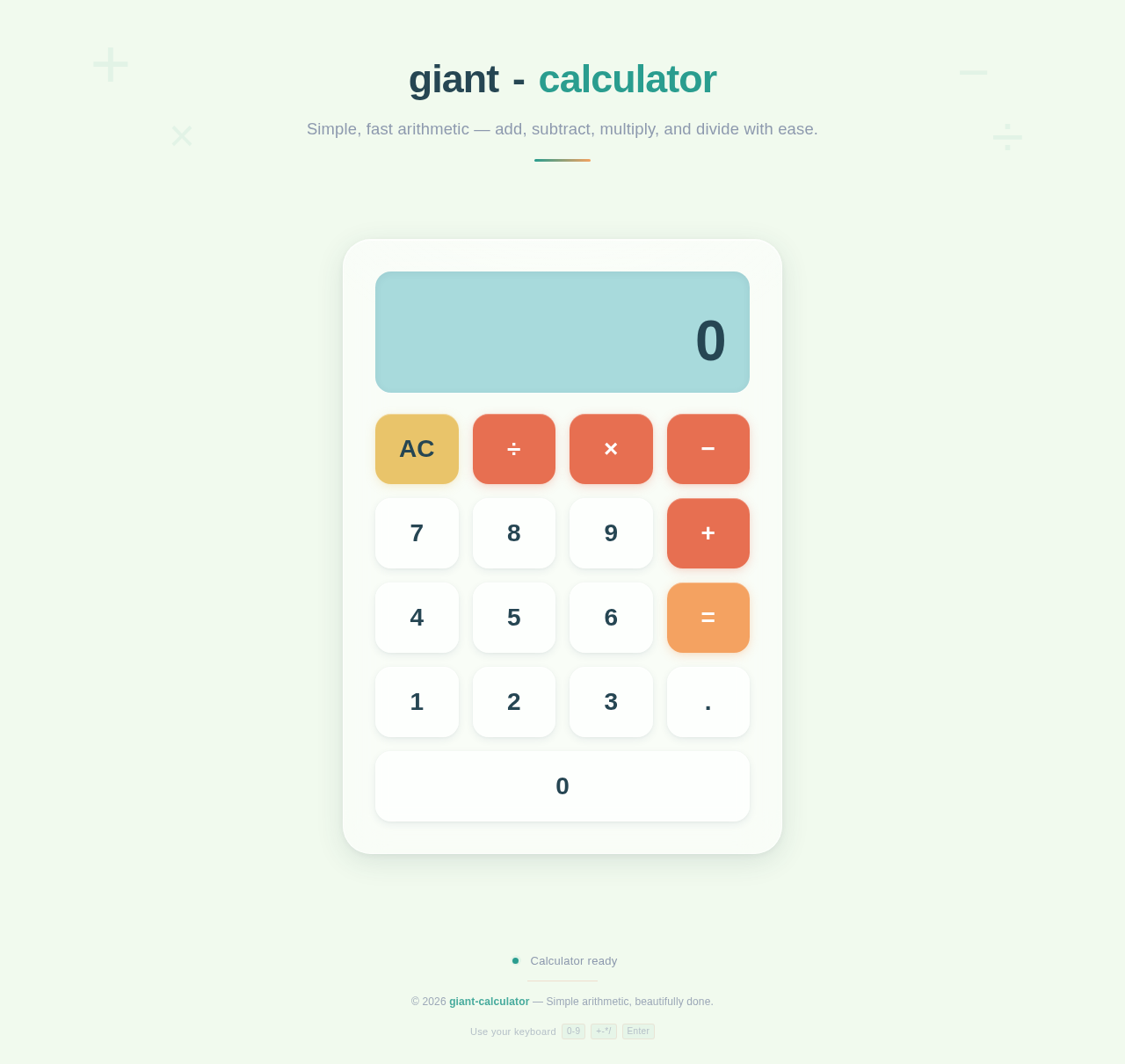
giant-calculator
Simple, fast arithmetic — add, subtract, multiply, and divide with ease.
No comments yet. Be the first!