active
get-card
by Vipin Vipin
Vipin Vipin1. वेबसाइट का मुख्य उद्देश्य (Core Business Model) नाम: GetCard (डिजिटल डॉक्यूमेंट व स्मार्ट कार्ड पोर्टल) उद्देश्य: किसी भी छात्र, आम नागरिक, साइबर कैफ़े संचालक या ऑफ़िस कर्मी को सिर्फ 2 मिनट में असली दिखने वाला 3D स्मार्ट कार्ड (आईडी कार्ड, मार्कशीट, प्रमाण पत्र) या प्रोफेशनल रिज़्यूम तैयार करके देने की सुविधा। कमाई का मॉडल: फ्री टेम्पलेट्स पर सीधा डाउनलोड, और प्रीमियम टेम्पलेट्स पर नाममात्र की फीस (पेमेंट गेटवे से) लेकर हाई-रिज़ॉल्यूशन 300 DPI फ़ाइल डाउनलोड करवाना। 2. यूआई डिज़ाइन व थीम (UI & Aesthetic) कलर पैलेट: लग्ज़री एमराल्ड/फॉरेस्ट ग्रीन (#064e3b / #022c22) थीम। पुराने सभी काले/डार्क-स्लेट बॉक्स हटाकर पूरी साइट को प्रोफेशनल ग्रीन टोन दिया गया। बॉटम नेविगेशन बार (5 टैब्स): होम (Home): टॉप बैनर, कार्ड बनाने की 3-स्टेप गाइड, एडमिन द्वारा चुनी गई 4 "मोस्ट पॉपुलर" कार्ड्स की ग्रिड, और सबसे नीचे 5-स्टार रेटिंग व कस्टमर रिव्यूज। ट्यूटोरियल वीडियो: पूरा अलग पेज, जहाँ यूट्यूब/इंस्टाग्राम के वीडियो गाइड्स लिस्टेड हों। टेम्पलेट्स (+ बटन): सेंटर में एमराल्ड ग्लो वाला बटन। ऑर्डर्स: यूज़र द्वारा बनाए गए पिछले कार्ड्स का रिकॉर्ड। प्रोफ़ाइल / लॉगिन: वेलकम मैसेज, शेयरिंग अपील कार्ड। एक्टिव बटन हाईलाइटिंग: जिस टैब या बटन पर क्लिक हो, वह तुरंत मिंट-ग्रीन में ग्लो/हाईलाइट होता है और बाकी नॉर्मल रहते हैं। 3D कार्ड लुक: टेम्पलेट्स सिर्फ फ्लैट इमेज नहीं हैं; उनके पीछे साफ़ बैकग्राउंड, डीप ड्रॉप शैडो और राउंडेड किनारे हैं—जिससे ऐसा 3D लुक मिलता है जैसे असली कार्ड सामने रखा हो। 3. टेम्पलेट्स गैलरी व कैटेगरी फ़िल्टर गैलरी के ऊपर से भारी-भरकम डार्क हीरो बॉक्स हटाकर सिंगल-लाइन थिन-बॉर्डर फ़िल्टर पिल्स ("सभी", "स्कूल व कॉलेज", "सरकारी पहचान", "स्टाफ व ऑफिस", "प्रमाण पत्र", "रिज्यूम") लगाई गई हैं। वॉटरमार्क सुरक्षा: जब तक यूज़र सिर्फ गैलरी में टेम्पलेट्स देखेगा, कार्ड बिल्कुल साफ़ (बिना वॉटरमार्क) दिखेंगे। जैसे ही यूज़र "बनाएं / Edit" दबाएगा, लाइव प्रीव्यू पर हल्का वॉटरमार्क आ जाएगा ताकि कोई स्क्रीनशॉट न ले सके। पेमेंट होने के बाद (या एडमिन द्वारा) डाउनलोड करने पर वॉटरमार्क अपने आप हट जाएगा। 4. एडिटर स्क्रीन व लाइव प्रीव्यू (Sticky Layout) लॉक्ड/स्टिकी लाइव प्रीव्यू: मोबाइल स्क्रीन पर ऊपर कार्ड का प्रीव्यू लॉक (फिक्स) रहता है। यूज़र जब नीचे फॉर्म भरते हुए स्क्रॉल करता है, तो प्रीव्यू ऊपर नहीं छुपता—सिर्फ फॉर्म स्क्रॉल होता है। डायनेमिक 2-Way डेटा बाइंडिंग: फॉर्म में नाम, पिता का नाम, मोबाइल, रोल नंबर टाइप करते ही या कैलेंडर से जन्मतिथि चुनते ही ऊपर के कार्ड में वह लाइव बदलता है। 5. रिज़्यूम (Resume / CV) इंजन - 5 नए स्टाइल्स रिज़्यूम के लिए बिना X/Y पोज़ीशन के झंझट वाला ऑटो-फ़्लोइंग प्योर CSS लेआउट: Emerald Executive Pro (डबल-कॉलम, साइडबार, प्रोग्रेस बार) Nordic Minimalist (क्लीन सिंगल कॉलम, फॉर्मल जॉब्स हेतु) Creative Studio Portfolio (ग्रेडिएंट हेडर, प्रोजेक्ट ग्रिड) Tech & Engineering (हाई-डेंसिटी, स्किल्स चिप्स) Academic & Corporate Classic (पारंपरिक बायो-डाटा स्टाइल) 6. एडमिन कंट्रोल, टूल और मास्टर अधिकार मास्टर एडमिन: vipin53271@gmail.com एडमिन के लिए 100% फ्री बाईपास (बिना पेमेंट सीधे ओरिजिनल एचडी डाउनलोड)। आम यूज़र्स से एडमिन गियर आइकन छुपा हुआ। मल्टी-फ़ॉर्मेट टेम्पलेट डिज़ाइनर: एडमिन PNG, JPG, JPEG, WEBP या PDF अपलोड कर सकता है। फ़ोटो स्टाइल डिज़ाइनर: एडमिन तय कर सकता है कि यूज़र की फ़ोटो सर्कल, चौकोर या राउंडेड बॉर्डर में कैसी दिखेगी। सैंपल डेटा प्रीव्यू: एडमिन खाली टेम्पलेट पर डमी नाम/फ़ोटो भरकर सेव करेगा, जिससे गैलरी में हर टेम्पलेट पूरा भरा हुआ और सुंदर दिखेगा। मोस्ट पॉपुलर रियल-टाइम सिंक: एडमिन के किसी टेम्पलेट को "पॉपुलर" चुनते ही सभी यूज़र्स के होम पेज पर तुरंत वही 4 कार्ड्स बिना रिफ्रेश किए अपडेट हो जाते हैं। 7. डाउनलोड व A4 प्रिंट इंजन हर टेम्पलेट (फ्री या पेड) के अंत में दो मुख्य डाउनलोड विकल्प: डाउनलोड ओरिजिनल (Original HD): वास्तविक आकार में 300 DPI फ़ाइल। A4 प्रिंट शीट (A4 Print Ready PDF): ID कार्ड्स: पूरे पेज पर फैलने के बजाय A4 शीट के ऊपर असली CR80 साइज़ (85.6mm × 54mm) में कटिंग-मार्क्स और "यहाँ से काटें व लेमिनेट करें" निर्देश के साथ प्रिंट होते हैं। रिज़्यूम व सर्टिफिकेट: पूरे A4 पेज पर सटीक मार्जिन के साथ प्रिंट होते हैं। Zero Price (₹0) बाईपास: यदि एडमिन किसी टेम्पलेट की कीमत ₹0 सेट करता है, तो पेमेंट गेटवे बाईपास होकर हरा "FREE" बैज दिखता है और सीधा "मुफ़्त डाउनलोड करें" का बटन आता है। 8. प्रोफ़ाइल स्क्रीन पुराने गैर-ज़रूरी ऑप्शन्स ("मेरे ऑर्डर्स व डाउनलोड", "नया स्मार्ट कार्ड बनाएं", और "Google ऑथेंटिकेशन" वाली लाइन) हटा दिए गए। प्यारा सा वेलकम संदेश और दोस्तों को शेयर करने का कार्ड: "कृपया यह वेबसाइट अपने जरूरी फ्रेंड्स सर्कल में जरूर भेजें। जो भी 18 साल से कम का है, उसे यह वेबसाइट बहुत हेल्प करेगी।"


Comments (0)
Sign in to leave a comment
System Requirements
Page 1 of 6
System Requirements Document for get-card
1. Introduction
GetCard is a digital document and smart card portal designed to enable students, ordinary citizens, cyber café operators, and office workers to create realistic-looking 3D smart cards, ID cards, marksheets, certificates, or professional resumes in about two minutes. The platform offers free templates for direct download and premium templates for a nominal fee, ensuring a quick and user-friendly experience.
2. System Overview
GetCard provides a streamlined process for creating and downloading high-resolution digital documents and smart cards. The system supports a luxury emerald/forest-green visual theme and features a bottom navigation bar with five primary destinations: Home, Tutorial Video, Templates, Orders, and Profile/Login. The platform includes a robust admin control system for managing templates and user interactions.
2a. Product Interpretation and Delivery Boundary
GetCard is delivered as a web-based application with a focus on functional clarity and professional design. The system requires user authentication for accessing protected features such as document creation, order history, and downloads. Admin controls are restricted to the master admin account, ensuring secure management of templates and pricing. The platform supports various template formats and provides both Original HD and A4 Print Ready PDF outputs.
Page 2 of 6
2b. Source Content Inventory
Not applicable as no content source directive was provided.
2c. Page Content and Component Coverage
Home
- Top Banner: Introduction to GetCard's services.
- 3-Step Card Creation Guide: Instructions for creating cards.
- Most Popular Cards: Grid of four admin-selected templates.
- Ratings and Reviews: Display of customer feedback.
Profile / Login
- Welcome Message: Personalized greeting for users.
- Sharing Appeal Card: Encouragement to share the platform with friends.
Tutorial Video
- Video List: Embedded YouTube/Instagram guides for using GetCard.
Templates
- Gallery: Display of templates with category filter pills.
- 3D Presentation: Realistic card previews with deep shadows.
Editor
- Sticky Live Preview: Fixed card preview while editing.
- Form Fields: Dynamic data binding for user inputs.
Page 3 of 6
Admin Login
- Access Control: Secure login for master admin.
Orders
- Order History: Record of previously created cards.
Downloads
- Download Options: Original HD and A4 Print Ready PDF retrieval.
Admin Controls
- Template Management: Upload and configure templates.
- Photo Style Configuration: Set user photo presentation styles.
- Sample Data Preview: Populate templates with dummy data.
- Popular Template Sync: Real-time update of popular templates.
3. Functional Requirements
- As a Document Creator, I should be able to browse and select templates from a categorized gallery to create documents. (explicit)
- As a Document Creator, I should be able to edit templates with live preview and dynamic data binding. (explicit)
- As a Document Creator, I should be able to download documents in Original HD or A4 Print Ready PDF format. (explicit)
- As a Document Creator, I should be able to view tutorial videos for guidance. (explicit)
- As a Master Admin, I should be able to manage templates, pricing, and popular selections. (explicit)
- As a Master Admin, I should be able to bypass payment for template downloads. (explicit)
- As a Document Creator, I should complete self-service enrollment before accessing protected features. (required_inference)
- As a Document Creator, I should verify my identity through Profile / Login to access protected records. (required_inference)
- As a Master Admin, I should verify my identity through Admin Login to access admin controls. (required_inference)
Page 4 of 6
4. User Personas
- Document Creator: Includes students, ordinary citizens, cyber café operators, and office workers. Responsible for browsing templates, entering data, creating documents, and downloading results.
- Master Admin: Manages templates, sample previews, pricing, photo styles, popularity selection, and free HD-download bypass.
5. Core User Flows
Document Creator Flow
- Access the Home page to view the top banner and card creation guide.
- Navigate to Templates to browse and select a desired template.
- Enter the Editor to customize the template with personal data.
- Preview the document with live updates and watermark.
- Proceed to Downloads to retrieve the document in the desired format.
- Use Profile / Login for identity verification when accessing protected features.
Master Admin Flow
- Access Admin Login to verify identity.
- Navigate to Admin Controls to manage templates and settings.
- Update popular templates and sync changes in real-time.
- Bypass payment for template downloads as needed.
Page 5 of 6
6. Visuals Colors and Theme
- Muse: Dieter Rams
- Palette: Background #022c22, Surface #064e3b, Text #ffffff, Primary #022c22, Accent #f57c00, Muted #3a3a3a.
- Typography: Headings Saira (Medium, small caps), Body Fira Sans, Scale 1.414 modular.
- Shape Language: Rounded-rectangle controls.
- Layout: Modular grid with horizontal rules.
- Imagery: Diagrammatic elements and sharp 3D card renders.
7. Signature Design Concept
A clean, modular grid showcasing a large 3D card render as the focal point, surrounded by functional UI elements in emerald and orange accents. The design emphasizes precision and realism, guiding users through the card creation process with clarity.
8. Interaction Model & Motion Direction
- Interaction Model: Static
- Motion Tempo: Restrained
- Hero Dimensionality: Flat
- Landing Hero Motion Brief: A composed first frame with a large 3D card render, using orange accents for interactive elements. Reduced-motion state available for accessibility.
9. Non-Functional Requirements
- The system must support high-resolution 300 DPI output for all documents. (explicit)
- The admin interface must remain hidden from ordinary users. (explicit)
- The platform must ensure secure user authentication and authorization. (required_inference)
Page 6 of 6
10. Tech Stack
- Frontend: React
- Backend: Python/FastAPI
- Storage: Appropriate storage solutions for document persistence
- Deployment: Docker/docker-compose
11. Assumptions and Constraints
- Only the named master admin account can bypass payment for downloads.
- The platform must adhere to the specified emerald/forest-green theme.
- Templates must be available in the specified formats (PNG, JPG, JPEG, WEBP, PDF).
12. Glossary
- 3D Smart Card: A digital representation of a card with realistic 3D effects.
- CR80 Size: Standard size for ID cards, measuring 85.6mm × 54mm.
- Master Admin: The user with full control over admin settings and template management.
- Document Creator: Any user creating documents or smart cards using the platform.
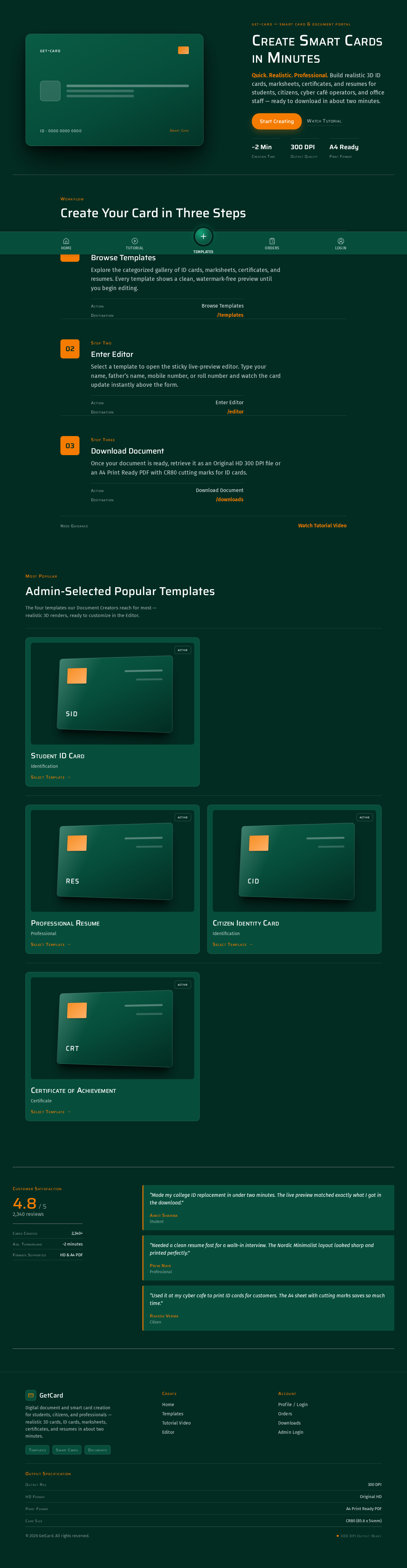
get-card
ID · 0000 0000 0000Smart Card
get-card — smart card & document portal
Create Smart Cards in Minutes
Quick. Realistic. Professional. Build realistic 3D ID cards, marksheets, certificates, and resumes for students, citizens, cyber café operators, and office staff — ready to download in about two minutes.
~2 MinCreation Time
300 DPIOutput Quality
A4 ReadyPrint Format
Workflow
Create Your Card in Three Steps
- 01Step One
Browse Templates
Explore the categorized gallery of ID cards, marksheets, certificates, and resumes. Every template shows a clean, watermark-free preview until you begin editing.
ActionBrowse TemplatesDestination/templates - 02Step Two
Enter Editor
Select a template to open the sticky live-preview editor. Type your name, father’s name, mobile number, or roll number and watch the card update instantly above the form.
ActionEnter EditorDestination/editor - 03Step Three
Download Document
Once your document is ready, retrieve it as an Original HD 300 DPI file or an A4 Print Ready PDF with CR80 cutting marks for ID cards.
ActionDownload DocumentDestination/downloads
Most Popular
Admin-Selected Popular Templates
The four templates our Document Creators reach for most — realistic 3D renders, ready to customize in the Editor.
active
active
active
get-card
ID · 0000 0000 0000Smart Card
get-card — smart card & document portal
Create Smart Cards in Minutes
Quick. Realistic. Professional. Build realistic 3D ID cards, marksheets, certificates, and resumes for students, citizens, cyber café operators, and office staff — ready to download in about two minutes.
~2 MinCreation Time
300 DPIOutput Quality
A4 ReadyPrint Format
Workflow
Create Your Card in Three Steps
- 01Step One
Browse Templates
Explore the categorized gallery of ID cards, marksheets, certificates, and resumes. Every template shows a clean, watermark-free preview until you begin editing.
ActionBrowse TemplatesDestination/templates - 02Step Two
Enter Editor
Select a template to open the sticky live-preview editor. Type your name, father’s name, mobile number, or roll number and watch the card update instantly above the form.
ActionEnter EditorDestination/editor - 03Step Three
Download Document
Once your document is ready, retrieve it as an Original HD 300 DPI file or an A4 Print Ready PDF with CR80 cutting marks for ID cards.
ActionDownload DocumentDestination/downloads
Most Popular
Admin-Selected Popular Templates
The four templates our Document Creators reach for most — realistic 3D renders, ready to customize in the Editor.
active
active
active
active
No comments yet. Be the first!