gentle-start
 Diya Trivedi
start a project to build a simple single page design of calculator

Comments (0)
Sign in to leave a comment
System Requirements
System Requirements Document for gentle-start
1. Introduction
gentle-start is a simple calculator delivered as a single-page design. Its entire product intent is one page, one job: a person opens the page, enters numbers and operators on an on-screen keypad, and reads a correct arithmetic result. There is no navigation, no account, no marketing surface, and no second screen.
The audience is anyone who needs arithmetic in the moment — students, shoppers, freelancers, parents — and the product is designed to feel unhurried, humane, and quietly trustworthy: a well-made notebook page rather than a fintech instrument panel. Warmth and legibility matter more than spectacle; the keys should feel like objects you want to touch.
This document is the System Requirements Document for gentle-start, written for the requester, Diya Trivedi.
2. System Overview
gentle-start is a single-page web calculator. The current delivery consists of:
- Calculator — the one and only page. It is anonymously reachable, requires no identity, and owns all number entry, operator selection, clearing, backspace, and evaluation. It is the product's public entry surface and its complete information architecture.
- Calculator User — the single active human role: opens the page, presses keys, and reads the computed result.
Accepted behavior in scope:
- A full-width result display at the top of the calculator card.
- A strict 4-column keypad: digits 0–9, a decimal point, the four operators (÷ × − +), AC (all clear),\x20\xe2\x8c\xab (backspace), and equals (=).
- Evaluation of the entered expression when equals is pressed, with the result committed to the display.
- Keyboard input as a quiet courtesy: Esc, Enter, and Backspace, documented in a small footer line.
Delivery and ownership:
- The React frontend renders the single Calculator page.
- The shared FastAPI backend process hosts application APIs and domain modules; it is reused rather than duplicated.
- MariaDB is provisioned as application-owned persistent storage. The calculator's arithmetic is a single-page, in-session interaction; no durable domain entity is required by the accepted requirements, so the database is provisioned infrastructure without a mandated schema.
- No authentication, no accounts, no roles, and no permission differentiation exist in this product.
Narrow exclusions: there is no second page, no navigation bar, no logo strip, no call-to-action, no history panel, no scientific functions, no unit conversion, and no persistence of calculations across visits.
Removed from scope
- Multi-page navigation (also: navigation bar, logo strip, route list)
- Marketing hero with headline, subtext, and CTA button (also: call-to-action)
- User accounts and authentication (also: sign-in, login, identity)
- Calculation history and saved results (also: memory keys, M+, M−)
- Scientific or programmer calculator modes (also: trigonometry, parentheses, exponent keys)
2a. Product Interpretation and Delivery Boundary
gentle-start is a public, anonymous, single-page utility. The Calculator page is reachable directly with no gate: a visitor lands on it and can immediately press keys. Because the accepted behavior is a self-contained arithmetic session with no durable actor-specific state, no commitment, no entitlement, and no value transfer, no application-owned identity is established and no session continuity is required. Nothing is protected.
The current horizon is exactly the one page described here. There is no future-horizon feature set accepted for this product; anything beyond the single calculator page — history, accounts, scientific modes — is out of scope rather than deferred.
The backend and database exist as provisioned infrastructure supporting the application; they do not introduce product behavior, entities, or access rules of their own.
2c. Page Content and Component Coverage
Calculator
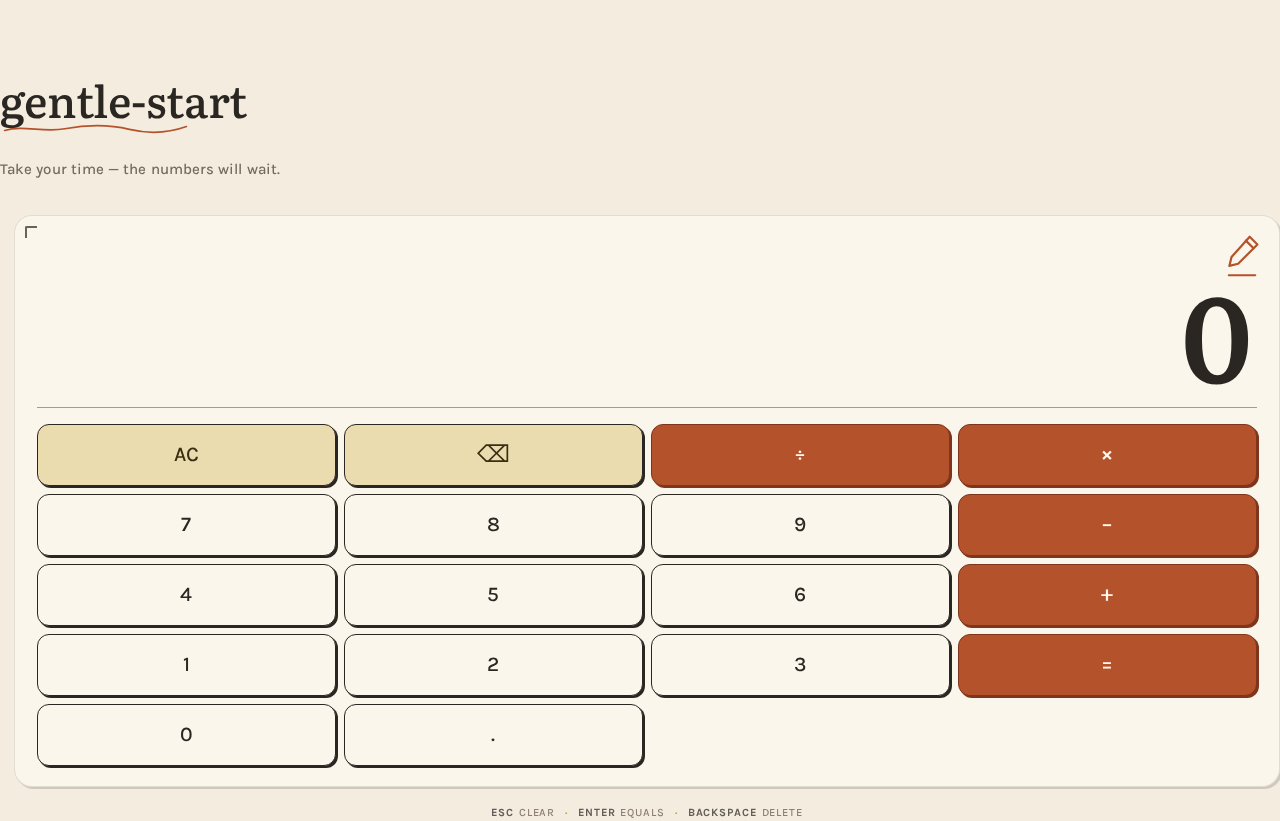
The single page of the product. Anonymous, no identity, no navigation. A wide cream paper field with a narrow centred column.
Information and state
- Current display value — the large right-aligned numeral shown in the display. Initial state is
0. - Entry state — the in-progress expression the user is building (digits, decimal point, operators). Not persisted; lives only for the page session.
- Committed result state — after equals is pressed, the computed result replaces the display value with a soft 220ms fade.
- Error state — when an expression cannot be evaluated (for example division by zero, or a malformed operator sequence), the display shows a clear error indication instead of a number; the next digit or AC returns the calculator to a usable state.
- Empty/initial state — display reads
0; no expression in progress.
Primary actions
- Press a digit key (0–9) to append it to the current entry.
- Press the decimal point key to begin a fractional part.
- Press an operator key (÷ × − +) to record the pending operation.
- Press equals (=) to evaluate the expression and commit the result to the display.
- Press AC to clear the display and the in-progress expression back to
0. - Press\x20\xe2\x8c\xab to remove the last entered character.
Supporting actions
- Keyboard input: Esc clears (equivalent to AC), Enter evaluates (equivalent to =), Backspace deletes the last character (equivalent to\x20\xe2\x8c\xab). Documented in the footer line.
Domain entities
- None persisted. The calculator operates on an in-session numeric expression and result only.
Component responsibilities
- Page title block — left-aligned Literata title
gentle-startwith a hand-drawn rust squiggle underline beneath it. - Warm hint line — one line of Karla text: "Take your time — the numbers will wait."
- Calculator card — one rounded rectangle (18px radius, hairline ink border at 12% opacity) on the lighter surface, with a small ink corner tick and a single hand-drawn rust spot illustration (pencil or abacus, 2px stroke) in the top-right corner.
- Result display — full-width, right-aligned, Literata 600 with tabular figures, sized
clamp(56px, 14vw, 120px). Shows the current value or committed result. - Mustard rule — a thin mustard divider between the display and the keypad.
- Keypad grid — strict 4-column grid. Top row: AC and\x20\xe2\x8c\xab tinted mustard. Operator column (÷ × − +) tinted rust. Digits in cream with ink. Equals key spans the bottom-right as a larger rust block.
- Key press feedback — 180ms ease-out press state:
translateY(1px)with the 2px offset shadow collapsing, like a real key. - Footer line — tiny muted Karla text listing keyboard shortcuts (Esc, Enter, Backspace).
States
- Loading — the card fades in with one gentle staggered reveal on load; no spinner, no skeleton, because there is no remote data to fetch.
- Empty — display shows
0. - Success — result committed to the display with a soft fade.
- Error — unevaluable expression shows an error indication; recovery via any digit or AC.
- Recovery — AC always returns the page to the initial
0state. - Reduced motion — all transitions become instant and the staggered reveal becomes a single static frame.
3. Functional Requirements
FR-1 — Open the calculator As a Calculator User I should open the Calculator page directly and see a ready calculator, so that I can begin arithmetic immediately.
- Provenance: explicit (single-page calculator).
- Trigger: navigating to the page.
- Observable result: the page renders with the display reading
0and the full keypad visible. - Access: anonymous; no identity required.
- Failure/recovery: none applicable — the page is static and self-contained.
- Continuation: the user may begin entering digits.
FR-2 — Enter digits As a Calculator User I should press digit keys 0–9 to build a number in the display, so that I can enter the operands of my calculation.
- Provenance: explicit (calculator).
- Trigger: pressing a digit key.
- Observable result: the digit is appended to the current display value; the display updates immediately.
- Access: anonymous.
- Failure/recovery: pressing a digit while an error is shown starts a fresh entry.
- Continuation: the user may continue entering digits or choose an operator.
FR-3 — Enter a decimal point As a Calculator User I should press the decimal point key to begin a fractional part, so that I can calculate with non-integer values.
- Provenance: required_inference (indispensable to a usable calculator keypad).
- Trigger: pressing the decimal point key.
- Observable result: a decimal point is appended to the current entry.
- Access: anonymous.
- Failure/recovery: a second decimal point in the same number is ignored rather than producing an invalid entry.
- Continuation: the user continues entering fractional digits.
FR-4 — Select an operator As a Calculator User I should press an operator key (÷ × − +) to record the pending operation, so that I can combine two operands.
- Provenance: explicit (calculator).
- Trigger: pressing an operator key.
- Observable result: the operator is recorded and the display is ready for the next operand.
- Access: anonymous.
- Failure/recovery: pressing an operator with no operand entered leaves the display unchanged.
- Continuation: the user enters the second operand.
FR-5 — Evaluate the expression As a Calculator User I should press equals (=) to compute the result, so that I can read the answer to my calculation.
- Provenance: explicit (calculator).
- Trigger: pressing the equals key.
- Observable result: the computed result replaces the display value with a soft 220ms fade.
- Access: anonymous.
- Failure/recovery: an unevaluable expression (for example division by zero) shows an error indication instead of a number; the next digit or AC returns the calculator to a usable state.
- Continuation: the user may chain a new operation from the result or clear with AC.
FR-6 — Clear everything As a Calculator User I should press AC to reset the calculator, so that I can start a fresh calculation.
- Provenance: explicit (calculator).
- Trigger: pressing AC.
- Observable result: the display returns to
0and any in-progress expression is discarded. - Access: anonymous.
- Failure/recovery: AC also clears an error state.
- Continuation: the user begins a new calculation.
FR-7 — Delete the last character As a Calculator User I should press\x20\xe2\x8c\xab to remove the last entered character, so that I can correct a mistyped digit without clearing everything.
- Provenance: required_inference (indispensable correction mechanic for a usable keypad).
- Trigger: pressing\x20\xe2\x8c\xab.
- Observable result: the last character of the current entry is removed; if the entry becomes empty the display shows
0. - Access: anonymous.
- Failure/recovery: pressing\x20\xe2\x8c\xab on an empty entry leaves the display at
0. - Continuation: the user continues entering digits.
FR-8 — Use the keyboard As a Calculator User I should use Esc, Enter, and Backspace on my keyboard, so that I can operate the calculator without reaching for the mouse.
- Provenance: explicit (creative direction footer and keyboard-shortcut courtesy).
- Trigger: pressing Esc, Enter, or Backspace.
- Observable result: Esc clears (equivalent to AC), Enter evaluates (equivalent to =), Backspace deletes the last character (equivalent to\x20\xe2\x8c\xab).
- Access: anonymous.
- Failure/recovery: same recovery semantics as the corresponding on-screen keys.
- Continuation: the user continues with either keyboard or keypad.
4. User Personas
Calculator User
Product context. The Calculator User is anyone who needs arithmetic in the moment — a student checking a problem, a shopper totalling a basket, a freelancer working out an invoice line, a parent helping with homework. They arrive at gentle-start with a number in their head and no patience for ceremony. They are not signing in, not configuring anything, and not looking for a dashboard.
Primary goal. Get a correct arithmetic result from the on-screen keypad without leaving the page.
Distinct accepted responsibilities.
- Entering operands using the digit keys and decimal point.
- Choosing the operation with the operator column.
- Committing the calculation with equals and reading the result.
- Correcting mistakes with\x20\xe2\x8c\xab or resetting with AC.
- Optionally operating the calculator by keyboard (Esc, Enter, Backspace).
Relevant inputs and decisions. Which numbers to enter, which operator to apply, whether to correct a digit or clear entirely, and when to commit with equals.
Interactions with other accepted participants. None. The Calculator User is the only human participant; the calculator itself is the counterpart that produces the result. There is no handoff, no approval, and no second party.
Observable success. The display shows the correct result of the entered expression, and the user can immediately begin another calculation or clear the page.
What makes this role distinct. The role's entire work is a short, private, in-session arithmetic loop on a single page. There is no identity, no history, no sharing, and no state that outlives the visit — which is precisely why the product can be one page.
5. Core User Flows
Flow 1 — Perform a basic calculation
- The Calculator User opens the Calculator page. The page renders on a cream paper field with the title
gentle-start, the warm hint line, and the calculator card; the display reads0. (Owner: Calculator page.) - The user presses digit keys to enter the first operand. Each digit appears in the oversized display immediately. (Owner: Calculator page.)
- The user presses an operator key in the rust-tinted operator column. The operator is recorded and the display is ready for the second operand. (Owner: Calculator page.)
- The user presses digit keys to enter the second operand. (Owner: Calculator page.)
- The user presses the rust equals key. The computed result replaces the display value with a soft 220ms fade. (Owner: Calculator page.)
- The user reads the result. They may chain a new operation from the result, or press AC to return to
0and start again. (Owner: Calculator page.)
Flow 2 — Correct a mistyped entry
- The user is mid-entry and notices a wrong digit in the display. (Owner: Calculator page.)
- The user presses\x20\xe2\x8c\xab (mustard-tinted, top row). The last character is removed; if the entry becomes empty the display shows
0. (Owner: Calculator page.) - The user continues entering the correct digits and proceeds with the calculation. (Owner: Calculator page.)
Flow 3 — Reset after a mistake or an error
- The user has entered an expression they no longer want, or the display shows an error indication (for example after division by zero). (Owner: Calculator page.)
- The user presses AC. The display returns to
0and any in-progress expression is discarded. (Owner: Calculator page.) - The user begins a fresh calculation. (Owner: Calculator page.)
Flow 4 — Operate by keyboard
- The user is on the Calculator page with the keyboard focused. (Owner: Calculator page.)
- The user types digits and operators; the display updates as with the keypad. (Owner: Calculator page.)
- The user presses Enter to evaluate, or Backspace to delete the last character, or Esc to clear. The display responds exactly as the corresponding on-screen keys. (Owner: Calculator page.)
- The user reads the result and continues. (Owner: Calculator page.)
6. Visuals Colors and Theme
The creative direction is authoritative for this section. Muse: Frank Chimero — warm editorial calm for a calculator you actually enjoy pressing. Headline idea: a well-made notebook page, not an instrument panel.
Mode. Light only. No dark mode.
Colour tokens (exact hex, by role)
| Role | Hex | Use |
|---|---|---|
| Background | #F4ECDF | Warm cream paper ground covering the page |
| Surface | #FBF6EC | Calculator card, slightly lighter than the ground |
| Text / Ink | #2A2622 | All readable text, display numerals, key outlines |
| Primary | #B4532B | Rust — equals key, operator column tint, status dot, squiggle, spot illustration |
| Accent | #C99A2E | Mustard — AC/\xe2\x8c\xab keys, thin section rule |
| Muted | #8A7F70 | Warm grey — labels, hints, key legend, footer |
Contrast: ink on cream ≈ 13:1; rust on cream ≈ 4.9:1 at body size. No white-on-white, no blue anywhere.
Typography
- Headings: Literata, medium weight, tracking
-0.01em, generous line-height for the small page title. - Display numerals: Literata 600, tabular figures, tracking
0.01em, so digits read like a printed ledger and never jitter as you type. - Body and labels: Karla, medium weight; micro-labels in uppercase with
0.08emtracking. - Scale (1.333 modular): display
clamp(56px, 14vw, 120px); page titleclamp(28px, 5vw, 44px); key labels 18–22px; micro-labels 11px uppercase with0.08emtracking; body/hint 15px. - Forbidden: Inter, Roboto, Arial, Helvetica, Poppins, system-ui.
Shape language. Paper and ink. One rounded rectangle for the calculator body (18px radius, hairline #2A2622 at 12% opacity). Keys are soft 12px-radius blocks with a 1px ink outline and a 2px offset "printed" shadow rather than a glossy lift. A single hand-drawn underline squiggle beneath the page title; a small ink corner tick on the card. No blobs, no glass, no gradients.
Layout. Single centred column, max-width 420px on mobile and 460px on desktop, on a wide cream field with generous margins. Above the card: a left-aligned page title and a one-line warm hint ("Take your time — the numbers will wait."). The card holds a full-width result display at the top, a thin mustard rule, then a strict 4-column keypad: AC and\x20\xe2\x8c\xab in the top row tinted mustard, the operator column (÷ × − +) tinted rust, digits in cream with ink, and the equals key spanning the bottom-right as a larger rust block. A footer line of tiny muted text gives keyboard shortcuts (Esc, Enter, Backspace). On desktop the card sits slightly right of centre with the title anchored left, so the whitespace is asymmetric.
Imagery. No photography, no 3D renders. Illustration is limited to one small hand-drawn ink spot illustration in the top-right of the card — a pencil or abacus line drawing in rust at 2px stroke — and the squiggle underline. A faint paper grain texture at 3% opacity over the cream ground. Everything else is type and keys.
Spacing rhythm. Generous outer margins; a consistent 8px base unit for key gaps and card padding; the display given the most vertical breathing room so the numeral dominates.
7. Signature Design Concept
The calculator is the hero. The first screen is a wide cream paper field with a narrow centred column. A left-aligned Literata title gentle-start sits above a hand-drawn rust squiggle, followed by a one-line warm hint in Karla. Then the calculator card itself: its display showing a large Literata 0 at clamp(56px, 14vw, 120px), right-aligned, sitting above the strict keypad grid.
The dominant element is the oversized display numeral — not a button, not an image. Rust and mustard appear only on the operator and clear keys, so the card reads as ink on paper with two coded columns. The composition is asymmetric in its whitespace: the card sits slightly right of centre on desktop with the title anchored left. There is no navigation bar, no logo strip, and no CTA — one object, one job.
Signature moves carried into the build:
- An oversized Literata result display, right-aligned, with tabular figures so digits never jitter as you type.
- Keys as printed blocks: 1px ink outline with a 2px offset shadow that collapses on press — a physical key, not a hover-lift card.
- A two-colour coded keypad: mustard for AC/\xe2\x8c\xab, rust for the operator column and a full-width rust equals block — colour as wayfinding, not decoration.
- A hand-drawn rust squiggle underline beneath the left-aligned title and a single ink spot illustration in the card corner — the only warmth beyond type.
- A quiet keyboard-shortcut footer line in small-caps Karla, treating the page like a well-set page of a book rather than an app.
8. Interaction Model & Motion Direction
Interaction Model: Animated Motion Tempo: restrained Hero Dimensionality: flat
Landing Hero Motion Brief
- Focal subject. The oversized Literata result numeral in the calculator display — the calculator itself is the hero, not a marketing headline.
- Input → transformation → outcome thesis. A key press (input) collapses the key's 2px offset shadow and nudges it
translateY(1px)over 180ms (transformation), so the key reads as a physical object being pressed; when equals is pressed, the display value fades softly over 220ms into the committed result (outcome). Nothing else moves. - Motion vocabulary. Restrained and purposeful: a 180ms ease-out press state on keys, a soft 220ms fade for the display when a result is committed, and one gentle staggered fade-in of the card on load. Nothing bounces, nothing loops.
- Composed first frame. The cream field, the left-anchored title with its rust squiggle, the warm hint line, and the calculator card settling into place with its display reading
0— a single static frame that already contains the whole product. - Reduced-motion state. With
prefers-reduced-motion, all transitions become instant and the staggered reveal becomes a single static frame; the calculator remains fully usable.
9. Non-Functional Requirements
- Single page (explicit). The product must be exactly one page. No routes, navigation, or secondary screens may be added.
- Simplicity (explicit). The design must be simple: one card, one display, one keypad, one footer line. No panels, tabs, or settings.
- Readability at every viewport (explicit, creative direction). Headlines, labels, numbers, and controls stay entirely inside the viewport and their container at 375px, 768px, and 1280px, wrapping or scaling via
clamp(...)to fit. No element covers any part of readable text or a control. - Accessibility (required_inference). Ink-on-cream contrast ≈ 13:1 and rust-on-cream ≈ 4.9:1 at body size; keys are reachable and operable by keyboard;
prefers-reduced-motionis honoured with a usable static arrangement. - Performance (required_inference). The page is static and self-contained; it renders without waiting on remote data, and key presses update the display immediately.
- No persistence (explicit by omission of any history requirement). Calculations are in-session only; nothing is stored across visits.
- No identity (explicit access contract). The page is anonymous; no sign-in, account, or permission differentiation exists.
10. Tech Stack
- Frontend: React application UI rendering the single Calculator page.
- Backend: shared FastAPI process for application APIs and domain modules, reused rather than duplicated.
- Database: MariaDB, provisioned as application-owned persistent storage. The accepted calculator behavior requires no durable entity, so no schema is mandated by this document.
- Containerization: Docker / docker-compose, with the provisioned services
backend,database, andfrontend. - Fonts: Literata and Karla, loaded as web fonts.
11. Assumptions and Constraints
- A-1 (explicit). The product is a simple calculator delivered as a single page; the page count is exactly one.
- A-2 (explicit). The calculator is anonymous and public; no identity, account, or session continuity is required.
- A-3 (required_inference). The calculator supports the four basic operations (÷ × − +), digits 0–9, a decimal point, AC,\x20\xe2\x8c\xab, and equals — the minimum keypad implied by "calculator" and the creative direction's keypad description.
- A-4 (required_inference). Keyboard shortcuts Esc, Enter, and Backspace mirror AC, equals, and\x20\xe2\x8c\xab respectively, as stated in the creative direction's footer line.
- A-5 (required_inference). Division by zero and malformed expressions produce an error indication rather than a crash, with recovery via any digit or AC.
- A-6 (explicit, creative direction). Light mode only; no dark mode, no blue/indigo/violet, no glassmorphism, no gradients, no photography, no 3D renders, no bouncy or looping motion.
- A-7 (explicit, creative direction). Inter, Roboto, Arial, Helvetica, Poppins, and system-ui are forbidden for any text.
- A-8 (provisioned infrastructure). The backend and database are provisioned but do not introduce product behavior, entities, or access rules.
12. Glossary
- Calculator page — the single page of gentle-start; the sole owner of number entry, operator selection, clearing, backspace, and evaluation.
- Calculator User — the single active human role; opens the page, presses keys, and reads the result.
- Display — the full-width, right-aligned Literata numeral area at the top of the calculator card.
- Keypad — the strict 4-column grid of keys below the display.
- AC — all clear; resets the display and in-progress expression to
0. - \xe2\x8c\xab — backspace; removes the last entered character.
- Committed result — the computed value that replaces the display after equals is pressed, shown with a soft 220ms fade.
- Tabular figures — numerals of equal width, so digits do not jitter as they are typed.
- Reduced motion — the
prefers-reduced-motionstate in which all transitions become instant and the staggered reveal becomes a single static frame.
gentle-start
Take your time — the numbers will wait.
Esc clearEnter equalsBackspace delete
gentle-start
Take your time — the numbers will wait.
Esc clearEnter equalsBackspace delete
No comments yet. Be the first!