gentle-simple
 Diya Trivedi
create a simple single page design of the todo

Comments (0)
Sign in to leave a comment
System Requirements
System Requirements Document for gentle-simple
1. Introduction
gentle-simple is a single-page todo application. One person opens one page, writes down what needs doing, sees the list of what remains, marks items complete, and removes items they no longer want. The product intent is deliberately narrow: a calm, unhurried, low-stakes working sheet rather than a productivity cockpit. There is no collaboration, no dashboard, no prioritisation scheme, and no second surface — the page itself is the product.
The audience is a single anonymous user managing their own tasks. The design register the project name asks for — gentle, simple — is treated as a functional requirement of the interface: the empty list is a designed state, each added task is the one calm object on the page, and the interface stays quiet at every viewport.
2. System Overview
gentle-simple is delivered as a React frontend, a shared FastAPI backend process, and a MariaDB database for application-owned persistent data. The frontend renders the single Todo page; the backend exposes the todo item APIs and persists items in MariaDB so the list survives reloads and return visits.
Actors:
- Todo user — the single active human persona. Anonymous, single-user, no account, no sign-in. They add, view, complete, and delete their own todo items.
- Application backend (system actor) — stores and returns todo items, assigns identifiers, and records completion state.
- MariaDB (system actor) — durable storage for todo items.
Accepted behavior in scope: adding a todo item, viewing the list of todo items, marking a todo item complete, and deleting a todo item, all on one page.
Narrow exclusions: no accounts, no multi-user sharing, no categories, priorities, due dates, reminders, or notifications, no additional pages or routes, no reporting or analytics surface.
Removed from scope
- Multi-page navigation (also: routes, secondary screens)
- User accounts and sign-in (also: authentication, login)
- Task categories and priority tags (also: labels, colour-coded categories)
- Due dates and reminders (also: notifications, scheduling)
2a. Product Interpretation and Delivery Boundary
The whole product is one page. Access is anonymous and public: the Todo page is the entry point and the complete working surface, and no identity, account, or session is required to use it. Because the product is single-user and anonymous, there is no per-user private state to protect and no differentiated permissions or role-based visibility anywhere in the product.
Durability is application-owned: todo items are stored by the backend in MariaDB so that the list a user sees reflects what they previously added, completed, or deleted, including after a page reload. This is the only state continuity the product provides; it is not an account, and it does not identify the user.
Everything described in this document is current. No future-horizon capabilities are accepted.
2c. Page Content and Component Coverage
Todo
The single page of the product, and the complete working surface. Anonymous public entry; no sign-in gate.
Information and state
- A tiny uppercase date label at the top-left margin.
- The wordmark
gentle-simple(32px desktop / 24px mobile, light weight, wide tracking), flush-left in the column. - One quiet greeting line beneath the wordmark.
- The task sheet: a flat
#FBF8F2rectangle with a 1px#DAD3C6hairline border, 2px maximum radius, no shadow. - The list of todo items, each rendered as a ruled row: completion circle, task text, delete ×.
- A right-aligned muted remaining count beneath the final rule (e.g.
3 remaining), with the numeral in the light wordmark weight. - A footer: one thin rule and a single 11px line of quiet copy.
- Page states: loading (list being fetched), empty (no items), populated, and error (list could not be loaded or an action failed).
Primary actions
- Add a todo item: the input row is the first ruled line of the sheet — a borderless field with a thin
+at left, a 1px underline that grows left-to-right in#B4703Con focus, and a muted uppercaseaddlabel at right that turns ink when the field has text. Submitting adds the item to the list; no modal, no second surface. - Mark a todo item complete: the 18px circle outline fills with
#B4703Cand receives a thin ink check in 200ms; the task text fades to#8C867Aand gains a 1px strike that stops short of the last word. - Delete a todo item: a whisper-thin × at 1px and 40% opacity, reaching full ink only on row hover or keyboard focus.
Supporting actions and controls
- Keyboard focus on the input, on each completion circle, and on each delete control, with a clay focus treatment and a 1px offset ink outline.
- Remaining count updates as items are added, completed, or deleted.
Domain entities
- Todo item — identifier, text, completion state, creation order. Owned by the backend and persisted in MariaDB.
Component responsibilities
- Page shell — paper ground
#F4F0E8, centered single column max-width 560px, minimum 96px above the wordmark at desktop and 40px at mobile, flush-left composition inside the centered measure. - Date label — 11px uppercase, 0.16em tracking, muted.
- Wordmark and greeting — Zen Kaku Gothic New Light 300, wide tracking, generous leading.
- Add row — input field,
+glyph,addlabel, focus underline animation. - Task list — ruled rows with 1px separators that stop 24px short of the sheet's right edge.
- Task row — completion circle, task text at 18px regular with 1.7 line-height, delete ×.
- Remaining count — right-aligned, muted, light-weight numeral.
- Footer — thin rule plus one 11px quiet line.
States
- Loading — the sheet renders with its rules and input active; the list area shows no rows until items arrive.
- Empty — a single centered 14px muted line of copy with 0.16em tracking floating in the middle of the sheet; the input row above remains active. No illustration, no "get started" card.
- Success — a new row fades in over 240ms on add; a completed row shows the filled circle, muted struck text; a deleted row fades out over 240ms and the count updates.
- Error — if the list cannot be loaded, the sheet shows a quiet muted line stating the list could not be loaded with a retry control; if an add, complete, or delete action fails, the row returns to its prior state and a quiet muted line reports that the change was not saved, with retry available.
- Recovery — retry re-requests the list or re-attempts the failed action; the input remains usable throughout.
3. Functional Requirements
FR-1 — Add a todo item (explicit) As a Todo user I should be able to add a new todo item from the input row on the Todo page so that it appears in my list.
- Trigger/input: the user types text into the sheet's first ruled input row and submits (Enter or the
addlabel). - Observable result: the new item appears as a ruled row in the list with a 240ms ease-out opacity fade; the remaining count increases; the input clears and keeps focus.
- Access state: anonymous, no sign-in.
- Failure/recovery: if the save fails, the row is not added, a quiet muted line reports the change was not saved, and the user can retry; the typed text is preserved for retry.
- Continuation: the user can immediately add another item or act on the new row.
- Owner: Todo page (frontend) with the shared backend and MariaDB persisting the item.
FR-2 — View the list of todo items (explicit) As a Todo user I should be able to see my list of todo items on the Todo page so that I know what still needs doing.
- Trigger/input: opening the Todo page, or any add/complete/delete action.
- Observable result: the sheet lists every stored item as a ruled row in creation order, with completed items visibly distinguished; the remaining count reflects items not yet complete.
- Access state: anonymous, no sign-in.
- Failure/recovery: if the list cannot be loaded, a quiet muted line states the list could not be loaded and offers retry.
- Continuation: the user can act on any row.
- Owner: Todo page (frontend) reading from the shared backend and MariaDB.
FR-3 — Mark a todo item complete (explicit) As a Todo user I should be able to mark a todo item complete so that I can see it is done.
- Trigger/input: the user activates the completion circle on a row (pointer or keyboard).
- Observable result: the circle fills with
#B4703Cand receives a thin ink check over 200ms; the task text fades to#8C867Aand gains a 1px strike stopping short of the last word; the remaining count decreases. - Access state: anonymous, no sign-in.
- Failure/recovery: if the save fails, the row returns to its prior state and a quiet muted line reports the change was not saved, with retry available.
- Continuation: the user can continue with other rows.
- Owner: Todo page (frontend) with the shared backend and MariaDB persisting completion state.
FR-4 — Delete a todo item (explicit) As a Todo user I should be able to delete a todo item so that it no longer appears in my list.
- Trigger/input: the user activates the whisper-thin × on a row (visible at full ink on hover or keyboard focus).
- Observable result: the row fades out over 240ms and is removed from the list; the remaining count updates.
- Access state: anonymous, no sign-in.
- Failure/recovery: if the delete fails, the row remains and a quiet muted line reports the change was not saved, with retry available.
- Continuation: the user can continue with other rows or add a new item.
- Owner: Todo page (frontend) with the shared backend and MariaDB removing the item.
FR-5 — Single-page delivery (explicit) As a Todo user I should experience the entire product on one page so that adding, viewing, completing, and deleting never requires navigating away.
- Observable result: every capability above is reachable on the Todo page; there are no other routes or screens.
- Owner: Todo page.
FR-6 — Durable todo state (required_inference) As a Todo user I should find my todo items still present when I return to the page so that the list reflects what I previously added, completed, or deleted.
- Trigger/input: a page load after prior use.
- Observable result: the list and completion states match the last successfully saved state.
- Access state: anonymous; durability is not tied to an account.
- Failure/recovery: as in FR-2.
- Owner: shared backend and MariaDB, surfaced on the Todo page.
4. User Personas
Todo user
Product context. One person, working alone, on one page. They arrive with a small set of things on their mind and want to put them down somewhere quiet and see them clearly. There is no team, no manager, no shared board, and no account — the page is theirs by virtue of being the only page.
Primary goal. A clear, up-to-date view of what still needs doing, reached with as little ceremony as possible.
Distinct accepted responsibilities.
- Writing a new item into the sheet's first ruled line and committing it.
- Reading the list to see what remains, including which items are already done.
- Deciding an item is finished and marking it complete.
- Deciding an item is no longer wanted and deleting it.
Relevant inputs and decisions. The text of each task; whether a task is done; whether a task should be removed. The user makes every decision on this page — nothing is decided for them and nothing is scheduled, categorised, or prioritised by the product.
Interactions with other participants. None. The Todo user is the only human actor; the backend and database act only in service of the user's own actions.
Observable success. The list on screen matches what the user intends: new items appear immediately, completed items read as done at a glance, deleted items are gone, and the remaining count is correct. On return, the list is as they left it.
What makes this role distinct. The work is entirely self-directed and stateless with respect to identity: there is no handoff, no approval, no counterparty, and no permission boundary. The only thing that must persist is the list itself.
5. Core User Flows
Flow 1 — Add a todo item
- The Todo user opens the Todo page. The paper ground, date label, wordmark, and greeting render; the sheet's first ruled line is the input row.
- The user clicks or tabs into the input. The 1px underline grows left-to-right in
#B4703Cover 160ms. - The user types the task text. The muted uppercase
addlabel at the right turns ink. - The user presses Enter or activates
add. The frontend sends the new item to the shared backend, which stores it in MariaDB. - On success, the new row fades in over 240ms as a ruled row with a completion circle, the task text, and a whisper-thin ×; the remaining count increases; the input clears and keeps focus.
- Failure/recovery: if the save fails, no row is added, the typed text is preserved, and a quiet muted line reports the change was not saved with retry available. The user retries or continues.
- Continuation: the user adds another item, or moves on to completing or deleting an existing one.
Flow 2 — View the list
- The Todo user opens the Todo page.
- The frontend requests the stored items from the shared backend, which reads them from MariaDB.
- While loading, the sheet renders with its rules and active input; the list area shows no rows yet.
- On success, items appear as ruled rows in creation order. Completed items show a filled clay circle, a thin ink check, muted text, and a strike stopping short of the last word. The remaining count sits right-aligned beneath the final rule.
- If there are no items, the sheet shows a single centered 14px muted line with 0.16em tracking; the input row above stays active.
- Failure/recovery: if the list cannot be loaded, a quiet muted line states the list could not be loaded and offers retry; retry re-requests the list.
- Continuation: the user acts on any row, or adds a new item.
Flow 3 — Mark a todo item complete
- From the populated list on the Todo page, the Todo user moves to the row they have finished.
- The user activates the 18px completion circle (pointer click, or keyboard focus then activation; focus shows a clay treatment with a 1px offset ink outline).
- The frontend sends the completion change to the shared backend, which records it in MariaDB.
- On success, the circle fills with
#B4703Cand receives a thin ink check over 200ms; the task text fades to#8C867Aand gains a 1px strike stopping short of the last word; the remaining count decreases. - Failure/recovery: if the save fails, the row returns to its prior state and a quiet muted line reports the change was not saved with retry available.
- Continuation: the user completes further rows, deletes a row, or adds a new item.
Flow 4 — Delete a todo item
- From the populated list on the Todo page, the Todo user hovers or keyboard-focuses the row they no longer want. The whisper-thin × reaches full ink.
- The user activates the ×.
- The frontend sends the delete to the shared backend, which removes the item from MariaDB.
- On success, the row fades out over 240ms and disappears; the remaining count updates.
- Failure/recovery: if the delete fails, the row remains and a quiet muted line reports the change was not saved with retry available.
- Continuation: the user continues with other rows or adds a new item.
Flow 5 — Return to the page
- The Todo user returns to the Todo page later.
- The frontend requests the stored items; the backend returns them from MariaDB.
- The list renders exactly as last saved — items, completion states, and remaining count — with no sign-in step.
- The user continues with any of Flows 1–4.
6. Visuals Colors and Theme
The muse is Kenya Hara, and the headline is "Emptiness as content — a todo list that breathes." The register is paper and morning light, not software.
Colour tokens (light mode)
| Role | Hex | Use |
|---|---|---|
| Background | #F4F0E8 | Unbleached paper ground for the whole page |
| Surface | #FBF8F2 | The task sheet, barely lifted |
| Border | #DAD3C6 | 1px hairline on the sheet and row rules |
| Text / Primary | #2B2A26 | All type and the single primary action |
| Accent | #B4703C | Warm wood/clay, 2–3% of the screen: completion tick, focused input underline, count numeral |
| Muted | #8C867A | Metadata, micro-labels, completed-task text |
No second accent, no colour-coded categories, no gradients, no blue or indigo anywhere including focus rings. Focus is clay with a 1px offset outline in ink.
Typography
- Headings and body: Zen Kaku Gothic New.
- Scale (1.25 modular): 44 / 32 / 24 / 18 / 14 / 11.
- Wordmark: Light 300, 32px desktop / 24px mobile, 0.08em tracking, generous leading.
- Greeting: 24px desktop / 20px mobile, Light 300.
- Task text: 18px desktop / 17px mobile, regular 400, 1.7 line-height.
- Micro-labels (count,
add,done): 11px uppercase, 0.16em tracking, muted. - Never bold; emphasis comes from colour and space. No display type above 32px.
Shape language. Square proportions and thin rules. The sheet is a flat rectangle with at most 2px radius and a 1px #DAD3C6 hairline border — no soft cards, no pills, no blobs, no drop shadows. Completion is a hand-drawn-feeling 18px circle outline that fills with #B4703C and a thin ink check. Delete is a whisper-thin × at 1px, 40% opacity, reaching full ink only on hover or keyboard focus. Section rules stop 24px short of the sheet's right edge, like a margin line on washi paper.
Spacing rhythm. Centered single column, max-width 560px, flush-left composition inside the measure. Minimum 96px above the wordmark at desktop and 40px at mobile. Everything is one column at 375, 768, and 1280; the sheet simply gains margin as the viewport widens. Readable text and controls stay whole inside the viewport and their container at all three widths, wrapping or scaling (for example clamp() with its mobile size) to fit, and nothing covers them.
Imagery. No photography, no illustration, no icons beyond the thin circle, plus, and × glyphs. The only "image" is the paper texture implied by the ground colour and the hairline rules; the interface itself is the still life.
7. Signature Design Concept
The first screen is the working sheet, treated as a still life in emptiness. The top of the viewport is dominated by empty paper #F4F0E8, with a tiny uppercase date label at the top-left margin. Ninety-six pixels below it, flush-left in the 560px column, sits the 32px light wordmark gentle-simple with wide tracking, then a 24px greeting line in ink. Immediately beneath, the task sheet begins with its underline-only input as the first ruled row — a thin + at left, a 1px underline, and a muted uppercase add at right.
The dominant element is the negative space itself. The single clay accent appears only as the focused input underline and the count numeral. Nothing is centered except the empty-state line: a centered 14px muted line with 0.16em tracking floating in the middle of the sheet while the input row stays active above it — no illustration, no "get started" card. The composition is flush-left, quiet, and unmistakably not a SaaS hero.
8. Interaction Model & Motion Direction
Interaction Model: Static (direction) Motion Tempo: still Hero Dimensionality: flat
Landing Hero Motion Brief
- Focal subject: the task sheet itself — the input row as its first ruled line, the ruled task rows, and the negative space around them.
- Input → transformation → outcome thesis: the user types into the sheet's first line → the underline grows left-to-right in
#B4703Cover 160ms and theaddlabel turns ink → on commit the new row fades in over 240ms as one calm object on the page, and the remaining count updates. - Motion vocabulary: a 240ms ease-out opacity fade on add and remove, a 160ms underline grow on input focus, and a 200ms fill on the completion circle. No bounces, no parallax, no scroll effects, no confetti, no celebratory animation.
- Composed first frame: empty paper ground, tiny uppercase date label at top-left, wordmark and greeting flush-left in the column, the sheet beginning with its active input row, and the centered muted empty-state line in the middle of the sheet.
- Reduced-motion state: with
prefers-reduced-motion, all transitions drop to instant state changes; the composition is unchanged and every control remains fully usable.
9. Non-Functional Requirements
- Single page (explicit): the product is one page; no additional routes or screens exist.
- Simplicity (explicit): the interface stays minimal — one column, one sheet, one input row, ruled task rows, one count, one footer line.
- Readability at every viewport (explicit, from the creative direction): wordmark, labels, task text, count, and controls stay entirely inside the viewport and their container at 375px, 768px, and 1280px, wrapping or scaling to fit, with nothing covering them.
- Accessible focus (explicit, from the creative direction): every interactive control (input, completion circle, delete ×, retry) is keyboard reachable with a visible clay focus treatment and a 1px offset ink outline.
- Reduced motion (explicit, from the creative direction):
prefers-reduced-motioncollapses all transitions to instant state changes without altering the composition. - Durability (required_inference): todo items and their completion state persist in MariaDB so the list survives reloads and return visits.
- Quiet failure handling (required_inference): load and action failures are reported in muted inline copy with retry, never as blocking modals or alerts.
10. Tech Stack
- Frontend: React application rendering the single Todo page.
- Backend: shared FastAPI process hosting the todo item APIs and domain modules.
- Database: MariaDB for application-owned persistent todo data.
- Infrastructure: docker-compose with the
frontend,backend, anddatabaseservices; the backend is extended with todo routes rather than adding a new service.
11. Assumptions and Constraints
- Single page, exact (explicit): the product consists of exactly one page, the Todo page, which is also the anonymous public entry.
- Anonymous, single-user (explicit via the access contract): no accounts, sign-in, sessions, or permissions; the list is not tied to an identity.
- No adjacent task-management features (explicit exclusion): no categories, priorities, due dates, reminders, notifications, search, filters, or reporting.
- Durability without identity (required_inference): persistence is application-owned and shared by whoever opens the page; this is the minimum needed for the accepted add/view/complete/delete lifecycle to be usable across visits.
- Design defaults (from the creative direction): palette, typography, shape, layout, and motion values above are authoritative for this project; the generic indigo/blue-on-white SaaS template is forbidden.
12. Glossary
- Todo page — the single page of the product and its complete working surface.
- Task sheet — the flat
#FBF8F2rectangle with a hairline border that holds the input row and the task rows. - Todo item — one task: its text, completion state, and position in the list.
- Completion circle — the 18px outline control that fills with clay and receives an ink check when a task is marked complete.
- Remaining count — the right-aligned muted count of items not yet complete.
- Empty state — the designed state showing a single centered muted line when no items exist, with the input row still active.
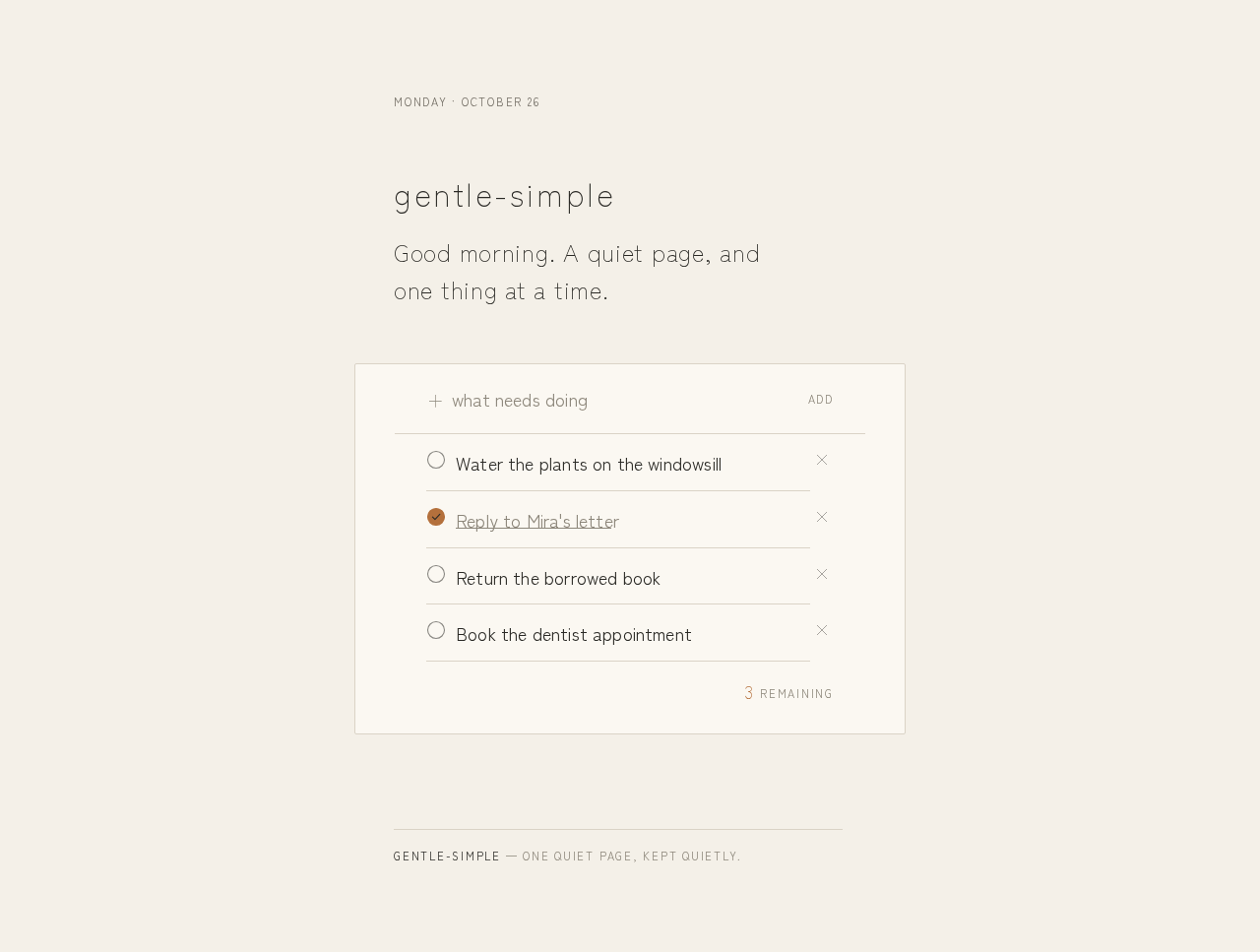
gentle-simple
Good morning. A quiet page, and one thing at a time.
- Water the plants on the windowsill
- Reply to Mira's letter
- Return the borrowed book
- Book the dentist appointment
3remaining
gentle-simple
Good morning. A quiet page, and one thing at a time.
- Water the plants on the windowsill
- Reply to Mira's letter
- Return the borrowed book
- Book the dentist appointment
3remaining
No comments yet. Be the first!