gentle-production
 Madhuri
Build a production-ready Resume & CV Builder SPA in **one React JSX file** (<1000 lines), default export. Act as a top-tier product designer + senior React engineer. Use React hooks, no Tailwind/external UI libraries; one `<style>` tag/inline CSS. Dark obsidian UI: #080C15 base, #0D1220 panels, #111827 cards, #1C2740 borders, #C9A227 accent, #E8EAF0 text, #8892A6 muted; Inter + Instrument Serif via Google Fonts. No gradients, decorative shadows, emojis, or radii >10px. Fixed 3-zone layout: sticky 48px topbar, 420px scrollable form panel, flexible scrollable preview with centered US-Letter paper. Add 4 live-switching SVG-preview templates: Classic, Modern, Minimal, Executive; font selector, 5 accent swatches, Export PDF, Copy plain text. Include live ATS scanner scoring 9 checks: complete contact, 15–60-word summary, ≥50% quantified bullets, no weak openers, 5–18 skills, single column, ATS font, 250–900 words, no date gaps. Accordion form: Contact, Summary, repeatable Experience/Education/Projects/Certifications, Skills, Languages. Live preview; weak bullets appear gray/italic/struck through. Claude API actions: rewrite summary, rewrite bullets, suggest 10 skills; POST `/v1/messages`, model `claude-sonnet-4-6`, max_tokens 1000, no invented facts, inline errors. Persist `{data,template,font,accent}` via `window.storage` key `resume-engine-v1`, debounced 600ms. `window.print()` PDF stylesheet; clipboard plain text + single replacing toast. Fully functional first render, no console errors.

Comments (0)
Sign in to leave a comment
System Requirements
System Requirements Document for gentle-production
1. Introduction
The gentle-production project aims to deliver a production-ready Resume & CV Builder as a single-page application (SPA) built in one React JSX file. The target audience includes professional users seeking to create ATS-friendly resumes and CVs with clarity and efficiency. The application will feature a dark obsidian UI, live-switching SVG-preview templates, an ATS scanner, and data persistence, all while maintaining a fully functional first render with no console errors.
2. System Overview
The Resume & CV Builder SPA will be delivered as a single React JSX file, adhering to strict design and implementation constraints. It will provide users with a cohesive environment to create, edit, and export resumes and CVs. The application will include live preview templates, an ATS scanner, and integration with the Claude API for content enhancement. The system will ensure data persistence and offer export options in PDF and plain text formats.
2a. Product Interpretation and Delivery Boundary
The application is designed to operate as a standalone SPA with no external UI libraries, using React hooks and inline CSS for styling. The dark obsidian color palette and specified typography will ensure a professional appearance. The application will be accessible without requiring user authentication, and all functionalities will be available from a single page. The system will rely on browser capabilities for storage, printing, and clipboard operations.
2b. Source Content Inventory
Not applicable as no content source directive was provided.
2c. Page Content and Component Coverage
Resume Builder
-
Topbar
- Sticky 48px height with functional controls.
- Includes font selector and accent color swatches.
-
Form Panel
- Accordion sections for Contact, Summary, Experience, Education, Projects, Certifications, Skills, and Languages.
- Live ATS scanner feedback with inline indicators for weak bullets.
- Claude API integration for rewriting and skill suggestions.
-
Preview Panel
- Flexible scrollable area with centered US-Letter paper.
- Live-switching SVG-preview templates: Classic, Modern, Minimal, Executive.
- Real-time updates reflecting form changes.
-
Export and Copy
- Export as PDF using
window.print()with a PDF stylesheet. - Copy plain text to clipboard with a single replacing toast notification.
- Export as PDF using
-
Persistence
- Data persistence using
window.storagewith keyresume-engine-v1and 600ms debounce.
- Data persistence using
-
Error Handling
- Inline error messages for Claude API actions.
- No console errors on first render.
3. Functional Requirements
- As a Resume Builder User, I should be able to create and edit my resume using accordion sections for various categories. (explicit)
- As a Resume Builder User, I should be able to switch between four live SVG-preview templates. (explicit)
- As a Resume Builder User, I should be able to select fonts and accent colors for my resume. (explicit)
- As a Resume Builder User, I should receive live ATS scanner feedback on my resume content. (explicit)
- As a Resume Builder User, I should see weak bullets styled as gray, italic, and struck through. (explicit)
- As a Resume Builder User, I should be able to use Claude API actions to enhance my resume content. (explicit)
- As a Resume Builder User, I should have my resume data persisted locally with a debounce mechanism. (explicit)
- As a Resume Builder User, I should be able to export my resume as a PDF. (explicit)
- As a Resume Builder User, I should be able to copy my resume as plain text to the clipboard. (explicit)
- As a Resume Builder User, I should experience a fully functional application with no console errors on first render. (explicit)
4. User Personas
- Resume Builder User: Responsible for entering, editing, reviewing, optimizing, persisting, and exporting their resume or CV.
5. Core User Flows
-
Creating and Editing a Resume
- User accesses the Resume Builder page.
- User enters information in accordion sections.
- User receives live ATS feedback and adjusts content accordingly.
- User uses Claude API actions for content enhancement.
-
Previewing and Customizing the Resume
- User selects a preview template.
- User chooses fonts and accent colors.
- User observes real-time updates in the preview panel.
-
Exporting and Copying the Resume
- User exports the resume as a PDF.
- User copies the resume as plain text to the clipboard.
-
Data Persistence
- User's resume data is automatically saved locally with a debounce mechanism.
6. Visuals Colors and Theme
- Muse: Dieter Rams
- Palette:
- Background: #080C15
- Surface: #0D1220
- Text: #E8EAF0
- Primary: #C9A227
- Accent: #C9A227
- Muted: #8892A6
- Typography:
- Headings: Inter Tight, Medium weights, small caps
- Body: Instrument Serif
- Scale: 1.25 modular (48/36/24/18/14)
- Shape Language: Rounded-rectangle controls, precise alignment
- Layout: Strict modular grid
- Motion: Instant, mechanical feedback with quick transitions
7. Signature Design Concept
The public entry page will feature a structured, tabular layout showcasing the resume form alongside a preview pane. The dark palette with gold accents will highlight key elements, ensuring a professional and focused user experience.
8. Interaction Model & Motion Direction
- Interaction Model: Static
- Motion Tempo: Restrained
- Hero Dimensionality: Flat
- Landing Hero Motion Brief: The hero will present a composed layout with instant feedback on user actions, maintaining focus on the resume content without decorative motion.
9. Non-Functional Requirements
- The application must be implemented in one React JSX file under 1000 lines with a default export. (explicit)
- The application must use React hooks and no external UI libraries. (explicit)
- The application must use one style tag or inline CSS. (explicit)
- The application must adhere to the specified color palette and typography. (explicit)
- The application must have no console errors on first render. (explicit)
10. Tech Stack
- Frontend: React (hooks, single JSX file)
- Styling: Inline CSS, one
<style>tag - Fonts: Google Fonts (Inter, Instrument Serif)
- API: Claude API for content enhancement
- Persistence:
window.storage - Export:
window.print()
11. Assumptions and Constraints
- The application will be delivered as a single-page React application.
- Browser support for
window.storage,window.print(), and clipboard operations is assumed. - The application will not use any external UI libraries or frameworks beyond React.
12. Glossary
- SPA: Single-Page Application
- ATS: Applicant Tracking System
- Claude API: An API used for enhancing resume content
- SVG: Scalable Vector Graphics
- PDF: Portable Document Format
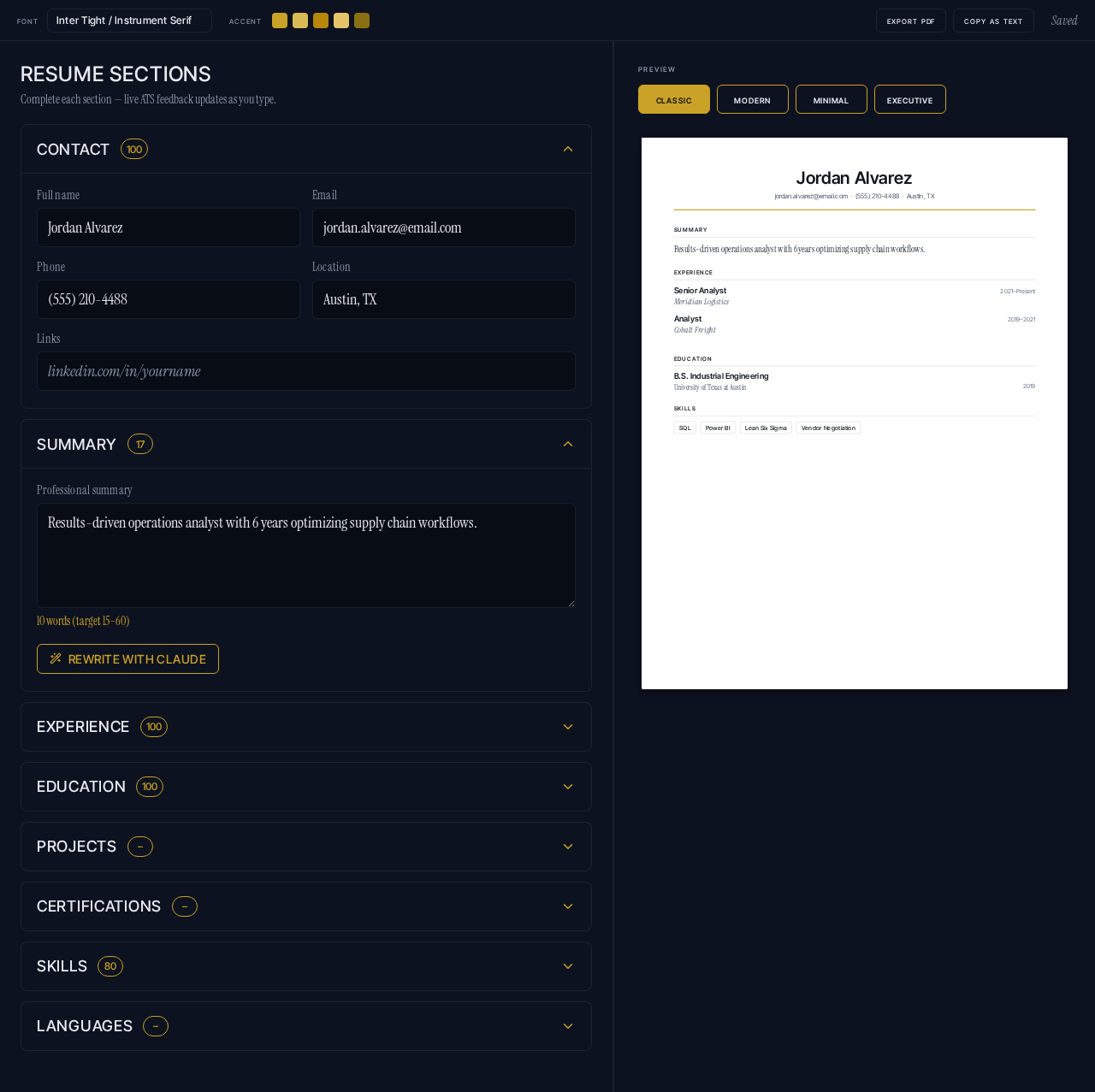
Resume Sections
Complete each section — live ATS feedback updates as you type.
Resume Sections
Complete each section — live ATS feedback updates as you type.
No comments yet. Be the first!