gentle-page
build a to-do with single page design and minimal design

Comments (0)
Sign in to leave a comment
System Requirements
System Requirements Document for gentle-page
Introduction
The purpose of this document is to outline the system requirements for the "gentle-page" project, a single-page to-do application with a minimal design. This document will provide a comprehensive overview of the system's functionality, user personas, design elements, and technical specifications.
System Overview
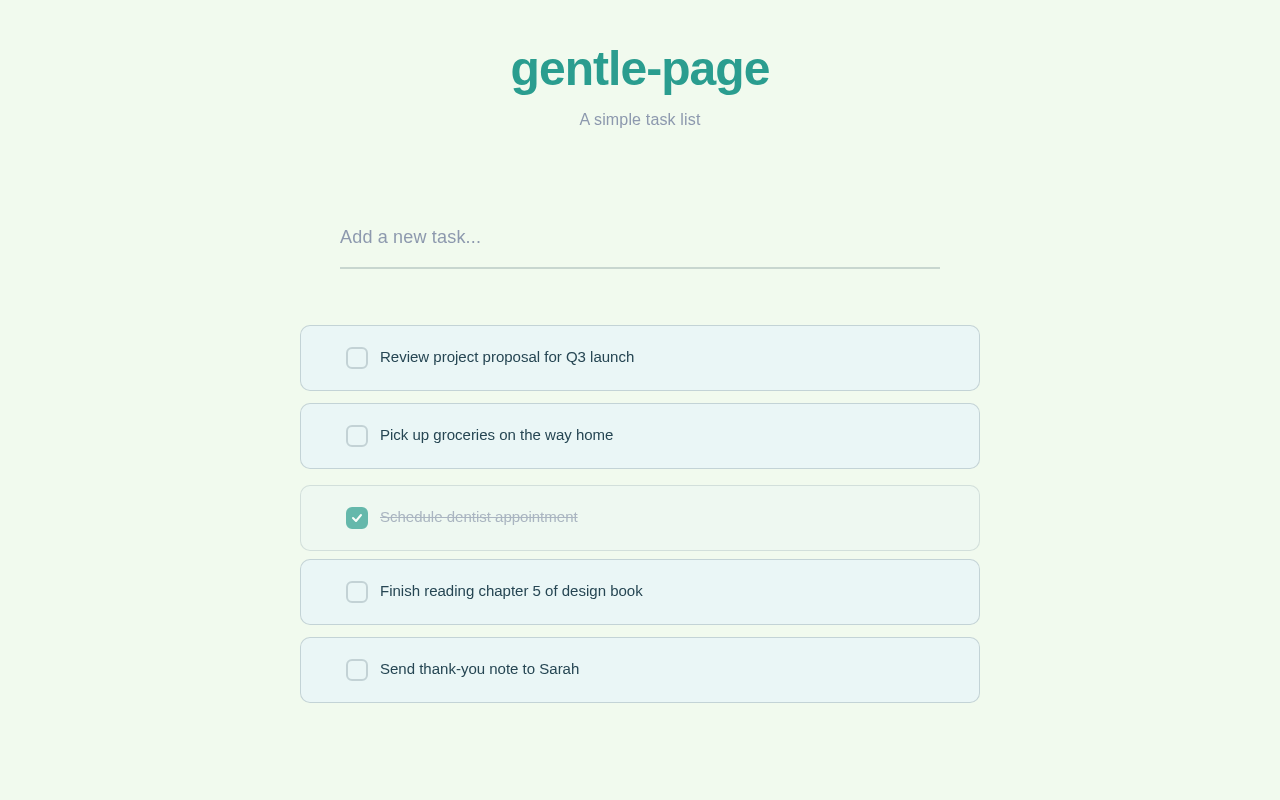
The "gentle-page" project is designed to offer users a simple and efficient way to manage their tasks. The application will focus on delivering a clean, minimalistic interface that allows users to create and manage a straightforward list of tasks without any unnecessary distractions. The system will be developed as a single-page application to ensure a seamless user experience.
Functional Requirements
- As a User, I should be able to add tasks to my to-do list.
- As a User, I should be able to view all tasks in a single list.
- As a User, I should be able to mark tasks as complete.
- As a User, I should be able to delete tasks from the list.
User Personas
- User: The primary user of the application who needs to manage personal tasks efficiently. This user values simplicity and ease of use in task management applications.
Visuals Colors and Theme
The "gentle-page" project will feature a unique color palette that aligns with its minimalistic design ethos:
- primary: #2A9D8F (a calming teal)
- primary_light: #A8DADC (a soft, light teal for hover states)
- secondary: #E76F51 (a warm coral for emphasis)
- accent: #F4A261 (a vibrant orange for call-to-action elements)
- highlight: #E9C46A (a golden yellow for notifications and active states)
- bg: #F1FAEE (a light, airy background color)
- surface: rgba(233, 245, 248, 0.8) (a subtle card/panel background)
- text: #264653 (a deep, clear blue for primary text)
- text_muted: #8D99AE (a muted gray for secondary text)
- border: rgba(38, 70, 83, 0.2) (a subtle border color)
Signature Design Concept
The "gentle-page" will feature an interactive, minimalist design concept where the entire to-do list is presented as a single, scrollable canvas. Users can interact with tasks through simple drag-and-drop gestures to reorder them. The design will incorporate subtle animations using framer-motion to provide feedback when tasks are added, completed, or deleted. The interface will be devoid of traditional buttons, relying instead on intuitive gestures and hover states to reveal options, enhancing the minimalist aesthetic.
Interaction Model & Motion Direction
The landing page will employ an "animated" interaction model, focusing on smooth transitions and hover effects to guide the user through task management. Each task interaction will be accompanied by a gentle animation to provide visual feedback, ensuring the application remains engaging without overwhelming the user. Internal pages, if any, will maintain a "static" approach to prioritize clarity and speed in task management.
Non-Functional Requirements
- The application must load within 2 seconds on standard broadband connections.
- The user interface should be responsive and accessible on both desktop and mobile devices.
- The system should handle up to 1000 tasks without performance degradation.
Tech Stack
- Frontend: React for Web
- Backend: FastAPI
- Database: MySQL
- Local orchestration: Docker, docker-compose
Assumptions and Constraints
- The application will be developed as a single-page application.
- The design will prioritize minimalism and ease of use.
- The system will not include advanced features like task categorization or reminders.
Glossary
- SPA: Single Page Application
- UI: User Interface
- UX: User Experience
- CTA: Call to Action
This document outlines the requirements and design principles for the "gentle-page" project, ensuring a focused and user-friendly task management experience.
gentle-page
A simple task list
No comments yet. Be the first!