
gentle-kinetic

bySridharan Selvaraj

Kinetic Flow is an execution and accountability platform designed to help people complete work, not just create task lists. It acts as a personal command center that always shows the most important action to take next. Users can create, organize, and track tasks through a structured lifecycle from creation to completion. The app highlights overdue work, blocked tasks, upcoming deadlines, and items waiting for action, ensuring nothing is forgotten. Every task includes priorities, due dates, checklists, reminders, notes, and progress tracking. A Smart Home dashboard provides a clear overview of daily priorities and momentum. The interface is clean, responsive, and focused on helping users make decisions quickly. Its goal is simple: turn commitments into completed outcomes through clarity, accountability, and continuous progress.

LandingTasksSMSMessageLogin
Landing

Comments (0)

No comments yet. Be the first!

System Requirements

System Requirement Document
Page 1 of 5

System Requirements Document for gentle-kinetic

1. Introduction

The gentle-kinetic project aims to develop an execution and accountability platform designed to help users complete work efficiently, not just create task lists. It acts as a personal command center, highlighting the most important actions to take next, ensuring commitments are turned into completed outcomes through clarity, accountability, and continuous progress.

2. System Overview

gentle-kinetic is a task management application that provides users with a structured lifecycle for task creation, organization, and tracking. It includes features such as priorities, due dates, checklists, reminders, notes, and progress tracking. The platform is designed to help users manage real-world responsibilities effectively, with a focus on decision-making and task completion.

3. Functional Requirements as Story Points

  • As a User, I should be able to create and organize tasks with priorities, due dates, checklists, reminders, notes, and progress tracking.
  • As a User, I should be able to view a Smart Home dashboard that provides a clear overview of daily priorities and momentum.
  • As a User, I should be able to communicate directly with people involved in a task, even if they don't use the app, through a Smart Communication Hub.
  • As a User, I should be able to select a contact or enter a phone number and/or email address while creating or editing a task.
  • As a User, I should be able to send task assignments, reminders, follow-ups, status check requests, document requests, deadline reminders, completion confirmations, and custom messages through platforms like WhatsApp, Telegram, SMS, Gmail, Outlook, Microsoft Teams, or Slack.
  • As a User, I should be able to use professionally written, customizable message templates with placeholders like task name, due date, priority, and sender name.
  • As a User, I should be able to view every message sent in a task's Communication Timeline, showing when it was sent, through which platform, and whether a response was received or the task status changed.
  • As a User, I should be able to schedule automatic follow-ups, such as reminders one day before the deadline or periodic follow-ups until the task is completed.
Page 2 of 5

4. User Personas

  • User: Individuals using the gentle-kinetic platform to manage and complete tasks efficiently.
  • Recipient: Individuals who receive communications related to tasks but do not necessarily use the gentle-kinetic platform.

5. Core User Flows

  • User creates a task -> selects contact or enters communication details -> sends task-related messages -> messages are recorded in the Communication Timeline -> schedules automatic follow-ups if needed.
  • User views Smart Home dashboard -> identifies priorities and upcoming deadlines -> takes action on tasks based on the dashboard overview.

6. Visuals Colors and Theme

  • primary: #1E90FF (Dodger Blue)
  • primary_light: #63B8FF (Light Sky Blue)
  • secondary: #FFD700 (Gold)
  • accent: #FF4500 (Orange Red)
  • highlight: #32CD32 (Lime Green)
  • bg: #F0F8FF (Alice Blue)
  • surface: #FFFFFF (White)
  • text: #000000 (Black)
  • text_muted: #696969 (Dim Gray)
  • border: #D3D3D3 (Light Gray)

7. Signature Design Concept

Page 3 of 5

Interactive Communication Hub

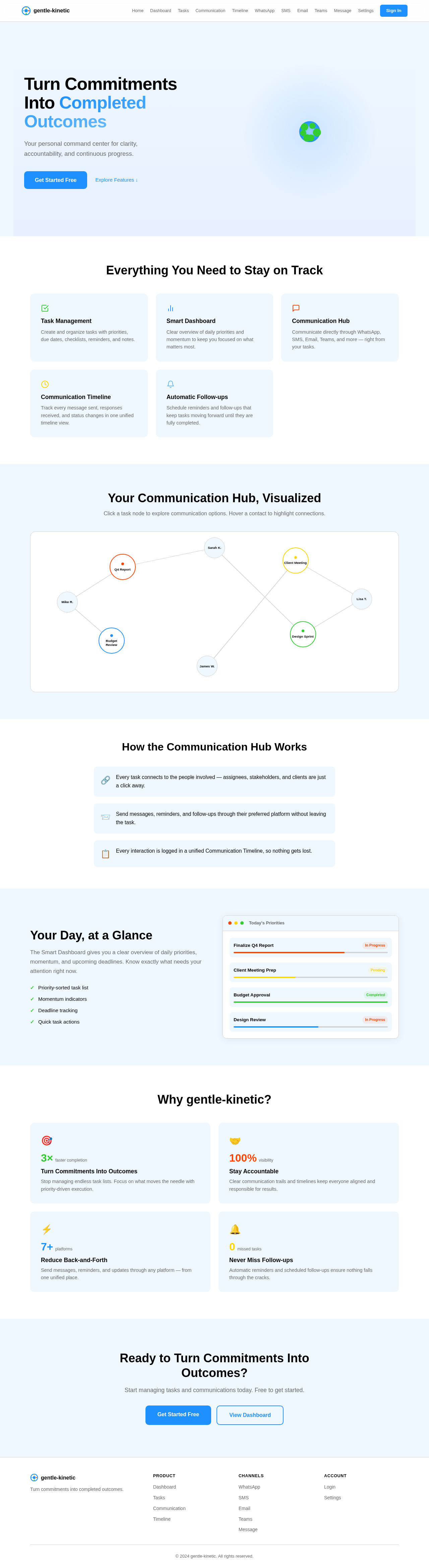
The gentle-kinetic platform will feature an Interactive Communication Hub on the landing page. This hub will visually represent a network of tasks and contacts as interconnected nodes. Users can click on a task node to expand it, revealing communication options and message templates. Hovering over a contact node will highlight the tasks they are associated with, creating an engaging and interactive experience. The nodes will dynamically rearrange to show the most relevant connections, providing a clear visual representation of task-related communications.

Landing Hero Motion Brief

The landing page will feature a dynamic illustration of tasks flowing into a central hub, transforming into completed outcomes. The animation will show tasks as colorful orbs moving towards the hub, where they change color to indicate progress and completion. This continuous loop will highlight the platform's ability to turn commitments into completed outcomes. The animation will be built using motion/react for smooth transitions and interactive elements.

8. Interaction Model & Motion Direction

  • Interaction Model: Animated
  • The landing page will feature moderate scroll-triggered reveals, hover transitions, and spring physics on interactive elements. This approach will provide a polished and engaging experience for users as they explore the platform's features.
Page 4 of 5

9. Non-Functional Requirements

  • The platform must ensure secure access control for all user data and communications.
  • The application should be responsive and perform efficiently across different devices and screen sizes.
  • Communication features should support multiple languages and regional formats, considering Sridharan's locale in India.

10. Tech Stack

  • Frontend: React for Web
  • Backend: Python, FastAPI
  • Database RDBMS: MySQL or MariaDB, using alembic for migrations
  • AI Models: GPT 5.4 for user-friendly responses
  • AI Tools: Litellm for LLM Routing, Langchain
  • Local Orchestration: Docker, docker-compose
  • Server-side Orchestration: Kubernetes

11. Assumptions and Constraints

  • The Smart Communication Hub will initially support WhatsApp, Telegram, SMS, Gmail, Outlook, and Microsoft Teams, with Slack integration planned for the future.
  • Users will have the option to customize message templates to suit their communication style and preferences.
  • The platform will be designed to accommodate future expansions and integrations with additional communication platforms.
Page 5 of 5

12. Glossary

  • Smart Communication Hub: A feature that allows users to communicate task-related information with contacts through various platforms.
  • Communication Timeline: A record of all communications related to a task, including sent messages and responses.
  • Task Node: A visual representation of a task within the Interactive Communication Hub.
  • Contact Node: A visual representation of a contact associated with tasks within the Interactive Communication Hub.
Landing design preview
WhatsApp: Receive Assignment
Message: View Task Details
Message: Reply Status
SMS: Receive Reminder
Message: Confirm Completion
Email: Receive Document Request
Email: Send Document
Message: Receive Confirmation
Teams: Receive Follow-up
Message: Send Custom Reply
Landing design preview
WhatsApp: Receive Assignment
Message: View Task Details
Message: Reply Status
SMS: Receive Reminder
Message: Confirm Completion
Email: Receive Document Request
Email: Send Document
Message: Receive Confirmation
Teams: Receive Follow-up
Message: Send Custom Reply