gentle-calculator
 Diya Trivedi
create a simple single page design of calculator

Comments (0)
Sign in to leave a comment
System Requirements
System Requirements Document for gentle-calculator
1. Introduction
gentle-calculator is a single-purpose everyday utility: a calculator delivered as one simple page. The product intent is to let a person open the page, enter numbers and operators, and read the computed result — nothing more. The design brief is "gentle": soft proportions, calm tactile feedback, and an interface that disappears into the task rather than performing a brand.
The audience is anyone who needs to add, subtract, multiply, or divide on one page — students, shoppers, freelancers, parents at the kitchen table. The tool is anonymous, public, and requires no account.
2. System Overview
gentle-calculator is a single-page, anonymous web utility. It has exactly one page, Calculator, which is also the public entry surface. A visitor lands directly on the calculator, performs arithmetic using the on-screen keypad, and reads the result in the display band. There is no navigation, no marketing section, no account, and no persistence of calculations.
Actors
- Calculator User (human, active) — the sole supported human role.
- The calculator's own client-side arithmetic engine (system process) — computes results from entered operands and operators.
Accepted behavior
- A calculator interface on a single page for performing basic calculations.
- A simple design throughout.
Exclusions (narrow, source-backed)
- No additional pages, routes, or navigation destinations.
- No accounts, sign-in, or identity establishment.
- No history, memory, or saved calculations.
- No scientific, programmer, or unit-conversion modes.
- No marketing sections, hero headlines, or promotional copy around the calculator.
2a. Product Interpretation and Delivery Boundary
The entire product is one first-party page owned by the application, reachable anonymously with no access requirement. All arithmetic is performed in the browser; there is no server-side calculation, storage, or user data. The current delivery horizon contains only the single Calculator page and its basic arithmetic behavior. Nothing in the source requests future capabilities; any extension (history, scientific functions, persistence) is explicitly out of current scope and is not planned here.
2b. Source Content Inventory
Not applicable — no reference directive declares a content_source.
2c. Page Content and Component Coverage
Calculator
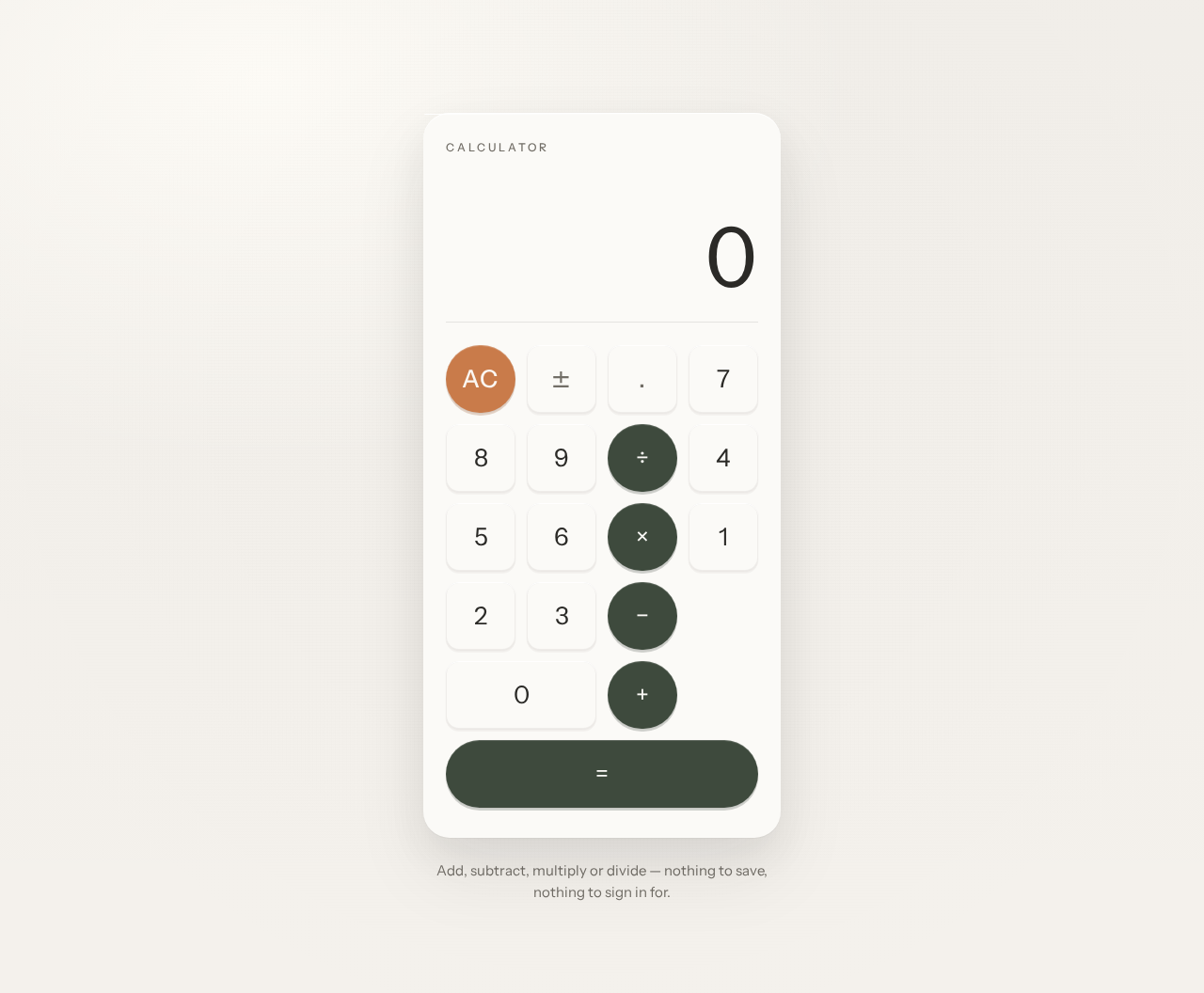
The sole page and public entry. A single centred column on a warm paper-white ground containing one calculator card (max-width 420px), with one quiet line of helper text below it.
Information and state
- Current entry expression (the sequence of digits and operators entered so far).
- Current result value, right-aligned in the display band, rendered in light-weight tabular numerals.
- Active-operator indicator (which operator key is currently engaged).
- Error state when an expression cannot be evaluated (for example, division by zero).
Primary actions
- Enter digits 0–9 and a decimal point.
- Select operators: add, subtract, multiply, divide.
- Evaluate with equals.
- Clear the current entry with the AC key.
Supporting actions
- Toggle the sign of the current entry (if represented as a key, it is a subordinate control within the keypad, not a separate capability beyond basic arithmetic entry).
Domain entities
- Entry expression (transient, in-memory only).
- Operand values (numeric).
- Operator (one of +, −, ×, ÷).
- Result value (numeric or error).
Component responsibilities
- Wordmark — small tracked-caps "CALCULATOR" label at the top-left of the object.
- Display band — right-aligned result display as display type (40px mobile → 88px desktop via clamp), tabular numerals, cross-fading in place on value change.
- Hairline rule — the only chrome separating display from keypad.
- Keypad grid — 4-column grid with 12px gutters; number keys as soft rounded squares (14px radius); operator and equals keys as pill-shaped deep-moss keys; one terracotta AC key.
- Helper text — one quiet line below the card in muted colour.
States
- Loading — none required; the page renders immediately with an empty/zero display.
- Empty — display shows
0; no expression entered. - Success — result displayed after equals; active-operator ring clears.
- Error — display shows an error indication (e.g., "Cannot divide by zero"); AC returns to the empty state.
- Recovery — pressing AC at any time clears the expression and error and returns to the empty state.
3. Functional Requirements
FR-1 — Single-page calculator design (explicit) As a Calculator User, I should see a simple calculator design contained entirely on a single page, so that I can perform calculations without navigating anywhere.
- Trigger: opening the application.
- Observable result: the Calculator page renders with wordmark, display band, hairline rule, and 4×4 keypad.
- Access: anonymous, no account.
- Failure/recovery: none applicable; the page is static content plus client-side arithmetic.
- Continuation: the user may immediately begin entering digits.
FR-2 — Calculator interface for basic calculations (explicit) As a Calculator User, I should use a calculator interface to perform basic calculations, so that I obtain the correct arithmetic result.
- Trigger: pressing digit, operator, and equals keys.
- Input: digits 0–9, decimal point, operators + − × ÷, equals, AC.
- Observable result: the display band shows the entered expression and, after equals, the computed result.
- Access: anonymous.
- Failure/recovery: an unevaluable expression (e.g., division by zero) shows an error indication; AC clears it and returns to the empty state.
- Continuation: after a result, the user may start a new calculation or continue from the result.
FR-3 — Simple design constraint (explicit) As a Calculator User, I should experience a simple, uncluttered interface, so that the tool disappears into the task.
- Observable result: one calculator card, one wordmark, one hairline rule, one helper line; no marketing sections, no navigation, no decorative illustration.
- Access: anonymous.
- Failure/recovery: not applicable.
- Continuation: not applicable.
FR-4 — Tactile key feedback (required_inference) As a Calculator User, I should receive immediate visual feedback when I press a key, so that I know my input registered.
- Trigger: key press.
- Observable result: the key depresses 1px with a 120ms ease-out and shadow collapse; the result numerals cross-fade in place over 160ms; the active operator shows a slow 1.5s terracotta ring pulse.
- Access: anonymous.
- Failure/recovery: under
prefers-reduced-motion, the full static arrangement is shown with no motion. - Continuation: the user continues entering input.
4. User Personas
Calculator User
Product context. A person at a kitchen table, a desk, or on a phone who needs a quick arithmetic answer. They arrive with a specific sum in mind and want it resolved in seconds. They are not looking for a tool to learn, configure, or return to later.
Primary goal. Complete one calculation — add, subtract, multiply, or divide — on a single page and read the result, without navigating elsewhere or creating an account.
Distinct accepted responsibilities.
- Enter digits and a decimal point.
- Select an operator.
- Evaluate with equals.
- Clear with AC when starting over or recovering from an error.
Relevant inputs and decisions. Which numbers to enter, which operator applies, and when to evaluate versus clear. The user decides when a calculation is complete and whether to continue from the result or start fresh.
Interactions with other participants. None — the Calculator User is the only human participant. The calculator's client-side arithmetic engine computes results in response to the user's input; there is no handoff to another person, provider, or external service.
Observable success. The result appears in the display band, right-aligned in tabular numerals, and the user can read it without the digits jittering. The whole interaction completes on one page.
Constraints. No account, no persistence, no history. The interface must remain simple and calm, with tactile but unshowy feedback.
5. Core User Flows
Flow 1 — Perform a basic calculation
- The Calculator User opens the application. The Calculator page renders anonymously: warm paper-white ground, a small tracked "CALCULATOR" wordmark, a display band showing
0, a hairline rule, and a 4×4 keypad. - The user presses digit keys to enter the first operand. Each key depresses 1px over 120ms; the display updates, with numerals cross-fading in place over 160ms.
- The user presses an operator key (+, −, ×, or ÷). The key is pill-shaped in deep moss and receives a slow 1.5s terracotta ring pulse indicating it is the active operator.
- The user presses digit keys to enter the second operand. The display continues to update in place.
- The user presses equals. The client-side arithmetic engine computes the result, and the display band shows it right-aligned in light-weight tabular numerals at up to 88px on desktop (40px on mobile). The active-operator ring clears.
- Continuation: the user may begin a new calculation by pressing AC, or continue from the displayed result by selecting another operator.
Flow 2 — Recover from an error
- The user enters an expression that cannot be evaluated, such as a division by zero, and presses equals.
- The display band shows an error indication instead of a result.
- The user presses the terracotta AC key. The expression and error clear, and the display returns to
0. - Continuation: the user re-enters a valid expression following Flow 1.
Flow 3 — Clear and start over
- Mid-entry, the user decides the current expression is wrong.
- The user presses AC. The display returns to
0and any active-operator ring clears. - Continuation: the user begins a fresh calculation following Flow 1.
6. Visuals, Colors and Theme
Muse and headline. Naoto Fukasawa — "Super normal arithmetic: a calculator that feels inevitable." The page should read as a well-made object resting on a table, not a SaaS template.
Mode. Light mode only.
Colour tokens (exact hex by role)
- Background (warm paper ground):
#F4F1EC - Surface (keypad card):
#FBFAF7 - Text (ink, digits and labels):
#2B2A27 - Primary (operator and equals keys, deep moss):
#3E4A3D - Accent (AC key and active-operator ring, terracotta):
#C97B4A - Muted (secondary labels, helper text):
#8A857C
Proportions: ~70% warm ground, 25% surface, 5% ink/accent. All text pairs pass body-size contrast on their grounds.
Typography
- Headings and body: Instrument Sans.
- Wordmark: small tracked caps, medium weight, slightly open tracking.
- Result display: the display type — large, light-weight numerals with tabular alignment so digits do not jitter. No bold shouting anywhere.
- Scale: 1.25 modular. Display result 40px mobile → 88px desktop (
clamp); keypad digits 22px → 26px; labels 12px tracked caps; helper text 15px; line-height 1.5 body / 1.0 numerals.
Shape language. Simple rounded blocks with soft continuous radii: 18–28px on the calculator shell, 14px on number keys, fully pill-shaped operator and equals keys. One gentle top-edge highlight on each key like a softly lit physical button. No blobs, no glass, no gradients beyond a 1px inner light line.
Layout. Single centred column on the warm ground: a small tracked wordmark at top-left of the object, then one calculator card (max-width 420px) holding a right-aligned result display band, a hairline rule, and a 4-column keypad grid with generous 12px gutters. Below the card, one quiet line of helper text. Calm sequential spacing on an 8-pt rhythm. On mobile the card goes edge-to-edge with 20px margins; on desktop it floats with real breathing room.
Imagery. No photography and no illustration. The interface is the object: a softly lit product still-life treatment achieved in CSS — one gentle top highlight, a soft ambient shadow beneath the card, and a faint paper texture on the ground. Digits and keys are the content.
Avoid. Blue or indigo accents; glassmorphism, gradient blobs, frosted panels; grids of identical hover-lift cards or any marketing section; bold shouting display type or all-caps numerals; bouncy or springy key animations, particles, entrance choreography; photography, stock people, decorative illustration; visible grid lines, dashed borders, wireframe styling.
7. Signature Design Concept
The first screen is a single softly lit object. The calculator card sits slightly above centre on a warm paper-white ground (#F4F1EC), lit from the top-left with a wide, low-opacity ambient shadow so it reads as a physical device resting on a table — not a UI panel. The right-aligned result display is the dominant element at 40px on mobile and up to 88px on desktop, with a small tracked "CALCULATOR" wordmark above it and a hairline rule separating display from keypad. The 4×4 keypad fills the lower two-thirds with pill-shaped operators in deep moss (#3E4A3D) and one terracotta (#C97B4A) clear key. No headline, no subtext, no button — the object is the hero.
Signature moves:
- A calculator rendered as a physical object: soft continuous-radius shell, one top-left key light, a wide low-opacity ambient shadow beneath it on a warm paper ground.
- The result display as display type: light-weight tabular numerals scaling from 40px to 88px, right-aligned, cross-fading in place as the value changes so digits never jitter.
- Pill-shaped operator keys in deep moss with a slow terracotta ring pulse on the active operator, while number keys stay as soft rounded squares — one shape difference carries the whole function hierarchy.
- Keys that physically depress: 1px translate plus shadow collapse over 120ms ease-out, giving tactile feedback with no bounce or flourish.
- A small tracked-caps wordmark and a single hairline rule as the only chrome — everything else is the object.
8. Interaction Model & Motion Direction
Interaction Model: Static (direction) Motion Tempo: still Hero Dimensionality: flat
Landing Hero Motion Brief
- Focal subject. The calculator card itself — a single softly lit object on a warm paper ground, with the right-aligned result display as the dominant element.
- Input → transformation → outcome thesis. A key press depresses the key 1px with a 120ms ease-out and shadow collapse; the result numerals cross-fade in place over 160ms; the active operator receives a slow 1.5s terracotta ring pulse. The outcome is a calm, tactile confirmation that input registered and the value changed — no bounce, no particles, no entrance choreography.
- Motion vocabulary. Subtle tactile feedback only: 1px key depression, shadow collapse, 160ms numeral cross-fade, 1.5s terracotta ring pulse.
- Composed first frame. The calculator card sits slightly above centre on the warm ground, lit from the top-left, with the display showing
0, the wordmark above it, the hairline rule, and the full 4×4 keypad visible. No entrance animation — the object is simply present. - Reduced-motion state. Under
prefers-reduced-motion, the full static arrangement is shown: no key depression animation, no cross-fade, no ring pulse. All controls remain fully usable and readable.
9. Non-Functional Requirements
NFR-1 — Single-page constraint (explicit) The product must consist of exactly one page. No additional routes, navigation destinations, or secondary screens may exist.
NFR-2 — Simplicity constraint (explicit) The design must be simple: one calculator card, one wordmark, one hairline rule, one helper line. No marketing sections, no decorative illustration, no navigation chrome.
NFR-3 — Readable text and controls at every viewport (explicit, from creative direction)
Headlines, wordmarks, labels, numbers, cards' text and controls must stay entirely inside the viewport and their container at 375px, 768px, and 1280px, wrapping or scaling (e.g., font-size: clamp(...) with its mobile size) to fit. No other element may cover any part of them.
NFR-4 — Reduced-motion support (explicit, from creative direction)
Under prefers-reduced-motion, a usable static arrangement must be provided with all motion removed.
NFR-5 — Contrast (explicit, from creative direction) All text pairs must pass body-size contrast on their grounds.
NFR-6 — No persistence (required_inference) Calculations are transient and in-memory only. No calculation history, memory, or user data is stored or transmitted.
NFR-7 — Anonymous access (required_inference) The Calculator page is reachable without an account, sign-in, or identity establishment.
10. Tech Stack
- Frontend: React (single-page application) with a client-side arithmetic engine.
- Styling: CSS with custom properties for the colour tokens,
clamp()for the display type scale, andprefers-reduced-motionmedia queries. - Fonts: Instrument Sans (headings and body).
- Backend: None required — all arithmetic is client-side; no server-side calculation, storage, or user data.
- Deployment: Static hosting of the built single-page application.
11. Assumptions and Constraints
Assumptions
- The calculator supports the four basic arithmetic operations (add, subtract, multiply, divide), a decimal point, equals, and clear (AC). These are the conventional contents of a "basic calculator" and are required for the accepted capability "performing basic calculations."
- The display shows
0in the empty state. - An unevaluable expression (e.g., division by zero) shows an error indication rather than a numeric result.
- The page is anonymous and public; no account or identity is required.
- Calculations are transient; no history or persistence is provided.
Constraints
- Exactly one page (explicit).
- Simple design (explicit).
- Light mode only (from creative direction).
- No blue or indigo accents; no glassmorphism, gradient blobs, or frosted panels; no marketing sections; no photography or decorative illustration (from creative direction).
- Readable text and controls stay whole at 375px, 768px, and 1280px (from creative direction).
12. Glossary
- Calculator User — the sole supported human role; a person who opens the single calculator page to perform arithmetic.
- Calculator page — the sole page and public entry surface of the product.
- Display band — the right-aligned area showing the current entry and result in light-weight tabular numerals.
- Keypad grid — the 4-column grid of number, operator, equals, and AC keys.
- AC — the clear key, rendered in terracotta, which resets the expression and any error to the empty state.
- Active operator — the operator key currently engaged, indicated by a slow terracotta ring pulse.
- Tabular numerals — numerals with fixed advance width so digits do not jitter as values change.
- Empty state — the display showing
0with no expression entered. - Error state — the display showing an error indication when an expression cannot be evaluated.
Calculator
Add, subtract, multiply or divide — nothing to save, nothing to sign in for.
Calculator
Add, subtract, multiply or divide — nothing to save, nothing to sign in for.
No comments yet. Be the first!