gentle-avatar
 PAWAN JANGIR
ठीक है — मैं तुम्हें **पूरी तरह fresh, साफ और structured MASTER PROMPT** दे रहा हूँ, जिसे तुम सीधे use कर सकते हो 👇 (ये पहले वाले से भी refined और बेहतर है) --- # 🚀 🔥 EDUVORA CINEMATIC AI WEBSITE – MASTER PROMPT (FINAL) ```txt Build a futuristic AI-powered website called “Eduvora” that delivers a cinematic, interactive learning experience. OBJECTIVE: Create a premium AI Tutor platform that combines storytelling, animation, voice interaction, and a realistic talking avatar. The website should feel like a mix of a news studio, movie intro, and AI assistant. ----------------------------------- 🎨 DESIGN & UI STYLE ----------------------------------- - Dark theme (deep navy, black, purple gradients) - Neon glow accents (blue/purple) - Glassmorphism UI (blur + transparency cards) - Smooth animations and transitions - Clean, modern typography - Fully responsive (mobile + desktop) ----------------------------------- 🎬 CINEMATIC SCROLL EXPERIENCE ----------------------------------- Use scroll-based animation (GSAP ScrollTrigger or similar): Scene 1: INTRO - Animated headline: “Welcome to Eduvora” - Subtext fades in: “The Future of AI Learning” - Background: moving particles + light streaks - Parallax scrolling effect Scene 2: AVATAR ENTRY - Realistic 3D avatar appears (center screen) - Idle animation (breathing, blinking, slight head movement) - Subtitle appears: “Main hoon aapka AI Tutor” Scene 3: FEATURE STORY - Animated sequence instead of static cards: - Microphone icon → “Bol ke pucho” - Brain icon → “AI samjhega” - Avatar gesture → “Main samjhaunga” - Smooth transitions between elements Scene 4: LIVE DEMO SIMULATION - Chat bubble appears with user question - Avatar responds with: - Voice output - Subtitle text - Talking animation (lip sync) Scene 5: FINAL CTA - Big cinematic text: “Future of Learning Starts Here” - Glowing animated button: “Start Now” ----------------------------------- 🧍 3D AVATAR SYSTEM ----------------------------------- - Use realistic human-like avatar (GLB format) - NOT in T-pose (natural standing posture) - Include: - Idle animation - Talking animation - Eye blinking and facial expressions - Camera view: medium shot (waist-up framing) - Lighting: soft studio lighting ----------------------------------- 🎙️ VOICE INTERACTION SYSTEM ----------------------------------- - Use browser speech recognition (Web Speech API) - Convert voice → text - Send text to AI backend - Receive response - Convert response → human-like voice ----------------------------------- 🔊 TEXT-TO-SPEECH ----------------------------------- - Use realistic AI voice (e.g., ElevenLabs style) - Natural tone (like teacher/news anchor) - Play audio response in sync with avatar ----------------------------------- 🗣️ LIP SYNC (IMPORTANT) ----------------------------------- - Sync avatar mouth movement with audio - Use morph targets or viseme-based animation - Trigger speaking animation when audio plays ----------------------------------- 🧠 AI RESPONSE BEHAVIOR ----------------------------------- Use this system instruction: “You are a professional AI tutor. Speak clearly, confidently, and intelligently. Use simple Hindi mixed with English. Explain concepts in short, structured, easy-to-understand ways. Sound like a smart teacher or news anchor.” ----------------------------------- 🎥 BACKGROUND ANIMATION ----------------------------------- - Moving particles - Glowing lines - Digital grid - Subtle continuous motion loop ----------------------------------- 📄 WEBSITE STRUCTURE ----------------------------------- 1. Hero Section: - Title: Eduvora AI Tutor - Subtitle: Voice se pucho, AI se samjho - Buttons: Try Now, Watch Demo - Avatar visible 2. Features Section: - Voice Learning - AI Avatar Teacher - Fast Answers - All Subjects 3. How It Works: - Step 1: Speak - Step 2: AI processes - Step 3: Avatar explains 4. Demo Section: - Simulated chat interaction - Avatar response with voice 5. CTA Section: - “Start Learning Smarter” - Action button ----------------------------------- ⚡ PERFORMANCE OPTIMIZATION ----------------------------------- - Lazy load 3D assets - Optimize animations for smooth FPS - Compress media files - Ensure fast loading on mobile ----------------------------------- 💡 EXTRA FEATURES ----------------------------------- - Daily “Power Fact” section - Voice waveform animation while speaking - Subtitle captions for avatar speech - Smooth transitions between sections ----------------------------------- 📱 FINAL OUTPUT ----------------------------------- - Fully working modern AI website - Cinematic animation experience - Realistic avatar interaction - Voice-enabled AI tutor - Clean and premium UI ``` --- # 🎯 अब क्या करना है 👉 इस prompt को: * Lovable / Bolt / Framer AI / Web builder में paste करो * Generate करो * फिर avatar + voice APIs connect करो --- # 🚀 आगे का level (अगर सच में powerful बनाना है) मैं तुम्हें next में दे सकता हूँ: * ✅ Ready avatar file (download link) * ✅ Best AI voice setup * ✅ Backend API (chat system) * ✅ Free hosting (live website) --- 👉 बस बोलो: **“Next setup de”** 🔥
Comments (0)
Sign in to leave a comment
System Requirements
System Requirements Document (SRD)
Project Name: gentle-avatar
1. Introduction
The gentle-avatar project aims to create a futuristic, AI-powered web application that delivers a cinematic, interactive learning experience. This system will feature a professional AI tutor styled like a news anchor, offering voice-based interaction, realistic 3D avatar animations, and a dynamic, engaging user interface. The platform is designed to cater to aspirants and learners in India, blending Hindi and English for a localized, user-friendly experience.
This document outlines the updated system requirements for the gentle-avatar project, incorporating advanced features such as Web Speech API integration, realistic avatar lip-syncing, a dedicated demo page, and optimized performance for mobile devices.
2. System Overview
The gentle-avatar system will function as an AI tutor platform that combines storytelling, animation, voice interaction, and a realistic talking avatar. The platform will:
- Accept voice input from users via the Web Speech API.
- Provide AI-generated responses in both text and voice formats.
- Feature a realistic 3D avatar with synchronized lip movements using viseme/morph-target cues.
- Include a dedicated
/demopage for immersive chat, voice, and waveform experiences. - Rotate a "Daily Power Fact" dynamically, ensuring timezone consistency.
- Optimize 3D assets and animations for mobile devices with lazy-loading and reduced-motion fallback options.
The system will deliver a premium, cinematic experience while maintaining fast performance and responsiveness across devices.
3. Functional Requirements
- As a User, I should be able to ask questions by speaking using the Web Speech API.
- As a User, I should receive AI-generated answers in both text and voice formats.
- As a User, I should see the avatar's mouth movements synchronized with the generated audio.
- As a User, I should access a
/demopage to experience full chat, voice, and waveform interactions. - As a User, I should see a "Daily Power Fact" that rotates dynamically and remains consistent across timezones.
- As a Mobile User, I should experience optimized 3D and animation loading with lazy-loading and reduced-motion fallback.
4. User Personas
1. Learner
- Description: Students and professionals seeking quick, structured answers to their questions.
- Goals: Learn concepts interactively using voice and visual explanations.
- Pain Points: Lack of engaging, localized, and easy-to-understand learning platforms.
2. Guest User
- Description: First-time visitors exploring the platform's features.
- Goals: Experience the AI tutor's capabilities through the
/demopage. - Pain Points: Need for a quick, immersive introduction to the platform.
5. Visuals Colors and Theme
The gentle-avatar project will feature a sleek, futuristic design with a professional yet engaging aesthetic. Below is the unique color palette:
- Background:
#0D1B2A(Deep Navy) - Surface:
#1B263B(Dark Blue-Gray) - Text:
#E0E1DD(Soft White) - Accent:
#FF6F61(Vibrant Coral) - Muted:
#415A77(Muted Steel Blue)
This palette ensures a cinematic, modern look while maintaining readability and visual appeal.
6. Signature Design Concept
Interactive News Studio Homepage
The homepage will resemble a futuristic news studio, immersing users in a cinematic experience:
- Background Animation: A dynamic digital grid with glowing lines and moving particles, creating a sense of depth and motion.
- Hero Section:
- A 3D avatar (waist-up framing) standing in the center, with idle animations (breathing, blinking).
- Animated headline: “Welcome to gentle-avatar.”
- Subtitle: “Voice se pucho, AI se samjho.”
- Buttons: “Try Now” and “Watch Demo” with glowing neon effects.
- Scroll-Based Animations:
- Parallax effects as users scroll down.
- Sections transition smoothly with fade-ins and slide-ins.
- Micro-Interactions:
- Hover effects on buttons and icons.
- Subtle animations for text and images.
The design will captivate users from the moment they land on the page, making the platform unforgettable.
7. Non-Functional Requirements
- Performance:
- Ensure smooth animations with a minimum of 60 FPS.
- Optimize 3D assets for fast loading on mobile devices.
- Scalability:
- Support concurrent users without performance degradation.
- Localization:
- Blend Hindi and English in responses for a localized experience.
- Accessibility:
- Provide reduced-motion options for users with motion sensitivity.
8. Tech Stack
Frontend
- React for Web
- Tailwind CSS for styling
Backend
- Python
- FastAPI
Database
- MySQL (with Alembic for migrations)
AI Models
- GPT 5.4 for user-friendly responses
- Google Nano Banana for image generation
AI Tools
- Litellm for LLM Routing
- Langchain
3D and Animation
- Three.js for 3D avatar rendering
- GSAP for scroll-based animations
Voice Interaction
- Web Speech API for voice input
- ElevenLabs for text-to-speech
Orchestration
- Docker and docker-compose for local development
- Kubernetes for server-side orchestration
9. Assumptions and Constraints
Assumptions
- Users will primarily access the platform via modern browsers with Web Speech API support.
- The platform will target users in India, blending Hindi and English for localization.
- The majority of users will access the platform on mobile devices.
Constraints
- Limited support for older browsers that do not support Web Speech API.
- Avatar animations must be optimized to prevent performance issues on low-end devices.
10. Glossary
- Web Speech API: A browser API that enables voice input and speech recognition.
- Viseme: Visual representation of phonemes used for lip-syncing animations.
- Morph-Target Animation: A technique for animating 3D models by interpolating between predefined shapes.
- LOD (Level of Detail): A technique to optimize 3D rendering by reducing detail for distant objects.
- Reduced-Motion Fallback: A design option that minimizes animations for users with motion sensitivity.
This document provides a comprehensive roadmap for implementing the gentle-avatar project. Let’s bring this vision to life, PAWAN! 🚀
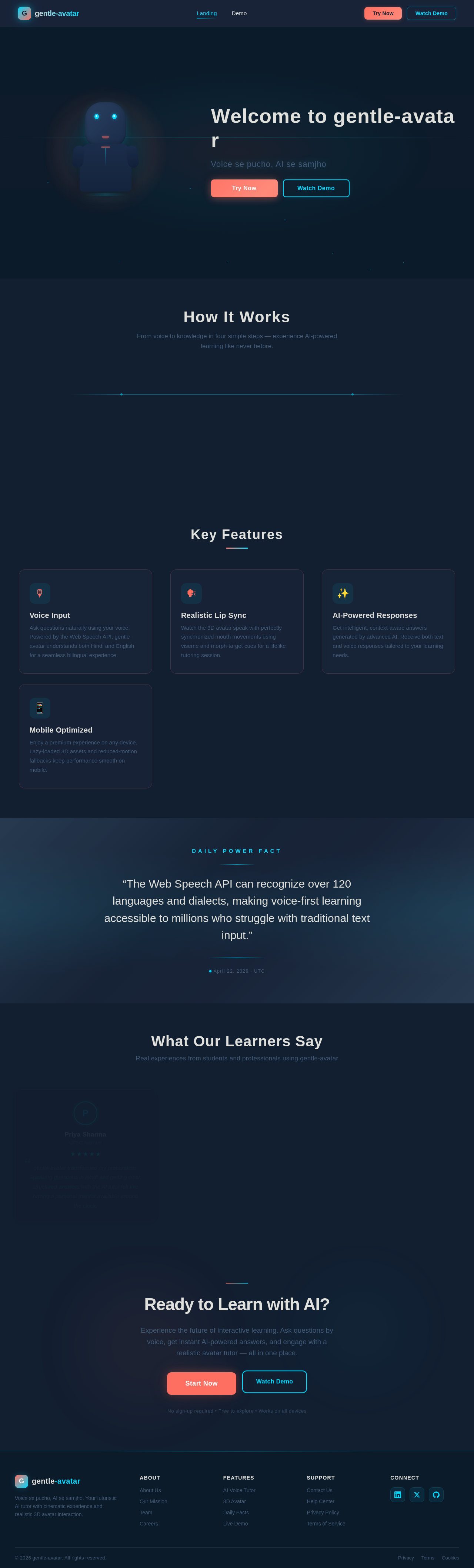
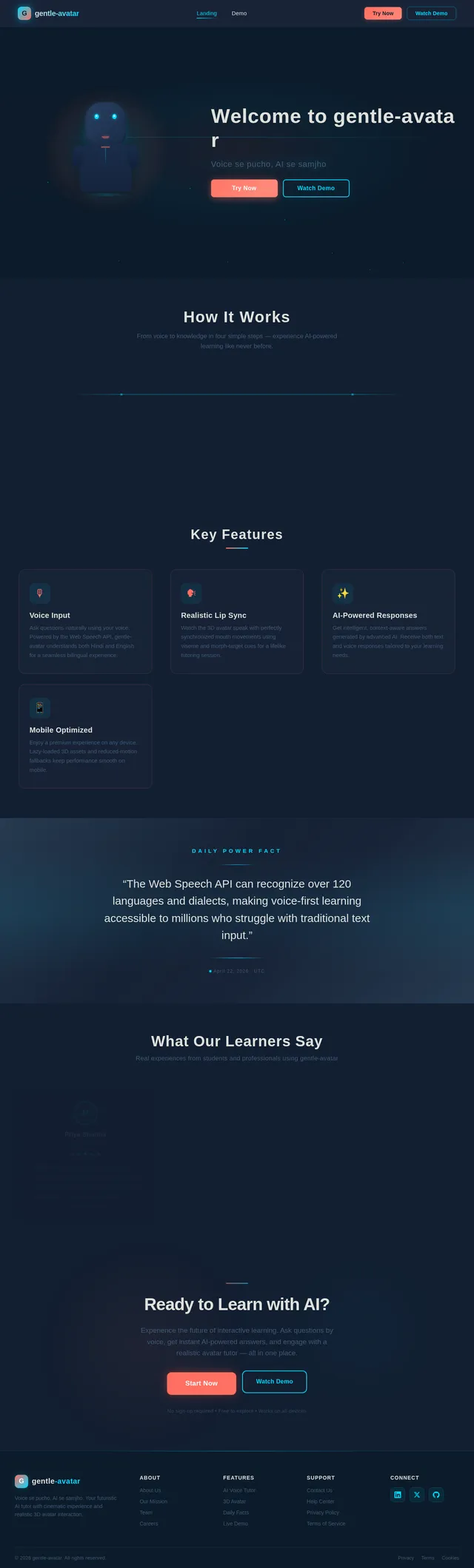
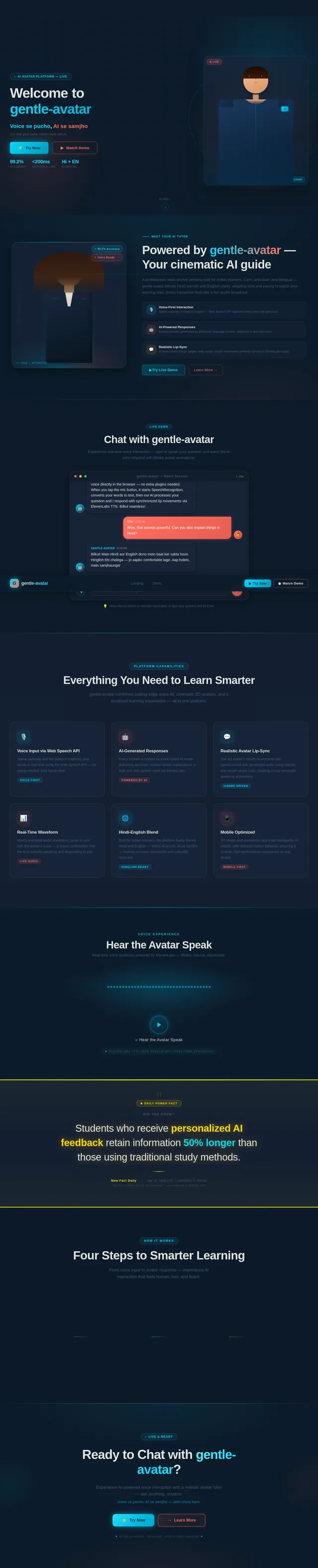
Welcometogentle-avatar
Voice se pucho, AI se samjho
How It Works
From voice to knowledge in four simple steps — experience AI-powered learning like never before.
Speak Your Question
Use your voice to ask anything — the Web Speech API captures your words naturally in Hindi or English.
AI Responds Instantly
Our AI tutor processes your question and generates a clear, structured response in text and voice.
Avatar Animates
A realistic 3D avatar speaks the answer back to you with synchronized lip movements and natural gestures.
Learn & Grow
Absorb knowledge through an immersive, cinematic experience that makes complex concepts easy to understand.
Key Features
Voice Input
Ask questions naturally using your voice. Powered by the Web Speech API, gentle-avatar understands both Hindi and English for a seamless bilingual experience.
Realistic Lip Sync
Watch the 3D avatar speak with perfectly synchronized mouth movements using viseme and morph-target cues for a lifelike tutoring session.
AI-Powered Responses
Get intelligent, context-aware answers generated by advanced AI. Receive both text and voice responses tailored to your learning needs.
Mobile Optimized
Enjoy a premium experience on any device. Lazy-loaded 3D assets and reduced-motion fallbacks keep performance smooth on mobile.
Daily Power Fact
“The human brain processes speech at roughly 150 words per minute, but can comprehend up to 400 words per minute when listening — making voice-based AI tutoring one of the fastest ways to absorb knowledge.”
July 11, 2026 · UTC
What Our Learners Say
Real experiences from students and professionals using gentle-avatar
Ready to Learn with AI?
Experience the future of interactive learning. Ask questions by voice, get instant AI-powered answers, and engage with a realistic avatar tutor — all in one place.
No sign-up required • Free to explore • Works on all devices
No comments yet. Be the first!