gen-a

byTech Joshua

What can you do

Landing
Landing

Comments (0)

No comments yet. Be the first!

System Requirements

System Requirement Document
Page 1 of 10

System Requirements Document for gen-a

1. Introduction

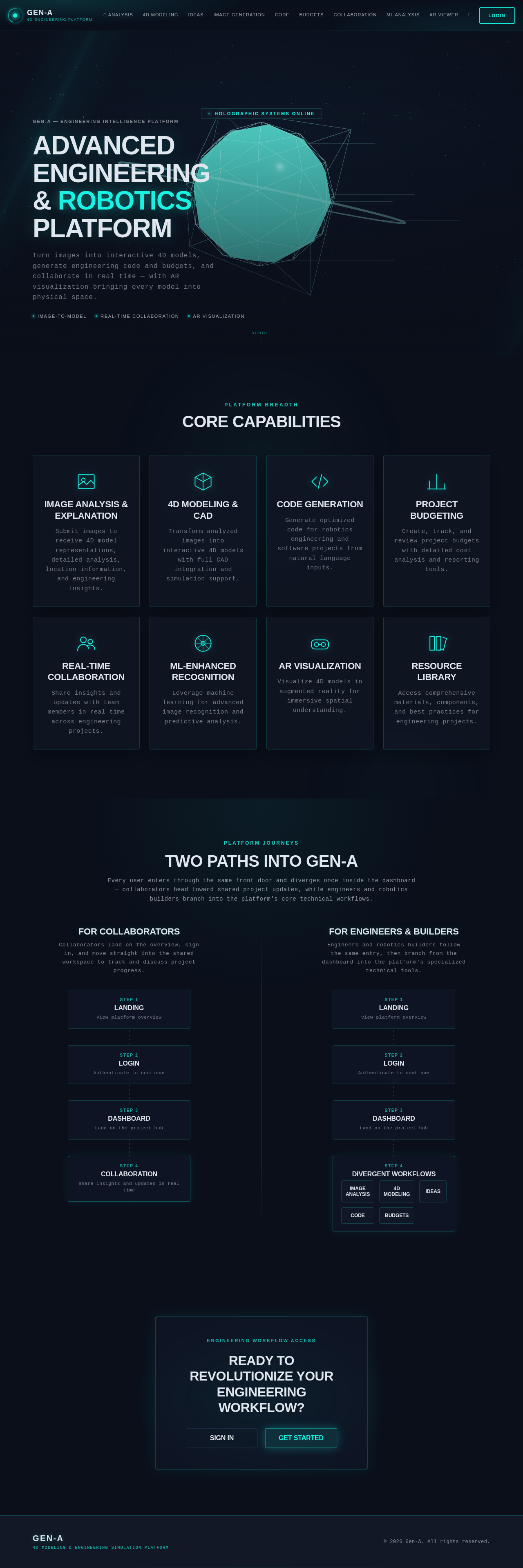
The gen-a application is designed to revolutionize the fields of robotics and engineering by providing a structured platform for image analysis, 4D modeling, CAD, and simulation workflows. It aims to be the best in the world by integrating advanced technologies such as machine learning, augmented reality, and real-time collaboration. The primary audience includes engineers, robotics builders, and collaborators involved in engineering projects.

2. System Overview

The gen-a application delivers a comprehensive suite of tools for professionals in robotics and engineering. It accepts images as input to create 4D models, analyze content, and provide detailed explanations, including location and relevant information. The app supports CAD and simulation, generates images and code for engineering projects, and offers budgeting tools. It also includes real-time collaboration, machine-learning enhancements, augmented reality support, and a resource library. User customization is available to tailor the interface and functionality to individual needs.

Page 2 of 10

2a. Product Interpretation and Delivery Boundary

The gen-a application is structured for robotics and engineering, with a focus on CAD and simulation. It includes real-time collaboration, machine-learning integration, AR support, a comprehensive resource library, and user customization. The application requires authentication and authorization for access to protected features, with role-aware authorization for builder-owned and shared project states. Backend persistence ensures durable analyses, models, budgets, generated assets, collaboration updates, and settings.

2b. Source Content Inventory

Not applicable as no content source directive was provided.

2c. Page Content and Component Coverage

Landing

  • Purpose: Public entry surface explaining the app's capabilities.
  • Components: Overview of features, benefits, and use cases.
  • States: Loading, success, error.

Login

  • Purpose: Identity access surface for user authentication.
  • Components: Username, password fields, login button, forgot password link.
  • States: Loading, success, error.
Page 3 of 10

Dashboard

  • Purpose: Protected hub for accessing workflows.
  • Components: Navigation to various tools, project summaries, recent activity.
  • States: Loading, success, error.

Image Analysis

  • Purpose: Image submission, analysis, and explanation.
  • Components: Upload image, analysis results, location information.
  • States: Loading, success, error.

4D Modeling

  • Purpose: Creation of 4D models from images.
  • Components: Image input, model viewer, export options.
  • States: Loading, success, error.

Image Results

  • Purpose: Review of analyzed image results.
  • Components: Image gallery, detailed information, location data.
  • States: Loading, success, error.

Ideas

  • Purpose: General analysis and idea generation.
  • Components: Input field, generated ideas, suggestions.
  • States: Loading, success, error.
Page 4 of 10

Image Generation

  • Purpose: Generation of engineering images.
  • Components: Input parameters, generated images, download options.
  • States: Loading, success, error.

Code

  • Purpose: Code generation for engineering projects.
  • Components: Input parameters, generated code, export options.
  • States: Loading, success, error.

Budgets

  • Purpose: Project budgeting tools.
  • Components: Budget input, calculations, reports.
  • States: Loading, success, error.

Collaboration

  • Purpose: Real-time sharing of insights and updates.
  • Components: Chat interface, project updates, notifications.
  • States: Loading, success, error.

ML Analysis

  • Purpose: Machine-learning-enhanced image recognition.
  • Components: Image input, ML analysis results, prediction data.
  • States: Loading, success, error.
Page 5 of 10

AR Viewer

  • Purpose: Augmented reality visualization of 4D models.
  • Components: Model viewer, AR settings, interaction controls.
  • States: Loading, success, error.

Resource Library

  • Purpose: Access to materials, components, and best practices.
  • Components: Search, categories, resource details.
  • States: Loading, success, error.

Settings

  • Purpose: Customization of interface and functionality.
  • Components: Preferences, themes, account settings.
  • States: Loading, success, error.
Page 6 of 10

3. Functional Requirements

  • As an Engineer/Robotics Builder, I should be able to submit an image and receive a 4D model representation. (Provenance: explicit)
  • As an Engineer/Robotics Builder, I should be able to analyze images and receive explanations, including location and relevant information. (Provenance: explicit)
  • As an Engineer/Robotics Builder, I should be able to generate ideas for engineering subjects. (Provenance: explicit)
  • As an Engineer/Robotics Builder, I should be able to generate images for robotics engineering and software work. (Provenance: explicit)
  • As an Engineer/Robotics Builder, I should be able to generate code for engineering projects. (Provenance: explicit)
  • As an Engineer/Robotics Builder, I should be able to create and review project budgets. (Provenance: explicit)
  • As an Engineer/Robotics Builder, I should be able to collaborate in real-time with other users. (Provenance: explicit)
  • As an Engineer/Robotics Builder, I should be able to use machine-learning-enhanced image recognition. (Provenance: explicit)
  • As an Engineer/Robotics Builder, I should be able to visualize 4D models in augmented reality. (Provenance: explicit)
  • As an Engineer/Robotics Builder, I should be able to access a comprehensive resource library. (Provenance: explicit)
  • As an Engineer/Robotics Builder, I should be able to customize the application interface and functionality. (Provenance: explicit)
  • As a Collaborator, I should be able to participate in real-time collaboration by sharing insights and updates. (Provenance: explicit)

4. User Personas

  • Engineer/Robotics Builder: Engages with image analysis, 4D modeling, CAD, simulation, code generation, budgeting, and AR visualization. Utilizes the resource library and customizes the application.
  • Collaborator: Participates in real-time collaboration, sharing insights and updates on engineering projects.

5. Core User Flows

Page 7 of 10

Engineer/Robotics Builder

  1. Image Analysis and 4D Modeling:

    • Upload an image on the Image Analysis page.
    • Receive analysis results and explanations.
    • Navigate to the 4D Modeling page to create a model.
    • View and export the 4D model.
  2. Idea and Code Generation:

    • Enter a subject on the Ideas page.
    • Receive generated ideas and suggestions.
    • Navigate to the Code page to input parameters.
    • Generate and export code.
  3. Budgeting and Collaboration:

    • Access the Budgets page to input project details.
    • Generate and review budget reports.
    • Use the Collaboration page to share insights and updates.
  4. Machine Learning and AR Visualization:

    • Upload an image on the ML Analysis page.
    • Receive enhanced recognition and prediction results.
    • Use the AR Viewer to visualize models in augmented reality.
  5. Resource Library and Settings:

    • Browse materials and best practices in the Resource Library.
    • Customize interface and functionality in the Settings page.
Page 8 of 10

Collaborator

  1. Real-Time Collaboration:
    • Access the Collaboration page.
    • Share insights and updates with the Engineer/Robotics Builder.
    • Receive notifications and participate in discussions.

6. Visuals Colors and Theme

  • Muse: Gleb Kuznetsov
  • Palette (dark mode):
    • Background: #0a0f1a
    • Surface: #121826
    • Text: #e0e6ed
    • Primary: #1f2a38
    • Accent: #19f2e2
    • Muted: #2b3445
  • Typography:
    • Headings: Space Grotesk — Wide geometric sans, uppercase, large scale, tight tracking
    • Body: Orbitron; scale 1.414 modular, 64/45/32/24/18
  • Shape Language: Full-bleed 3D scenes with floating glass panels and radial layouts
  • Layout: Floating glass panels on a dark void background, with thin luminous strokes and data-oriented layouts
  • Motion: Continuous slow orbit/parallax, light sweeps, data streams; scroll-scrubbed camera moves
Page 9 of 10

7. Signature Design Concept

The Landing page features a full-bleed 3D holographic object enveloped in electric cyan glows against a deep navy background. Floating glass panels with radial layouts provide an immersive introduction to the app's capabilities. Uppercase micro-labels with wide geometric sans typography guide users through the futuristic interface.
8. Interaction Model & Motion Direction

  • Interaction Model: Animated
  • Motion Tempo: Cinematic
  • Hero Dimensionality: WebGL
  • Landing Hero Motion Brief: The focal subject is a 3D holographic object that transforms as users scroll, revealing different aspects of the app's capabilities. The motion vocabulary includes slow orbiting parallax and data streams, creating an immersive experience. A reduced-motion state is available for accessibility.

9. Non-Functional Requirements

  • Performance: The application must handle high-resolution images and complex 4D models efficiently.
  • Scalability: The system should support a growing number of users and projects without performance degradation.
  • Security: Ensure secure authentication and authorization processes, protecting user data and project information.
  • Usability: The interface should be intuitive and customizable to meet diverse user needs.
Page 10 of 10

10. Tech Stack

  • Frontend: React
  • Backend: Python/FastAPI
  • Storage: Appropriate storage solutions for image and model data
  • Containerization: Docker/docker-compose
  • Deployment: Kubernetes (if required for deployment)

11. Assumptions and Constraints

  • The application is structured specifically for robotics and engineering.
  • CAD and simulation support are integral to the app's functionality.
  • Real-time collaboration, machine-learning integration, AR support, a comprehensive resource library, and user customization are mandatory features.

12. Glossary

  • 4D Modeling: Creating a three-dimensional model with the addition of time as the fourth dimension.
  • CAD: Computer-Aided Design, used for creating precision drawings or technical illustrations.
  • AR: Augmented Reality, an interactive experience of a real-world environment enhanced by computer-generated perceptual information.
Landing design preview
Landing: View overview
Login: Sign in
Dashboard: View project summaries
Collaboration: Share insights
Collaboration: Receive notifications
Landing design preview
Landing: View overview
Login: Sign in
Dashboard: View project summaries
Collaboration: Share insights
Collaboration: Receive notifications