gdw
 Abdul Wahab
I am a production manager in leather goods manufacturing


Comments (0)
Sign in to leave a comment
System Requirements
System Requirements Document for gdw
1. Introduction
gdw is a production tracker application for leather goods manufacturing. Its purpose is to let a production manager monitor production output hourly — recording what each hour of production yields and seeing, hour by hour, whether output is on target or low.
The product intent is narrow and operational: a production manager on a factory floor needs a fast, exact, legible record of hourly output and a clear read of which hours are falling short. The audience is the production manager role in leather goods manufacturing; the primary user is Abdul Wahab, a production manager in India.
The application is delivered as a first-party web application with application-owned identity: a new production manager enrolls through self-service sign-up, a returning production manager verifies identity at login, and the hourly output records are protected behind that identity so each manager's records persist and can be resumed.
2. System Overview
gdw is a single first-party web application composed of a React frontend, a shared FastAPI backend, and a MariaDB database for application-owned persistent data. The frontend presents an anonymous public entry (Landing), two identity-access surfaces (Sign Up, Login), and two protected working surfaces (Hourly Output, Record Output). The backend owns the domain APIs for accounts and hourly output records; the database persists accounts and hourly output entries so records survive across sessions and can be revisited.
The only active human actor is the Production Manager. There are no other human personas, no external providers, and no outbound recipients in the current scope. The system itself performs persistence, session verification, and hourly aggregation as supporting work behind the manager's own interactions.
Current accepted behavior:
- The manager records production output for each hour.
- The manager views production output for each hour and can identify low-output hours.
- The manager establishes identity through self-service sign-up and verifies identity on return through login.
Narrow exclusions: gdw does not include inventory, purchasing, payroll, machine telemetry, multi-role administration, or reporting beyond the hourly output view described here.
Removed from scope
- None. No concept was explicitly removed by the user.
2a. Product Interpretation and Delivery Boundary
gdw is delivered as a first-party application. The public entry (Landing) is anonymously reachable and explains the hourly production tracker before sign-in. Sign Up and Login are also anonymously reachable because a protected destination cannot own the interaction that establishes access to itself. The Hourly Output and Record Output surfaces require login: they hold durable, manager-specific hourly output state that must remain bound to the correct manager and be resumable on return.
Identity is application-owned and established by self-service enrollment (Sign Up) with returning verification (Login). This is the minimum identity continuity required by the accepted journeys; it does not introduce differentiated permissions, role-based visibility, or account-management capabilities. All current behavior is in the current delivery horizon; no future-horizon features are accepted.
2b. Source Content Inventory
Not applicable — no reference directive with content_source was supplied.
2c. Page Content and Component Coverage
Landing
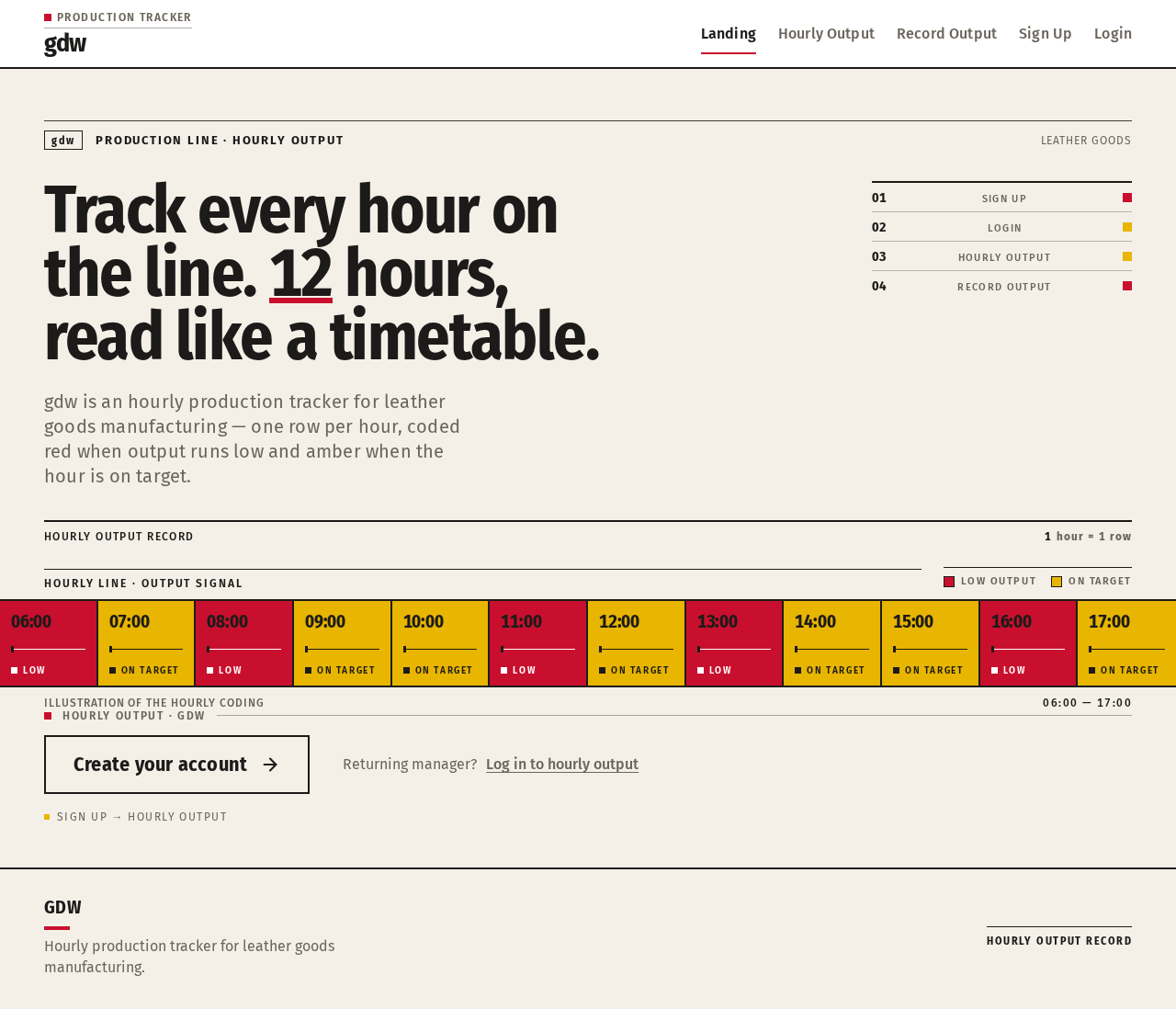
- Information/state: Anonymous public entry. Explains that gdw is an hourly production tracker for leather goods manufacturing. Presents the full-width hourly timetable band as the hero: a condensed headline on the paper ground and a live strip of 12 hour blocks running edge to edge below it, each block coded red (low output) or amber (on-target).
- Primary action: A chunky ink-outlined sign-up block pinned at the band's left edge, leading to Sign Up.
- Supporting actions: A link to Login for returning managers.
- Domain entities: None persisted; the hour strip is illustrative of the hourly output concept.
- Component responsibilities: Hero headline (Fira Sans Condensed, 40px mobile to 72px desktop, tabular numerals where numbers appear); 12-block hour strip (red/amber coding, wraps or scrolls into fully readable rows under reduced motion); sign-up block (2px ink border, square corners, no shadow); login link.
- States: Loading — static content, no data fetch required. Empty — not applicable. Success — page renders fully at 375px, 768px, and 1280px with all text and controls whole inside the viewport. Error — not applicable. Recovery — not applicable.
Sign Up
- Information/state: Anonymous identity-establishment surface. Collects the credentials a new production manager needs to create an account and keep hourly output records.
- Primary action: Submit enrollment to create the account and proceed to the protected working surfaces.
- Supporting actions: Navigate to Login if the manager already has an account; return to Landing.
- Domain entities: Account (manager identity).
- Component responsibilities: Enrollment form with small-caps labels above each field; chunky square submit button with 2px ink border; inline validation messaging.
- States: Loading — submit button shows in-progress state during account creation. Empty — blank form with labels. Success — account created and manager proceeds to Hourly Output. Error — duplicate or invalid credentials shown inline with a recovery path to correct and resubmit. Recovery — manager can retry submission or switch to Login.
Login
- Information/state: Anonymous identity-verification surface for a returning production manager.
- Primary action: Verify identity to reach protected hourly output records.
- Supporting actions: Navigate to Sign Up for a new account; return to Landing.
- Domain entities: Account (manager identity).
- Component responsibilities: Credential form with small-caps labels; chunky square submit button; inline error messaging.
- States: Loading — submit button shows in-progress state during verification. Empty — blank form with labels. Success — verified and routed to Hourly Output. Error — incorrect credentials shown inline with a recovery path to retry. Recovery — manager can retry or switch to Sign Up.
Hourly Output
- Information/state: Protected working surface. Shows production output for each hour as timetable-aligned rows: a left hour rail and a right data table, with output numerals at 40px tabular, aligned right on a 2px rule. Each hour is coded red (low output) or amber (on-target). Small-caps section labels sit above a hairline like station signs.
- Primary action: Read hourly output and identify low-output hours.
- Supporting actions: Navigate to Record Output to add an hour's output; refresh to see newly recorded hours.
- Domain entities: Hourly output entry (hour, output quantity, target comparison state).
- Component responsibilities: Hour rail; data table with tabular numerals; red/amber hour coding; small-caps labels; navigation to Record Output.
- States: Loading — table skeleton while records load. Empty — no records yet, with a prompt to record the first hour. Success — rows render with correct red/amber coding. Error — load failure shown with a retry action. Recovery — retry reloads records; manager can proceed to Record Output.
Record Output
- Information/state: Protected working surface. Lets the manager record production output for a specific hour.
- Primary action: Submit an hour's output quantity, which persists and appears in Hourly Output.
- Supporting actions: Return to Hourly Output; correct an entry before submission.
- Domain entities: Hourly output entry (hour, output quantity).
- Component responsibilities: Hour selection and output quantity input with small-caps labels; chunky square submit button; inline validation; confirmation of saved entry.
- States: Loading — submit in progress. Empty — blank form with labels. Success — entry saved, confirmation shown, and the new hour row appears in Hourly Output (sliding in from the top per the motion direction). Error — invalid or missing values shown inline with a recovery path. Recovery — manager corrects and resubmits, or returns to Hourly Output.
3. Functional Requirements
FR-1 — Record hourly production output (explicit) As a Production Manager, I should record production output for each hour so that the tracker holds an accurate hourly record of what the line produced.
- Trigger/input: The manager selects an hour and enters the output quantity on Record Output.
- Observable result: The entry is persisted and appears as a row in Hourly Output.
- Access state: Requires login.
- Failure/recovery: Invalid or missing values are shown inline; the manager corrects and resubmits.
- Continuation: The manager returns to Hourly Output to see the new row.
FR-2 — View hourly production output (explicit) As a Production Manager, I should view production output for each hour so that I can monitor the line hour by hour.
- Trigger/input: The manager opens Hourly Output.
- Observable result: Hourly rows render with output numerals and red/amber coding.
- Access state: Requires login.
- Failure/recovery: Load failure shows a retry action that reloads records.
- Continuation: The manager reads the table and proceeds to Record Output when needed.
FR-3 — Identify low-output hours (explicit) As a Production Manager, I should see which hours are low output so that I can act on shortfalls.
- Trigger/input: The manager reads the Hourly Output table.
- Observable result: Low-output hours are coded red; on-target hours are coded amber.
- Access state: Requires login.
- Failure/recovery: Covered by FR-2 load recovery.
- Continuation: The manager uses the coding to focus attention on low hours.
FR-4 — Self-service enrollment (required_inference) As a Production Manager, I should create an account through self-service sign-up so that my hourly output records are kept and can be resumed.
- Trigger/input: The manager submits enrollment on Sign Up.
- Observable result: An account is created and the manager reaches the protected working surfaces.
- Access state: Anonymous entry.
- Failure/recovery: Duplicate or invalid credentials are shown inline; the manager corrects and resubmits or switches to Login.
- Continuation: The manager proceeds to Hourly Output.
FR-5 — Returning identity verification (required_inference) As a Production Manager, I should verify my identity on return so that I can reach my protected hourly output records.
- Trigger/input: The manager submits credentials on Login.
- Observable result: Identity is verified and the manager is routed to Hourly Output.
- Access state: Anonymous entry.
- Failure/recovery: Incorrect credentials are shown inline; the manager retries or switches to Sign Up.
- Continuation: The manager resumes monitoring and recording.
4. User Personas
Production Manager
- Product context: Works in leather goods manufacturing and is responsible for monitoring production output hour by hour. Uses gdw on the factory floor under time pressure, where the record must be fast to enter and exact to read.
- Primary goal: Keep an accurate hourly output record and immediately see which hours are falling short.
- Distinct accepted responsibilities: Records production output for each hour (Record Output); views hourly output and identifies low-output hours (Hourly Output); establishes identity through self-service sign-up and verifies identity on return through login.
- Relevant inputs or decisions: The hour being recorded and its output quantity; the decision of which low-output hours need attention based on the red/amber coding.
- Interactions with other accepted participants: None beyond the manager; the only other actor is the system, which persists records and verifies sessions.
- Observable success: A saved hourly entry appears in the Hourly Output table, and low-output hours are visibly coded red against on-target amber hours.
5. Core User Flows
Flow A — New manager enrolls and records the first hour
- The Production Manager opens Landing anonymously and reads the hourly timetable band explaining the tracker.
- The manager selects the chunky ink-outlined sign-up block at the band's left edge and arrives at Sign Up.
- The manager enters enrollment credentials and submits.
- On success, the account is created and the manager is routed to Hourly Output, which shows an empty state prompting the first record.
- The manager navigates to Record Output, selects the hour, and enters the output quantity.
- The manager submits; the entry is saved and confirmed, and the new hour row appears in Hourly Output, sliding in from the top.
- Failure/recovery: If enrollment credentials are invalid or already used, Sign Up shows the error inline; the manager corrects and resubmits or switches to Login. If the output entry is invalid, Record Output shows the error inline and the manager corrects and resubmits.
Flow B — Returning manager verifies identity and monitors output
- The Production Manager opens Landing and selects the login link.
- On Login, the manager enters credentials and submits.
- On success, the manager is routed to Hourly Output, where prior hourly records load as timetable-aligned rows with tabular numerals and red/amber coding.
- The manager reads the table and identifies low-output hours by their red coding.
- The manager proceeds to Record Output to add the current hour, then returns to Hourly Output to confirm the new row.
- Failure/recovery: If credentials are incorrect, Login shows the error inline; the manager retries or switches to Sign Up. If Hourly Output fails to load, a retry action reloads the records.
6. Visuals Colors and Theme
The creative direction is authoritative: Hourly output, set like a transit timetable, after the muse Erik Spiekermann — typographic infrastructure for shift work and data rows, with signal colours showing low output like a delayed transit line.
Colour tokens (light mode):
- Background —
#F4F0E8(warm paper ground, ~70% of screen) - Surface —
#FFFFFF - Text —
#1C1B19(ink, carries all data) - Primary —
#C8102E(signal red: low output and primary actions) - Accent —
#E8B500(amber: on-target hours) - Muted —
#6B655C
Typography:
- Headings — Fira Sans Condensed, Bold, mixed case, tight tracking, large tabular numerals.
- Body — Fira Sans.
- Scale — 1.25 modular: 72 / 56 / 40 / 28 / 20 / 16. Mobile headline 40px scaling to 72px desktop via
clamp(...).
Shape language: Square corners, 2px ink rules, chunky outlined buttons, colour-coded hour bars. No drop shadows.
Layout: 12-column grid with a left hour rail and a right data table; rows align like a timetable; small-caps labels above each value.
Imagery: Pictograms for cutting, stitching, and finishing; schematic line art of a leather panel as the only illustration.
Avoid: Rounded pill buttons and soft drop shadows; blue or indigo accents on white; glass panels, gradients, and blob shapes; identical hover-lift card grids; Inter, Roboto, or system-ui fonts.
7. Signature Design Concept
The public entry is a full-width hourly timetable band. A 40px-to-72px condensed headline sits left on the warm paper ground. Below it, a live strip of 12 hour blocks runs edge to edge, each block coded red (#C8102E) or amber (#E8B500) like a transit line diagram. The sign-up button is a chunky ink-outlined block pinned at the band's left edge. Tabular numerals at 40px align right on a 2px rule in every output row, and small-caps section labels sit above a hairline like station signs. The concept recomposes only accepted content and controls — the hour strip illustrates the hourly output concept, and the sign-up block leads to Sign Up.
8. Interaction Model & Motion Direction
Interaction Model: Animated Motion Tempo: restrained Hero Dimensionality: flat
Landing Hero Motion Brief
- Focal subject: The 12-block hour strip running edge to edge below the condensed headline.
- Thesis: On load, the hour blocks settle into their red/amber coding in short 120ms state changes; the sign-up block remains pinned at the band's left edge. Input (page load) → transformation (blocks resolve to coded state) → outcome (the manager reads the hourly concept and selects sign-up).
- Motion vocabulary: Short 120ms state changes only; a new hour row slides in from the top; no decorative loops.
- Composed first frame: Paper ground
#F4F0E8, condensed headline left, 12-block strip below, ink-outlined sign-up block at the left edge. - Reduced-motion state: The hour strip wraps into rows or allows horizontal scrolling so every block is fully readable; no sliding or settling animation.
9. Non-Functional Requirements
- NFR-1 — Durable state (required_inference): Hourly output records and accounts persist in MariaDB so records survive sessions and can be resumed on return.
- NFR-2 — Protected records (required_inference): Hourly Output and Record Output require login; Landing, Sign Up, and Login are anonymously reachable.
- NFR-3 — Readability under time pressure (explicit, from creative direction): Headlines, labels, numbers, and controls stay whole inside the viewport and their container at 375px, 768px, and 1280px, wrapping or scaling to fit; no element covers readable text or controls.
- NFR-4 — Reduced motion (explicit, from creative direction): With
prefers-reduced-motion, the hour strip provides a usable static arrangement (wrapped rows or horizontal scrolling) with every item fully readable. - NFR-5 — No forbidden visual patterns (explicit, from creative direction): No rounded pill buttons, soft drop shadows, blue/indigo accents on white, glass panels, gradients, blob shapes, hover-lift card grids, or Inter/Roboto/system-ui fonts.
10. Tech Stack
- Frontend: React application UI.
- Backend: Shared FastAPI process for application APIs and domain modules (accounts, hourly output records).
- Database: MariaDB for application-owned persistent data.
- Infrastructure: docker-compose with the
frontend,backend, anddatabaseservices. No additional infrastructure is required for the current workflows.
11. Assumptions and Constraints
- A-1 (required_inference): Identity is application-owned and established by self-service sign-up with returning login verification; no differentiated permissions or role-based visibility are introduced.
- A-2 (required_inference): Each manager's hourly output records are bound to that manager's account.
- A-3 (explicit): The product scope is limited to recording and viewing hourly production output for leather goods manufacturing; no inventory, purchasing, payroll, telemetry, or multi-role administration is included.
- A-4 (explicit, from creative direction): The visual system follows the Spiekermann transit-timetable direction with the specified palette, fonts, and shape language.
12. Glossary
- Hourly output — The production quantity recorded for a specific hour of production.
- Low output — An hour whose output falls short of target, coded signal red (
#C8102E). - On-target hour — An hour meeting target, coded amber (
#E8B500). - Hour strip — The 12-block transit-line-style band coding each hour red or amber.
- Production Manager — The sole active human persona; records and monitors hourly output.
- Timetable layout — The 12-column grid with a left hour rail and right data table, rows aligned like a transit timetable.
Hourly line · output signal
- Low output
- On target
Illustration of the hourly coding06:00 — 17:00
Returning manager?Log in to hourly output
Hourly line · output signal
- Low output
- On target
Illustration of the hourly coding06:00 — 17:00
Returning manager?Log in to hourly output
No comments yet. Be the first!