garnet-inner
 Mostafa Salama
عاوز اعمل تطبيق شبه اللاسلكية بء بدون نت بين اصحابى فى الشغل


Comments (0)
Sign in to leave a comment
System Requirements
System Requirements Document for garnet-inner
1. Introduction
garnet-inner is an offline, local peer-to-peer messaging application for a small circle of workmates. Mostafa Salama and his colleagues at work want to exchange messages with each other directly between their devices — without any internet connection — using a local/offline link between devices (for example a shared local network or a direct device-to-device link). The product's whole point is that it works in the basement, on the factory floor, or anywhere the internet does not reach: two or more colleagues with the app open near each other can discover one another, establish a local link, and send and read messages.
The audience is the user's own colleagues at work. The app is a tool, not a social network: it is scoped to a small trusted circle of workmates, it has no cloud dependency, and it must feel honest, legible and mechanical.
This document is the System Requirements Document for garnet-inner, written from the requester's stated intent.
2. System Overview
garnet-inner is delivered as a first-party web application with three runnable services:
- frontend — a React application that renders the Landing, Login, Sign Up, Nearby Devices and Messages surfaces.
- backend — a shared FastAPI process that serves the application APIs and domain modules for identity, device discovery/connection state, and message exchange.
- database — MariaDB holding application-owned persistent data (peer identities, established local links, and message history).
Current accepted behavior:
- A workplace peer can enroll (Sign Up) and later verify themselves (Login) so that their messaging state is durably theirs.
- A signed-in peer can open Nearby Devices to discover colleagues' devices over a local connection and establish a link before messaging.
- A signed-in peer can open Messages to send messages to connected colleagues and to receive and read incoming messages.
- All messaging works without an internet connection, relying on the local/offline connection between devices.
- Participants are the user's colleagues at work.
Removed from scope
- None. No concept was explicitly removed by the user.
2a. Product Interpretation and Delivery Boundary
garnet-inner is a first-party application with application-owned identity. Because each peer must privately own and resume their own durable messaging state (their identity, their established links, and their message history), the app establishes identity on first use through self-service Sign Up and verifies returning peers through Login. The Landing page is the anonymous entry surface that explains the product before identity is established; Nearby Devices and Messages are protected surfaces available only after login.
The defining delivery boundary is connectivity: the product must function with no internet connection, using a local/offline connection between devices. There is no cloud mystique and no internet/cloud iconography — the absence of the internet is the product's point. The current scope is the offline workplace messaging lifecycle described in this document; nothing beyond it (no cloud sync, no social features, no internet-dependent services) is part of the current delivery.
2c. Page Content and Component Coverage
Landing
- Information/state: Anonymous first impression. Explains that garnet-inner is an offline workplace messaging app for colleagues, that it works without internet over a local connection between devices, and who it is for. Presents the hero instrument panel: oversized headline "YOUR WORKMATES. NO INTERNET." with a single orange full-stop; a 3-row tabular spec block (RANGE / PEERS / LINK) in mono with hairline rules; a circular radar gauge with concentric ink rings, a sweeping orange needle, and labelled green dots for colleague devices; a solid orange "SCAN FOR DEVICES" control pinned to the panel's bottom edge; a full-width 1px ink rule beneath the hero; section number "01" in the left rail.
- Primary actions: Navigate to Sign Up (begin using the app); navigate to Login (returning peer).
- Supporting actions: Read the product explanation and spec block.
- Domain entities: None persisted; presents product concept and illustrative device/link state.
- Component responsibilities: Hero headline block; tabular spec block; radar gauge component (static or sweeping per motion rules); primary key control; navigation to Sign Up and Login.
- States: Loading — not applicable (static content). Empty — not applicable. Success — page renders fully. Error — not applicable. Recovery — navigation controls remain available at all viewports.
Login
- Information/state: Returning verification surface for a peer resuming use. Collects the peer's identifying credentials established at Sign Up.
- Primary actions: Submit credentials to verify identity and enter the app.
- Supporting actions: Navigate to Sign Up if the peer has not enrolled; return to Landing.
- Domain entities: Peer identity (credential verification against stored identity).
- Component responsibilities: Credential form; submit key control; inline validation and error display; link to Sign Up.
- States: Loading — submit control shows pending state during verification. Empty — form fields empty with labels. Success — peer is verified and routed to Nearby Devices / Messages. Error — invalid credentials shown inline with a retry path. Recovery — peer can correct input and resubmit, or go to Sign Up.
Sign Up
- Information/state: Self-service first-use enrollment for a peer independently beginning to use the app. Collects the information needed to establish the peer's identity.
- Primary actions: Submit enrollment to create the peer's identity.
- Supporting actions: Navigate to Login if already enrolled; return to Landing.
- Domain entities: Peer identity (new record).
- Component responsibilities: Enrollment form; submit key control; inline validation and error display; link to Login.
- States: Loading — submit control shows pending state. Empty — form fields empty with labels. Success — identity established and peer routed into the app. Error — validation or enrollment failure shown inline with a retry path. Recovery — peer can correct input and resubmit, or go to Login.
Nearby Devices
- Information/state: Protected surface (login required). Owns discovery of and connection to nearby colleagues' devices over a local connection without internet access. Shows a radar/compass gauge for discovery, a device list in tabular form (aligned label/value pairs, hairline dividers, fixed-width status column on the right), and connection state per device.
- Primary actions: Scan for nearby devices; select a discovered colleague's device and establish a local link.
- Supporting actions: View device status (online/link established); proceed to Messages once a link exists.
- Domain entities: Nearby device (colleague device identity), local link/connection state.
- Component responsibilities: Radar gauge with stepped sweep; scan key control; tabular device list with status column; link-establishment control and feedback.
- States: Loading — scanning indicated by the radar sweep. Empty — no devices found, with a clear message and rescan path. Success — discovered devices listed; link established marked in green. Error — scan or link failure shown with a retry path. Recovery — peer can rescan or retry linking.
Messages
- Information/state: Protected surface (login required). Owns sending messages to connected colleagues and receiving and reading incoming messages. Message rows styled as readouts: sender in ALL-CAPS 12px 0.14em on the left, tabular mono timestamp right-aligned, orange 2px left-edge bar only on unread rows.
- Primary actions: Compose and send a message to a connected colleague; open and read an incoming message.
- Supporting actions: View message history; see unread indicators; return to Nearby Devices to establish a link if none exists.
- Domain entities: Message (sender, recipient, body, timestamp, read state), conversation with a connected colleague.
- Component responsibilities: Message list with readout rows; compose field and send key control; unread indicator; empty-state guidance to connect a device first.
- States: Loading — message list pending. Empty — no messages yet, with guidance to connect a colleague via Nearby Devices. Success — sent message appears in the list; received message appears and is marked unread until read. Error — send failure shown with retry path. Recovery — peer can retry sending or re-establish the link.
3. Functional Requirements
FR-1 — Offline messaging between colleagues (explicit) As a workplace peer (sender), I should be able to exchange messages with my colleagues at work without an internet connection, using a local/offline connection between devices, so that I can reach them where the internet does not reach.
- Trigger/input: peer composes a message to a connected colleague.
- Observable result: the message is delivered to the intended colleague over the local, offline connection and appears in their Messages view.
- Access state: login required.
- Failure/recovery: if the local link is unavailable, the peer is guided to Nearby Devices to establish it and can retry.
- Continuation: peer continues the conversation in Messages.
FR-2 — Scoped to workplace colleagues (explicit) As a workplace peer, I should use the app only among my own colleagues at work, so that the circle of participants stays the trusted work group.
- Trigger/input: peer discovers and connects to nearby devices.
- Observable result: only colleagues' devices on the local connection are discoverable and reachable.
- Access state: login required.
- Failure/recovery: devices outside the colleague circle are not part of the accepted participant set.
- Continuation: peer proceeds to message a connected colleague.
FR-3 — Self-service enrollment (required_inference) As a workplace peer beginning to use the app, I should be able to enroll myself on Sign Up, so that my messaging state is durably mine.
- Trigger/input: peer opens Sign Up and submits enrollment information.
- Observable result: the peer's identity is established and they enter the app.
- Access state: anonymous (Sign Up is reachable without login).
- Failure/recovery: validation or enrollment failure is shown inline; peer corrects and resubmits or goes to Login.
- Continuation: peer proceeds to Nearby Devices.
FR-4 — Returning verification (required_inference) As a workplace peer resuming use, I should be able to verify myself on Login, so that I resume my own durable messaging state.
- Trigger/input: peer opens Login and submits credentials.
- Observable result: the peer is verified and routed into the app.
- Access state: anonymous (Login is reachable without login).
- Failure/recovery: invalid credentials are shown inline; peer retries or goes to Sign Up.
- Continuation: peer proceeds to Nearby Devices or Messages.
FR-5 — Local offline connection before messaging (required_inference) As a workplace peer, I should establish a local offline connection to a colleague's device on Nearby Devices before messaging, so that messages can be exchanged without internet.
- Trigger/input: peer scans for nearby devices and selects a discovered colleague's device.
- Observable result: a local link is established and shown as connected (green) in the device list.
- Access state: login required.
- Failure/recovery: scan or link failure is shown with a retry path; peer can rescan.
- Continuation: peer proceeds to Messages to send.
FR-6 — Send messages to connected colleagues (required_inference) As a workplace peer (sender), I should send messages to a connected colleague from Messages, so that I can communicate directly.
- Trigger/input: peer composes a message and sends it.
- Observable result: the sent message appears in the message list with sender and tabular mono timestamp.
- Access state: login required.
- Failure/recovery: send failure is shown with a retry path; peer may need to re-establish the link.
- Continuation: peer continues the conversation.
FR-7 — Receive and read incoming messages (required_inference) As a workplace peer (recipient), I should receive and read incoming messages from colleagues on Messages, so that I can see what coworkers send me without internet access.
- Trigger/input: a colleague sends a message over the local link.
- Observable result: the incoming message appears in the recipient's message list, marked unread (orange left-edge bar) until opened.
- Access state: login required.
- Failure/recovery: if no link exists, the recipient is guided to Nearby Devices.
- Continuation: recipient reads the message and can reply.
4. User Personas
Workplace peer (sender)
- Product context: An employee who wants to reach colleagues at work without an internet connection, initiating contact and sharing messages with them directly.
- Primary goal: The message reaches the intended colleague over a local, offline connection.
- Distinct responsibilities: Enrolls or verifies identity; scans for nearby devices; selects a colleague's device and establishes a local link; composes and sends messages; sees sent messages in the list.
- Inputs/decisions: Enrollment/credentials; which discovered device to connect to; message content.
- Interactions with other participants: Initiates contact with the workplace peer (recipient) over the local link.
- Observable success: The message is delivered to the intended colleague and appears in their Messages view.
Workplace peer (recipient)
- Product context: A colleague at work who receives and reads messages from peers on the same local, offline network.
- Primary goal: See incoming messages from coworkers without needing internet access.
- Distinct responsibilities: Enrolls or verifies identity; makes their device discoverable and accepts a local link; receives incoming messages; opens and reads them (clearing the unread indicator); can reply.
- Inputs/decisions: Enrollment/credentials; whether to accept a link from a nearby colleague; which message to open.
- Interactions with other participants: Responds to the workplace peer (sender) by receiving and reading their messages.
- Observable success: Incoming messages from coworkers are visible and readable without internet access.
5. Core User Flows
Flow A — First use: enroll and connect (sender)
- Peer opens garnet-inner and lands on Landing (anonymous), which explains the offline workplace messaging product.
- Peer selects the Sign Up action and arrives at Sign Up.
- Peer submits enrollment information; on success their identity is established and they enter the app. On failure, inline errors appear and the peer corrects and resubmits.
- Peer arrives at Nearby Devices (login required) and starts a scan; the radar gauge sweeps.
- Discovered colleague devices appear in the tabular device list. If none are found, an empty state with a rescan path is shown.
- Peer selects a colleague's device and establishes a local link; the device shows connected (green).
- Peer proceeds to Messages to begin messaging.
Flow B — Returning use: verify and resume (either persona)
- Peer opens garnet-inner and selects Login from Landing.
- Peer arrives at Login (anonymous) and submits credentials.
- On success the peer is verified and routed into the app with their durable state. On failure, inline errors appear; the peer retries or goes to Sign Up.
- Peer proceeds to Nearby Devices or Messages.
Flow C — Sending a message (sender)
- Signed-in sender is on Messages with an established local link to a colleague.
- Sender composes a message and sends it.
- The sent message appears in the message list with sender label and tabular mono timestamp.
- If sending fails, an error with a retry path is shown; the sender may return to Nearby Devices to re-establish the link.
- Sender continues the conversation.
Flow D — Receiving and reading a message (recipient)
- Signed-in recipient has a local link established with a colleague.
- A message arrives over the local link and appears in the recipient's Messages list, marked unread with the orange left-edge bar.
- Recipient opens the message; it is marked read.
- If no link exists, the recipient is guided to Nearby Devices to establish one.
- Recipient can reply, continuing the conversation.
6. Visuals Colors and Theme
Muse: Dieter Rams — "Less, but better — a signal-orange instrument panel for offline messaging." Headline: YOUR WORKMATES. NO INTERNET.
Palette (light mode):
- Background:
#EFEDE6(warm off-white paper ground, ~65% of page) - Surface:
#E3E0D6(panels, slightly darker warm grey) - Rules:
#C9C4B6(1px hairlines) - Text:
#1A1A18(ink, body contrast 13:1) - Primary:
#D2451E(Braun signal orange — reserved for exactly one thing per screen: live/connected state, primary action, or a single rule; never more than ~5% of pixels; orange-on-paper 4.9:1, use only for ≥18px semibold or on ink panels where it reaches 6.4:1) - Accent:
#1F6B4F(deep green — marks "device online / link established"; never next to orange as decoration) - Muted:
#6E6A60(small-caps labels and metadata)
Typography:
- Headings: Archivo, 600–700 weight, tight tracking (-0.03em) on display sizes; mixed case for headlines, ALL-CAPS at 0.14em tracking for micro-labels and control legends.
- Body: IBM Plex Sans.
- Numbers: IBM Plex Mono tabular figures so device counts, signal bars and timestamps align in columns.
- Scale: 1.333 modular on a 4px baseline — display
clamp(44px, 8vw, 112px); h2 28→48; h3 20→28; body 16→18 (line-height 1.55); label 12px ALL-CAPS 0.14em; mono data 13→15.
Shape language: Rounded-rectangle controls with 10px radius (Braun knobs and keys); hard 1px rules; square panels and circular gauges. No blobs, no pills, no soft shadows — elevation is a 1px border plus a 2px offset ink line, never a blur. Iconography is diagrammatic line art at 1.5px stroke.
Layout: Visible 12-column modular grid with a persistent left rail (numbered sections 01–04) on desktop, collapsing to a single stacked column at 375px. Device lists and message rows are tabular: aligned label/value pairs, hairline dividers, fixed-width status column on the right. Sections separated by full-width edge-to-edge rules, not cards.
Imagery: Diagrammatic only — radar/compass gauge for device discovery, signal-strength bar stacks, schematic device silhouettes (phone, laptop, tablet) as 1.5px line art, topographic-style concentric rings. No photography, no people, no illustration for its own sake.
Avoid: Gradient blobs, glassmorphism or blurred surfaces; chat-bubble pinks/pastels or social-app gloss; more than one orange element per screen; hover-lift cards with drop shadows; rounded pill buttons and 24px+ radii; photography of people or stock office imagery; internet/cloud iconography; centred headline + subtext + button hero composition. The generic indigo/blue-on-white SaaS template is forbidden.
7. Signature Design Concept
The public entry (Landing) is a split instrument panel, not a centred SaaS hero.
- Left 7 columns: an oversized Archivo headline set flush-left and ragged-right — "YOUR WORKMATES. NO INTERNET." — at
clamp(44px, 8vw, 112px)in ink, with a single orange full-stop the size of a fist. Beneath it, a 3-row tabular spec block (RANGE / PEERS / LINK) in IBM Plex Mono with hairline rules — data as ornament. - Right 5 columns: a large circular radar gauge on a
#E3E0D6panel — concentric ink rings, a sweeping orange needle, three green dots labelled with colleague device names — with a solid orange "SCAN FOR DEVICES" control pinned flush to the panel's bottom edge. - A 1px ink rule runs the full viewport width beneath the whole hero, and section number "01" sits in the left rail.
Signature moves carried through the app: the live circular radar gauge as the dominant object; the tabular spec block with aligned mono label/value pairs; the numbered left rail (01–04) with full-bleed horizontal rules; message rows styled as Braun readouts (sender ALL-CAPS 12px 0.14em left, tabular mono timestamp right-aligned, orange 2px left-edge bar only on unread rows); primary controls as rounded-rectangle keys with a 2px offset ink under-line that depresses on press (translate-y 2px, no shadow), never a pill button.
8. Interaction Model & Motion Direction
Interaction Model: Animated Motion Tempo: restrained Hero Dimensionality: flat
Landing Hero Motion Brief
- Focal subject: the circular radar gauge on the right panel — concentric ink rings, a stepped orange sweep, and discovered colleague devices appearing as labelled green dots.
- Input → transformation → outcome thesis: the page loads with the radar at rest; the orange sweep steps in discrete increments around the rings; as it passes, three green dots snap into place labelled with colleague device names — the outcome is a visible, honest picture of "nearby colleagues, no internet."
- Motion vocabulary: instant, mechanical feedback — 90–140ms linear state changes; a signal-bar that steps in discrete increments rather than easing; a single purposeful loop, the "listening for nearby devices" sweep on the radar gauge. No bounce, no parallax, no hover-lift.
- Composed first frame: headline flush-left with its orange full-stop; spec block aligned beneath; radar panel with rings and needle at rest; orange "SCAN FOR DEVICES" key pinned to the panel bottom; full-width ink rule beneath.
- Reduced-motion state: the radar freezes as a static gauge and state changes become instant; all readable text and controls remain whole and usable.
9. Non-Functional Requirements
- Offline operation (explicit): The app must work without an internet connection, relying on a local/offline connection between devices. No feature may require internet access to complete the accepted messaging lifecycle.
- Participant scope (explicit): The app is scoped to the user's colleagues at work as the participants.
- Durable state (required_inference): Peer identity, established local links, and message history are persisted in the application-owned database so a returning peer resumes their own state after Login.
- Readability and containment: Readable text and controls stay whole at 375px, 768px and 1280px — headlines, wordmarks, labels, numbers, cards' text and controls stay entirely inside the viewport and their container, wrapping or scaling (e.g.
clamp(...)with its mobile size) to fit, with no other element covering them. Imagery, decoration and motion may be cropped, bled, rotated or overlapped as the direction asks, as long as they cover no readable text or control. - Reduced motion: Under
prefers-reduced-motion, the radar freezes as a static gauge and state changes become instant; a usable static arrangement is provided. - Accessibility: Body text contrast 13:1; orange-on-paper 4.9:1 used only for ≥18px semibold or on ink panels (6.4:1).
10. Tech Stack
- Frontend: React application UI.
- Backend: shared FastAPI process for application APIs and domain modules (identity, device discovery/connection state, message exchange).
- Database: MariaDB for application-owned persistent data.
- Infrastructure: Docker / docker-compose for the three services (frontend, backend, database). Kubernetes only if deployment requires it.
11. Assumptions and Constraints
- Assumption: The local/offline connection between devices is provided by the environment (e.g. a shared local network or a direct device-to-device link); the app relies on it but does not itself provision network hardware.
- Assumption: The circle of participants is the user's own colleagues at work; no broader public directory is in scope.
- Constraint (explicit): No internet connection is required or used for the accepted messaging lifecycle.
- Constraint (explicit): Participants are limited to the user's colleagues at work.
- Constraint: Identity is application-owned; Nearby Devices and Messages require login, while Landing, Login and Sign Up are reachable without login.
12. Glossary
- Peer: A workplace colleague using garnet-inner on their own device.
- Local/offline connection: A device-to-device or local-network link that works without internet access.
- Local link: An established connection between two peers' devices, shown as connected (green) on Nearby Devices.
- Radar gauge: The circular discovery instrument on Nearby Devices and the Landing hero, showing a stepped sweep and discovered colleague devices as labelled dots.
- Readout row: A message row styled as a Braun readout — sender ALL-CAPS label left, tabular mono timestamp right, orange left-edge bar on unread rows.
- Signal orange: The primary colour
#D2451E, reserved for one live/connected state, primary action, or single rule per screen.
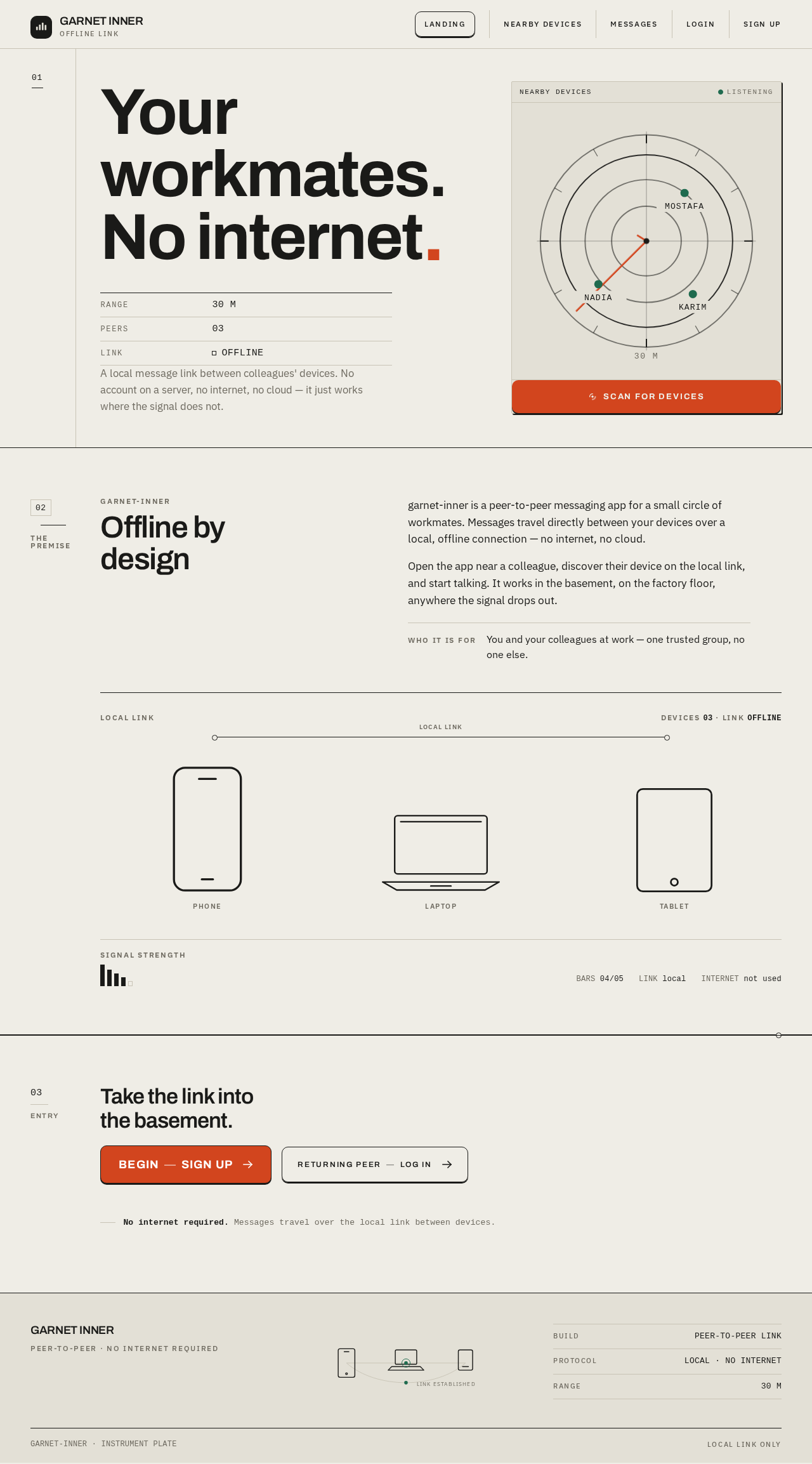
Your workmates.
No internet.
- RANGE30 M
- PEERS03
- LINKOFFLINE
A local message link between colleagues' devices. No account on a server, no internet, no cloud — it just works where the signal does not.
Offline by design
garnet-inner is a peer-to-peer messaging app for a small circle of workmates. Messages travel directly between your devices over a local, offline connection — no internet, no cloud.
Open the app near a colleague, discover their device on the local link, and start talking. It works in the basement, on the factory floor, anywhere the signal drops out.
03 · LINK OFFLINETake the link into the basement.
No internet required. Messages travel over the local link between devices.
Your workmates.
No internet.
- RANGE30 M
- PEERS03
- LINKOFFLINE
A local message link between colleagues' devices. No account on a server, no internet, no cloud — it just works where the signal does not.
Offline by design
garnet-inner is a peer-to-peer messaging app for a small circle of workmates. Messages travel directly between your devices over a local, offline connection — no internet, no cloud.
Open the app near a colleague, discover their device on the local link, and start talking. It works in the basement, on the factory floor, anywhere the signal drops out.
03 · LINK OFFLINETake the link into the basement.
No internet required. Messages travel over the local link between devices.
No comments yet. Be the first!