garnet-hi
 Nakul
NakulHi

Comments (0)
Sign in to leave a comment
System Requirements
System Requirements Document for garnet-hi
1. Introduction
Port View Residency is a small independent residential property — rooms and suites for rent — that needs a public website. The product intent is twofold and comes directly from the residency owner's request: give Port View Residency a warm, human, trustworthy public web presence, and carry practical location details obtained from Google Maps so that people can actually find and reach the place.
The audience is people looking for a place to stay or live — travellers, students, families, and workers relocating — who arrive to learn what the residency is and where it is located, plus the residency owner/manager who maintains the published information about the residency.
The website is delivered as a first-party web application with a public, account-free visitor experience and a protected management workspace for the residency owner/manager.
2. System Overview
garnet-hi is a website for Port View Residency. It presents the residency to the public and gives the owner/manager a way to keep the residency's published information and location details correct.
Current delivery consists of five first-party pages:
- Landing — the anonymous public entry surface that introduces Port View Residency and points visitors to its public information.
- Location — the public destination that presents the residency's location details sourced from Google Maps so visitors can find and reach it.
- Sign Up — self-service enrollment for the Residency Owner / Manager to establish access for maintaining the residency's durable published information.
- Login — returning verification for the Residency Owner / Manager to resume protected management.
- Residency Info — the protected management workspace where the Residency Owner / Manager maintains the residency's published information and location details.
Actors:
- Residency Owner / Manager (human persona) — owns the published information about Port View Residency and keeps it accurate.
- Prospective Resident / Visitor (human persona) — arrives anonymously to learn what the residency is and where it is located.
- Google Maps (external provider, non-persona) — supplies the location details used by the public Location destination.
Accepted behavior in scope: a public website for the residency; Google Maps-sourced location details displayed publicly; self-service enrollment and returning verification for the owner/manager; and a protected workspace for maintaining the residency's published information and location details.
Narrow exclusions: no booking, reservation, payment, tenancy application, messaging, or listing-marketplace capability is accepted by the source. No account is required for visitors to read the residency's public information or its location details.
2a. Product Interpretation and Delivery Boundary
The public side of the site is open and account-free. A visitor can read about Port View Residency and see its location details without signing up for anything. The location details are not authored by the site itself — they are obtained from Google Maps, which is the authoritative source for that content, and the site presents them.
The management side is first-party and protected. Because the residency's published information is durable and must remain bound to the correct owner, the Residency Owner / Manager establishes access once through self-service enrollment on Sign Up, and thereafter verifies identity on Login before resuming protected management on Residency Info. Sign Up and Login are anonymously reachable entry surfaces; Residency Info is not, and its protected state remains unavailable until identity is established.
Everything described above is current. No future-horizon capability has been accepted by the source; nothing beyond the current scope is planned or promised here.
2b. Source Content Inventory
The reference directive for Google Maps declares uses: ["domain_context", "content_source"] with authority: authoritative, instructing that Google Maps be used to obtain the residency's location details for display on the website.
Verified factual entities available from that directive:
- Provider: Google Maps.
- Content supplied: the residency's location details for Port View Residency.
- Intended use: display on the website, on the public Location destination, so visitors can find and reach the residency.
No further verified factual entities, collection items, field values, descriptions, dates, contacts, links, or media references were supplied by the directive. Location detail values (street address, coordinates, landmarks, transport, contact numbers) are resolved at runtime from Google Maps and are not invented here.
2c. Page Content and Component Coverage
Landing
- Information and state: the residency's identity as Port View Residency; a warm introductory statement of what the residency is; a short pointer to where the residency is located; the anonymous, unauthenticated state of the visitor.
- Primary actions: navigate to Location to see the residency's location details; navigate to the residency's public information sections on this page.
- Supporting actions: navigate to Login for the owner/manager returning to protected management; navigate to Sign Up for the owner/manager establishing access for the first time.
- Domain entities: Residency (name: Port View Residency), Public residency information, Location summary.
- Component responsibilities:
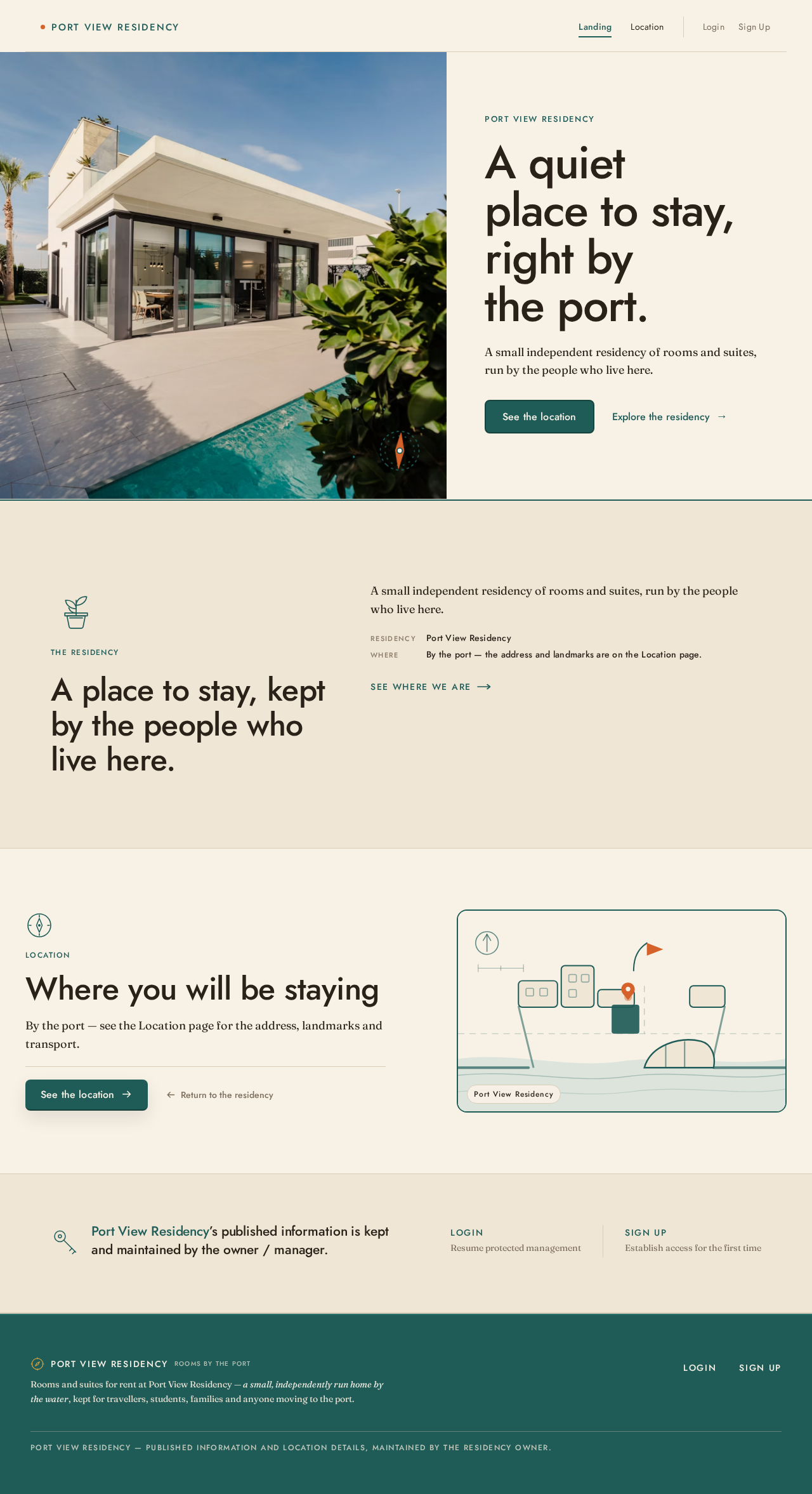
- Split hero: full-bleed warm photograph or hand-drawn facade illustration on one side; stacked overline, headline, one sentence of body copy, and two CTAs on the other; thin teal rule running the full width beneath.
- Overline label: all-caps "PORT VIEW RESIDENCY" in Jost with wide letterspacing.
- Primary CTA: solid teal "See the location" leading to Location.
- Secondary CTA: text-with-arrow "Explore the residency" leading to the residency information on this page.
- Residency introduction section: short, honest description of the residency as a place to stay.
- Location teaser band: a brief pointer to the Location destination, with the map pin as the single accent-orange element.
- Owner/manager access links: quiet links to Login and Sign Up.
- Hand-drawn mid-century motif (compass, key, or plant) in single-weight teal line art as a section opener.
- States:
- Loading: hero image and any residency summary content resolve progressively; text and CTAs render immediately and remain usable.
- Empty: if no residency summary content has been published yet, the introduction section shows a short neutral placeholder line and the Location CTA remains available.
- Success: the visitor reads the residency introduction and can reach Location in one action.
- Error: if the hero image fails to load, the hand-drawn facade illustration on oat renders in its place; no broken image is shown.
- Recovery: the visitor can still reach Location and the residency information through the text CTAs regardless of image state.
Location
- Information and state: the residency's location details as supplied by Google Maps — address, landmarks, transport, and contact information presented as aligned label/value pairs; the map panel showing the residency's position; the anonymous, unauthenticated state of the visitor.
- Primary actions: view the residency's position on the map; read the address, landmark, transport, and contact details; open the location in Google Maps to get directions.
- Supporting actions: return to Landing; navigate to Login or Sign Up as the owner/manager.
- Domain entities: Residency (Port View Residency), Google Maps location details, Map position, Address, Landmarks, Transport, Contact details.
- Component responsibilities:
- Map panel: large map framed in a teal border, showing the residency's position with a single accent-orange pin using a soft 2s pulse.
- "Port log" ruled details band: address, landmarks, transport, and contact laid out as aligned label/value pairs with hairline rules; overline labels in all-caps Jost with +0.12em tracking; numerals and small data in Jost medium with tabular spacing.
- Directions action: opens the residency's location in Google Maps for turn-by-turn directions.
- Hand-drawn compass motif in single-weight teal line art as the section opener.
- Owner/manager access links: quiet links to Login and Sign Up.
- States:
- Loading: the map panel shows a calm oat placeholder with the teal frame while Google Maps content resolves; the details band shows label skeletons in place.
- Empty: if a particular detail group (for example landmarks) has no value from Google Maps, that label/value row is omitted rather than shown blank.
- Success: the visitor sees the residency's position on the map and reads the full set of location details.
- Error: if Google Maps content cannot be retrieved, the map panel shows a clear message that the map is temporarily unavailable, and the address and contact details already resolved remain readable; the directions action is disabled with an explanatory note.
- Recovery: the visitor can retry loading the map from the panel, and can still read the address and contact details and return to Landing.
Sign Up
- Information and state: the anonymous, unauthenticated state of the person establishing access; the purpose of enrollment — maintaining Port View Residency's published information and location details.
- Primary actions: submit enrollment details to establish access for protected management.
- Supporting actions: navigate to Login if access already exists; return to Landing.
- Domain entities: Owner/Manager identity, Enrollment submission.
- Component responsibilities:
- Single-column, centred enrollment form on an oat panel over the cream ground.
- Field set for the owner/manager's identifying and contact details, with inline validation messages.
- Submit control in solid teal as the single accent moment on the screen.
- Link to Login for people who already have access.
- States:
- Loading: the submit control shows an in-progress state and is disabled while the submission is processed.
- Empty: the form renders with empty fields and no error styling on first view.
- Success: enrollment is accepted and the owner/manager is taken into protected management on Residency Info.
- Error: invalid or incomplete fields are marked inline with specific messages; a submission failure shows a clear message on the panel and preserves the entered values.
- Recovery: the owner/manager can correct the marked fields and resubmit, or switch to Login if access already exists.
Residency Info
- Information and state: the protected management workspace; the residency's currently published information and location details; the identity of the signed-in Residency Owner / Manager; the saved/unsaved state of each editable panel.
- Primary actions: edit the residency's published information; edit the residency's location details; save changes so they appear on the public pages.
- Supporting actions: review the current published state of each panel; sign out of protected management.
- Domain entities: Residency (Port View Residency), Published residency information, Location details, Owner/Manager identity.
- Component responsibilities:
- Two-column management layout: left nav rail with teal text on cream listing the editable panels; right content area of stacked editable panels.
- Editable panel for the residency's published information.
- Editable panel for the residency's location details, including the Google Maps-sourced values.
- Per-panel save control and per-panel saved/unsaved indicator.
- Sign-out control.
- States:
- Loading: panels show calm oat skeletons while the current published values resolve.
- Empty: a panel with no published value yet shows an empty field with a short prompt describing what belongs there.
- Success: a saved panel shows a clear saved confirmation and the updated values are what the public pages present.
- Error: a failed save shows a clear message on that panel, keeps the edited values in place, and leaves the previously published values intact.
- Recovery: the owner/manager can retry the save on the affected panel, or discard the edit to return to the last published values.
- Access: an unauthenticated request to this page does not expose protected state and directs the person to Login.
Login
- Information and state: the anonymous, unauthenticated state of the returning Residency Owner / Manager.
- Primary actions: submit credentials to verify identity and resume protected management.
- Supporting actions: navigate to Sign Up if access has not been established; return to Landing.
- Domain entities: Owner/Manager identity, Verification attempt.
- Component responsibilities:
- Single-column, centred verification form on an oat panel over the cream ground.
- Credential fields with inline validation messages.
- Submit control in solid teal as the single accent moment on the screen.
- Link to Sign Up for first-time access.
- States:
- Loading: the submit control shows an in-progress state and is disabled while verification is processed.
- Empty: the form renders with empty fields and no error styling on first view.
- Success: identity is verified and the owner/manager resumes protected management on Residency Info.
- Error: incorrect credentials show a clear, non-specific message on the panel without revealing which field was wrong; the entered identifier is preserved.
- Recovery: the owner/manager can retry verification, or switch to Sign Up if access has not been established.
3. Functional Requirements
FR-1 — Public residency website (explicit) As a Residency Owner / Manager, I should have a public website for Port View Residency so that the residency has an accurate public web presence.
- Trigger/input: the owner/manager's decision to publish the residency's web presence.
- Observable result: a publicly reachable website presenting Port View Residency, owned by the application.
- Access state: public pages are reachable without an account.
- Failure/recovery: if the site is unreachable, the owner/manager can retry loading it; no protected state is exposed by the failure.
- Continuation: the owner/manager proceeds to maintain the residency's published information on Residency Info.
- Owner: Landing, Location (first-party pages).
FR-2 — Google Maps location details presented publicly (explicit) As a Prospective Resident / Visitor, I should see Port View Residency's location details obtained from Google Maps so that I can find and reach the residency.
- Trigger/input: the visitor opens Location.
- Observable result: the residency's position on a map plus its address, landmark, transport, and contact details, sourced from Google Maps.
- Access state: no account required.
- Failure/recovery: if Google Maps content cannot be retrieved, the map panel states that the map is temporarily unavailable, already-resolved address and contact details remain readable, the directions action is disabled with an explanatory note, and the visitor can retry loading the map.
- Continuation: the visitor opens the location in Google Maps for directions, or returns to Landing.
- Owner: Location (first-party page); Google Maps supplies the content.
FR-3 — Google Maps as the location-details provider (required_inference) As the system, I should obtain the residency's location details from Google Maps so that the public Location destination presents authoritative location content.
- Trigger/input: a request for the Location destination's content.
- Observable result: location details attributed to and supplied by Google Maps are available for display.
- Access state: provider-side; no visitor account involved.
- Failure/recovery: provider unavailability surfaces as the Location page's map-unavailable state with retry.
- Continuation: resolved details populate the map panel and the ruled details band.
- Owner: Google Maps (external provider).
FR-4 — Self-service enrollment (required_inference) As a Residency Owner / Manager, I should complete self-service enrollment on Sign Up so that I can establish access for maintaining the residency's durable published information.
- Trigger/input: the owner/manager opens Sign Up and submits their enrollment details.
- Observable result: enrollment is accepted and the owner/manager enters protected management on Residency Info.
- Access state: Sign Up is anonymously reachable; protected state remains unavailable until enrollment completes.
- Failure/recovery: invalid or incomplete fields are marked inline with specific messages; a submission failure shows a clear message and preserves entered values so the owner/manager can correct and resubmit.
- Continuation: the owner/manager proceeds to Residency Info to maintain the residency's information.
- Owner: Sign Up (first-party page).
FR-5 — Returning verification (required_inference) As a Residency Owner / Manager, I should complete returning verification on Login so that I can resume protected management of the residency's durable published information.
- Trigger/input: the returning owner/manager opens Login and submits their credentials.
- Observable result: identity is verified and protected management resumes on Residency Info.
- Access state: Login is anonymously reachable; Residency Info is not, and its protected state stays unavailable until verification succeeds.
- Failure/recovery: incorrect credentials show a clear, non-specific message without revealing which field was wrong, and the entered identifier is preserved so the owner/manager can retry or switch to Sign Up.
- Continuation: the owner/manager resumes maintenance on Residency Info.
- Owner: Login (first-party page).
FR-6 — Maintain the residency's published information (required_inference) As a Residency Owner / Manager, I should edit and save the residency's published information on Residency Info so that the public pages stay correct as the residency's details change.
- Trigger/input: the signed-in owner/manager edits a panel and saves it.
- Observable result: the saved values become what the public pages present, and the panel shows a saved confirmation.
- Access state: protected; requires established identity.
- Failure/recovery: a failed save shows a clear message on that panel, keeps the edited values in place, and leaves the previously published values intact; the owner/manager can retry the save or discard the edit.
- Continuation: the owner/manager moves to the next panel or signs out.
- Owner: Residency Info (first-party page).
FR-7 — Maintain the residency's location details (required_inference) As a Residency Owner / Manager, I should edit and save the residency's location details on Residency Info so that the publicly displayed location information stays accurate.
- Trigger/input: the signed-in owner/manager edits the location details panel and saves it.
- Observable result: the updated location details are what the public Location destination presents.
- Access state: protected; requires established identity.
- Failure/recovery: a failed save shows a clear message on the panel, keeps the edited values, and leaves the previously published location details intact; the owner/manager can retry or discard.
- Continuation: the owner/manager signs out, or continues editing other panels.
- Owner: Residency Info (first-party page).
FR-8 — Anonymous public reading of the residency's information (required_inference) As a Prospective Resident / Visitor, I should read about Port View Residency and its location without creating an account so that I can decide whether to reach out or visit.
- Trigger/input: the visitor opens Landing.
- Observable result: the residency's introduction and a clear route to its location details are presented without any account prompt.
- Access state: no account required; no protected state is exposed.
- Failure/recovery: if the hero image fails to load, the hand-drawn facade illustration renders in its place and the text CTAs remain usable.
- Continuation: the visitor navigates to Location or to the residency information on Landing.
- Owner: Landing (first-party page).
4. User Personas
Residency Owner / Manager
- Product context: the requester is building a website for their own residency, Port View Residency. They own the published information about it and are the only accepted human actor on the management side of the product.
- Primary goal: have an accurate public web presence for Port View Residency, including its location details sourced from Google Maps, and keep that information correct as the residency's details change.
- Distinct accepted responsibilities: establishing access for the first time through self-service enrollment on Sign Up; verifying identity on Login when returning; editing and saving the residency's published information and its location details on Residency Info; signing out of protected management.
- Relevant inputs and decisions: the residency's descriptive information; the residency's location details as supplied by Google Maps; the decision of when an edit is ready to be saved and published.
- Interactions with other accepted participants: the owner/manager's saved edits are what the Prospective Resident / Visitor reads on Landing and Location. Google Maps supplies the location content the owner/manager maintains and the visitor views.
- Observable success: the public pages present the residency's current information and location details, and each saved panel confirms the save.
- What makes this role different: this is the only role that writes durable state. Its work is custodial and ongoing — correcting and updating published facts over time — rather than the visitor's one-off reading of them. It is also the only role that must establish and verify identity, because its edits must remain bound to the correct owner.
Prospective Resident / Visitor
- Product context: the public website exists to inform people about Port View Residency. These visitors arrive anonymously, with no account and no prior relationship to the site.
- Primary goal: understand what Port View Residency is and where it is located, and use the Google Maps location details to find and reach it.
- Distinct accepted responsibilities: reading the residency's introduction on Landing; viewing the residency's position on the map and reading its address, landmark, transport, and contact details on Location; opening the location in Google Maps for directions.
- Relevant inputs and decisions: the residency's description and its location details; the decision of whether and how to travel to the residency.
- Interactions with other accepted participants: the visitor consumes the information the Residency Owner / Manager maintains and the location content Google Maps supplies. The visitor never writes state and never interacts with the owner/manager inside the product.
- Observable success: the visitor understands the residency and its location without needing an account, and can act on the location details to reach the place.
- What makes this role different: this role is entirely read-only and anonymous. It has no protected state, no durable relationship to resume, and no management responsibility — its whole journey completes in a single visit.
5. Core User Flows
Flow A — A visitor learns about Port View Residency and finds it (Prospective Resident / Visitor)
- Starting context: the visitor has no account and arrives at the public site for the first time.
- On Landing, the visitor reads the all-caps overline "PORT VIEW RESIDENCY", the headline, and the single sentence of body copy describing the residency as a quiet place to stay by the port.
- The visitor scrolls through the residency introduction section and the location teaser band, forming an impression of the residency. No account prompt appears at any point.
- The visitor selects the solid teal "See the location" CTA.
- On Location, the visitor sees the map panel framed in teal with the residency's position marked by a single accent-orange pin pulsing softly, and reads the "port log" ruled details band: address, landmarks, transport, and contact as aligned label/value pairs.
- Observable result: the visitor knows what Port View Residency is and where it is.
- Continuation: the visitor selects the directions action to open the residency's location in Google Maps and plan the trip, or returns to Landing via the secondary "Explore the residency" path.
- Material failure and recovery: if Google Maps content cannot be retrieved, the map panel states that the map is temporarily unavailable, the address and contact details that already resolved remain readable, and the directions action is disabled with an explanatory note. The visitor selects retry on the panel; if the map still does not load, the visitor can still read the address and contact details and return to Landing.
Flow B — The owner/manager establishes access for the first time (Residency Owner / Manager)
- Starting context: the owner/manager has no access yet and wants to maintain Port View Residency's published information.
- From Landing, the owner/manager selects the quiet Sign Up link.
- On Sign Up, the owner/manager fills in the single-column, centred enrollment form on the oat panel, entering their identifying and contact details.
- The owner/manager submits. The submit control shows an in-progress state and is disabled while the submission is processed.
- Observable result: enrollment is accepted and the owner/manager is taken into protected management on Residency Info.
- Continuation: the owner/manager begins maintaining the residency's published information and location details (Flow D).
- Material failure and recovery: if fields are invalid or incomplete, they are marked inline with specific messages. If the submission fails, a clear message appears on the panel and the entered values are preserved; the owner/manager corrects the marked fields and resubmits, or switches to Login if access already exists.
Flow C — The owner/manager returns to protected management (Residency Owner / Manager)
- Starting context: the owner/manager has established access previously and is returning to update the residency's information.
- From Landing, the owner/manager selects the quiet Login link.
- On Login, the owner/manager enters their credentials in the single-column, centred form on the oat panel and submits. The submit control shows an in-progress state and is disabled while verification is processed.
- Observable result: identity is verified and protected management resumes on Residency Info.
- Continuation: the owner/manager proceeds to edit the panels they came to update (Flow D).
- Material failure and recovery: if the credentials are incorrect, a clear, non-specific message appears on the panel without revealing which field was wrong, and the entered identifier is preserved. The owner/manager retries verification, or switches to Sign Up if access has not been established.
- Access boundary: if an unauthenticated request reaches Residency Info directly, no protected state is exposed and the person is directed to Login.
Flow D — The owner/manager maintains the residency's published information and location details (Residency Owner / Manager)
- Starting context: the owner/manager is signed in and on Residency Info, which shows the two-column management layout — the left nav rail with teal text on cream, and the right content area of stacked editable panels.
- The owner/manager selects the panel for the residency's published information in the left nav rail. The panel loads its current published values, showing calm oat skeletons while they resolve.
- The owner/manager edits the fields. If a panel has no published value yet, it shows an empty field with a short prompt describing what belongs there.
- The owner/manager selects the panel's save control. The panel shows a saved confirmation, and the updated values become what the public pages present.
- The owner/manager then selects the location details panel and edits the residency's location details, including the Google Maps-sourced values, and saves it. The updated location details become what the public Location destination presents.
- Observable result: the public pages now present the residency's current information and location details, and each saved panel confirms its save.
- Continuation: the owner/manager moves to the next panel, or signs out of protected management.
- Material failure and recovery: if a save fails, a clear message appears on that panel, the edited values stay in place, and the previously published values remain intact. The owner/manager retries the save on the affected panel, or discards the edit to return to the last published values.
Flow E — Google Maps supplies the location details (Google Maps, external provider)
- Starting context: a request for the Location destination's content is made.
- Google Maps resolves the residency's location details — position, address, landmarks, transport, and contact information.
- Observable result: the resolved details populate the map panel and the ruled details band on Location, and are available to the owner/manager in the

Port View Residency
A quiet place to stay,right by the port.
A small independent residency of rooms and suites, run by the people who live here.
Port View Residency’s published information is kept and maintained by the owner / manager.
Port View Residency
A quiet place to stay,right by the port.
A small independent residency of rooms and suites, run by the people who live here.
Port View Residency’s published information is kept and maintained by the owner / manager.
No comments yet. Be the first!