garnet-calculator
 Diya Trivedi
start a project to build a simple single page of project of calculator

Comments (0)
Sign in to leave a comment
System Requirements
System Requirements Document for garnet-calculator
1. Introduction
garnet-calculator is a simple calculator delivered as a single page. A visitor opens the page, enters numbers and operators, and sees the arithmetic result without leaving the page. The product intent is narrow and complete: one page, basic arithmetic, a visible result, and a way to clear the calculation and start again.
The audience is any general user who wants a correct answer fast — no account, no brand relationship, no audience segmentation beyond "someone doing arithmetic." The page is the anonymous public entry to the product and the only surface of the product.
There is no separate product document requested beyond this SRD; the requester asked for a project to build a simple single-page calculator, and this document specifies that product.
2. System Overview
garnet-calculator is a single-page web calculator. The page presents a display readout and a keypad of digits, operators, an equals control, and a clear control. The user builds an expression by pressing keys, commits it with equals, and reads the result in the display. Clearing resets the calculation so a new one can begin.
Actors
- Calculator User — the single active human persona. An anonymous visitor who enters numbers and operators, computes a result, reads it, and clears the calculation to start again.
Delivery and ownership
- The calculator is delivered as one custom first-party page, Calculator, which is the anonymous public entry and the only page. It hosts entering numbers and operators, computing and viewing the result, and clearing the calculation.
- No application-owned identity, sign-in, or account is required or provided. The page is reachable anonymously and holds no durable per-user state.
- Arithmetic evaluation is a client-side interaction on the page; the shared backend and database exist as provisioned infrastructure but carry no calculator domain requirement.
Current scope
- Basic arithmetic calculation on a single page with a visible result.
- Clearing the calculation.
Exclusions
- No additional pages, routes, or navigation destinations.
- No accounts, sign-in, profiles, or saved history.
- No scientific, programmer, memory, or unit-conversion calculator modes.
- No sharing, export, or persistence of calculations.
Removed from scope
- None — no concepts were removed by the user.
2a. Product Interpretation and Delivery Boundary
The user asked for "a simple single page of project of calculator." That is taken literally: one page, one purpose, arithmetic. The page is public and anonymous — there is no reason for identity because nothing the user does needs to be privately owned, resumed, or bound to a commitment. The calculator's state lives only for the duration of the visit.
Everything the user needs — the display, the digits, the four basic operators, equals, and clear — lives on the single Calculator page. There is no second destination to navigate to, and no future horizon was stated by the user, so no future section is carried.
The provisioned backend, database, and frontend services are infrastructure for the project; they do not add calculator capabilities. The calculator's arithmetic is performed in the page interaction itself.
2c. Page Content and Component Coverage
Calculator
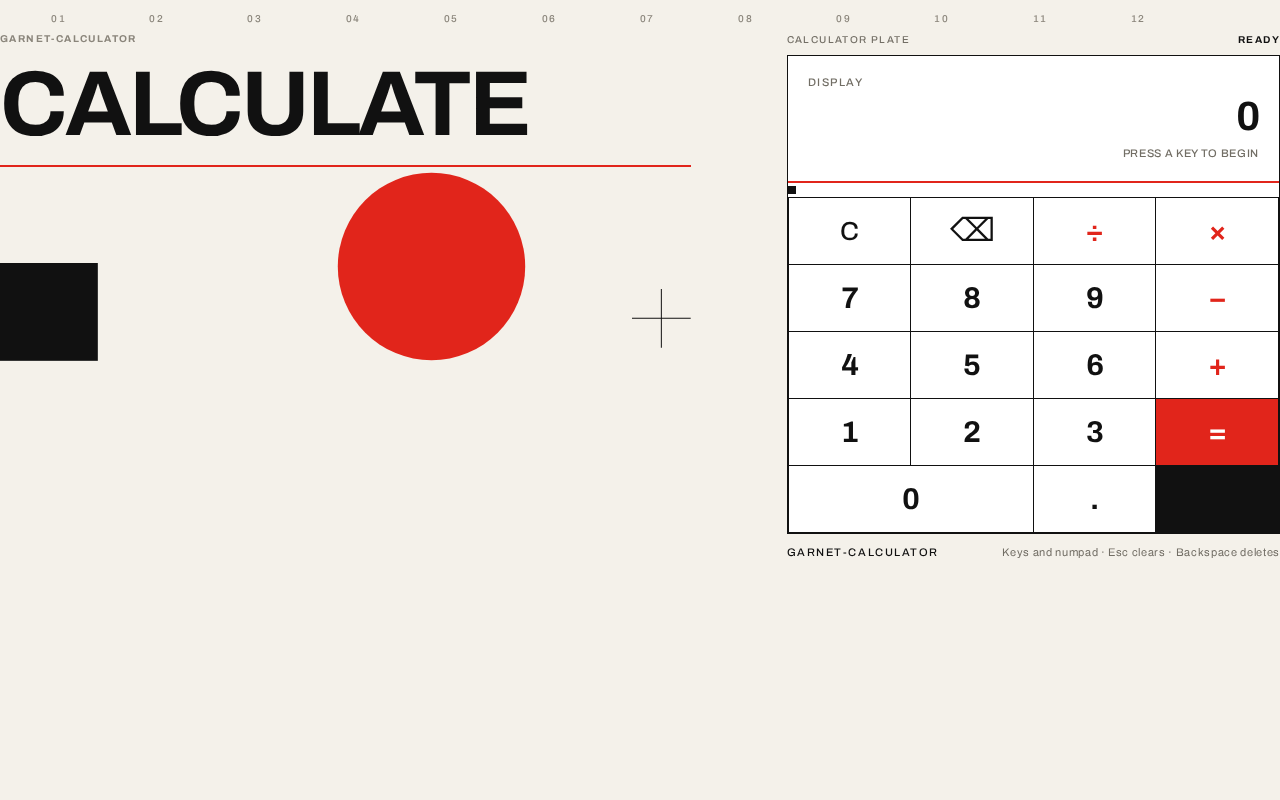
The single page of the product. Anonymous public entry; no identity required. It is a two-panel Swiss poster layout on desktop: a headline and geometric composition on the left, the calculator plate on the right; a single column on mobile.
Information and state
- Display readout — shows the current entry or the computed result. Tabular numerals, right-aligned, flush within the display band. States: empty/initial (shows
0), entry in progress (shows the expression being built), result (shows the computed value), error (shows an error indication when the expression cannot be evaluated, e.g. division by zero or malformed input). - Current expression — the sequence of digits and operators entered since the last clear or result.
- Calculation status — entering, computed, or error.
Primary actions
- Digit keys (0–9) — append a digit to the current entry.
- Decimal point key — begin or extend a fractional entry.
- Operator keys (÷ × − +) — set the pending operation; set as pure typographic glyphs in the red operator column.
- Equals key — commit the expression and compute the result; a solid red block with a white glyph, anchoring the bottom-right corner of the keypad.
- Clear key — reset the display and expression to the initial state.
Supporting actions
- Backspace/delete — remove the last entered character of the current entry (supporting control within the keypad plate).
Domain entities
- Expression — an ordered sequence of numeric operands and operators entered by the user.
- Result — the numeric outcome of evaluating the expression, or an error state.
Component responsibilities
- Headline block — oversized flush-left
CALCULATEwordmark with a 2px red rule at exactly the headline's measure, and beneath it the geometric composition (black square, red circle, hairline cross) placed asymmetrically on the grid. - Column markers — numbered
01–12micro-labels along the top edge on desktop only, exposing the grid. - Calculator plate — a white rectangle with the display band on top and a 4×5 keypad divided by 1px black hairlines with no gaps or radii; one 8px black square marks the grid origin at the top-left of the keypad.
- Display band — the readout with a single 2px red rule beneath it.
- Keypad — the digit, operator, equals, clear, decimal, and backspace keys as one engineered plate.
States
- Loading — not applicable; the page renders immediately with no data fetch.
- Empty/initial — display shows
0; no expression in progress. - Success — result displayed after equals; a new value lands with a single 120ms opacity fade (removed under
prefers-reduced-motion). - Error — an unevaluable expression (e.g. division by zero) shows an error indication in the display; the user can clear to recover.
- Recovery — the clear key resets to the initial state from any state, including error.
3. Functional Requirements
FR-1 — Single-page calculator delivery (explicit) As a Calculator User, I should reach the calculator as a single page, so that I can do arithmetic without navigating anywhere else.
- Trigger: the user opens the product.
- Observable result: the Calculator page renders with the display and keypad.
- Access: anonymous; no identity required.
- Failure/recovery: not applicable — the page is static and renders immediately.
- Continuation: the user proceeds to enter a calculation.
FR-2 — Enter numbers and operators (explicit) As a Calculator User, I should enter numbers and operators on the page, so that I can build the arithmetic expression I want to compute.
- Trigger: the user presses digit, decimal, and operator keys.
- Observable result: the display readout reflects the digits and operators entered, in order.
- Access: anonymous.
- Failure/recovery: malformed sequences are handled at evaluation (FR-3); the user can clear (FR-4) or backspace to correct.
- Continuation: the user presses equals to compute.
FR-3 — Compute and view the result (explicit) As a Calculator User, I should compute the expression and see the result on the page, so that I get the answer I came for.
- Trigger: the user presses the equals key with an expression entered.
- Observable result: the display shows the computed numeric result; a new value lands with a single 120ms opacity fade (removed under
prefers-reduced-motion). - Access: anonymous.
- Failure/recovery: if the expression cannot be evaluated (e.g. division by zero), the display shows an error indication; the user can clear to recover.
- Continuation: the user reads the result, or continues with a new calculation.
FR-4 — Clear the calculation (required_inference) As a Calculator User, I should clear the calculation, so that I can start a fresh calculation from a known state.
- Trigger: the user presses the clear key.
- Observable result: the display returns to the initial state (
0) and the expression is reset. - Access: anonymous.
- Failure/recovery: clear works from any state, including error, and is the recovery path.
- Continuation: the user begins a new calculation.
FR-5 — Correct the current entry (required_inference) As a Calculator User, I should remove the last entered character, so that I can fix a mistyped digit without clearing the whole calculation.
- Trigger: the user presses the backspace/delete key.
- Observable result: the last character of the current entry is removed and the display updates.
- Access: anonymous.
- Failure/recovery: backspace on an empty entry leaves the initial state unchanged.
- Continuation: the user continues entering or presses equals.
4. User Personas
Calculator User
Product context. A general visitor who arrives at the single Calculator page to do a piece of basic arithmetic and get a correct answer quickly. There is no account, no history, and no relationship with the product beyond this visit.
Primary goal. Enter a calculation and read the correct result without leaving the page.
Distinct accepted responsibilities.
- Enter numbers and operators to build an expression (FR-2).
- Commit the expression with equals and read the computed result (FR-3).
- Clear the calculation to start again (FR-4).
- Correct a mistyped entry with backspace (FR-5).
Relevant inputs and decisions. Which digits and operators to enter; when the expression is complete enough to commit with equals; whether to correct, clear, or continue after a result or an error.
Interactions with other accepted participants. None — the Calculator User is the only active human participant, and no other persona is affected by the calculation.
Observable success. The display shows the correct numeric result for the entered expression, and the user can clear and start a new calculation without leaving the page.
5. Core User Flows
Flow 1 — Perform a basic calculation
- The Calculator User opens the product and lands on the Calculator page (anonymous; no sign-in).
- The display shows the initial state
0. - The user presses digit keys to enter the first operand; the display updates with each press.
- The user presses an operator key (÷, ×, −, or +); the pending operation is set.
- The user presses digit keys to enter the second operand; the display updates.
- The user presses the equals key.
- The display shows the computed result with a single 120ms opacity fade (no fade under
prefers-reduced-motion). - The user reads the result. To do another calculation, they press clear (Flow 3) and begin again.
Flow 2 — Correct a mistyped entry
- On the Calculator page, the user is entering an operand and notices a wrong digit.
- The user presses the backspace/delete key; the last character is removed and the display updates.
- The user re-enters the correct digit and continues with the operator and second operand.
- The user presses equals and reads the result.
Flow 3 — Clear and start over
- On the Calculator page, the user has a result displayed, an expression in progress, or an error indication.
- The user presses the clear key.
- The display returns to the initial state
0and the expression is reset. - The user begins a new calculation (Flow 1).
Flow 4 — Recover from an unevaluable expression
- The user presses equals on an expression that cannot be evaluated (e.g. division by zero).
- The display shows an error indication.
- The user presses clear; the display returns to
0. - The user enters a valid expression and presses equals to get a result.
6. Visuals Colors and Theme
Muse and headline. Josef Müller-Brockmann — "Swiss arithmetic: a calculator locked to the grid." The register is exactness, calm, and mathematical confidence: engineered, not decorated. No warmth, no playfulness, no gloss.
Colour tokens (light mode)
| Role | Hex | Use |
|---|---|---|
| Background | #F4F1EA | Warm paper ground carrying the page (~70%) |
| Surface | #FFFFFF | Calculator plate (~20%) |
| Text / ink | #111111 | Numerals, rules, hairlines (~8%) |
| Primary | #E1251B | Swiss red — equals key, operator column, 2px rule under display (~2%) |
| Accent | #111111 | Second colour in the two-colour system |
| Muted | #8A857B | Micro-labels and secondary metadata only |
Typography. Archivo throughout. Headings and display numerals at 700; labels at 500; helper text at 400. Flush-left, ragged-right. Uppercase micro-labels with 0.14em tracking. Result readout uses tabular numerals at 700 with -0.02em tracking so digits lock into columns.
Type scale (1.5 modular rhythm, four sizes only)
- Display:
clamp(40px, 8vw, 96px)— 40px mobile → 96px desktop. - Key numerals: 22px mobile → 30px desktop.
- Body: 15/16px.
- Micro-label: 11px (section labels 11/12/13px uppercase).
Shape language. Hard edges only — 0px radius on every surface, key, and rule. Keys are rectangles divided by 1px #111 hairlines rather than gaps, so the keypad reads as one engineered plate. A single 2px red rule sits under the display; one 8px black square marks the grid origin at the top-left of the keypad. No shadows, no rounding, no pills.
Layout. 12-column asymmetric grid on the paper ground. Left 7 columns: oversized flush-left CALCULATE headline over a black-and-red geometric composition (red circle, black square, hairline cross). Right 5 columns: the white calculator plate with display band on top and a 4×5 keypad divided by hairlines. At 375px: single column, headline block first (40px), then keypad full-width. At 768px: headline and keypad 50/50. At 1280px: 7/5 split with a 96px gutter. Numbered column markers 01–12 run as 10px muted labels along the top edge on desktop only.
Imagery. No photography, no illustration. Geometry only: solid red circle, black square, hairline cross, plus the keypad itself as the second poster. Operators are pure typographic glyphs in the red column; equals is a solid red block with a white glyph.
Accessibility. Readable text and controls stay whole at 375px, 768px, and 1280px, wrapping or scaling to fit; no element covers any part of them. Contrast: #111111 on #F4F1EA and on #FFFFFF exceeds WCAG AA; white glyph on #E1251B equals key meets AA for large text.
7. Signature Design Concept
The public entry is a two-panel Swiss poster, not a centred card. On the paper ground (#F4F1EA), the left panel carries CALCULATE in Archivo 700 at up to 96px, flush to the left margin with no container, a 2px red rule spanning exactly the headline's measure beneath it, and below that a black square, a red circle, and a hairline cross arranged asymmetrically on the grid — the page's poster image. The right panel is the white calculator plate: hard-edged, display band on top with a 2px red rule, a 4×5 keypad divided by 1px black hairlines with no gaps or radii, the red operator column as the only colour among black numerals, and the solid red equals key anchoring the bottom-right corner. Numbered 01–12 column markers along the top edge expose the grid the whole page is built on. No gradient, no shadow, no floating card, no third colour.
8. Interaction Model & Motion Direction
Interaction Model: Static (direction) Motion Tempo: restrained Hero Dimensionality: flat
Landing Hero Motion Brief
- Focal subject. The oversized flush-left
CALCULATEheadline and the geometric composition (black square, red circle, hairline cross) beside the white calculator plate. - Input → transformation → outcome thesis. A key press is the only input: it swaps the pressed key's background to
#111with white numerals for 90ms — mechanical feedback, no easing flourish — and the display readout updates. Pressing equals lands a new value in the readout with a single 120ms opacity fade. The page itself never animates on entry. - Motion vocabulary. Instant 90ms key-press background swap; single 120ms opacity fade on a new result value; hairline thickening on key hover. No entrance animation, no parallax, no hover lift, no springy easing.
- Composed first frame. Paper ground;
CALCULATEflush left at 96px with the red rule beneath; geometric composition below; white calculator plate on the right with the red equals key at bottom-right; column markers along the top edge. - Reduced-motion state. Under
prefers-reduced-motion, the 120ms result fade is removed; the readout changes instantly. Key-press feedback and hover hairline thickening remain as non-motion state changes.
9. Non-Functional Requirements
- Single-page constraint (explicit) — the calculator must be a single page; no additional routes or destinations. Rationale: explicit user constraint "build a simple single page of project of calculator."
- Simplicity (explicit) — the product is a simple calculator; no scientific, programmer, memory, or unit-conversion modes. Rationale: explicit user requirement.
- Anonymous access (required_inference) — the page is reachable without identity; no account state is created or required. Rationale: no accepted behavior needs durable per-user state.
- Responsive integrity (explicit, from design constraints) — readable text and controls stay entirely inside the viewport and their container at 375px, 768px, and 1280px; no element covers any part of them.
- Reduced motion (explicit, from creative direction) —
prefers-reduced-motionremoves the 120ms result fade and provides a usable static arrangement. - Accessibility contrast (required_inference) — text and control contrast meets WCAG AA against the specified palette.
10. Tech Stack
- Frontend — React application UI (provisioned scaffold service). The calculator page, keypad, display, and arithmetic evaluation live here.
- Backend — shared FastAPI process for application APIs and domain modules (provisioned scaffold service). No calculator domain API is required by the accepted behavior; the process is retained as provisioned infrastructure.
- Database — MariaDB for application-owned persistent data (provisioned scaffold service). No calculator domain entities are persisted; the database is retained as provisioned infrastructure and does not justify domain entities or authentication.
- Containerization — Docker / docker-compose as the runnable service inventory (
frontend,backend,database).
No additional infrastructure is required for the accepted calculator workflows.
11. Assumptions and Constraints
- A-1 (explicit) — The calculator is a single page; no other pages exist.
- A-2 (explicit) — The calculator performs basic arithmetic: addition, subtraction, multiplication, and division.
- A-3 (required_inference) — Arithmetic is evaluated in the page interaction; the provisioned backend and database carry no calculator domain requirement.
- A-4 (required_inference) — The page is anonymous and holds no durable per-user state.
- A-5 (required_inference) — A clear control and a backspace control are indispensable mechanics for a usable calculator lifecycle (starting over and correcting input) and are included as required inferences, not as adjacent features.
- A-6 (required_inference) — An unevaluable expression (e.g. division by zero) shows an error indication in the display, recoverable by clear.
- A-7 (default — not specified by user) — The initial display state shows
0. - A-8 (default — not specified by user) — The keypad is a 4×5 grid as specified in the creative direction.
12. Glossary
- Calculator page — the single page of the product; the anonymous public entry hosting the display and keypad.
- Display readout — the band at the top of the calculator plate showing the current entry, result, or error.
- Expression — the ordered sequence of digits and operators entered by the user.
- Result — the numeric outcome of evaluating the expression, or an error state.
- Calculator plate — the white rectangle containing the display band and the 4×5 keypad, divided by hairlines.
- Operator column — the red column of ÷, ×, −, + keys.
- Equals key — the solid red block with a white glyph anchoring the bottom-right of the keypad.
- Clear key — the control that resets the display and expression to the initial state.
Calculate
Keypad
garnet-calculatorKeys and numpad · Esc clears · Backspace deletes
Calculate
Keypad
garnet-calculatorKeys and numpad · Esc clears · Backspace deletes
No comments yet. Be the first!