gamma-todo
build a to-do with no design page just code and logic


Comments (0)
Sign in to leave a comment
Project Tasks28
Implement Navbar for Landing
As a frontend developer, implement the Navbar section for the Landing page. Build the `Navbar` component using `useState` for `mobileOpen` toggle and `useScroll`/`useTransform` from framer-motion to animate `bgOpacity`, `blurVal`, `shadowOpacity`, and `borderOpacity` as scroll-driven motion values applied inline to the `motion.nav` element. Render an animated SVG logo using `logoPathVariants` and `logoCheckVariants` with sequenced `pathLength` transitions on `motion.rect`, `motion.line`, and `motion.path` elements. Map `navLinks` array to desktop `<ul>` nav links and a mobile hamburger menu toggled by `mobileOpen`. Apply `Navbar.css` styles. Note: this component may already exist from a previous page.
Create Task database models
As a Backend Developer, implement the SQLAlchemy ORM models for the Task entity using Python/FastAPI and MySQL/MariaDB. Define the Task model with fields: id (primary key, auto-increment), title (VARCHAR 255, not null), description (TEXT, nullable), completed (BOOLEAN, default false), created_at (DATETIME, default now), updated_at (DATETIME, auto-update). Configure Alembic for database migrations and create the initial migration script. Ensure the model is registered with the SQLAlchemy metadata and Alembic env.py is correctly wired to the database URL from environment variables.
Setup FastAPI app and DB config
As a Backend Developer, set up the FastAPI application entrypoint and database configuration. Create: main.py with FastAPI app instance, CORS middleware configured for the React frontend origin, and router inclusion for /api/v1. Create database.py with SQLAlchemy async engine, SessionLocal factory, and get_db dependency. Create config.py reading DATABASE_URL, APP_ENV from environment variables. Wire Alembic alembic.ini and env.py to use DATABASE_URL. Ensure the app starts cleanly with uvicorn and connects to MySQL/MariaDB. This is a prerequisite for all API endpoint tasks.
Implement LandingHero for Landing
As a frontend developer, implement the `LandingHero` section. Use `useRef` for `sectionRef` and `gridRef`, and `useScroll`/`useTransform` to derive `gridScale`, `gridY`, `midY`, and `contentOpacity` scroll-driven parallax values. Build a memoized SVG blueprint grid via `useMemo` generating vertical, horizontal, and diagonal `<line>` elements with `lh-grid-major` and `lh-grid-accent` class variants based on spacing of 48px over 40 cols × 60 rows. Wire a `gsap.timeline` entrance animation in `useEffect` sequencing `.lh-badge`, `.lh-headline`, `.lh-subheadline`, `.lh-cta-group`, and `.lh-scroll-hint` with `fromTo` stagger using `power3.out` ease. Apply `LandingHero.css` styles.
Implement LandingValueProposition for Landing
As a frontend developer, implement the `LandingValueProposition` section. Define `VALUE_CARDS` array with three entries (`simple`, `fast`, `reliable`) each carrying a `lucide-react` icon (`Layers`, `Zap`, `Shield`), heading, description, and `accentColor`. Use `useState` for `hoveredIndex` and `useRef` for `clusterRef`. Create per-card `useMotionValue` instances for `x`, `y`, `rotate` and wrap each in `useSpring` with `{ stiffness: 200, damping: 22, mass: 0.8 }`. Implement `handleHoverStart` callback that reads `ATTRACTION_OFFSETS[index]` to push sibling motion values and lifts the hovered card by `y = -4`, and `handleHoverEnd` to reset all cards to zero. Render a parallax background layer behind the card cluster. Apply `LandingValueProposition.css`.
Implement LandingWorkflow for Landing
As a frontend developer, implement the `LandingWorkflow` section. Define a `steps` array of 4 items with `lucide-react` icons (`Plus`, `Eye`, `CheckCircle2`, `Trash2`). Use `useRef` for `sectionRef`, `svgRef`, `pathRef`, `activePathRef`, `flowArrowRef`, and `hasAnimated`. Use `useInView` with `{ once: true, amount: 0.25 }` and `useState` for `cardPositions`, `isMobile`, and `hoveredStep`. On resize via `updateBreakpoint`, toggle between `DESKTOP_PATH` and `TABLET_PATH` bezier SVG strings. In a `useEffect`, calculate card positions by calling `path.getPointAtLength(totalLength * offsets[i])` at offsets `[0.06, 0.33, 0.60, 0.94]`. On `isInView`, run a GSAP animation that draws `activePathRef` using `strokeDasharray`/`strokeDashoffset` and animates `flowArrowRef` along the path. On mobile, render a vertical stacked layout instead. Apply `LandingWorkflow.css`.
Implement LandingShowcase for Landing
As a frontend developer, implement the `LandingShowcase` section. Define `mockTasks` array (4 tasks with `id`, `text`, `done`, `cat`, `catClass`) and `hotspots` array (4 entries: `checkbox`, `addBtn`, `category`, `delete`) each with absolute `style` positioning, `cardPos`, `arrowDir`, label, desc, color, and icon type. Define `callouts` array (3 items with `title`, `desc`, `iconClass`, `icon`). Build `HotspotIcon` sub-component rendering inline SVGs for `check`, `plus`, `tag`, and `trash` types. Use `useState` for active hotspot tracking. Render an interactive mock task UI with hotspot overlays using `motion` and `AnimatePresence` for tooltip/card transitions. Render the 3 `callouts` below the showcase panel. Apply `LandingShowcase.css`.
Implement LandingBenefits for Landing
As a frontend developer, implement the `LandingBenefits` section. Define a `benefits` array of 4 entries (`organize`, `remember`, `peace`, `anywhere`) each with `cardClass`, `gradient`, `glowAnimation`, inline SVG `icon`, and `enterFrom` directional offset (-40 or 40). Build `BenefitCard` sub-component that uses `React.useRef` and `useInView` with `{ once: true, margin: '-60px' }`, plus `useMotionValue` for `gradientProgress` and `useTransform` to drive animated `backgroundPosition` on the card's gradient border. Animate card entrance from `enterFrom` offset using framer-motion `initial`/`animate` driven by `isInView`. Apply `LandingBenefits.css`.
Implement LandingTestimonials for Landing
As a frontend developer, implement the `LandingTestimonials` section. Define a `testimonials` array of 5 entries with `quote`, `name`, `role`, `initials`, `avatarClass`, and `stars`. Use `useState` for `activeIndex`, `cardWidth`, `gap`, `visibleCount`, and `isDragging`, plus `useRef` for `trackRef`. Build `StarIcon` and `QuoteIcon` SVG sub-components. Implement a draggable carousel track using `useMotionValue` and `useSpring` from framer-motion for smooth scroll momentum with drag gesture handling (`onMouseDown`/`onTouchStart` → drag delta → snap to nearest card index). Measure `cardWidth` and `gap` from the DOM on resize. Apply `LandingTestimonials.css`.
Implement LandingFAQ for Landing
As a frontend developer, implement the `LandingFAQ` section. Define `faqItems` array of 7 entries (`what-is`, `organize`, `data-safe`, `delete-tasks`, `mark-complete`, `free`, `get-started`) each with `id`, `question`, and `answer` strings. Use `useState` for `activeId` (accordion active item). Implement `handleToggle` that sets `activeId` to the clicked `id` or `null` if already active. Render two parallax hatching background divs (`fq-hatch-layer`, `fq-hatch-mid`) with CSS custom property `--scroll` transforms at `-0.2` and `-0.35` speed multipliers. Wrap accordion panel content in `AnimatePresence` with `motion.div` for collapse/expand animation. Apply `LandingFAQ.css`.
Implement LandingCTA for Landing
As a frontend developer, implement the `LandingCTA` section. Define `PARTICLE_COUNT = 16` and `PARTICLE_COLORS = ['accent','secondary','highlight','primary']`. Implement `generateParticles(originX, originY)` that distributes 16 particles by evenly spacing angles with random jitter, random `distance` (40–100px), and random `size` (5–11px). Use `useState` for `particles`, `isHovered`, `mousePos`, and `btnRect`, and `useRef` for `btnRef`. In `useEffect`, attach resize and scroll listeners to keep `btnRect` updated. In `handleClick`, generate particles at button center and clear them after 700ms via `setTimeout`. Compute magnetic `pullX`/`pullY` from cursor-to-button-center delta × 0.05 when hovered. Render three parallax blob layers (`lc-blob-1/2/3`) and animate particles using `AnimatePresence` and `motion.div`. Apply `LandingCTA.css`.
Implement Footer for Landing
As a frontend developer, implement the `Footer` section. Define `linkColumns` array of 4 columns (`Product`, `Company`, `Resources`, `Legal`) each with a `title` and array of `{ label, href }` links. Use `useRef` for `sectionRef` and `useScroll`/`useTransform` to derive `bgY` parallax offset from `[0, 1]` → `[0, -60]` mapped to `scrollYProgress` with offset `['start end', 'end start']`. Build a memoized SVG grid background (40×40 lines at 40px spacing) wrapped in a `motion.div` with `style={{ y: bgY }}`. Render an animated logo SVG using `motion.rect` with `pathLength` drawn down from 1 to 0 over 2s ease-in-out, and the 4 link columns in a flex/grid layout. Apply `Footer.css`. Note: this component may already exist from a previous page.
Implement Navbar for TaskList
As a frontend developer, implement the Navbar section for the TaskList page. This component (Navbar.css) may already exist from the Landing page (task ebd2066d-f71c-44f9-be17-603f7bacf5c3). It uses framer-motion with useScroll and useTransform hooks to create a scroll-reactive nav: bgOpacity transitions from 0.6 to 0.95, blurVal from 0 to 8px, shadowOpacity and borderOpacity all driven by scrollY [0,120] ranges. The animated SVG logo uses logoPathVariants (pathLength 0→1, 0.8s easeInOut) and logoCheckVariants (delay 0.6s) for a draw-on effect. Includes a mobileOpen useState toggle for hamburger menu, navLinks array with Landing/TaskList/TaskForm routes, and desktop nav links rendered via map.
Implement Tasks CRUD API
As a Backend Developer, implement the FastAPI REST API endpoints for task management. Create the following endpoints under /api/v1/tasks: GET /tasks (list all tasks, returns array of task objects), POST /tasks (create a new task, accepts {title: string, description?: string}), PATCH /tasks/{id} (update a task, accepts {title?: string, description?: string, completed?: boolean} — supports marking complete/incomplete), DELETE /tasks/{id} (delete a task by ID). Implement Pydantic schemas for request/response validation: TaskCreate, TaskUpdate, TaskResponse. Use SQLAlchemy async session for DB operations. Return appropriate HTTP status codes (200, 201, 404, 422). Note: TaskListGrid, TaskListFilters, TaskListActions, FormContainer frontend tasks all depend on these endpoints.
Implement TaskListHero for TaskList
As a frontend developer, implement the TaskListHero section for the TaskList page (TaskListHero.css). Uses two useState hooks (displayTotal, displayDone) initialized to 0, animated via a requestAnimationFrame loop in useEffect with a 600ms cubic-ease-out easing function (1 - Math.pow(1 - progress, 3)) counting up to TOTAL_TASKS=12 and COMPLETED_TASKS=7. Renders a top row with an SVG clipboard icon (tlh-icon-wrap), an h1 'My Tasks', and two count badges (tlh-badge-total, tlh-badge-done) with dot indicators and aria-labels. Below is a progress bar (role=progressbar, aria-valuenow=pct) with tlh-progress-bar-track/fill driven by pct width, plus a subtitle row with 'Manage your tasks efficiently' and an Add Task CTA link to /TaskForm with a plus SVG icon.
Implement TaskListFilters for TaskList
As a frontend developer, implement the TaskListFilters section for the TaskList page (TaskListFilters.css). Uses two useState hooks: activeFilter (default 'all') and activeView (default 'list'). Renders a nav with role=tablist containing three filter buttons from the FILTERS array [{key:'all', label:'All Tasks', count:12}, {key:'active', label:'Active', count:7}, {key:'completed', label:'Completed', count:5}] — each button toggles tlf-active class and aria-selected based on activeFilter state, and shows a tlf-count span. A tlf-divider separates filters from a view toggle group (role=group) with two buttons: list view (three horizontal SVG lines) and compact view (2x2 SVG grid of rects), each toggling tlf-view-active class on activeView state.
Implement TaskListGrid for TaskList
As a frontend developer, implement the TaskListGrid section for the TaskList page (TaskListGrid.css). Uses useState for tasks (INITIAL_TASKS array of 7 items with id/title/completed fields) and deletingIds array. toggleTask maps over tasks flipping completed boolean by id. deleteTask adds id to deletingIds, then after 340ms timeout removes from both tasks and deletingIds (CSS exit animation window). Computes completedCount, totalCount, progressPct for a tlg-summary bar (tlg-progress-bar-fill width driven by progressPct%). When totalCount===0 renders tlg-empty-hint with clipboard SVG and Add First Task link to /TaskForm. Otherwise renders a ul.tlg-list of task items — each item applies a deleting class when id is in deletingIds. Each task row has a checkbox toggle (calling toggleTask), task title with completed strikethrough style, and a delete button (calling deleteTask).
Implement TaskListEmpty for TaskList
As a frontend developer, implement the TaskListEmpty section for the TaskList page (TaskListEmpty.css). A purely static presentational component with no state hooks. Renders tle-icon-wrap containing two decorative background divs (tle-icon-bg, tle-icon-bg-inner) for layered glow effect, plus a clipboard SVG (48x48 viewBox) with outline rect, top clip rect, and a large checkmark path (d='M17 25 L22 30 L32 19'). Below: h2 'No tasks yet', a p.tle-subtext, and an tle-cta anchor to /TaskForm with a plus SVG icon (tle-cta-icon). Ends with a p.tle-hint 'Takes less than a second' and three tle-dot decorative divs inside tle-dots.
Implement TaskListActions for TaskList
As a frontend developer, implement the TaskListActions section for the TaskList page (TaskListActions.css). Uses useState for activeModal (null | 'clear-completed' | 'delete-all') and toast (null | string) plus toastKey counter. useCallback showToast sets toast message, increments toastKey, and auto-clears after 2400ms. Defines icon components: CheckAllIcon, SweepIcon, TrashIcon, WarnIcon, CheckCircleIcon (all SVG). MODAL_CONFIGS object maps action keys to {title, desc, confirmLabel, iconClass, toastMsg}. handleMarkAllComplete calls showToast. openModal/closeModal toggle activeModal. handleConfirm reads MODAL_CONFIGS[activeModal] to trigger action then shows toast. Renders three action buttons (Mark All Complete, Clear Completed, Delete All) that open modals. Modal overlay renders WarnIcon, title, desc, cancel/confirm buttons. Toast notification renders with toastKey as React key for CSS re-trigger animation.
Implement Footer for TaskList
As a frontend developer, implement the Footer section for the TaskList page (Footer.css). This component may already exist from the Landing page (task 975b1137-b216-407c-967c-84c2f53519e2). Uses useRef (sectionRef) and framer-motion useScroll with offset ['start end','end start'] to drive bgY via useTransform(scrollYProgress,[0,1],[0,-60]) for parallax grid background. Generates an SVG grid of 40x40 vertical and horizontal lines at 40px spacing rendered inside motion.div.ftr-parallax-bg. Content area (ftr-content) includes ftr-top with animated logo SVG (motion.rect pathLength animation) and tagline, plus ftr-top-and-columns with four linkColumns: Product (TaskList/TaskForm/Landing links), Company, Resources (Documentation/Help Center/API Reference/Status Page), Legal (Privacy/Terms/Cookie). Bottom bar shows copyright and brand.
Implement Navbar for TaskForm
As a frontend developer, implement the Navbar shared component for the TaskForm page. This component already exists from the Landing and TaskList pages (sections/Navbar.jsx). Verify it renders correctly on TaskForm with the sticky motion.nav using useScroll and useTransform hooks for scroll-driven bgOpacity (0.6→0.95), blurVal (0→8px), shadowOpacity, and borderOpacity transitions. Confirm the navLinks array includes Landing, TaskList, and TaskForm hrefs. Validate the animated SVG logo with logoPathVariants (pathLength 0→1, 0.8s) and logoCheckVariants (delay 0.6s). Confirm mobile hamburger state (mobileOpen useState) toggles nb-mobile-menu visibility and the Add Task CTA links to /TaskForm.
Setup frontend API client
As a Frontend Developer, create a centralized API client module for the React frontend to communicate with the FastAPI backend. Create src/api/tasks.js (or .ts) using fetch or axios with a configured base URL (from REACT_APP_API_URL env var). Implement the following functions: fetchTasks() → GET /api/v1/tasks, createTask({title, description}) → POST /api/v1/tasks, updateTask(id, {completed?, title?, description?}) → PATCH /api/v1/tasks/{id}, deleteTask(id) → DELETE /api/v1/tasks/{id}. Include error handling and response parsing. This module should be imported by TaskListGrid, TaskListActions, and FormContainer sections to replace their current mock/static data with real API calls.
Implement FormHero for TaskForm
As a frontend developer, implement the FormHero section for the TaskForm page. The section renders a fh-root container with breadcrumb navigation (fh-breadcrumb) linking back to /TaskList as 'My Tasks' with a separator and 'Add New Task' as current page. Includes an h1 fh-title 'Add a New Task', fh-subtitle paragraph, and a step indicator pill row (fh-steps) mapping over a steps array with two entries: 'Task Details' (status: active) and 'Review' (status: pending) — rendered as fh-step-pill with fh-step-pill--active or fh-step-pill--done classes separated by fh-steps-divider spans. A decorative fh-accent SVG renders a clipboard outline (path d='M13 4h-4...'), clipboard header shape, horizontal lines, and an fh-accent-check checkmark path. A fh-separator div closes the section. Adapts to mobile with responsive stacking.
Implement FormContainer for TaskForm
As a frontend developer, implement the FormContainer section for the TaskForm page — the core interactive form. Uses useState hooks for: title (max 100 chars via TITLE_MAX), description (max 500 chars via DESC_MAX), titleError (validation message string), titleFocused and descFocused (focus states), submitting (loading state bool), and success (post-submit banner bool). Uses useRef for titleRef to programmatically focus the title input on failed validation. Computes progressStep (0/1/2) and progressWidth ('0%'/'50%'/'100%') based on titleFilled and descFilled derived values. Implements validateTitle() checking for empty and minimum 3-char length. handleTitleBlur triggers validation; handleTitleChange enforces TITLE_MAX and clears errors when valid; handleDescChange enforces DESC_MAX. handleSubmit prevents default, validates, sets submitting for 1200ms timeout then sets success for 3000ms then resets. Renders: fc-success-banner (role=status, aria-live=polite) with check-circle SVG that animates in/out via fc-success-visible class; fc-card with fc-form-header (h2 + subtitle); progress bar driven by progressWidth; TASK TITLE input (ref=titleRef, required) with char counter showing titleCharWarn warning style near 90% of 100; titleError inline error message; DESCRIPTION textarea with descCharWarn warning near 90% of 500; Cancel button linking to /TaskList; Add Task submit button with loading spinner state during submitting.
Implement FormFooter for TaskForm
As a frontend developer, implement the FormFooter section for the TaskForm page. Renders a ff-root section (aria-label='Form tips') containing ff-inner with a ff-tip-list ul (role=list) mapping over a tips array of 3 items: 'autosave' (floppy-disk SVG icon, text about immediate save on submission), 'manage' (list/doc SVG icon, text about viewing/completing/deleting from Task List), and 'keyboard' (keyboard SVG icon, text about pressing Enter to add tasks). Each tip renders as ff-tip-item li with ff-tip-icon span (aria-hidden) and ff-tip-text span. Below the tip list: a ff-divider div, then a ff-bottom-row with ff-save-notice (ff-save-dot indicator dot + ff-save-text 'Tasks are saved immediately') on the left and ff-nav-hint paragraph with an anchor to /TaskList on the right. Responsive: tip list wraps to column on mobile.
Implement Footer for TaskForm
As a frontend developer, implement the Footer shared component for the TaskForm page. This component already exists from Landing and TaskList pages (sections/Footer.jsx). Verify it renders correctly on TaskForm: ftr-root footer with useRef sectionRef and useScroll targeting that ref with offset ['start end','end start'] for scrollYProgress. bgY useTransform maps scrollYProgress [0,1] to y [0,-60] for parallax grid. SVG grid pattern generates 40×40 lines at 40px spacing (1600×1600 viewBox) inside ftr-parallax-bg motion.div. Content area includes ftr-top-and-columns with ftr-top (animated logo SVG with pathLength 1→0 transitions on rect and checkmark path) and ftr-columns mapping over 4 linkColumns (Product, Company, Resources, Legal) each with ftr-col-title and ftr-col-links. ftr-bottom has copyright '© 2026 gamma-todo' and ftr-socials with 4 motion.a social links (Twitter, GitHub, LinkedIn, Email) each with whileHover scale 1.2 + rotate 360 spring animation.
Integrate TaskList with backend
As a Tech Lead, verify end-to-end integration between the TaskList page frontend sections (TaskListGrid, TaskListFilters, TaskListActions) and the Tasks CRUD API backend. Ensure: TaskListGrid fetches real tasks from GET /api/v1/tasks on mount, toggleTask calls PATCH /api/v1/tasks/{id} with {completed: true/false} and updates local state on success, deleteTask calls DELETE /api/v1/tasks/{id} and removes the item from state on success, TaskListActions bulk actions (Mark All Complete, Clear Completed, Delete All) call appropriate API endpoints, TaskListFilters filter state reflects actual API data counts, loading and error states are handled gracefully in the UI. Note: TaskListGrid and TaskListActions frontend tasks (0821dea9, 0151e4f1) must be completed, and the backend API task (tmp-backend-tasks-api) and frontend API client (tmp-frontend-api-client) must be in place before this integration task.
Integrate TaskForm with backend
As a Tech Lead, verify end-to-end integration between the TaskForm page (FormContainer section) and the POST /api/v1/tasks backend endpoint. Ensure: FormContainer's handleSubmit calls createTask({title, description}) from the API client instead of the current mock setTimeout, success banner appears on 201 response and clears after 3 seconds, validation errors from the API (422 Pydantic errors) are surfaced in the UI, the Cancel button and post-success redirect navigate correctly to /TaskList, network error states are handled with user-friendly messages. Note: FormContainer frontend task (b3ca1b91) must be completed and the backend API (tmp-backend-tasks-api) and frontend API client (tmp-frontend-api-client) must be in place before this task.
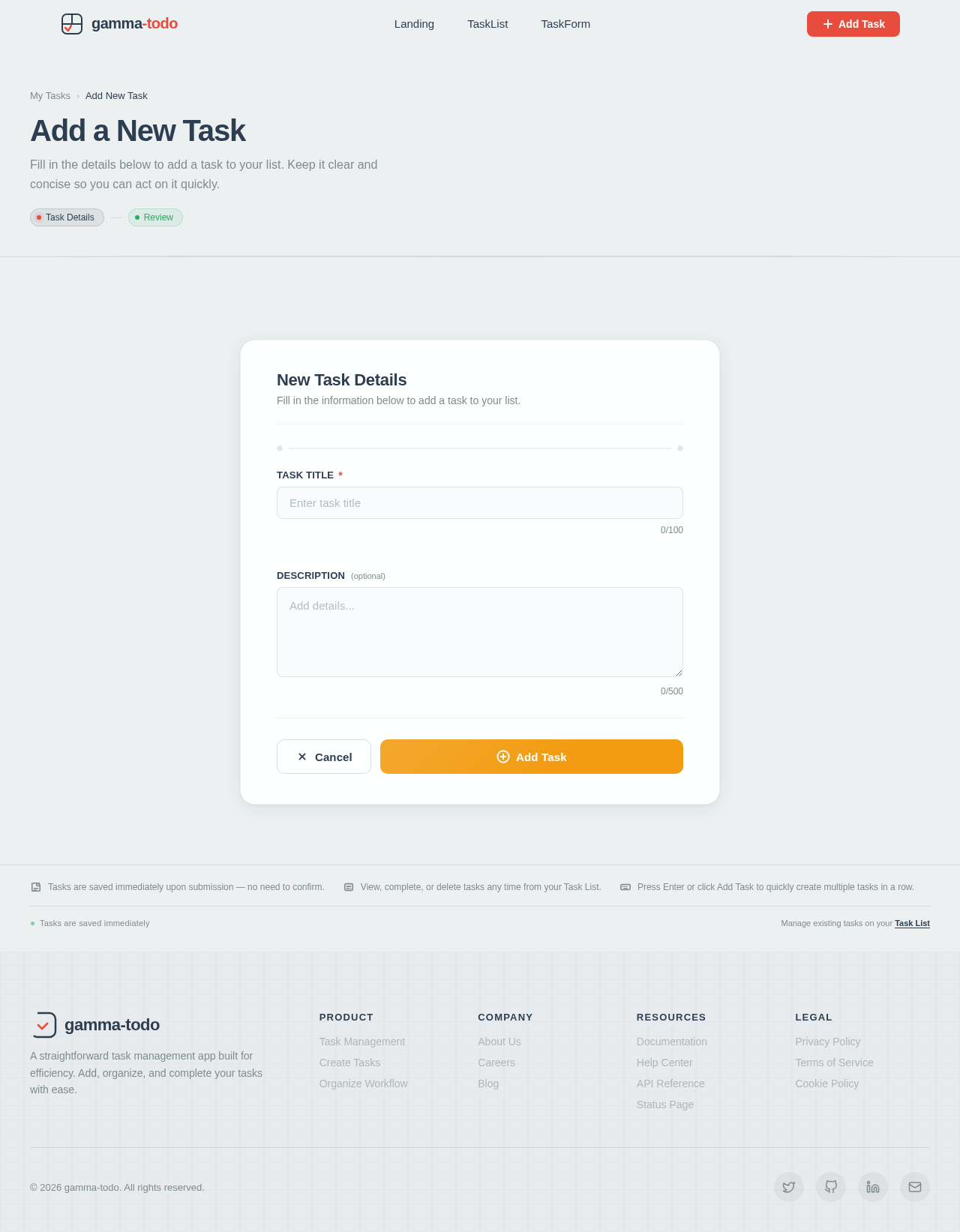
Add a New Task
Fill in the details below to add a task to your list. Keep it clear and concise so you can act on it quickly.
No comments yet. Be the first!