gamma-simple
 Diya Trivedi
start a project to build simple single page design of calcuator

Comments (0)
Sign in to leave a comment
System Requirements
System Requirements Document for gamma-simple
1. Introduction
gamma-simple is a simple calculator delivered as a single page. The product intent is narrow and complete: a person opens one page, enters numbers and operators, and reads the arithmetic result. There is no account, no navigation, no secondary screen, and no surrounding application shell — the calculator is the whole product.
The audience is the everyday calculator user: anyone who needs quick basic arithmetic and wants a clear, friendly, legible tool rather than a corporate or feature-heavy application. The design language (paper-cream ground, white keys with ink outlines, one hot orange accent on the equals key) serves that audience by keeping the interface instantly readable and pleasant to use.
The requester, Diya Trivedi, asked for a simple single-page design of a calculator; this document specifies that product in full.
2. System Overview
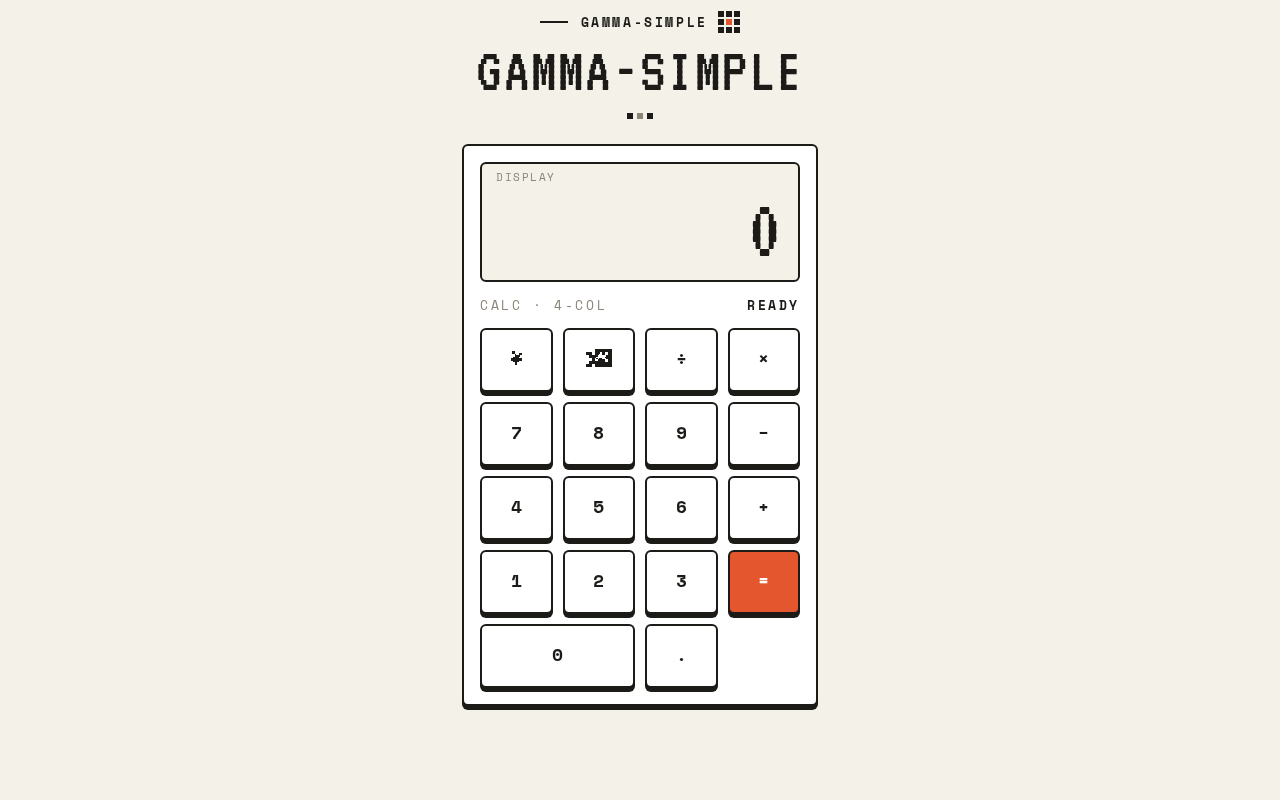
gamma-simple is a single-page web calculator. The page presents a wordmark row, a result display panel, and a four-column key grid. The user presses digit keys to build a number, presses an operator key to select an operation, presses digit keys again for the second operand, and presses the equals key to see the result. Clear and backspace keys let the user correct input. All arithmetic is performed for the user on the page and the result is shown in the display panel.
The only active human actor is the Calculator user. The only page is Calculator, which is publicly reachable with no sign-in, no account, and no stored personal state. There is no differentiated permission model because there is no shared or private product state.
Current delivery is a React frontend presenting the calculator page, supported by the provisioned shared FastAPI backend and MariaDB database services in the deployment inventory. The calculator's arithmetic and display state are page-local; the backend and database are available infrastructure and are not required to hold calculator state, history, or identity for the accepted behavior.
Removed from scope
- None. No concept was removed by the user; the request has only ever been a simple single-page calculator.
2a. Product Interpretation and Delivery Boundary
The product is delivered entirely as one first-party page. The Calculator page is the public entry surface: it opens directly into a usable calculator with no gate, no onboarding, and no identity step. Because the accepted behavior creates no durable actor-specific state, no commitment, and no value transfer that must remain bound to a person, no application-owned identity is introduced.
Everything the user does — entering digits, choosing an operator, clearing, backspacing, and evaluating — happens on that one page and produces an immediately observable result in the display. There is no future horizon stated by the user, and no provider-owned or external surface participates in the accepted behavior.
2c. Page Content and Component Coverage
Calculator
Information and state
- Current entry or result shown in the result display panel, right-aligned, in VT323 digits sized
clamp(40px, 9vw, 88px). - The active operator, indicated by the orange accent on that operator key only.
- A small-caps label strip above the display reading
GAMMA-SIMPLEin 13px Space Mono capitals with 0.2em tracking. - A 64px VT323 wordmark in ink above the calculator panel.
- Transient states: empty/initial display, in-progress first operand, operator selected awaiting second operand, second operand in progress, computed result, and an error state for invalid operations (for example division by zero).
Primary actions
- Press a digit key (0–9) to append that digit to the current entry.
- Press a decimal point key to begin or extend a fractional entry.
- Press an operator key (+, −, ×, ÷) to select the operation; the selected operator key takes the orange accent.
- Press the equals key (solid
#E4572Eblock with white digits) to evaluate the pending operation and show the result in the display.
Supporting actions
- Press the clear key, drawn as a pixel cross icon, to reset the calculator to its initial empty state.
- Press the backspace key, drawn as a pixel backspace arrow icon, to remove the last entered digit.
Domain entities
- Current entry value (the number being typed).
- Pending operand and selected operator (the first operand and the operation awaiting a second operand).
- Displayed result or error message.
Component responsibilities
- Wordmark row: renders the
GAMMA-SIMPLElabel strip and the VT323 wordmark; purely presentational. - Result display panel: cream inset panel with a 2px ink outline; renders the current entry, result, or error, right-aligned and scaled to fit at 375px, 768px, and 1280px.
- Key grid: four-column grid of chunky keys, each with a 2px ink border, 4px hard offset shadow, square corners with 6px radii; hosts digit, decimal, operator, equals, clear, and backspace keys.
- Key press feedback: on press, the key drops 4px into its shadow for 90ms with no easing theatrics; under reduced motion, a static colour change replaces the drop.
States
- Loading: not applicable; the page renders its calculator immediately with no data fetch required for use.
- Empty: display shows the initial zero/empty entry; no operator accented.
- Success: equals produces a numeric result shown in the display; the result can seed a further calculation.
- Error: an invalid operation (such as division by zero) shows an error indication in the display instead of a number; the user recovers by pressing clear and starting again.
- Recovery: clear resets to the empty state; backspace corrects a mistyped digit without a full reset.
3. Functional Requirements
FR-1 — Open the calculator As a Calculator user, I should open the single Calculator page and immediately see a usable calculator, so that I can begin arithmetic without any setup.
- Provenance: explicit (single page design; simple calculator).
- Lifecycle: trigger — the user navigates to the product; input — none; observable result — the Calculator page renders the wordmark, display panel, and key grid; access — public, no identity required; failure/recovery — not applicable to a static page render; continuation — the user proceeds to enter digits.
- Acceptance: the page shows the
GAMMA-SIMPLElabel strip, the VT323 wordmark, the result display panel, and the four-column key grid with no other page or navigation.
FR-2 — Enter digits As a Calculator user, I should press digit keys to build a number, so that I can supply the values I want to calculate.
- Provenance: explicit (calculator behavior).
- Lifecycle: trigger — the user presses a digit key; input — the digit; observable result — the digit appears appended in the result display; access — public; failure/recovery — backspace removes a mistyped digit; continuation — the user presses more digits, a decimal point, or an operator.
- Acceptance: each digit press appends exactly that digit to the current entry shown in the display.
FR-3 — Enter a decimal point As a Calculator user, I should press the decimal point key to enter fractional numbers, so that I can calculate with non-integer values.
- Provenance: required_inference (indispensable to a usable calculator's number entry).
- Lifecycle: trigger — the user presses the decimal key; input — the decimal point; observable result — the current entry becomes fractional and further digits extend it; access — public; failure/recovery — backspace removes the decimal point; continuation — the user completes the number and selects an operator.
- Acceptance: a decimal point is placed in the current entry and subsequent digits extend the fractional part.
FR-4 — Select an operator As a Calculator user, I should press an operator key (+, −, ×, ÷) to choose the operation, so that the calculator knows what to do with my numbers.
- Provenance: explicit (calculator behavior).
- Lifecycle: trigger — the user presses an operator key; input — the chosen operator; observable result — that operator key takes the orange accent, marking it active, and the calculator awaits the second operand; access — public; failure/recovery — pressing a different operator replaces the selection; continuation — the user enters the second operand.
- Acceptance: exactly the selected operator key shows the orange accent; all other keys remain white with ink digits.
FR-5 — Evaluate with equals As a Calculator user, I should press the equals key to compute the result, so that I can see the answer to my calculation.
- Provenance: explicit (calculator behavior).
- Lifecycle: trigger — the user presses the equals key after entering an operator and second operand; input — the pending operands and operator; observable result — the computed result appears in the display panel; access — public; failure/recovery — an invalid operation shows an error in the display and the user recovers via clear; continuation — the result can seed a further calculation.
- Acceptance: the equals key is a solid
#E4572Eblock with white digits; pressing it replaces the display with the computed result.
FR-6 — Clear the calculator As a Calculator user, I should press the clear key to reset the calculator, so that I can start a fresh calculation or recover from a mistake.
- Provenance: explicit (calculator behavior; pixel cross icon per direction).
- Lifecycle: trigger — the user presses the clear key; input — none; observable result — the display returns to its initial empty state and no operator is accented; access — public; failure/recovery — this is the recovery path from errors and mistakes; continuation — the user begins a new entry.
- Acceptance: the clear key is drawn as a pixel cross icon; pressing it resets the display and operator selection.
FR-7 — Backspace a digit As a Calculator user, I should press the backspace key to remove the last entered digit, so that I can correct a typo without clearing everything.
- Provenance: explicit (calculator behavior; pixel backspace arrow icon per direction).
- Lifecycle: trigger — the user presses the backspace key; input — none; observable result — the last digit is removed from the current entry in the display; access — public; failure/recovery — repeated presses remove further digits; continuation — the user continues entering the corrected number.
- Acceptance: the backspace key is drawn as a pixel backspace arrow icon; each press removes exactly the last entered digit.
4. User Personas
Calculator user
Product context. The Calculator user is an everyday person who needs quick basic arithmetic and opens gamma-simple as a small, friendly utility. They arrive at the single Calculator page directly, with no account, no onboarding, and no expectation of saved history — the tool is used in the moment and the result is read immediately.
Primary goal. Get a correct arithmetic answer quickly and clearly, with as little friction as possible.
Distinct accepted responsibilities.
- Entering numbers via digit and decimal keys.
- Choosing an operation via the operator keys, and seeing which operator is active.
- Committing the calculation by pressing equals.
- Correcting input via backspace and resetting via clear.
- Reading the result or error from the display panel.
Relevant inputs and decisions. Which numbers to enter, which operator to apply, when to evaluate, and whether to correct or clear. The user decides when a calculation is complete and whether to continue from the result.
Interactions with other accepted participants. None. The Calculator user is the only active human actor; the calculator's arithmetic is performed for them on the page, and no other person, provider, or counterparty is affected by the outcome.
Observable success. The display shows the correct result of the entered calculation, the active operator is clearly marked in orange, and the user can immediately start another calculation or correct a mistake.
5. Core User Flows
Flow 1 — Perform a basic calculation
- The Calculator user opens the product and lands on the Calculator page. The page renders the
GAMMA-SIMPLElabel strip, the VT323 wordmark, the cream result display panel, and the four-column key grid. No sign-in or setup occurs. - The user presses digit keys to build the first number. Each digit appears appended in the display panel.
- The user presses an operator key (for example +). That key takes the orange accent, marking it active, and the calculator awaits the second operand.
- The user presses digit keys to build the second number, which appears in the display.
- The user presses the equals key (the solid orange block). The computed result replaces the display content.
- The user reads the result. They may press an operator to continue calculating from the result, or press clear to start fresh.
Failure/recovery. If the user mistypes a digit, they press the backspace key (pixel backspace arrow) to remove it and continue. If they want to abandon the calculation, they press the clear key (pixel cross) to reset to the empty state.
Flow 2 — Correct a mistake mid-entry
- On the Calculator page, the user has entered a number and realizes a digit is wrong.
- The user presses the backspace key. The last digit is removed from the display.
- The user presses the correct digit key, and the corrected number appears.
- The user continues with an operator and equals as in Flow 1.
Failure/recovery. If several digits are wrong, the user presses backspace repeatedly, or presses clear to reset entirely and re-enter the number.
Flow 3 — Recover from an invalid operation
- On the Calculator page, the user enters an operation that cannot produce a number (for example division by zero) and presses equals.
- The display shows an error indication instead of a numeric result.
- The user presses the clear key. The display returns to its initial empty state and no operator is accented.
- The user begins a new calculation.
Continuation. After any flow, the user remains on the same Calculator page and can start another calculation immediately; there is no other destination to return to.
6. Visuals Colors and Theme
The visual direction is "Charming clarity, one pixel at a time", with Susan Kare as the muse: crisp small-palette icon craft that gives a small utility tool personality while staying quick, friendly, and clear.
Color tokens (light mode)
- Background:
#F4F1E8(paper-cream ground) - Surface:
#FFFFFF(white key and panel surfaces) - Text:
#1C1B18(ink text and key digits) - Primary:
#1C1B18(ink outlines, wordmark, primary keys) - Accent:
#E4572E(hot orange — equals key and active operator only) - Muted:
#8A8578(secondary labels)
Typography
- Headings and result digits: VT323, pixel display, capitals for the wordmark and result digits, wide tracking on small labels.
- Body and labels: Space Mono.
- Scale: 1.25 modular — 64 / 40 / 24 / 16 / 13.
- Result digits:
clamp(40px, 9vw, 88px).
Shape language
- Chunky keys with 2px ink outlines and 4px hard offset shadows.
- Square corners with tight 6px radii.
- Pixel-icon marks for backspace and clear.
Layout
- One centred column, max 420px wide.
- Wordmark row on top, result display panel, then a 4-column key grid.
- Labels sit under the display in small caps.
Imagery
- Pixel icons only: a backspace arrow, a clear cross, and a small grid motif. No photography and no illustration.
Accessibility of text and controls. Headlines, wordmarks, labels, numbers, and controls stay entirely inside the viewport and their container at 375px, 768px, and 1280px, wrapping or scaling (for example clamp(...)) to fit, with no other element covering them.
Avoid. Rounded pill buttons and soft drop shadows; blue or indigo accents; gradient backgrounds or glass panels; photography or 3D renders; hover-lift card grids. The generic indigo/blue-on-white SaaS template is forbidden.
7. Signature Design Concept
The calculator itself is the hero. On the cream #F4F1E8 ground, a white panel with a 2px ink outline floats as the single focal object. Above it sits a 64px VT323 wordmark in ink, and a small-caps GAMMA-SIMPLE label strip in 13px Space Mono capitals with 0.2em tracking. Inside the panel, the result display is a cream inset panel with a 2px ink outline holding right-aligned VT323 digits up to 88px. Below it, the four-column key grid presents chunky white keys with ink digits and 2px ink borders over 4px hard offset shadows — and exactly one hot block: the equals key in solid #E4572E with white digits. The active operator is the only other element allowed to take the orange accent. Pixel icons (backspace arrow, clear cross) replace text words on their keys. The composition is a single centred column, max 420px wide, with no decoration competing with the calculator.
8. Interaction Model & Motion Direction
Interaction Model: Animated Motion Tempo: restrained Hero Dimensionality: flat
Landing Hero Motion Brief
- Focal subject. The calculator panel itself: the white, ink-outlined panel on the cream ground, with the VT323 wordmark above and the orange equals key as the single hot block in the grid.
- Input → transformation → outcome thesis. A key press (input) drops the key 4px into its hard offset shadow for 90ms (transformation), and the display panel updates with the entered digit, active operator accent, or computed result (outcome). The motion is frame-by-frame and mechanical, matching the pixel-craft muse; it never eases theatrically.
- Motion vocabulary. Frame-by-frame key press: a key drops 4px into its shadow for 90ms. No easing theatrics. The active operator accent appears as a static colour change. No parallax, no scroll-linked depth, no hover-lift.
- Composed first frame. The page at rest: cream ground, centred 420px column, ink wordmark and label strip, white display panel showing the initial empty entry, and the full key grid with the orange equals key as the only saturated element.
- Reduced-motion state. Under
prefers-reduced-motion, the 4px drop is replaced by a static colour change on the pressed key; all content and controls remain fully usable and legible, and the layout is unchanged.
9. Non-Functional Requirements
- Single page. The product is exactly one page, the Calculator page; no additional routes, navigation, or secondary screens exist. (explicit — user constraint; page count exact = 1)
- Simplicity. The design and interaction stay simple: one centred column, one display, one key grid, no surrounding application chrome. (explicit — user constraint)
- Public access. The Calculator page is reachable without sign-in, account creation, or any identity step; no personal state is stored. (explicit/required_inference — no durable actor-specific state exists)
- Legibility at every viewport. Readable text and controls remain whole and uncovered at 375px, 768px, and 1280px, scaling or wrapping to fit. (explicit — creative direction)
- Reduced motion. A usable static arrangement is provided under
prefers-reduced-motion. (explicit — creative direction) - Immediate usability. The calculator is usable on page render with no data fetch required for arithmetic. (required_inference — indispensable to a simple calculator)
10. Tech Stack
- Frontend: React application UI presenting the single Calculator page.
- Backend: shared FastAPI process for application APIs and domain modules (provisioned infrastructure; the accepted calculator behavior is page-local and does not require backend calls).
- Database: MariaDB for application-owned persistent data (provisioned infrastructure; no calculator domain entities, history, or identity are stored for the accepted behavior).
- Deployment: docker-compose with the
frontend,backend, anddatabaseservices as provisioned.
11. Assumptions and Constraints
- Assumption: The calculator supports the four basic operations (+, −, ×, ÷), digits 0–9, a decimal point, equals, clear, and backspace, as the minimum complete set for a "simple calculator." (required_inference)
- Assumption: Arithmetic is performed on the page for the user; no server round-trip is needed for a result. (required_inference)
- Constraint: Exactly one page exists. (explicit)
- Constraint: The design is simple and follows the supplied palette, fonts, surfaces, tone, and layout. (explicit)
- Constraint: No accounts, authentication, history, or persistence of calculations. (required_inference from the absence of any such accepted behavior)
- Constraint: No photography, 3D renders, gradients, glass panels, pill buttons, soft shadows, or blue/indigo accents. (explicit — creative direction)
12. Glossary
- Calculator page — the single page of gamma-simple containing the wordmark, display panel, and key grid.
- Result display panel — the cream inset panel with a 2px ink outline that shows the current entry, result, or error in right-aligned VT323 digits.
- Key grid — the four-column grid of chunky keys with 2px ink borders and 4px hard offset shadows.
- Active operator — the operator key currently selected, marked by the
#E4572Eorange accent. - Equals key — the solid
#E4572Eblock with white digits that evaluates the pending operation. - Clear key — the key drawn as a pixel cross icon that resets the calculator.
- Backspace key — the key drawn as a pixel backspace arrow icon that removes the last entered digit.
- Calculator user — the sole active human persona who enters numbers and operators and reads results.
GAMMA-SIMPLE
gamma-simple
Display
Display shows 0Calc · 4-colReady
GAMMA-SIMPLE
gamma-simple
Display
Display shows 0Calc · 4-colReady
No comments yet. Be the first!