gamma-https

bykunal kumar

https://528f7bab-eb5b-484a-ad37-8ce3ab876d45.preview.shogo.ai find out what are weakness in my ai ad correct that and also add everything that a personal jarvis should have

LandingLoginDiagnostics
Landing

Comments (0)

No comments yet. Be the first!

System Requirements

System Requirement Document
Page 1 of 9

System Requirements Document for gamma-https

1. Introduction

The gamma-https project aims to develop a personal AI assistant that can control a user's PC, search for and learn information, and apply that knowledge effectively. It will feature a human-like voice and an enhanced 3D user interface. The target audience is users seeking a personal assistant with capabilities akin to a "Jarvis" from popular media, providing advanced interaction and control over their personal computing environment.

2. System Overview

The gamma-https system will deliver a personal AI assistant with capabilities to control the user's PC, perform searches, learn and apply information, and interact using a human-like voice. The assistant will feature an improved 3D user interface. The system will address identified weaknesses in the existing preview application and enhance its functionalities. The assistant will operate within the user's personal computing environment, maintaining a focus on personal use and privacy.

2a. Product Interpretation and Delivery Boundary

The system will be delivered as a personal AI assistant application with app-owned identity management. Users will need to complete a first-use enrollment and verification process to access protected functionalities. The system will not provide unrestricted autonomous control or capabilities beyond the stated personal-assistant outcomes. The existing preview application serves as the basis for identifying weaknesses and implementing corrective enhancements.

Page 2 of 9

2b. Source Content Inventory

  • Main Entities:

    • AI Avatar: A digital assistant displayed as a 3D virtual human capable of basic chat interaction.
  • Main Content:

    • Home: Features a 3D avatar, text chat interface, and microphone/speaker controls.
    • About: Provides project/team information.
    • Contact: Includes a contact form with fields for Name, Email, and Message.
  • Media:

    • 3D avatar: Static pose with basic rendering and limited sophistication in UV/texturing.

2c. Page Content and Component Coverage

Landing

  • Information/State:
    • Introduction to the personal assistant's capabilities.
  • Primary Actions:
    • Explore assistant features.
  • Components:
    • Overview of PC control, search, learning, voice, and 3D capabilities.
Page 3 of 9

Login

  • Information/State:
    • User identity verification.
  • Primary Actions:
    • Login with credentials.
  • Components:
    • Username and password fields, login button.

Diagnostics

  • Information/State:
    • Inspection results of the existing assistant.
  • Primary Actions:
    • Review identified weaknesses and corrective actions.
  • Components:
    • Diagnostic report, corrective action list.

Assistant

  • Information/State:
    • Conversational workspace.
  • Primary Actions:
    • Engage in dialogue, receive responses.
  • Components:
    • Chat interface, voice interaction controls, 3D avatar display.
Page 4 of 9

PC Control

  • Information/State:
    • PC control execution and feedback.
  • Primary Actions:
    • Launch applications, manage files.
  • Components:
    • Control panel, confirmation/cancellation options.

Search

  • Information/State:
    • Search requests and results.
  • Primary Actions:
    • Conduct searches, review results.
  • Components:
    • Search bar, results display.

Knowledge

  • Information/State:
    • Retained and revisited information.
  • Primary Actions:
    • Access learned information.
  • Components:
    • Knowledge repository, retrieval options.
Page 5 of 9

Tasks

  • Information/State:
    • Task management and tracking.
  • Primary Actions:
    • Apply knowledge to tasks, track progress.
  • Components:
    • Task list, progress indicators.

3. Functional Requirements

  • As a Personal Assistant User, I should be able to control my PC through the assistant, including launching applications and managing files. (explicit)
  • As a Personal Assistant User, I should be able to search for information using the assistant and receive relevant results. (explicit)
  • As a Personal Assistant User, I should be able to have the assistant learn new information and apply it to tasks. (explicit)
  • As a Personal Assistant User, I should experience human-like voice interaction with the assistant. (explicit)
  • As a Personal Assistant User, I should interact with an enhanced 3D user interface. (explicit)
  • As a Personal Assistant User, I should complete first-use enrollment before accessing protected assistant work. (required_inference)
  • As a Personal Assistant User, I should complete verification before accessing protected assistant capabilities. (required_inference)
  • As a Personal Assistant User, I should be able to inspect the existing assistant for weaknesses and review corrective actions. (required_inference)
  • As a Personal Assistant User, I should confirm PC-control actions and have options for cancellation, error handling, and recovery. (required_inference)

4. User Personas

  • Personal Assistant User: The primary user who interacts with the assistant to control their PC, search and learn information, and apply what is learned.
  • Personal AI Assistant: The interactive assistant responsible for executing PC control, searching, learning, applying knowledge, and providing voice interaction.

5. Core User Flows

Page 6 of 9

Personal Assistant User

  1. Landing Page Interaction:

    • User visits the Landing page to learn about the assistant's capabilities.
    • User explores features and decides to proceed with enrollment.
  2. Login and Verification:

    • User accesses the Login page and enters credentials.
    • System verifies identity and grants access to protected functionalities.
  3. Diagnostics Review:

    • User navigates to the Diagnostics page.
    • User reviews identified weaknesses and corrective actions.
  4. Assistant Interaction:

    • User engages with the Assistant page for conversation and voice interaction.
    • User receives responses and interacts with the 3D avatar.
  5. PC Control Execution:

    • User accesses the PC Control page to execute commands.
    • User confirms actions, with options for cancellation and error recovery.
  6. Search and Knowledge Management:

    • User conducts searches on the Search page and reviews results.
    • User accesses the Knowledge page to retrieve learned information.
  7. Task Management:

    • User applies knowledge to tasks on the Tasks page.
    • User tracks task progress and completion.
Page 7 of 9

6. Visuals Colors and Theme

  • Muse: Gleb Kuznetsov
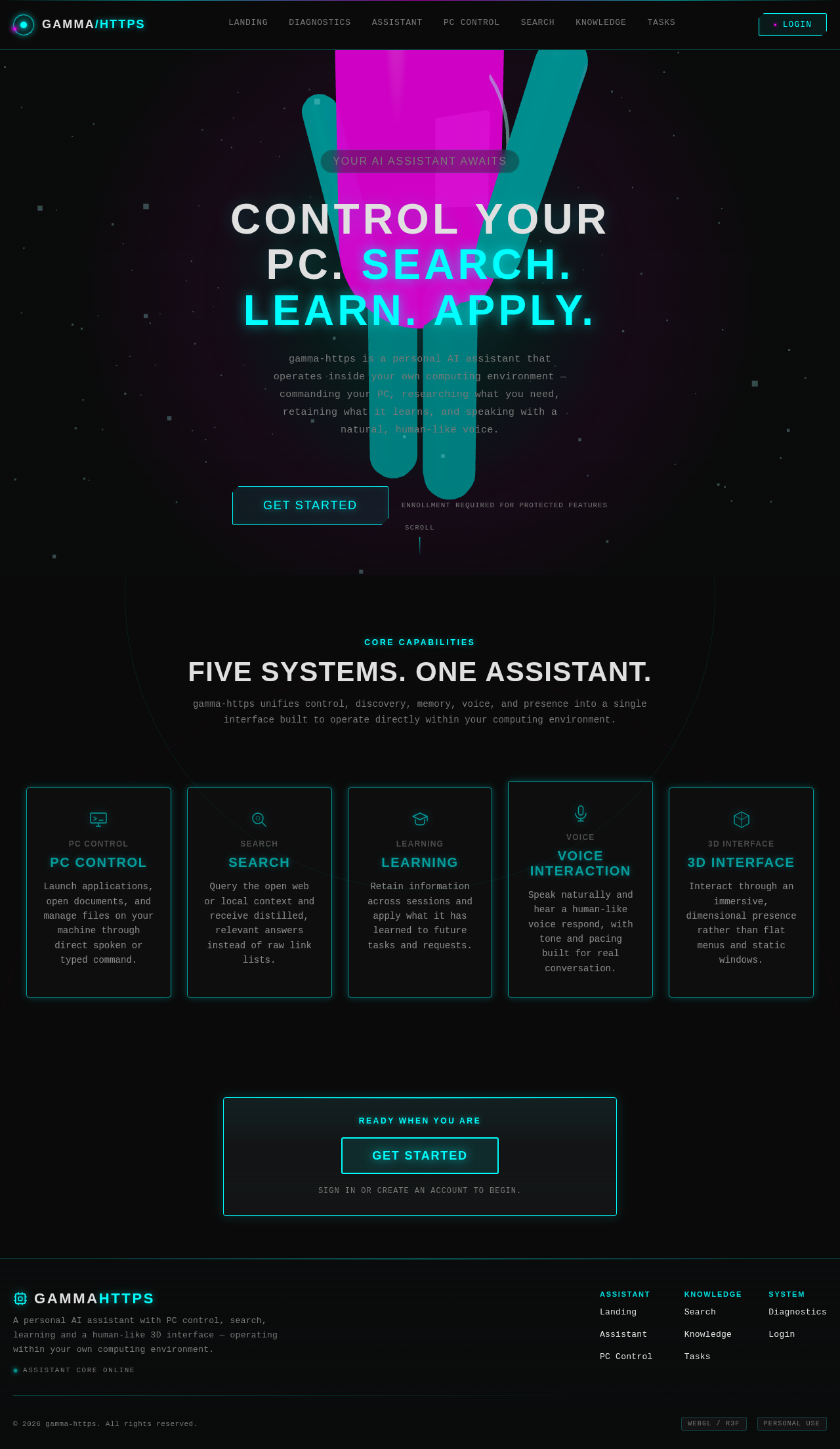
  • Palette (dark mode):
    • Background: #0A0A0A
    • Surface: #1C1C1E
    • Text: #E0E0E0
    • Primary: #00FFFF
    • Accent: #FF00FF
    • Muted: #404040
  • Typography:
    • Headings: Space Grotesk — Large, uppercase, tight tracking
    • Body: Orbitron
    • Scale: 1.5 modular, 64/48/32/24/16
  • Shape Language: Floating glass panels with thin luminous strokes and radial layouts.
  • Layout: Full-bleed 3D scene with floating elements and a HUD-like interface.
  • Motion: Continuous slow orbit and parallax with light sweeps across elements.

7. Signature Design Concept

The public entry page will feature a full-bleed 3D scene with the AI avatar as a holographic presence, glowing against a deep black background with cyan and magenta accents. The avatar will rotate and respond to user interactions, creating an immersive and futuristic experience. Navigation will utilize floating glass panels with glowing outlines, and data will appear as HUD-like overlays.
Page 8 of 9

8. Interaction Model & Motion Direction

  • Interaction Model: Animated
  • Motion Tempo: Cinematic
  • Hero Dimensionality: WebGL
  • Landing Hero Motion Brief:
    • Focal Subject: AI avatar as a holographic presence.
    • Input→Transformation→Outcome: User interaction causes the avatar to rotate and respond, with light sweeps and glowing highlights enhancing the experience.
    • Reduced-Motion State: Static avatar with minimal animation for accessibility.

9. Non-Functional Requirements

  • The system must provide a seamless and responsive user experience with minimal latency in voice interaction and 3D rendering.
  • The assistant's voice output should be natural and human-like, with emotional modulation and intonation.
  • The 3D avatar must render smoothly with realistic shading and lighting effects.

10. Tech Stack

  • Frontend: React, WebGL/R3F for 3D rendering
  • Backend: Python/FastAPI
  • Voice Processing: Natural TTS engine
  • Deployment: Docker, Kubernetes (if required for scaling)
Page 9 of 9

11. Assumptions and Constraints

  • The assistant will operate within the user's personal computing environment, focusing on personal use and privacy.
  • The existing preview application is the basis for identifying weaknesses and implementing enhancements.
  • The system will not provide unrestricted autonomous control or capabilities beyond the stated personal-assistant outcomes.

12. Glossary

  • AI Avatar: A digital assistant displayed as a 3D virtual human.
  • PC Control: The ability of the assistant to execute commands on the user's PC, such as launching applications and managing files.
  • Natural TTS: Text-to-speech technology that produces human-like voice output.
  • WebGL/R3F: Technologies used for rendering 3D graphics in web applications.
Landing design preview
Landing: Explore features
Login: Verify identity
Diagnostics: Report weaknesses
Assistant: Provide responses
PC Control: Execute commands
Search: Return results
Knowledge: Store learned information
Tasks: Apply knowledge
Landing design preview
Landing: Explore features
Login: Verify identity
Diagnostics: Report weaknesses
Assistant: Provide responses
PC Control: Execute commands
Search: Return results
Knowledge: Store learned information
Tasks: Apply knowledge