gamma-calculator
create a project to build calculator with single page design and minimal design

Comments (0)
Sign in to leave a comment
System Requirements
Gamma-Calculator System Requirements Document
Introduction
The Gamma-Calculator project aims to develop a basic arithmetic calculator with a single-page design. The focus is on simplicity and minimalism to ensure an intuitive and user-friendly experience. This document outlines the system requirements for the Gamma-Calculator, providing a clear framework for development and implementation.
System Overview
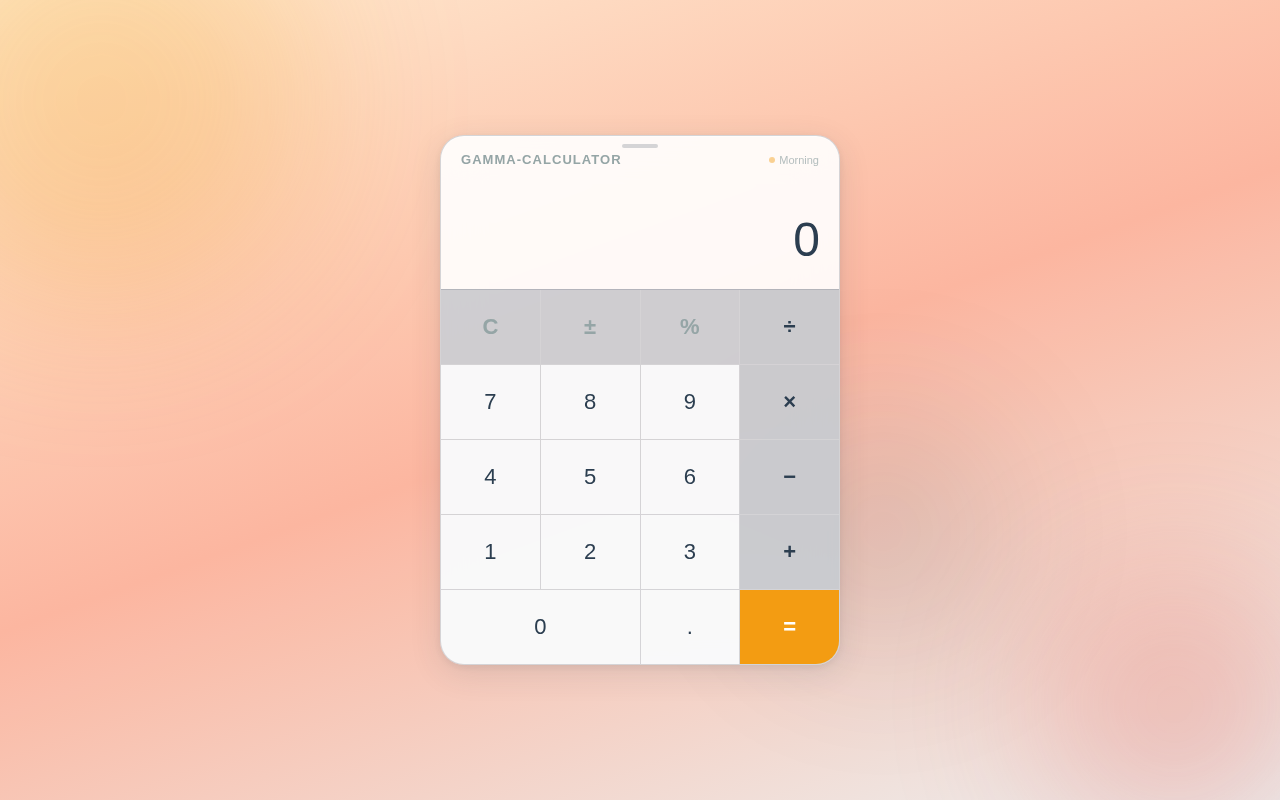
The Gamma-Calculator is designed to perform basic arithmetic operations such as addition, subtraction, multiplication, and division. The application will be a single-page web app, ensuring quick access and ease of use. The minimal design approach will enhance user experience by reducing distractions and focusing on core functionalities.
Functional Requirements
- As a User, I should be able to perform addition, subtraction, multiplication, and division.
- As a User, I should be able to clear the current input or result.
- As a User, I should be able to view the result immediately after performing an operation.
- As a User, I should be able to use the calculator on a single-page interface.
User Personas
- Basic User: Individuals who need a simple tool for quick arithmetic calculations without additional features or complexities.
Visuals Colors and Theme
- primary: #2C3E50 (a deep blue for the main interface)
- primary_light: #34495E (a lighter blue for hover states)
- secondary: #E74C3C (a coral hue for emphasis and alerts)
- accent: #F39C12 (a vibrant orange for call-to-action buttons)
- highlight: #F1C40F (a warm gold for active indicators)
- bg: #ECF0F1 (a light grey for the background)
- surface: rgba(255, 255, 255, 0.9) (a soft white for panels)
- text: #2C3E50 (a dark blue for primary text)
- text_muted: #95A5A6 (a muted grey for secondary text)
- border: rgba(44, 62, 80, 0.2) (a subtle blue for borders)
Signature Design Concept
The Gamma-Calculator will feature a unique interactive design where the calculator interface appears as a floating, translucent panel on the screen. Users can drag this panel around the page, providing a sense of physical interaction. The buttons will have a subtle 3D effect, and when pressed, they will animate with a slight "bounce" using framer-motion for a tactile response. The background will feature a gentle gradient that shifts colors based on the time of day, creating a dynamic and engaging user experience.
Interaction Model & Motion Direction
The landing page will adopt an "animated" interaction model. The calculator interface will have moderate hover transitions and spring physics on interactive elements, enhancing the user experience without overwhelming the simplicity of the design. Internal pages, if any, will maintain a "static" model to prioritize clarity and speed.
Non-Functional Requirements
- The application must load within 2 seconds on a standard broadband connection.
- The interface should be responsive and accessible on both desktop and mobile devices.
- The design should adhere to accessibility standards, ensuring usability for all users.
Tech Stack
- Frontend: React for Web
- Backend: Not applicable (as this is a single-page application without server-side logic)
- Database: Not applicable
- Local orchestration: Docker for containerization
Assumptions and Constraints
- The calculator will only support basic arithmetic operations.
- The application will be developed as a single-page web app.
- No backend or database is required for this project.
Glossary
- Single-page application (SPA): A web application that interacts with the user by dynamically rewriting the current page rather than loading entire new pages from the server.
- Responsive design: An approach to web design that makes web pages render well on a variety of devices and window or screen sizes.
- Accessibility standards: Guidelines and practices to ensure web content is accessible to all users, including those with disabilities.
No comments yet. Be the first!