gamma-basic
 Dharav Antani
i want to build a basic e commerce website

Comments (0)
Sign in to leave a comment
System Requirements
System Requirements Document for gamma-basic
1. Introduction
The gamma-basic project aims to develop a basic e-commerce website. The primary audience includes general consumers looking to browse and purchase products online, as well as store managers responsible for maintaining the product catalog and managing orders.
2. System Overview
The gamma-basic e-commerce website provides a platform for shoppers to browse products, add them to a cart, and complete purchases through a checkout process. Store managers have access to manage products and orders. The system is designed with a bold Americana theme, emphasizing a welcoming and straightforward user experience.
2a. Product Interpretation and Delivery Boundary
The e-commerce website will be delivered as a custom UI with application-owned identity management. Shoppers can access the storefront anonymously, while store managers require authentication to access management functionalities. The system includes pages for landing, cart, checkout, login, products, and orders. The project excludes advanced e-commerce features such as user reviews, wishlists, and loyalty programs.
2b. Source Content Inventory
Not applicable as no content source directive was provided.
2c. Page Content and Component Coverage
Landing
- Information/State: Display of product offerings and shop introduction.
- Primary Actions: Browse products, navigate to product details.
- Supporting Actions: Search products, filter by category.
- Components: Product listings, search bar, category filters.
- States: Loading, empty (no products), success (products displayed), error (failed to load products).
Cart
- Information/State: Display of selected products for purchase.
- Primary Actions: Proceed to checkout, update quantities, remove items.
- Supporting Actions: Continue shopping, view product details.
- Components: Product list, quantity controls, total price.
- States: Loading, empty (no items), success (items displayed), error (failed to update cart).
Checkout
- Information/State: Collection of purchase and payment details.
- Primary Actions: Submit order, enter payment information.
- Supporting Actions: Edit cart, apply discount codes.
- Components: Payment form, order summary, discount code input.
- States: Loading, success (order submitted), error (payment failed).
Login
- Information/State: Authentication for store managers.
- Primary Actions: Log in, reset password.
- Supporting Actions: Contact support.
- Components: Login form, password reset link.
- States: Loading, success (logged in), error (authentication failed).
Products
- Information/State: Management of product catalog.
- Primary Actions: Add new product, edit product details, delete product.
- Supporting Actions: Search products, filter by category.
- Components: Product list, product form, category filters.
- States: Loading, success (products managed), error (failed to update products).
Orders
- Information/State: Management of incoming orders.
- Primary Actions: View order details, update order status.
- Supporting Actions: Search orders, filter by status.
- Components: Order list, order detail view, status filters.
- States: Loading, success (orders managed), error (failed to update orders).
3. Functional Requirements
- As a Shopper, I should be able to browse products on the landing page to find items of interest. (Provenance: explicit)
- As a Shopper, I should be able to add products to my cart and view them before proceeding to checkout. (Provenance: explicit)
- As a Shopper, I should be able to complete a purchase by providing necessary payment details at checkout. (Provenance: required_inference)
- As a Store Manager, I should be able to log in to access product and order management functionalities. (Provenance: required_inference)
- As a Store Manager, I should be able to manage the product catalog by adding, editing, or deleting products. (Provenance: explicit)
- As a Store Manager, I should be able to manage incoming orders by viewing details and updating statuses. (Provenance: explicit)
4. User Personas
- Shopper: Responsible for browsing products, adding items to the cart, and completing purchases.
- Store Manager: Responsible for maintaining the product catalog and managing incoming orders.
5. Core User Flows
Shopper Flow
- Browse Products: Access the landing page to view available products.
- Add to Cart: Select products and add them to the cart.
- View Cart: Review selected items in the cart.
- Checkout: Provide payment details and submit the order.
- Order Confirmation: Receive confirmation of the order submission.
Store Manager Flow
- Login: Authenticate to access management functionalities.
- Manage Products: Add, edit, or delete products in the catalog.
- Manage Orders: View order details and update order statuses.
6. Visuals Colors and Theme
- Muse: Aaron Draplin
- Palette:
- Background: #F5F5DC
- Surface: #FFF8DC
- Text: #000000
- Primary: #FF8C00
- Accent: #2E8B57
- Muted: #C0C0C0
- Typography:
- Headings: Alfa Slab One — Bold, all caps, tight tracking
- Body: Source Sans Pro
- Scale: 1.5 modular, 48/32/24/16/14
- Shape Language: Badges and thick strokes with ruled panels and outlined sections.
- Layout: Grid-based with emphasized sections and badge-like labels.
- Imagery: Thick-line vector icons, halftone photos, and gear-like illustrations.
7. Signature Design Concept
The landing page will feature a full-bleed image of featured products with a badge overlay. An oversized headline in Alfa Slab One will be displayed on a warm cream background with orange accents. Badge-style buttons and CTAs will have thick borders and shadow effects. The layout will use a grid with ruled panels and section dividers in contrasting hues, complemented by warm, inviting imagery.
8. Interaction Model & Motion Direction
- Interaction Model: Static
- Motion Tempo: Restrained
- Hero Dimensionality: Flat
- Landing Hero Motion Brief: The landing page will feature a static hero image with a bold headline and badge overlay. The design will focus on a warm and welcoming vibe with no motion elements, reflecting the straightforward and honest design ethos.
9. Non-Functional Requirements
- The system must be accessible and responsive across various devices and screen sizes. (Provenance: required_inference)
- The website should load within 3 seconds on a standard broadband connection. (Provenance: required_inference)
10. Tech Stack
- Frontend: React
- Backend: Python/FastAPI
- Database: PostgreSQL
- Containerization: Docker
- Deployment: Kubernetes (if required for scaling)
11. Assumptions and Constraints
- The e-commerce website will not include advanced features such as user reviews or wishlists.
- Store managers must be provisioned or invited to their roles before accessing management functionalities.
12. Glossary
- Shopper: A user who browses and purchases products on the e-commerce website.
- Store Manager: A user responsible for managing the product catalog and orders.
- Cart: A feature that allows shoppers to store selected products before purchase.
- Checkout: The process of providing payment details and completing a purchase.
- Landing Page: The initial page that introduces the shop and displays product offerings.
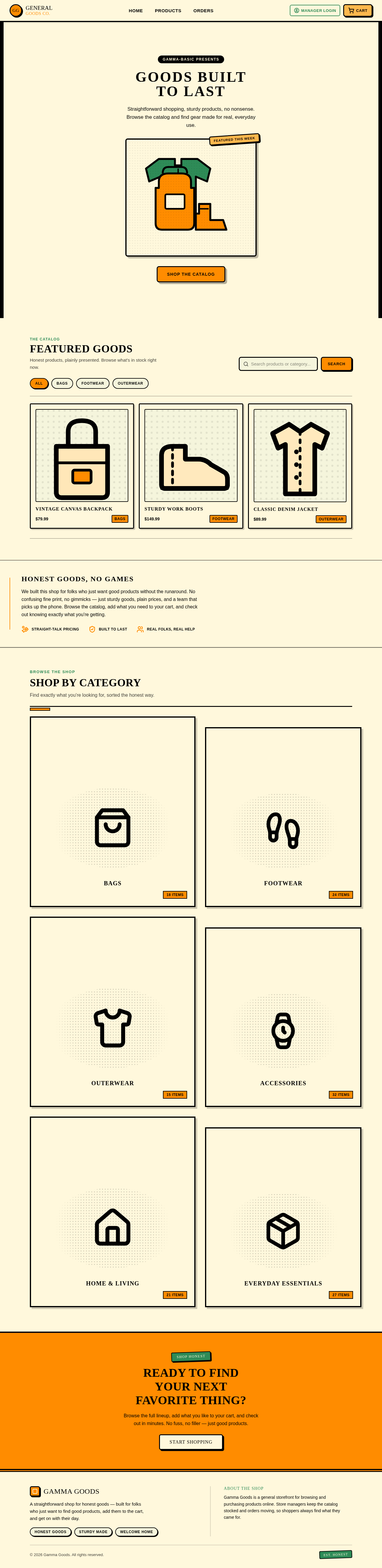
GOODS BUILT
TO LAST
Straightforward shopping, sturdy products, no nonsense. Browse the catalog and find gear made for real, everyday use.
Featured Goods
Honest products, plainly presented. Browse what's in stock right now.
Vintage Canvas Backpack
Sturdy Work Boots
Classic Denim Jacket
Honest Goods, No Games
We built this shop for folks who just want good products without the runaround. No confusing fine print, no gimmicks — just sturdy goods, plain prices, and a team that picks up the phone. Browse the catalog, add what you need to your cart, and check out knowing exactly what you're getting.
Shop by Category
Find exactly what you're looking for, sorted the honest way.
READY TO FIND YOUR NEXT FAVORITE THING?
Browse the full lineup, add what you like to your cart, and check out in minutes. No fuss, no filler — just good products.
START SHOPPINGGOODS BUILT
TO LAST
Straightforward shopping, sturdy products, no nonsense. Browse the catalog and find gear made for real, everyday use.
Featured Goods
Honest products, plainly presented. Browse what's in stock right now.
Vintage Canvas Backpack
Sturdy Work Boots
Classic Denim Jacket
Honest Goods, No Games
We built this shop for folks who just want good products without the runaround. No confusing fine print, no gimmicks — just sturdy goods, plain prices, and a team that picks up the phone. Browse the catalog, add what you need to your cart, and check out knowing exactly what you're getting.
Shop by Category
Find exactly what you're looking for, sorted the honest way.
READY TO FIND YOUR NEXT FAVORITE THING?
Browse the full lineup, add what you like to your cart, and check out in minutes. No fuss, no filler — just good products.
START SHOPPING
No comments yet. Be the first!