gaming-equipment-gamezone
 Harshil Vaja
Create a modern premium gaming equipment e-commerce website named **GameZone**. Design an attractive homepage with a gaming hero banner and featured products. Include gaming keyboards, mice, headsets, monitors, controllers and gaming chairs. Create a product listing page with product cards, prices, ratings, filters and sorting. Create detailed product pages with images, specifications, descriptions and pricing. Create a profile page with user information, profile image and account details. Use modern typography, smooth hover effects, responsive layouts and attractive animations. also use ultra-realistic, high-quality product photography for all gaming equipment, with professional studio lighting, realistic shadows, detailed textures, and premium 3D product visuals. Avoid cartoon-style images, illustrations, placeholders, and AI-looking unrealistic products. Focus only on UI/UX design; do not add unnecessary features.


Comments (0)
Sign in to leave a comment
System Requirements
System Requirements Document for gaming-equipment-gamezone
1. Introduction
GameZone is a modern premium gaming equipment e-commerce website, completely redesigned from scratch with a unique, futuristic and premium gaming aesthetic. Its product intent is to present gaming keyboards, mice, headsets, monitors, controllers and gaming chairs as collector-grade performance instruments, browsed through an attractive homepage with a gaming hero section, promotional banners, featured products and category navigation, dedicated product category sections for each of the six equipment types, a product listing page with modern product cards, prices, ratings, category filters and sorting, detailed product pages with large product images, specifications, descriptions, pricing and clear Add to Cart and Buy Now buttons, a simple cart and checkout UI that provides a clear step-by-step purchasing experience, and a profile page with profile image, personal information and account details. The header, menus, breadcrumbs and page transitions are structured so navigation is intuitive and consistent across the site.
The audience is discerning players who evaluate gear through performance, materials, specifications and visual impact. The experience must use premium typography, smooth hover effects, responsive layouts, attractive animations and glowing effects, and must present all gaming equipment through ultra-realistic, high-quality product photography with professional studio lighting, realistic shadows, detailed textures and premium 3D product visuals. Cartoon-style images, illustrations, placeholders and AI-looking unrealistic products are excluded.
The complete UI/UX — header, navigation, homepage, product categories, product listing, product details, cart, checkout and user profile — is redesigned from scratch. The previous design and layouts are not reused; every page receives a completely fresh, consistent and professional appearance. The site uses a modern dark theme with neon purple and electric blue gradients, realistic gaming equipment images and premium typography, and layouts are visually stunning with modern product cards, immersive banners, smooth animations, glowing effects and responsive designs. This visual redesign changes only the existing UI and visual design: functionality, features, business logic, APIs, backend, database and existing workflows MUST NOT be modified.
The focus is only on UI/UX design; unnecessary features and complex backend functionality are out of scope. The modern dark gaming theme, premium typography, realistic product images, smooth animations, glowing effects and responsive layouts are maintained throughout.
2. System Overview
GameZone is delivered as a React frontend served alongside a shared FastAPI backend process and a MariaDB database. The frontend owns the entire visible experience: the homepage, the product categories destination, the product listing page, the product details pages, the shopping flow (cart and step-by-step checkout), the user profile page, and the Login and Sign Up access surfaces, plus the shared futuristic navigation header, menus, breadcrumbs and page transitions. Every one of these surfaces is rebuilt from scratch in the new futuristic premium aesthetic; no previous layout, component composition or visual treatment is carried over. The backend supplies the product catalog data (categories, product records, prices, ratings, specifications, descriptions and imagery references), the cart contents that persist from product details through the shopping flow, and the account records that back the user profile page. MariaDB stores the catalog, cart and account data.
Two active human personas use the product: the Shopper, who browses the homepage, category sections, listing and product details pages anonymously and completes a step-by-step cart and checkout flow, and the Account holder, who signs up or logs in and maintains their profile page. The homepage, product categories, product listing, product details and shopping flow are publicly reachable without identity. The user profile page requires login; Login and Sign Up are anonymously reachable entry surfaces.
Current scope is limited to the eight accepted pages and the catalog, cart and profile data they display. There is no order management, wishlist, review authoring, messaging, loyalty, or administrative tooling, and no complex backend functionality beyond the catalog, cart and account records these pages need.
Redesign mandate
- The entire website is redesigned from scratch: header, navigation, homepage, product categories, product listing, product details, cart, checkout and user profile pages.
- The previous design and layouts MUST NOT be reused; every page MUST have a completely fresh, consistent and professional appearance.
- The aesthetic MUST be unique, futuristic and premium, expressed through a modern dark theme with neon purple and electric blue gradients, realistic gaming equipment images and premium typography.
- Layouts MUST be visually stunning, using modern product cards, immersive banners, smooth animations, glowing effects and responsive designs.
- The redesign MUST remain a consistent, user-friendly UI/UX without adding unnecessary features or complex backend functionality.
- The redesign MUST change only the existing UI and visual design; functionality, features, business logic, APIs, backend, database and existing workflows MUST NOT be modified.
- The neon purple and electric blue gradient direction supersedes the earlier no-blue/no-violet-glow restriction; glowing effects are now part of the accepted aesthetic.
Removed from scope
- Order management, order history and fulfilment tracking
- Wishlist and saved-items features
- Customer-authored reviews and ratings submission
- Live chat, messaging and support ticketing
- Loyalty programs, coupons and promotions engines
- Admin catalog management and back-office tooling
- Cartoon-style imagery, illustrations, placeholder blocks and AI-looking unrealistic product renders
2a. Product Interpretation and Delivery Boundary
GameZone is a first-party, application-owned storefront. All eight pages are custom React surfaces owned by the application. The homepage, product categories, product listing, product details and shopping flow are public and require no identity; a Shopper can complete the full discovery, comparison and purchase journey anonymously. The user profile page is protected and requires an authenticated Account holder; Login and Sign Up are the anonymous entry surfaces that establish and verify that identity. Identity exists solely so an Account holder can privately own and maintain their profile information, profile image and account details — it does not gate browsing or purchasing, and it does not create differentiated permissions or role-based visibility.
Catalog content (product records, prices, ratings, specifications, descriptions and imagery) is served by the shared backend from MariaDB. Cart contents persist from product details through the shopping flow so the step-by-step checkout can be completed. Account records backing the user profile page are likewise application-owned. No provider-owned or external destination carries accepted product behavior. Future ideas beyond the accepted pages are not part of this delivery.
2c. Page Content and Component Coverage
homepage
- Information and state: Public entry surface. Displays the gaming hero banner and a featured products section. No identity required; no loading gate beyond catalog fetch for featured products.
- Primary actions: Explore gear (routes to the product listing page); select a featured product (routes to its product page); select a category from the instrument rail (routes to the product listing page filtered to that category).
- Supporting actions: Navigate to Login or Sign Up from the header account readout.
- Domain entities: Featured product summary (name, model code, category, price, rating, performance index, image reference); category index (01 Keyboards through 06 Chairs).
- Component responsibilities:
- Hero chamber: full-width dark equipment chamber with a stacked Barlow Condensed headline, a thin vertical specification strip (switch type, response time, chassis material), the primary amber "Explore gear" control, a life-size three-quarter keyboard render on a graphite plinth in CSS perspective, and a partially obscured decorative response-time gauge.
- Instrument rail header: wordmark at left, numbered category index centered with a champagne rule that slides to the active category, account and cart readouts at right. The header is a single-row flex container with
align-items: centerso every header item — including every Key Features label in the category index — is perfectly centered vertically within the header band. Every category key-feature label is treated identically, not just the first one: Keyboards, Mice, Headsets, Monitors, Controllers and Chairs all sit on the header's vertical centerline with no label riding high or low relative to its neighbours. Each label is a flex item withdisplay: flex,align-items: centerandjustify-content: center, a line-height equal to its own font size, zero top/bottom margin and zero top/bottom padding, and no inherited vertical offset from the numbered prefix, the champagne rule or the sliding indicator; the numbered prefix and the label text share one baseline inside the item, and the item's box height equals the label's line box so no extra leading pushes the text off center. The champagne rule and its sliding indicator are absolutely positioned decoration that never adds height or vertical offset to the label row. Header items share one vertical center regardless of differing font sizes, icon heights or readout heights, and the alignment holds for all six category labels at 375px, 768px and 1280px. - Featured products section: equipment-dossier cards with oversized product photograph, ruled data band with model code, star rating, tabular-numeral price and a small circular performance index.
- Loadout Index strip: dark horizontal strip between homepage sections with amber category markers and numeric inventory readouts; becomes a horizontally scrollable row with fully readable labels under reduced motion.
- States: Loading — skeleton bays in the featured grid while catalog data resolves. Empty — featured section shows a restrained "no featured gear available" message with a link to the full listing. Success — hero and featured cards render with imagery and data. Error — featured section shows a retry control and a link to the listing page. Recovery — retry re-fetches featured products without leaving the page.
product listing page
- Information and state: Public surface. Displays product cards across all six categories with prices and ratings, plus filters and sorting. Filter and sort state is reflected in the visible result set.
- Primary actions: Apply filters (category, price range, rating, and specification attributes surfaced per category); change sort order (for example price ascending/descending, rating, newest); open a product card to its product page.
- Supporting actions: Clear all filters; expand or collapse the mobile filter drawer; navigate via the instrument rail category index.
- Domain entities: Product card (image, name, model code, category, price, rating, performance index); filter groups and their options; sort options; result count.
- Component responsibilities:
- Specification rail (desktop): left-hand filter column with champagne hairlines and inset seams; on mobile becomes a full-width expandable control drawer.
- Sort control: compact select or segmented control with 180ms mechanical feedback.
- Product grid: 12-column equipment-bay grid at 1280px, 8-column at 768px, 4-column at 375px, with varied spans (one lead product at six columns beside two stacked three-column products) rather than identical tiles.
- Product card: equipment dossier with oversized photograph, ruled data band, model code, star rating, tabular-numeral price and circular performance index.
- States: Loading — card skeletons in the grid. Empty — no products match the active filters, with a clear-filters action. Success — grid renders with result count and active filter chips. Error — grid area shows a retry control while filters remain usable. Recovery — retry re-fetches the result set with the current filters and sort preserved.
product pages
- Information and state: Public surface, one page per product. Displays product images, specifications, description and pricing.
- Primary actions: Browse the image sequence via macro material thumbnails; read specifications, description and price.
- Supporting actions: Navigate back to the listing page or to a related category via the instrument rail.
- Domain entities: Product record (name, model code, category, price, rating, description, specification list, dominant render, macro crop set with indexed annotations).
- Component responsibilities:
- Dominant render: large isolated studio render with a slow 8–12 second turntable rotation on hover-capable devices; static three-quarter angle under reduced motion.
- Macro thumbnail sequence: vertical column of macro material crops; hovering a thumbnail reveals a fine crosshair and an indexed annotation such as "03 / PBT DOUBLESHOT."
- Specification and description block: Sora body text with technical labels at 0.14em tracking; tabular numerals for price and rating.
- Pricing block: price in tabular numerals with champagne premium metadata treatment.
- States: Loading — render and specification placeholders in the bay layout. Empty — product not found, with a link back to the listing page. Success — render, thumbnails, specifications, description and price all present. Error — retry control for the product fetch. Recovery — retry re-fetches the product record; navigation back to the listing remains available.
profile page
- Information and state: Protected surface requiring login. Displays the Account holder's user information, profile image and account details.
- Primary actions: View user information, profile image and account details; update profile fields and profile image.
- Supporting actions: Sign out; navigate to the storefront.
- Domain entities: Account record (display name, email, profile image reference, account details such as membership date and account identifier).
- Component responsibilities:
- Identity block: profile image with a machined circular frame and the display name in Barlow Condensed.
- Account details panel: ruled data rows with technical labels and Sora values.
- Edit controls: inline field editing with 180ms mechanical feedback and a save action.
- States: Loading — panel skeletons while the account record resolves. Empty — a newly created account with no profile image shows a neutral silhouette frame and prompts to add an image. Success — saved changes are reflected immediately with a confirmation. Error — save failure shows an inline message and preserves entered values. Recovery — retry save; unauthenticated access redirects to Login.
Login
- Information and state: Anonymous identity access surface for returning Account holders.
- Primary actions: Submit email and password to verify identity and reach the profile page.
- Supporting actions: Navigate to Sign Up for a new account.
- Domain entities: Credentials (email, password); session state.
- Component responsibilities: Instrument-styled form with Sora labels, champagne focus rules and an amber submit control.
- States: Idle — empty form. Loading — submit control shows progress. Success — redirect to the profile page. Error — invalid credentials message with fields preserved. Recovery — correct and resubmit.
Sign Up
- Information and state: Anonymous identity access surface for self-starting Account holders.
- Primary actions: Submit display name, email and password to create an account and reach the profile page.
- Supporting actions: Navigate to Login for an existing account.
- Domain entities: New account record (display name, email, password); session state.
- Component responsibilities: Instrument-styled form matching Login, with inline field validation.
- States: Idle — empty form. Loading — submit control shows progress. Success — account created and redirected to the profile page. Error — validation or duplicate-email message with fields preserved. Recovery — correct and resubmit.
3. Functional Requirements
FR-1 — Premium storefront identity (explicit) As a Shopper I should experience GameZone as a modern premium gaming equipment e-commerce website so that the storefront reads as collector-grade equipment retail.
- Trigger: any page load.
- Observable result: every page uses the dark titanium palette, Barlow Condensed headings, Sora body text, machined rectangles and champagne hairlines.
- Access: public.
- Failure/recovery: none material; styling is static.
- Continuation: navigation across all pages.
FR-2 — Homepage hero banner (explicit) As a Shopper I should see an attractive gaming hero banner on the homepage so that I immediately understand what GameZone sells.
- Trigger: opening the homepage.
- Observable result: the full-width equipment chamber renders with the stacked "BUILT / TO / WIN." headline, specification strip, "Explore gear" control, keyboard render and decorative gauge.
- Access: public, no identity.
- Failure/recovery: if the hero render fails to load, the headline, specification strip and control remain fully readable and usable.
- Continuation: select "Explore gear" to reach the product listing page.
FR-3 — Featured products on homepage (explicit) As a Shopper I should see featured products on the homepage so that I can start from curated gear.
- Trigger: homepage load.
- Observable result: featured equipment-dossier cards render with photograph, model code, rating, price and performance index.
- Access: public.
- Failure/recovery: empty state message with a link to the listing; error state with retry.
- Continuation: select a card to open its product page.
FR-4 — Six equipment categories (explicit) As a Shopper I should browse gaming keyboards, mice, headsets, monitors, controllers and gaming chairs so that I can find the gear type I need.
- Trigger: selecting a numbered category from the instrument rail or a filter.
- Observable result: the listing page shows products for the selected category.
- Access: public.
- Failure/recovery: empty state with clear-filters action.
- Continuation: open a product card.
FR-5 — Product listing cards with prices and ratings (explicit) As a Shopper I should see product cards with prices and ratings on the product listing page so that I can compare gear at a glance.
- Trigger: opening the product listing page.
- Observable result: cards render with image, name, model code, price in tabular numerals and star rating.
- Access: public.
- Failure/recovery: loading skeletons; error state with retry preserving filters.
- Continuation: open a card or refine results.
FR-6 — Filters (explicit) As a Shopper I should filter the product listing so that I can narrow results to gear that matches my needs.
- Trigger: selecting filter options in the specification rail (desktop) or drawer (mobile).
- Observable result: the result set and result count update with 180ms mechanical feedback; active filters are visible.
- Access: public.
- Failure/recovery: empty result state with clear-filters action; error state with retry preserving filters.
- Continuation: adjust filters, sort, or open a product.
FR-7 — Sorting (explicit) As a Shopper I should sort the product listing so that I can order results by the attribute I care about.
- Trigger: selecting a sort option.
- Observable result: the grid reorders and the active sort is indicated.
- Access: public.
- Failure/recovery: error state with retry preserving the selected sort.
- Continuation: open a product.
FR-8 — Detailed product pages (explicit) As a Shopper I should open a detailed product page so that I can evaluate images, specifications, description and pricing before deciding.
- Trigger: selecting a product card or featured product.
- Observable result: the product page renders the dominant render, macro thumbnail sequence, specifications, description and price.
- Access: public.
- Failure/recovery: product-not-found state with a link back to the listing; fetch error with retry.
- Continuation: return to the listing or move to another category.
FR-9 — Macro material thumbnails (explicit) As a Shopper I should hover macro material thumbnails on a product page so that I can inspect textures and materials closely.
- Trigger: hovering a thumbnail on a hover-capable device.
- Observable result: the large render updates and a fine crosshair with an indexed annotation appears.
- Access: public.
- Failure/recovery: on touch devices the thumbnails remain selectable without hover; under reduced motion the static three-quarter angle is shown.
- Continuation: continue reading specifications.
FR-10 — Profile page content (explicit) As an Account holder I should see my user information, profile image and account details on my profile page so that my identity and account data are presented accurately.
- Trigger: opening the profile page while authenticated.
- Observable result: identity block, profile image and account detail rows render.
- Access: requires login.
- Failure/recovery: loading skeletons; unauthenticated access redirects to Login.
- Continuation: edit profile fields.
FR-11 — Profile maintenance (explicit) As an Account holder I should update my profile information, profile image and account details so that my profile stays current.
- Trigger: editing a field or the profile image and saving.
- Observable result: saved values are reflected immediately with a confirmation.
- Access: requires login.
- Failure/recovery: save failure shows an inline message and preserves entered values; retry save.
- Continuation: continue viewing the profile or sign out.
FR-12 — Self-service enrollment (required_inference) As an Account holder I should create an account on Sign Up so that I can own and maintain a profile.
- Trigger: submitting display name, email and password on Sign Up.
- Observable result: the account is created and the Account holder reaches the profile page.
- Access: anonymous entry.
- Failure/recovery: validation or duplicate-email message with fields preserved; correct and resubmit.
- Continuation: complete or edit the profile.
FR-13 — Returning identity verification (required_inference) As an Account holder I should log in on Login so that I can reach my protected profile page.
- Trigger: submitting email and password on Login.
- Observable result: identity is verified and the profile page opens.
- Access: anonymous entry.
- Failure/recovery: invalid-credentials message with fields preserved; correct and resubmit.
- Continuation: view or edit the profile.
FR-14 — Modern typography, hover effects, responsive layouts and animations (explicit) As a Shopper I should experience modern typography, smooth hover effects, responsive layouts and attractive animations so that browsing feels premium and fluid.
- Trigger: any page load, hover, or viewport change.
- Observable result: Barlow Condensed and Sora typography, 180ms mechanical control feedback, slow turntable rotation on hover-capable devices, gauge arcs sweeping once on entry, and layouts that reflow at 375px, 768px and 1280px.
- Access: public.
- Failure/recovery: under prefers-reduced-motion, static three-quarter product angles, completed gauge values and no autonomous rotation are shown.
- Continuation: all controls remain usable.
FR-15 — Ultra-realistic product photography (explicit) As a Shopper I should see ultra-realistic, high-quality product photography with professional studio lighting, realistic shadows, detailed textures and premium 3D product visuals so that I can judge gear as real equipment.
- Trigger: any product imagery render.
- Observable result: charcoal-sweep studio renders with directional lighting, visible brushed metal, keycap texture, braided cables, mesh, leatherette and realistic contact shadows.
- Access: public.
- Failure/recovery: no cartoon-style images, illustrations, placeholders or AI-looking unrealistic products are used; if an image fails, the card retains its data band and name.
- Continuation: open the product page for macro crops.
FR-16 — UI/UX-only focus (explicit) As a Shopper I should encounter only the accepted storefront experience so that the product stays focused on UI/UX design.
- Trigger: any interaction.
- Observable result: no checkout, cart transaction, wishlist, review authoring, messaging, loyalty or admin tooling is present.
- Access: public.
- Failure/recovery: not applicable.
- Continuation: browsing and profile maintenance only.
FR-17 — Header vertical alignment of Key Features (explicit) As a Shopper I should see the Key Features section in the top header perfectly centered vertically within the header so that the instrument rail reads as a precisely machined, horizontally aligned band.
- Trigger: any page load that renders the instrument rail header, and any viewport change at 375px, 768px or 1280px.
- Observable result: every Key Features label in the category index — Keyboards, Mice, Headsets, Monitors, Controllers and Chairs — sits on the header's vertical centerline, sharing one vertical center with the wordmark, the numbered category index and the account and cart readouts; no extra top or bottom offset, margin, padding or line-height pushes any label high or low within the header band, and no label is offset relative to the others.
- Access: public.
- Failure/recovery: if the header items have differing heights (larger wordmark, taller readouts, wrapped labels), the header still centers every item vertically rather than aligning them to the top or baseline; every category key-feature label remains fully readable and never clipped by the header band. If one label appears misaligned, the fix is applied to the shared label item styling so all six labels correct together rather than patching a single label.
- Continuation: all header controls remain usable and navigation across all pages is unaffected.
4. User Personas
Shopper
- Product context: A discerning player evaluating gaming equipment through performance, materials, specifications and visual impact. Arrives anonymously at the homepage and moves through the listing and product pages.
- Primary goal: Find a product whose details and pricing match their needs.
- Distinct accepted responsibilities: Explores the homepage hero and featured products; browses the six categories; compares product cards by price and rating; narrows results with filters and sorting; evaluates a product page's images, specifications, description and pricing; inspects macro material thumbnails.
- Relevant inputs or decisions: Category selection, filter options, sort order, which product card to open, which macro thumbnail to inspect.
- Interactions with other accepted participants: None required; the Shopper journey is anonymous and does not depend on the Account holder.
- Observable success: Reaches a product page whose specifications, imagery and pricing answer their evaluation, and can return to the listing to continue comparing.
Account holder
- Product context: A player who has created a GameZone account and maintains a profile page with their user information, profile image and account details.
- Primary goal: Keep their profile reflecting current personal and account information.
- Distinct accepted responsibilities: Enrolls on Sign Up or verifies identity on Login; views user information, profile image and account details; updates profile fields and profile image; signs out.
- Relevant inputs or decisions: Display name, email, password, profile image, account detail edits.
- Interactions with other accepted participants: None required; the Account holder's work is private to their own profile.
- Observable success: The profile page shows accurate, current information and image after saving, with confirmation.
5. Core User Flows
Flow A — Shopper discovers gear from the homepage
- Shopper opens the homepage (public, no identity). The hero chamber renders with the "BUILT / TO / WIN." headline, specification strip, "Explore gear" control, keyboard render and decorative gauge.
- Shopper reads the featured products section, where equipment-dossier cards show photograph, model code, rating, price and performance index.
- Shopper selects "Explore gear" or a numbered category from the instrument rail. The product listing page opens, filtered to that category when a category was chosen.
- Shopper selects a featured card instead. The corresponding product page opens directly.
- If featured products fail to load, the section shows a retry control and a link to the listing; Shopper retries or continues to the listing.
Flow B — Shopper narrows and compares on the product listing page
- Shopper opens the product listing page (public). Cards render with prices and ratings across the six categories.
- Shopper applies filters in the specification rail on desktop, or expands the full-width control drawer on mobile. The result set and count update with 180ms mechanical feedback.
- Shopper changes the sort order. The grid reorders and the active sort is indicated.
- Shopper compares cards by price in tabular numerals and star rating.
- If no products match, the empty state appears with a clear-filters action; Shopper clears filters and results return.
- If the fetch fails, the grid shows a retry control while filters remain usable; Shopper retries with filters and sort preserved.
- Shopper opens a product card to continue evaluation.
Flow C — Shopper evaluates a product page
- Shopper opens a product page (public). The dominant render, macro thumbnail sequence, specifications, description and price render.
- On a hover-capable device, Shopper hovers macro material thumbnails; the large render updates and a fine crosshair with an indexed annotation such as "03 / PBT DOUBLESHOT" appears.
- Under reduced motion, the static three-quarter angle is shown and thumbnails remain selectable.
- Shopper reads specifications and description and confirms pricing.
- If the product is not found, a not-found state offers a link back to the listing; if the fetch fails, a retry control appears.
- Shopper returns to the listing or selects another category to continue comparing.
Flow D — Account holder enrolls and maintains a profile
- Account holder opens Sign Up (anonymous entry) from the header account readout.
- Account holder enters display name, email and password and submits. The submit control shows progress.
- On success, the account is created and the profile page opens. On validation or duplicate-email failure, an inline message appears with fields preserved; Account holder corrects and resubmits.
- On the profile page, Account holder views user information, profile image and account details. A new account without an image shows a neutral silhouette frame and a prompt to add one.
- Account holder edits profile fields or the profile image and saves. Saved values are reflected immediately with a confirmation.
- If saving fails, an inline message appears and entered values are preserved; Account holder retries the save.
- Account holder signs out when finished.
Flow E — Account holder returns and verifies identity
- Account holder opens Login (anonymous entry) from the header account readout.
- Account holder enters email and password and submits. The submit control shows progress.
- On success, identity is verified and the profile page opens.
- On invalid credentials, an inline message appears with fields preserved; Account holder corrects and resubmits.
- If the Account holder reaches the profile page without a session, they are redirected to Login and continue from step 2.
6. Visuals Colors and Theme
The muse is MARQ by Garmin — luxury instrument aesthetic. Headline: Precision luxury instruments for play.
Color tokens (dark mode):
- Background / graphite void:
#101214(dominant, ~65%) - Surface / raised equipment bays and filter surfaces:
#1B1F22(~25%) - Text / warm ivory:
#F4F0E8 - Primary / champagne (premium metadata, active rules, fine instrumentation):
#D6B46A - Accent / vivid amber (conversion actions, live stock states, selected controls):
#FF9D1C - Muted / steel (secondary labels, dividers):
#8E9698
Blue and violet glows are excluded.
Typography:
- Headings: Barlow Condensed 600–700, uppercase for category labels and display-scale, tightly tracked.
- Body: Sora 400–600 for product names, specifications and shopping controls.
- Scale via
clamp(): display 52px mobile → 132px desktop; H1 42px → 76px; H2 30px → 48px; product title 22px → 30px; body 16px → 18px; technical labels 11px → 12px with 0.14em tracking; tabular numerals for prices and ratings.
Shape language: Machined rectangles with 2–6px radii, thin champagne hairlines, inset seams and circular dial motifs. Product selectors resemble calibrated control rings; shadows are tight, realistic contact shadows rather than floating card shadows. Pill forms are reserved for compact status indicators only.
Layout: 12-column equipment-bay grid at 1280px, 8-column at 768px, 4-column at 375px. Slim instrument rail header: wordmark left, numbered category index centered, account and cart readouts right. Product grids vary spans — one lead product at six columns beside two stacked three-column products. Listing filters become a left specification rail on desktop and a full-width expandable control drawer on mobile.
Imagery style: Only commissioned or licensed ultra-realistic studio photography and premium 3D product renders. Each item on charcoal sweeps with directional hard-soft lighting, visible brushed metal, keycap texture, braided cables, mesh, leatherette and realistic contact shadows. Detail pages pair a dominant isolated render with macro crops of switches, sensor housings, ear-cup materials and monitor edges. No illustrated gaming scenes, neon stock setups, AI-looking objects or empty placeholder blocks.
7. Signature Design Concept
The homepage hero is a full-width black equipment chamber, not a centred marketing panel. A hyper-real three-quarter mechanical keyboard occupies the right 58% of the viewport at near life-size, tilted in CSS perspective above a low reflective graphite plinth; amber under-key light is the only luminous colour. On the left, the stacked Barlow Condensed headline "BUILT / TO / WIN." runs from 52px on mobile to 132px on desktop, with a thin vertical specification strip listing switch type, response time and chassis material. The primary amber "Explore gear" control is pinned below the data strip, while a circular amber-accented response-time gauge sits behind the product as a partially obscured decorative instrument. On mobile, the headline and CTA sit in a protected upper block, with the keyboard render below at a clean three-quarter crop and no text overlap. Readable text and controls stay whole at 375px, 768px and 1280px; the gesture of cropping and overlap is carried by imagery and decoration only.
8. Interaction Model & Motion Direction
Interaction Model: Animated Motion Tempo: cinematic Hero Dimensionality: dimensional_css
Landing Hero Motion Brief
- Focal subject: the life-size three-quarter mechanical keyboard on the graphite plinth, with the partially obscured response-time gauge behind it.
- Input → transformation → outcome thesis: as the homepage enters view, the gauge arc sweeps once to its completed response-time value while the keyboard settles into its three-quarter perspective above the plinth; on hover-capable devices the render makes one slow 8–12 second turntable rotation. The outcome is a composed, instrument-like first frame that presents the product as calibrated equipment.
- Motion vocabulary: 180ms mechanical control feedback for filters and cart actions; gauge arcs sweep once on entry; slow turntable rotation on hover-capable devices; the champagne category rule slides mechanically between labels.
- Composed first frame: headline, specification strip and "Explore gear" control fully readable on the left; keyboard render and gauge composed on the right; no element covers readable text or controls.
- Reduced-motion state: static three-quarter product angle, completed gauge values, no autonomous rotation; the Loadout Index becomes a horizontally scrollable row with every label fully readable.
9. Non-Functional Requirements
- Responsive integrity (explicit): layouts reflow at 375px, 768px and 1280px; headlines, wordmarks, labels, numbers, card text and controls stay entirely inside the viewport and their container, wrapping or scaling via
clamp(). - Reduced motion (explicit, from creative direction):
prefers-reduced-motionyields a usable static arrangement — static three-quarter product angles, completed gauge values, no autonomous rotation, and scrollable rows with fully readable labels. - Imagery fidelity (explicit): all gaming equipment imagery is ultra-realistic studio photography or premium 3D renders; cartoon-style images, illustrations, placeholders and AI-looking unrealistic products are prohibited.
- Contrast and readability (explicit, from creative direction): warm ivory text on graphite and surface tokens; no low-contrast metallic text; no all-caps body copy.
- Scope discipline (explicit): only UI/UX design for the accepted pages; no unnecessary features.
- Access control (required_inference): the profile page requires an authenticated session; homepage, listing, product pages, Login and Sign Up are anonymously reachable.
- Header alignment (explicit): the instrument rail header vertically centers all of its items on a single shared centerline; every category Key Features label in the header — Keyboards, Mice, Headsets, Monitors, Controllers and Chairs — is perfectly centered vertically within the header band at 375px, 768px and 1280px, with no stray margin, padding or line-height offset and no label misaligned relative to its neighbours.
10. Tech Stack
- Frontend: React application UI (single-page application) implementing all six pages, the instrument rail, equipment-bay grids, CSS-perspective hero and motion behaviors.
- Backend: shared FastAPI process serving catalog and account APIs and domain modules.
- Database: MariaDB for application-owned persistent catalog and account data.
- Infrastructure: docker-compose with
frontend,backendanddatabaseservices; the backend is reused for all feature APIs.
11. Assumptions and Constraints
- Assumption: Catalog data (products, prices, ratings, specifications, descriptions, imagery references) is seeded into MariaDB and served by the backend; no admin authoring surface is in scope.
- Assumption: Account identity is application-owned and limited to enabling the profile page; it does not gate browsing or create differentiated permissions.
- Constraint: Focus only on UI/UX design; do not add unnecessary features.
- Constraint: Avoid cartoon-style images, illustrations, placeholders and AI-looking unrealistic products.
- Constraint: Readable text and controls remain whole at every viewport; cropping and overlap apply only to imagery and decoration.
- Constraint: No blue or violet glows; no centred marketing-panel hero; no identical white product cards with hover-lift shadows.
- Constraint: The Key Features section in the top header must be perfectly centered vertically within the header; all six category key-feature labels (Keyboards, Mice, Headsets, Monitors, Controllers, Chairs) align on one shared vertical centerline rather than to the top edge or baseline, and a fix must correct the shared label styling rather than a single label.
12. Glossary
- Equipment dossier: The product card pattern — oversized photograph above a ruled data band with model code, star rating, tabular-numeral price and circular performance index.
- Instrument rail: The slim persistent header with wordmark, numbered category index (01 Keyboards through 06 Chairs) and account/cart readouts.
- Loadout Index: The dark horizontal strip between homepage sections with amber category markers and numeric inventory readouts.
- Specification rail: The left-hand filter column on desktop, becoming a full-width expandable control drawer on mobile.
- Macro material thumbnail: A close-up crop of a product material (switch, sensor housing, ear-cup material, monitor edge) with an indexed annotation.
- Performance index: The small circular gauge on a product card summarizing a product's performance rating.
- Account holder: The authenticated persona who owns and maintains a profile page.
- Shopper: The anonymous persona who browses the homepage, listing and product pages.
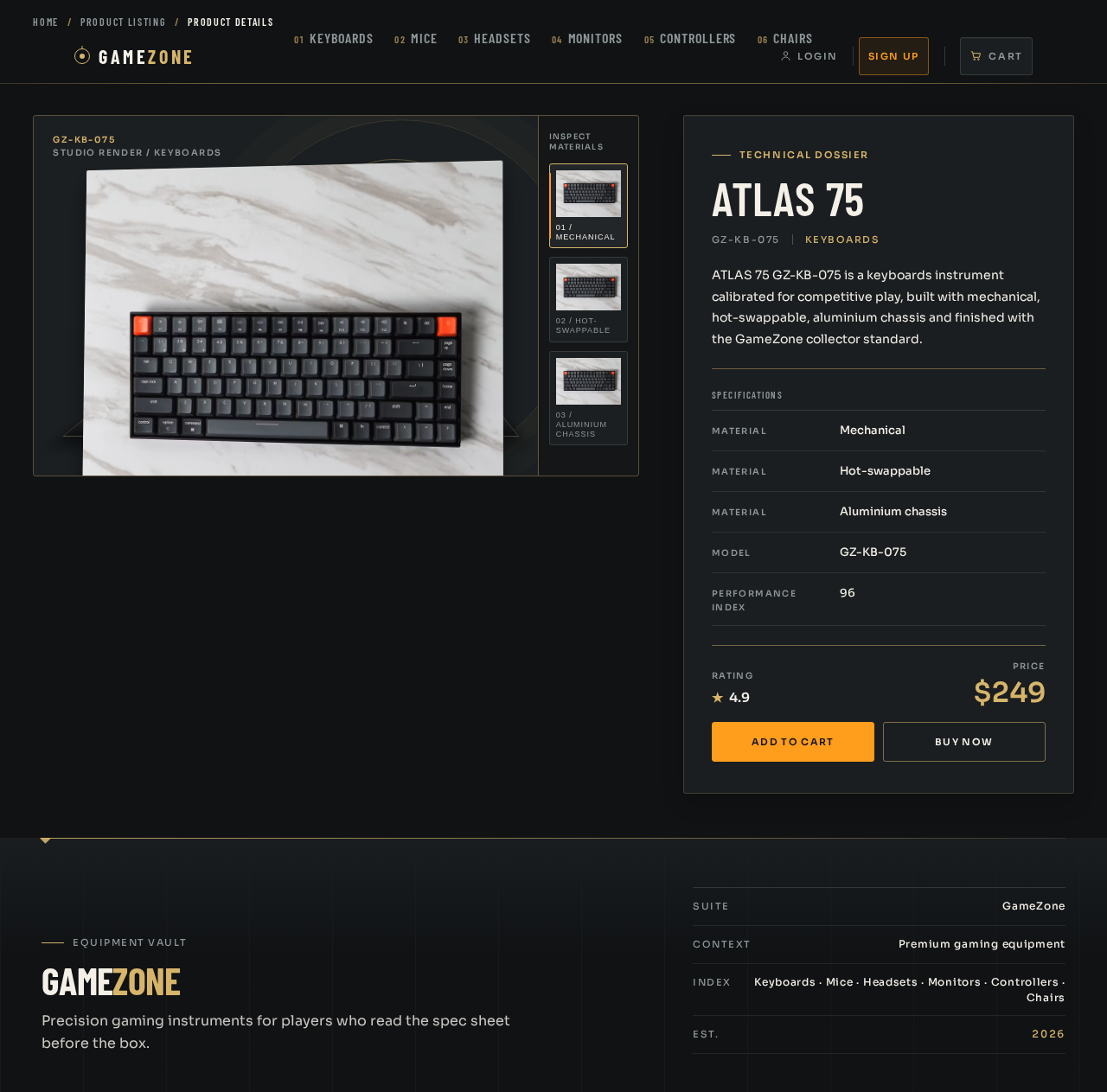
GZ-KB-075
Studio render / keyboards

01 / MECHANICAL
Technical dossier
ATLAS 75
GZ-KB-075
Keyboards
ATLAS 75 GZ-KB-075 is a keyboards instrument calibrated for competitive play, built with mechanical, hot-swappable, aluminium chassis and finished with the GameZone collector standard.
Specifications
- Material
- Mechanical
- Material
- Hot-swappable
- Material
- Aluminium chassis
- Model
- GZ-KB-075
- Performance index
- 96
GZ-KB-075
Studio render / keyboards
01 / MECHANICAL
Technical dossier
ATLAS 75
GZ-KB-075
Keyboards
ATLAS 75 GZ-KB-075 is a keyboards instrument calibrated for competitive play, built with mechanical, hot-swappable, aluminium chassis and finished with the GameZone collector standard.
Specifications
- Material
- Mechanical
- Material
- Hot-swappable
- Material
- Aluminium chassis
- Model
- GZ-KB-075
- Performance index
- 96
No comments yet. Be the first!