gameboost-vpnservice
 Abderrahim Lamrabat
# الدور أنت كبير مهندسي أندرويد (Senior Android Engineer) متخصص في الشبكات وVpnService. مهمتك بناء مشروع أندرويد كامل جاهز لإنتاج ملف APK يعمل على هاتف حقيقي. لا تكتب كوداً لأي منصة أخرى (لا iOS، لا Flutter، لا React Native). # المنتج اسم التطبيق: GameBoost. الهدف: عند اللعب (eFootball / FC Mobile أو أي لعبة يختارها المستخدم) يُقطع الإنترنت كلياً عن جميع التطبيقات الأخرى، وتبقى اللعبة وحدها متصلة مباشرة لأفضل بينج ممكن. # المواصفات التقنية (إلزامية) - Kotlin + Jetpack Compose + Material 3، بنية MVVM + Clean Architecture (data / domain / ui)، Hilt للحقن، Coroutines وFlow، DataStore للإعدادات، Room لسجل الجلسات. - minSdk 26، targetSdk 35، Gradle Kotlin DSL مع Version Catalog. # المحرك الأساسي (VpnService) 1. أنشئ VpnService محلياً بدون أي خادم خارجي. 2. استدعِ addDisallowedApplication لـ: اللعبة المختارة، تطبيقنا نفسه، والتطبيقات المستثناة. بذلك تُوجَّه حزم كل التطبيقات الأخرى إلى واجهة TUN وتُهمَل (blackhole) فينقطع إنترنتها كلياً، وتتصل اللعبة مباشرة دون أي وسيط. 3. أضف مسارات 0.0.0.0/0 و::/0 حتى لا يتسرب أي اتصال عبر IPv6. 4. الخدمة Foreground Service مع إشعار دائم وزر "إيقاف" وعرض البينج. 5. أعد تشغيل الخدمة تلقائياً عند الفشل وعالج إلغاء إذن VPN وتبديل الشبكة (Wi-Fi ↔ بيانات) عبر ConnectivityManager.NetworkCallback. # الميزات 1. شاشة رئيسية: اختيار اللعبة من المثبتة (مع الأيقونات) وزر دائري كبير متحرك "ابدأ اللعب" يفعّل الحجب ثم يفتح اللعبة. 2. اكتشاف فتح/إغلاق اللعبة عبر UsageStatsManager وإيقاف الحجب تلقائياً بعد إغلاقها. 3. قائمة استثناءات (واتساب للمكالمات، الرسائل...). 4. قياس Ping وJitter وPacket Loss كل ثانية لخادم يختاره المستخدم، مع رسم بياني مباشر (Canvas) دون مكتبات ثقيلة. 5. WifiLock بوضع WIFI_MODE_FULL_LOW_LATENCY أثناء الجلسة. 6. طلب وضع عدم الإزعاج (NotificationManager.Policy) اختيارياً. 7. Quick Settings Tile للتشغيل السريع. 8. سجل الجلسات ومتوسط البينج، وإعدادات: بدء تلقائي مع اللعبة. 9. تنبيه عند التحول من Wi-Fi إلى بيانات الهاتف. # التصميم - واجهة داكنة بطابع ألعاب، ألوان نيون (أخضر #00FF9C / سماوي #00D4FF). - دعم العربية (RTL) والإنجليزية عبر strings.xml. - Onboarding من 3 شاشات يشرح الأذونات قبل طلبها. # الأذونات BIND_VPN_SERVICE، PACKAGE_USAGE_STATS، QUERY_ALL_PACKAGES، FOREGROUND_SERVICE (+ FOREGROUND_SERVICE_SPECIAL_USE)، POST_NOTIFICATIONS، ACCESS_NETWORK_STATE، ACCESS_WIFI_STATE. اشرح سبب كل إذن داخل التطبيق. # الأداء والجودة - لا Memory Leaks، لا عمل ثقيل على Main Thread، استهلاك بطارية منخفض. - ProGuard/R8 مفعّل في release، واختبارات وحدة للـ ViewModels ومنطق الاستثناءات. # المخرجات المطلوبة 1. شجرة المشروع الكاملة ثم كل ملف بمساره الكامل وكوده كاملاً دون اختصار أو "..."، بما فيها AndroidManifest وbuild.gradle.kts. 2. أوامر بناء الـ APK: ./gradlew assembleDebug → app/build/outputs/apk/debug/app-debug.apk وطريقة توقيع نسخة release (keystore) وإنتاج APK موقّع. 3. خطوات التثبيت عبر adb واختبار الحجب على هاتف حقيقي. 4. قائمة تحقق للتأكد أن المشروع يُبنى بدون أخطاء. ابدأ بالنسخة الأساسية (VPN + حجب + اختيار لعبة) ثم أضف بقية الميزات على مراحل، وأكّد اكتمال كل مرحلة قبل الانتقال للتالية.

Comments (0)
Sign in to leave a comment
System Requirements
System Requirements Document for gameboost-vpnservice
1. Introduction
GameBoost is a native Android application that, while the user plays a chosen mobile game (eFootball, FC Mobile, or any installed game the user selects), cuts the internet off completely for every other application on the device while keeping the selected game connected directly — with no intermediary server — for the lowest possible ping. The product is delivered as a complete, buildable Android project that produces an installable APK running on a real phone.
The audience is competitive mobile gamers on Android who want one thing during a match: everyone else's internet dead, their match alive. The app is Arabic-first (RTL) with English parity, dark-first, and neon-signalled.
This document is the System Requirements Document for the project named gameboost-vpnservice. It specifies the product's features and workflows in full, together with the technical, design, performance, and delivery constraints the requester stated.
Delivery intent. The requester asked for a complete Android project delivered as a full project tree followed by every file at its full path with its complete code and no abbreviation or ..., including AndroidManifest and build.gradle.kts; the APK build commands (./gradlew assembleDebug → app/build/outputs/apk/debug/app-debug.apk); the release signing procedure with a keystore producing a signed APK; adb installation steps and real-phone blocking test steps; and a checklist confirming the project builds without errors. Implementation proceeds in stages — the base version first (VPN + blocking + game selection), then the remaining features — with each stage confirmed complete before the next begins.
2. System Overview
GameBoost is a single native Android application (Kotlin, Jetpack Compose, Material 3) built on MVVM + Clean Architecture with data / domain / ui layers, Hilt injection, Coroutines and Flow, DataStore for settings, and Room for the session log. Its core engine is a local VpnService with no external server: it calls addDisallowedApplication for the selected game, the app itself, and the excepted applications, so every other application's packets are routed into the TUN interface and discarded (blackhole) — their internet is fully cut — while the game connects directly with no intermediary. Routes 0.0.0.0/0 and ::/0 are added so no connection leaks over IPv6. The service runs as a Foreground Service with a persistent notification carrying a "Stop" button and the live ping, restarts automatically on failure, and handles VPN-permission revocation and network switching (Wi-Fi ↔ mobile data) through ConnectivityManager.NetworkCallback.
Around that engine the app provides: a home screen for choosing the installed game (with icons) and a large animated circular "Start Playing" button that enables blocking and then opens the game; game open/close detection via UsageStatsManager with automatic blocking stop after the game closes; an exceptions list (WhatsApp for calls, messaging, …); per-second Ping, Jitter, and Packet Loss measurement against a user-chosen server with a live Canvas chart and no heavy libraries; a WifiLock in WIFI_MODE_FULL_LOW_LATENCY during the session; an optional Do Not Disturb request (NotificationManager.Policy); a Quick Settings Tile for fast start; a session log with average ping and settings including auto-start with the game; and an alert when the connection switches from Wi-Fi to mobile data.
Actors. The only active human actor is the Player (لاعب). The Android platform (VPN consent dialog, Usage Access settings screen, notification permission prompt, Do Not Disturb access screen, Quick Settings panel) is a non-persona system actor that owns the permission-granting surfaces; the selected game application is an external destination the app launches; the measurement server is an external network endpoint the Player chooses.
Delivery and infrastructure. The product itself is the Android application. The provisioned scaffold inventory — a shared FastAPI backend process, a MariaDB database, and a React frontend — is infrastructure inventory only; it does not add product requirements, does not change any access decision, and does not justify domain entities, authentication, or an ER diagram. GameBoost's blocking engine is explicitly local with no external server, and the app is explicitly native Android only. The Android app is therefore the sole product surface; the scaffold services are recorded in the Tech Stack as provisioned-but-unused-by-product-behavior infrastructure.
Removed from scope
- iOS application (also: iOS)
- Flutter application (also: Flutter)
- React Native application (also: React Native)
- External VPN or proxy server for the blocking engine (also: خادم خارجي)
2a. Product Interpretation and Delivery Boundary
GameBoost is delivered as a native Android APK. Everything the Player does happens on the phone: choosing the game, granting permissions, starting and stopping the block, watching live telemetry, and reviewing the session log. The blocking engine is a local VpnService; the selected game's traffic never passes through any GameBoost-operated server, and no account, sign-in, or cloud identity is part of the product. The app's own identity is the Android application itself; the durable state it owns (selected game, exceptions list, measurement server, auto-start preference, Do Not Disturb preference, onboarding completion, session history) lives on the device in DataStore and Room.
Access to the app's working screens is gated by the platform permissions the Player grants through Android's own surfaces — VPN consent, Usage Access, notification permission, and package visibility — plus the three-screen onboarding that explains each permission before it is requested. These are journey prerequisites owned by the Android platform, not GameBoost account features. The public entry (Landing) and Onboarding are reachable before any permission is granted; the working screens become usable once the required permissions are in place.
The provisioned FastAPI backend, MariaDB database, and React frontend are infrastructure inventory. They are not product surfaces, they carry no GameBoost behavior, and they do not introduce accounts, roles, or server-side state. If a future requirement needs server-side behavior, it would extend the shared backend rather than add a new service; no current requirement does.
2c. Page Content and Component Coverage
Landing
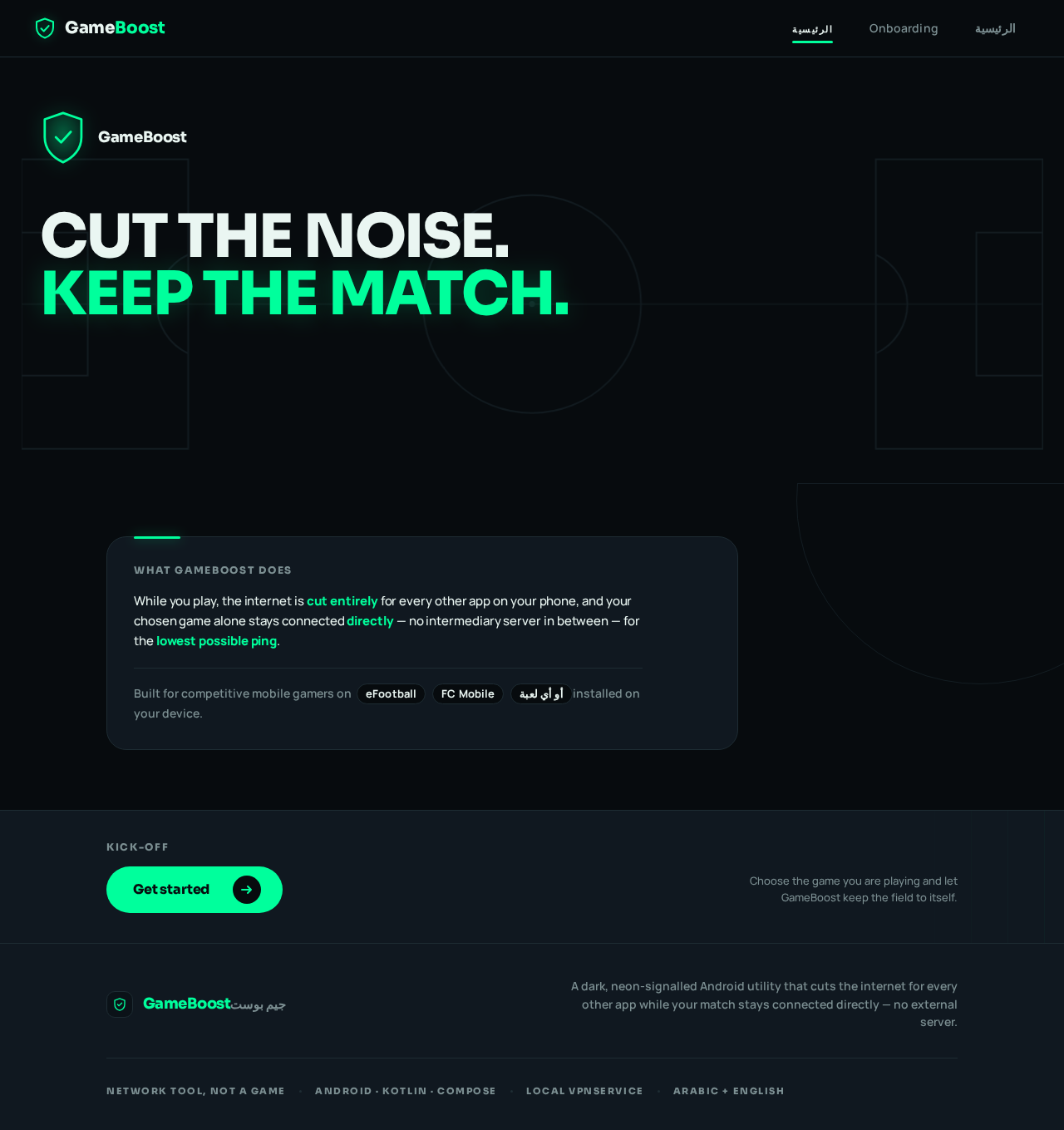
- Information/state: product mark (neon shield glyph), the two-line headline "CUT THE NOISE." / "KEEP THE MATCH.", a one-paragraph statement of what GameBoost does (all other apps' internet cut, the chosen game alone connected directly for the lowest ping), and a short statement of who it is for (competitive mobile gamers on eFootball, FC Mobile, or any installed game). No permission is required to view this page.
- Primary action: a single neon-green pill "Get started" control that opens Onboarding.
- Supporting actions: a secondary text link "I already set up" that goes directly to الرئيسية when onboarding was previously completed.
- Domain entities: none persisted; reads the onboarding-completed flag from DataStore to decide whether to show the returning link.
- Component responsibilities: full-bleed
#070B0Epitch block occupying the top 60% of the viewport with faint centre-circle and penalty-box line art bleeding off the bottom edge; stacked flush-left headline (flush-right in RTL) with the second line in#00FF9C; shield glyph as the product mark. - States: loading — a static pitch block with the headline rendered immediately (no spinner); empty — not applicable; success — tap navigates to Onboarding or الرئيسية; error — none; recovery — if the onboarding flag cannot be read, the returning link is hidden and "Get started" remains available.
Onboarding
- Information/state: exactly three screens, each explaining one group of permissions and the reason for it before it is requested. Screen 1 explains the VPN permission (
BIND_VPN_SERVICE) — why GameBoost needs to create a local VPN tunnel to cut other apps' internet. Screen 2 explains Usage Access (PACKAGE_USAGE_STATS) — why GameBoost needs to detect when the chosen game opens and closes so blocking stops automatically. Screen 3 explains notifications (POST_NOTIFICATIONS) and package visibility (QUERY_ALL_PACKAGES) — why the persistent notification with the Stop button and live ping must be shown, and why the installed-games list needs to see installed apps. Each screen carries a step indicator (1/3, 2/3, 3/3), an ALL-CAPS permission chip, the plain-language reason, and a "Grant" control that opens the corresponding Android surface. - Primary actions: "Next" to advance between screens; "Grant" on each screen to open the Android permission surface for that permission; "Finish" on screen 3 to record onboarding completion and go to الرئيسية.
- Supporting actions: "Skip for now" on each screen, which advances without granting and leaves the permission ungranted (the working screens then surface the missing permission).
- Domain entities: onboarding-completed flag (DataStore); per-permission granted state read from the platform.
- Component responsibilities: full-bleed colour header per screen, one idea per block, big tappable rows, RTL mirroring of the whole flow with icons and numbers staying LTR.
- States: loading — permission status read asynchronously, "Grant" disabled until known; empty — not applicable; success — returning from the Android surface with the permission granted flips the chip to a granted state and enables "Next"/"Finish"; error — returning without granting keeps the chip in its ungranted state and shows the reason again; recovery — "Grant" can be tapped again at any time, and "Skip for now" always remains available.
الرئيسية
- Information/state: hero block with the selected game's identity (real icon and package name) and the shield state (IDLE / LOCKED); the giant 220px circular Start control; a horizontally scrolling row of installed games as rounded dark tiles with real icons and package names; the live telemetry strip (ping / jitter / loss) when a session is active; a compact session-log preview. Requires the permissions established through Onboarding to be usable; if a required permission is missing, the page shows which one and links back to the relevant Onboarding screen.
- Primary actions: tap a game tile to select it (selected tile gains a neon border and a small shield badge); tap the circular "START MATCH" control to enable blocking and then open the selected game.
- Supporting actions: tap the shield state to stop an active session; navigate to الاستثناءات, القياس, السجل, الإعدادات.
- Domain entities: installed application (package name, label, icon), selected game (DataStore), session (Room), live telemetry sample.
- Component responsibilities: pitch centre-circle line art behind the hero; breathing neon ring on the Start control while idle; single ring sweep and shield flip to LOCKED on activation; game row with rubber-band edge scrolling; telemetry strip with tabular instrument numerals and ALL-CAPS micro-labels.
- States: loading — game row shows dark placeholder tiles while the installed-apps query runs off the main thread; empty — no installed games found shows a message and a retry control; success — selection persists and the Start control becomes enabled; error — VPN consent denied or a required permission missing shows the reason and a route to fix it; recovery — retry re-queries installed apps; a failed game launch keeps the session state visible with a stop control.
الاستثناءات
- Information/state: the list of installed applications with a per-app excepted toggle; excepted apps are excluded from blocking via
addDisallowedApplicationalongside the selected game and GameBoost itself. A short explanation states that excepted apps (for example WhatsApp for calls and messages) keep their internet during a session. - Primary actions: toggle an app into or out of the exceptions list.
- Supporting actions: search/filter the installed-app list; navigate back to الرئيسية.
- Domain entities: exception entry (package name, label, icon, excepted flag) persisted in DataStore.
- Component responsibilities: big tappable rows with real app icons, a pill toggle per row, RTL mirroring.
- States: loading — rows render as placeholders while the installed-apps query runs; empty — no installed apps found shows a message and retry; success — toggle persists immediately and the row reflects the new state; error — a persistence failure reverts the toggle and shows a message; recovery — retry the toggle.
القياس
- Information/state: the Player-chosen measurement server (host/address entered or selected), and the live readouts of Ping, Jitter, and Packet Loss updated every second, plus the live Canvas chart of ping over time. The chosen server persists in DataStore.
- Primary actions: set/confirm the measurement server; start and stop live measurement.
- Supporting actions: clear the chart; navigate back to الرئيسية.
- Domain entities: measurement server setting (DataStore), telemetry sample (ping, jitter, loss, timestamp), chart series.
- Component responsibilities: Canvas-drawn neon polyline over a dark pitch grid with the current value pinned to the leading edge and the line drawing itself each second; tabular instrument numerals in cyan and green with ALL-CAPS labels; no heavy charting library.
- States: loading — chart area shows the grid with no polyline while the first sample is pending; empty — no server chosen shows a prompt to choose one; success — readouts and polyline update each second; error — unreachable server shows a clear error state and keeps the last values visible; recovery — changing the server or retrying resumes measurement.
السجل
- Information/state: the session history read from Room, each entry showing the game, start and end time, duration, and average ping for that session.
- Primary actions: open a session entry to see its details.
- Supporting actions: navigate back to الرئيسية.
- Domain entities: session record (game package/label, start time, end time, duration, average ping).
- Component responsibilities: stacked block list with tabular numerals for average ping, RTL mirroring.
- States: loading — list skeleton while Room query runs; empty — no sessions yet shows a message; success — entries listed newest first; error — query failure shows a message and retry; recovery — retry reloads the list.
الإعدادات
- Information/state: the auto-start-with-game toggle (بدء تلقائي مع اللعبة), the optional Do Not Disturb request control, and a per-permission explanation list restating why each declared permission exists (
BIND_VPN_SERVICE,PACKAGE_USAGE_STATS,QUERY_ALL_PACKAGES,FOREGROUND_SERVICE+FOREGROUND_SERVICE_SPECIAL_USE,POST_NOTIFICATIONS,ACCESS_NETWORK_STATE,ACCESS_WIFI_STATE), with the current granted state of each. - Primary actions: toggle auto-start; request Do Not Disturb access.
- Supporting actions: open the Android surface for any permission that is not granted; navigate back to الرئيسية.
- Domain entities: auto-start preference (DataStore), Do Not Disturb preference (DataStore), permission granted states (platform).
- Component responsibilities: big tappable rows, pill toggles, ALL-CAPS status chips, RTL mirroring.
- States: loading — toggles disabled until preferences load; empty — not applicable; success — toggles persist immediately; error — persistence failure reverts the toggle and shows a message; recovery — retry the toggle or reopen the permission surface.
3. Functional Requirements
Each story carries provenance: explicit (stated by the requester), basic_default (accepted default), or required_inference (indispensable mechanics needed to make an accepted outcome usable).
FR-1 — Native Android project foundation. As a Player I should have GameBoost built as a native Android app in Kotlin with Jetpack Compose and Material 3, MVVM + Clean Architecture (data / domain / ui), Hilt, Coroutines and Flow, DataStore for settings, Room for the session log, minSdk 26, targetSdk 35, and Gradle Kotlin DSL with a Version Catalog, so that the product runs on a real phone. Provenance: explicit. Acceptance: the project compiles with those exact settings; no code exists for iOS, Flutter, or React Native.
FR-2 — Local VpnService with no external server. As a Player I should have GameBoost create a local VpnService with no external server, so that blocking happens entirely on my phone. Provenance: explicit. Acceptance: the service is created locally; no remote VPN endpoint is contacted.
FR-3 — Disallowed applications and blackhole. As a Player I should have the service call addDisallowedApplication for the selected game, the GameBoost app itself, and the excepted applications, so that every other application's packets are routed into the TUN interface and discarded (blackhole) — their internet fully cut — while the game connects directly with no intermediary. Provenance: explicit. Acceptance: with a session active, a non-excepted app has no internet; the selected game and excepted apps do.
FR-4 — Full IPv4 and IPv6 routes. As a Player I should have routes 0.0.0.0/0 and ::/0 added, so that no connection leaks over IPv6. Provenance: explicit. Acceptance: both routes are present in the VPN builder.
FR-5 — Foreground Service notification. As a Player I should see a persistent notification while the service runs, carrying a "Stop" button and the live ping. Provenance: explicit. Acceptance: the notification is ongoing; tapping "Stop" ends the session; the ping value is displayed and updates.
FR-6 — Automatic restart and network resilience. As a Player I should have the service restart automatically on failure, and have VPN-permission revocation and network switching (Wi-Fi ↔ mobile data) handled through ConnectivityManager.NetworkCallback. Provenance: explicit. Acceptance: a service failure triggers restart; revoking VPN permission is handled without a crash; a network switch is observed through the callback.
FR-7 — Home screen game selection and Start. As a Player I should choose my game from the installed apps (with icons) on the home screen and press a large animated circular "Start Playing" button that enables blocking and then opens the game. Provenance: explicit. Acceptance: installed games are listed with their real icons; the selected game is persisted; pressing Start enables blocking and then launches the game.
FR-8 — Game open/close detection. As a Player I should have GameBoost detect the game opening and closing via UsageStatsManager and stop blocking automatically after the game closes. Provenance: explicit. Acceptance: closing the game ends the session without a manual stop.
FR-9 — Exceptions list. As a Player I should manage a list of excepted applications (WhatsApp for calls, messaging, …) that keep their internet during a session. Provenance: explicit. Acceptance: toggling an app adds/removes it from the exceptions list; excepted apps are passed to addDisallowedApplication.
FR-10 — Per-second telemetry and live Canvas chart. As a Player I should have Ping, Jitter, and Packet Loss measured every second against a server I choose, with a live chart drawn on Canvas without heavy libraries. Provenance: explicit. Acceptance: the three metrics update each second; the chart is Canvas-drawn; no heavy charting dependency is present.
FR-11 — WifiLock during session. As a Player I should have a WifiLock in WIFI_MODE_FULL_LOW_LATENCY held during the session. Provenance: explicit. Acceptance: the lock is acquired on session start and released on session end.
FR-12 — Optional Do Not Disturb. As a Player I should be able to optionally request Do Not Disturb mode via NotificationManager.Policy. Provenance: explicit. Acceptance: the request is optional and only made when the Player chooses it.
FR-13 — Quick Settings Tile. As a Player I should have a Quick Settings Tile for fast start. Provenance: explicit. Acceptance: the tile starts a session from the Quick Settings panel.
FR-14 — Session log, average ping, and auto-start setting. As a Player I should review a session log with average ping and configure settings including auto-start with the game. Provenance: explicit. Acceptance: sessions are stored in Room with their average ping; the auto-start toggle persists in DataStore and, when on, starts a session with the game.
FR-15 — Wi-Fi to mobile-data alert. As a Player I should be alerted when the connection switches from Wi-Fi to mobile data. Provenance: explicit. Acceptance: the switch produces a visible alert.
FR-16 — Dark gaming UI with neon palette and bilingual support. As a Player I should see a dark gaming interface with neon green #00FF9C and cyan #00D4FF, with Arabic (RTL) and English supported through strings.xml. Provenance: explicit. Acceptance: both locales render from strings.xml; RTL mirrors the layout; the palette matches.
FR-17 — Three-screen onboarding with permission reasons. As a Player I should see a three-screen onboarding that explains the permissions before they are requested, and I should find the reason for each permission explained inside the app. Provenance: explicit. Acceptance: exactly three onboarding screens precede permission requests; each declared permission has an in-app explanation.
FR-18 — Declared permissions. As a Player I should have GameBoost declare BIND_VPN_SERVICE, PACKAGE_USAGE_STATS, QUERY_ALL_PACKAGES, FOREGROUND_SERVICE (+ FOREGROUND_SERVICE_SPECIAL_USE), POST_NOTIFICATIONS, ACCESS_NETWORK_STATE, and ACCESS_WIFI_STATE. Provenance: explicit. Acceptance: all are present in the manifest.
FR-19 — Performance and quality. As a Player I should have no memory leaks, no heavy work on the main thread, low battery consumption, ProGuard/R8 enabled in release, and unit tests for the ViewModels and the exceptions logic. Provenance: explicit. Acceptance: release build has R8 enabled; unit tests exist for ViewModels and exceptions logic; no main-thread heavy work.
FR-20 — Complete delivery artifacts. As the requester I should receive the full project tree followed by every file at its full path with complete code and no abbreviation or ..., including AndroidManifest and build.gradle.kts; the APK build commands (./gradlew assembleDebug → app/build/outputs/apk/debug/app-debug.apk); the release signing procedure with a keystore producing a signed APK; adb installation and real-phone blocking test steps; and a build checklist. Provenance: explicit. Acceptance: every listed artifact is delivered in full.
FR-21 — Staged implementation. As the requester I should have the base version (VPN + blocking + game selection) delivered first, then the remaining features in stages, with each stage confirmed complete before the next. Provenance: explicit. Acceptance: stage completion is confirmed before proceeding.
FR-22 — VPN consent before blocking. As a Player I should grant the VPN permission (BIND_VPN_SERVICE) before blocking can be activated, through the Android consent surface. Provenance: required_inference. Acceptance: pressing Start without consent opens the Android VPN consent dialog; blocking activates only after consent; denial leaves the session inactive with a visible reason and a retry path.
FR-23 — Usage Access before game detection. As a Player I should grant Usage Access (PACKAGE_USAGE_STATS) so that game open/close detection works. Provenance: required_inference. Acceptance: without Usage Access, automatic stop after game close is unavailable and the app states why and links to the Android Usage Access screen.
FR-24 — Notification permission before the persistent notification. As a Player I should grant POST_NOTIFICATIONS so the persistent notification with the Stop button and live ping can be shown. Provenance: required_inference. Acceptance: without it, the app states the notification cannot be shown and links to the Android prompt.
FR-25 — Package visibility before the installed-games list. As a Player I should have QUERY_ALL_PACKAGES in effect so the installed-games list can be populated. Provenance: required_inference. Acceptance: the installed-games list is populated from installed applications with icons.
FR-26 — Onboarding completion before permission requests. As a Player I should complete the three onboarding screens before the permissions are requested. Provenance: required_inference. Acceptance: permission requests are reachable from the onboarding screens; onboarding completion is recorded in DataStore.
FR-27 — Session record with average ping. As a Player I should have each session recorded with its game, start and end time, duration, and average ping, so the session log is meaningful. Provenance: required_inference. Acceptance: a completed session appears in السجل with those fields.
4. User Personas
Player (لاعب)
Product context. The Player is a competitive mobile gamer on Android who plays eFootball, FC Mobile, or another installed game and wants the match to have the best possible ping by removing every other app's internet during play. They are Arabic-first or English-speaking and use the app in a dark, neon-lit gaming register.
Primary goal. Keep the chosen game alone connected, directly, at the lowest possible ping, while every other application is cut off — and see proof of the connection quality while playing.
Distinct accepted responsibilities.
- Completes the three-screen onboarding and grants the platform permissions it explains (VPN consent, Usage Access, notifications, package visibility).
- Selects the game from the installed apps (with icons) on الرئيسية and presses the large animated circular "Start Playing" button, which enables blocking and then opens the game.
- Manages the exceptions list on الاستثناءات (for example WhatsApp for calls and messages) so those apps keep their internet during a session.
- Chooses the measurement server on القياس and watches Ping, Jitter, and Packet Loss update every second on the live Canvas chart.
- Optionally requests Do Not Disturb, and can start a session from the Quick Settings Tile.
- Configures auto-start with the game on الإعدادات.
- Reviews the session log and average ping on السجل after a session.
- Responds to the alert when the connection switches from Wi-Fi to mobile data.
Relevant inputs and decisions. Which game to select; which apps to except; which measurement server to use; whether to enable auto-start; whether to request Do Not Disturb; whether to stop a session manually (from the app or the notification's "Stop" button) or let it stop automatically when the game closes.
Interactions with other accepted participants. The Player interacts with the Android platform for permission grants (VPN consent, Usage Access, notification permission, Do Not Disturb access) and with the Quick Settings panel for the tile. The selected game is launched as an external destination. The measurement server is an external network endpoint the Player chooses. No other human participant exists in the product.
Observable success. The selected game is connected while other apps are cut off; the shield state reads LOCKED during a session; ping/jitter/loss update every second; the session ends automatically when the game closes; the session appears in the log with its average ping; and a Wi-Fi→mobile-data switch produces an alert.
5. Core User Flows
Flow A — First launch, onboarding, and permission grants
- The Player opens GameBoost for the first time and lands on Landing, which shows the headline "CUT THE NOISE." / "KEEP THE MATCH.", the shield mark, and what the app does. No permission is required to view it.
- The Player taps "Get started" and arrives at Onboarding, screen 1/3, which explains the VPN permission (
BIND_VPN_SERVICE) and why GameBoost needs a local tunnel to cut other apps' internet. - The Player taps "Grant"; the Android VPN consent surface opens. Granting returns the Player to Onboarding with the chip in its granted state. Denying returns them with the chip ungranted and the reason still visible; "Grant" can be tapped again, and "Skip for now" remains available.
- The Player taps "Next" to screen 2/3, which explains Usage Access (
PACKAGE_USAGE_STATS) and why game open/close detection needs it. "Grant" opens the Android Usage Access settings screen; returning with access granted flips the chip. - The Player taps "Next" to screen 3/3, which explains
POST_NOTIFICATIONS(the persistent notification with Stop and live ping) andQUERY_ALL_PACKAGES(the installed-games list). "Grant" opens the Android notification prompt. - The Player taps "Finish"; onboarding completion is recorded in DataStore and the app opens الرئيسية. If any permission was skipped, الرئيسية shows which one is missing and links back to the relevant Onboarding screen.
Flow B — Selecting a game and starting a session
- On الرئيسية, the Player sees the hero block with the shield state IDLE and the horizontally scrolling row of installed games as rounded dark tiles with real icons and package names.
- The Player taps a game tile (for example eFootball). The tile gains a neon border and a small shield badge, and the selection is persisted in DataStore. The hero block now shows that game's icon and package name.
- The Player taps the 220px circular "START MATCH" control. The ring sweeps once around the circle and the shield state flips to LOCKED.
- GameBoost starts the local
VpnServiceas a Foreground Service, callsaddDisallowedApplicationfor the selected game, GameBoost itself, and every excepted app, adds routes0.0.0.0/0and::/0, and holds aWifiLockinWIFI_MODE_FULL_LOW_LATENCY. Every other app's packets are routed into the TUN interface and discarded; the game connects directly with no intermediary. - The persistent notification appears with a "Stop" button and the live ping. The Player is taken into the selected game.
- Failure/recovery: if VPN consent was not granted, the Android consent dialog opens instead of activating blocking; denial leaves the shield at IDLE with a visible reason and the Start control available to retry. If the game fails to launch, the session state remains visible with a stop control.
- Continuation: the Player plays. The telemetry strip on الرئيسية and the notification show the live ping; the Player can return to the app at any time to see the LOCKED state and telemetry.
Flow C — Automatic stop when the game closes
- During a session, GameBoost observes the selected game's foreground state through
UsageStatsManager. - The Player closes the game. GameBoost detects the close and stops blocking automatically: the
VpnServiceends, theWifiLockis released, and the shield state returns to IDLE. - The session is written to Room with its game, start and end time, duration, and average ping, and appears in السجل.
- Failure/recovery: if Usage Access was not granted, automatic stop is unavailable; the app states why and links to the Android Usage Access screen, and the Player can stop manually from the app or the notification's "Stop" button.
Flow D — Manual stop
- During a session, the Player taps "Stop" in the persistent notification (or taps the LOCKED shield state on الرئيسية).
- Blocking ends, the
WifiLockis released, the notification is dismissed, and the shield state returns to IDLE. - The session is recorded in Room and appears in السجل.
Flow E — Managing exceptions
- The Player opens الاستثناءات from الرئيسية and sees the installed applications with a pill toggle per row and a short explanation that excepted apps keep their internet during a session.
- The Player toggles WhatsApp on. The toggle persists immediately in DataStore and the row reflects the new state.
- On the next session, WhatsApp is passed to
addDisallowedApplicationalongside the selected game and GameBoost itself, so it keeps its internet while every other app is cut off. - Failure/recovery: if persistence fails, the toggle reverts and a message is shown; the Player can retry the toggle. If the installed-apps query returns nothing, a message and retry control are shown.
Flow F — Choosing a measurement server and watching live telemetry
- The Player opens القياس from الرئيسية.
- The Player sets the measurement server (host/address). The choice persists in DataStore.
- The Player starts live measurement. Every second, Ping, Jitter, and Packet Loss are measured against that server and the readouts update as tabular instrument numerals in cyan and green with ALL-CAPS labels.
- The Canvas chart draws its neon polyline over the dark pitch grid left-to-right each second, with the current value pinned to the leading edge.
- Failure/recovery: if the server is unreachable, a clear error state is shown and the last values remain visible; changing the server or retrying resumes measurement. If no server is chosen, a prompt to choose one is shown.
Flow G — Optional Do Not Disturb and auto-start settings
- The Player opens الإعدادات from الرئيسية and sees the auto-start-with-game toggle, the optional Do Not Disturb control, and the per-permission explanation list with each permission's current granted state.
- The Player toggles auto-start on; the preference persists in DataStore. With it on, a session starts with the game.
- The Player taps the Do Not Disturb control; the Android Do Not Disturb access surface opens. The request is optional and is only made when the Player chooses it.
- Failure/recovery: if a preference fails to persist, the toggle reverts and a message is shown; the Player can retry. Any permission shown as not granted can be opened from its row.
Flow H — Quick Settings Tile fast start
- The Player opens the Quick Settings panel and taps the GameBoost tile.
- A session starts for the selected game using the same local
VpnServiceengine, and the persistent notification appears with the Stop button and live ping. - Failure/recovery: if no game is selected or a required permission is missing, the tile does not start a session and the app surfaces the reason when opened.
Flow I — Wi-Fi to mobile-data alert
- During a session, the connection switches from Wi-Fi to mobile data.
ConnectivityManager.NetworkCallbackobserves the switch. - GameBoost shows an alert that the connection moved from Wi-Fi to mobile data.
- Continuation: the session continues; the Player can stop it or keep playing.
Flow J — Reviewing the session log
- The Player opens السجل from الرئيسية.
- The list of past sessions is shown newest first, each with the game, start and end time, duration, and average ping in tabular numerals.
- The Player opens an entry to see its details.
- Failure/recovery: if the Room query fails, a message and retry control are shown; retry reloads the list. If no sessions exist yet, an empty message is shown.
6. Visuals Colors and Theme
The creative direction is authoritative for this section. The muse is Haraldur Thorleifsson; the headline is "CUT THE NOISE. / KEEP THE MATCH." — big-hearted boldness for a shield that lets you play alone.
Mode. Dark-first, end to end. No light mode.
Colour tokens (exact hex, by role).
| Role | Hex | Use |
|---|---|---|
| Background / pitch | #070B0E | Fills ~70% of every screen |
| Surface / raised panel | #101820 | Cards, tiles, notification body |
| Hairline | #1E2C33 | 1px border on raised panels |
| Text | #EAF6F2 | Body text on #070B0E (~17:1 contrast) |
| Muted | #7C8F92 | Labels only at 14px+ semibold |
| Primary (action signal) | #00FF9C | The circular Start button, the live ping number, the shield state — the single action signal |
| Accent (instrument) | #00D4FF | Jitter/loss readouts and the live Canvas chart stroke — never used for a button |
| Status error | #FF4D6D | "Blocked / error" only |
No third hue. Neon green and cyan are the only signals in a near-black stadium.
Typography. Headings: Sora — Sora ExtraBold 800, tight −0.03em tracking, sentence case for screen titles, ALL-CAPS micro-labels at 12px with +0.14em tracking for permission and status chips. The ping figure is Sora 800 tabular with a smaller unit suffix. Body: Manrope. Scale: 1.25 modular on a 4pt baseline — display 48/40/32, title 28/24/20, body 16/15/14, label 13/12/11. Arabic uses the same sizes with 1.15 line-height compensation. Inter, Roboto, Arial, Poppins, and system-ui are excluded for headings and body.
Shape language. Chunky rounded blocks: 20–28px radii on panels, 999px pill buttons and chips, a 200–240px perfect circle for the Start control with a 3px neon ring and an inner glow. Section boundaries are hard colour blocks, not soft gradients; the only curves are the circle and the card corners.
Spacing rhythm. 4pt baseline; single-column mobile-first stack with a fixed bottom action dock; one idea per block; big tappable rows.
Layout. Home = hero block (game identity + shield state) → the giant circular Start button centred on a dark pitch with faint centre-circle line art → horizontal scrolling row of installed games as rounded tiles with icons → live telemetry strip (ping/jitter/loss) → session log. Settings, Exceptions, and Onboarding (3 screens) reuse the same block rhythm: full-bleed colour header, one idea per block, big tappable rows. RTL mirrors the whole flow; icons and numbers stay LTR.
Imagery style. No stock photos. The visual world is built from the app's own data and geometry: a faint pitch centre-circle and penalty-box line drawing behind the hero, a neon shield glyph as the product mark, and the live Canvas ping chart as the only "illustration". Game tiles use the real installed app icons on rounded dark chips.
Readability rule. Headlines, wordmarks, labels, numbers, cards' text, and controls stay entirely inside the viewport and their container at 375px, 768px, and 1280px, wrapping or scaling (for example clamp(...) with its mobile size) to fit; no other element covers any part of them. Decoration and motion may bleed, overlap, or be cropped; readable text and controls never are.
7. Signature Design Concept
The public entry (Landing) is a matchday poster, not a SaaS hero. A full-bleed #070B0E pitch block fills the top 60% of the viewport. An oversized two-line headline in Sora 800 — "CUT THE NOISE." over "KEEP THE MATCH." — is stacked flush-left (flush-right in RTL) and spans the full width at clamp(40px, 11vw, 72px), with the second line in #00FF9C. The faint pitch centre-circle line art bleeds off the bottom edge and partially overlaps the headline block without covering any readable text. The neon shield glyph sits as the product mark. A single neon-green pill "Get started" control sits in the fixed bottom action dock, with a secondary text link for returning Players. No centred subheadline-plus-blue-button stack, no gradient blob, no glassmorphism.
The same poster language carries into الرئيسية: the selected game sits as a wide rounded chip with its real icon and package name, and directly under it the 220px neon-ringed circular Start control dominates the centre with "START MATCH" in Sora 800 inside, the game icon docked at its centre. The live ping figure (#00D4FF, Sora 800, tabular) and a one-line "others blocked" status sit above the button on the right edge in RTL-aware alignment.
8. Interaction Model & Motion Direction
Interaction Model: Animated Motion Tempo: expressive Hero Dimensionality: layered_2d
Landing Hero Motion Brief
- Focal subject: the oversized two-line headline "CUT THE NOISE. / KEEP THE MATCH." over the faint pitch centre-circle line art, with the neon shield glyph as the product mark.
- Input → transformation → outcome thesis: as the Player arrives, the pitch block and headline compose into a matchday poster; the shield glyph settles into place and the "Get started" control becomes the single neon action signal; tapping it carries the Player into Onboarding. Only accepted content and controls are used — no new behavior.
- Motion vocabulary: layered 2D depth; the headline block and pitch line art move at slightly different depths on entry; the shield glyph has a restrained settle; the Start control on الرئيسية breathes a 2.4s neon ring pulse while idle, compresses on press, and on activation the ring sweeps once around the circle while the shield state flips to LOCKED. Ping numbers tick with a short count animation; the Canvas chart draws its polyline left-to-right each second; the game row scrolls with a rubber-band edge.
- Composed first frame: full-bleed
#070B0Epitch block, headline stacked flush-left (flush-right in RTL) with the second line in#00FF9C, shield glyph visible, "Get started" pill in the bottom dock — every readable element whole and inside the viewport. - Reduced-motion state: all of it collapses to static states under
prefers-reduced-motion— no pulse, no sweep, no count animation, no chart draw-in; the poster, the shield state, the numbers, and the controls remain fully readable and usable, and the game row wraps or scrolls so each item can be brought fully into view.
9. Non-Functional Requirements
- NFR-1 — No memory leaks. No memory leaks anywhere in the app. Provenance: explicit. Rationale: stated quality requirement.
- NFR-2 — No heavy main-thread work. No heavy work on the main thread; installed-apps queries, telemetry measurement, and Room access run off the main thread. Provenance: explicit.
- NFR-3 — Low battery consumption. Battery consumption stays low; the
WifiLockis held only during a session and released on stop. Provenance: explicit. - NFR-4 — R8/ProGuard in release. ProGuard/R8 is enabled in the release build. Provenance: explicit.
- NFR-5 — Unit tests. Unit tests cover the ViewModels and the exceptions logic. Provenance: explicit.
- NFR-6 — No heavy charting library. The live chart is drawn on Canvas without heavy libraries. Provenance: explicit.
- NFR-7 — Local-only engine. The
VpnServiceis local with no external server; the game connects directly with no intermediary. Provenance: explicit. - NFR-8 — IPv6 leak prevention. Routes
0.0.0.0/0and::/0are always added so no connection leaks over IPv6. Provenance: explicit. - NFR-9 — Resilience. The service restarts automatically on failure; VPN-permission revocation and network switching are handled through
ConnectivityManager.NetworkCallbackwithout crashing. Provenance: explicit. - NFR-10 — Bilingual and RTL. Arabic (RTL) and English are supported through
strings.xml; the layout mirrors in RTL while icons and numbers stay LTR. Provenance: explicit. - NFR-11 — Readable text and controls. Headlines, labels, numbers, cards' text, and controls stay whole and inside the viewport and their container at 375px, 768px, and 1280px. Provenance: explicit (creative direction).
- NFR-12 — Reduced motion. Under
prefers-reduced-motion, a usable static arrangement is provided. Provenance: explicit (creative direction).
10. Tech Stack
- Language and UI: Kotlin, Jetpack Compose, Material 3. Provenance: explicit.
- Architecture: MVVM + Clean Architecture with
data/domain/uilayers. Provenance: explicit. - Injection: Hilt. Provenance: explicit.
- Async: Coroutines and Flow. Provenance: explicit.
- Settings storage: DataStore. Provenance: explicit.
- Session log storage: Room. Provenance: explicit.
- SDK levels:
minSdk 26,targetSdk 35. Provenance: explicit. - Build: Gradle Kotlin DSL with a Version Catalog;
./gradlew assembleDebug→app/build/outputs/apk/debug/app-debug.apk; release signing with a keystore producing a signed APK; ProGuard/R8 enabled in release. Provenance: explicit. - Platform APIs:
VpnService(addDisallowedApplication, routes0.0.0.0/0and::/0), Foreground Service withFOREGROUND_SERVICE_SPECIAL_USE,UsageStatsManager,ConnectivityManager.NetworkCallback,WifiManagerWifiLockinWIFI_MODE_FULL_LOW_LATENCY,NotificationManager.Policy, Quick Settings Tile service, Canvas drawing. Provenance: explicit. - Declared permissions:
BIND_VPN_SERVICE,PACKAGE_USAGE_STATS,QUERY_ALL_PACKAGES,FOREGROUND_SERVICE(+FOREGROUND_SERVICE_SPECIAL_USE),POST_NOTIFICATIONS,ACCESS_NETWORK_STATE,ACCESS_WIFI_STATE. Provenance: explicit. - Excluded platforms: no iOS, no Flutter, no React Native. Provenance: explicit.
- Provisioned scaffold infrastructure (inventory only, not used by product behavior): a shared FastAPI backend process, a MariaDB database, and a React frontend. These are recorded as provisioned infrastructure; they add no product requirements, no domain entities, no authentication, and no ER diagram, and the product's blocking engine remains local with no external server. Provenance: basic_default (scaffold inventory).
11. Assumptions and Constraints
Assumptions.
- A-1: The Player uses a real Android phone at API 26 or above with the selected game installed. Provenance: basic_default.
- A-2: The Android platform owns the VPN consent dialog, the Usage Access settings screen, the notification permission prompt, and the Do Not Disturb access screen; GameBoost opens these surfaces but does not implement them. Provenance: required_inference.
- A-3: The measurement server is an external network endpoint the Player chooses; GameBoost does not operate it. Provenance: basic_default.
- A-4: The provisioned FastAPI backend, MariaDB database, and React frontend carry no GameBoost behavior in the current scope. Provenance: basic_default (scaffold inventory).
Constraints.
- C-1: No code for any other platform — no iOS, no Flutter, no React Native; native Android only. Provenance: explicit.
- C-2: The
VpnServiceis local with no external server; the game connects directly with no intermediary. Provenance: explicit. - C-3: The technical specification is mandatory: Kotlin + Jetpack Compose + Material 3, MVVM + Clean Architecture (
data/domain/ui), Hilt, Coroutines and Flow, DataStore, Room,minSdk 26,targetSdk 35, Gradle Kotlin DSL with Version Catalog. Provenance: explicit. - C-4: Routes
0.0.0.0/0and::/0must be added to prevent IPv6 leaks. Provenance: explicit. - C-5: The live chart is drawn on Canvas without heavy libraries. Provenance: explicit.
- C-6: ProGuard/R8 is enabled in release. Provenance: explicit.
- C-7: No memory leaks, no heavy main-thread work, low battery consumption. Provenance: explicit.
- C-8: The Do Not Disturb request is optional. Provenance: explicit.
- C-9: Delivery must be complete code with no abbreviation or
..., every file at its full path. Provenance: explicit. - C-10: Implementation is staged, with each stage confirmed complete before the next. Provenance: explicit.
- C-11: The palette is fixed: dark UI with neon green
#00FF9Cand cyan#00D4FF; no third hue; status red#FF4D6Donly for blocked/error. Provenance: explicit. - C-12: Arabic (RTL) and English are supported through
strings.xml. Provenance: explicit.
12. Glossary
- GameBoost — the Android application specified here; project name
gameboost-vpnservice. - Player (لاعب) — the sole active human actor; selects the game, manages exceptions, configures settings, and reviews the session log.
- VpnService — Android's local VPN service API used here to route other apps' packets into a TUN interface and discard them.
- addDisallowedApplication — the
VpnService.Buildercall that excludes an app from the tunnel; used for the selected game, GameBoost itself, and excepted apps. - Blackhole — discarding packets routed into the TUN interface, which cuts an app's internet completely.
- TUN interface — the virtual network interface the local VPN creates.
- Exceptions list — the Player-managed set of apps that keep their internet during a session.
- Ping / Jitter / Packet Loss — the per-second connection-quality metrics measured against the Player-chosen server.
- WifiLock (
WIFI_MODE_FULL_LOW_LATENCY) — the Wi-Fi lock held during a session to keep the radio in low-latency mode. - Do Not Disturb (
NotificationManager.Policy) — the optional interruption-suppression mode the Player may request. - Quick Settings Tile — the Android panel tile that starts a session quickly.
- Session — one period of active blocking, recorded in Room with its game, start and end time, duration, and average ping.
- Onboarding — the three screens that explain the permissions before they are requested.
- Landing — the public entry surface that explains what GameBoost is and who it is for before any permission or protected work.
- RTL — right-to-left layout for Arabic; icons and numbers stay LTR.
CUT THE NOISE.KEEP THE MATCH.
While you play, the internet is cut entirely for every other app on your phone, and your chosen game alone stays connected directly — no intermediary server in between — for the lowest possible ping.
Built for competitive mobile gamers oneFootballFC Mobileأو أي لعبةinstalled on your device.
CUT THE NOISE.KEEP THE MATCH.
While you play, the internet is cut entirely for every other app on your phone, and your chosen game alone stays connected directly — no intermediary server in between — for the lowest possible ping.
Built for competitive mobile gamers oneFootballFC Mobileأو أي لعبةinstalled on your device.
No comments yet. Be the first!