fx-bot
 Glitch Samson
Build a **demo-only educational trading automation app** that receives signals from a Telegram channel, parses them, schedules trades, records results, and displays analytics. ### Tech Stack * **Backend:** Python 3.11+, FastAPI, SQLAlchemy, SQLite/PostgreSQL * **Telegram:** Telethon * **Frontend:** React + Vite + TypeScript + Tailwind CSS + Recharts * **Testing:** Pytest ### Signal Format The Telegram channel sends signals like: ```text 🔔 NEW SIGNAL! 🎫 Trade: 🇨🇭 CHF/JPY 🇯🇵 (OTC) ⏳ Timer: 1 minutes ➡️ Entry: 7:26 PM 📈 Direction: SELL 🟥 ↪️ Martingale Levels: Level 1 → 7:27 PM Level 2 → 7:28 PM Level 3 → 7:29 PM ``` Parse this into: ```json { "asset": "CHF/JPY", "market": "OTC", "direction": "SELL", "expiry_minutes": 1, "entry_time": "19:26", "martingale_levels": ["19:27", "19:28", "19:29"] } ``` ### Core Workflow ```text Telegram Channel ↓ Telegram Listener ↓ Signal Parser ↓ Signal Validator ↓ Entry-Time Scheduler ↓ Demo/Simulation Engine ↓ Result Tracker ↓ Database ↓ React Dashboard ``` ### Telegram Listener Use Telethon to: * Monitor the configured channel. * Receive new messages. * Ignore unrelated messages. * Prevent duplicate processing. * Handle disconnections gracefully. Credentials must be stored in `.env`, never in source code. ### Signal Parser Extract: * Asset * OTC status * BUY/SELL direction * Entry time * Expiry * MG1/MG2/MG3 times Handle emojis, spacing and minor formatting variations. Reject incomplete or ambiguous signals rather than guessing. ### Time Handling * Store timestamps internally in UTC. * Default display timezone: `Africa/Lagos`. * Correctly convert `7:26 PM → 19:26`. * Handle midnight and expired signals. * Execute/simulate at the specified entry time, not when the Telegram message arrives. ### Simulation Build the simulator **before any platform execution**. Record: * Signal * Entry * Direction * Stake * Expiry * Result * Profit/loss * Martingale level Collect at least 100+ signals for analysis before relying on the system. ### Martingale Support: ```text Initial → MG1 → MG2 → MG3 ``` But: ```text MARTINGALE_ENABLED=false ``` by default. Track how many signals win initially, require MG1/MG2/MG3, or fail completely. ### Risk Controls Default configuration: ```text DEMO_MODE=true BASE_STAKE=1 MAX_MARTINGALE_LEVEL=3 MAX_DAILY_TRADES=20 MAX_CONSECUTIVE_LOSSES=5 MARTINGALE_ENABLED=false ``` Automatically pause when safety limits are reached. ### IQ Option Create an isolated `iq_option_adapter.py`. The application must be **demo-only** and must not bypass CAPTCHA, anti-bot systems, authentication protections, or other platform security. If no legitimate supported API/access method is available, keep the IQ Option adapter disabled and use simulation instead. Never implement automatic real-money trading. ### Database Store signals and trades with fields such as: ```text signal_id telegram_message_id asset market direction entry_time expiry martingale_level stake result profit created_at closed_at ``` ### Dashboard Create a modern dark trading analytics dashboard showing: * Demo Mode status * Bot status * Total signals * Total trades * Wins/losses * Win rate * Profit/loss * Current streak * Latest signal * Entry countdown * Trade history * Asset performance * Martingale statistics * Daily performance charts Include **START, PAUSE and STOP** controls. ### Project Structure ```text telegram-trading-bot/ ├── backend/ │ ├── app/ │ │ ├── main.py │ │ ├── config.py │ │ ├── database.py │ │ ├── models/ │ │ ├── schemas/ │ │ ├── api/ │ │ └── services/ │ │ ├── telegram_listener.py │ │ ├── signal_parser.py │ │ ├── signal_validator.py │ │ ├── scheduler.py │ │ ├── simulator.py │ │ ├── risk_manager.py │ │ └── iq_option_adapter.py │ └── tests/ ├── frontend/ ├── .env.example ├── .gitignore └── README.md ``` ### Development Order Build and test sequentially: 1. Telegram listener 2. Signal parser 3. Signal validator 4. Time scheduler 5. Simulation engine 6. Database 7. Risk management 8. Analytics/dashboard 9. IQ Option **demo adapter** Do not move to the next stage until the previous stage works. The final application must clearly display **DEMO ONLY**, never expose credentials, prevent duplicate signals, handle errors gracefully, and never place real-money trades.


Comments (0)
Sign in to leave a comment
System Requirements
System Requirements Document for fx-bot
1. Introduction
The fx-bot is a demo-only educational trading automation application designed to receive trading signals from a Telegram channel, parse them, schedule trades, record results, and display analytics. It is intended for educational purposes, allowing users to simulate trading without executing real-money trades. The target audience includes technology enthusiasts and data-driven users interested in trading automation and analytics.
2. System Overview
The fx-bot application is structured to process trading signals from a Telegram channel, simulate trades based on these signals, and provide comprehensive analytics through a modern dashboard. The system is strictly demo-only, ensuring no real-money trades are executed. It includes a sequence of components that handle signal reception, parsing, validation, scheduling, simulation, and result tracking. The application is built using a specified tech stack and adheres to strict risk controls and constraints.
2a. Product Interpretation and Delivery Boundary
The fx-bot is delivered as a demo-only application with a focus on educational trading automation. It operates within a closed environment, ensuring no real-money trades are executed. The application uses a custom UI for interaction, with self-service enrollment and returning verification required for access to protected features. Telegram credentials are securely managed through environment configuration. The system's functionality is built and tested sequentially, ensuring each component operates correctly before advancing to the next stage.
2b. Source Content Inventory
Not applicable as no content_source directive was provided.
2c. Page Content and Component Coverage
Landing
- Purpose: Provide an anonymous first impression of the demo-only educational trading automation product.
- Components:
- Overview of the product's purpose and capabilities.
- Explanation of the signal-to-analytics workflow.
- Introduction to the Demo Trading Operator persona.
Login
- Purpose: Allow returning users to verify their identity before accessing protected features.
- Components:
- Username and password fields.
- Login button.
- Error messages for failed login attempts.
Sign Up
- Purpose: Enable new users to enroll and gain access to the application.
- Components:
- Registration form with fields for personal information.
- Submit button.
- Confirmation message upon successful registration.
Dashboard
- Purpose: Display analytics and control the demo bot.
- Components:
- Demo Mode status and bot status indicators.
- Total signals, trades, wins/losses, win rate, profit/loss, and current streak metrics.
- Latest signal and entry countdown.
- Trade history and asset performance charts.
- Martingale statistics and daily performance charts.
- START, PAUSE, and STOP controls.
Settings
- Purpose: Configure Telegram channel connection and operational defaults.
- Components:
- Fields for Telegram channel configuration.
- Options for setting operational defaults.
- Save and reset buttons.
Signals
- Purpose: Review and manage signals.
- Components:
- List of accepted, rejected, deduplicated, scheduled, and expired signals.
- Filters and search functionality.
- Signal details and status indicators.
Trades
- Purpose: Display trade history and outcomes.
- Components:
- List of simulated trades with details such as entry, outcome, stake, expiry, profit/loss, and martingale levels.
- Filters and search functionality.
- Trade outcome indicators.
3. Functional Requirements
-
As a Demo Trading Operator, I should be able to monitor the configured Telegram channel for new signals.
- Provenance: explicit
- Lifecycle: Initiated by the operator, signals received and processed, errors handled gracefully.
- Acceptance: Signals are correctly received and processed without duplication.
-
As a Demo Trading Operator, I should be able to parse and validate trading signals.
- Provenance: explicit
- Lifecycle: Signals parsed into structured data, validated for completeness and accuracy.
- Acceptance: Only complete and unambiguous signals are processed.
-
As a Demo Trading Operator, I should be able to schedule trades based on parsed signals.
- Provenance: explicit
- Lifecycle: Trades scheduled at specified entry times, simulation executed.
- Acceptance: Trades are executed at the correct times with accurate simulation results.
-
As a Demo Trading Operator, I should be able to view analytics on a modern dashboard.
- Provenance: explicit
- Lifecycle: Dashboard displays real-time analytics and historical data.
- Acceptance: Accurate and comprehensive analytics are displayed, with controls for bot operation.
-
As a Demo Trading Operator, I should be able to configure the application settings.
- Provenance: required_inference
- Lifecycle: Settings configured and saved, affecting subsequent operations.
- Acceptance: Configuration changes are saved and applied correctly.
4. User Personas
- Demo Trading Operator: Responsible for monitoring the demo bot, inspecting parsed signals and results, using START, PAUSE, and STOP controls, and reviewing analytics and trade history.
5. Core User Flows
-
Signal Reception and Parsing:
- The Demo Trading Operator configures the Telegram channel.
- The system listens for new signals, parses them, and validates their completeness.
- Valid signals are scheduled for simulation.
-
Trade Simulation and Result Tracking:
- Scheduled trades are simulated at the specified entry times.
- Results are recorded, including profit/loss and martingale levels.
- The operator reviews trade outcomes on the Trades page.
-
Analytics and Dashboard Interaction:
- The operator accesses the Dashboard to view real-time analytics and historical data.
- The operator uses START, PAUSE, and STOP controls to manage the demo bot.
- The operator reviews performance metrics and adjusts settings as needed.
-
Settings Configuration:
- The operator accesses the Settings page to configure Telegram and operational defaults.
- Changes are saved and applied to future operations.
6. Visuals Colors and Theme
- Muse: Gleb Kuznetsov
- Palette:
- Background: #000A1F
- Surface: #111827
- Text: #E5E7EB
- Primary: #1F90FF
- Accent: #FF3E96
- Muted: #374151
- Typography:
- Headings: Orbitron, Uppercase, wide letter-spacing, large scale
- Body: Space Grotesk
- Scale: 1.5 modular, 64/48/32/24/16
- Shape Language: Floating glass panels, thin luminous strokes, radial data layouts
- Layout: Full-bleed dashboard with interactive data elements and floating UI components
7. Signature Design Concept
A full-viewport hero with an interactive 3D data visualization, featuring floating glass panels with electric blue highlights. Hover effects reveal additional data insights, and radial layouts are used for analytics sections. Scroll-linked animations create a fluid narrative.
8. Interaction Model & Motion Direction
- Interaction Model: Animated
- Motion Tempo: Cinematic
- Hero Dimensionality: WebGL
- Landing Hero Motion Brief:
- Focal Subject: Central glowing data visualization
- Input → Transformation → Outcome: User interaction with data elements leads to dynamic visualization changes
- Motion Vocabulary: Continuous slow data streams and light sweeps
- Composed First Frame: Full-bleed dark mode hero with central visualization
- Reduced-Motion State: Static representation of data visualization
9. Non-Functional Requirements
- Security: Credentials must be stored securely and never exposed in source code or UI.
- Performance: The system must handle up to 20 trades per day with a maximum of 5 consecutive losses.
- Reliability: The system must handle disconnections gracefully and prevent duplicate signal processing.
10. Tech Stack
- Backend: Python 3.11+, FastAPI, SQLAlchemy, SQLite/PostgreSQL
- Telegram: Telethon
- Frontend: React + Vite + TypeScript + Tailwind CSS + Recharts
- Testing: Pytest
11. Assumptions and Constraints
- The application is demo-only and educational, never executing real-money trades.
- The IQ Option adapter remains disabled unless a legitimate supported API is available.
- The system must collect at least 100 signals before relying on analysis.
12. Glossary
- Demo Trading Operator: The user responsible for operating the demo trading bot and reviewing analytics.
- Martingale: A trading strategy that involves increasing stakes after losses.
- Signal: A trading instruction received from a Telegram channel.
- Simulation: The process of executing trades in a demo environment without real money.
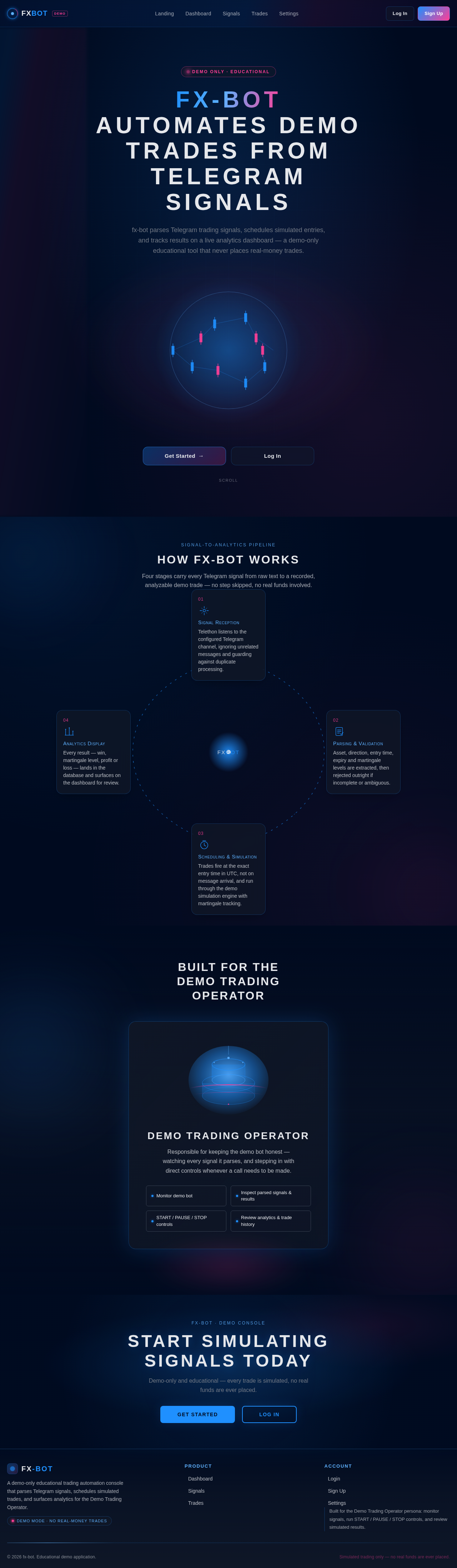
fx-bot automates demo trades from Telegram signals
fx-bot parses Telegram trading signals, schedules simulated entries, and tracks results on a live analytics dashboard — a demo-only educational tool that never places real-money trades.
How fx-bot Works
Four stages carry every Telegram signal from raw text to a recorded, analyzable demo trade — no step skipped, no real funds involved.
Built for the Demo Trading Operator
Demo Trading Operator
Responsible for keeping the demo bot honest — watching every signal it parses, and stepping in with direct controls whenever a call needs to be made.
fx‑bot · demo console
Start Simulating Signals Today
Demo-only and educational — every trade is simulated, no real funds are ever placed.
fx-bot automates demo trades from Telegram signals
fx-bot parses Telegram trading signals, schedules simulated entries, and tracks results on a live analytics dashboard — a demo-only educational tool that never places real-money trades.
How fx-bot Works
Four stages carry every Telegram signal from raw text to a recorded, analyzable demo trade — no step skipped, no real funds involved.
Built for the Demo Trading Operator
Demo Trading Operator
Responsible for keeping the demo bot honest — watching every signal it parses, and stepping in with direct controls whenever a call needs to be made.
fx‑bot · demo console
Start Simulating Signals Today
Demo-only and educational — every trade is simulated, no real funds are ever placed.
No comments yet. Be the first!