futech

byTushar Sawant

Create me a micro sas for the website seller website

Landing
Landing

Comments (0)

No comments yet. Be the first!

System Requirements

System Requirement Document
Page 1 of 7

System Requirements Document for futech

1. Introduction

The futech project aims to create a micro-SaaS platform specifically designed for website sellers. This platform will provide an engaging, user-friendly interface that supports the core workflow of website sellers, enabling them to manage their website-selling activities efficiently.

2. System Overview

The futech micro-SaaS platform is designed to deliver a seamless experience for website sellers by providing a set of tools to manage their work items. The system will include a public landing page, a login page for identity verification, and protected areas for managing and editing work items. The platform will leverage a vibrant and bold design approach to create an engaging user experience.

2a. Product Interpretation and Delivery Boundary

The micro-SaaS platform will be delivered as a web application with application-owned identity management. The system will require users to log in to access protected features, ensuring that only authenticated website sellers can manage their work items. The platform will not include adjacent capabilities beyond the core workflow for website sellers.

2b. Source Content Inventory

Not applicable as no content source directive was provided.

Page 2 of 7

2c. Page Content and Component Coverage

Landing

  • Purpose: Introduce the micro-SaaS platform to website sellers.
  • Components:
    • Overview of the platform's features and benefits.
    • Call-to-action buttons for login and sign-up.
    • Custom character and spot illustrations.
    • Asymmetric layout with bold color blocks.

Login

  • Purpose: Allow website sellers to authenticate and access their accounts.
  • Components:
    • Username and password fields.
    • "Forgot Password" link.
    • Login button styled with primary color.
    • Error messages for failed login attempts.

Work Items

  • Purpose: Provide an overview of the website seller's work items.
  • Components:
    • List of current work items with status indicators.
    • Buttons for creating new work items.
    • Search and filter options.
    • Error and empty states for no work items.
Page 3 of 7

Work Item Editor

  • Purpose: Enable the creation and editing of work items.
  • Components:
    • Form fields for work item details (e.g., title, description).
    • Save and cancel buttons.
    • Validation messages for form errors.
    • Success message upon saving.

3. Functional Requirements

  • As a Website Seller, I should be able to view an overview of my work items to manage my website-selling activities. (Provenance: explicit)
  • As a Website Seller, I should be able to create and edit work items to update my website-selling tasks. (Provenance: explicit)
  • As a Website Seller, I should be able to log in to access my account and manage my work items. (Provenance: required_inference)
  • As a Website Seller, I should be able to sign up for the platform to start using the micro-SaaS services. (Provenance: required_inference)

4. User Personas

  • Website Seller: The primary user of the micro-SaaS platform, responsible for managing and selling websites. They will interact with all aspects of the platform, including viewing, creating, and editing work items.
Page 4 of 7

5. Core User Flows

  1. Landing to Login:

    • The Website Seller visits the Landing page.
    • They click on the "Login" button.
    • They are redirected to the Login page.
  2. Login to Work Items:

    • The Website Seller enters their credentials on the Login page.
    • Upon successful authentication, they are redirected to the Work Items page.
  3. Managing Work Items:

    • On the Work Items page, the Website Seller views their current work items.
    • They can create a new work item by clicking the "New Work Item" button.
    • They are redirected to the Work Item Editor page to enter details.
    • After saving, they return to the Work Items page with the updated list.
  4. Editing Work Items:

    • The Website Seller selects a work item to edit from the Work Items page.
    • They are redirected to the Work Item Editor page with pre-filled details.
    • They make changes and save the work item.
    • They return to the Work Items page with the updated item.
Page 5 of 7

6. Visuals Colors and Theme

  • Muse: Haraldur Thorleifsson
  • Palette:
    • Background: #F5F5F5
    • Surface: #FFFFFF
    • Text: #333333
    • Primary: #FF6F61
    • Accent: #FFD700
    • Muted: #CCCCCC
  • Typography:
    • Headings: Sora, Bold weights, large sizes, tight tracking
    • Body: Outfit
    • Scale: 1.414 modular, 48/34/24/18/16
  • Shape Language: Chunky rounded cards and color-blocked sections with smooth edges.
  • Layout: Asymmetric layouts with bold color blocks.
  • Motion: Lively entrance animations and hover pops.
  • Imagery: Custom character and spot illustrations, bold iconography.

7. Signature Design Concept

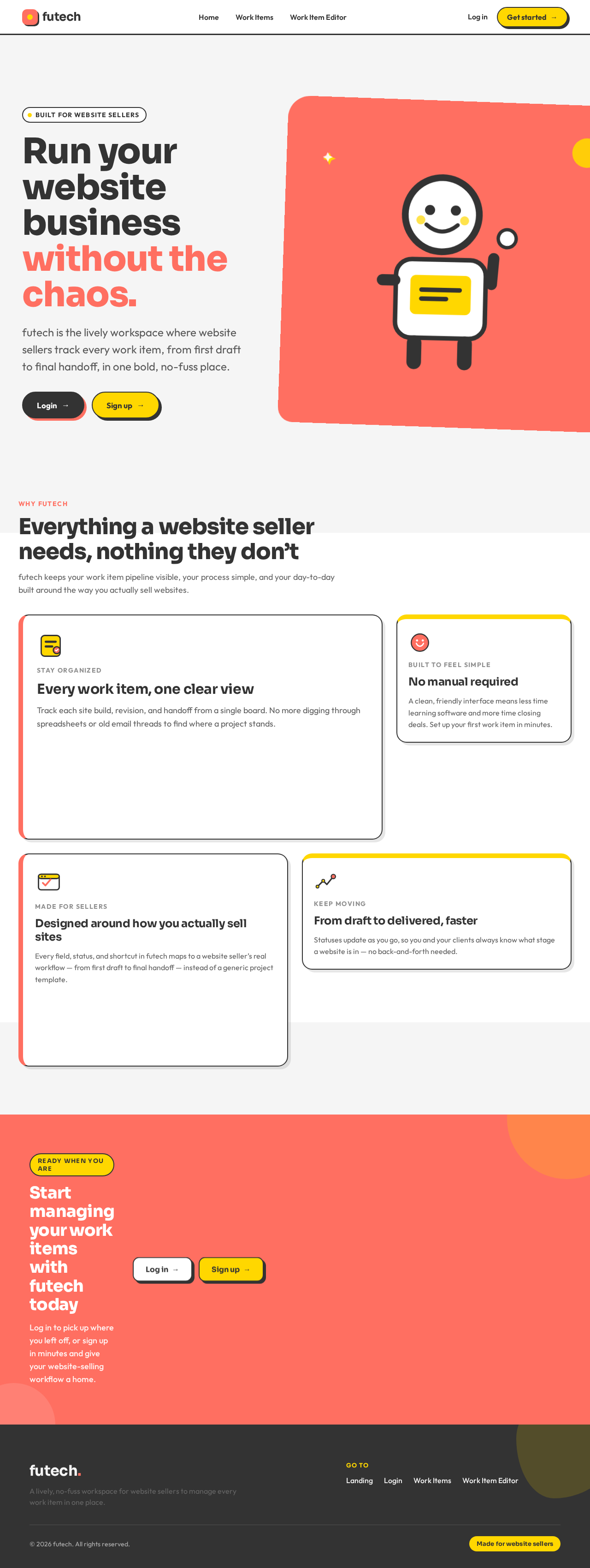
The Landing page will feature an oversized headline that spans the viewport with bold color blocks underneath. The hero section will be illustration-led with vibrant color contrasts, featuring chunky rounded navigation buttons with hover pops. The asymmetric grid will guide users through the content with expressive typography that plays with scale and contrast.
Page 6 of 7

8. Interaction Model & Motion Direction

  • Interaction Model: Animated
  • Motion Tempo: Expressive
  • Hero Dimensionality: Layered_2d
  • Landing Hero Motion Brief: The hero section will feature a character illustration that animates into view with an expressive entrance. The primary color will dominate, with hover pops on interactive elements. The reduced-motion state will simplify animations to fade-ins.

9. Non-Functional Requirements

  • The platform must support responsive design to ensure usability across devices. (Provenance: required_inference)
  • The system should maintain a high level of performance, with page loads under 2 seconds. (Provenance: required_inference)
  • Ensure accessibility compliance with WCAG 2.1 standards. (Provenance: required_inference)

10. Tech Stack

  • Frontend: React
  • Backend: Python/FastAPI
  • Storage: PostgreSQL
  • Containerization: Docker/docker-compose
  • Deployment: Kubernetes (only if required by deployment)

11. Assumptions and Constraints

  • The platform will only support website sellers as the primary user persona.
  • The system will not include features beyond the core workflow of managing work items.
  • Application-owned identity is required for accessing protected features.
Page 7 of 7

12. Glossary

  • Micro-SaaS: A small-scale Software as a Service product focused on a niche market.
  • Website Seller: An individual or business that sells websites to clients.
  • Work Item: A task or project related to the website-selling process.
Landing design preview
Landing: View platform overview
Login: Sign up
Login: Log in
Work Items: 1. View work items
Work Items: Search and filter items
Work Item Editor: 2. Create new item
Work Item Editor: 3. Edit existing item
Work Item Editor: 4. Save work item
Landing design preview
Landing: View platform overview
Login: Sign up
Login: Log in
Work Items: 1. View work items
Work Items: Search and filter items
Work Item Editor: 2. Create new item
Work Item Editor: 3. Edit existing item
Work Item Editor: 4. Save work item