fs-portfolio

byPritesh Kumar Singh

can we create futurasitc portfolio for a full stack developer

Landing
Landing

Comments (0)

No comments yet. Be the first!

System Requirements

Page 1 of 18

System Requirements Document for fs-portfolio

1. Introduction

fs-portfolio is a public, futuristic portfolio website for a full stack developer. Its product intent is to present the developer's full stack skills and projects to an outside audience — recruiters, clients, and engineering peers — through a dark, instrument-like surface that reads as a deep-tech launch page rather than a conventional personal site. The portfolio is publicly viewable; visitors arrive anonymously, scan the developer's range (front-end craft, back-end depth, systems thinking), and find a clear way to make contact.

The audience is technical and time-poor. The site must therefore be dense, dark, and legible: proof of range visible within seconds, deeper inspection available on demand, and a single obvious path to reach the developer.

Page 2 of 18

2. System Overview

fs-portfolio is a first-party web application delivered as a set of publicly reachable pages. It has two accepted active human participants:

  • Full Stack Developer (Portfolio Owner) — the developer whose skills, projects, and professional identity the portfolio presents, and who is responsible for keeping that content current and accurate.
  • Portfolio Visitor (Recruiter / Client / Peer) — the outside reader who evaluates the developer's full stack capabilities and decides whether to reach out.

The current delivery covers four pages: Landing, Portfolio, Projects, and Contact. All four are publicly accessible with no access requirement; there is no sign-in, no account, and no protected state in the current scope. The developer's presentation content (skills, projects, professional identity) is the authoritative material the site renders; visitors browse it and use Contact to reach the developer.

The futuristic visual style is a hard, explicit constraint: a dark void canvas, luminous cyan instrumentation, a single rationed magenta accent, and a real-time WebGL hero subject. This style is not decoration — it is the product's stated identity and the reason the portfolio reads as a system builder's surface.

Page 3 of 18

2a. Product Interpretation and Delivery Boundary

Delivery ownership. fs-portfolio is a first-party application-owned surface. Every page is rendered and owned by the application itself; no page is delegated to a provider surface or an external destination. The site is public and anonymous: visitors do not establish identity, and the application does not maintain visitor-specific durable state. There is consequently no application-owned identity, no first-use identity establishment, and no returning verification in the current scope.

Current boundary. Current scope is exactly the four accepted pages and the behavior described in Sections 2c, 3, and 5: presenting the developer's full stack skills and projects, letting visitors browse and revisit that work, and letting interested visitors contact the developer. The developer's portfolio content is the material the site presents; the site does not itself author, version, or publish that content in the current scope.

Future boundary. Anything not listed above — including any content-authoring or editing surface, any analytics or visitor tracking, any account or authentication capability, and any additional page — is out of current scope and is not part of current acceptance. See Section 11.

2b. Source Content Inventory

No reference directive in this project declares content_source authority. No source content inventory is included.

2c. Page Content and Component Coverage

The page inventory is the accepted final page contract: Landing, Portfolio, Projects, Contact. Each is represented exactly once below.

Page 4 of 18

Landing

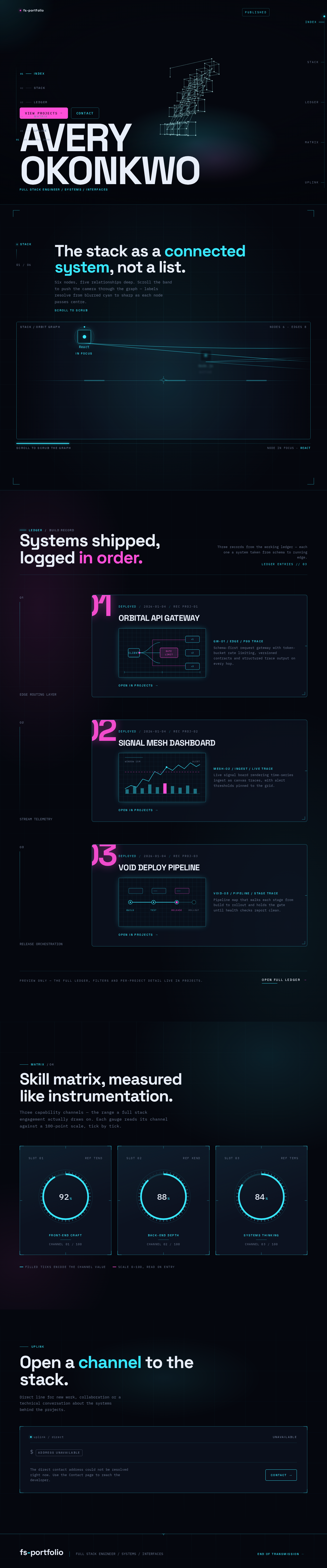
  • Information / state. The public entry surface. A full-viewport dark void (#05070E) carrying: a single uppercase 11px cyan HUD line reading FULL STACK ENGINEER / SYSTEMS / INTERFACES; the developer's name set in Space Grotesk 700 at 12–16vw, flush bottom-left, spanning toward the right edge and slightly cropped by the viewport; two inline CTAs at the baseline — a magenta-filled VIEW PROJECTS and a hairline-outlined CONTACT; and a thin cyan scroll-progress rail running the full right edge with tick labels for each section. No centred stack, no subtext paragraph, no gradient blob.
  • Primary actions. VIEW PROJECTS (magenta fill) advances the visitor into the project work. CONTACT (hairline outline, fills cyan on hover) advances the visitor to the contact surface. The right-edge progress rail and the fixed left-rail section index both act as navigation and as progress instruments.
  • Supporting actions. Pointer movement over the hero subject produces parallax; scroll drives the scrubbed camera push into the stack graph and fills the rail ticks.
  • Domain entities. Developer identity (name, role line), section index entries (INDEX, STACK, LEDGER, MATRIX, UPLINK), navigation targets.
  • Component responsibilities. WebGL hero scene (volumetric wireframe node-and-edge server stack, cyan #38E8FF with magenta #FF4FD8 light accents, positioned right-of-centre at ~55% viewport width, soft radial glow beneath); overlaid display type; HUD micro-label; CTA pair; right-edge scroll-progress rail with tick labels; fixed left-rail section index with cyan tick marks and scroll-progress fill.
  • States. Loading: the hero scene initialises against the void; type and HUD line render immediately so the page is never blank. Empty: not applicable — the Landing surface has no collection to be empty. Success: the hero subject is live and rotating, the name and HUD line are legible, both CTAs are reachable, and the progress rail tracks scroll. Error / recovery: if the WebGL scene cannot initialise, the void, the name, the HUD line, both CTAs, and the progress rail remain fully functional and legible without the 3D subject; the visitor can still reach Portfolio, Projects, and Contact.

Portfolio

  • Information / state. The developer's full stack presentation in the required futuristic style: a horizontal scroll-scrubbed "stack orbit" band where each technology is a node on a glowing graph; a skill matrix of radial cyan gauges with tick marks and monospace numerals; and the developer's professional identity as presented on the site. Content sits in floating glass panels (#0C1220 with 1px luminous strokes) over the dark canvas on a persistent 12-column instrument grid.
  • Primary actions. Scroll to scrub the stack orbit and push the camera through the graph; read skill gauges and their counted-up numerals; move to the project ledger.
  • Supporting actions. Node labels resolve from blurred cyan to sharp as they pass centre; HUD numerals count up on entry; the left-rail index tick for this section fills as the visitor scrolls.
  • Domain entities. Technologies / stack nodes and their relationships (node-and-edge graph), skill metrics with values, developer professional identity.
  • Component responsibilities. Stack-orbit band (scroll-scrubbed camera push, node labels, connector paths); radial gauge grid (3-up) with tick marks and monospace numerals; glass panels with corner brackets and crosshair ticks; left-rail section index; section headline in Space Grotesk at 56–72px.
  • States. Loading: panels and gauges render in their resting state while the orbit band initialises. Empty: if no stack nodes or skill metrics are available to present, the section shows its HUD micro-label and headline with an explicit no-data indication rather than a blank band. Success: the orbit band scrubs smoothly, node labels resolve at centre, gauges display their values with counted-up numerals. Error / recovery: if the scrubbed camera motion cannot run, the stack nodes and skill values remain readable as a static arrangement; the visitor can continue to the project ledger.

Projects

  • Information / state. A revisitable public browsing destination for the developer's projects, laid out as an asymmetric two-column project ledger: large index numerals on the left, project panel on the right. Each project panel carries an oversized magenta index numeral (01–06) bleeding off the panel's left edge, a project title at 32px, and an instrument-readout thumbnail — schematic diagrams and UI captures with cyan edge-glow on dark, never lifestyle mockups.
  • Primary actions. Browse the project ledger; open a project panel to inspect its detail; revisit the page to re-inspect work.
  • Supporting actions. Panels reveal with a 1px cyan line sweeping left-to-right before content fades in; the left-rail index tick for this section fills as the visitor scrolls.
  • Domain entities. Projects (index numeral, title, description, technology associations, thumbnail/readout), project ordering.
  • Component responsibilities. Project ledger layout (index numeral column, project panel column); project panel with sweep-in reveal; instrument-readout thumbnail treatment; section headline; left-rail section index.
  • States. Loading: the ledger renders its structure while project entries resolve. Empty: if no projects are available to present, the page shows its headline and an explicit no-projects indication instead of an empty ledger. Success: every project entry is listed with its numeral, title, and readout, and each panel opens to its detail. Error / recovery: if a project's readout or detail cannot be resolved, that entry shows its numeral and title with an explicit unavailable indication while the remaining entries stay browsable.
Page 5 of 18

Contact

  • Information / state. A focused destination for contacting the portfolio owner, framed as a terminal prompt: the developer's email address followed by a blinking cyan cursor, set on dark glass with a 1px luminous stroke.
  • Primary actions. Read the developer's contact address; initiate contact with the developer.
  • Supporting actions. The terminal-prompt framing presents the address as a command-line readout; the left-rail index tick for this section fills as the visitor scrolls.
  • Domain entities. Developer contact address, contact framing/prompt state.
  • Component responsibilities. Terminal-prompt panel; email address display with blinking cyan cursor; section headline; left-rail section index.
  • States. Loading: the panel renders its frame and headline while the address resolves. Empty: if no contact address is available to present, the panel shows an explicit unavailable indication rather than a prompt with no address. Success: the address is legible and the visitor can initiate contact from it. Error / recovery: if the address cannot be resolved, the panel states that contact is currently unavailable and the visitor retains the rest of the site.
Page 6 of 18

3. Functional Requirements

Each requirement is a distinct story point with provenance, lifecycle facts, and observable acceptance.

FR-1 — Futuristic portfolio presentation As a Full Stack Developer (Portfolio Owner), I should have a futuristic-styled portfolio website that presents my full stack skills and projects, so that my range is visible to the people evaluating me.

  • Provenance: explicit (futuristic-styled portfolio for a full stack developer; presents full stack skills and projects).
  • Actor: Full Stack Developer (Portfolio Owner). Trigger: the portfolio is published and reachable.
  • Observable result: a publicly reachable site whose Landing, Portfolio, Projects, and Contact surfaces render in the required futuristic style — dark void canvas, luminous cyan instrumentation, rationed magenta accent, WebGL hero subject.
  • Access state: public, no access requirement.
  • Failure / recovery: if the WebGL hero subject cannot initialise, the site remains fully legible and navigable without it.
  • Continuation: the developer's presented skills and projects remain browsable by visitors.

FR-2 — Public viewing by recruiters, clients, and peers As a Portfolio Visitor (Recruiter / Client / Peer), I should be able to view the portfolio publicly without an account, so that I can evaluate the developer immediately on arrival.

  • Provenance: explicit (publicly viewable by visitors such as recruiters, clients, and peers).
  • Actor: Portfolio Visitor. Trigger: the visitor opens the site.
  • Observable result: the Landing surface renders immediately with the developer's name, role HUD line, and both CTAs, with no identity step in between.
  • Access state: anonymous, no access requirement on any of the four pages.
  • Failure / recovery: if the hero scene fails, the entry content and navigation remain available.
  • Continuation: the visitor proceeds to Portfolio, Projects, or Contact.

FR-3 — Browsing the developer's full stack skills As a Portfolio Visitor (Recruiter / Client / Peer), I should be able to browse the developer's full stack skills on the Portfolio page, so that I can judge the breadth and depth of their stack.

  • Provenance: explicit (the portfolio presents the developer's full stack skills).
  • Actor: Portfolio Visitor. Trigger: the visitor reaches the Portfolio page and scrolls.
  • Observable result: the stack-orbit band scrubs as the visitor scrolls, node labels resolve from blurred cyan to sharp as they pass centre, and the radial skill gauges display their values with numerals counting up on entry.
  • Access state: public, no access requirement.
  • Failure / recovery: if the scrubbed camera motion cannot run, the stack nodes and skill values remain readable as a static arrangement.
  • Continuation: the visitor moves on to the project ledger or to Contact.

FR-4 — Browsing and revisiting the developer's projects As a Portfolio Visitor (Recruiter / Client / Peer), I should be able to browse the developer's projects on the Projects page and return to them later, so that I can inspect the work in detail and re-check it before deciding.

  • Provenance: explicit (the portfolio presents the developer's projects; publicly viewable).
  • Actor: Portfolio Visitor. Trigger: the visitor opens the Projects page.
  • Observable result: the asymmetric project ledger lists each project with its oversized magenta index numeral (01–06), title, and instrument-readout thumbnail; each panel opens to its detail; the page is revisitable at the same public address.
  • Access state: public, no access requirement; no visitor-specific state is retained between visits.
  • Failure / recovery: if a project's readout or detail cannot be resolved, that entry shows its numeral and title with an explicit unavailable indication while the remaining entries stay browsable.
  • Continuation: the visitor returns to Portfolio, or proceeds to Contact.

FR-5 — Contacting the portfolio owner As a Portfolio Visitor (Recruiter / Client / Peer), I should be able to reach the developer from the Contact page, so that I can act on my interest.

  • Provenance: explicit (publicly viewable by visitors such as recruiters, clients, and peers; the Contact page is the accepted focused destination for contacting the portfolio owner).
  • Actor: Portfolio Visitor. Trigger: the visitor opens the Contact page or follows the Landing CONTACT CTA.
  • Observable result: the terminal-prompt panel displays the developer's contact address with a blinking cyan cursor, and the visitor can initiate contact from it.
  • Access state: public, no access requirement.
  • Failure / recovery: if the address cannot be resolved, the panel states that contact is currently unavailable and the visitor retains the rest of the site.
  • Continuation: the visitor has completed their goal; the developer receives the contact.

FR-6 — Receiving visitor contact As a Full Stack Developer (Portfolio Owner), I should receive contact initiated by interested visitors, so that I can respond to hiring, contracting, and collaboration interest.

  • Provenance: required_inference — the accepted Contact destination exists so that interested visitors can reach the portfolio owner; the owner's receipt of that contact is the indispensable other side of the same lifecycle.
  • Actor: Full Stack Developer (Portfolio Owner). Trigger: a visitor initiates contact from the Contact page.
  • Observable result: the developer receives the visitor's contact at the address presented on the Contact page.
  • Access state: the developer's contact address is publicly presented; no application identity is involved.
  • Failure / recovery: if the address cannot be resolved, the Contact page states that contact is currently unavailable, so the visitor is not left with a dead end.
  • Continuation: the developer responds to the visitor outside the portfolio.

FR-7 — Keeping portfolio content current and accurate As a Full Stack Developer (Portfolio Owner), I should be responsible for keeping the portfolio's presented skills, projects, and professional identity current and accurate, so that visitors evaluate an accurate picture of my work.

  • Provenance: required_inference — the accepted persona rationale assigns the developer responsibility for keeping the portfolio content current and accurate; this is the owner-side obligation of the presentation lifecycle.
  • Actor: Full Stack Developer (Portfolio Owner). Trigger: the developer's skills, projects, or professional identity change.
  • Observable result: the Landing identity line, the Portfolio stack and skill metrics, and the Projects ledger reflect the developer's current full stack work.
  • Access state: not applicable to visitors; the current scope defines no in-application authoring surface (see Section 11).
  • Failure / recovery: if a presented item cannot be resolved, the affected page shows an explicit unavailable or no-data indication rather than a blank or misleading surface.
  • Continuation: visitors continue to browse an accurate portfolio.

FR-8 — Navigating the portfolio as an instrument As a Portfolio Visitor (Recruiter / Client / Peer), I should be able to move between the portfolio's sections and pages using the site's own navigation instruments, so that I can reach any part of the work without hunting.

  • Provenance: required_inference — the accepted four-page contract and the direction's fixed left-rail section index and right-edge scroll-progress rail make cross-page and in-page movement indispensable to using the accepted surfaces.
  • Actor: Portfolio Visitor. Trigger: the visitor uses the left-rail section index, the right-edge progress rail, or a CTA.
  • Observable result: the visitor reaches the intended section or page, and the rail tick for the current section fills as they scroll.
  • Access state: public, no access requirement.
  • Failure / recovery: if a motion-driven navigation affordance cannot run, the underlying links and CTAs remain operable.
  • Continuation: the visitor continues browsing from the reached destination.
Page 7 of 18

4. User Personas

Page 8 of 18

Full Stack Developer (Portfolio Owner)

Product context. The developer is the subject and owner of fs-portfolio. The site exists to present their full stack work — front-end craft, back-end depth, systems thinking — to an outside audience. They are not a visitor of their own portfolio in the browsing sense; they are the party whose professional identity the site carries and who is accountable for its accuracy.

Primary goal. A compelling, self-maintained portfolio that represents their full stack work to visitors, so that recruiters, clients, and peers form an accurate and favorable picture of their range.

Distinct accepted responsibilities. The developer owns the presented content: the identity line and role framing on Landing, the stack and skill metrics on Portfolio, the project ledger on Projects, and the contact address on Contact. They are responsible for keeping that content current and accurate as their work changes (FR-7). They are also the recipient of visitor contact initiated from the Contact page (FR-6) — the other side of the contact lifecycle, without which the Contact destination has no purpose.

Relevant inputs or decisions. What skills and technologies to present and how to group them; which projects to include and in what order; what professional identity framing to carry; which contact address to present publicly. These are content decisions the developer makes about their own presentation.

Interactions with other accepted participants. The developer's relationship to the Portfolio Visitor is one-directional in the current scope: the developer presents, the visitor evaluates. The only reciprocal interaction is contact — the visitor initiates from the Contact page and the developer receives it.

Observable success. The portfolio is publicly reachable, renders in the required futuristic style, presents the developer's full stack skills and projects accurately, and delivers visitor contact to the developer.

Source-backed constraints. The futuristic visual style is a hard constraint on how this developer's work is presented. The current scope defines no in-application authoring surface; the developer's content responsibility is an obligation about accuracy, not a granted editing capability.

Page 9 of 18

Portfolio Visitor (Recruiter / Client / Peer)

Product context. The visitor arrives anonymously from outside — typically a recruiter screening candidates, a client assessing a potential contractor, or an engineering peer evaluating a collaborator. They are technical or technically literate, they scan rather than read, and they are deciding quickly whether this developer is worth a conversation.

Primary goal. Quickly understand the developer's full stack expertise and have a clear way to reach out.

Distinct accepted responsibilities. The visitor drives every browsing action on the site: they enter at Landing, read the identity framing, choose between the project work and contact, scrub the stack orbit and read the skill gauges on Portfolio, browse and revisit the project ledger on Projects, and initiate contact from Contact. They also decide whether to act on what they see — the evaluation itself is their work.

Relevant inputs or decisions. Which CTA to take on arrival; how far to scrub the stack orbit; which projects to open; whether the demonstrated range justifies reaching out; whether to make contact now or return later.

Interactions with other accepted participants. The visitor's only interaction with the developer is outbound: they initiate contact from the Contact page, and the developer receives it. Everything else is the visitor reading what the developer has presented.

Observable success. The visitor reaches the site without an account step, understands the developer's full stack range, inspects the projects in detail, and can initiate contact from a single focused destination.

Source-backed constraints. The visitor is anonymous and public — no account, no sign-in, no retained visitor-specific state. The site must remain legible to a technical reader on a dark, dense surface.

Page 10 of 18

5. Core User Flows

Flow A — Visitor arrives and orients (Portfolio Visitor)

  1. The visitor opens the fs-portfolio public address. No identity step is presented.
  2. The Landing page renders: the dark void, the live WebGL wireframe stack right-of-centre, the developer's name in Space Grotesk 700 flush bottom-left and slightly cropped by the right edge, and the 11px cyan HUD line FULL STACK ENGINEER / SYSTEMS / INTERFACES.
  3. The visitor moves the pointer; the hero subject parallaxes. The visitor scrolls; the camera pushes into the stack graph and the right-edge progress rail fills.
  4. The visitor reads the two inline CTAs at the baseline: magenta-filled VIEW PROJECTS and hairline-outlined CONTACT.
  5. Decision: the visitor chooses to inspect the work or to make contact directly.
  6. Continuation: VIEW PROJECTS leads to Flow B; CONTACT leads to Flow D.
  7. Failure / recovery: if the WebGL scene cannot initialise, the void, the name, the HUD line, both CTAs, and the progress rail remain fully functional and legible; the visitor proceeds exactly as above without the 3D subject.

Flow B — Visitor evaluates the developer's stack (Portfolio Visitor)

  1. The visitor reaches the Portfolio page, from the Landing VIEW PROJECTS CTA or from the left-rail section index.
  2. The visitor scrolls into the horizontal stack-orbit band. Scrolling scrubs the camera through the glowing node-and-edge graph; each technology node's label resolves from blurred cyan to sharp as it passes centre.
  3. The visitor continues to the skill matrix: radial cyan gauges in a 3-up grid with tick marks and monospace numerals that count up on entry.
  4. The visitor reads the developer's professional identity framing and the section headline.
  5. Observable result: the visitor has seen the developer's stack as a connected system and their skill metrics as instrument readouts.
  6. Continuation: the visitor moves to the project ledger (Flow C) or to Contact (Flow D).
  7. Failure / recovery: if the scrubbed camera motion cannot run, the stack nodes and skill values remain readable as a static arrangement and the visitor continues to the ledger.
Page 11 of 18

Flow C — Visitor inspects and revisits the projects (Portfolio Visitor)

  1. The visitor reaches the Projects page, from the Portfolio ledger, the left-rail index, or directly on a later visit.
  2. The asymmetric ledger renders: large index numerals on the left, project panels on the right. Each panel opens with a 1px cyan line sweeping left-to-right before its content fades in, carrying an oversized magenta index numeral (01–06) bleeding off the panel's left edge.
  3. The visitor reads each project's title at 32px and its instrument-readout thumbnail — schematic diagrams and UI captures with cyan edge-glow on dark.
  4. The visitor opens a project panel to inspect its detail.
  5. Observable result: the visitor has inspected the developer's project work in detail.
  6. Continuation: the visitor returns to the ledger, moves to Portfolio, or proceeds to Contact. Because the page is public and stateless, the visitor can revisit the same address later and re-inspect the same work.
  7. Failure / recovery: if a project's readout or detail cannot be resolved, that entry shows its numeral and title with an explicit unavailable indication while the remaining entries stay browsable.

Flow D — Visitor contacts the developer (Portfolio Visitor → Full Stack Developer)

  1. The visitor reaches the Contact page, from the Landing CONTACT CTA, the left-rail index, or after browsing the work.
  2. The terminal-prompt panel renders: the developer's contact address followed by a blinking cyan cursor, on dark glass with a 1px luminous stroke.
  3. The visitor reads the address and initiates contact with the developer.
  4. Observable result (visitor side): the visitor has a clear, completed path to reach the developer.
  5. Participant handoff: the contact reaches the Full Stack Developer (Portfolio Owner) at the address presented on the page.
  6. Observable result (developer side): the developer receives the visitor's contact and can respond to the hiring, contracting, or collaboration interest.
  7. Continuation: the developer responds outside the portfolio; the visitor's goal is complete.
  8. Failure / recovery: if the address cannot be resolved, the panel states that contact is currently unavailable rather than presenting a dead prompt, and the visitor retains the rest of the site.

Flow E — Developer keeps the portfolio accurate (Full Stack Developer)

  1. The developer's skills, projects, or professional identity change.
  2. The developer updates the portfolio's presented content so that the Landing identity line, the Portfolio stack and skill metrics, and the Projects ledger reflect their current full stack work.
  3. Observable result: visitors arriving afterwards evaluate an accurate picture of the developer's range.
  4. Continuation: the developer's contact address on the Contact page remains the address at which visitor contact arrives.
  5. Failure / recovery: if a presented item cannot be resolved, the affected page shows an explicit unavailable or no-data indication rather than a blank or misleading surface.
Page 12 of 18

6. Visuals Colors and Theme

Muse and headline. Gleb Kuznetsov — cinematic future tech: a dark void where the developer's stack orbits as a live HUD. The surface is a deep-tech launch page, not a friendly-corporate or editorial-quiet site. The audience is technical, so the surface may be dense, dark, and instrument-like.

Colour tokens (dark mode).

RoleHexUsage
Background (void)#05070ECarries ~70% of every screen; no white or near-white grounds anywhere
Surface (glass panel)#0C1220Raised panels with 1px luminous strokes
Text#E8EEF9Body copy at 15–17px; contrast ≈ 16:1 on background
Primary (signal)#38E8FFHUD labels, active nav, link underlines, data ticks, hero wireframe glow
Accent (hot)#FF4FD8Rationed to under 5% of pixels: CTA fill, cursor-trail node, one project status dot, section index numeral
Muted#6E7C96Micro-labels and metadata only — never reading copy

Forbidden colours. Any blue-indigo primary (#0057FF, #2563EB, #6366F1, #7C3AED) and any white or near-white ground. The entire surface stays in the #05070E void. The generic indigo/blue-on-white SaaS template is forbidden for this project.

Typography.

  • Headings: Space Grotesk — 700 for display, mixed case, tight -0.03em tracking, enormous scale jumps. The hero name runs 12–16vw so it spans the viewport edge to edge; section headlines sit at 56–72px.
  • HUD / micro-label voice: uppercase Space Grotesk 500 at 11–12px with +0.22em letterspacing (SKILLS, STACK, DEPLOYED, LAT/LONG-style metadata).
  • Body: IBM Plex Mono.
  • Forbidden typefaces: Inter, Roboto, Arial, Helvetica, Poppins, Open Sans, Lato, and system-ui for headings or body.

Type scale (1.5 modular). 128 / 88 / 56 / 32 / 20 / 16 / 13 / 11 px. Display 128–176px for the hero name; 88px page titles; 56px section heads; 32px project titles; 20px lede; 16px body; 13px captions; 11px uppercase HUD labels.

Shape language. Thin luminous strokes — 1px cyan at 40–70% opacity — over dark glass panels with 4–8px radii: sharp enough to read as instrumentation, never bubbly. Circular gauges and radial tick marks for skill and metric displays. Corner brackets and crosshair ticks frame key panels. Diagonal 1px flow lines and node-and-edge connector paths (the stack graph) are the recurring decorative geometry; nothing is purely ornamental — every line encodes a relationship. Rounded-pill everything is forbidden; radii stay at 4–8px.

Spacing rhythm. Wide margins (minimum 6vw) and generous vertical rhythm of 160px between sections, on a persistent 12-column instrument grid with content in floating glass panels that overlap the grid edges deliberately.

Imagery style. No stock photography and no flat clip art. Visuals are generated from the developer's own material: a real-time Three.js wireframe/point-cloud subject in the hero (an abstracted server-stack or node graph), glowing architecture diagrams, code panels rendered as luminous text on dark glass, terminal output as texture, and data-driven particle fields derived from commit/contribution counts. Project thumbnails are treated as instrument readouts — schematic diagrams and UI captures with cyan edge-glow on dark, never lifestyle mockups. Stock photography of people at laptops, flat vector "developer" clip art, and generic device mockups are forbidden. Glassmorphism used as decoration at full saturation (violet→pink gradients behind white frosted cards) is forbidden.

Page 13 of 18

7. Signature Design Concept

The cropped name over a live stack. The Landing page is a full-viewport #05070E void. Right-of-centre, occupying roughly 55% of the viewport width, a slowly rotating volumetric wireframe subject — an abstracted node-and-edge server stack — glows in cyan #38E8FF with magenta #FF4FD8 light accents and a soft radial glow beneath it. The developer's name is set in Space Grotesk 700 at 12–16vw, flush bottom-left, spanning toward the right edge and deliberately cropped by the viewport: it reads as architecture, not as a centred headline. Above it sits a single uppercase 11px cyan HUD line — FULL STACK ENGINEER / SYSTEMS / INTERFACES. Two CTAs sit inline at the baseline: a magenta-filled VIEW PROJECTS and a hairline-outlined CONTACT that fills cyan on hover. A thin cyan scroll-progress rail runs the full right edge with tick labels for each section.

The concept recomposes only accepted content and controls: the developer's name and role framing, the two CTAs, the section index, and the WebGL stack subject. It introduces no new behavior, page, or destination. There is no centred stack, no subtext paragraph, no gradient blob, and no blue button on white.

Page 14 of 18

8. Interaction Model & Motion Direction

Interaction Model: Animated Motion Tempo: cinematic Hero Dimensionality: webgl

Landing Hero Motion Brief.

  • Focal subject. The volumetric wireframe node-and-edge server stack, cyan #38E8FF with magenta #FF4FD8 light accents, positioned right-of-centre at ~55% viewport width with a soft radial glow beneath it, over the #05070E void.
  • Input → transformation → outcome thesis. Pointer movement over the hero produces parallax on the wireframe subject; scrolling drives a scrubbed camera push through the stack graph and fills the right-edge progress rail. The outcome is that the visitor's own movement animates the developer's stack as a live instrument, and the page's progress is legible as a filled rail rather than an inferred scroll position.
  • Motion vocabulary. Expressive-to-cinematic and continuous: slow rotation of the hero subject with pointer parallax; scroll-scrubbed camera push through the stack graph; HUD numerals counting up on entry; project panels revealing with a 1px cyan line sweeping left-to-right before content fades in; a faint cursor-trail node that lights nearby interactive elements. All transitions 400–700ms with cubic-bezier(0.16, 1, 0.3, 1). No bounces, no playful springs, no confetti-style micro-interactions.
  • Composed first frame. The void fills the viewport. The wireframe stack sits right-of-centre, mid-rotation, its glow pooling beneath it. The developer's name spans bottom-left to the right edge, cropped. The cyan HUD line sits above it. The magenta VIEW PROJECTS and hairline CONTACT CTAs sit inline at the baseline. The right-edge progress rail is at zero with its tick labels visible.
  • Reduced-motion state. Under prefers-reduced-motion, the orbit freezes and scrubs are swapped for fades: the wireframe subject holds a static pose, the camera push becomes a cross-fade between stack states, HUD numerals appear at their final values without counting up, and the cursor-trail node is suppressed. The name, HUD line, CTAs, and progress rail remain fully legible and operable.

Landing Hero 3D Scene Brief — DIRECTION-DERIVED. The direction specifies webgl hero dimensionality, so a real-time 3D hero is expected. Build one crafted real-time object: an abstracted node-and-edge server stack rendered as a volumetric wireframe in cyan #38E8FF, with magenta #FF4FD8 light accents and a soft radial glow beneath it, positioned right-of-centre at ~55% viewport width. The scene shows the product's defining state — the developer's stack as a connected, orbiting system. It rotates slowly and responds to pointer parallax; scroll drives a scrubbed camera push through the graph. Under reduced motion the subject holds a static pose and the camera push becomes a cross-fade. If the scene cannot initialise, the void, name, HUD line, CTAs, and progress rail remain fully functional without it.

Page 15 of 18

9. Non-Functional Requirements

NFR-1 — Public anonymous access. Every page (Landing, Portfolio, Projects, Contact) is publicly reachable with no access requirement and no identity step. Provenance: explicit (the portfolio is publicly viewable by visitors such as recruiters, clients, and peers). Rationale: a recruiter, client, or peer must be able to evaluate the developer immediately on arrival; any gate would defeat the portfolio's purpose.

NFR-2 — No visitor-specific durable state. The current scope retains no visitor-specific state between visits; the Projects page is revisitable at the same public address without continuity of identity. Provenance: required_inference from the accepted public, no-access contract. Rationale: no accepted journey requires the application to remember a visitor, and no accepted capability creates a durable visitor relationship.

NFR-3 — Legibility on the dark surface. Body text #E8EEF9 at 15–17px on #05070E yields a contrast ratio of approximately 16:1. #6E7C96 is reserved for micro-labels and metadata and is never used for reading copy. Provenance: explicit (creative direction). Rationale: the audience is technical and scans quickly; the dense dark surface must not cost them legibility.

NFR-4 — Motion accessibility. prefers-reduced-motion freezes the hero orbit and swaps scrubs for fades. Provenance: explicit (creative direction). Rationale: continuous cinematic motion must not be mandatory for a visitor to read the portfolio.

NFR-5 — Graceful degradation of the WebGL hero. If the real-time hero scene cannot initialise, the Landing page remains fully legible and navigable without it. Provenance: required_inference from the accepted public-entry lifecycle. Rationale: the hero is the entry surface; a failed scene must not block a visitor from reaching the developer's work or contact.

NFR-6 — No-data and unavailable states. Where a page's content cannot be resolved — no stack nodes or skill metrics, no projects, no contact address, or an unresolvable project readout — the page shows an explicit indication rather than a blank or misleading surface. Provenance: required_inference from the accepted presentation lifecycle. Rationale: a portfolio that silently shows nothing misrepresents the developer's work.

NFR-7 — Futuristic visual style. The dark void palette, luminous cyan instrumentation, rationed magenta accent, Space Grotesk / IBM Plex Mono typography, 4–8px radii, and instrument-grid layout are required, not optional. Provenance: explicit (futuristic visual style is a required constraint). Rationale: the style is the product's stated identity.

Page 16 of 18

10. Tech Stack

The authoritative source specifies no technology choices. The following are coherent defaults for the accepted delivery shape (a first-party, publicly reachable, custom-UI web application with a real-time WebGL hero), labeled as defaults.

  • Front end: React with a component-based page structure for Landing, Portfolio, Projects, and Contact. [Default — not specified by user]
  • 3D / hero rendering: Three.js with React Three Fiber for the real-time wireframe stack subject, with Drei for scene helpers. [Default — not specified by user]
  • Styling: CSS with custom properties for the colour, type-scale, and spacing tokens in Section 6; no component library that would impose a light-surface or rounded-pill default. [Default — not specified by user]
  • Back end: Python with FastAPI, serving the portfolio's presented content (developer identity, stack and skill metrics, project ledger, contact address) to the front end. [Default — not specified by user]
  • Storage: a lightweight store for the portfolio's presented content. [Default — not specified by user]
  • Packaging and deployment: Docker with docker-compose for local and single-host deployment. Kubernetes is not required by any accepted constraint and is not included. [Default — not specified by user]
Page 17 of 18

11. Assumptions and Constraints

Constraints (binding).

  • The portfolio must be futuristic in style. This is an explicit hard constraint and governs every page.
  • The portfolio must present the developer's full stack skills and projects.
  • The portfolio must be publicly viewable by visitors such as recruiters, clients, and peers.
  • The page inventory is fixed at Landing, Portfolio, Projects, and Contact, each publicly accessible with no access requirement.
  • The forbidden-colour and forbidden-typeface lists in Section 6 are binding: no white or near-white grounds, no blue-indigo primary, no Inter/Roboto/Arial/Helvetica/Poppins/Open Sans/Lato/system-ui for headings or body, no rounded-pill radii, no playful springs or bouncy easing, no stock photography or flat "developer" clip art, and no decorative full-saturation glassmorphism.

Assumptions (narrow, labeled).

  • The developer's portfolio content — identity framing, stack and skill metrics, project entries, and contact address — is available as the material the site presents. The current scope defines no in-application authoring or editing surface; the developer's content responsibility (FR-7) is an obligation about accuracy, not a granted editing capability.
  • The project ledger accommodates the index numerals 01–06 as specified by the creative direction; the exact number of projects is not fixed by the authoritative source.
  • Contact is initiated from the address presented on the Contact page; the current scope defines no in-application message form, inbox, or contact-history surface.
  • No analytics, visitor tracking, or visitor-identifying capability is in current scope.

Future (explicitly out of current scope and current acceptance).

  • Any content-authoring, editing, or publishing surface for the developer.
  • Any account, authentication, or identity capability for any participant.
  • Any analytics, visitor tracking, or visitor-identifying capability.
  • Any additional page beyond Landing, Portfolio, Projects, and Contact.
Page 18 of 18

12. Glossary

  • fs-portfolio — the project name for this futuristic full stack developer portfolio website.
  • Full Stack Developer (Portfolio Owner) — the developer whose skills, projects, and professional identity the portfolio presents, and who is responsible for keeping that content current and accurate.
  • Portfolio Visitor (Recruiter / Client / Peer) — an anonymous outside reader who evaluates the developer's full stack capabilities and may initiate contact.
  • Landing — the public entry page: full-viewport void, WebGL wireframe stack, cropped developer name, HUD role line, and the VIEW PROJECTS / CONTACT CTAs.
  • Portfolio — the page presenting the developer's full stack skills: the scroll-scrubbed stack-orbit band and the radial skill-gauge matrix.
  • Projects — the revisitable public browsing page presenting the developer's projects as an asymmetric ledger with oversized index numerals.
  • Contact — the focused destination for reaching the portfolio owner, framed as a terminal prompt with the developer's address and a blinking cyan cursor.
  • Stack orbit — the horizontal scroll-scrubbed band on Portfolio where each technology is a node on a glowing graph and scrolling pushes the camera through the graph.
  • HUD — the instrument-style micro-label voice: uppercase Space Grotesk 500 at 11–12px with +0.22em letterspacing, used for labels such as SKILLS, STACK, and DEPLOYED.
  • Instrument readout — the treatment of project thumbnails as schematic diagrams and UI captures with cyan edge-glow on dark, rather than lifestyle mockups.
  • Section index — the fixed left-rail vertical index (INDEX, STACK, LEDGER, MATRIX, UPLINK) whose cyan ticks fill as the visitor scrolls, doubling as navigation and as a progress instrument.
Landing design preview
Landing: Verify public identity line, CTAs, and progress rail render
Portfolio: Confirm stack orbit nodes and skill gauges reflect current work
Portfolio: Check no-data indication when metrics unresolved
Projects: Review project ledger numerals, titles, and readouts
Projects: Check unavailable indication on unresolvable readout
Contact: Verify presented contact address and prompt framing
Contact: Check unavailable indication when address unresolved
Contact: Receive visitor contact initiated from this address
Landing: Confirm hero degradation keeps site legible and navigable
Projects: Confirm visitors browse an accurate portfolio
Landing design preview
Landing: Verify public identity line, CTAs, and progress rail render
Portfolio: Confirm stack orbit nodes and skill gauges reflect current work
Portfolio: Check no-data indication when metrics unresolved
Projects: Review project ledger numerals, titles, and readouts
Projects: Check unavailable indication on unresolvable readout
Contact: Verify presented contact address and prompt framing
Contact: Check unavailable indication when address unresolved
Contact: Receive visitor contact initiated from this address
Landing: Confirm hero degradation keeps site legible and navigable
Projects: Confirm visitors browse an accurate portfolio