frozen-videos
 Mishra Umesh Chandra
build a app for storing videos

Comments (0)
Sign in to leave a comment
System Requirements
System Requirements Document (SRD) for frozen-videos
1. Introduction
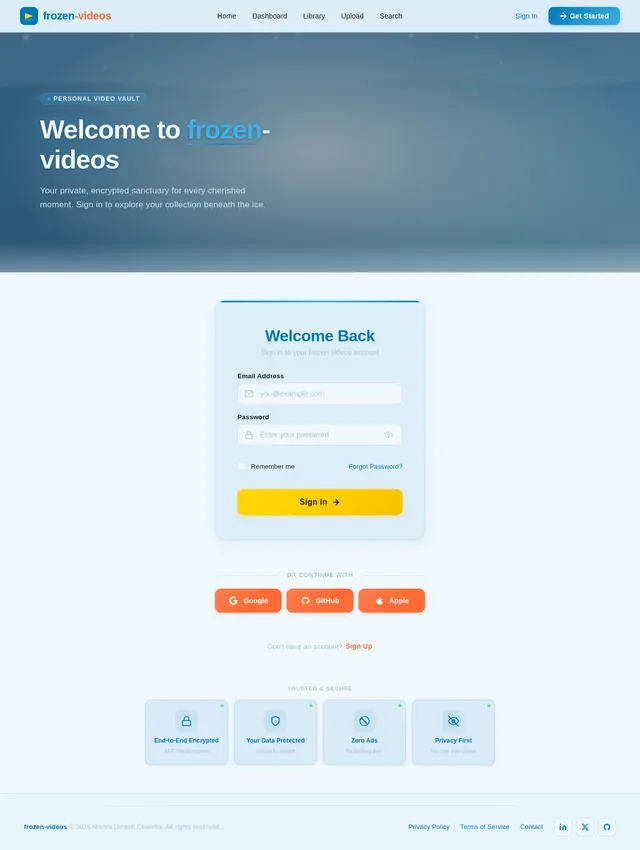
The frozen-videos project is a personal video storage application designed for Mishra Umesh Chandra, based in India. This application aims to provide a simple, secure, and efficient way to store, organize, and access personal videos. The focus is on privacy, ease of use, and robust functionality tailored to individual needs.
This document outlines the system requirements for the frozen-videos project, including functional and non-functional requirements, user personas, visual design elements, technical stack, and other critical aspects.
2. System Overview
The frozen-videos application is a personal video storage solution that allows users to upload, categorize, and retrieve videos effortlessly. The system will prioritize privacy and security while offering features like metadata tagging, search functionality, and video categorization. The application will be accessible via both web and mobile platforms, ensuring convenience and flexibility for the user.
Key features include:
- Secure video storage with encryption.
- Categorization and tagging for easy organization.
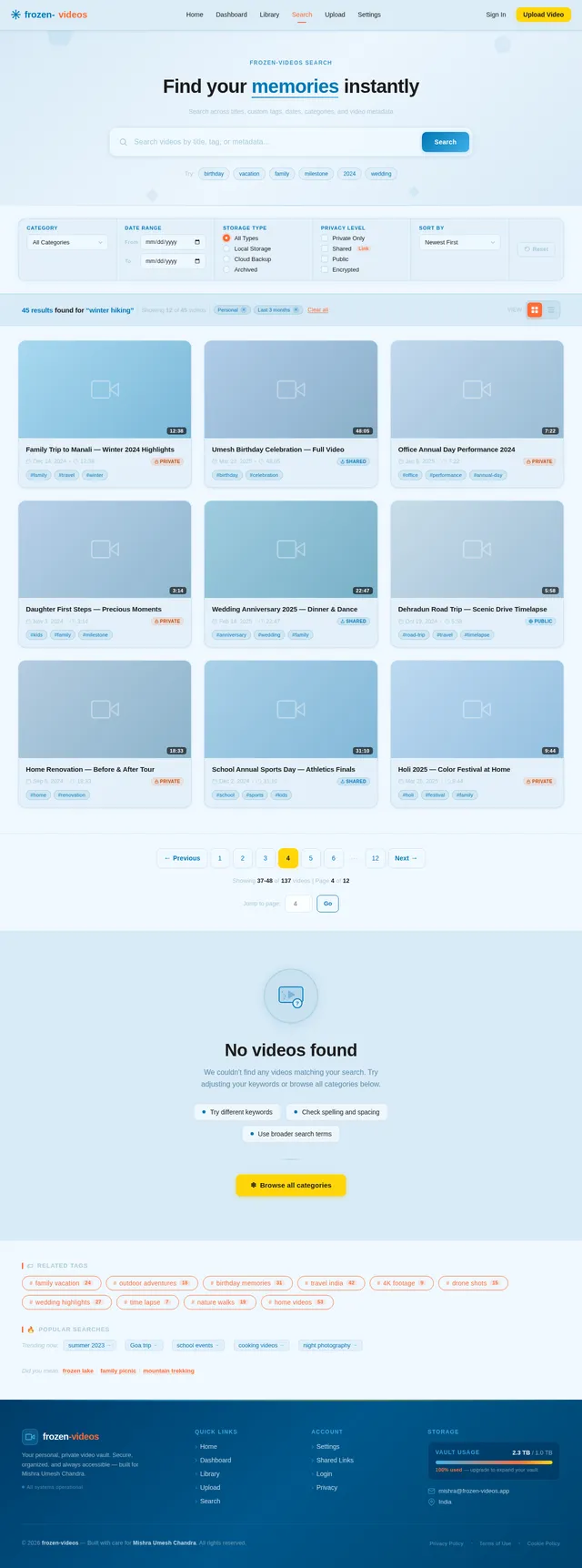
- Advanced search capabilities using metadata.
- A user-friendly interface optimized for personal use.
The system will be designed with a focus on Mishra's specific requirements and preferences, ensuring it meets his personal needs effectively.
3. Functional Requirements
As a User:
- I should be able to upload videos securely.
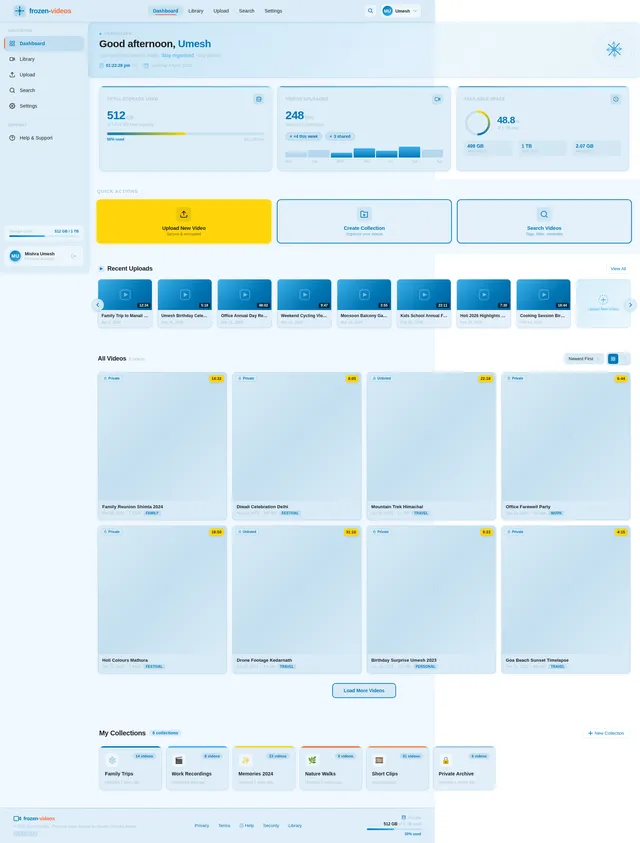
- I should be able to categorize videos into folders or collections.
- I should be able to tag videos with custom metadata.
- I should be able to search for videos using tags, titles, or other metadata.
- I should be able to preview videos before downloading or playing them.
- I should be able to delete videos I no longer need.
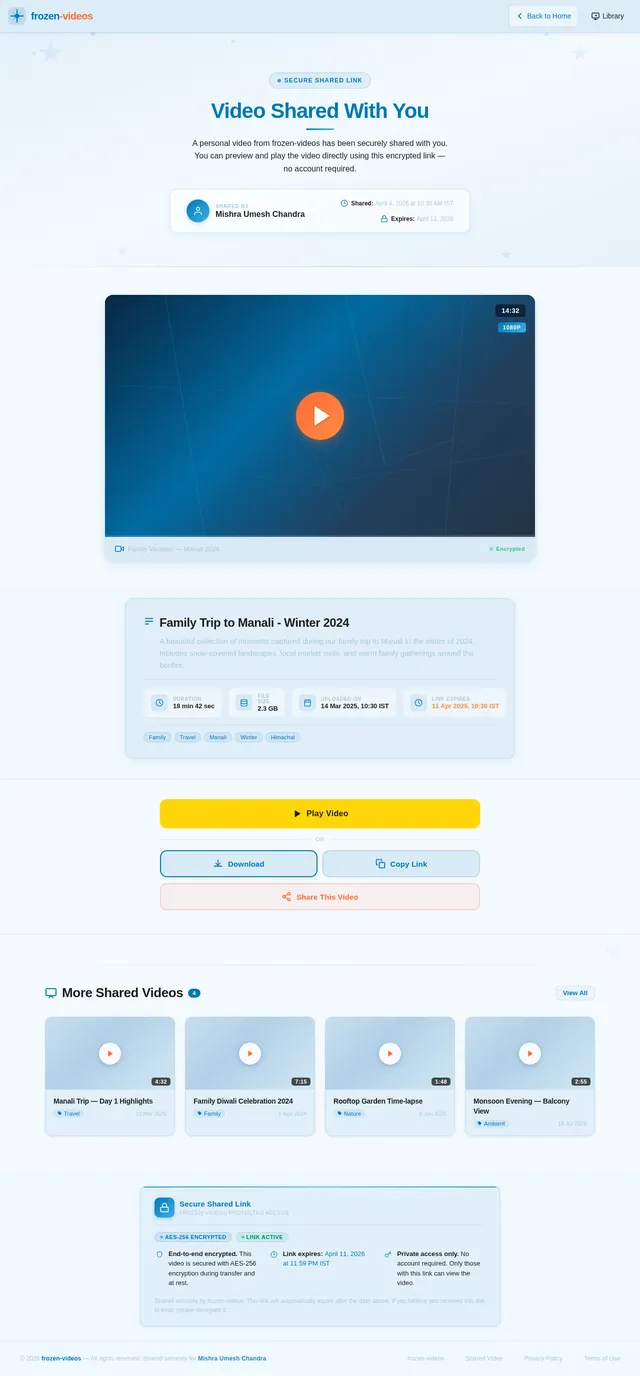
- I should be able to share videos securely with specific individuals via a link.
- I should be able to view storage usage and available space.
- I should be able to set privacy settings for individual videos or collections.
4. User Personas
Primary User: Mishra Umesh Chandra
- Role: Personal user.
- Goals: Securely store and organize personal videos for easy access and retrieval.
- Pain Points: Difficulty in organizing large video collections, lack of privacy in existing solutions, and the need for a simple, intuitive interface.
Secondary User: Trusted Individuals
- Role: Recipients of shared videos.
- Goals: Access shared videos securely without needing to create an account.
- Pain Points: Complicated sharing processes and lack of security in shared links.
5. Visuals Colors and Theme
The frozen-videos application will feature a unique and visually appealing color palette that reflects the theme of "frozen" while maintaining a modern and clean aesthetic.
Color Palette:
- Background: #F0F8FF (Alice Blue)
- Surface: #D8EAF6 (Light Ice Blue)
- Text: #1C1C1C (Charcoal Black)
- Accent: #0077B6 (Deep Arctic Blue)
- Muted Tones: #A9C9D9 (Soft Frosted Gray)
This palette evokes a sense of calm, clarity, and organization, aligning with the app's purpose of simplifying video storage.
6. Signature Design Concept
The frozen-videos homepage will feature an interactive frozen lake design. The user will see a serene, animated frozen lake as the background, with subtle ripples and cracks forming dynamically as they move their cursor across the screen. Each "crack" will reveal a video thumbnail or category, creating an engaging and memorable interaction.
Key Features:
- Dynamic Animations: The frozen lake will respond to user interactions with smooth animations, creating a tactile and immersive experience.
- Hover Effects: Hovering over a crack will display a preview of the video or category it represents.
- Smooth Transitions: Clicking on a crack will "shatter" the ice, transitioning the user to the selected video or category page.
- Thematic Consistency: The design will incorporate the icy color palette, with frosted glass effects and subtle snowflake animations.
This unique design will make the app stand out and provide an unforgettable first impression.
7. Non-Functional Requirements
- Performance: The app should load within 2 seconds for all pages.
- Scalability: The system should support up to 1TB of video storage per user.
- Security: All videos must be encrypted during upload and storage.
- Availability: The system should maintain 99.9% uptime.
- Compatibility: The app must be compatible with major browsers (Chrome, Firefox, Safari) and mobile operating systems (iOS, Android).
- Localization: The app should support Indian Standard Time (IST) and English as the default language.
8. Tech Stack
Frontend:
- React for Web
- React Native for Mobile App
Backend:
- Python
- FastAPI
Database:
- MySQL (with Alembic for migrations)
AI Models:
- GPT 5.4 for user-friendly responses.
AI Tools:
- Langchain
- Litellm for LLM Routing
Orchestration:
- Docker
- Kubernetes
9. Assumptions and Constraints
Assumptions:
- The user will primarily access the application from India.
- The app will be used for personal purposes, not commercial or public sharing.
- The user has a stable internet connection for uploading and downloading videos.
Constraints:
- Maximum storage per user is capped at 1TB.
- The app must comply with Indian data privacy regulations.
- The system must be optimized for low to moderate traffic, as it is intended for personal use.
10. Glossary
- Metadata: Data that provides information about other data, such as tags, titles, or descriptions for videos.
- Encryption: The process of converting data into a secure format to prevent unauthorized access.
- IST: Indian Standard Time, the time zone observed in India.
- Frontend: The part of the application that users interact with directly.
- Backend: The server-side logic and database management of the application.
- Orchestration: The automated configuration, management, and coordination of computer systems and software.

Secure Your Moments, Explore Frozen Memories
Your personal video vault with a touch of magic. Store, organize, and relive your most precious moments with complete privacy.
Explore Your Frozen Memories
Hover across the ice to reveal cracks and ripples — click a tile to dive into your collection
Move your cursor across the lake to see the ice respond
Your Quick Stats
Everything You Need to Manage Your Videos
From secure uploads to instant sharing, frozen-videos gives you complete control over your personal video library.
Secure Upload
Upload your videos with end-to-end encryption. Every file is protected from the moment it leaves your device to when it reaches our servers.
Easy Organization
Categorize videos into folders and collections. Add custom tags and metadata to keep your library perfectly structured.
Advanced Search
Find any video instantly using tags, titles, dates, or custom metadata. Powerful filters narrow results in seconds.
Privacy First
Set granular privacy controls for individual videos or entire collections. Your content stays private unless you decide otherwise.
Quick Preview
Preview any video without downloading. Thumbnails and playback are optimized for fast loading across all devices.
One-Click Sharing
Share videos securely with trusted individuals via encrypted links. No account required for recipients to view.
Get Started in Four Simple Steps
From sign-up to enjoying your frozen memories, the entire process is designed to be effortless and secure.
Sign Up
Create your personal account in seconds. Just an email and password to get started with your private video vault.
Upload Videos
Drag and drop your videos or browse your files. All uploads are encrypted end-to-end for maximum privacy.
Tag & Organize
Add custom tags, create collections, and categorize your memories. Find anything instantly with smart metadata.
Search & Enjoy
Use advanced search to find any video by title, tag, or date. Preview, play, and share your frozen memories anytime.
Create your personal account in seconds. Just an email and password to get started with your private video vault.
Drag and drop your videos or browse your files. All uploads are encrypted end-to-end for maximum privacy.
Add custom tags, create collections, and categorize your memories. Find anything instantly with smart metadata.
Use advanced search to find any video by title, tag, or date. Preview, play, and share your frozen memories anytime.
Your Privacy, Our Priority
Frozen Videos is built with security at its core. Your personal memories deserve the highest level of protection, and we deliver it without compromise.
End-to-End Encryption
Every video you upload is encrypted with AES-256 before it leaves your device. Your content stays private, even from us.
★ AES-256Privacy Compliance
Built with data protection standards in mind. Your personal videos are governed by strict access policies and never shared with third parties.
✓ VerifiedSecure Link Sharing
Share videos with trusted individuals through encrypted, time-limited links. Recipients can view without creating an account.
⚿ Protected"I finally have a place where my personal videos feel truly safe. The encryption and secure sharing features give me complete peace of mind."
Frozen Videos User
Plenty of Room for Your Memories
Keep every moment safe with generous storage built for your growing video collection. No more worrying about running out of space.
500 GB of 1000 GB used
500 GB available · 50% capacity utilized
Need more space? Upgrade your plan anytime from Settings to unlock additional storage tiers and keep your memories safe.
Manage Storage →Ready to Secure Your Memories?
Start preserving your personal videos with end-to-end encryption, effortless organization, and up to 1TB of private storage — all in one beautifully simple app.
Common Questions
Everything you need to know about storing and managing your personal videos.
All videos are encrypted during upload and at rest using industry-standard encryption protocols. Your data is stored securely and only accessible by you, ensuring complete privacy and protection for your personal video collection.
Each user account comes with up to 1TB of dedicated storage space. You can monitor your current usage and available capacity from the Dashboard at any time, giving you full visibility into your storage.
Absolutely! You can create custom folders and collections to categorize your videos. Additionally, you can tag each video with custom metadata like titles, descriptions, and keywords for even more granular organization.
Our advanced search lets you find videos using tags, titles, descriptions, or any custom metadata you have added. Results are displayed instantly, making it effortless to locate specific videos even in large collections.
Yes, you can generate secure sharing links for individual videos. Recipients can access shared videos without needing to create an account. You retain full control over sharing permissions and can revoke access at any time.
Frozen Videos supports all major video formats including MP4, AVI, MOV, MKV, and WebM. Videos are processed and optimized during upload to ensure smooth playback and quick previewing across all devices.
Yes, Frozen Videos is accessible via both web and mobile platforms. The application is fully responsive and optimized for iOS and Android devices, so you can access and manage your videos from anywhere.
Of course! Every video in your library supports quick previewing. Simply hover or tap on a video thumbnail to see a preview, and click to play the full video without needing to download it first.
Secure Your Moments, Explore Frozen Memories
Your personal video vault with a touch of magic. Store, organize, and relive your most precious moments with complete privacy.
Explore Your Frozen Memories
Hover across the ice to reveal cracks and ripples — click a tile to dive into your collection
Move your cursor across the lake to see the ice respond
Your Quick Stats
Everything You Need to Manage Your Videos
From secure uploads to instant sharing, frozen-videos gives you complete control over your personal video library.
Secure Upload
Upload your videos with end-to-end encryption. Every file is protected from the moment it leaves your device to when it reaches our servers.
Easy Organization
Categorize videos into folders and collections. Add custom tags and metadata to keep your library perfectly structured.
Advanced Search
Find any video instantly using tags, titles, dates, or custom metadata. Powerful filters narrow results in seconds.
Privacy First
Set granular privacy controls for individual videos or entire collections. Your content stays private unless you decide otherwise.
Quick Preview
Preview any video without downloading. Thumbnails and playback are optimized for fast loading across all devices.
One-Click Sharing
Share videos securely with trusted individuals via encrypted links. No account required for recipients to view.
Get Started in Four Simple Steps
From sign-up to enjoying your frozen memories, the entire process is designed to be effortless and secure.
Sign Up
Create your personal account in seconds. Just an email and password to get started with your private video vault.
Upload Videos
Drag and drop your videos or browse your files. All uploads are encrypted end-to-end for maximum privacy.
Tag & Organize
Add custom tags, create collections, and categorize your memories. Find anything instantly with smart metadata.
Search & Enjoy
Use advanced search to find any video by title, tag, or date. Preview, play, and share your frozen memories anytime.
Create your personal account in seconds. Just an email and password to get started with your private video vault.
Drag and drop your videos or browse your files. All uploads are encrypted end-to-end for maximum privacy.
Add custom tags, create collections, and categorize your memories. Find anything instantly with smart metadata.
Use advanced search to find any video by title, tag, or date. Preview, play, and share your frozen memories anytime.
Your Privacy, Our Priority
Frozen Videos is built with security at its core. Your personal memories deserve the highest level of protection, and we deliver it without compromise.
End-to-End Encryption
Every video you upload is encrypted with AES-256 before it leaves your device. Your content stays private, even from us.
★ AES-256Privacy Compliance
Built with data protection standards in mind. Your personal videos are governed by strict access policies and never shared with third parties.
✓ VerifiedSecure Link Sharing
Share videos with trusted individuals through encrypted, time-limited links. Recipients can view without creating an account.
⚿ Protected"I finally have a place where my personal videos feel truly safe. The encryption and secure sharing features give me complete peace of mind."
Frozen Videos User
Plenty of Room for Your Memories
Keep every moment safe with generous storage built for your growing video collection. No more worrying about running out of space.
500 GB of 1000 GB used
500 GB available · 50% capacity utilized
Need more space? Upgrade your plan anytime from Settings to unlock additional storage tiers and keep your memories safe.
Manage Storage →Ready to Secure Your Memories?
Start preserving your personal videos with end-to-end encryption, effortless organization, and up to 1TB of private storage — all in one beautifully simple app.
Common Questions
Everything you need to know about storing and managing your personal videos.
All videos are encrypted during upload and at rest using industry-standard encryption protocols. Your data is stored securely and only accessible by you, ensuring complete privacy and protection for your personal video collection.
Each user account comes with up to 1TB of dedicated storage space. You can monitor your current usage and available capacity from the Dashboard at any time, giving you full visibility into your storage.
Absolutely! You can create custom folders and collections to categorize your videos. Additionally, you can tag each video with custom metadata like titles, descriptions, and keywords for even more granular organization.
Our advanced search lets you find videos using tags, titles, descriptions, or any custom metadata you have added. Results are displayed instantly, making it effortless to locate specific videos even in large collections.
Yes, you can generate secure sharing links for individual videos. Recipients can access shared videos without needing to create an account. You retain full control over sharing permissions and can revoke access at any time.
Frozen Videos supports all major video formats including MP4, AVI, MOV, MKV, and WebM. Videos are processed and optimized during upload to ensure smooth playback and quick previewing across all devices.
Yes, Frozen Videos is accessible via both web and mobile platforms. The application is fully responsive and optimized for iOS and Android devices, so you can access and manage your videos from anywhere.
Of course! Every video in your library supports quick previewing. Simply hover or tap on a video thumbnail to see a preview, and click to play the full video without needing to download it first.
No comments yet. Be the first!