frozen-safety
 Suba Shri
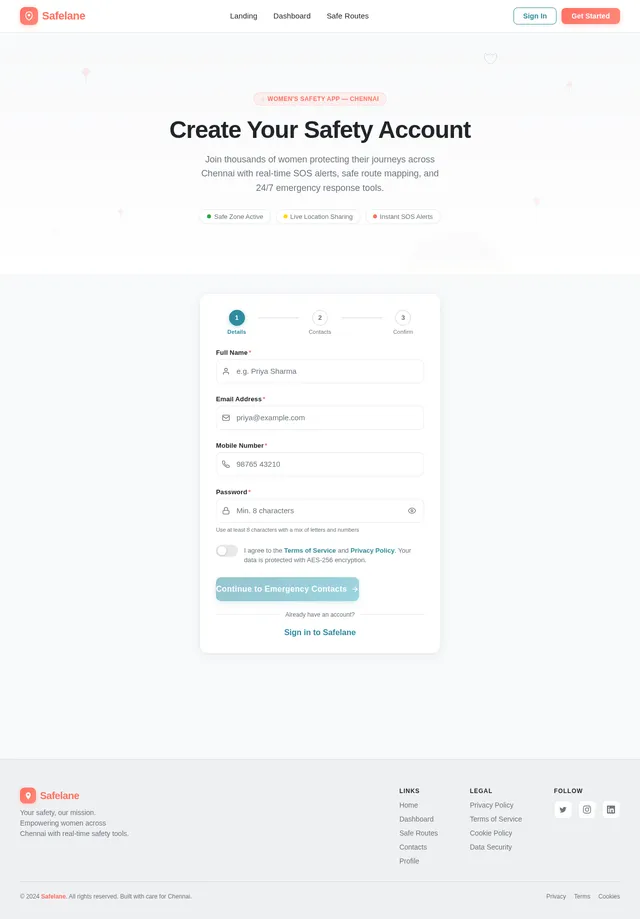
You are an expert full-stack mobile app developer. Build a professional, production-level mobile application called "Safelane" focused on women's safety. TECH STACK REQUIREMENTS: - Frontend: Mobile UI (Flutter or React Native preferred for modern UI) - Backend: Python (Flask or Django REST API) - System-level / performance modules: C language integration where applicable (for SOS trigger optimization or low-level features) - Database: SQLite or PostgreSQL UI/UX REQUIREMENTS: - The login screen must EXACTLY match this structure: - Title: "Welcome Back" - Subtitle: "Login to stay protected" - Fields: Email Address, Password - Button: Login (rounded, bold, modern) - Option: "Don't have an account? Sign Up" - Divider: "OR" - Button: "Continue with Google" - Soft pastel background with rounded UI elements (minimalist, clean design) - After login, dashboard should contain 4 main cards (grid layout): 1. Fake Call 2. Safe Routes 3. Contacts 4. Profile CORE FEATURES: 1. 🚨 SOS BUTTON (MOST IMPORTANT) - Floating or fixed emergency button - On click: - Sends live location to saved emergency contacts - Triggers alert message (SMS simulation or API) - Optional loud alarm sound - Optimize SOS trigger using C module for faster execution 2. 🗺️ SAFE ROUTES (Chennai-based) - Integrate map functionality (Google Maps API or OpenStreetMap) - Show safe routes within Chennai (example routes like: - T. Nagar → Anna Nagar - Velachery → Guindy ) - Highlight: - Well-lit roads - Police stations nearby - Hospitals nearby - Simulate "Rapido-like" route UI 3. 📞 CONTACTS MODULE - Allow user to: - Save emergency contacts - Add NGOs and helplines - Preload important contacts: - Women's Helpline India: 1091 - Police: 100 - Ambulance: 102 - Option to quickly call or message 4. 📲 FAKE CALL FEATURE - Simulate incoming call screen - User can schedule or trigger instantly - Custom caller name option 5. 👤 PROFILE - User details (name, email, phone) - Edit profile option BACKEND FEATURES: - Secure login & signup (JWT authentication) - Store user data and contacts - API for SOS alerts and route data EXTRA FEATURES: - Clean animations and transitions - Error handling - Responsive design - Modular, well-commented code OUTPUT REQUIREMENTS: - Provide full project structure - Separate frontend, backend, and C modules - Include setup instructions - Include API endpoints - Make it beginner-friendly but professional - Ensure code is clean, readable, and production-ready GOAL: Build a polished, modern, real-world usable women's safety app that looks professional and functions smoothly.

Comments (0)
Sign in to leave a comment
System Requirements
System Requirements Document (SRD)
Project Name: frozen-safety
1. Introduction
The frozen-safety project is a professional, production-level mobile application designed to enhance women's safety. The app, named Safelane, focuses on providing real-time assistance, secure navigation, and emergency response features tailored to the needs of users in Chennai, India. This document outlines the system requirements for the development of the application, ensuring a robust, user-friendly, and scalable solution.
The app aims to empower women by offering features such as an SOS button, safe route mapping, emergency contacts, and a fake call feature. It is designed with a modern, minimalist UI/UX and leverages advanced technologies to ensure reliability and performance.
2. System Overview
The frozen-safety system is a mobile application that integrates multiple safety features into a single platform. It is built using a cross-platform framework (React Native) to ensure compatibility with both Android and iOS devices. The backend is powered by Python (Flask) for lightweight and efficient API handling, with PostgreSQL as the database for structured data storage.
The system's core functionality revolves around:
- Emergency Response: A highly optimized SOS button that sends alerts and live location to emergency contacts.
- Safe Navigation: Route mapping within Chennai, highlighting well-lit roads, police stations, and hospitals.
- Personal Safety Tools: Features like fake calls and emergency contact management.
The app is designed to be intuitive, responsive, and secure, with a focus on user privacy and data protection.
3. Functional Requirements
User Stories:
- As a User, I should be able to press an SOS button that sends my live location and an alert message to my emergency contacts.
- As a User, I should be able to view safe routes within Chennai, including details like well-lit roads, nearby police stations, and hospitals.
- As a User, I should be able to save, edit, and delete emergency contacts.
- As a User, I should be able to access preloaded emergency helpline numbers (e.g., Women’s Helpline, Police, Ambulance).
- As a User, I should be able to simulate an incoming call with a customizable caller name.
- As a User, I should be able to view and edit my profile details, including name, email, and phone number.
- As a User, I should be able to log in securely using email and password or via Google authentication.
- As a User, I should experience smooth animations and transitions throughout the app.
4. User Personas
1. Primary User:
- Description: Women seeking a safety-focused mobile application.
- Goals: Quick access to emergency tools, safe navigation, and personal safety features.
- Technical Proficiency: Moderate (familiar with mobile apps).
2. Admin:
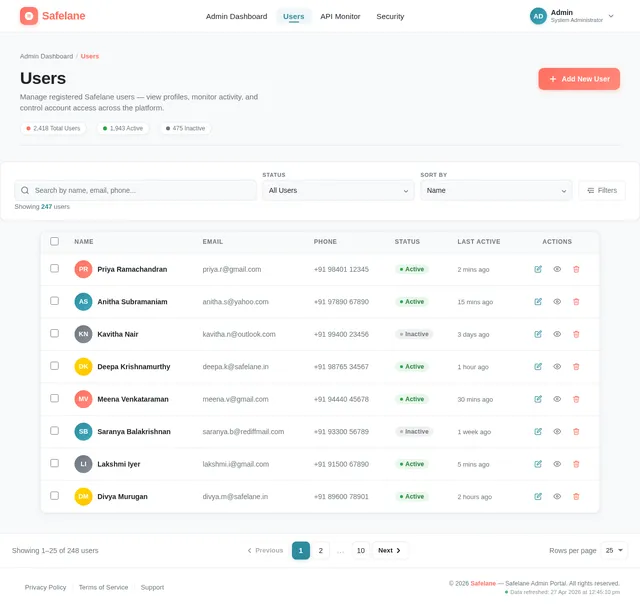
- Description: Backend administrator managing user data and system performance.
- Goals: Ensure system reliability, manage APIs, and monitor data security.
- Technical Proficiency: High (developer-level expertise).
5. Visuals Colors and Theme
Color Palette:
The app will use a calming yet empowering color scheme to evoke trust and safety.
- Background:
#F8F9FA(Soft Light Gray) - Surface:
#FFFFFF(Pure White) - Text:
#212529(Dark Charcoal) - Accent:
#FF6F61(Empowering Coral Red) - Muted Tones:
#6C757D(Muted Gray)
6. Signature Design Concept
The Safelane app will feature a "Living Safety Dashboard" as its signature design concept.
Concept Details:
- Dynamic Dashboard: The home screen will feature a real-time safety meter that changes based on the user's location. For example:
- Green: Safe area (well-lit, nearby police stations).
- Yellow: Moderate safety (less lighting, fewer resources).
- Red: High-risk area (poor lighting, no nearby resources).
- Interactive Map: The map on the dashboard will display safe routes with animated markers for police stations and hospitals.
- Micro-Interactions:
- The SOS button will "pulse" gently to draw attention.
- Cards (Fake Call, Safe Routes, etc.) will have a "flip" animation when selected.
- Transitions: Smooth page transitions with fade-in effects and subtle motion.
This concept ensures the app is visually engaging while keeping safety at the forefront.
7. Non-Functional Requirements
-
Performance:
- SOS trigger must execute within 1 second.
- Map rendering should not exceed 2 seconds.
-
Scalability:
- Backend should support up to 10,000 concurrent users.
-
Security:
- User data must be encrypted (AES-256).
- APIs must use HTTPS for secure communication.
-
Usability:
- The app must be intuitive and accessible to users with moderate technical proficiency.
-
Localization:
- Support for English and Tamil languages.
8. Tech Stack
Frontend:
- React Native
Backend:
- Python (Flask)
Database:
- PostgreSQL
Performance Modules:
- C language for SOS trigger optimization
APIs:
- Google Maps API for route mapping
Deployment:
- Docker and Kubernetes for containerization and orchestration
9. Assumptions and Constraints
Assumptions:
- Users will have internet access for most features (e.g., maps, SOS alerts).
- The app will initially target Android and iOS platforms.
Constraints:
- Localization is limited to Chennai in the initial phase.
- Real-time map data depends on the availability of Google Maps API.
10. Glossary
- SOS Button: A button that triggers an emergency alert and shares the user's location.
- Safe Routes: Predefined routes within Chennai that prioritize safety.
- Fake Call: A feature that simulates an incoming call to help users exit uncomfortable situations.
- JWT Authentication: JSON Web Token, a secure method for user authentication.
- AES-256: Advanced Encryption Standard, a secure encryption algorithm.
This document provides a comprehensive roadmap for the frozen-safety project. Suba, let me know if you'd like to refine or expand any section further!

Real-Time Safety
at Your Fingertips
Empower yourself with Safelane: SOS alerts, safe routes, and emergency contacts in one app. Stay protected, stay confident.
10K+
Women Empowered
2
Languages Available
256-bit
Bank-Level Security
Instant
Real-Time Alerts
Your Safety, Live and Breathing
The Living Safety Dashboard monitors your surroundings in real time, displaying a color-coded safety meter that shifts from green to yellow to red based on your current location. Know instantly whether you're in a safe zone near well-lit streets and police stations, or approaching an area that requires extra caution.
Everything You Need to Stay Safe
Safelane combines powerful safety tools into one intuitive app, designed to keep you protected wherever you go.
SOS Button
One tap sends your live location and emergency alert to all your saved contacts instantly. Help is always within reach.
Safe Routes
Navigate through well-lit roads near police stations and hospitals. Real-time route mapping keeps you on the safest path in Chennai.
Fake Call
Simulate a realistic incoming call with a customizable caller name to safely exit uncomfortable or threatening situations.
Emergency Contacts
Save and manage your trusted contacts and access preloaded helpline numbers including Women's Helpline, Police, and Ambulance.
How It Works
Get Started in 3 Simple Steps
Safelane is designed to be set up quickly so you can focus on what matters — feeling safe, wherever you go.
Sign Up
Create your account in 2 minutes. Just your name, email, and a password to get started.
Add Contacts
Save your emergency contacts so Safelane knows exactly who to alert when you need help.
Stay Safe
Access SOS alerts, safe routes, fake calls, and more — all from your safety dashboard.
Know Your Safety Level in Real Time
Safelane continuously monitors your surroundings and gives you an instant, color-coded safety assessment wherever you go.
Auto-cycling — tap to explore
Near Anna Nagar Police Station, Chennai — well-lit area with active patrols.
Share Your Route
Let your emergency contacts know your planned route for added peace of mind.
Stay Aware
Even in safe areas, keep your phone accessible and stay on well-traveled paths.
Update Contacts
Regularly check that your emergency contacts are up to date in Safelane.
Trusted by Thousands of Women
Real stories from women who feel safer every day with Safelane
Ready to Take Control of Your Safety?
Join thousands of women who are already using Safelane to navigate safely, stay connected with loved ones, and feel empowered every day.
Frequently Asked Questions
Everything you need to know about Safelane. Can't find what you're looking for? Reach out to our support team.
Still have questions? Contact our support team and we'll get back to you within 24 hours.
No comments yet. Be the first!