frozen-make
 Ashray Mangal
make a 3d webflow website for a sofa factory

Comments (0)
Sign in to leave a comment
System Requirements
frozen-make System Requirements Document
1. Introduction
The project "frozen-make" aims to develop a 3D product showcase for a sofa factory. The primary users of this system are wholesalers and architects who are interested in bulk purchases and design integration.
2. System Overview
The "frozen-make" project is designed to enhance user experience by providing interactive 3D views of sofas. This system will allow users to select a product and view it in a 3D interface, offering a detailed visualization that aids in decision-making for bulk purchases and design purposes.
2a. Product Interpretation and Delivery Boundary
-
Domain Descriptors:
- 3D Product Visualization: Enhance user experience with interactive 3D views of sofas. (Confidence: 0.9)
-
What is being built: A 3D product showcase specifically for a sofa factory, focusing on interactive visualization rather than generic e-commerce features or user account management.
-
First-party Custom Pages:
- 3D Product Showcase: A custom page that serves as the public entry surface for users to interact with 3D product views.
-
Access: Application-owned, with public entry for users.
-
Behavior Contracts:
- 3D Product Viewing:
- Actor: Wholesalers and Architects
- Trigger: User selects a product to view in 3D
- Outcome: Interactive 3D view of the selected product
- Failure Outcome: 3D view fails to load
- Provenance: Explicit
- 3D Product Viewing:
2c. Page Content and Component Coverage
- 3D Product Showcase Page:
- Information and Actions:
- Product selection interface
- Interactive 3D viewer
- Product details and specifications
- Domain Entities:
- Sofa models
- 3D visualization components
- Component Responsibilities:
- Render interactive 3D models
- Provide product information and specifications
- States:
- Loading state for 3D models
- Error state if 3D view fails to load
- Success state with interactive controls for 3D navigation
- Information and Actions:
3. Functional Requirements as Story Points
- As a wholesaler or architect, I should be able to select a sofa product to view it in a 3D interactive interface.
explicit - As a wholesaler or architect, I should be able to access detailed product specifications alongside the 3D view.
required_inference - As a wholesaler or architect, I should receive feedback if the 3D view fails to load.
required_inference
4. User Personas
- Wholesalers and Architects: Primary users interested in bulk purchases and design integration, utilizing the 3D product showcase to make informed decisions.
5. Core User Flows
-
Accessing the 3D Product Showcase:
- User navigates to the 3D product showcase page.
- User selects a sofa product from the list.
- The system loads the interactive 3D view of the selected product.
- User interacts with the 3D model to view different angles and details.
-
Handling 3D View Errors:
- If the 3D view fails to load, the system displays an error message.
- User can retry loading the 3D view or select a different product.
6. Visuals Colors and Theme
- Primary: #2A9D8F (Dominant brand color)
- Primary Light: #E9C46A (Lighter tint for hover states)
- Secondary: #264653 (Supporting color for contrast)
- Accent: #F4A261 (Emphasis color for CTAs and active states)
- Highlight: #E76F51 (Color for hover states and notifications)
- Background: #F1FAEE (Page background color)
- Surface: #FFFFFF (Card/panel background)
- Text: #1D3557 (Primary text color)
- Text Muted: #A8DADC (Softer color for secondary text)
- Border: #457B9D (Subtle border color)
7. Signature Design Concept
The 3D Product Showcase page will feature a clean, modern design with a focus on the interactive 3D viewer. The layout will be intuitive, allowing users to easily select products and view them in 3D. The design will use the brand's color palette to create a cohesive and engaging user experience. The 3D viewer will be the focal point, with product details and specifications accessible alongside it.
8. Interaction Model & Motion Direction
- Interaction Model: Animated
- The 3D Product Showcase page will feature moderate scroll-triggered reveals and hover transitions to enhance user engagement.
- Interactive elements will use spring physics for a polished feel.
9. Non-Functional Requirements
No additional non-functional requirements were inferred beyond the source-stated behavior and interaction needs.
10. Tech Stack
- Frontend: React for Web
- Backend: Python with FastAPI
- Database: MySQL or MariaDB, using Alembic for migrations
- Local Orchestration: Docker and docker-compose
11. Assumptions and Constraints
- The system will not include generic e-commerce features or user account management.
- The primary focus is on providing an interactive 3D visualization experience.
12. Glossary
- 3D Product Showcase: A page where users can view products in a 3D interactive format.
- Wholesalers and Architects: Primary users of the system, interested in bulk purchases and design integration.
- Interactive 3D Viewer: A component that allows users to view and interact with 3D models of products.
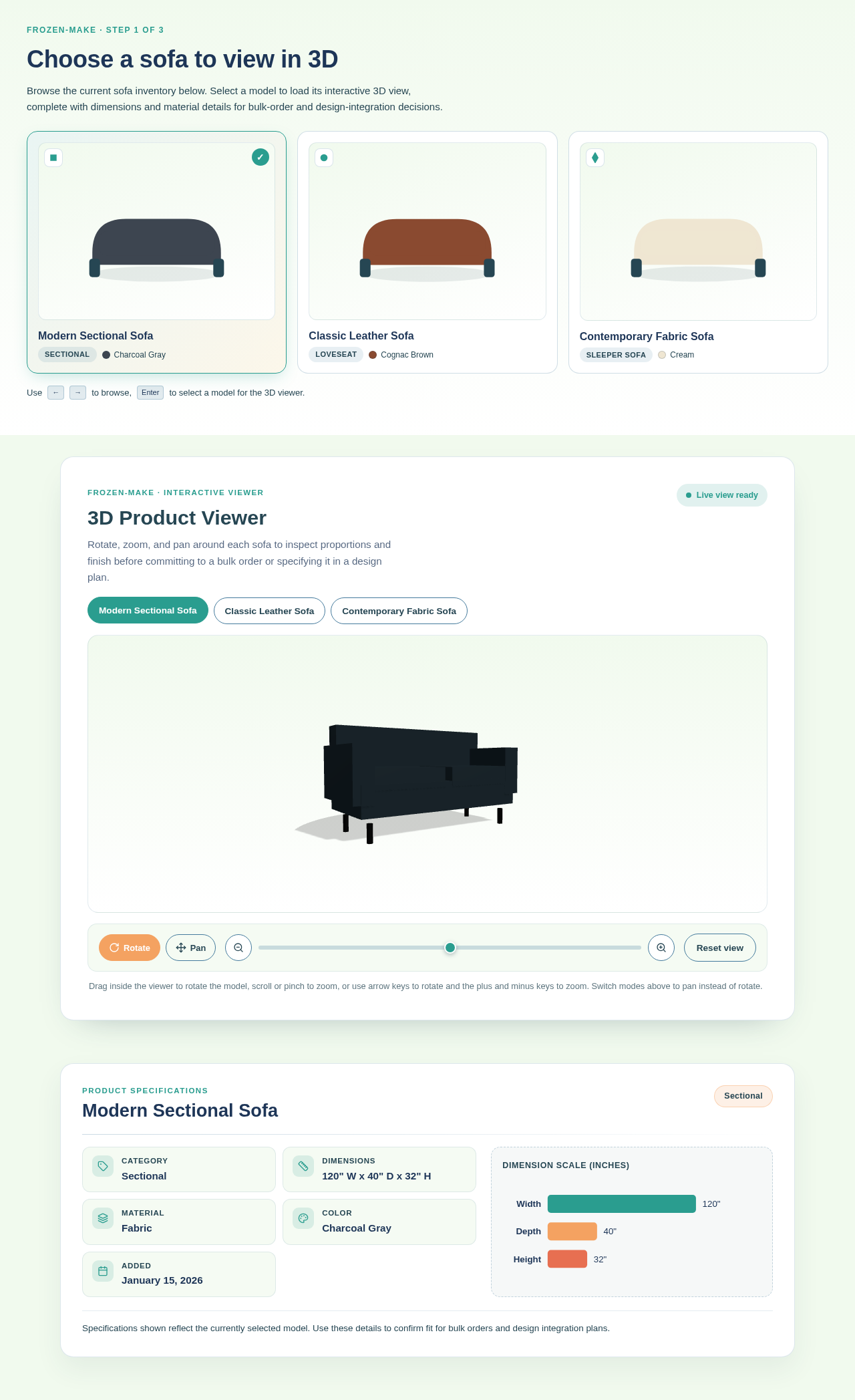
Choose a sofa to view in 3D
Browse the current sofa inventory below. Select a model to load its interactive 3D view, complete with dimensions and material details for bulk-order and design-integration decisions.
Modern Sectional Sofa
Classic Leather Sofa
Contemporary Fabric Sofa
3D Product Viewer
Rotate, zoom, and pan around each sofa to inspect proportions and finish before committing to a bulk order or specifying it in a design plan.
Interactive 3D model of Modern Sectional Sofa is ready. Drag to rotate, scroll or pinch to zoom, switch to pan mode to move the view, or use arrow keys and plus and minus keys.
Drag inside the viewer to rotate the model, scroll or pinch to zoom, or use arrow keys to rotate and the plus and minus keys to zoom. Switch modes above to pan instead of rotate.
Modern Sectional Sofa
Specifications shown reflect the currently selected model. Use these details to confirm fit for bulk orders and design integration plans.
Choose a sofa to view in 3D
Browse the current sofa inventory below. Select a model to load its interactive 3D view, complete with dimensions and material details for bulk-order and design-integration decisions.
Modern Sectional Sofa
Classic Leather Sofa
Contemporary Fabric Sofa
3D Product Viewer
Rotate, zoom, and pan around each sofa to inspect proportions and finish before committing to a bulk order or specifying it in a design plan.
Interactive 3D model of Modern Sectional Sofa is ready. Drag to rotate, scroll or pinch to zoom, switch to pan mode to move the view, or use arrow keys and plus and minus keys.
Drag inside the viewer to rotate the model, scroll or pinch to zoom, or use arrow keys to rotate and the plus and minus keys to zoom. Switch modes above to pan instead of rotate.
Modern Sectional Sofa
Specifications shown reflect the currently selected model. Use these details to confirm fit for bulk orders and design integration plans.
No comments yet. Be the first!