frozen-lunar
做一个待办事项网页

Comments (0)
Sign in to leave a comment
System Requirements
System Requirements Document for frozen-lunar
1. Introduction
frozen-lunar is a single-page personal to-do web application. Its product intent is narrow and complete: an everyday user opens one page, adds tasks, marks tasks complete, and deletes tasks, while the list persists in the browser on that device. The interface uses a light theme throughout. There is no login and no backend.
The audience is the individual personal user — someone who wants a light, calm, local-only tool for keeping track of what needs doing. The product is domestic and tactile rather than corporate: getting things done should feel like arranging objects on a warm wooden table, not operating a dashboard.
The entire product is one page. All interaction — adding, completing, deleting, filtering, and reading the running counts — happens on that page, anonymously, with no account and no server.
2. System Overview
frozen-lunar is delivered as a single custom web page, 待办事项单页, which is also the anonymous public entry surface. A visitor lands directly on the working to-do list; there is no gate, no sign-in, and no separate landing screen.
Actors
- 待办事项使用者 (To-do user) — the sole active human persona. They own the list on their device and perform every action: adding, completing, deleting, and filtering tasks.
- Browser local storage — a non-persona system store. It holds the task list on the user's device and is the only persistence layer.
Accepted behavior
- Add a task with a title.
- Mark a task complete (and un-complete it).
- Delete a task.
- View the list, with open / done / total counts.
- Filter the list by All / Open / Done.
- Light theme throughout.
- Data stored in browser local storage; no login; no backend.
Ownership and exclusions
All product behavior is owned by the single page. There is no authentication surface, no account management, no server API, no database, and no multi-device sync. These are explicit exclusions, not deferred features.
2a. Product Interpretation and Delivery Boundary
frozen-lunar is a local-only, anonymous, single-page tool. The user's data lives in their own browser; nothing is transmitted anywhere. Because there is no login and no backend, there is no identity establishment step, no session, and no protected destination — the one page is fully usable on first visit.
The delivery boundary is deliberately tight:
- Current: one page, add / complete / delete, light theme, browser-local persistence, client-side filtering and counts.
- Explicitly excluded: login, accounts, backend services, databases, remote sync, sharing, collaboration, notifications, and any second page or route.
The design language is warm modernism in the spirit of Charles & Ray Eames: a cream ground, warm paper surfaces, walnut hairlines, teal as the primary action and completed-state colour, and tomato as the single hot accent. The interface itself is the main image, treated like a mid-century printed form.
2b. Source Content Inventory
Not applicable — no reference directive supplies a content_source.
2c. Page Content and Component Coverage
待办事项单页
The single page of the product, and the anonymous entry surface. It is a single centred column, max-width 760px, on a cream ground (#F4EDE1), with a wide 96px top margin on desktop and a 24px margin at 375px.
Information and state
- The current task list, each task carrying a title, a completion state, and a creation timestamp.
- Running counts: Open, Done, Total.
- The active filter: All, Open, or Done.
- Persistence state: the list is read from and written to browser local storage.
Primary actions
- Add a task — type a title into the add bar and commit it (the tomato "Add a task" pill / submit). The new row appears at the top of the list.
- Toggle completion — click the checkbox on a task row to mark it complete or return it to open.
- Delete a task — activate the delete glyph on a task row to remove it.
Supporting actions
- Filter — switch between All / Open / Done via pill chips flush right on the list-header rule.
- Read counts — the three-panel stat strip reflects the current list at all times.
Domain entities
- Task —
id,title,completed(boolean),createdAt(timestamp). Persisted as an ordered collection in local storage.
Component responsibilities
- Hero band — full-width cream band (not a card): a small teal three-arc geometric motif above an oversized flush-left Jost headline "Today, arranged." at
clamp(44px, 9vw, 112px), with a single tomato pill "Add a task" pinned beneath the headline at the left edge. On desktop, a ruled stat panel stack sits to the right. - Stat strip — three ruled warm-paper panels (Open / Done / Total) with 12px uppercase Jost labels and large Jost numerals, separated by 1px walnut rules, each with a simple pictogram.
- Add bar — warm paper (#FFFBF4) with a 14px radius and 1px walnut hairline; a text input for the task title and the tomato add control. Pinned above the list.
- List header — a rule carrying the list label on the left and the filter chips flush right.
- Filter chips — pill toggles (999px radius); the active chip is filled teal, the others outlined walnut.
- Task list — ruled printed-form rows, each with a square 8px-radius checkbox, a Fraunces title, a small right-aligned walnut timestamp, and a delete glyph revealed on hover/focus.
- Completed row treatment — Fraunces italic title with a hand-drawn-feeling teal strikethrough that draws left to right on toggle.
States
- Loading — the page reads local storage on mount; this is effectively instantaneous. If storage is unreadable, the page renders an empty list rather than failing.
- Empty — when there are no tasks (or the active filter matches none), the list area shows a calm empty message in Fraunces; the stat strip shows zeros; the add bar remains fully usable.
- Success — a new row slides down 8px and fades in over 220ms; a checkbox draws its teal tick over 180ms; a delete collapses the row height over 200ms; a filter change crossfades the list over 160ms.
- Error / recovery — if a local-storage write fails (for example, storage is full or blocked), the in-memory list still reflects the user's action and the page surfaces a brief, non-blocking notice that changes may not be saved on this device. The user can continue working; the next successful write clears the notice.
- Reduced motion — with
prefers-reduced-motion, all transitions are removed and rows are static; the hero's 6px scroll drift is disabled.
3. Functional Requirements
FR-1 — Single-page delivery (explicit) As a 待办事项使用者, I should reach the entire product on one page, so that I never navigate away to do my work.
- Trigger: opening the app.
- Observable result: the to-do list, add bar, stat strip, and filters are all present on one page; there are no other routes or pages.
- Acceptance: no navigation control leads to a second page; all capabilities are reachable from the single page.
FR-2 — Add a task (explicit) As a 待办事项使用者, I should add a task by entering a title, so that new work is recorded in my list.
- Input: a non-empty task title typed into the add bar.
- Observable result: a new task row appears at the top of the list with the entered title, an open (incomplete) state, and a creation timestamp; the Open and Total counts increase by one.
- Failure/recovery: an empty or whitespace-only title is not accepted — the add control does not create a task and the input retains focus. If the local-storage write fails, the row still appears and a non-blocking "may not be saved" notice is shown.
- Continuation: the input clears and is ready for the next task.
FR-3 — Mark a task complete (explicit) As a 待办事项使用者, I should mark a task complete, so that my list reflects what is done.
- Trigger: activating the checkbox on an open task row.
- Observable result: the task's completed state becomes true; its title switches to Fraunces italic with a teal strikethrough drawn left to right; the Open count decreases and the Done count increases.
- Recovery: activating the checkbox again returns the task to open, removing the strikethrough and reversing the counts.
- Continuation: the change is persisted to local storage; if the write fails, the visual state still updates and the non-blocking notice appears.
FR-4 — Delete a task (explicit) As a 待办事项使用者, I should delete a task, so that items I no longer need leave my list.
- Trigger: activating the delete glyph on a task row (revealed on hover/focus).
- Observable result: the row collapses over 200ms and is removed; the Total count decreases, and the Open or Done count decreases according to the task's state.
- Recovery: if the local-storage write fails, the row is still removed from view and the non-blocking notice appears.
- Continuation: the remaining list stays in order and fully usable.
FR-5 — Light theme (explicit) As a 待办事项使用者, I should see the product in a light theme, so that it feels calm and readable.
- Observable result: the page renders on the cream ground with warm paper surfaces and dark ink text at all times; there is no dark mode and no theme toggle.
FR-6 — Browser-local persistence (explicit) As a 待办事项使用者, I should have my list saved in my browser, so that it is still there when I return on the same device.
- Trigger: any add, complete, or delete action.
- Observable result: the current task list is written to browser local storage; on the next visit to the page, the stored list is restored with each task's title, completion state, and timestamp intact.
- Failure/recovery: if storage is unavailable or a write fails, the in-memory list remains authoritative for the session and a non-blocking notice explains that changes may not be saved on this device.
FR-7 — No login, no backend (explicit) As a 待办事项使用者, I should use the product without signing in, so that I can start immediately.
- Observable result: the page is fully usable on first visit with no account, no sign-in, no session, and no server request for task data; all task data stays in the browser.
FR-8 — Running counts (required_inference) As a 待办事项使用者, I should see how many tasks are open, done, and total, so that I can read my progress at a glance.
- Observable result: the three-panel stat strip always reflects the current list; it updates immediately on add, complete, un-complete, and delete; with an empty list it shows zeros.
- Rationale: the accepted list lifecycle produces open/done/total state that the user must be able to observe; the counts are derived from the same task collection and introduce no new data operation.
FR-9 — Filter the list (required_inference) As a 待办事项使用者, I should filter the list to All, Open, or Done, so that I can focus on what still needs doing.
- Trigger: selecting a filter chip.
- Observable result: the list shows only tasks matching the active filter (All shows everything; Open shows incomplete tasks; Done shows completed tasks); the active chip is filled teal and the others outlined walnut; the list crossfades over 160ms.
- Failure/recovery: if the active filter matches no tasks, the list area shows the empty message while the stat strip continues to show the true totals.
- Continuation: the selected filter persists for the session; the user can switch back to All at any time.
- Rationale: the accepted list lifecycle creates open and done states that the user must be able to act on and review; filtering is the minimal observable view over that same state and adds no new data operation.
4. User Personas
待办事项使用者 (To-do user)
Product context. An everyday individual keeping a personal list of things to do. They open frozen-lunar on their own device, in their own browser, without an account. The tool is theirs alone: nothing is shared, nothing syncs, nothing is sent anywhere.
Primary goal. Keep a short, honest list of what needs doing and see it settle as items get done — with as little ceremony as possible.
Distinct accepted responsibilities.
- Add tasks by typing a title and committing it.
- Mark tasks complete, and return them to open if they were marked by mistake.
- Delete tasks that no longer belong on the list.
- Read the open / done / total counts to gauge progress.
- Filter the list to All, Open, or Done to focus on what remains.
Relevant inputs and decisions.
- The task title (free text, non-empty).
- The completion decision for each task (checkbox toggle).
- The removal decision for each task (delete glyph).
- The view decision (which filter is active).
Interactions with other accepted participants. None. The persona is the only human actor; the browser's local storage is a system store that silently holds and restores their list. There is no counterparty, recipient, or approver.
Observable success. The list on screen matches what the user intends to do: new items appear at the top, completed items read as struck-through and italic, deleted items are gone, the counts agree with the list, and the same list is still there the next time they open the page on that device.
Constraints carried from source. No login, no backend, light theme, single page, data stored in the browser. The persona never encounters an account, a permission, or a server error.
5. Core User Flows
Flow A — First visit and adding a task
- The 待办事项使用者 opens frozen-lunar in their browser. The single page
待办事项单页loads directly — no sign-in, no gate. - The page reads browser local storage. On a first visit there is nothing stored, so the list area shows the calm empty message and the stat strip shows Open 0 / Done 0 / Total 0.
- The user types a task title into the add bar and commits it with the tomato "Add a task" pill.
- The new row slides down 8px and fades in at the top of the list over 220ms, showing the title, an unchecked square checkbox, and a small walnut timestamp. The Open and Total counts each increase by one.
- The input clears and is ready for the next task. The user repeats step 3 for as many tasks as they need.
- Failure/recovery: if the user submits an empty or whitespace-only title, no task is created and the input keeps focus. If the local-storage write fails, the row still appears and a brief non-blocking notice says changes may not be saved on this device; the user continues working, and the next successful write clears the notice.
- Continuation: the user moves on to completing or deleting tasks, or leaves the page — the list is saved in the browser.
Flow B — Completing a task (and undoing it)
- The 待办事项使用者 is on
待办事项单页with at least one open task visible. - They click the checkbox on a task row.
- The checkbox draws a teal tick over 180ms; the title switches to Fraunces italic with a teal strikethrough drawn left to right; the Open count decreases by one and the Done count increases by one.
- The change is written to local storage.
- Recovery: if the user marked the wrong task, they click the checkbox again. The tick and strikethrough are removed, the title returns to upright Fraunces, and the counts reverse.
- Continuation: the user continues down the list, or switches to the Done filter to review what is finished.
Flow C — Deleting a task
- The 待办事项使用者 is on
待办事项单页and hovers over (or focuses) a task row. - The delete glyph appears at the row's edge.
- They activate the delete glyph.
- The row collapses over 200ms and is removed from the list. The Total count decreases by one, and the Open or Done count decreases according to the task's state.
- Failure/recovery: if the local-storage write fails, the row is still removed from view and the non-blocking "may not be saved" notice appears.
- Continuation: the remaining rows stay in order and fully usable; the user can keep adding, completing, or deleting.
Flow D — Filtering the list
- The 待办事项使用者 is on
待办事项单页with a mixed list of open and done tasks. - They select the Open chip on the list-header rule. The chip fills teal, the others become walnut outlines, and the list crossfades over 160ms to show only incomplete tasks.
- They work through the open items, completing them one by one (Flow B). As each is completed, it leaves the Open view and the counts update.
- They select Done to review what is finished, then All to see the whole list again.
- Failure/recovery: if the active filter matches no tasks — for example, Done with nothing completed — the list area shows the empty message while the stat strip continues to show the true totals. The user switches back to All or Open to continue.
- Continuation: the selected filter holds for the session; the user can change it at any time.
Flow E — Returning to the list
- The 待办事项使用者 opens frozen-lunar again on the same device and browser.
- The page reads local storage and restores the saved list, with each task's title, completion state, and timestamp intact.
- The stat strip shows the restored Open / Done / Total counts; the list renders in its saved order.
- Failure/recovery: if storage is unreadable, the page renders an empty list rather than failing, and the user can begin adding tasks again.
- Continuation: the user picks up where they left off — adding, completing, deleting, or filtering.
6. Visuals, Colors and Theme
Muse and headline. Charles & Ray Eames — "Today, arranged." Warm modernism for a list that feels like a well-made object: warm mid-century materials and joyful colour inside strict order, kept light as explicitly requested.
Mode. Light only. There is no dark mode and no theme toggle.
Colour tokens (light mode)
| Role | Hex | Use |
|---|---|---|
| Background | #F4EDE1 | Cream ground carrying the page |
| Surface | #FFFBF4 | Warm paper for cards, add bar, stat panels |
| Text (ink) | #2B2620 | All text |
| Primary | #1F5C55 | Primary action, completed-state colour, active filter chip, teal tick and strikethrough |
| Accent | #D9502E | Single hot accent: the add button and destructive/urgent moments |
| Muted | #8A7E6D | Secondary text |
| Mustard | #E0A32E | Small category chips and thin underlines only |
| Walnut | #6E4B2A | Hairlines, rules, timestamps, outlined chips |
Proportion roughly 70% cream, 20% paper, 10% colour. Cards and the add bar sit on warm paper with a 1px walnut hairline.
Typography
- Headings: Jost at 600–700 for the wordmark, counters, and section labels; tight tracking (-0.02em); sentence case with generous size contrast. A single oversized display line in Jost 500 at
clamp(44px, 9vw, 112px)anchors the hero. - Body and task text: Fraunces at 400/500, 17–20px with 1.55 line-height, giving the list a warm printed quality. Completed tasks switch to Fraunces italic with a strikethrough in muted walnut.
- Scale: 1.333 modular — 112 / 72 / 44 / 28 / 20 / 17 / 14. Mobile display starts at 44px; desktop caps at 112px. Labels are 12px uppercase Jost with 0.14em tracking.
Shape language. Organic-modern: soft 14px radii on cards and the add bar, 999px pill for the add button and filter chips, 8px on checkboxes. Sections are separated by 1px walnut rules and thin mustard underlines; a few offset rounded rectangles behind the hero echo Eames modular panels. No glass, no blobs, no drop shadows beyond a 2px warm-paper offset.
Layout. Single column, max-width 760px, centred on the cream ground with a wide 96px top margin on desktop. Hero: a stacked display line over a full-width cream band with a small teal rule. Below it a horizontal stat strip (Open / Done / Total) as three ruled panels, then the add bar pinned above the list, then the task list as ruled rows with a checkbox, task title, small walnut timestamp, and a hover-revealed delete glyph. Filter chips (All / Open / Done) sit flush right on the same rule as the list header. Everything collapses to a single 24px-margin column at 375px.
Imagery. No stock photography. Warm flat illustration only: a small hand-drawn Eames-style geometric motif (stacked arcs and a dot grid) in teal and mustard beside the hero, a thin mustard rule pattern as a section divider, and simple pictograms for the stat panels. The interface itself is the main image, treated like a mid-century printed form.
Readability guarantee. Headlines, wordmarks, labels, numbers, cards' text, and controls stay entirely inside the viewport and their container at 375px, 768px, and 1280px, wrapping or scaling (for example font-size: clamp(...) with its mobile size) to fit. No other element covers any part of them. Decoration and motion may be cropped, bled, or overlapped as the direction asks, provided they cover no readable text or control.
Avoid. Bootstrap blue or indigo on white; glassmorphism, blur panels, gradient blobs; Inter, Roboto, Arial, Helvetica, Open Sans, Lato, Poppins; a grid of identical hover-lift cards; a centred headline + subtext + blue button hero; dark mode or graphite grounds; bouncy spring animations or confetti; photographic hero imagery.
7. Signature Design Concept
The exhibition-catalogue cover that is also the working list.
The public entry — which is the product itself — opens on a full-width cream band, not a card. Above the headline sits a small teal geometric motif of three stacked arcs, hand-drawn in feel. Beneath it, flush left, an oversized Jost headline reads "Today, arranged." at clamp(44px, 9vw, 112px), with a single tomato pill "Add a task" pinned beneath the headline at the left edge. To the right on desktop, a ruled stat panel stack (Open / Done / Total) in warm paper with walnut hairlines balances the composition.
The effect is the cover of an Eames exhibition catalogue that happens to be a to-do list: no centred headline, no gradient, no blue button. The hero is not a separate marketing screen — the add pill in the hero is the same add action the user uses all day, and the stat panels are the same counts that update as they work. Below the band, the list reads as a printed form: ruled rows, square checkboxes, Fraunces titles, small walnut timestamps, and a delete glyph that appears only on hover or focus. Completed rows flip to italic with a teal strikethrough that draws left to right.
The concept recomposes only accepted content and controls — the add action, the counts, the list, the filters — into a poster-like arrangement. It introduces no new behavior, page, or destination.
8. Interaction Model & Motion Direction
Interaction Model: Animated Motion Tempo: restrained Hero Dimensionality: layered_2d
Landing Hero Motion Brief
- Focal subject. The oversized flush-left Jost headline "Today, arranged." with the teal three-arc motif above it and the tomato "Add a task" pill pinned beneath — the poster band itself, with the ruled stat panel stack to the right on desktop.
- Input → transformation → outcome thesis. As the user scrolls, the hero band drifts upward by no more than 6px (layered 2D depth), settling the poster band into the working list below; the stat panels remain crisp and readable throughout. The motion reveals the list as the natural continuation of the cover — the same counts and the same add action, now in their working position.
- Motion vocabulary. Restrained and film-like: 220ms ease-out on task insert (row slides down 8px and fades), a 180ms stroke drawing the teal checkbox tick, a 200ms row-height collapse on delete, a 160ms crossfade on filter change, and the 6px hero band drift on scroll. No bounce, no parallax beyond the 6px drift.
- Composed first frame. Cream ground; teal three-arc motif upper left; "Today, arranged." flush left in oversized Jost; tomato "Add a task" pill beneath it at the left edge; ruled warm-paper stat panels (Open / Done / Total) to the right on desktop, stacked below on mobile; the add bar and list beginning beneath the band.
- Reduced-motion state. With
prefers-reduced-motion, all transitions are removed, the hero drift is disabled, and rows are static; the page presents the same composed arrangement with no movement.
9. Non-Functional Requirements
NFR-1 — Single page (explicit) The product consists of exactly one page. There are no additional routes, screens, or navigation destinations.
NFR-2 — Light theme (explicit) The interface renders in a light theme at all times, using the cream ground and warm paper surfaces defined in Section 6. No dark mode is provided.
NFR-3 — Browser-local data only (explicit) All task data is stored in the user's browser local storage. No task data is transmitted to any server. Rationale: the source explicitly requires local storage and no backend.
NFR-4 — No login (explicit) There is no authentication, account, or session. The page is fully usable anonymously on first visit.
NFR-5 — No backend (explicit) There is no server-side component, API, or database for this product. All logic runs in the browser.
NFR-6 — Responsive readability (explicit, from design constraints) Readable text and controls stay whole and inside the viewport and their container at 375px, 768px, and 1280px. Decoration may be cropped or overlapped; readable text and controls may not.
NFR-7 — Reduced motion (explicit, from design constraints)
With prefers-reduced-motion, all transitions are removed and the page presents a usable static arrangement.
NFR-8 — Persistence resilience (required_inference) A failed local-storage read renders an empty list rather than an error page; a failed write leaves the in-memory list authoritative and surfaces a non-blocking notice. Rationale: the accepted local-persistence lifecycle must remain usable when storage is unavailable, without introducing a backend or account.
10. Tech Stack
- Frontend: React (single-page application), rendered as one page.
- Styling: CSS with the tokens in Section 6; Jost and Fraunces loaded as web fonts.
- Persistence: browser
localStorage— the only data store. - Backend: none, per explicit constraint.
- Infrastructure: none required beyond static hosting of the built frontend. No Docker services, no database, no Kubernetes.
11. Assumptions and Constraints
Constraints (explicit, binding)
- Single page — exactly one page, no additional routes.
- Light theme — no dark mode.
- Data stored in browser local storage.
- No login.
- No backend.
Assumptions (narrow, labeled)
- Assumption: The task title is the only user-entered field; completion state and creation timestamp are derived automatically. This follows from the source naming only add / complete / delete.
- Assumption: The list is ordered newest-first, matching the direction's "row slides down 8px" insert at the top of the list.
- Assumption: The active filter persists for the browser session only and is not stored across visits; the source does not require filter persistence.
- Assumption: "Add tasks with AI" in the requirement thread is a label on the request, not an accepted AI capability; no AI feature is specified, and none is included.
- Assumption: The counts (Open / Done / Total) and the All / Open / Done filters are required inferences over the accepted list state, not new data operations.
Explicit exclusions
- No accounts, sign-in, or identity of any kind.
- No server, API, or database.
- No multi-device sync, sharing, or collaboration.
- No notifications or reminders.
- No additional pages or destinations.
12. Glossary
- Task — A single to-do item with a title, a completion state, and a creation timestamp.
- Open — A task that has not been marked complete.
- Done — A task that has been marked complete.
- Total — The count of all tasks currently in the list, open and done.
- Add bar — The warm-paper input area, pinned above the list, where a new task title is entered and committed.
- Stat strip — The three ruled panels showing Open / Done / Total counts.
- Filter chip — A pill toggle (All / Open / Done) that narrows the visible list.
- Local storage — The browser's on-device key-value store where the task list is persisted.
- 待办事项单页 — The single page of the product and its anonymous entry surface.
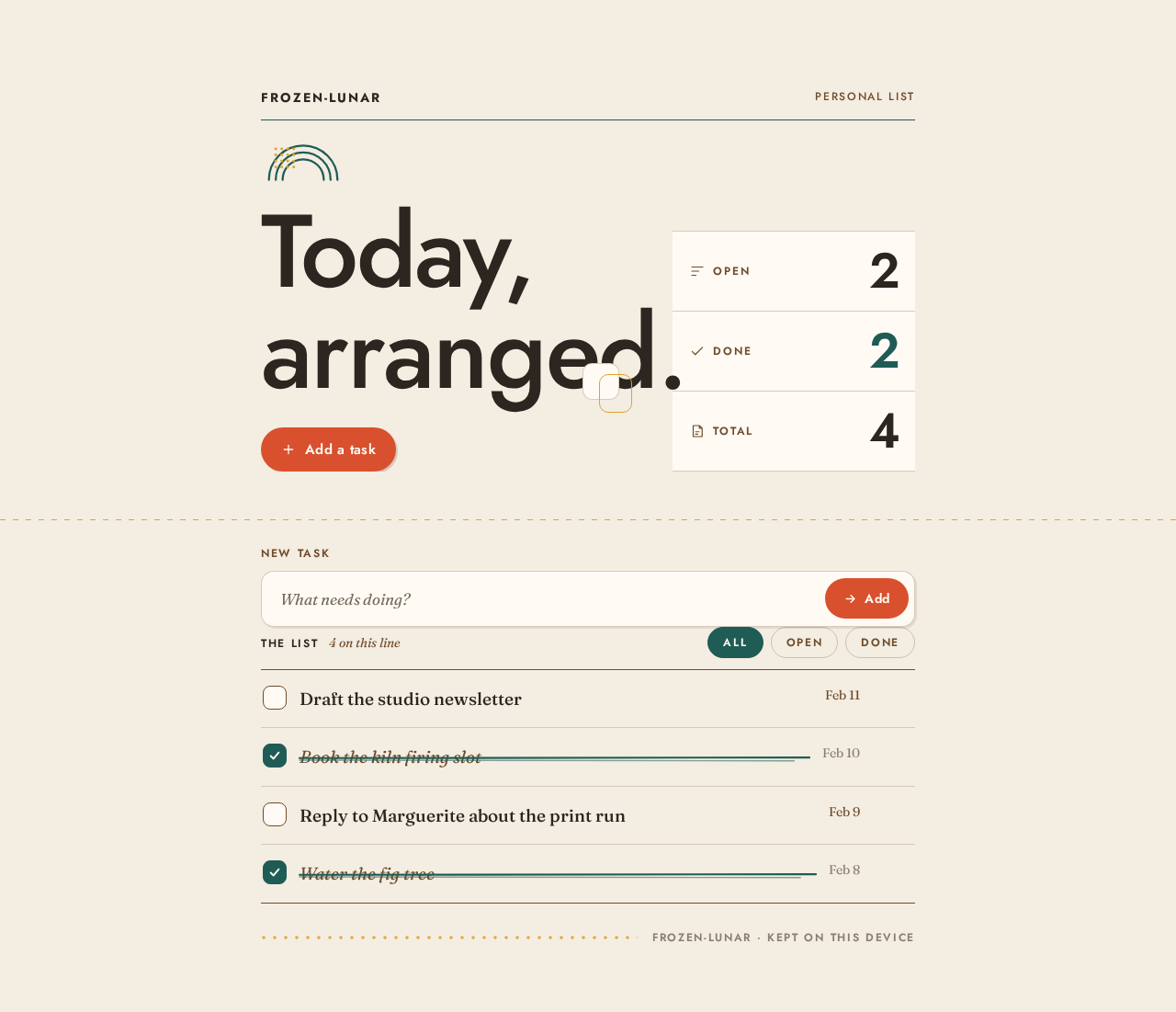
Today,arranged.
2 open, 2 done, 4 total.
The list
4 on this line- Draft the studio newsletter
- Book the kiln firing slot
- Reply to Marguerite about the print run
- Water the fig tree
Today,arranged.
2 open, 2 done, 4 total.
The list
4 on this line- Draft the studio newsletter
- Book the kiln firing slot
- Reply to Marguerite about the print run
- Water the fig tree
No comments yet. Be the first!