frozen-application
 Monish Raj
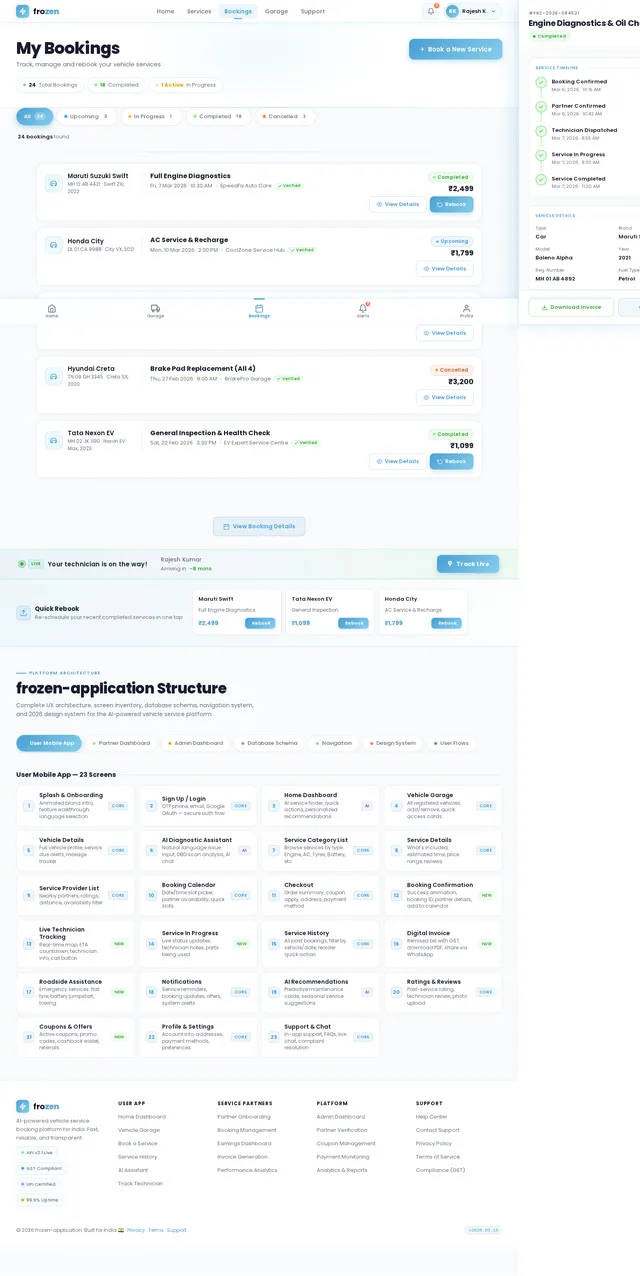
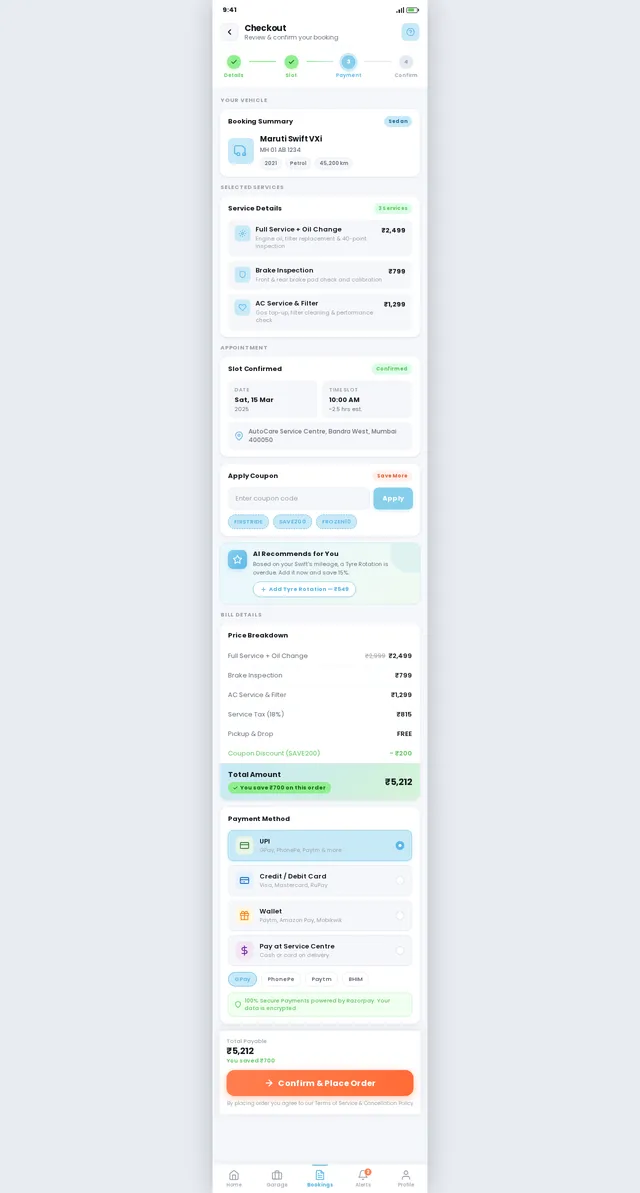
Create a modern AI-powered mobile application and web admin platform for vehicle service booking in India. The platform should support both cars and motorcycles of any brand and any manufacturing year. The target audience is users aged 18–45 primarily, with secondary users aged 45–55. The UI should follow modern 2026 design trends: minimal layout, card-based UI, instant actions, AI-driven suggestions, and fast booking flows similar to Uber and Urban Company. The system must include four main modules: User Mobile App, Service Partner Dashboard, Admin Dashboard, and an AI Chat Assistant. User Mobile Application Features: 1. User Authentication Allow users to sign up and log in using phone number (OTP), email, or Google login. 2. Vehicle Garage Users can add and manage multiple vehicles with the following details: * Vehicle type (Car or Motorcycle) * Brand * Model * Manufacturing year * Fuel type * Registration number * Last service date 3. AI Service Finder (Main Feature) Users can search their vehicle and instantly see recommended services based on vehicle age, service history, and typical maintenance patterns. AI should show: * recommended services * estimated price * estimated service duration * urgency level 4. Service Marketplace Users can book services such as: * Oil change * Tire replacement * Brake pad replacement * Battery replacement * Engine diagnostics * AC service * General inspection Services should be organized into categories: * Maintenance Services * Repair Services * Quick Fix Services * Emergency Services 5. Roadside Assistance Emergency services available instantly: * Flat tire repair * Battery jumpstart * Fuel delivery * Towing service Show nearby technicians and estimated arrival time. 6. AI Diagnostic Assistant Users can describe a vehicle problem in natural language (for example: "My bike makes noise while braking"). The AI analyzes the issue and suggests possible causes and recommended services. 7. Smart Booking System Users can book services in a simple flow: Step 1: Select service Step 2: Select service center or technician Step 3: Choose date and time slot Step 4: Confirm booking 8. Service Packages Offer recommended service bundles such as: * Basic service * Standard service * Premium service AI can recommend packages based on vehicle age and mileage. 9. Coupon and Discount System Users can apply coupon codes during checkout for discounts. 10. Online Payments Support payments through UPI, credit card, debit card, and wallet. 11. Digital Invoice After service completion, generate a downloadable invoice with service details, parts replaced, taxes (GST), and total cost. 12. Service History Users can view past services with a timeline of maintenance records. 13. Maintenance Alerts AI automatically notifies users about upcoming service requirements such as oil change, brake inspection, or battery replacement. 14. Live Service Tracking Users can track technician arrival and service progress. 15. Ratings and Reviews Users can rate technicians and service centers after service completion. AI Chatbot Assistant: Include a built-in chatbot that helps users with: * vehicle issue diagnosis * service recommendations * booking assistance * FAQs The chatbot should understand natural language queries and provide intelligent responses. Service Partner Dashboard: Allow service centers and technicians to register and manage their operations. Features include: * technician profile management * service pricing configuration * booking management * service status updates * uploading service completion reports * generating invoices * viewing earnings and performance metrics Admin Dashboard: Admin can manage the entire platform including: * user management * service partner verification * service pricing rules * booking monitoring * coupon management * payment tracking * analytics and reports * service performance insights Admin analytics should include: * number of bookings per day * revenue metrics * most requested services * technician performance * user activity trends Design Requirements: The UI should follow modern 2026 design principles including: * clean minimal interface * card-based layout * strong primary call-to-action buttons * AI-generated service suggestion cards * smooth micro-interactions * mobile-first design * fast navigation with minimal steps Important Screens: User App * AI service search homepage * vehicle garage * service category screen * service detail page * booking calendar * checkout page * booking confirmation * live technician tracking * service history * digital invoice * chatbot screen * profile and vehicle management Service Partner * partner dashboard * booking management * service status updates * earnings dashboard Admin * platform overview dashboard * booking management * service provider management * coupon management * analytics and reporting The system should automatically generate the frontend UI, backend APIs, database schema, and booking workflow. The application must support scalable architecture and be ready for future features such as subscription service plans and fleet management.


Comments (0)
Sign in to leave a comment
System Requirements
System Requirements Document (SRD)
Project Name: frozen-application
1. Introduction
The frozen-application is an AI-powered mobile and web platform designed for vehicle service booking in India. It caters to users aged 18–45 primarily, with secondary users aged 45–55, offering seamless booking and management for cars and motorcycles of any brand and manufacturing year. The platform integrates modern 2026 design trends, AI-driven suggestions, and fast booking flows inspired by Uber and Urban Company.
This document outlines the complete platform architecture, UX flow, screen lists, database schema, navigation system, and design system to ensure scalability and readiness for future features such as subscription service plans and fleet management.
The design has been updated to prioritize a mobile-first approach with a lighter theme and refreshed color palette, ensuring a user-friendly experience for Monish Raj and other users in India.
2. System Overview
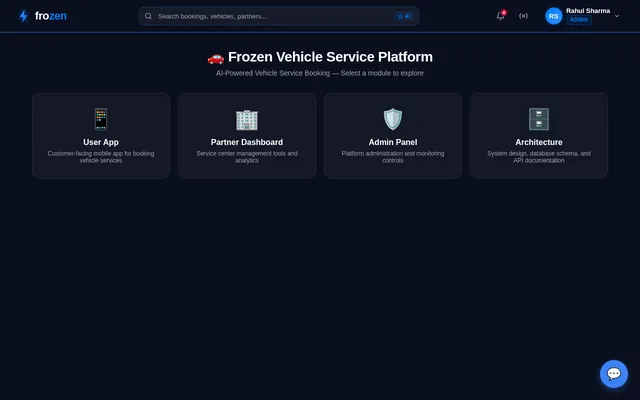
The frozen-application consists of four main modules:
- User Mobile App: A mobile application for users to book vehicle services, manage their vehicles, and access AI-powered recommendations.
- Service Partner Dashboard: A web-based platform for service centers and technicians to manage bookings, earnings, and service operations.
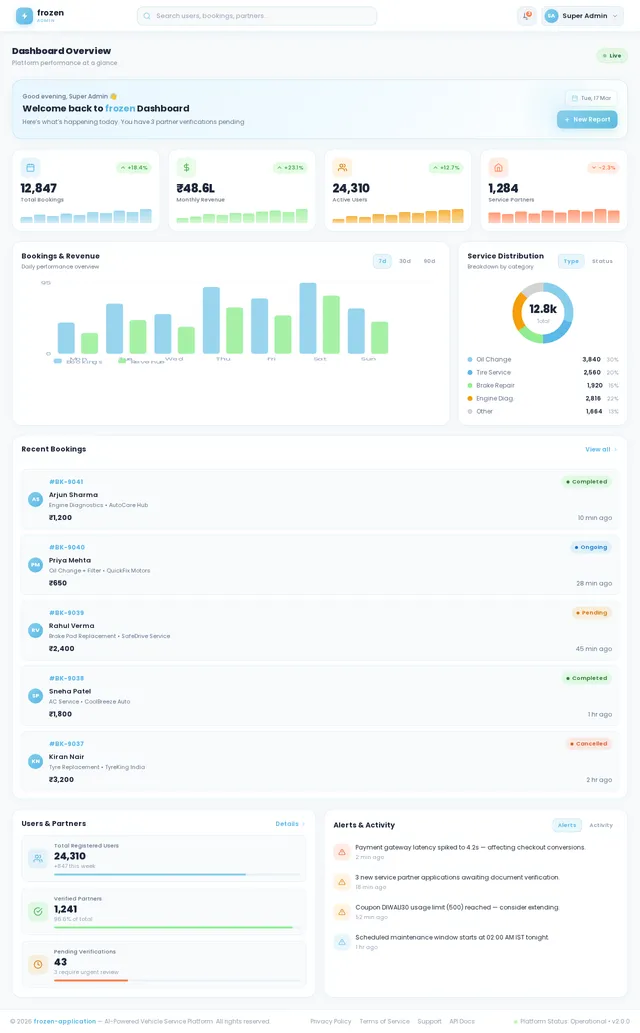
- Admin Dashboard: A web-based platform for administrators to oversee platform operations, manage users and service partners, and analyze performance metrics.
- AI Chat Assistant: An intelligent chatbot integrated into the user app for vehicle issue diagnosis, service recommendations, booking assistance, and FAQs.
3. Functional Requirements
User Mobile App
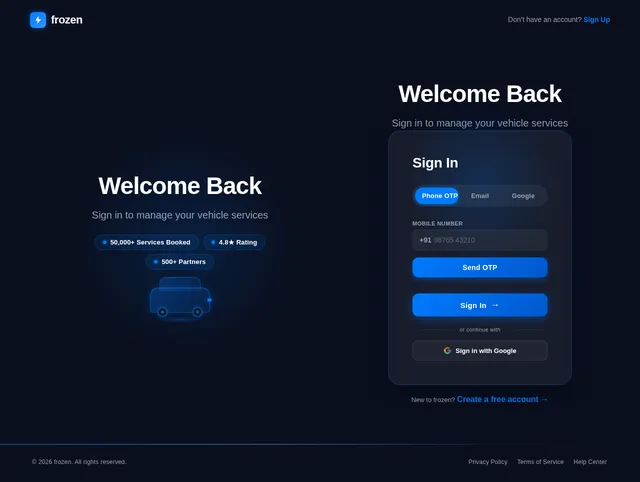
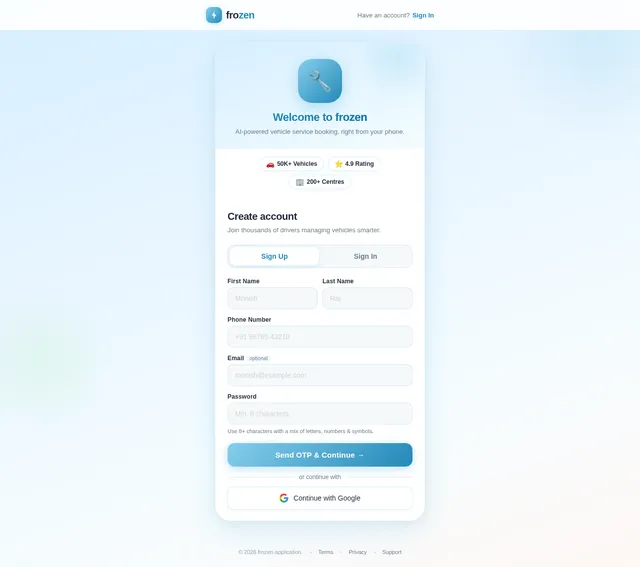
- As User I should be able to sign up and log in using phone number (OTP), email, or Google login.
- As User I should be able to add and manage multiple vehicles with details like type, brand, model, manufacturing year, fuel type, registration number, and last service date.
- As User I should be able to search for services using an AI-powered service finder.
- As User I should be able to book services such as oil change, tire replacement, brake pad replacement, battery replacement, engine diagnostics, AC service, and general inspection.
- As User I should be able to access roadside assistance for emergencies like flat tire repair, battery jumpstart, fuel delivery, and towing service.
- As User I should be able to describe vehicle issues in natural language and get AI-driven diagnostics and service recommendations.
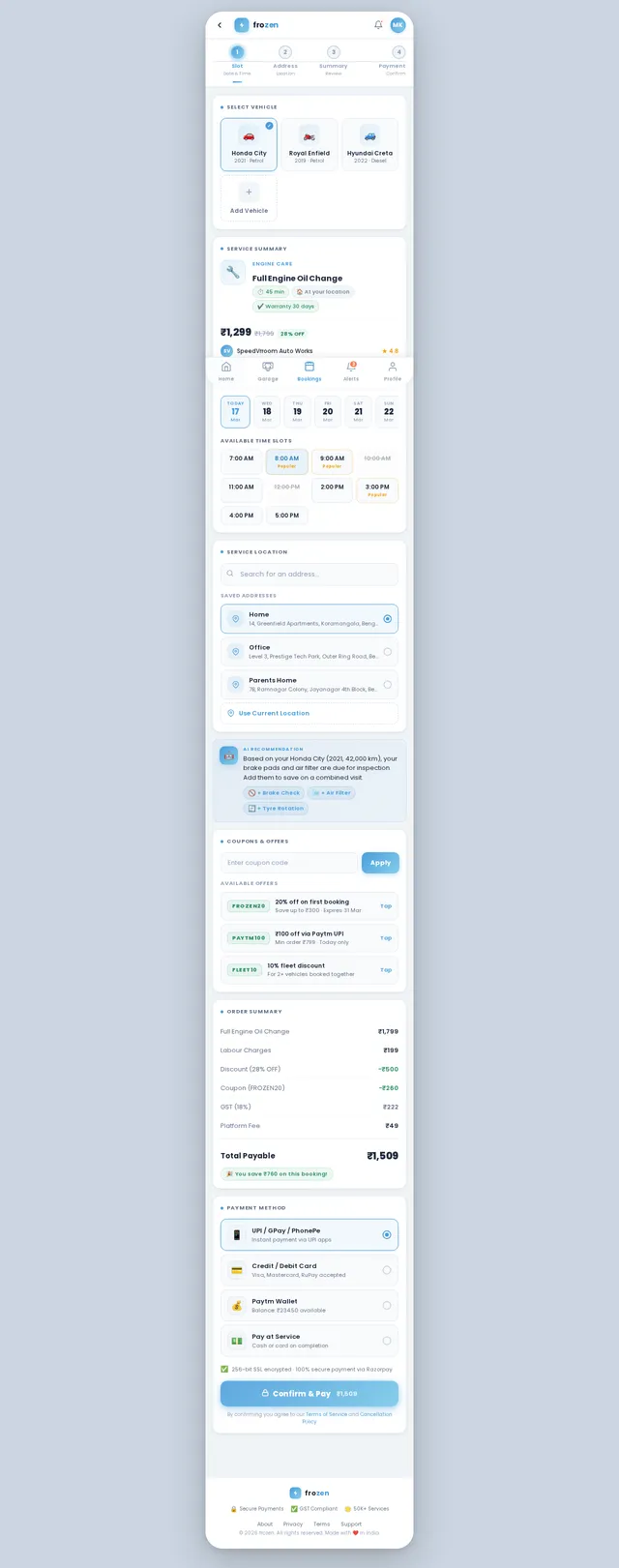
- As User I should be able to book services in a simple flow with date and time selection.
- As User I should be able to view recommended service packages based on vehicle age and mileage.
- As User I should be able to apply coupon codes for discounts during checkout.
- As User I should be able to make payments via UPI, credit card, debit card, and wallet.
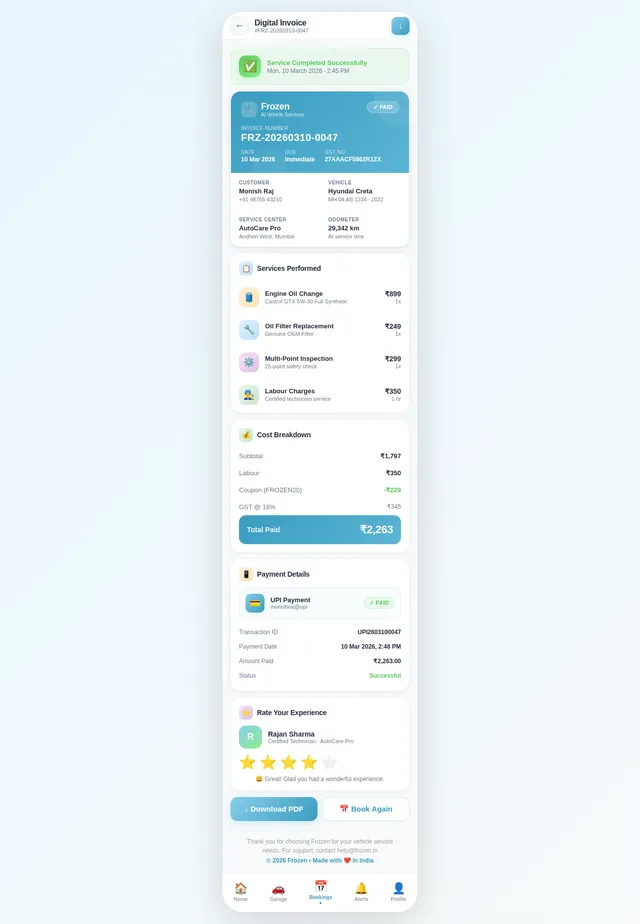
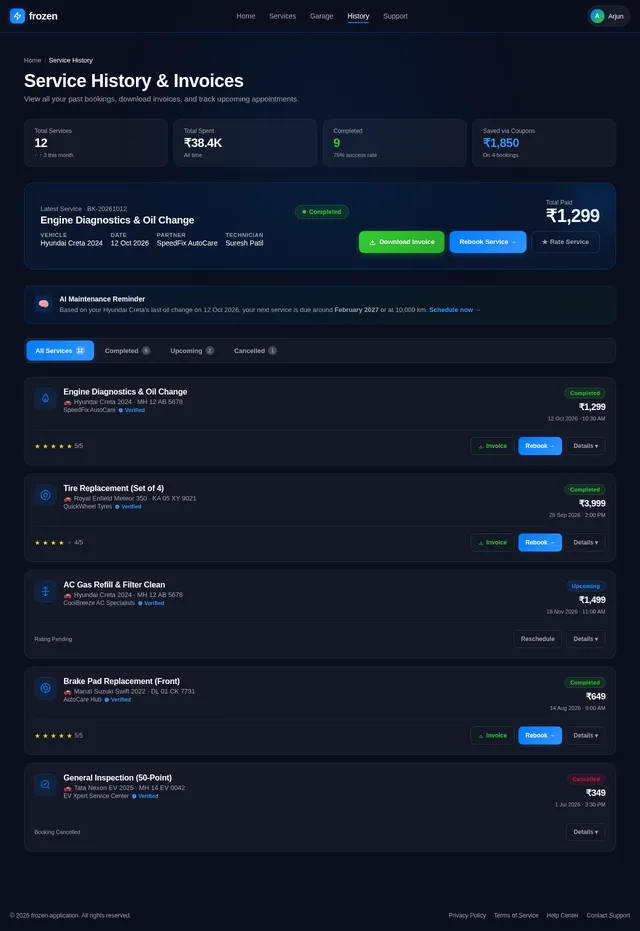
- As User I should be able to download digital invoices after service completion.
- As User I should be able to view service history and maintenance records.
- As User I should be able to receive maintenance alerts for upcoming service requirements.
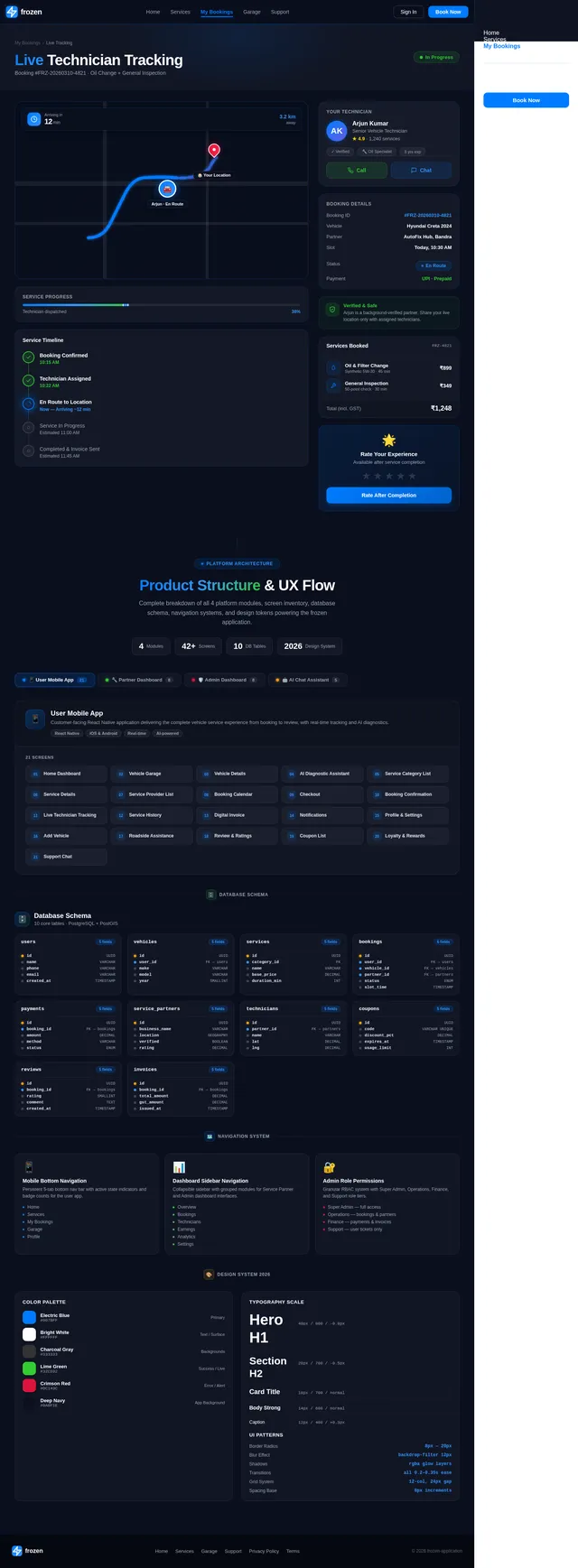
- As User I should be able to track technician arrival and service progress live.
- As User I should be able to rate technicians and service centers after service completion.
- As User I should be able to trigger selective re-run capability to regenerate the System Requirements Document (SRD).
Service Partner Dashboard
- As Service Partner I should be able to register and manage my profile.
- As Service Partner I should be able to configure service pricing.
- As Service Partner I should be able to manage bookings and update service statuses.
- As Service Partner I should be able to upload service completion reports.
- As Service Partner I should be able to generate invoices for services.
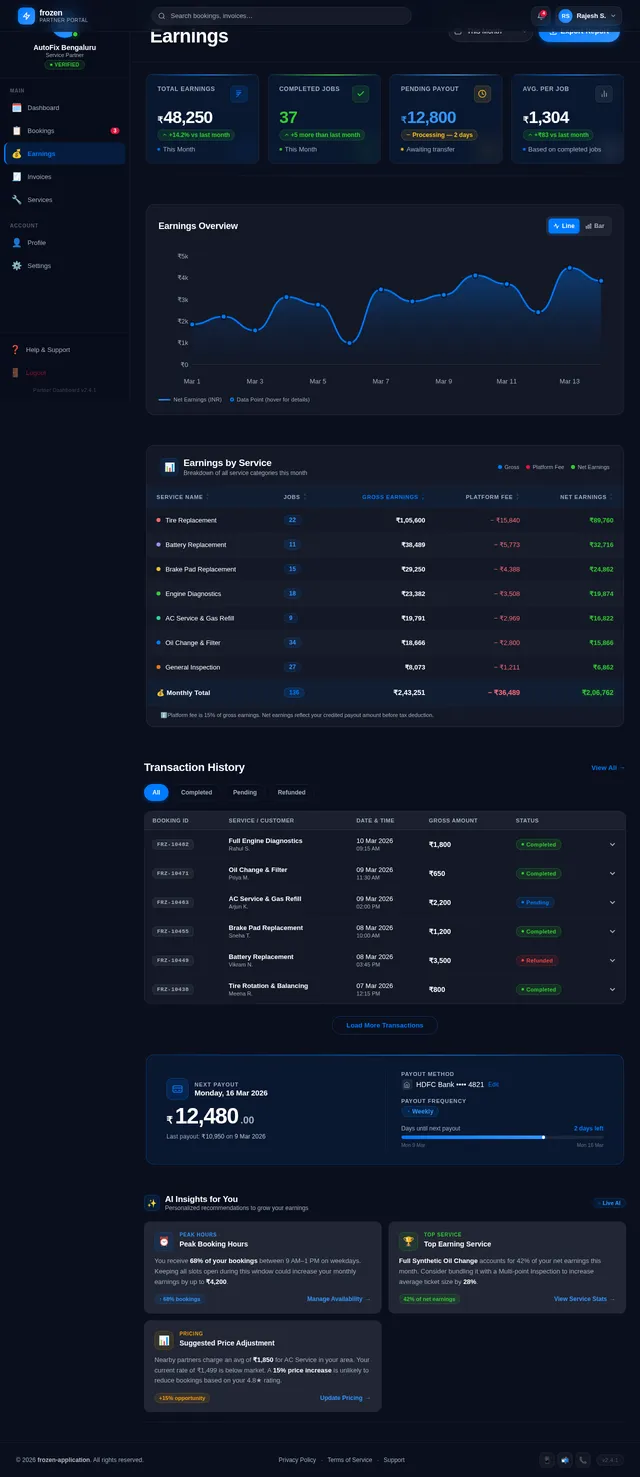
- As Service Partner I should be able to view earnings and performance metrics.
Admin Dashboard
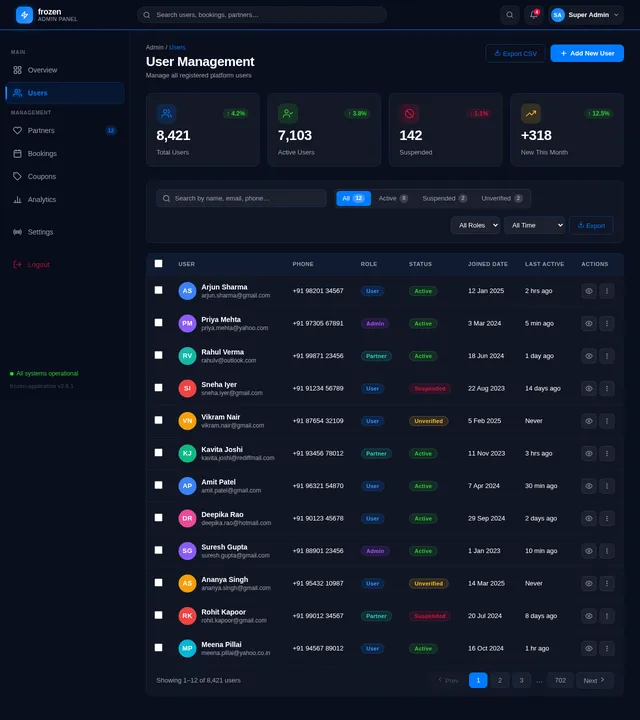
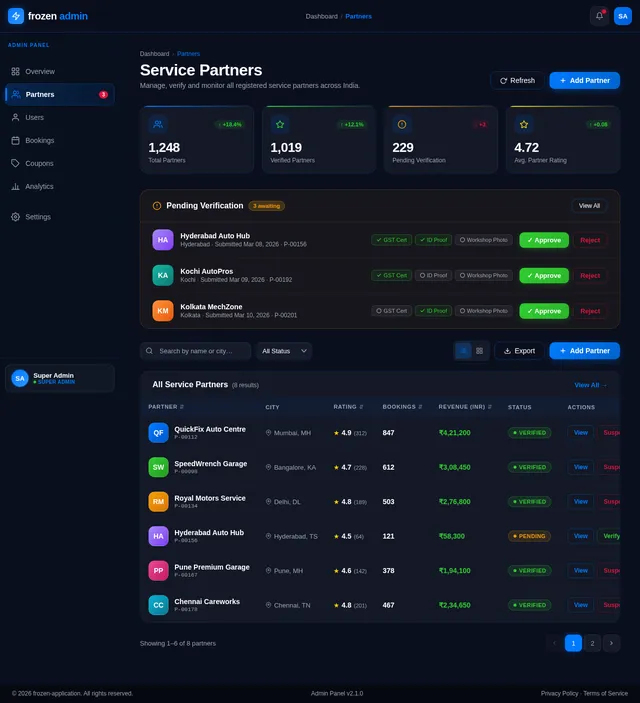
- As Admin I should be able to manage users and service partners.
- As Admin I should be able to verify service partner profiles.
- As Admin I should be able to monitor bookings and control service pricing rules.
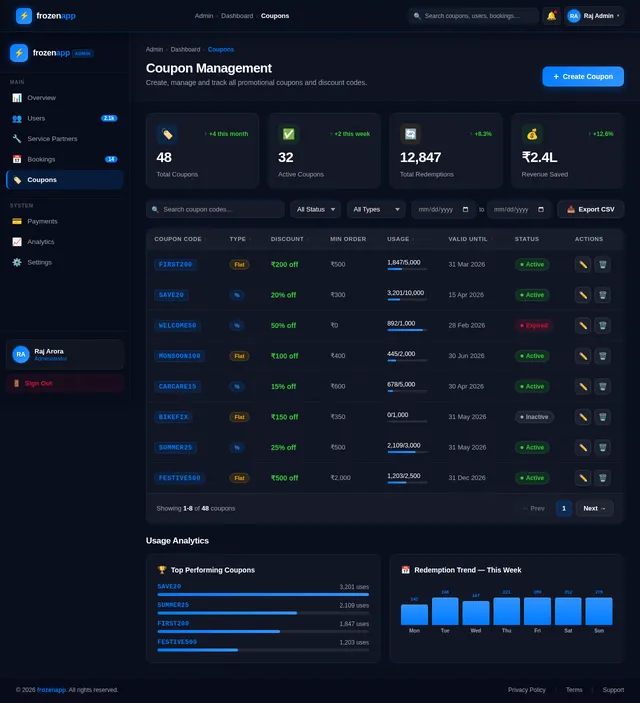
- As Admin I should be able to manage coupons and discounts.
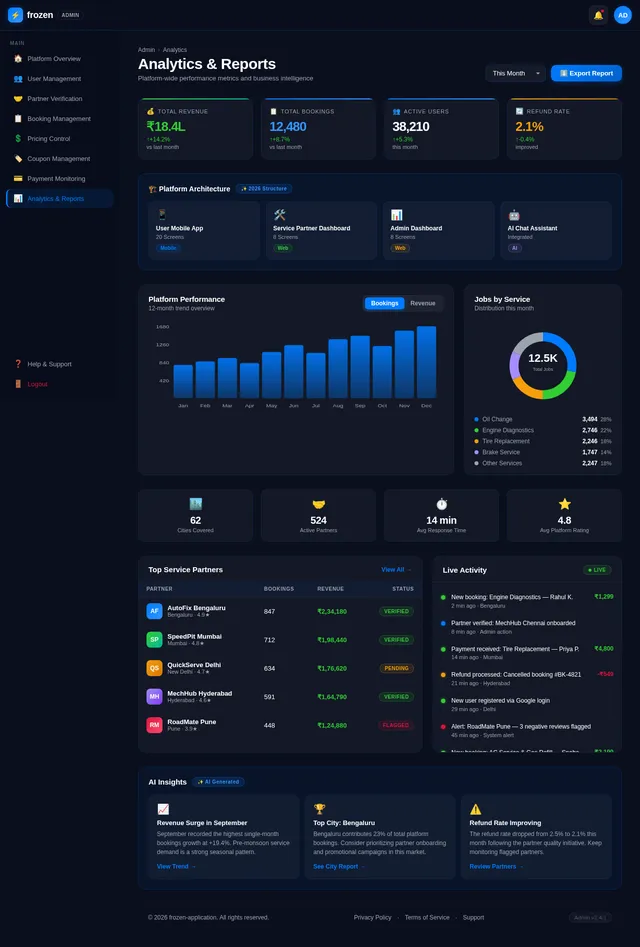
- As Admin I should be able to track payments and generate analytics reports.
- As Admin I should be able to analyze platform performance metrics such as bookings, revenue, and user activity trends.
4. User Personas
- User: Individuals aged 18–55 who own cars or motorcycles and require vehicle services.
- Service Partner: Service centers and technicians offering vehicle maintenance and repair services.
- Admin: Platform administrators managing operations, users, and service partners.
5. Visuals Colors and Theme
The design has been updated to follow a lighter theme:
- Primary Colors: Sky Blue (#87CEEB), Pure White (#FFFFFF), and Light Gray (#D3D3D3).
- Accent Colors: Soft Green (#90EE90) for success actions and Coral (#FF7F50) for alerts.
- Typography: Rounded sans-serif fonts like Poppins and Nunito for a friendly and approachable feel.
- Theme: Mobile-first design with a focus on clean layouts, intuitive navigation, and responsive elements.
6. Signature Design Concept
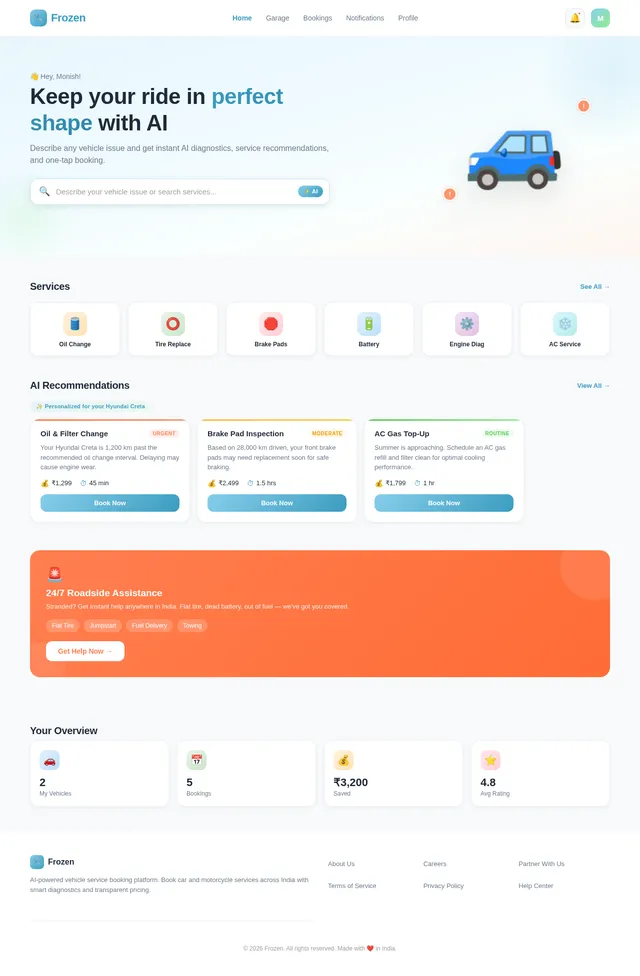
Immersive Mobile-First AI Service Finder Homepage:
The homepage will feature an AI-powered interactive dashboard optimized for mobile devices, creating a visually stunning and engaging experience.
- Visuals: A dynamic 3D model of a car or motorcycle that rotates and highlights problem areas based on user input (e.g., glowing tires for tire replacement). The model will scale perfectly for mobile screens.
- Interactions: Tapping on service categories will trigger micro-animations (e.g., oil droplets for oil change or sparks for engine diagnostics).
- AI Suggestions: Cards will slide in with recommended services, urgency levels, estimated costs, and durations.
- Transitions: Smooth transitions between sections with swipe gestures and subtle color shifts.
- Call-to-Actions: Prominent buttons for "Book Now" and "Learn More" with hover effects and tactile feedback for mobile users.
This homepage will create a futuristic, engaging first impression for users, especially on mobile devices.
7. Screen List
User Mobile App (18–25 screens)
- Home Dashboard
- Vehicle Garage
- Vehicle Details
- AI Diagnostic Assistant
- Service Category List
- Service Details
- Service Provider List
- Booking Calendar
- Checkout
- Booking Confirmation
- Live Technician Tracking
- Service History
- Digital Invoice
- Notifications
- Profile & Settings
Service Partner Dashboard
- Partner Onboarding
- Service Center Profile
- Technician Management
- Booking Management
- Service Status Update
- Invoice Generation
- Earnings Dashboard
- Performance Analytics
Admin Dashboard
- Platform Overview
- User Management
- Partner Verification
- Booking Management
- Service Pricing Control
- Coupon Management
- Payment Monitoring
- Analytics and Reporting
8. Database Schema
- Users: User ID, Name, Email, Phone, Password, Role
- Vehicles: Vehicle ID, User ID, Type, Brand, Model, Year, Fuel Type, Registration Number, Last Service Date
- Services: Service ID, Name, Category, Description, Price
- Bookings: Booking ID, User ID, Vehicle ID, Service ID, Date, Time, Status
- Payments: Payment ID, Booking ID, Amount, Method, Status
- Service Partners: Partner ID, Name, Location, Services Offered
- Technicians: Technician ID, Partner ID, Name, Expertise
- Coupons: Coupon ID, Code, Discount, Expiry Date
- Reviews: Review ID, User ID, Booking ID, Rating, Comments
- Invoices: Invoice ID, Booking ID, Service Details, Amount, GST
9. Navigation System
Mobile Bottom Navigation
- Home
- Garage
- Bookings
- Notifications
- Profile
Dashboard Sidebar Navigation
- Overview
- Bookings
- Earnings
- Analytics
Admin Role Permissions
- Full access to user, partner, and booking management.
- Restricted access for analytics and reporting.
10. Non-Functional Requirements
- Scalability to support millions of users and service partners.
- High availability with 99.9% uptime.
- Secure authentication and payment systems.
- Fast response times (<2 seconds for AI recommendations).
- Compliance with Indian regulations (GST, data privacy laws).
11. Glossary
- AI: Artificial Intelligence
- OTP: One-Time Password
- UPI: Unified Payments Interface
- GST: Goods and Services Tax
- RDBMS: Relational Database Management System
This document provides the foundation for developing the frozen-application platform. Further modules will be built based on this structure.
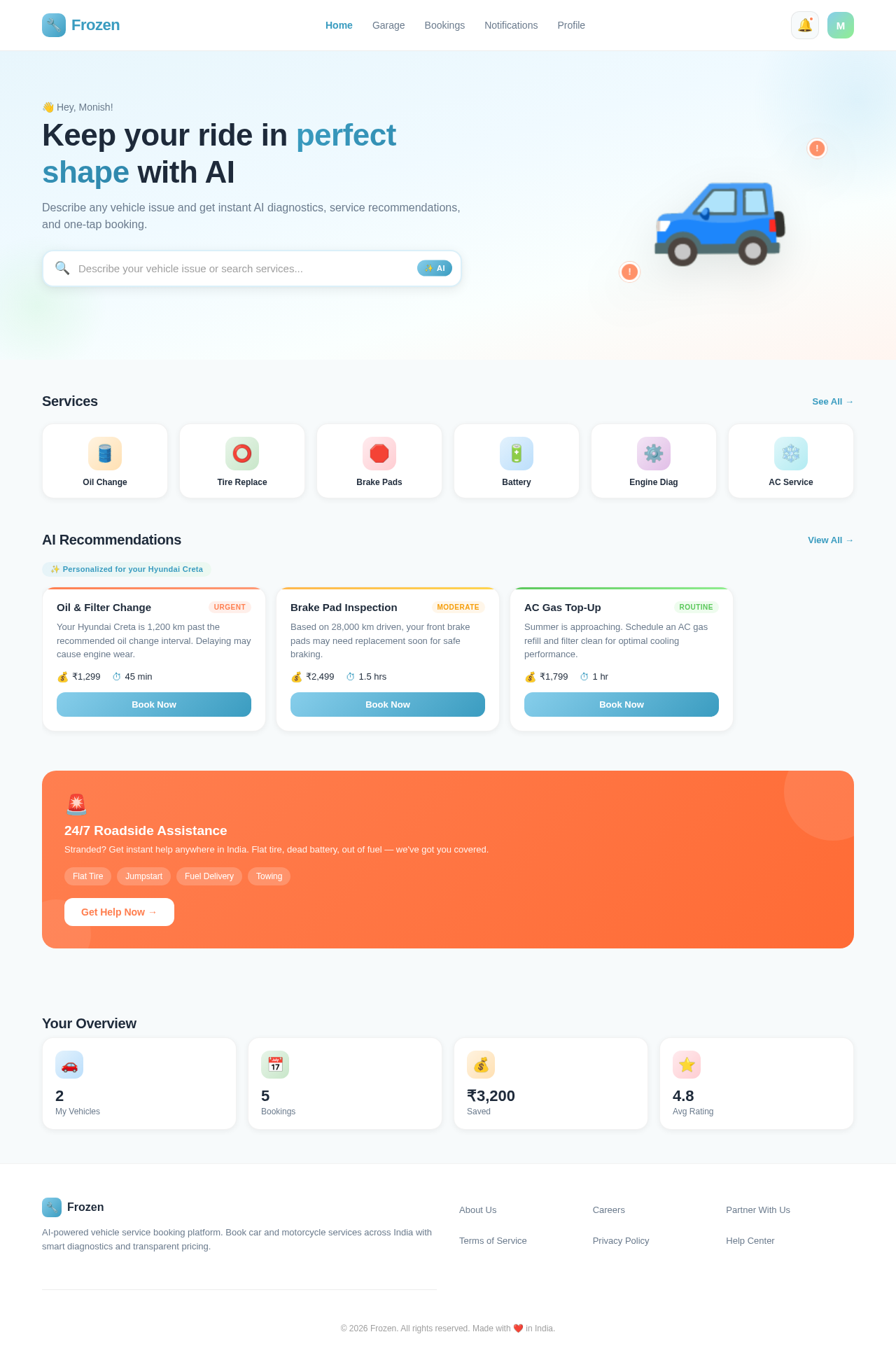
Keep your ride in perfect shape with AI
Describe any vehicle issue and get instant AI diagnostics, service recommendations, and one-tap booking.
Services
AI Recommendations
24/7 Roadside Assistance
Stranded? Get instant help anywhere in India. Flat tire, dead battery, out of fuel — we've got you covered.
No comments yet. Be the first!